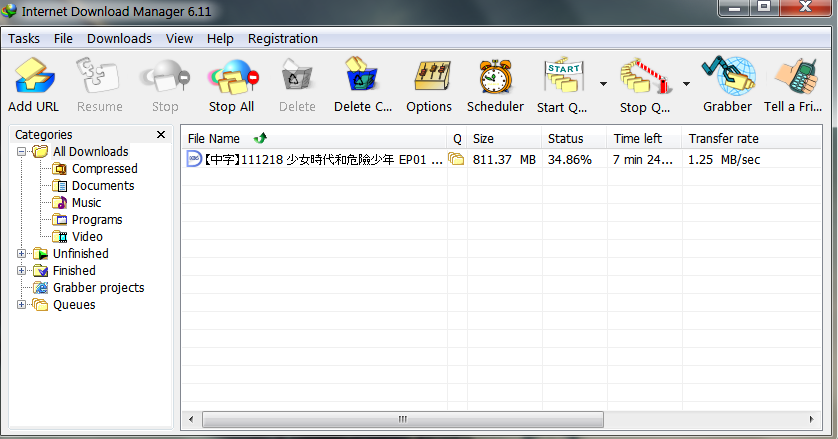
now I testing the speed for pps.tv it still same speed around 400Kbps. but download file from website I can get full speed.
Maxis The Official Maxis FTTH Thread | v3, Maxis Home Fibre Internet, from RM138
Maxis The Official Maxis FTTH Thread | v3, Maxis Home Fibre Internet, from RM138
|
|
 Sep 9 2012, 08:44 AM Sep 9 2012, 08:44 AM
|
 
Newbie
0 posts Joined: Apr 2005  
|
now I testing the speed for pps.tv it still same speed around 400Kbps. but download file from website I can get full speed.
|
|
|
|
|
|
Sep 9 2012, 08:51 AM
|

Senior Member
662 posts Joined: Feb 2006 From: int eth 5/0/16 vlan 13
|
new maxis user here...
the latency is horrible... zzzz even my company's service is way better... This post has been edited by casperito: Sep 9 2012, 08:52 AM |
|
|
Sep 9 2012, 10:25 AM
|

Senior Member
4,540 posts Joined: Jan 2003 From: Sing-a-poor / Kayell / Jay-Bee 
|
Hi guys, I have Windows Home Server at home but I couldn't setup my router to enable remote web access from external....such errors stated as following
(1) Remote web access to your server is blocked (2) Your domain name cannot be resolved to the IP address for your server (3) Domain name cannot be reached (4) Dynamic DNS cannot be updated any idea, bro!? |
|
|
Sep 9 2012, 10:27 AM
|
 
Elite
6,799 posts Joined: Jan 2003
|
QUOTE(jssc @ Sep 9 2012, 08:44 AM) now I testing the speed for pps.tv it still same speed around 400Kbps. but download file from website I can get full speed. PPS max is 750kb  the speed depends on their server side and heavy usage loading. Seems like early morning to afternoons u can get max at 750kbps rest of the day and especially nights its around 400kbps for streaming well it only needs 250kbps to be perfect. |
|
|
Sep 9 2012, 12:00 PM
|

Senior Member
3,466 posts Joined: Jan 2003 From: PJ, Malaysia
|
QUOTE(eric84cool @ Sep 9 2012, 10:25 AM) Hi guys, I have Windows Home Server at home but I couldn't setup my router to enable remote web access from external....such errors stated as following its because they give you private ip(1) Remote web access to your server is blocked (2) Your domain name cannot be resolved to the IP address for your server (3) Domain name cannot be reached (4) Dynamic DNS cannot be updated any idea, bro!? you need to call them up for public ip before able to do what you want but i warn you not to do so yet, coz you have headache of disconnecction issue they claim to resolve end of this month, wait till then |
|
|
Sep 9 2012, 12:49 PM
|

Junior Member
100 posts Joined: Jan 2003
|
QUOTE(iZuDeeN @ Sep 9 2012, 12:00 PM) its because they give you private ip Good Info dude, almost requested Public IP.. luckily maxis CS ignore me after few follow up calls... else... you need to call them up for public ip before able to do what you want but i warn you not to do so yet, coz you have headache of disconnecction issue they claim to resolve end of this month, wait till then  |
|
|
|
|
|
Sep 9 2012, 04:25 PM
|
|
Senior Member
4,540 posts Joined: Jan 2003 From: Sing-a-poor / Kayell / Jay-Bee
|
QUOTE(iZuDeeN @ Sep 9 2012, 12:00 PM) its because they give you private ip Thx for the info bro... you need to call them up for public ip before able to do what you want but i warn you not to do so yet, coz you have headache of disconnecction issue they claim to resolve end of this month, wait till then  |
|
|
Sep 9 2012, 04:56 PM
|
|
Newbie
0 posts Joined: Apr 2005
|
QUOTE(cstkl1 @ Sep 9 2012, 10:27 AM) PPS max is 750kb The problem is my speed is count on bit, not bytethe speed depends on their server side and heavy usage loading. Seems like early morning to afternoons u can get max at 750kbps rest of the day and especially nights its around 400kbps for streaming well it only needs 250kbps to be perfect. I know thst for pps is need around 1Mbit to down is aroud 100KB to run But my connect is around 400Kbit around 40KB |
|
|
Sep 9 2012, 05:11 PM
|

Junior Member
88 posts Joined: Dec 2009 From: Kl,Wangsa Maju
|
can someone confirm me how to check my home fiber account number?
RGW ID=account number? or its the 14digit customer ID? |
|
|
Sep 9 2012, 05:45 PM
|
|
Elite
6,799 posts Joined: Jan 2003
|
crap wrote that wrongly
i meant PPS max is 750kb/s which is 6mbps. Worse case is 250kb/s which is 2mbps and average is 400kb/s which is 3.2mbps. never seen it go more than 6mbps. weekends and new shows are normally the one at 2mbps. This post has been edited by cstkl1: Sep 9 2012, 05:47 PM |
|
|
Sep 9 2012, 09:51 PM
|

Junior Member
85 posts Joined: Jan 2012
|
holy crap...
download steam game only got 200kbps max |
|
|
Sep 9 2012, 10:17 PM
|

All Stars
21,309 posts Joined: Jan 2003 From: Kuala Lumpur 
|
QUOTE(cstkl1 @ Sep 9 2012, 05:45 PM) crap wrote that wrongly Learn to use capitalisation ok ?i meant PPS max is 750kb/s which is 6mbps. Worse case is 250kb/s which is 2mbps and average is 400kb/s which is 3.2mbps. never seen it go more than 6mbps. weekends and new shows are normally the one at 2mbps. KB = KiloByte kb = kilobit |
|
|
Sep 9 2012, 11:01 PM
|
 
VIP
3,815 posts Joined: Jan 2003 From: Kuala Lumpur 
|
I guess I'm starting to feel the slowness apparently. Downloads never seem to exceed 100KB/s even from large sites like thinkbroadband and Microsoft, even though Speedtest seems OK, but only to local servers.
|
|
|
|
|
|
Sep 10 2012, 01:13 AM
|

Junior Member
112 posts Joined: Sep 2006
|
My day-2 with maxis ftth, power from yesterday till now only off once because need to relocate the power adapter of the Thomson router, tested direct download and youtube all o.k, but test tonton.com.my got buffering a lot... don't know why. test download 720p video on youtube site with IDM speed o.k too. » Click to show Spoiler - click again to hide... «
|
|
|
Sep 10 2012, 06:07 AM
|
|
Elite
6,799 posts Joined: Jan 2003
|
QUOTE(ronnie @ Sep 9 2012, 10:17 PM) Learn to use capitalisation ok ? its kB/s and kbps dude. think need to know the difference before posting.KB = KiloByte kb = kilobit This post has been edited by cstkl1: Sep 10 2012, 06:09 AM |
|
|
Sep 10 2012, 08:10 AM
|
|
All Stars
21,309 posts Joined: Jan 2003 From: Kuala Lumpur
|
QUOTE(cstkl1 @ Sep 10 2012, 06:07 AM) its kB/s and kbps dude. think need to know the difference before posting. If you knew the difference why post like below ? unless your Shift/Caps Lock button is broken.QUOTE(cstkl1 @ Sep 9 2012, 05:45 PM) crap wrote that wrongly i meant PPS max is 750kb/s which is 6mbps. Worse case is 250kb/s which is 2mbps and average is 400kb/s which is 3.2mbps. never seen it go more than 6mbps. weekends and new shows are normally the one at 2mbps. |
|
|
Sep 10 2012, 09:04 AM
|
|
Elite
6,799 posts Joined: Jan 2003
|
QUOTE(ronnie @ Sep 10 2012, 08:10 AM) If you knew the difference why post like below ? unless your Shift/Caps Lock button is broken. its correctwhats the prob?? u dont need capitalization. just wrote it for ure sake since u want to be all formal like and was wrong in ure KB and kb. its kB/s and kbps for data over time. did u have a overshift/caps issue?? lol This post has been edited by cstkl1: Sep 10 2012, 09:05 AM |
|
|
Sep 10 2012, 09:07 AM
|
|
All Stars
21,309 posts Joined: Jan 2003 From: Kuala Lumpur
|
QUOTE(cstkl1 @ Sep 10 2012, 09:04 AM) its correct You confuse newbie readers.... KB/s is what is shown on IE/FF download manager... not kB/swhats the prob?? u dont need capitalization. just wrote it for ure sake since u want to be all formal like and was wrong in ure KB and kb. its kB/s and kbps for data over time. did u have a overshift/caps issue?? lol |
|
|
Sep 10 2012, 09:13 AM
|
|
Newbie
0 posts Joined: Apr 2005
|
I think I know what is my problem.
I using windows 8 with pps.tv install. My pps.tv only can get around 400kbs. I try another computer with windows 7 and pps.tv. I can get more the. 2000kbps I need to wait until pps.tv fully support windows 8 |
|
|
Sep 10 2012, 09:16 AM
|
|
All Stars
21,309 posts Joined: Jan 2003 From: Kuala Lumpur
|
QUOTE(jssc @ Sep 10 2012, 09:13 AM) I think I know what is my problem. Possibly TCP half-open connection issue on Windows 8 ?I using windows 8 with pps.tv install. My pps.tv only can get around 400kbs. I try another computer with windows 7 and pps.tv. I can get more the. 2000kbps I need to wait until pps.tv fully support windows 8 |
|
Topic ClosedOptions
|
| Change to: |  0.0288sec 0.0288sec
 0.43 0.43
 6 queries 6 queries
 GZIP Disabled GZIP Disabled
Time is now: 8th December 2025 - 12:30 PM |
 Quote
Quote