Welcome Guest ( Log In | Register )

8 Pages < 1 2 3 4 5 > » Bottom

Outline · [ Standard ] · Linear+

 Sandy Bridge Overclocking V2 | 2500K/2600K/2700K, The Journey Continues Here... :)

views
     
TSowikh84
post Dec 14 2012, 06:40 AM

i7 Clan
Group Icon
Elite
8,711 posts

Joined: Nov 2007
From: Butterworth, PG / Machang, Kelantan


QUOTE(unequalteck @ Dec 13 2012, 11:08 PM)
these are my setting. is it good to go? anything too over or under?
higher LLC require lower vcore, but why power saving will be lesser?
*

Your voltages looks fine. Pretty much all stock volts.
But i don't understand your 2nd question rclxub.gif


unequalteck
post Dec 14 2012, 12:46 PM

Custom member title
*******
Senior Member
2,690 posts

Joined: Dec 2008
From: Kota Kinabalu Current: Wangsa Maju


QUOTE(owikh84 @ Dec 14 2012, 06:40 AM)
Your voltages looks fine. Pretty much all stock volts.
But i don't understand your 2nd question  rclxub.gif
*
lol sorry, forget about it.
so the LLC should set to ultra high? previously i set it as auto then it automatically ultra high
and how about the CPU Current Capabilities?
TSowikh84
post Dec 14 2012, 03:22 PM

i7 Clan
Group Icon
Elite
8,711 posts

Joined: Nov 2007
From: Butterworth, PG / Machang, Kelantan


QUOTE(unequalteck @ Dec 14 2012, 12:46 PM)
lol sorry, forget about it.
so the LLC should set to ultra high? previously i set it as auto then it automatically ultra high
and how about the CPU Current Capabilities?
*
LLC Very High is recommended by Asus themselves.
Auto = Very High, so any selection also will give the same result.

QUOTE
5. Select Loadline Calibration, Select Ultra High this value will provide overall the closest load level of voltage to the value defined in the bios or AiSuite II

Asus P67/Z68 OC Guide - posted in Post #1

QUOTE
All “Current Capability” settings: A setting of 100% on all of these settings should be ample to overclock processors using conventional cooling methods. If pushing processors using Ln2 or other sub-zero forms of cooling then increase the current threshold to each voltage rail respectively. A setting of 140% should ensure OCP does not trip during benchmarks.

Asus MVF/E OC Guide

This post has been edited by owikh84: Dec 14 2012, 03:25 PM
unequalteck
post Dec 14 2012, 03:31 PM

Custom member title
*******
Senior Member
2,690 posts

Joined: Dec 2008
From: Kota Kinabalu Current: Wangsa Maju


QUOTE(owikh84 @ Dec 14 2012, 03:22 PM)
LLC Very High is recommended by Asus themselves.
Auto = Very High, so any selection also will give the same result.
Asus P67/Z68 OC Guide - posted in Post #1
Asus MVF/E OC Guide
*
yup i read that also, need to clarify it smile.gif
btw, thanks man for replying fast!
DunkyKung
post Jan 1 2013, 11:57 PM

~im dead sexxay~
*****
Senior Member
826 posts

Joined: Dec 2006
From: around kaybee


hello guys, i just upgraded my system to intel, now im into overclocking,slowly learning here smile.gif

put that aside, i just wanna some clarification, why my proc which is i52550k voltage very high on offset mode?at 4.0ghz its 1.38v already..i tried manual voltage, it run stable on 1.2v @4ghz..proc or mobo prob? im using asrock z77 extreme 4..using manual OC, proc stay 4ghz no matter what condition, idle or load..pls enlighten me, as this is a new world for me..

edit/add info
and, why my proc idle temp is so high?using cm212evo with 2 fan, idle around 35-40, load around 55-60..these temp on stock clock which is 3.4~3.8(turbo).. sweat.gif

This post has been edited by DunkyKung: Jan 2 2013, 12:07 AM
TSowikh84
post Jan 2 2013, 11:14 AM

i7 Clan
Group Icon
Elite
8,711 posts

Joined: Nov 2007
From: Butterworth, PG / Machang, Kelantan


QUOTE(DunkyKung @ Jan 1 2013, 11:57 PM)
hello guys, i just upgraded my system to intel, now im into overclocking,slowly learning here smile.gif

put that aside, i just wanna some clarification, why my proc which is i52550k voltage very high on offset mode?at 4.0ghz its 1.38v already..i tried manual voltage, it run stable on 1.2v @4ghz..proc or mobo prob? im using asrock z77 extreme 4..using manual OC, proc stay 4ghz no matter what condition, idle or load..pls enlighten me, as this is a new world for me..

edit/add info
and, why my proc idle temp is so high?using cm212evo with 2 fan, idle around 35-40, load around 55-60..these temp on stock clock which is 3.4~3.8(turbo).. sweat.gif
*

Offset mode is ultimately depends on the VID of the chip. Every CPU has different VID. It is also depends on what level of offset you set in BIOS, +0.05, -0.05, +0.1 etc which will tell how the chip will behave under load/idle.

Manual voltage on the other hand, will override VID, thus what vCore is set in BIOS + LLC is what you get in the OS. If you feel that manual voltage could give you better vCore then just use the manual mode. I myself, like most people out there prefer to OC with manual voltage. More comfortable. nod.gif

If you don't want to see CPU clock @ 4.0GHz all the time, enable the SpeedStep (EIST), C1E, C3, C6 in CPU configurations in BIOS. In Windows, go to Power Management settings, change to Balanced or Power Saver plan, instead of High Performance.


Added on January 2, 2013, 11:17 amYour temps look quite normal if you're in an non-airconditioned room. Besides that, it depends on the air flow inside your casing as well. You might wanna remount the CPU cooler and reapply with a better TIM like Arctic MX-4, Tuniq TX-2, etc. Just to name a few.

This post has been edited by owikh84: Jan 2 2013, 11:17 AM

DunkyKung
post Jan 2 2013, 06:51 PM

~im dead sexxay~
*****
Senior Member
826 posts

Joined: Dec 2006
From: around kaybee


QUOTE(owikh84 @ Jan 2 2013, 11:14 AM)
Offset mode is ultimately depends on the VID of the chip. Every CPU has different VID. It is also depends on what level of offset you set in BIOS, +0.05, -0.05, +0.1 etc which will tell how the chip will behave under load/idle.

Manual voltage on the other hand, will override VID, thus what vCore is set in BIOS + LLC is what you get in the OS. If you feel that manual voltage could give you better vCore then just use the manual mode. I myself, like most people out there prefer to OC with manual voltage. More comfortable. nod.gif

If you don't want to see CPU clock @ 4.0GHz all the time, enable the SpeedStep (EIST), C1E, C3, C6 in CPU configurations in BIOS. In Windows, go to Power Management settings, change to Balanced or Power Saver plan, instead of High Performance.


Added on January 2, 2013, 11:17 amYour temps look quite normal if you're in an non-airconditioned room. Besides that, it depends on the air flow inside your casing as well. You might wanna remount the CPU cooler and reapply with a better TIM like Arctic MX-4, Tuniq TX-2, etc. Just to name a few.
*
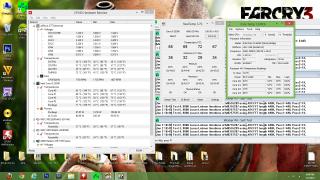
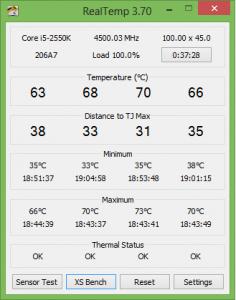
ok,here is the latest oc ive done, hwmonitor and coretemp showing different cpu voltage..which one should i trust? rclxub.gif this is on offset mode +0.005v with additional turbo voltage at +0.004v..and the temp is so hot @4.5ghz..im not planning 24/7 on this speed, just wanna see how far this proc could go with minimal voltage added..

Attached Image

btw, according to intel, 2nd gen i5 which is sandy bridge only support ram up to 1333mhz @1.5 volt, is there any downside if i use xmp profile which is 1600mhz @1.65v?

update:now im on offset mode -0.005v, temp is much better, but i dont know about stability on idle
Attached Image

This post has been edited by DunkyKung: Jan 2 2013, 07:23 PM
TSowikh84
post Jan 2 2013, 07:45 PM

i7 Clan
Group Icon
Elite
8,711 posts

Joined: Nov 2007
From: Butterworth, PG / Machang, Kelantan


QUOTE(DunkyKung @ Jan 2 2013, 06:51 PM)
ok,here is the latest oc ive done, hwmonitor and coretemp showing different cpu voltage..which one should i trust? rclxub.gif this is on offset mode +0.005v with additional turbo voltage at +0.004v..and the temp is so hot @4.5ghz..im not planning 24/7 on this speed, just wanna see how far this proc could go with minimal voltage added..

btw, according to intel, 2nd gen i5 which is sandy bridge only support ram up to 1333mhz @1.5 volt, is there any downside if i use xmp profile which is 1600mhz @1.65v?

update:now im on offset mode -0.005v, temp is much better, but i dont know about stability on idle
*

HWMonitor shows vCore, whilst CoreTemp shows VID so we would refer to the HWM.

It is fine to run a 1.5v rated RAM at 1.65v. The reason why 1.5v is specified in their specs is because Intel only validate their processors at 1.5v.
DunkyKung
post Jan 2 2013, 07:55 PM

~im dead sexxay~
*****
Senior Member
826 posts

Joined: Dec 2006
From: around kaybee


QUOTE(owikh84 @ Jan 2 2013, 07:45 PM)
HWMonitor shows vCore, whilst CoreTemp shows VID so we would refer to the HWM.

It is fine to run a 1.5v rated RAM at 1.65v. The reason why 1.5v is specified in their specs is because Intel only validate their processors at 1.5v.
*
i just got a bsod just now, on windows 8 its hard to get the error code, but i manage somehow..its 0x124, and according to u in overclock.net forum, 0x124 = increase/decrease vcore or QPI/VTT . so i think , i need tu bump the offset more..is that right?
TSowikh84
post Jan 2 2013, 08:07 PM

i7 Clan
Group Icon
Elite
8,711 posts

Joined: Nov 2007
From: Butterworth, PG / Machang, Kelantan


QUOTE(DunkyKung @ Jan 2 2013, 07:55 PM)
i just got a bsod just now, on windows 8 its hard to get the error code, but i manage somehow..its 0x124, and according to u in overclock.net forum, 0x124 = increase/decrease vcore or QPI/VTT . so i think , i need tu bump the offset more..is that right?
*

BSOD 124 on this platform is referred to insufficient vCore. Try upping the vCore or offset.
torino
post Jan 24 2013, 11:49 AM

><
*****
Senior Member
978 posts

Joined: Jul 2010
From: Sitiawan, Perak


Not sure whether this is good or not..try to push my 2500k to 4.6Ghz..maybe sifu can give some comments here..


Attached thumbnail(s)
Attached Image
kherel77
post Jan 30 2013, 10:57 PM

Noobie
******
Senior Member
1,435 posts

Joined: Apr 2011
From: Blank Space


Is it normal if BCLK not staying at 100. Mine keep moving between 99.7 - 99.8, but never reach 100. I'm leave it at default in bios.
;i5-2550k
;Z77MA-G45

» Click to show Spoiler - click again to hide... «

TSowikh84
post Jan 31 2013, 06:48 AM

i7 Clan
Group Icon
Elite
8,711 posts

Joined: Nov 2007
From: Butterworth, PG / Machang, Kelantan


QUOTE(kherel77 @ Jan 30 2013, 10:57 PM)
Is it normal if BCLK not staying at 100. Mine keep moving between 99.7 - 99.8, but never reach 100. I'm leave it at default in bios.
;i5-2550k
;Z77MA-G45
*
It is normally for MSI & Gigabyte boards, there's about 2% variation of BCLK.
I'd just manually set the BCLK to 100.1 or 100.2 in BIOS.
http://forum-en.msi.com/index.php?topic=151146.0
kherel77
post Jan 31 2013, 08:56 AM

Noobie
******
Senior Member
1,435 posts

Joined: Apr 2011
From: Blank Space


QUOTE(owikh84 @ Jan 31 2013, 06:48 AM)
It is normally for MSI & Gigabyte boards, there's about 2% variation of BCLK.
I'd just manually set the BCLK to 100.1 or 100.2 in BIOS.
http://forum-en.msi.com/index.php?topic=151146.0
*
Thanks a lot bro notworthy.gif , i thought something wrong with my chip. Very relieved that doesn't affect anything sweat.gif . Will try adjust manually later...
rulmufc
post Feb 7 2013, 01:08 PM

Getting Started
**
Junior Member
225 posts

Joined: Sep 2009
From: Sabah / Melaka / JB / KL
Hey Guys,

I'm not sure whether this is the right place to ask but since this is OC thread for SB, I might as well ask for help here.
I did OC since I upgraded my system which is Nov 2011, and since that there is no problem until recently. So, here is the problem with my system. Every time I on my system, it will show the page Overclocking Failed. Please enter setup to re-configure your system. Press F1 to run setup. Then I thought my OC problem so I reset it to default which is no more OC but the problem still the same till now. Whenever the OC Failed page show, I need to enter F1 and go Bios, then I just need to discard changes and exit from bios it will boot to windows with no problem. But if I change something and save changes & exit from bios it would not boot to windows and it will shut down the system. One more thing is, every time I restart my system it will shut down the system instead of restarting it. I have to push the power button again to run my system.

I did read some of the solution suggested by any forum that I can find and I did all the solution but still same problem happen. So, I'd like to ask if any of u guys face the same problem or maybe know how to fix this problem. My friend thought maybe the OC chip on MoBo is burn or something, that's why this problem happen.

So guys, please help me fix this problem. Should I send the MoBo for warranty or what? Any help or suggestion would be appreciated. Thanks.

Pic of OC Failed.
» Click to show Spoiler - click again to hide... «

deale30
post Feb 17 2013, 01:51 AM

Casual
***
Junior Member
491 posts

Joined: Oct 2007
hi guys..

im using i7 2600K with asrock xtreme4 z77 mobo

my question is

why my CPU ratio the max is 42 only..
and it is ok to put BLCK to 105

TSowikh84
post Feb 17 2013, 02:07 PM

i7 Clan
Group Icon
Elite
8,711 posts

Joined: Nov 2007
From: Butterworth, PG / Machang, Kelantan


QUOTE(rulmufc @ Feb 7 2013, 01:08 PM)
Hey Guys,

I'm not sure whether this is the right place to ask but since this is OC thread for SB, I might as well ask for help here.
I did OC since I upgraded my system which is Nov 2011, and since that there is no problem until recently. So, here is the problem with my system. Every time I on my system, it will show the page Overclocking Failed. Please enter setup to re-configure your system. Press F1 to run setup. Then I thought my OC problem so I reset it to default which is no more OC but the problem still the same till now. Whenever the OC Failed page show, I need to enter F1 and go Bios, then I just need to discard changes and exit from bios it will boot to windows with no problem. But if I change something and save changes & exit from bios it would not boot to windows and it will shut down the system. One more thing is, every time I restart my system it will shut down the system instead of restarting it. I have to push the power button again to run my system.

I did read some of the solution suggested by any forum that I can find and I did all the solution but still same problem happen. So, I'd like to ask if any of u guys face the same problem or maybe know how to fix this problem. My friend thought maybe the OC chip on MoBo is burn or something, that's why this problem happen.

So guys, please help me fix this problem. Should I send the MoBo for warranty or what? Any help or suggestion would be appreciated. Thanks.

Pic of OC Failed.
» Click to show Spoiler - click again to hide... «

*
Sounds like your mobo has a broken BIOS chip which cannot reset to default whenever you attempted to restore.
You might try to flash the BIOS to the latest revision in case if the BIOS is corrupted.
Otherwise, I'd say RMA the board is the best solution.

QUOTE(deale30 @ Feb 17 2013, 01:51 AM)
hi guys..

im using i7 2600K with asrock xtreme4 z77 mobo

my question is

why my CPU ratio the max is 42 only..
and it is ok to put BLCK to 105
*

Sometimes it's hard to answer mobo specific issues. You might try reflash the BIOS to the latest one.
BCLK 105 is fine, as long as your chip is able to do it.


deale30
post Feb 17 2013, 07:04 PM

Casual
***
Junior Member
491 posts

Joined: Oct 2007
QUOTE(owikh84 @ Feb 17 2013, 02:07 PM)
Sometimes it's hard to answer mobo specific issues. You might try reflash the BIOS to the latest one.
BCLK 105 is fine, as long as your chip is able to do it.
*
thanks bro...

rulmufc
post Feb 18 2013, 11:36 PM

Getting Started
**
Junior Member
225 posts

Joined: Sep 2009
From: Sabah / Melaka / JB / KL
QUOTE(owikh84 @ Feb 17 2013, 02:07 PM)
Sounds like your mobo has a broken BIOS chip which cannot reset to default whenever you attempted to restore.
You might try to flash the BIOS to the latest revision in case if the BIOS is corrupted.
Otherwise, I'd say RMA the board is the best solution.
*
Hey Bro,

I did flash to the latest BIOS but the problem still there. I've also troubleshoot everything else and there is nothing wrong with my psu, cpu, ram or any other. So, it should be my mobo. I think i will send it for RMA. Thanks for your opinion.
scriptkiddo
post Mar 31 2013, 02:12 PM

Getting Started
**
Junior Member
163 posts

Joined: Nov 2008


Hi guys, i overclocked my 2500K to 4.6Ghz but i am facing some problem when running LinX & Intel Burn Test

RAM Frequency:: 2133Mhz
VCORE:: 1.4
DRAM:: 1.65
others voltages are set to auto

Prime95 Max Temps
In-place FFTs :: 78C(MAX)
Blend Test:: 77-78C(MAX)

LinX test
Problem Size: 30600
Memory : 7168
Run: 20 Times

Intel Burn Test
Time to run :: 20
Stress Level:: Maximum
Threads:: All

i get error 0x101 & 0x124, which if im not mistaken means increase VCORE, but VCORE is already @ 1.4V, isnt it high for a 4.6Ghz OC, i have been keeping this setting for 2 weeks now, no problem until i encountered some lagging issues while playing FIFA, previously it was fine, even at stock setting FIFA runs smoothly. So i tested with LinX & Intel Burn Test, got blue screen redi with 2 types or error codes shocking.gif . Max temps for LinX before blue screen was 82c & 80c for intel burn test. I am really confused with where i am doing it wrongly, guide needed pls notworthy.gif

This post has been edited by scriptkiddo: Mar 31 2013, 02:35 PM

8 Pages < 1 2 3 4 5 > » Top
 

Change to:
| Lo-Fi Version
0.0233sec    0.18    6 queries    GZIP Disabled
Time is now: 3rd December 2025 - 08:59 AM