QUOTE(owikh84 @ Jan 2 2013, 11:14 AM)
Offset mode is ultimately depends on the VID of the chip. Every CPU has different VID. It is also depends on what level of offset you set in BIOS, +0.05, -0.05, +0.1 etc which will tell how the chip will behave under load/idle.
Manual voltage on the other hand, will override VID, thus what vCore is set in BIOS + LLC is what you get in the OS. If you feel that manual voltage could give you better vCore then just use the manual mode. I myself, like most people out there prefer to OC with manual voltage. More comfortable.

If you don't want to see CPU clock @ 4.0GHz all the time, enable the SpeedStep (EIST), C1E, C3, C6 in CPU configurations in BIOS. In Windows, go to Power Management settings, change to Balanced or Power Saver plan, instead of High Performance.
Added on January 2, 2013, 11:17 amYour temps look quite normal if you're in an non-airconditioned room. Besides that, it depends on the air flow inside your casing as well. You might wanna remount the CPU cooler and reapply with a better TIM like Arctic MX-4, Tuniq TX-2, etc. Just to name a few.
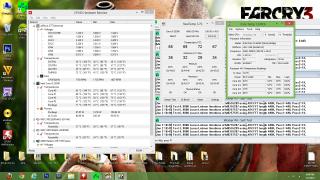
ok,here is the latest oc ive done, hwmonitor and coretemp showing different cpu voltage..which one should i trust?

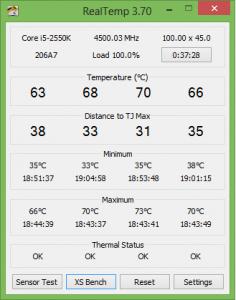
this is on offset mode +0.005v with additional turbo voltage at +0.004v..and the temp is so hot @4.5ghz..im not planning 24/7 on this speed, just wanna see how far this proc could go with minimal voltage added..
btw, according to intel, 2nd gen i5 which is sandy bridge only support ram up to 1333mhz @1.5 volt, is there any downside if i use xmp profile which is 1600mhz @1.65v?
update:now im on offset mode -0.005v, temp is much better, but i dont know about stability on idle
 This post has been edited by DunkyKung: Jan 2 2013, 07:23 PM

 Jan 1 2013, 11:57 PM


 Quote
Quote

 0.0199sec
 0.84
0.84
 7 queries
 GZIP Disabled