

did the pc give beep in any test condition?
no beep just minor memory timing mismatch, so find out the value for both KVR and CVS with cpuz tool
btw, what mobo is he running?
RAM Handbook, updating ... zlol 23/12/07
RAM Handbook, updating ... zlol 23/12/07
|
|
 Nov 5 2009, 12:01 PM Nov 5 2009, 12:01 PM
|
 
All Stars
13,197 posts Joined: Jul 2006 
|
did the pc give beep in any test condition?
no beep just minor memory timing mismatch, so find out the value for both KVR and CVS with cpuz tool btw, what mobo is he running? |
|
|
|
|
|
Nov 5 2009, 12:15 PM
|

Senior Member
4,789 posts Joined: Aug 2005 From: Ipoh <---> Kuala Lumpur 
|
nope, no beep whatsover, just the normal boot time beep. he's running gigabyte EP31-DS3L. that means that the timings can vary, even though the RAMs are theoratically at the same speed?
|
|
|
Nov 5 2009, 03:46 PM
|
|
All Stars
13,197 posts Joined: Jul 2006
|
only one timing at a time but mobo can't decide which one to follow
then this RAM gaduh with that RAM la.. so you use manual setting, follow the setting of slower /weaker RAM |
|
|
Nov 5 2009, 09:37 PM
|
|
Senior Member
4,789 posts Joined: Aug 2005 From: Ipoh <---> Kuala Lumpur
|
how do i adjust the rams tRC timings? the corsair one is running at 5-5-5-15-19. kingston is 5-5-5-15-20. i don't see any tRC timings in the bios. only tRAS. maybe i've missed it somehow?
|
|
|
Nov 5 2009, 10:29 PM
|
|
All Stars
13,197 posts Joined: Jul 2006
|
hit CTRL+F1 once u entered BIOS setup, it will unlock become secret military base.
gaygaybite hahaha |
|
|
Nov 5 2009, 10:56 PM
|
|
Senior Member
4,789 posts Joined: Aug 2005 From: Ipoh <---> Kuala Lumpur
|
yeah i did that already, changed the spd settings to manual, and then how do i proceed? i only see timings 5-5-5-15. i cant see the tRC timings
|
|
|
|
|
|
Nov 5 2009, 11:43 PM
|
|
All Stars
13,197 posts Joined: Jul 2006
|
menu is same as this right? http://bak2.beareyes.com.cn/2/lib/200805/14/164/BIOS09.JPG
sorry, i can't find TRC too DRAM RAS# Precharge (TRP) 4,5,6 and Precharge delay (TRAS) 14,15,16 --as this two settings should affect TRC value (minimum TRC=TRP+TRAS) or worst case put RAS# to CAS# Delay (TRCD) to 6 with Auto the rest anyway try at own risk. if it doesn't boot, clear CMOS will restore factory setting. |
|
|
Nov 6 2009, 11:05 PM
|
|
Senior Member
4,789 posts Joined: Aug 2005 From: Ipoh <---> Kuala Lumpur
|
pardon me, but i'm kinda confused now, man the ram timing stuff is pretty complicated
 anyway, here's screenshots of the timing settings in the bios. maybe can point out which value to change? i've manually set the standard timing controls, the settings must have went back to auto, coz when i inserted the other ram, it didn't pass the bios. 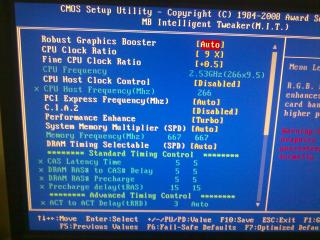

what values do i need to change in the advanced timing control section? |
|
|
Nov 8 2009, 11:03 PM
|

Senior Member
832 posts Joined: Nov 2004 From: far far away land 
|
guyz, i have a question here, abut sodimm notebook rams ...
lets say i currently have a motherboard using 667 ddr2 ram ... then on my hand got a 800 ddr2 ram .. can i fit the 800 ddr2 ram into my machine? .. is the connectors behind the same? ... sry ah .. noob in rams ... |
|
|
Nov 8 2009, 11:56 PM
|

Senior Member
6,583 posts Joined: Feb 2008
|
QUOTE(alvinz @ Nov 8 2009, 11:03 PM) guyz, i have a question here, abut sodimm notebook rams ... yes it can. the difference is the speed between the 2 rams. since both are DDR2, the connectors are the same lets say i currently have a motherboard using 667 ddr2 ram ... then on my hand got a 800 ddr2 ram .. can i fit the 800 ddr2 ram into my machine? .. is the connectors behind the same? ... sry ah .. noob in rams ...   This post has been edited by ham_revilo: Nov 8 2009, 11:57 PM |
|
|
Nov 10 2009, 02:23 PM
|

Senior Member
537 posts Joined: Dec 2007 From: Where Everyone Thought only Tree Houses
|
QUOTE(alvinz @ Nov 8 2009, 11:03 PM) guyz, i have a question here, abut sodimm notebook rams ... make sure your 800 ddr2 is also sodimm ram, if desktop ram you cant fit into laptop ram slot, if both also sodimm can use together but ram speed will remain at 667Mhzlets say i currently have a motherboard using 667 ddr2 ram ... then on my hand got a 800 ddr2 ram .. can i fit the 800 ddr2 ram into my machine? .. is the connectors behind the same? ... sry ah .. noob in rams ... |
|
|
Nov 11 2009, 08:37 PM
|
|
Senior Member
832 posts Joined: Nov 2004 From: far far away land
|
QUOTE(ham_revilo @ Nov 8 2009, 11:56 PM) yes it can. the difference is the speed between the 2 rams. since both are DDR2, the connectors are the same QUOTE(andx517 @ Nov 10 2009, 02:23 PM) make sure your 800 ddr2 is also sodimm ram, if desktop ram you cant fit into laptop ram slot, if both also sodimm can use together but ram speed will remain at 667Mhz thanks alot .. so as long as the connectors are the same means can use right? ... and yes both are small pieces sodimm rams .. haha tqtq  |
|
|
Nov 17 2009, 11:11 PM
|

Senior Member
3,806 posts Joined: Mar 2007
|
Wah i shock like hell when my pc fan suddenly turn on jet engine mode. The noise was so crazy. I never expect the fan to be so powerful until today.
So question is since only one memory stick is broken can I mix it up with a new 667 Mhz stick in the same slot? Would it still be able to run in DDR2? I am asking because 667Mhz stick is cheaper than the 533Mhz version. Any help can appreciate. Thanks. |
|
|
|
|
|
Nov 20 2009, 05:19 PM
|
|
Senior Member
537 posts Joined: Dec 2007 From: Where Everyone Thought only Tree Houses
|
QUOTE(soitsuagain @ Nov 17 2009, 11:11 PM) Wah i shock like hell when my pc fan suddenly turn on jet engine mode. The noise was so crazy. I never expect the fan to be so powerful until today. yeah, my old lappy also using one 533 and one 667, should be no problem, but speed still remain 533So question is since only one memory stick is broken can I mix it up with a new 667 Mhz stick in the same slot? Would it still be able to run in DDR2? I am asking because 667Mhz stick is cheaper than the 533Mhz version. Any help can appreciate. Thanks. |
|
|
Nov 23 2009, 05:00 PM
|

Junior Member
23 posts Joined: Nov 2009
|
impressive explanation!!
 thanks! thanks! |
|
|
Dec 12 2009, 05:08 PM
|

All Stars
10,859 posts Joined: Jan 2003 From: Sarawak
|
anyone know how to check whether the ram have problem or not? becos my crucial ballistix seems to give me BSOD, when i remove 1 of the stick, its running fine.
|
|
|
Dec 16 2009, 09:23 PM
|
|
Senior Member
2,096 posts Joined: May 2008
|
Can notebook ram mixed with different brands but same spec?
|
|
|
Dec 17 2009, 09:55 AM
|

Senior Member
7,689 posts Joined: Jul 2005 From: The Land of No Return
|
QUOTE(ben3003 @ Dec 12 2009, 05:08 PM) anyone know how to check whether the ram have problem or not? becos my crucial ballistix seems to give me BSOD, when i remove 1 of the stick, its running fine. Run it with Memtest86. It should be able to show whether there is a problem with the ram or not. Although my Crucial Ballistix did give BSOD problem last time but passed the Memtest. Still sent it for warranty and obtained a replacement which works fine (before crapping out again). |
|
|
Dec 30 2009, 12:39 AM
|

Junior Member
21 posts Joined: Oct 2009 
|
QUOTE(leyley @ Dec 16 2009, 09:23 PM) Can notebook ram mixed with different brands but same spec? Yeah, no problem...I did that with my laptop, 1gb transcend ddr2 800Mhz + (da original)512mb hynix ddr2 667MHz... No problems encountered. |
|
|
Dec 31 2009, 10:52 PM
|
|
Junior Member
7 posts Joined: Oct 2009
|
is my frequncy is right? sorry i'm so new in this..i buy ddr3 1333/pc10600isn't that i should get the frequency around 1333mhz? coz i only getting 686mhz only..
[attachmentid=1374920] |
| Change to: |  0.0346sec 0.0346sec
 0.21 0.21
 6 queries 6 queries
 GZIP Disabled GZIP Disabled
Time is now: 7th December 2025 - 03:09 AM |
 Quote
Quote