Outline ·
[ Standard ] ·
Linear+
RAM Handbook, updating ... zlol 23/12/07
|
yeeck06
|
 Jun 14 2007, 07:55 PM Jun 14 2007, 07:55 PM
|
Getting Started


|
QUOTE(greatgreedyguts @ Jun 14 2007, 06:12 PM) Try to get RAMs of the same memory capacity next time. Actually, I plan to get the Kingston 512mb KVR533 for my pc but no more stock so I went for 1gb KVR667 lor...Both ram only different by RM4 nia... 1gb 667 - RM123 and 512mb - RM119  The guy said no problem one, can work one...only cannot go up to 667mhz nia if my mobo only support 533.....so I beli lor... |
|
|
|
|
|
karom
|
Jun 15 2007, 01:38 AM
|
|
|
that is common issue that been faced by buyer. Normally it can be use but there is limitation. You cant do dual channel if the modules are not same.
|
|
|
|
|
|
toughnut
|
Jun 15 2007, 12:39 PM
|
|
|
@yeeck06
best bet is to buy ram in pair. it will run in dual channel unless your mobo picky. if buy separate, bring your old ram together for reference.
|
|
|
|
|
|
karom
|
Jun 15 2007, 02:53 PM
|
|
|
agree with that. Buy in pair. It will reduce chances of getting not reliable RAM.
|
|
|
|
|
|
overclock
|
Jun 15 2007, 06:30 PM
|
New Member
|
QUOTE(karom @ Jun 15 2007, 02:53 PM) agree with that. Buy in pair. It will reduce chances of getting not reliable RAM. y u guy din buy DDR800 cos in future when u need 2 upgrade ur PC jz change mbo nia..cos DDR800 price is dropping now..lyp makiwa jz sell Adata 1GB DDR800 @ RM140 only.. |
|
|
|
|
|
toughnut
|
Jun 16 2007, 08:35 AM
|
|
|
|
|
|
|
|
|
yeeck06
|
Jun 16 2007, 09:17 AM
|
Getting Started
|
|
|
|
|
|
|
toughnut
|
Jun 16 2007, 09:31 AM
|
|
|
|
|
|
|
|
|
karom
|
Jun 17 2007, 02:52 PM
|
|
|
well, the concept of single channel and dual channel is simple.
For single channel(2 stick):
the memory utilization, is based on stick per stick. This mean as long as the first stick not fully utilize, the second stick will become idle.
Dual Channel :
The ram Read and Write occur is simultaneously. This means for the ram will be access-from and write-into in two ways.
That is the general concept. If you need further info, please let me know
|
|
|
|
|
|
DeMoNkInG
|
Jun 19 2007, 02:53 AM
|
|
|
guys..
i got some noob question here..
i got mobo that support ddr1 only..
can i run ddr2 ram on my system?? and it run dual channel??
|
|
|
|
|
|
toughnut
|
Jun 19 2007, 08:29 AM
|
|
|
QUOTE(DeMoNkInG @ Jun 19 2007, 02:53 AM) guys.. i got some noob question here.. i got mobo that support ddr1 only.. can i run ddr2 ram on my system?? and it run dual channel?? it wont even fit in  ddr1 and ddr2 both has dual channel mode, provided your mobo support it and you use same type(size,bank,whatever) of memory |
|
|
|
|
|
Lacus
|
Jun 19 2007, 05:42 PM
|
Lacus Sama No Tameni!

|
btw..jz wondering..I jz made a new system, running on sempron. Bought the ram at Lowyat. Can work but weird thing is when i use CPUZ,Everest or Sisandra, it states the ram is Hyundai instead of Kingston. Is this normal?And also, to run dual channel, can i like put 1gb on slot 1 and 2, and 2gb on slot 3?Was thinking to get another 2x2gb or 1x1gb =/ Hope u guys can help. I nv check wat chipset is mine yet coz no internet at home =.=! Hopefully it's a good 1  . Btw cool guide on ram here. thanks a lot Jinaun-sama!!!!!!!!!!!!!! |
|
|
|
|
|
karom
|
Jun 19 2007, 07:38 PM
|
|
|
It is stated so due to the chipset that been used by Kingston.
|
|
|
|
|
|
Lacus
|
Jun 20 2007, 09:39 AM
|
Lacus Sama No Tameni!
|
i noe Kingston uses Hynix ram, but first time i see a ram that states Hyundai instead of kingston o_o".Seeing this, do i need to get the same type of chipset ram in order to run in dual channel?
|
|
|
|
|
|
karom
|
Jun 20 2007, 10:53 AM
|
|
|
recommended if you can get the same chipset.
|
|
|
|
|
|
Lacus
|
Jun 21 2007, 05:35 PM
|
Lacus Sama No Tameni!
|
so..wat chipset does my ram uses, damn hard to check..  I attached it here. Thanks alot for replying/helping. Attached thumbnail(s)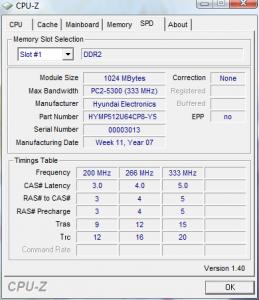
|
|
|
|
|
|
sHawTY
|
Jun 21 2007, 07:26 PM
|
|
|
QUOTE(Lacus @ Jun 21 2007, 05:35 PM) so..wat chipset does my ram uses, damn hard to check.. I attached it here. Thanks alot for replying/helping. There is no software that can be used to check the chipset that is on the rams. The only way to check it is by taking out your ram, look at the chipset by yourself, then take note of it.  |
|
|
|
|
|
karom
|
Jun 21 2007, 07:55 PM
|
|
|
yes, indeed. You have to check it manually as Shawty mentioned.
But if you worry, maybe you could get match pair ram so that the issue of mismatch chipset is solve instantly.
|
|
|
|
|
|
porkchop
|
Jun 26 2007, 01:13 PM
|
|
|
wanna ask is there performance diff for these??
2x 1gb DDR2 533mhz
and
2x 1gb DDR2 677Mhz?
the mhz affect it how?? by using same brand, same spec, same speed, we got Dual channel already rite??
|
|
|
|
|
|
karom
|
Jun 26 2007, 06:55 PM
|
|
|
Well, back to basic principle. Mhz is the mention of cycle per second. SO basically greater Mhz is better than lower Mhz. But if you could get higher mhz with tighter timing, it is much better.
|
|
|
|
|



 Quote
Quote


 0.0274sec
 0.46
0.46
 6 queries
 GZIP Disabled