

good thing about PV808 is then taking portrait it'll try to adjust the skin color as nice as possible. otherwise www.color.com.gg.
Nokia 808 - V02 - [The King of Camera Phones], PUREVIEW - The Legend of Camera Phone!!!
Nokia 808 - V02 - [The King of Camera Phones], PUREVIEW - The Legend of Camera Phone!!!
|
|
 Aug 7 2012, 02:21 PM Aug 7 2012, 02:21 PM
|
 
Senior Member
3,242 posts Joined: Apr 2008 From: From: From: From: From: From: From: From: From: 
|
good thing about PV808 is then taking portrait it'll try to adjust the skin color as nice as possible. otherwise www.color.com.gg.
|
|
|
|
|
|
Aug 7 2012, 04:18 PM
|

Junior Member
57 posts Joined: Jul 2012
|
im confused about sensor mode pureview/full resolution. its ok if i snap on auto mode?
|
|
|
Aug 7 2012, 05:14 PM
|
|
Senior Member
3,242 posts Joined: Apr 2008 From: From: From: From: From: From: From: From: From:
|
QUOTE(hadykucing @ Aug 7 2012, 04:18 PM) im confused about sensor mode pureview/full resolution. its ok if i snap on auto mode? why not? it'll only snap at 16:9 and at 8mp, utilizing all 41mp (it's actually 36mp for 16:9 and 38mp for 4:3) and downsize it to 8mp real time.   |
|
|
Aug 7 2012, 05:44 PM
|

Junior Member
340 posts Joined: Apr 2012
|
QUOTE(hadykucing @ Aug 7 2012, 04:18 PM) im confused about sensor mode pureview/full resolution. its ok if i snap on auto mode? Share with you my settings, maybe can help you abit to decide when to use what (DISCLAIMER: this is just my personal preferences, not the perfect or ideal settings or anything). Would like hear about other pureviewers here on their settings and usage too:AUTO and SCENES mode I use these modes mainly when taking non-critical, day-to-day casual photo. AUTO is when I'm super lazy to think or in a hurry, SCENES is when I'm less lazy to think and know the kinda subject I'm taking, for example macro shot of my fried loh shee fun or portrait shot of someone. These settings generally yield the best looking photos especially night shot because of the use of Pureview. But use zoom sparingly if really need to frame something afar and can't get close enough. Because though it is lossless, the more zoom power the less pureview power (less 'pure pixels'). CREATIVE mode (The FUN mode )Creative 1: Full resolution (34MP), 16:9, Superfine, Colour tones: Normal, Capture mode: Normal, Saturation/Contrast/Sharpness: Default, Flash: Off, Exposure: 0.0, WB: Auto, ISO50, ND filter: ON This is when I need to shoot something at the highest resolution for project/archiving/travel with post-processing using computer (aka The Kiasu Mode) 16:9 because my projects are mainly interior and architecture shots, go for 4:3 if you need the extra 38MP. ISO50 to get maximum details with sufficient lighting, ND filter for creative effect mostly daytime outdoor. Creative 2: Pureview 8MP, 16:9, Superfine, Vivid, Capture mode: Normal, Saturation/Contrast/Sharpness: Default, Flash: Off, Exposure: 0.0, WB: Auto, ISO AUTO, ND filter: Auto Most used settings, my default. The best balance for quality and resolution. Post-processing most of the time not needed. For slightly more important daily pics for most occasions, like pictures of your loved one or a nice landscape, etc. Creative 3: Pureview 5MP, 4:3, Superfine, Colour tones: Normal, Capture mode: Self-timer 2 seconds, Saturation/Contrast/Sharpness: Default, Flash: Off, Exposure: 0.0, WB: Auto, ISO 800/1600, ND filter: Auto The I-am-not-afraid-of-the-dark mode, 5MP and Normal colour tones to bring noise to the minimum, self-timer to avoid shake, ISO 800 or 1600 (extreme case) Creative 4 (I really wish I have this extra preset): Pureview 5MP, 4:3, Superfine, Colour tones: Normal, Capture mode: Bracketing 5 images -0.3/+0.3, Saturation/Contrast/Sharpness: Default, Flash: Off, Exposure: 0.0, WB: Auto, ISO 1600, ND filter: Off Basically the Sport mode for fast moving subject. This post has been edited by hox: Aug 7 2012, 06:29 PM |
|
|
Aug 7 2012, 06:11 PM
|
|
Junior Member
57 posts Joined: Jul 2012
|
QUOTE(hox @ Aug 7 2012, 05:44 PM) Share with you my settings, maybe can help you abit to decide when to use what (DISCLAIMER: this is just my personal preferences, not the perfect or ideal settings or anything). Would like hear about other pureviewers here on their settings and usage too: now i understand AUTO and SCENES mode I use these modes mainly when taking non-critical, day-to-day casual photo. AUTO is when I'm super lazy to think or in a hurry, SCENES is when I'm less lazy to think and know the kinda subject I'm taking, for example macro shot of my fried loh shee fun or portrait shot of someone. These settings generally yield the best looking photos especially night shot because of the use of Pureview. But use zoom sparingly if really need to frame something afar and can't get close enough. Because though it is lossless, the more zoom power the less pureview power (less 'pure pixels'). CREATIVE mode (The FUN mode )Creative 1: Full resolution (34MP), 16:9, Superfine, Colour tones: Normal, Capture mode: Normal, Saturation/Contrast/Sharpness: Default, Flash: Off, Exposure: 0.0, WB: Auto, ISO50, ND filter: ON This is when I need to shoot something at the highest resolution for project/archiving/travel with post-processing using computer. 16:9 because my projects are mainly interior and architecture shots, go for 4:3 if you need the extra 38MP. ISO50 to get maximum details with sufficient lighting, ND filter to creative effect mostly daytime outdoor. Creative 2: Pureview 8MP, 16:9, Superfine, Vivid, Capture mode: Normal, Saturation/Contrast/Sharpness: Default, Flash: Off, Exposure: 0.0, WB: Auto, ISO AUTO, ND filter: Auto Most used settings, my default. The best balance for quality and resolution. Post-processing most of the time not needed. For slightly more important daily pics for most occasions, like pictures of your loved one or a nice landscape, etc. Creative 3: Pureview 5MP, 4:3, Superfine, Colour tones: Normal, Capture mode: Self-timer 2 seconds, Saturation/Contrast/Sharpness: Default, Flash: Off, Exposure: 0.0, WB: Auto, ISO 800/1600, ND filter: Auto The I-am-not-afraid-of-the-dark mode, 5MP and Normal colour tones to bring noise to the minimum, self-timer to avoid shake, ISO 800 or 1600 (extreme case) Creative 4 (I really wish I have this extra preset): Pureview 5MP, 4:3, Superfine, Colour tones: Normal, Capture mode: Bracketing 5 images -0.3/+0.3, Saturation/Contrast/Sharpness: Default, Flash: Off, Exposure: 0.0, WB: Auto, ISO 1600, ND filter: Off Basically the Sport mode for fast moving subject.  . but im surprise the size of picture between 8mp and 34mp. like 800kb vs 10mb. for 4r paper i think 8mp enough already . but im surprise the size of picture between 8mp and 34mp. like 800kb vs 10mb. for 4r paper i think 8mp enough already |
|
|
Aug 7 2012, 06:32 PM
|
|
Junior Member
340 posts Joined: Apr 2012
|
QUOTE(hadykucing @ Aug 7 2012, 06:11 PM) now i understand more than enough, only use the full resolution mode (The Kiasu Mode) when you need to do large print or sell to stockphoto sites. . but im surprise the size of picture between 8mp and 34mp. like 800kb vs 10mb. for 4r paper i think 8mp enough already |
|
|
|
|
|
Aug 7 2012, 08:39 PM
|

Senior Member
666 posts Joined: Jan 2009
|
guy,
ND filter function for what, when it on make my pic become dark.. when situation or scene, when it need to use. |
|
|
Aug 7 2012, 08:43 PM
|
|
Junior Member
57 posts Joined: Jul 2012
|
this picture really make me shock...
snap to fan with speed 3 result can see fan blade  Attached thumbnail(s) 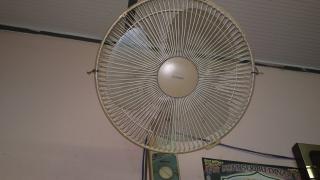
|
|
|
Aug 7 2012, 08:52 PM
|
|
Senior Member
666 posts Joined: Jan 2009
|
QUOTE(hadykucing @ Aug 7 2012, 08:43 PM) this picture really make me shock... what your all setting snap to fan with speed 3 result can see fan blade  |
|
|
Aug 7 2012, 08:54 PM
|
|
Senior Member
3,242 posts Joined: Apr 2008 From: From: From: From: From: From: From: From: From:
|
QUOTE(eidda @ Aug 7 2012, 08:52 PM) what your all setting flash on... |
|
|
Aug 7 2012, 08:54 PM
|
|
Junior Member
57 posts Joined: Jul 2012
|
QUOTE(eidda @ Aug 7 2012, 08:52 PM) what your all setting its automatic |
|
|
Aug 7 2012, 09:05 PM
|
|
Senior Member
666 posts Joined: Jan 2009
|
QUOTE(little ice @ Aug 7 2012, 08:54 PM) flash on... oh right, i just remember nokia 808 tip video using flash capture movement. |
|
|
Aug 7 2012, 09:06 PM
|
|
Junior Member
143 posts Joined: Nov 2007 
|
QUOTE(eidda @ Aug 7 2012, 09:39 PM) guy, http://en.wikipedia.org/wiki/Neutral_density_filterND filter function for what, when it on make my pic become dark.. when situation or scene, when it need to use. |
|
|
|
|
|
Aug 7 2012, 09:08 PM
|
|
Junior Member
57 posts Joined: Jul 2012
|
QUOTE(haley0918 @ Aug 7 2012, 09:06 PM) lets test on sky tomorrow |
|
|
Aug 7 2012, 10:39 PM
|

All Stars
35,468 posts Joined: Oct 2006 
|
QUOTE(hadykucing @ Aug 7 2012, 08:43 PM) this picture really make me shock... flash will stop motion like thissnap to fan with speed 3 result can see fan blade  Nokia N8 @ Water Effect by JTproductions, on Flickr  Nokia N8 @ Water drops by JTproductions, on Flickr This post has been edited by aspire2oo6: Aug 7 2012, 10:41 PM |
|
|
Aug 7 2012, 10:44 PM
|
|
Junior Member
340 posts Joined: Apr 2012
|
for those asking how to turn-off that pesky battery-draining 808's weather background app, install App Stop from the Store.
 This post has been edited by hox: Aug 9 2012, 04:42 PM |
|
|
Aug 8 2012, 01:02 AM
|
|
Senior Member
666 posts Joined: Jan 2009
|
i try capture small light in the totally dark room, but..
the result is like i using night mode, and cant focus small light also.. mean other area have some bright, not totally real dark.. btw i not using night mode, i also try manual mode still same. i want when black is black..how to setting.. |
|
|
Aug 8 2012, 01:12 AM
|
|
Junior Member
57 posts Joined: Jul 2012
|
QUOTE(eidda @ Aug 8 2012, 01:02 AM) i try capture small light in the totally dark room, but.. here i got some sample.the result is like i using night mode, and cant focus small light also.. mean other area have some bright, not totally real dark.. btw i not using night mode, i also try manual mode still same. i want when black is black..how to setting.. 1. flash on 2. flash off all set auto Attached thumbnail(s) 

|
|
|
Aug 8 2012, 01:36 AM
|
 
Staff
30,735 posts Joined: Jan 2003
|
QUOTE(eidda @ Aug 8 2012, 01:02 AM) i try capture small light in the totally dark room, but.. exposure -1.0.the result is like i using night mode, and cant focus small light also.. mean other area have some bright, not totally real dark.. btw i not using night mode, i also try manual mode still same. i want when black is black..how to setting.. |
|
|
Aug 8 2012, 02:17 AM
|
|
Junior Member
57 posts Joined: Jul 2012
|
QUOTE(aspire2oo6 @ Aug 7 2012, 10:39 PM) flash will stop motion like this Nokia N8 @ Water Effect by JTproductions, on Flickr Nokia N8 @ Water drops by JTproductions, on Flickr  i still need learning about photos |
|
Topic ClosedOptions
|
| Change to: |  0.0297sec 0.0297sec
 0.61 0.61
 6 queries 6 queries
 GZIP Disabled GZIP Disabled
Time is now: 11th December 2025 - 10:34 PM |
 Quote
Quote