

QUOTE(kuntilanak @ May 22 2012, 12:20 PM)
Thanks for the suggestion. The phone booted into 2.3.6 stock. If still fails, can I boot into download mode and flash the official ICS using ODin PC?

Yes definitelySAMSUNG GALAXY NOTE™ | V14, Phone? Tablet? It's Note!!!
|
|
 May 22 2012, 12:22 PM May 22 2012, 12:22 PM
Return to original view | Post
#121
|
 
Elite
27,801 posts Joined: Jun 2007 From: Johor  
|
QUOTE(kuntilanak @ May 22 2012, 12:20 PM) Thanks for the suggestion. The phone booted into 2.3.6 stock. If still fails, can I boot into download mode and flash the official ICS using ODin PC? Yes definitely |
|
|
|
|
|
May 22 2012, 12:27 PM
Return to original view | Post
#122
|
|
Elite
27,801 posts Joined: Jun 2007 From: Johor
|
QUOTE(beiodm @ May 22 2012, 12:23 PM) Hey peeps,i have downloaded the latest ICS official ROM of Malaysia. After extract, what do you see . If is just a single tar file than put it in PDA. Select startI am planning to use PC Odin to flash. But i am facing a problem now, which element should i insert into which column(PDA,Phone)?I scared i will flash wrongly. If it comprise of at least 3 files - select the biggest file with the word CORE as PDA, the rest is optional is usually modem and CSC file Do not select repartition, leave everything as default in odin window |
|
|
May 22 2012, 12:30 PM
Return to original view | Post
#123
|
|
Elite
27,801 posts Joined: Jun 2007 From: Johor
|
QUOTE(Avatar1975 @ May 22 2012, 12:28 PM) So just buy mobile Odin from google play Read my blog - I described how to use Mobile OdinDownload ics file, unzip to tar file can place in external sd card right Then use Odin to flash The rep correct? http://leemn.wordpress.com/2012/05/11/impr...axy-note-n7000/ This post has been edited by benny888: May 22 2012, 12:30 PM |
|
|
May 22 2012, 12:48 PM
Return to original view | Post
#124
|
|
Elite
27,801 posts Joined: Jun 2007 From: Johor
|
QUOTE(gogoman86 @ May 22 2012, 12:44 PM) laides/gentlemen, i currently updated to latest Malaysia stock ICS, wanna get some idea from everyone, which ICS launcher is the best? (looking for plain, simple, and original look of ICS launcher) Try either APEX or NOVA launcher ; the free version is sufficiently good enough |
|
|
May 22 2012, 01:17 PM
Return to original view | Post
#125
|
|
Elite
27,801 posts Joined: Jun 2007 From: Johor
|
QUOTE(mmw5610 @ May 22 2012, 01:10 PM) I already rooted my gb rom with franco kernel. Can I straight use mobile Odin Pro to flash the Malaysia ics rom without flashing back to stock kernel? Yes. Your Franco kernel will be replaced by ics lp6 kernelAdded on May 22, 2012, 1:20 pm QUOTE(nas @ May 22 2012, 12:59 PM) I'm currently on RR V1 with CF LPF kernel. Can I just flash this directly using PC Odin or do I still need to go back go GB first? You can directly flash it using odin in PC or mobile odin . No necessity to revert back to gb romIs it safe to use Mobile Odin Pro to flash the tar file directly from within the current ROM? This post has been edited by benny888: May 22 2012, 01:20 PM |
|
|
May 22 2012, 01:27 PM
Return to original view | Post
#126
|
|
Elite
27,801 posts Joined: Jun 2007 From: Johor
|
QUOTE(nas @ May 22 2012, 01:25 PM) Thanks. This will remove root from my device. Can we use Dr. Ketan's method to get root back? Use mobile odin pro to preserve rootIf you use odin in pc will lose root Than use ketan method to have root n cwm back |
|
|
|
|
|
May 22 2012, 01:47 PM
Return to original view | Post
#127
|
|
Elite
27,801 posts Joined: Jun 2007 From: Johor
|
QUOTE(nas @ May 22 2012, 01:33 PM) Thanks Benny. RightThere's been a lot of discussion going on on whether to use pc/mobile odin to flash. But looking at your posts, you prefer/recommend to use mobile odin to flash. Just one more confirmation is, in order to preserve root, just leave all default options selected by MO right? Then select wipe data/cache and dalvik. Added on May 22, 2012, 1:48 pm QUOTE(idesmond @ May 22 2012, 01:45 PM) Is there such thing as a PC Odin for Mac (Mac Odin) ? No. Alternative use Heimdall This post has been edited by benny888: May 22 2012, 01:48 PM |
|
|
May 22 2012, 01:51 PM
Return to original view | Post
#128
|
|
Elite
27,801 posts Joined: Jun 2007 From: Johor
|
QUOTE(razin @ May 22 2012, 01:49 PM) It seem that no one here want to help me... What is actually your problem ??If you want to use KIES, USB debugging must be set off |
|
|
May 22 2012, 03:21 PM
Return to original view | Post
#129
|
|
Elite
27,801 posts Joined: Jun 2007 From: Johor
|
Successfully upgraded to msia ics using mobile odin pro with root preserved
Noted baseband change to lp5 n kernel is now lp9. Have to wait for chainfire release matching kernel to have cwm Temporary use dr ketan cwm.zip to boot into cwm recovery 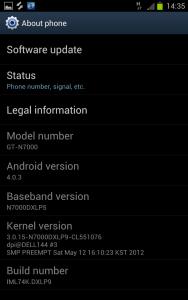
Standard screenshots. Only mobile odin n supersu are thro mobile odin install 


|
|
|
May 22 2012, 03:34 PM
Return to original view | Post
#130
|
|
Elite
27,801 posts Joined: Jun 2007 From: Johor
|
QUOTE(excel_saga @ May 22 2012, 02:01 PM) mr benny. do u have tutorial on how to use pc odin to install malaysia ics? How to use Odin in PC - just refer to post # 6 the tutorial guide under how to root n have CWM installed - in first part it is shown all the steps using Odin in PCAdded on May 22, 2012, 3:35 pm QUOTE(irone @ May 22 2012, 03:05 PM) I am on Aba 2.0 LPY..can I use mobile odin? YES definitelyThis post has been edited by benny888: May 22 2012, 03:35 PM |
|
|
May 22 2012, 03:39 PM
Return to original view | Post
#131
|
|
Elite
27,801 posts Joined: Jun 2007 From: Johor
|
QUOTE(naimadam @ May 22 2012, 03:08 PM) Any review for malaysia rom compared to ics rocket rom? Put it this way , NONE of the stock official ICS ( german, taiwan and Msia ) can match the slickness and improved smoothness of those tweaked ICS roms such as Rocket V1, Alba V2.2, Midteam 1.2The Msian rom basically for those who does not want a custom ICS rom and want to remain true/faithful to its local rom Actually if you are already on these custom roms , no point to change unless you want a Msian flavour which sucks anyway compared to these custom roms |
|
|
May 22 2012, 03:39 PM
Return to original view | Post
#132
|
|
Elite
27,801 posts Joined: Jun 2007 From: Johor
|
deleted
This post has been edited by benny888: May 22 2012, 03:40 PM |
|
|
May 22 2012, 03:42 PM
Return to original view | Post
#133
|
|
Elite
27,801 posts Joined: Jun 2007 From: Johor
|
And for those who has upgraded to the Msian ICS rom , refer this site to install CWM. This is only a temporary solution until Chianfire released his matching kernel
Each time when you boot to recovery, you will get stock recovery - just flash the CWM.zip file to get into CWM recovery http://forum.xda-developers.com/showpost.p...730&postcount=3 |
|
|
|
|
|
May 22 2012, 03:44 PM
Return to original view | Post
#134
|
|
Elite
27,801 posts Joined: Jun 2007 From: Johor
|
QUOTE(jwai85 @ May 22 2012, 03:42 PM) Uncle.... If im not wrong, ure pro CM9 rite?? but between Rocket V1, Alba V2.2, Midteam 1.2, whats your personal ranking? My preference rom is still Cyanogen9 follow by Liquid, Cyanofree and StunnerTouchwiz based rom , my preference in order : Rocket, Midteam and Alba |
|
|
May 22 2012, 03:46 PM
Return to original view | Post
#135
|
|
Elite
27,801 posts Joined: Jun 2007 From: Johor
|
QUOTE(shchiam1978 @ May 22 2012, 03:44 PM) Done reading few pages back. Wanna see how the improvement on iCS malaysia. At the moment, i am still with custom GB rom Litening and speedmod. You must be on stock Msian official rom ( even if it is rooted ) n kernel to have auto update through KIES ; nothing to do with basebandI try to connect to the kies and can't detect any update as my baseband is XXLB2. if i am not mistaken the baseband is Korea ver right? correct me if i am wrong. Uncle, for me to update using the Kies, i need to flash to Malaysia Baseband for Kies to detect any update? Or i can simply using the MO to flash it and the baseband, kernels will change based on the Malaysia ICS version? Thanks Custom roms will not allow auto update Added on May 22, 2012, 3:47 pm QUOTE(naimadam @ May 22 2012, 03:46 PM) I know performance wise that custom rom is always better. No new apps - same as German and Taiwan ICS ; only addition to GB is S NOTEI mean content wise, anything new ? new apps perhaps ? See my screenshots posted above : post # 2016 This post has been edited by benny888: May 22 2012, 03:49 PM |
|
|
May 22 2012, 03:49 PM
Return to original view | Post
#136
|
|
Elite
27,801 posts Joined: Jun 2007 From: Johor
|
QUOTE(antu_biskut @ May 22 2012, 03:47 PM) uncle just a curiosity..malaysia version got my story or need to install separately?? See my posted screenshots #2016 for the standard apps. No MY Story |
|
|
May 22 2012, 03:51 PM
Return to original view | Post
#137
|
|
Elite
27,801 posts Joined: Jun 2007 From: Johor
|
QUOTE(dry75 @ May 22 2012, 03:49 PM) I still on stunner 1.419. Time to check out cm9 then. Hehe. Cyanogen rom is now updated every 1- 2 days ( so called nitely) - once you are on it, just wipe all caches will do and flash the updated nightly ( a small file about 140 MB only) to have rom updatedThis post has been edited by benny888: May 22 2012, 04:16 PM |
|
|
May 22 2012, 03:54 PM
Return to original view | Post
#138
|
|
Elite
27,801 posts Joined: Jun 2007 From: Johor
|
QUOTE(rickysay @ May 22 2012, 03:52 PM) Premium Suite = S Note and S Memo. My Story only useful if the other chap which you wish to send your story over has also the same app My Story installedJst download the apk for My Story and install, tbh, there is nothing in My Story, another bloatware.  It is just another gimmick app |
|
|
May 22 2012, 04:09 PM
Return to original view | Post
#139
|
|
Elite
27,801 posts Joined: Jun 2007 From: Johor
|
[quote=Coisox,May 22 2012, 04:04 PM]
Need help coz not so clear after step 4. I want to migrate from ROCKET v23 to Alba v2.3. From the guide there, what I need to do is: 1. Download Alba v2.2 and v2.3 and put both on the SD card. 2. Hold power button and select Recovery (I believe this is called CWM) 3. Full wipe 4. Flash Alba v2.2 5. Flash Alba v2.3 6. Restart and done Like that? [/quote] somebody kindly please advice my previous posting. Do i get it correctly? [/quote] Edited : May I know where you get these instructions ?? You have to flash v 2.2 first. After reboot than flash V 2.3 And is hold down Volup+home+power button to boot to clockworkmod recovery mode This post has been edited by benny888: May 22 2012, 04:12 PM |
|
|
May 22 2012, 04:20 PM
Return to original view | Post
#140
|
|
Elite
27,801 posts Joined: Jun 2007 From: Johor
|
QUOTE(Coisox @ May 22 2012, 04:17 PM) Got it from here http://forum.xda-developers.com/showthread.php?t=1579301. But the steps are summarize from what i understand. It is better to do it this way. It only takes a few minutes more. You can try shortcut by flashing v2.3 immediately after 2.2 - worst scenario it will hang your phone only. In such a case just boot back to recovery and flash v2.2 again1 question, after flash to v2.2, I have to reboot then enter CWM again to flash v2.3? Why cant be done at once (flash 2.2 then flash 2.3 then reboot)? |
|
Topic ClosedOptions
|
| Change to: |  0.0487sec 0.0487sec
 0.49 0.49
 7 queries 7 queries
 GZIP Disabled GZIP Disabled
Time is now: 11th December 2025 - 07:26 PM |
 Quote
Quote