

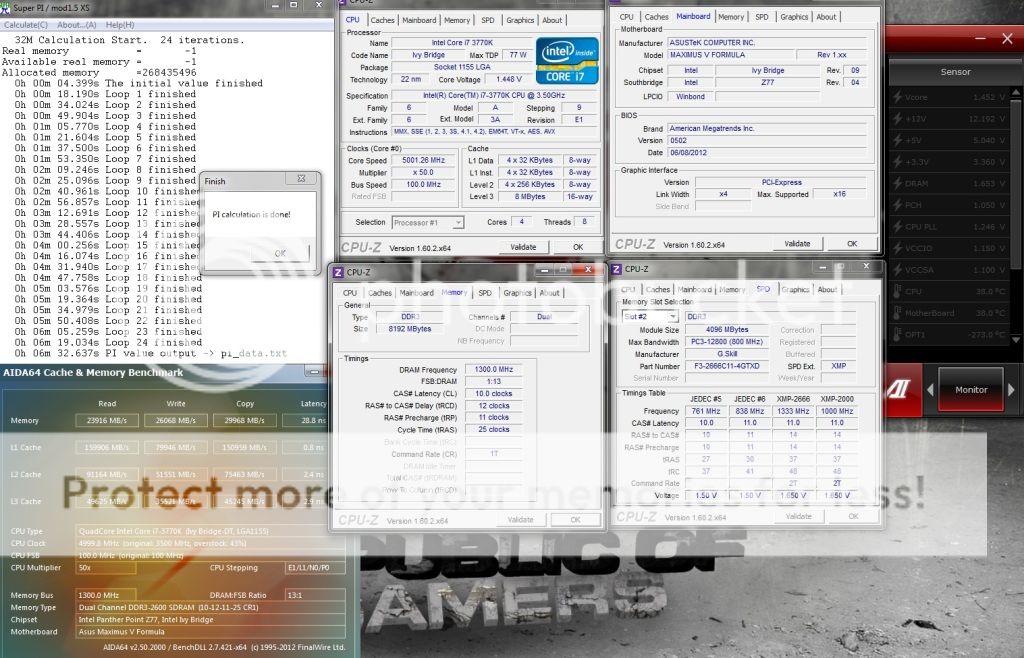
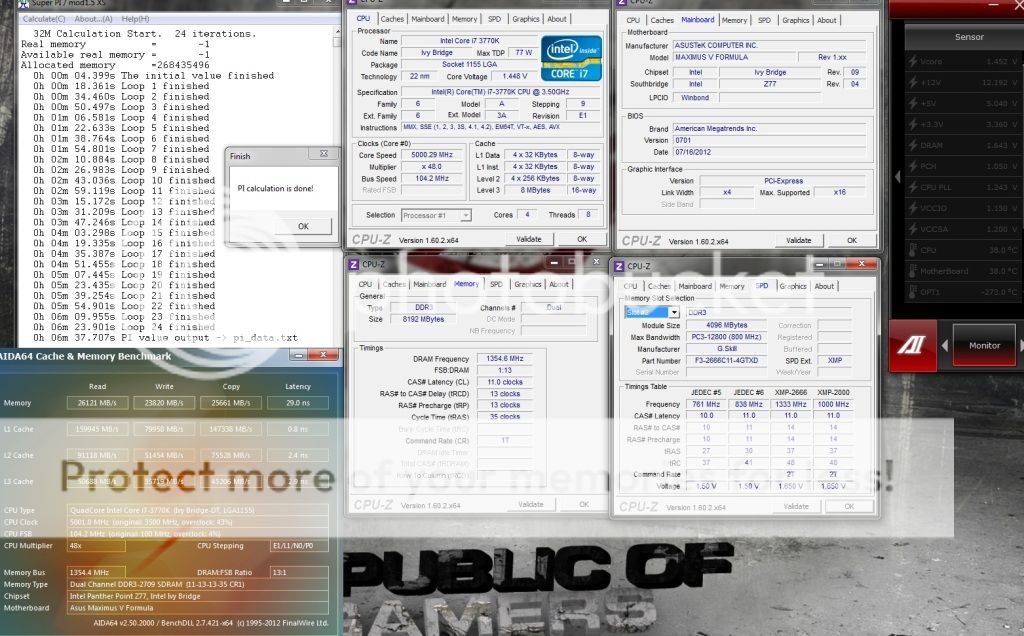
2600 10-12-11-25-1T @ 1.65v
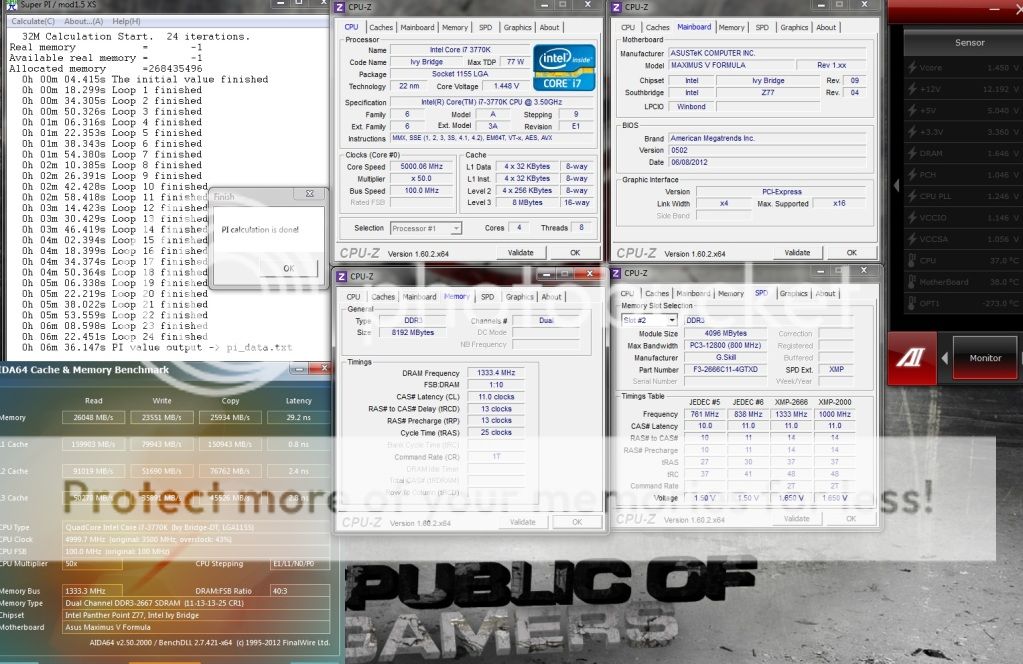
2666 11-13-13-25-1T @ 1.65v
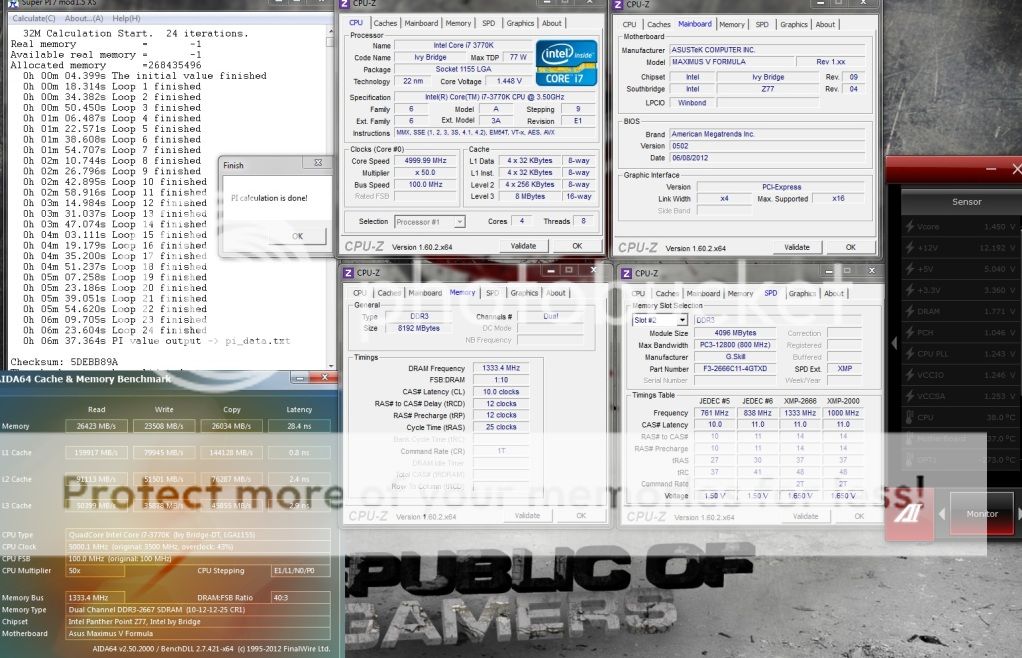
2666 10-12-12-25-1T @ 1.78v
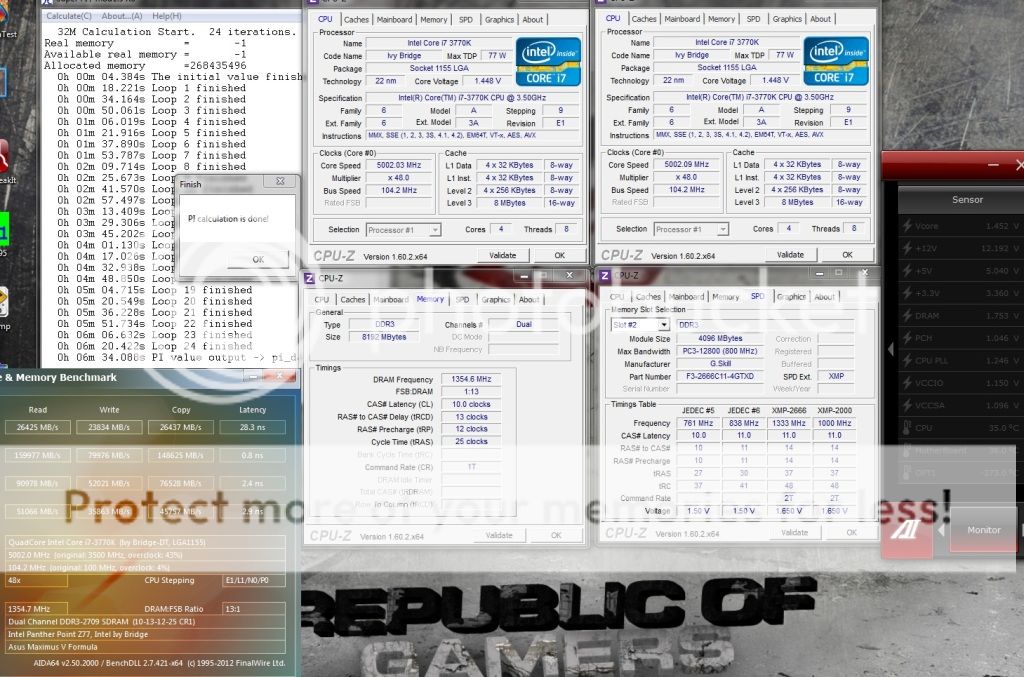
2700 10-13-12-25-1T @ 1.75v
2700 11-13-13-35-1T @ 1.65v
This post has been edited by owikh84: Sep 9 2012, 11:26 PM
Ivy Bridge Overclocking V1 | 3770K/3570K | Z77, Torture Your CPU, Post It Here!
|
|
 Jul 24 2012, 11:41 PM Jul 24 2012, 11:41 PM
Return to original view | Post
#161
|
 
Elite
8,711 posts Joined: Nov 2007 From: Butterworth, PG / Machang, Kelantan   
|
Done some 32m on the TridentX 2666C11 kit
2600 10-12-11-25-1T @ 1.65v 2666 11-13-13-25-1T @ 1.65v 2666 10-12-12-25-1T @ 1.78v 2700 10-13-12-25-1T @ 1.75v 2700 11-13-13-35-1T @ 1.65v This post has been edited by owikh84: Sep 9 2012, 11:26 PM |
|
|
|
|
|
Jul 25 2012, 06:50 AM
Return to original view | Post
#162
|
|
Elite
8,711 posts Joined: Nov 2007 From: Butterworth, PG / Machang, Kelantan
|
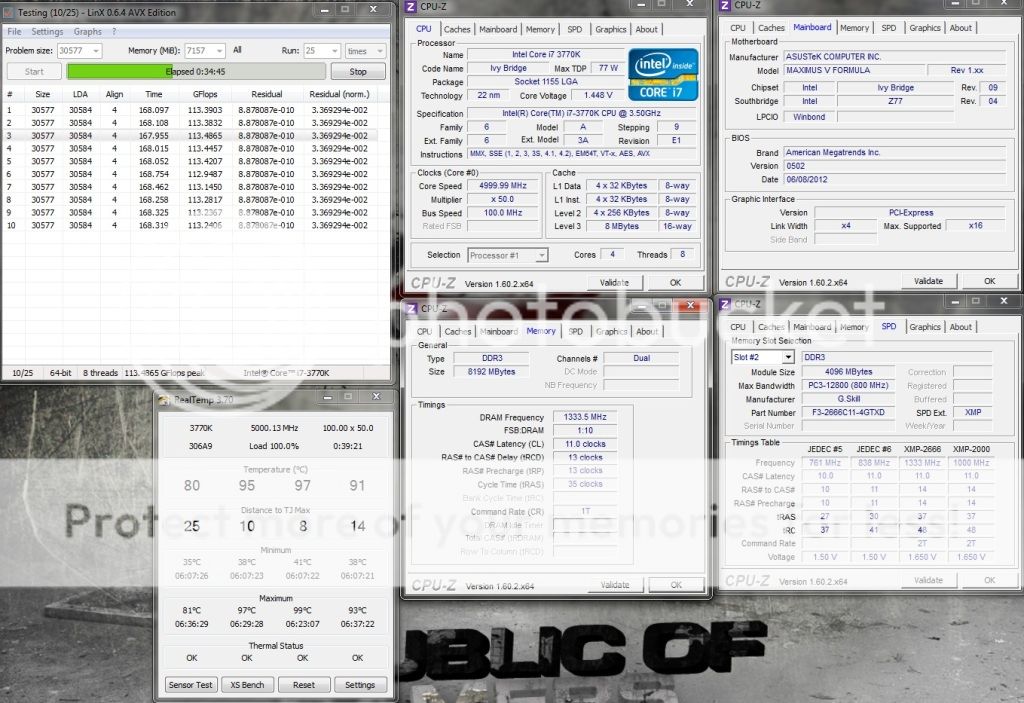
Short LinX with XMP 2666 11-13-13-35 but 1T @ 1.65v
 |
|
|
Jul 25 2012, 10:51 PM
Return to original view | Post
#163
|
|
Elite
8,711 posts Joined: Nov 2007 From: Butterworth, PG / Machang, Kelantan
|
QUOTE(yonghong @ Jul 25 2012, 03:54 PM) sorry noob here.where is the tutorial to learn how to overclock a processor ya? You might wanna read this guide although the writer's using a Gigabyte mobo, should be almost the same for others as well.  Ivy Bridge/Z77 Overclocking Guide credit to sin0822 |
|
|
Jul 26 2012, 06:13 AM
Return to original view | Post
#164
|
|
Elite
8,711 posts Joined: Nov 2007 From: Butterworth, PG / Machang, Kelantan
|
QUOTE(huzzLEE_82 @ Jul 25 2012, 10:58 PM) Google has a lot of reference website...surf around and do read a lot about OC..then oldtimers here will gladly help u giving tips and advise both also reliable. btw RMAed my ram before..and i've done with memtest86 and memtest.... later on i do LinX for 100 runs (4 hours 12 minutes 38 seconds) with none errors now doing prime95 blend test....  anyway which 1 is more reliable? prime or linX? anyway which 1 is more reliable? prime or linX?4.5 @ 1.216v, good 3570K you got there.  |
|
|
Jul 26 2012, 03:03 PM
Return to original view | Post
#165
|
|
Elite
8,711 posts Joined: Nov 2007 From: Butterworth, PG / Machang, Kelantan
|
it is Hynix bro from what i spotted through a flashlight.
Team 2600C10 is better can achieve 2800 whilst this TridentX 2666 maxed out at 2700 only, even at loosen timing and 1.85v. Team/Samsung scales better with voltage increment. At 2666, Team can do 10-12-12 @ 1.65v; TridentX 11-13-13 @ 1.65v and 10-13-13 @ 1.77v Trident beats Team/Samsung at 2600 & below only. 2600 10-12-11 vs 10-12-12 2400 9-11-10 vs 9-11-11 Those were to pass 32m This post has been edited by owikh84: Jul 28 2012, 08:17 AM |
|
|
Jul 26 2012, 07:04 PM
Return to original view | Post
#166
|
|
Elite
8,711 posts Joined: Nov 2007 From: Butterworth, PG / Machang, Kelantan
|
QUOTE(huzzLEE_82 @ Jul 26 2012, 06:59 PM) ok i think i'm done with stress test congrats on stability bro running LinX for 4 hours++..i think suffice enough btw here's the screenshot (same as before) then i do prime95 for 12 hours....so far well maintained Vcore=1.216v which is very gud i think here's the screenshot..i think can push higher but i'll keep stagnant at 4.5GHz for now coz no time testing..also very lazy and buzy... thanx to owikh84 for sharing his knowledge.... i like your initiative  |
|
|
|
|
|
Jul 28 2012, 08:18 AM
Return to original view | Post
#167
|
|
Elite
8,711 posts Joined: Nov 2007 From: Butterworth, PG / Machang, Kelantan
|
Both kits need 1.7v for 2400 9-11-10
 TridentX 2666C11 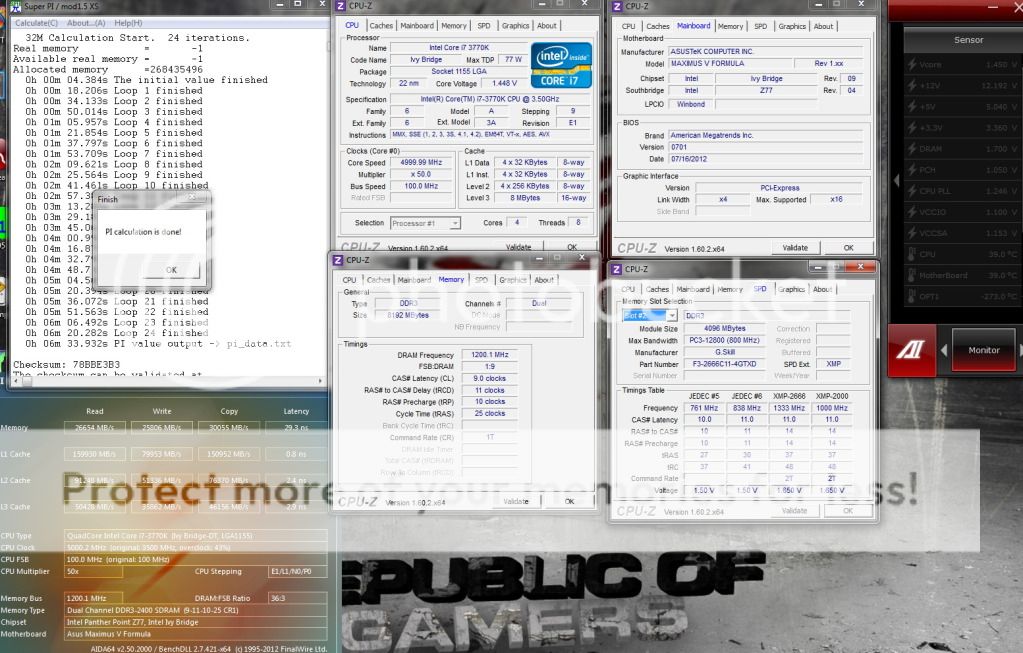 RipjawsZ 2400C9 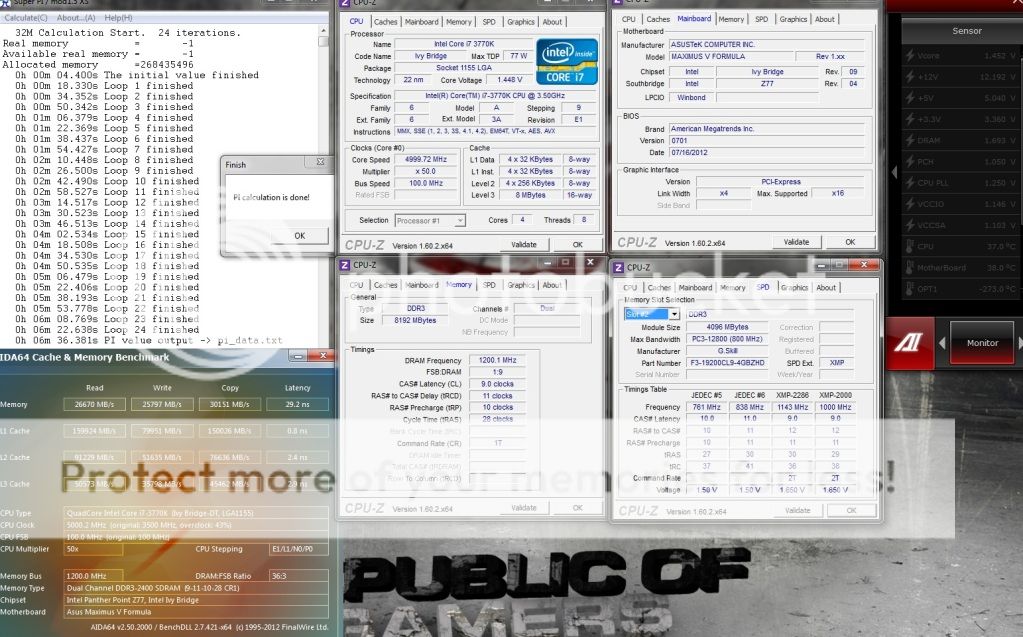 |
|
|
Jul 28 2012, 09:28 PM
Return to original view | Post
#168
|
|
Elite
8,711 posts Joined: Nov 2007 From: Butterworth, PG / Machang, Kelantan
|
QUOTE(sidewinderz @ Jul 28 2012, 07:39 PM) hey bro, Just curious...what is the temps you getting with that amount of vcore pumping into the chip? Cause my 3770k i dare not push pass 4.7ghz @1.29v as temps during prime95 is hitting slightly over 90 degrees..Currently using noctua nh-d14 QUOTE(owikh84 @ Jul 16 2012, 12:47 AM) The Auto tuning will actually write the settings into the bios for you. That is all it does, and doing it manually in the bios is no different, it accomplishes the very same thing. It's helpful for beginner overclocker who doesn't know how to use manual OC. This post has been edited by owikh84: Jul 28 2012, 09:28 PMSomehow I don't think auto tuning will choose the lowest & efficient vcore & other voltages for you. It will act just like it's having a brain on itself. OC manually in bios is more fun, I don't wanna let mobo OC for me, but I OC for mobo instead  Added on July 16, 2012, 10:21 am need more vcore for 7GB LinX (all RAM amount stressed) 3770K @ 5.0GHz HT 1.44v » Click to show Spoiler - click again to hide... « |
|
|
Jul 29 2012, 09:29 AM
Return to original view | Post
#169
|
|
Elite
8,711 posts Joined: Nov 2007 From: Butterworth, PG / Machang, Kelantan
|
QUOTE(trisx @ Jul 29 2012, 06:48 AM) So far i've tried 4.6Ghz only. Need WC to go higher and better PSU. My PSU chapalang only. Funding for PSU next month. yeah water is always a mate for OC. Something Gold  If you are brave enough voiding the warranty, delid the IHS, replace TIM & running the chip topless. A good PSU with less ripple is needed to get a stable constant OC. |
|
|
Jul 30 2012, 06:22 AM
Return to original view | Post
#170
|
|
Elite
8,711 posts Joined: Nov 2007 From: Butterworth, PG / Machang, Kelantan
|
QUOTE(diaBoliQu3 @ Jul 29 2012, 10:26 PM) CPU on idle. Most chips could do BCLK OC up to 107MHz, so 103 shouldn't give an issue for you.Intel new user here. So might take time. Few questions: -BCLK default is 103. Should I change to 100? -CPU voltage I set to manual but CPU manual voltage is auto. Do I need to set both voltage the same? -AI Overclock tuner is manual. -EPU Power saving mode is disabled. My question is how come cpuz show as above? Shouldn't it show: -Multiplier x41 as I set. -Bus speed is 103 However, it is multiplier x41 during stress test. Is it normal like this for Intel cpu to downclock it self during idle? I always set the vcore manually, don't let the mobo OC for you. You ARE the OCer LOL so OC tuner is not needed. Multiplier goes down when EIST (speedstep) kicks in when idling. So just disable this feature as well as C1E, C3, C6 in BIOS settings. i just set the power management to High Performance in windows. QUOTE(trisx @ Jul 30 2012, 12:57 AM) Yeah. Im still deciding between AX650 & Seasonic x660w for my build Corsair RMA is superb. We got forumer Legend86 working for CUDO the distro so easy to deal with. |
|
|
Jul 30 2012, 10:52 AM
Return to original view | Post
#171
|
|
Elite
8,711 posts Joined: Nov 2007 From: Butterworth, PG / Machang, Kelantan
|
QUOTE(diaBoliQu3 @ Jul 30 2012, 07:43 AM) -Don't exceed 101? Mine is 103... -Should I just leave to 103 or can change to 100? -So, how do we know how much for the vcore? Or it's try and error? -Is it okay if I let speedstep on? Or would it affect oc'ing? -Power management is custom, based on high performance but I surprised somehow Intel can auto downclock. -AMD ex user so I'm abit slow with Intel.  -Out of topic, Legend86 is superb. The thing that not superb is Airpak are damn late delivering my parcel.  QUOTE Most chips could do BCLK OC up to 107MHz, so 103 shouldn't give an issue for you. vcore you could try and error to get the lowest stable one. EIST won't effect OC. It is just a power saving feature to save electricity when your system is in idle state. |
|
|
Jul 31 2012, 06:17 AM
Return to original view | Post
#172
|
|
Elite
8,711 posts Joined: Nov 2007 From: Butterworth, PG / Machang, Kelantan
|
QUOTE(stasio @ Jul 30 2012, 11:12 AM) Just got 3770K Costa batch 3220B692..........testing. Congrats on ownership.  QUOTE(diaBoliQu3 @ Jul 30 2012, 11:23 AM) LoL... Thanks for the highlight. Read it but just want to be double sure. stock voltage can be vary, from board to board. Some boards follow CPU VID, others set CPU VID + offset, some just set whatever they wish. Differences in VRM design and BIOS make all the difference. If you want to know your stock vcore enter the bios and see what the vcore is set at when under stock settings. Whatever that value is will be your stock voltage for your setup. VID is another thing.  Added on July 30, 2012, 12:51 pmEyh, for Intel cpu, is the stock voltage is the minimum for the cpu to work or I can reduce the stock voltage for stock clock like I did with AMD? Added on July 30, 2012, 8:33 pm4.5ghz with 1.168v stable for 1/2 hour. I wish I can test for 24 hour like last time but I'm using electric powered by generator. And will shutdown at 2300.  QUOTE(diaBoliQu3 @ Jul 30 2012, 11:58 PM) Start at 2000, sreenshot at 2347. 3 hour plus, nearly 4 hour while I post this: Welcome to the club.I think enough for tonight. Lazy to try further. Will turn off generator at 0000 later. I'm sure tonight fuel are consume a lot than usual. Will check the temp at daytime because my ambient is high during daytime but cold during night time as I in jungle. Maybe if the temp are acceptable during daytime, I'll try to push further. Personally, I get more than I expected and I'm very happy with it. Am I part of the list? Added on July 31, 2012, 12:06 am4 hour, so far no crash or error... Will stop the stress test now. Gnite oc'er... Well done on half stability, 2/8GB RAM stressed. |
|
|
Jul 31 2012, 11:05 AM
Return to original view | Post
#173
|
|
Elite
8,711 posts Joined: Nov 2007 From: Butterworth, PG / Machang, Kelantan
|
QUOTE(diaBoliQu3 @ Jul 31 2012, 07:18 AM) And based on RealTemp, what's wrong with the different temp. Especially the first core. Is it related to TIM apply method? I'm using the one that provided with CM Cooler and I apply the vertical method as I read at Arctic Cooling. The temp difference between cores is normal since previous gens. core temp variation is normal; also, sensors vary - they are not bad but are tiny little things, accurate only when close to the shutoff temp, and we must expect variation. So, intrinsic variation + sensor variation = variation reported temps. Also different cores work at different rates, therefore some will normally run a little hotter than others. Coz say Core 1 is working a little harder than core 0, even at idle, that core will be a little bit hotter than Core 0. Just an example. |
|
|
|
|
|
Jul 31 2012, 11:42 AM
Return to original view | Post
#174
|
|
Elite
8,711 posts Joined: Nov 2007 From: Butterworth, PG / Machang, Kelantan
|
QUOTE(diaBoliQu3 @ Jul 31 2012, 11:21 AM) For CPU+RAM stress test, is Prime95 large is the best or Linx? Mind to share me what value I need to set for Linx? Linx and IntelBurnTest are the same right? There's no best stress tool. Both are just great.  choose ALL memory for max torture IBT also using linpack same as LinX so basically they are identical. |
|
|
Jul 31 2012, 11:58 AM
Return to original view | Post
#175
|
|
Elite
8,711 posts Joined: Nov 2007 From: Butterworth, PG / Machang, Kelantan
|
QUOTE(diaBoliQu3 @ Jul 31 2012, 11:51 AM) If I use Prime, Large or Custom? If custom, how much should I set. custom blend 128k min FFT, 4 threads for your 3570Kamount of mem to stress can be determined in Task Manager -> check for available physical mem check out Post #1 for youtube. |
|
|
Jul 31 2012, 01:37 PM
Return to original view | Post
#176
|
|
Elite
8,711 posts Joined: Nov 2007 From: Butterworth, PG / Machang, Kelantan
|
No need to touch the prob size.
I believe you opened other apps Realtime, CPU-z after launching LinX hence these apps consumed some MBs. Click the ALL button again. Next time open LinX the last. |
|
|
Jul 31 2012, 07:54 PM
Return to original view | Post
#177
|
|
Elite
8,711 posts Joined: Nov 2007 From: Butterworth, PG / Machang, Kelantan
|
QUOTE(diaBoliQu3 @ Jul 31 2012, 03:13 PM) How about this one boss? I can't set above 6000mb for ram though available memory is > 6000mb. Error regarding not enough swap will occur in Prime95. So, I just set to 6000 mb but seems like I'm stressing only 7.1gb of memory. How to max out? To save time, run LinX 20+ loops first then only proceed for prime95.Regarding the Linx, will try back again. Added on July 31, 2012, 5:37 pmSeems like I misread the Prime95 as I wake up from sleep. Can run with 6500mb memory, and load is 7.58gb of ram... Will continue tonight... Hopefully stable. If yes, the I will push further. Reason is LinX detects error faster than prime95. Good luck bro |
|
|
Jul 31 2012, 08:12 PM
Return to original view | Post
#178
|
|
Elite
8,711 posts Joined: Nov 2007 From: Butterworth, PG / Machang, Kelantan
|
QUOTE(diaBoliQu3 @ Jul 31 2012, 08:01 PM) But I can't run Linx boss. Don't know what happen. You might either customize the ram amount or select the largest or 2nd largest amount from the drop down list. Same error even though I close other apps. Am I doing Linx wrong or my oc is not good? Now running Prime95 for 2 hour stressing RAM and CPU till I'm unable to use my PC. Same error even though I close other apps. Am I doing Linx wrong or my oc is not good? Now running Prime95 for 2 hour stressing RAM and CPU till I'm unable to use my PC.  Now my memory comeback while I was oc'ing my AMD where during stress test, PC is unusabl e. Now my memory comeback while I was oc'ing my AMD where during stress test, PC is unusabl e. |
|
|
Aug 1 2012, 10:07 AM
Return to original view | Post
#179
|
|
Elite
8,711 posts Joined: Nov 2007 From: Butterworth, PG / Machang, Kelantan
|
QUOTE(Blackened @ Aug 1 2012, 07:49 AM) 6 hours prime between my sleep time and got warning Motherboard -3 centigrade on the AI Suite II. Anyone else had this lol? Can ignore? that's annoying AI sensor problem. Just ignore it or turning off the warning alert in AI probeII while running stress test. Or terminate the AI suite,i5 3570K (full load 64-71C) Asus P8Z77-M |
|
|
Aug 2 2012, 12:24 AM
Return to original view | Post
#180
|
|
Elite
8,711 posts Joined: Nov 2007 From: Butterworth, PG / Machang, Kelantan
|
QUOTE(Dreamworks @ Aug 1 2012, 10:45 PM) You mean should turn on HT? Because I read from OC guide somewhere to turn off HT Welcome to the club! Now 2 hours liao and still running strong, gonna try with 4/8 cores afterwards. Surprised that the temps are around 80, I'm just using Hyper 212 Evo and not some big hsf or wc... Added on August 1, 2012, 11:07 pmWeird. I turned on HT but GFlops dropped to ~60 only Must be something wrong somewhere, or is it due to my RAMs? Low core temps because of low GFlops. Like stasio said by rights you should get 100ish GFlops. Use the latest LinX (from post#1) and win7 SP1? Try increase vcore, vdimm, or VCCIO or lower Even at RAM 1333MHz will yield > 100 GFlops: » Click to show Spoiler - click again to hide... « HT ON should get lower GFlops because there is an extra thread to process the same core. QUOTE(stasio @ Aug 1 2012, 11:17 PM) This is my fast 4.5GHz setting and temp(without tweaking). Welcome to the club bro. Waiting for your BBSE while finished packing my Team 2600 kit Added on August 2, 2012, 12:28 am QUOTE(stasio @ Aug 1 2012, 05:34 PM) CPU-Tweaker 2.0 Beta 15 Thanks for sharing bro. http://www.tweakers.fr/download/CPU-Tweaker.rar -Replace Core VID by VCore. -Add VDimm on some chip. -Best XMP Profile is show now instead Jedec Profile in main window. testing my BBSE..... Edit: Added 3 digit Vdimm,link same. Pack my BBSE in box for tomorrow delivery. Testing with spare RAM: noticed that it will work on Z77 only, my X79 mobo can't launch it. This post has been edited by owikh84: Aug 2 2012, 12:28 AM |
|
Topic ClosedOptions
|
| Change to: |  0.0416sec 0.0416sec
 0.39 0.39
 7 queries 7 queries
 GZIP Disabled GZIP Disabled
Time is now: 5th December 2025 - 01:50 AM |
 Quote
Quote

