

On CM9 Nightly now. The boot up animation so sooo much cooler than gay unicorn. lol.
○ Galaxy Nexus V9 ○, latest Google flagship
○ Galaxy Nexus V9 ○, latest Google flagship
|
|
 Apr 25 2012, 11:07 AM Apr 25 2012, 11:07 AM
|
 
Senior Member
2,967 posts Joined: Jan 2003  
|
On CM9 Nightly now. The boot up animation so sooo much cooler than gay unicorn. lol.
|
|
|
|
|
|
Apr 25 2012, 11:12 AM
|

Senior Member
7,723 posts Joined: Jan 2005
|
QUOTE(Harddisk @ Apr 25 2012, 11:07 AM) On CM9 Nightly now. The boot up animation so sooo much cooler than gay unicorn. lol. any gif to show that? or any separate flashable zip for boot animation? included audio? |
|
|
Apr 25 2012, 11:12 AM
|
|
Senior Member
2,967 posts Joined: Jan 2003
|
QUOTE(ghost_301 @ Apr 25 2012, 10:54 AM) Are you trying to challenge me? I have checked with my brother, he said no. Few other Android phones I tested also the same. Data Network MUST be enabled in order to allow MMS to work. Hence there are 2 APN settings, 1 for 3G, 1 for MMS. If extra, probably WAP and stuff, but we are not getting into that. BTW, yes, I am sure, I owned a Galaxy Note as well. Even my Xperia X8 can send MMS without having the data turn on (what I mean is that the phone will turn on the data just to send/receive MMS automatically, not the phone can send MMS without any data). I still don't think they did any tweaking on this to enable MMS sending without enabling data.  Added on April 25, 2012, 11:13 am QUOTE(djlah @ Apr 25 2012, 11:12 AM) any gif to show that? or any separate flashable zip for boot animation? included audio? No audio. I think only Sammy's boot animation has audio in all Android phones, right?Teach me how to extract the animation, I can grab it for you.  Here's how it looked like: » Click to show Spoiler - click again to hide... « EDIT: at least now my BT can work. But it's still IMM76D ROM. This post has been edited by Harddisk: Apr 25 2012, 11:18 AM |
|
|
Apr 25 2012, 11:14 AM
|

Junior Member
411 posts Joined: May 2005 
|
QUOTE(DjK @ Apr 25 2012, 09:50 AM) Morning, Why would there be any problems switching batteries? So long as you use ori batteries that is specified for the Nexus. And if the battery dun come with NFC, the worst problem you can expect is that your NFC will not work, that's all. Not that it is much use at the moment anyway. So, what makes you think there will be a problem switching between batteries? A battery is a battery. Unless you use fake batteries, then your phone may overheat and possibly blow up. Other than that... what possible problem are you thinking of?Anyone here bought extra batteries? ones that comes with NFC or don't have? any problems with the phone after a period of time(months) after switching in between batteries? |
|
|
Apr 25 2012, 11:16 AM
|
|
Senior Member
7,723 posts Joined: Jan 2005
|
just browse Google Play website and click SHOP DEVICES section, you'll see:
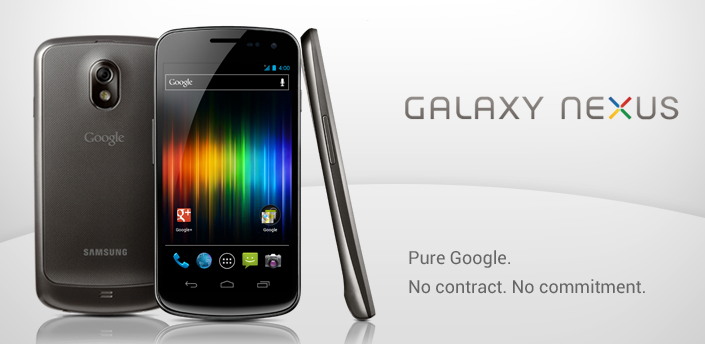 $399.00 Currently only available in the USA. Ships in 1-2 business days. Two-day shipping used for all orders. Galaxy Nexus HSPA+ available at Google Play |
|
|
Apr 25 2012, 11:17 AM
|

Senior Member
1,083 posts Joined: Dec 2007
|
QUOTE(Harddisk @ Apr 25 2012, 11:12 AM) I have checked with my brother, he said no. Few other Android phones I tested also the same. Data Network MUST be enabled in order to allow MMS to work. Hence there are 2 APN settings, 1 for 3G, 1 for MMS. If extra, probably WAP and stuff, but we are not getting into that. wonder.. if no data ON how MMS going to network? GSM wouldn't allow such colorful msg go tru...I still don't think they did any tweaking on this to enable MMS sending without enabling data. Added on April 25, 2012, 11:13 am No audio. I think only Sammy's boot animation has audio in all Android phones, right? Teach me how to extract the animation, I can grab it for you. |
|
|
|
|
|
Apr 25 2012, 11:18 AM
|
|
Senior Member
7,723 posts Joined: Jan 2005
|
QUOTE(Harddisk @ Apr 25 2012, 11:12 AM) I have checked with my brother, he said no. Few other Android phones I tested also the same. Data Network MUST be enabled in order to allow MMS to work. Hence there are 2 APN settings, 1 for 3G, 1 for MMS. If extra, probably WAP and stuff, but we are not getting into that. no idea how to extract it, never try before. nvm, wait for other folk sharing.I still don't think they did any tweaking on this to enable MMS sending without enabling data. Added on April 25, 2012, 11:13 am No audio. I think only Sammy's boot animation has audio in all Android phones, right? Teach me how to extract the animation, I can grab it for you. about boot audio already exist quite some time in custom rom, like BAMF, Gummy, etc... just replace the .mp3 with same file name. |
|
|
Apr 25 2012, 11:21 AM
|
|
Junior Member
411 posts Joined: May 2005
|
QUOTE(springfall @ Apr 25 2012, 10:24 AM) oh how i wish, our Gnex has infrared lights emmiters, to control our TV, press 1 channel 1 If one is gonna carry an extra battery, of course one should either carry two slim batteries or two thick batteries la. Not one slim one thick lor.  we got 1 of the most sensors, time to put some fun sensors! if u dun use NFC, just use the extra $$ on extra cap n cover, cuz once u get bigger batts, the old one cant fit and the casing protector will mostlikly not fit.. unless u do some sandpaper work~ the 2000 will give around 30-40 mins, reported by my friend, mugan, no nfc. she didnt do switch here n there but stay solid 100% time so... u gotta find some mad fella that wan carry 2 type batt, 2 type case and walk around switching em. But if one was to have an extra battery, then one should have to think about having a charger which can charge a battery without the battery being inside the phone. Otherwise, very mah farn loh. This post has been edited by jpaq: Apr 25 2012, 11:24 AM |
|
|
Apr 25 2012, 11:25 AM
|

Senior Member
2,759 posts Joined: Oct 2011 From: ★クララ - ClariS - アリス★
|
QUOTE(MrAvatar @ Apr 25 2012, 10:55 AM) i did, still nth happen Did you set system path files? to enable ADB to work?Like this, this is critical step. Computer>"Right Click" - Select Properties>Advance System Settings>Environment Variables>At bottom find PATH and select edit>Scroll to the last right and add your C:/ (Your ADB path file by default for me is should be ;C:/android-sdk-windows/tools>Then select OK> then OK till all windows closed. [REMEMBER add semi column in-front.] Then only use go cmd type adb if you see bunch of helps means you have adb enabled. As you do like this, you enable fastboot as well~ This post has been edited by droid13579: Apr 25 2012, 11:26 AM |
|
|
Apr 25 2012, 11:28 AM
|

Junior Member
423 posts Joined: Apr 2005
|
QUOTE(Doomsday @ Apr 25 2012, 02:53 AM) Yay using now.. lol not much.. but better than dropbox if u don't invite user.. but cool thing about it is it release the sdk at the same time.. means in future apps can have cloud storage with google drive at the same time.. means more awesome app but free 5GB of storage only but free 5GB of storage only  |
|
|
Apr 25 2012, 11:32 AM
|
|
Senior Member
7,723 posts Joined: Jan 2005
|
QUOTE(0204 @ Apr 25 2012, 11:28 AM) lol not much.. but better than dropbox if u don't invite user.. but cool thing about it is it release the sdk at the same time.. means in future apps can have cloud storage with google drive at the same time.. means more awesome app don't care, use all free cloud dropbox 2.5G, BOX 50G, SugarSync 6G, Google Drive 5G, wat else... |
|
|
Apr 25 2012, 11:35 AM
|

Senior Member
655 posts Joined: Apr 2011
|
QUOTE(droid13579 @ Apr 25 2012, 11:25 AM) Did you set system path files? to enable ADB to work? i couldnt understand wat to add in the Path, i dont know where is the android sdk stuff located in my pc lolLike this, this is critical step. Computer>"Right Click" - Select Properties>Advance System Settings>Environment Variables>At bottom find PATH and select edit>Scroll to the last right and add your C:/ (Your ADB path file by default for me is should be ;C:/android-sdk-windows/tools>Then select OK> then OK till all windows closed. [REMEMBER add semi column in-front.] Then only use go cmd type adb if you see bunch of helps means you have adb enabled. As you do like this, you enable fastboot as well~ or is there any other way? |
|
|
Apr 25 2012, 11:35 AM
|
|
Senior Member
2,967 posts Joined: Jan 2003
|
My dear CM9, you'll always have a special place in my heart.
» Click to show Spoiler - click again to hide... « |
|
|
|
|
|
Apr 25 2012, 11:39 AM
|
|
Senior Member
2,759 posts Joined: Oct 2011 From: ★クララ - ClariS - アリス★
|
QUOTE(MrAvatar @ Apr 25 2012, 11:35 AM) i couldnt understand wat to add in the Path, i dont know where is the android sdk stuff located in my pc lol Very simple you create a file called Android at C drive, then go to your SDK folder where you download all those adb fastboot from Google SDK you copy all of them and paste on your new Android folder at C.or is there any other way? Then at path there you scroll to the right last type like this ;C:/Android that makes it very simple. when you need ADB just cmd then type cd C:/Android then give your usual commands example adb devices to test adb success should have 12345ABCDE devices This post has been edited by droid13579: Apr 25 2012, 11:41 AM |
|
|
Apr 25 2012, 11:40 AM
|
|
Senior Member
7,723 posts Joined: Jan 2005
|
QUOTE(Harddisk @ Apr 25 2012, 11:35 AM) My dear CM9, you'll always have a special place in my heart. is your BT handsfree & tethering issue resolved in your new CM9 rom?» Click to show Spoiler - click again to hide... « |
|
|
Apr 25 2012, 11:48 AM
|
|
Senior Member
2,759 posts Joined: Oct 2011 From: ★クララ - ClariS - アリス★
|
QUOTE(Harddisk @ Apr 25 2012, 11:35 AM) My dear CM9, you'll always have a special place in my heart. The BT and tethering issue a lot people also have it :<» Click to show Spoiler - click again to hide... « AOKP now aware of this... expecting a fix release soon because a lot of people send logcats about it~ |
|
|
Apr 25 2012, 11:49 AM
|
|
Senior Member
655 posts Joined: Apr 2011
|
QUOTE(droid13579 @ Apr 25 2012, 11:39 AM) Very simple you create a file called Android at C drive, then go to your SDK folder where you download all those adb fastboot from Google SDK you copy all of them and paste on your new Android folder at C. i used this as my drivers >http://forum.xda-developers.com/showpost.php?p=20058157&postcount=1Then at path there you scroll to the right last type like this ;C:/Android that makes it very simple. when you need ADB just cmd then type cd C:/Android then give your usual commands example adb devices to test adb success should have 12345ABCDE devices so i do not hav sdk stuffs i extract it ^ and put it into the Android folder at C:/ but cmd still cannot work |
|
|
Apr 25 2012, 11:49 AM
|

Junior Member
500 posts Joined: Nov 2005 From: Setapak Jaya , KL
|
QUOTE(im_not_stupid @ Apr 25 2012, 11:17 AM) wonder.. if no data ON how MMS going to network? GSM wouldn't allow such colorful msg go tru... Data is needed to send MMS, I agreed with that. But in my Xperia X8, I don't need to turn on my data manually to send MMS, I just send like a usual SMS and it automatically activate data to send the MMS. Same goes to my Galaxy Note, probably to confirm, I will try later tonight. |
|
|
Apr 25 2012, 11:51 AM
|

Senior Member
782 posts Joined: Oct 2009 
|
how to add widget in apex launcher...anyone?
|
|
|
Apr 25 2012, 11:51 AM
|

Senior Member
4,072 posts Joined: Mar 2011 From: μετά
|
QUOTE(jpaq @ Apr 25 2012, 01:14 PM) Why would there be any problems switching batteries? So long as you use ori batteries that is specified for the Nexus. And if the battery dun come with NFC, the worst problem you can expect is that your NFC will not work, that's all. Not that it is much use at the moment anyway. So, what makes you think there will be a problem switching between batteries? A battery is a battery. Unless you use fake batteries, then your phone may overheat and possibly blow up. Other than that... what possible problem are you thinking of? i think he is implying on whether the device will be confused by keep changing capacity, measurements etc.as if the phone is swapped from 2000 mah, to 1750 mah, the phone might still think itz running 2000 and hence more juice is burnt ineficiently. i think thats what he ment. |
|
Topic ClosedOptions
|
| Change to: |  0.0266sec 0.0266sec
 0.78 0.78
 6 queries 6 queries
 GZIP Disabled GZIP Disabled
Time is now: 21st December 2025 - 03:14 PM |
 Quote
Quote
