Hi, welcome to this thread! Before you start posting on this thread, please spare a minute to read the below message. Thanks.
You can:
Discuss about phone/modem/settings for Maxis 3G/HS 3G.
Comment about Maxis 3G/HS 3G.
Ask for opinions on Maxis 3G/HS 3G.
You can't:
Discuss about piracy or illegal contents.
Request forummers to rent out their SIM cards here, this is not a trading platform.
REMINDER:
This package is already a discontinued plan, hence you will not be able to sign up as new subscribers.
Still, it's the best for you to check with Maxis if this plan is still allowable for now. We are not liable for any misinformation as we are not working for Maxis.
This is NOT Maxis Wireless Broadband thread! There is a separate Maxis WBB thread on this section. Check it out.
This post has been edited by fruitie: Mar 26 2012, 12:15 AM
Special credits to our master of trial and error, chuahcs79 for his contributions. He has tried different devices and used different types of booster to enhance his connection's speed and consistency. Those methods are proven workable and not forgetting they are also cost effective.
For your information, chuahcs79 is based in Penang and hence if your area is not within HSPA coverage, these methods might not work that well for you but they are definitely worth trying.
---------- Part 1:
Below are the methods proven to work in my area. These are however dependable on area, device, timing, distance from the cell signal tower base and network congestion within the same tower.
Booster
a) Windsurfer - Suitable for all USB modems - Download the template from HERE
b) Strainer - Suitable for USB stick modems - Suitable for areas with poor signal or bad connection's consistency - Alternatively, this can be used as directional antenna too
Huawei E1762's latest firmware updates As many of you are aware Huawei E1762 is one of the bundled modems for Maxis broadband registration, hence it shouldn't come to a surprise by seeing most of us (or people out there) using this modem. It is capable to run on 7.2Mbps download speed and 5.76Mbps upload speed.
Credits to cruxidex for his kindness to help out few poor souls out there who were having bad speed using the E1762.
The latest firmware: 11.126.10.00.00 If you are using E1762 with Aztech HW-5503G, hold your horses! Read the reminder in red first.
Else, please follow these easy peasy steps: 1) Download the firmware from here and only install the Update_11.126.10.00.00.B418.
2) After get the modem flashed to the latest firmware, it is time to upgrade your dashboard to a later version. Download from here. Install UTPS16.002.10.04.99_MAC16.001.30.00.99.
3) Done!
You will need to take note on these few important points before flashing your modem and dashboard. Spend 1 minute reading them, strongly advised by fruitie. 1) Do not fix the firmware, unless it is broken (slow). 2) OK, now you have decided to flash it; make sure you jot down your current firmware before you start doing anything. Can be obtained from your dashboard: Tools>Diagnostics 3) For those using this modem with TP-Link MR3420, basically not much issues can be found. MR3420 is a very flexible router unlike Aztech HW550-3G. 4) However, if you are using Aztech HW550-3G, before doing the above steps; please update your router to the latest firmware from here. 5) Proceed with the modem+dashboard flashes. In order for it to use on your Aztech HW550-3G router, select RAS (modem) on your dashboard before plugging it into your router. By default, it should be NDIS. 6) Now you should be able to use it on your Aztech router with no issues.
If you feel that your previous firmware does better job than the new one, you may still possible to download the old firmware from DC Files. Optional: You can also use cruxidex's uploaded file here.
Note: Perform all the steps on your own risk, we are not liable for any issues which may occur during or after the firmware flash.
Part 2: Mobile phones as modem and conclusion in next post...
This post has been edited by fruitie: Apr 22 2012, 02:47 PM
a) Sony Ericsson Phones - Recommended phones: SE W705, SE Yari U100 and SE Elm - I have been connecting them to the TP-Link's TL-MR3420, a 3G router. This is to show you how much the signal strength has gained using these SE phones as modem.
b) Nokia Phone - Recommended phone: Nokia X3-02 - My favourite phone. Why? I direct connect it with the stock USB cable to my PC and it can get quite a maximised speed in my area as I believe the 3G 900MHz band is stronger in my area. -Proven by results from Speedtest.net
Friendly reminder: As phones generally generate more heats compared to designated USB modems, please take precautions steps such as using a cooler pad underneath the phone or station it near to a fan or an air-conditioned system to avoid any unwanted incidents. Please try this on your own risk.
Conclusion: Phones are easier to get better signal in my area. I have tested with almost all available USB modems such as the Huawei E1762, E270, D-Link DWM 151, ZTE MF627, ZTE MF600, UMG1831 (credits to leecwai), SE phones and Nokia phone. Some areas are only running on 3G 2100 MHz band, while some areas like mine are running on both 2100MHz and 900 MHz 3G band.
In my area 900MHz is proven to have stronger signal and that's the reason phones can easily grab better signal than modem. If you are using phone to do tethering for 24/7, you will need to keep the phone cool all the time, make sure you get a spare battery and open the back cover or place it on top of a laptop cooler pad. It might reduce some of the heats. SE phones are much cooler than Nokia phone when it comes to tethering based on my experience.
If you are using or planning to buy a USB modem, please remember to buy those which support dual 3G 900MHz and 2100 MHz band modem.
Note: Big thanks to chuahcs79 for his experiments. Above finding is done by chuahcs79 and edited and compiled by fruitie.
Next post: Now you have a good device, good connection. What's next? Share the love, share out your connection. fruitie has some recommendations for you.
With the advancement of technology, fruitie personally recommends all the Maxis 3G Internet Unlimited users to have a 3G router. You can easily share this high speed connection with your family members or simply for your iPad or mobile phones.
3G routers are proven to have better connectivity and stability compared to direct plug-in USB modems. Of course, one can easily buy a MiFi device and connection can be shared via WiFi with few simple steps. However, if you are not a mobile person, 3G routers are always a better and cheaper choice than a MiFi. With a router, you can choose to connect using LAN (more stable than WiFi) or simply with just WiFi. If you have a ready USB modem then you can plug it to your router without wasting it, this is something MiFi can't have.
2) Aztech - HW550-3G(I'm using this and quite satisfied with its performance) http://www.aztech.com/prod_3g_hw550.html -Not an easy to be tamed router as it doesn't simply compatible with any modem, you may need to update your router with the latest firmware if your modem is not accepted. You just have to try. Discussion thread: https://forum.lowyat.net/index.php?showtopic=1966992
-----
However, computing technology makes life easier. Windows 7 is capable enough to turn your modem into a "virtual router" and you can share out the 3G connection with just some simple tweaks.
Read this tutorial for better understanding. The illustrations will actually help a lot! Credits to the original author, Damien from MakeTechEasier.
Comments: I have tried this method, all is well except that it is not working with my iPad.
This post has been edited by fruitie: May 5 2012, 07:15 PM
Guy, latest news from maxis CS who call me for clarification about multi-sim.
So, this is old FAQ: And, this is new FAQ: can see what has been changed? Yup, no more data sharing benefit for multi-sim.
Anyway, still got good news: Existing multi-sim user can continue this benefit.
then, new subscriber wouldn't have this data sharing feature anymore even though his/her main line has unlimited data plan.
Is it? Then no more sharing and renting out SIM card for those new subscribers. Thank God, mine is an old multi-SIM holder. Do you know when did this plan get changed?
Is it? Then no more sharing and renting out SIM card for those new subscribers. Thank God, mine is an old multi-SIM holder. Do you know when did this plan get changed?
The online maxis guy called me on Sat night, telling me this news because I am asking them about the multi-sim service. The guy really good, he said as they received email from the upper management level telling them starting Mon (26/3/2012), this data sharing benefit will be disabled. But he did mention in the phone, existing multi-sim customers still enjoy the benefits. So, you all got any issue with your multi-sim that no data anymore?
Well, no more sharing and renting out of sim card for new subscribers, but it seems like making another chance for those existing customer, perhaps.... raising up the renting fee??? lol...
Added on March 26, 2012, 1:31 pm
QUOTE(KKW @ Mar 26 2012, 12:31 PM)
Lol.. Lol.. I take should the SME plan earlier because it's cheaper btw, where you found the FAQ?
The online maxis guy called me on Sat night, telling me this news because I am asking them about the multi-sim service. The guy really good, he said as they received email from the upper management level telling them starting Mon (26/3/212), this data sharing benefit will be disabled. But the did mention in the phone, existing multi-sim customers still enjoy the benefits. So, you all got any issue with your multi-sim that no data anymore?
Well, no more sharing and renting out of sim card for new subscribers, but it seems like making another chance for those existing customer, perhaps.... raising up the renting fee??? lol...
I see. At least at 9.00 a.m., I'm still able to use my Maxis. Now I'm in the office.
The plan changed I think last month. I got my multisim and can share no issues.
The FAQ is on maxis website on multisim.
Added on March 26, 2012, 1:34 pm
QUOTE(leoo @ Mar 26 2012, 01:30 PM)
The online maxis guy called me on Sat night, telling me this news because I am asking them about the multi-sim service. The guy really good, he said as they received email from the upper management level telling them starting Mon (26/3/2012), this data sharing benefit will be disabled. But he did mention in the phone, existing multi-sim customers still enjoy the benefits. So, you all got any issue with your multi-sim that no data anymore?
Well, no more sharing and renting out of sim card for new subscribers, but it seems like making another chance for those existing customer, perhaps.... raising up the renting fee??? lol...
Added on March 26, 2012, 1:31 pm Hi, here you are:
The plan changed I think last month. I got my multisim and can share no issues.
The FAQ is on maxis website on multisim.
Added on March 26, 2012, 1:34 pm
Damn, no wonder on saturday morning my data all damn slow.
They settled it yesterday.
Even at home my dad <1mbps for all my devices.
Good to hear that your multi-sim no data issue. Bravo!
I experience really slow (~0.5 mbps) yesterday night at around 10~11pm on my secondary SIM. but well, I am going to sleep, so i didnt contact maxis. Will see how my speed be later when i go home.
The online maxis guy called me on Sat night, telling me this news because I am asking them about the multi-sim service. The guy really good, he said as they received email from the upper management level telling them starting Mon (26/3/2012), this data sharing benefit will be disabled. But he did mention in the phone, existing multi-sim customers still enjoy the benefits. So, you all got any issue with your multi-sim that no data anymore?
Well, no more sharing and renting out of sim card for new subscribers, but it seems like making another chance for those existing customer, perhaps.... raising up the renting fee??? lol...
Added on March 26, 2012, 1:31 pm Hi, here you are:
Hmm.. I guess they update their FAQ because the unlimited package are no longer for new subscriber.. So current package for data can't share on multi sim just only unlimited package can be share on multisim.. Will check with maxis tonight
They told me over the weekend got something wrong with multisim customers. :s Not sure if its that they cancelled the internet sharing or what.
But after checking with the USSD code, it says I am using unlimited plan, and checking it via my secondary.
Added on March 26, 2012, 1:47 pm
QUOTE(KKW @ Mar 26 2012, 01:46 PM)
Hmm.. I guess they update their FAQ because the unlimited package are no longer for new subscriber.. So current package for data can't share on multi sim just only unlimited package can be share on multisim.. Will check with maxis tonight
Current package for data could never be shared, only the unlimited could have shared previously.
Now, I think even unlimited may not be shared for new subscribers.
This post has been edited by MYstombox: Mar 26 2012, 01:47 PM
They told me over the weekend got something wrong with multisim customers. :s Not sure if its that they cancelled the internet sharing or what.
But after checking with the USSD code, it says I am using unlimited plan, and checking it via my secondary.
Added on March 26, 2012, 1:47 pm
Current package for data could never be shared, only the unlimited could have shared previously.
Now, I think even unlimited may not be shared for new subscribers.
no wonder my secondary SIM so slowwwwwwwwww speed on Sun night.
well, i did check for my main line and my secondary sim also, all showing the same result "You are already subscribe to unlimited data plan".
Now, I think even unlimited may not be shared for new subscribers. <<< this could be an issue, perhaps, still available for corporate users, but restrict to new subscription that new multi-sim won't work anymore for unlimited data sharing.
They won't revoke the rights for existing users of multisim data sharing. But new applications won't be able to subscribe for it.
Same with the unlimited plan, existing users can still use.
then we will see how maxis do later bah. will see if later on there is a new maxis unlimited data subscriber post his/her experience here lo. but, really hope maxis wont revoke the benefits for existing subscribers la.
i have a question pertaining to what kind of phone can be used as modem.why the downlink for nokia X3-02 can be higher than 7.2Mbps? never thought that old symbian phone can outweight my x10i -.-"
i have a question pertaining to what kind of phone can be used as modem.why the downlink for nokia X3-02 can be higher than 7.2Mbps? never thought that old symbian phone can outweight my x10i -.-"
Your question is so funny... That depends on the phones manufacturers ma. Buy modem, these days 7.2Mbps modems also cheap cheap only.
Another confirmation from maxis online CS. The maxis lady called me and said that yesterday is the last day to get multi-sim with data sharing capability enabled.
And, a confirm good news to all EXISTING unlimited multi-sim users, the new FAQ DIDN't affect you all.
And sorry for those who wish to get this multi-sim with data sharing capability enabled, sorry no more chance as claimed by maxis team.
They told me over the weekend got something wrong with multisim customers. :s Not sure if its that they cancelled the internet sharing or what.
But after checking with the USSD code, it says I am using unlimited plan, and checking it via my secondary.
Added on March 26, 2012, 1:47 pm
Current package for data could never be shared, only the unlimited could have shared previously.
Now, I think even unlimited may not be shared for new subscribers.
QUOTE(fruitie @ Mar 26 2012, 02:37 PM)
Yes but the CS also confirmed, existing multi-SIM users have no issues ma only will affect new users.
QUOTE(leoo @ Mar 26 2012, 03:54 PM)
Another confirmation from maxis online CS. The maxis lady called me and said that yesterday is the last day to get multi-sim with data sharing capability enabled.
And, a confirm good news to all EXISTING unlimited multi-sim users, the new FAQ DIDN't affect you all.
And sorry for those who wish to get this multi-sim with data sharing capability enabled, sorry no more chance as claimed by maxis team. So, cheers for all existing users!
That's means if a existing unlimited user can't apply anymore for multisim to use the unlimited?
QUOTE(MYstombox @ Mar 26 2012, 03:58 PM)
is this for WBB or mobile internet? Can show the link? I may want to get for my dad.
They promote via sms
This post has been edited by KKW: Mar 26 2012, 06:16 PM
Wow !! Honestly, I almost fall off the chair when I saw this
Does it work ? Improved the signal ?
Stainless Steel item Better effect than Past Strainer Like mug with cover ( in the photo ) , or 100+ can drinks,
there is a few more tricks,
Tips :
some new experiments i just done for improve my USB modem signal,.
u need 1 stainless steel mug with cover & 1 usb extension cable
PLace it like the photo shown, and up side down the mug cover , place your USB modem on top of it and slow turn it a bit by bit to find perfect direction,.. it work amazing for me and my speed stabilize easily,. remember try to download a very big huge file when u tweak your stainless steel cover around to find best direction,
Note: sometimes best signal not guarantee you best speed,. best direction is more important than best signal,..
Stainless Steel Mug Cover + 100+ can
remember download big file in IDM while u tweak,.. u will see result on the spot when direction is perfect ^^, u will be amaze on how much these few cheap item can do for u
This post has been edited by chuahcs79: Mar 27 2012, 05:03 AM
You are getting much better speed than me. Ald complain to Maxis, they claimed they "rest" my location internet speed, but i didnt get any significant result, still less than 1mbps, is around 0.8mbps only the last speed test i get before i go to bed. Well, should see how the speed when i go home later.
Added on March 27, 2012, 8:13 am
QUOTE(chuahcs79 @ Mar 27 2012, 05:01 AM)
Stainless Steel item Better effect than Past Strainer Like mug with cover ( in the photo ) , or 100+ can drinks,
there is a few more tricks, Tips :
some new experiments i just done for improve my USB modem signal,.
u need 1 stainless steel mug with cover & 1 usb extension cable
PLace it like the photo shown, and up side down the mug cover , place your USB modem on top of it and slow turn it a bit by bit to find perfect direction,.. it work amazing for me and my speed stabilize easily,. remember try to download a very big huge file when u tweak your stainless steel cover around to find best direction,
Note: sometimes best signal not guarantee you best speed,. best direction is more important than best signal,.. Stainless Steel Mug Cover + 100+ can
remember download big file in IDM while u tweak,.. u will see result on the spot when direction is perfect ^^, u will be amaze on how much these few cheap item can do for u
I should gv this a try when i go back later... I experienced slow speed from last weekend!
This post has been edited by leoo: Mar 27 2012, 08:13 AM
@leoo after they reset, you need to restart your device.
Mine was stuck at that speed over the weekend, after calling them, it got back to 6mbps.
i disconnect it, then exit the connection manager, then unplug the dongle, after unplug, direct plug it into laptop and surf net again. Anything step i missed or do it wrong?
wow, i have to find back my previous post, is the modem that maxis gv me the time i sign up for the pity 3GB quota internet.... macam is strat with F then 3 digit of numbers
Added on March 27, 2012, 8:48 amis MF190, when i found back, you r the one that reply to my post eh...
QUOTE
Don't think so anyway, because the MF190 is UMTS2100 only. Just did a check.
This post has been edited by leoo: Mar 27 2012, 08:48 AM
wow, i have to find back my previous post, is the modem that maxis gv me the time i sign up for the pity 3GB quota internet.... macam is strat with F then 3 digit of numbers
Added on March 27, 2012, 8:48 amis MF190, when i found back, you r the one that reply to my post eh...
I can't remember what modem you're using.
Anyway MF190 you can't change bands.
Have you tried inserting the card into your phone and testing the download speeds?
Have you tried inserting the card into your phone and testing the download speeds?
will, my phone is using the main sim card, i use secondary sim for my laptop. should i assume my phone sim card speed will almost the same as my secondary sim? if it is not, then perhaps i should put secondary sim into my phone and see.
You are getting much better speed than me. Ald complain to Maxis, they claimed they "rest" my location internet speed, but i didnt get any significant result, still less than 1mbps, is around 0.8mbps only the last speed test i get before i go to bed. Well, should see how the speed when i go home later.
Added on March 27, 2012, 8:13 am I should gv this a try when i go back later... I experienced slow speed from last weekend!
you should try it out, nothing to lose, and it will able to concentrate your signal and stable your speed, if u found a better direction speed might raise too
you should try it out, nothing to lose, and it will able to concentrate your signal and stable your speed, if u found a better direction speed might raise too
will, my phone is using the main sim card, i use secondary sim for my laptop. should i assume my phone sim card speed will almost the same as my secondary sim? if it is not, then perhaps i should put secondary sim into my phone and see.
But if his area only UMTS900 and his phone has that, then his modem won't be able to latch on to the signal.
Yes, I think it comes from the modem's limitation. If I'm not mistaken, my area is UMTS900 dominant. But never mind, my modem is dual band, I can easily hook on the network.
Both are good bands, some areas perform better in UMTS900, some UMTS2100. You just have to know which one is the better one for you. So, best bet... Get a dual band modem.
Both are good bands, some areas perform better in UMTS900, some UMTS2100. You just have to know which one is the better one for you. So, best bet... Get a dual band modem.
Good idea, so, any recommendation for a "not so expensive/economical" deal band modem?
Thanks for the fast reply. Let me consider thoroughly again. You know I'm a cheapksate person, to me one modem is sufficient. If only I can try out and see how does it perform in my area.
Thanks for the fast reply. Let me consider thoroughly again. You know I'm a cheapksate person, to me one modem is sufficient. If only I can try out and see how does it perform in my area.
if KKW stay near by, i suggest you can borrow from him to "TEST DRIVE" first, a lot of user comments is good modem due to the newer chipset from qualcomm
if KKW stay near by, i suggest you can borrow from him to "TEST DRIVE" first, a lot of user comments is good modem due to the newer chipset from qualcomm
Well, I don't think we are near to each other. It's OK la. I don't wanna impulse buy this.
Added on March 27, 2012, 4:44 pmhttp://www.u.com.my/phone-deals/bb42 Which modem should I go? MiFi or 42Mbps modem? Do you guys know the exact model of the modem?
Company is paying for my broadband, so I'll need to register one under my name. Thinking to go for this and let my sister use it back in hometown while I continue with my Maxis.
This post has been edited by fruitie: Mar 27 2012, 04:44 PM
Well, I don't think we are near to each other. It's OK la. I don't wanna impulse buy this.
Added on March 27, 2012, 4:44 pmhttp://www.u.com.my/phone-deals/bb42 Which modem should I go? MiFi or 42Mbps modem? Do you guys know the exact model of the modem?
Company is paying for my broadband, so I'll need to register one under my name. Thinking to go for this and let my sister use it back in hometown while I continue with my Maxis.
The MiFi and modems are ZTE
MF680 for the stick MF60 for the mifi
Added on March 27, 2012, 5:16 pmBtw fruitie, if company is paying for your broadband, then you should just register maxis the 6gb or 12gb one
The modem given is either 173u-2 or 1762, the wifi HSPA modem is crap though, old model.
Probably better to just get the free modem and stick it in a 3G router, either 3020 or 3420. TPlink.
This post has been edited by MYstombox: Mar 27 2012, 05:16 PM
yea, am planning to get a E353 myself, since i am moving to new area this sunday with UMTS2100MHz problems free area! LOL tested when checking the house that day with agent ^^
My main motive is to get the 42Mbps and use it on my Maxis, then switch my E1762 with my sister to use on U Mobile. After all, company is paying for all my expenses.
Connection is down in my area at PJ, no connection at all...
Anybody else? I'm using my BlackBerry to post this.. Hopefully when I'm awake later, everything will resume like normal.
my connection is sxxx! whole night long, keep speedtest-ing, results all < 1mpbs, sometimes it maybe just 0.2mpbs!!! at around 1130pm something, no connection at all but the line is connected, not dc! the maxis side claim that they are solving my problem now. anyway, they said mid-night 12am to 3am got 3G system upgrading, at KL/klang valley area, wonder is it will affect my connection since i at penang?
Ya, tested, i even take out my principle line and put into modem and test, same, result <1mbps.... sigh...
both my phone and modem showing full bar in 3G connection.
My area is Sg Dua, Butterworth Penang and I'm suffering the low DL speed for almost a week now. Doing speedtest a lot and always got DL speed of below 0.5M. Really tired of calling the Maxis CS again (call for few times already). Is it any party we can complaint to other then Maxis.
Got good signal on phone, 4 bar out of 5 bar, insert SIM card to E1762 modem connect using MDMA also get good RSSI of -71dB to -84dB. But above all condition only get speed below 0.5M (sometime 0.2M, lowest 0.11M).
kwlooi - sole sim or multisim? No need to call, just tweet them, better service on twitter. Oddly.
In phone, it shows 3G, when connect to internet, is shows 3.5G, this is good. Normal internet usage like whatsapp is fine, no issue. But my multi-sim in my modem, got problem surfing internet, signal showing is HSPA, sometimes is HSDPA, HSDPA better huh?
Ya, tested, i even take out my principle line and put into modem and test, same, result <1mbps.... sigh...
both my phone and modem showing full bar in 3G connection.
QUOTE(kwlooi @ Mar 28 2012, 10:07 AM)
My area is Sg Dua, Butterworth Penang and I'm suffering the low DL speed for almost a week now. Doing speedtest a lot and always got DL speed of below 0.5M. Really tired of calling the Maxis CS again (call for few times already). Is it any party we can complaint to other then Maxis.
Got good signal on phone, 4 bar out of 5 bar, insert SIM card to E1762 modem connect using MDMA also get good RSSI of -71dB to -84dB. But above all condition only get speed below 0.5M (sometime 0.2M, lowest 0.11M).
Clearly, the towers at your areas are down. I got that as well and I gave them very difficult time. What I did? I only tweeted and being the infamous notorious one, they straight away called me after saw my tweet.
My area is Sg Dua, Butterworth Penang and I'm suffering the low DL speed for almost a week now. Doing speedtest a lot and always got DL speed of below 0.5M. Really tired of calling the Maxis CS again (call for few times already). Is it any party we can complaint to other then Maxis.
Got good signal on phone, 4 bar out of 5 bar, insert SIM card to E1762 modem connect using MDMA also get good RSSI of -71dB to -84dB. But above all condition only get speed below 0.5M (sometime 0.2M, lowest 0.11M).
I am staying nearby you and I got the same issue. I am gonna cancel it should there be no improvement after 1-2 weeks from now.
It's, UMG1831, a T-mobile branded device, some people 'upgraded' it to be 28.8mbps by installing another device's firmware in it, but inadvertently screwed up the modem.
That's why I suggest to just get the e353, if you can find the e372 is better.
The E353 in Msia, most of the time is 3 branded, product code is e353u-1 or e353s-1
Clearly, the towers at your areas are down. I got that as well and I gave them very difficult time. What I did? I only tweeted and being the infamous notorious one, they straight away called me after saw my tweet. *HSPA is better than HSDPA
I'm not sure of it because when I was in front of Jayamas 200 or 300 meter away from my house, I can get quit decent DL speed of around 2M.
I'm becoming insane now cause wherever I go and stop by, I'll take out my phone and do a speedtest. It really disappoint me a lot when compare the DL speed to at my house DL speed.
I thought e353 only can do 3G and above only? Read in some other forum that it cannot connect to 2G or GSM connections...
bye the way E353 does support 2G,. most of my friend did get it and they say is stronger signal than current E1762,.. and even KKW here is using it too with his TL -MR3420,..
I am staying nearby you and I got the same issue. I am gonna cancel it should there be no improvement after 1-2 weeks from now.
Maxis CS just call, they said that some sort of TM or TNB underground cable had burn and caused the problem. It'll take 3 to 5 day for fixing it. Let cross our finger for it.
Maxis CS just call, they said that some sort of TM or TNB underground cable had burn and caused the problem. It'll take 3 to 5 day for fixing it. Let cross our finger for it.
Maxis network got any relation with TM huh?
Added on March 28, 2012, 8:36 pmBtw, my speed back to normal ald:
well, not very fast, but at least it is in the average. ok for that... 3G network system upgrade done ald i think. Satisfied with it ald.
This post has been edited by leoo: Mar 28 2012, 08:41 PM
Just noticed that my area has H+ already. Must be part of the pact to share towers since um the first with H+. Don't like it at all cos Galaxy Note kept switching between H and H+. Seem worse than few months ago when using prepaid.
bye the way E353 does support 2G,. most of my friend did get it and they say is stronger signal than current E1762,.. and even KKW here is using it too with his TL -MR3420,..
Just only COD with Andrew Speed mmg kaw2 Ping also
The band limitation only for US carrier. For Malaysia, all ok
Just only COD with Andrew Speed mmg kaw2 Ping also
The band limitation only for US carrier. For Malaysia, all ok
glad it works for you bro, all my fren who have this E353 modem they all say is superb, better than any other usb modem they ever used, i guess the reason is due to the newer Qualcomm 3G chipset...
glad to hear the PING also good, man,.. looks like i need to get one for myself too,
for the E353 i just receive it today .. [attachmentid=2763091]
If put in u mobile sim: [attachmentid=2763095]
and signal is super duper stronger,... compare with any other usb modem i ever try,... and the signal hold super stable 99%
and it does solve the problems of i have in my area stuck with UMTS2100MHz WCDMA issue, and now is back to 100% normal,.. when there is internet traffic it auto jump to UMTS2100MHz HSPA+ and it wil down to UMTS2100MHz WCDMA when no traffic detect!!
overall is a superb duper worth for buying modem!! compare to my icon , i LOVE E353 now!!
This post has been edited by chuahcs79: Mar 29 2012, 02:02 PM
Haha.. A lot kena poison on e353 Fruitie just get now.. Don't wait anymore to enjoy this ping and speed
Yeah... I got extra allowance of RM 500 this month...
Added on March 29, 2012, 3:05 pmBut I can't use it with my router... I already don't have extra USB to spare.. It is usually bulky and I can't use other ports that near to it....
I don't want to buy another MR 3420 just to support it la...
This post has been edited by fruitie: Mar 29 2012, 03:05 PM
Yeah... I got extra allowance of RM 500 this month...
Added on March 29, 2012, 3:05 pmBut I can't use it with my router... I already don't have extra USB to spare.. It is usually bulky and I can't use other ports that near to it....
I don't want to buy another MR 3420 just to support it la...
Aiks forget your're using other aztech router..
QUOTE(chuahcs79 @ Mar 29 2012, 03:12 PM)
well i have to say is a "good poison" for sure, i am so volunteer for kena,. hahahaha
the newer Qualcomm Chipset really amazing, better chipset than icon 505 even
Yup First test rat on maxis btw, I just called maxis about the multisim.. they still can multisim on data Some more they said the UNLIMITED RM99 plan still available for new user?
This post has been edited by KKW: Mar 29 2012, 06:05 PM
When I COD yesterday, he only got 1 more unit left
My PM to him wasn't last night, it was this morning. Dammit. He said that time he still had 6 units. It's OK, I'll get the router first then only get the modem next week.
Now let's hope the router is not complicated for a newbie like me.
Added on March 29, 2012, 9:24 pmI'm in the waiting list. No. 3 for demo unit and no. 8 for new unit. Omai. Luckily I can make it as he will bring in around 15 units.
This post has been edited by fruitie: Mar 29 2012, 09:24 PM
Aiks forget your're using other aztech router.. Yup First test rat on maxis btw, I just called maxis about the multisim.. they still can multisim on data Some more they said the UNLIMITED RM99 plan still available for new user?
why i need unlimited plan i can use IPAD i dont like quota
Wah, what you do with your iPad that you need unlimited plan? 5GB U Mobile not enough meh? Like us heavy downloaders, no choice la. I'm using iPad too but mine is WiFi version, so happily connect to my WiFi which is using this Maxis Unlimited 99 la.
Wah, what you do with your iPad that you need unlimited plan? 5GB U Mobile not enough meh? Like us heavy downloaders, no choice la. I'm using iPad too but mine is WiFi version, so happily connect to my WiFi which is using this Maxis Unlimited 99 la.
5GB not enough for me everday ipad i wil use surfing and youtube video
When LTE arrives, there will not be UNLIMITED plans anymore. If the ISP is generous they'lll offer best effort speeds(full 100mbps) with no restrictions but to compensate for the speed, volume of traffic will be capped.
Although fibre internet can still be generous enough for not having volume quota, it will not happen for mobile internet especially the investment needed for LTE.
Japan which is famous for it's truly unlimited mobile internet 3G plans has just started implementing quotas sine end of 2011.
Now their LTE plans are even more expensive than us. 5GB for 5000Yen-6000Yen? Throttled to 128kbps when quota is exceeded with option to buy 2GB top up at around 2000Yen as a supplement?
5000Yen for 5GB you do the currency calculation yourself.But of course their buying power is always higher than us.
Telcos are looking at ways to offload their mobile networks giving free accounts for Wi-Fi hotspots and sharing your fibre connection at home with a femtcell/Fonera Home AP.
damn it, i missed all the "fun" just because this thread got into V4, no wonder i dun get email on new postings
so now all E353 sold off because of Chuah again
Fruitie, you missed the boat just because you wan to wait and see ...............
Actually, E353,UMG1831,MF691 ( all 21Mbps modem ) will produce the same result because Maxis have finally upgraded to 21Mbps in most area and some parts of Klang Valley, Penang and JB is 42Mbps enabled too ( QoS 42000)
Fruitie will be amazed when she lay her hands on a 21Mbps modem soon, but if i were her, i just take the E372 to ride on the Dual Channel which not many ppl can touch and she will enjoy congestion free as DC ride on a different cell/tower , wat more ours is the UNLIMITED QUOTA sim
I infact wanted to lay my hands on a E372 but got derailed by myself as i used the fund to purchase a new Huddle for rm300 ( last min decision) to complement my Tablet when on the go as i also have a Yes Account ........and rm300 for a new Huddle (the battery is 2700mAh ) is memang berbaloi
This post has been edited by digilife: Mar 31 2012, 02:26 AM
Project E353, mission halfway accomplished. I got myself the router, finally. Not really attractive price but what the hell, I couldn't wait anymore. Experience tells me, wait gives me nothing eventually.
So, I got it at RM 89 from Viewnet LYP.
Now, I'm waiting for the real thing to come.
Err, MR 3420 is not easy to setup ya... Finally it managed to detect my little E1762 after a few attempts. Probably I didn't grasp it well on the first few attempts.
Project E353, mission halfway accomplished. I got myself the router, finally. Not really attractive price but what the hell, I couldn't wait anymore. Experience tells me, wait gives me nothing eventually.
So, I got it at RM 89 from Viewnet LYP.
Now, I'm waiting for the real thing to come.
Err, MR 3420 is not easy to setup ya... Finally it managed to detect my little E1762 after a few attempts. Probably I didn't grasp it well on the first few attempts.
So now price shoot up by rm10 from rm79 a few mths ago
Project E353, mission halfway accomplished. I got myself the router, finally. Not really attractive price but what the hell, I couldn't wait anymore. Experience tells me, wait gives me nothing eventually.
So, I got it at RM 89 from Viewnet LYP.
Now, I'm waiting for the real thing to come.
Err, MR 3420 is not easy to setup ya... Finally it managed to detect my little E1762 after a few attempts. Probably I didn't grasp it well on the first few attempts.
is very easy and user friendly router, and yet it show you signal strength too on the web interface,.
Hello guy, any good recommendation for a Mifi (mini wifi), because I hv extra multi-sim, I wish to get a mifi so that my ipad not only can "function" while at home... hehehe... so, a mifi would be a good choice for me to bring together with my ipad2 wifi version to go anyway and get connection anytime.
If only got Lifetime warranty units ...coz I always on 24hrs
My belkin router for 4 years already 24hrs on except for two times breakdown and had to replace the plug/psu
I don't think 3G router got lifetime warranty. Just get the tplink one I turn on 24hours as well but sometimes need restart router because heavy traffic
This post has been edited by KKW: Mar 31 2012, 11:22 AM
I don't think 3G router got lifetime warranty. Just get the tplink one I turn on 24hours as well but sometimes need restart router because heavy traffic
Why need to restart? To clear the logs?
Btw, I remember someone here previously mentioned can get public ip. Should I call CS only or request to speak to a technical advisor? Want to setup a remote vnc server
is very easy and user friendly router, and yet it show you signal strength too on the web interface,.
Yeah, how to disconnect my connection ya? Because I noticed that long inactivity will receive no packet and my pages are not loading. The only way is to disconnect from the 192.168 page?
QUOTE(ibnuasad @ Mar 31 2012, 11:09 AM)
Thanks for the confirmation
If only got Lifetime warranty units ...coz I always on 24hrs
My belkin router for 4 years already 24hrs on except for two times breakdown and had to replace the plug/psu
2 years also OK la. My Aztech router also 1 year only and most of the time is 24/7 even though I'm working in office.
I kept my router run 24hours because I can control my pc anything time from my phone using teamviewer.. Now thinking how to wake up from sleep using teamviewer
u said btw, I just called maxis about the multisim.. they still can multisim on data Some more they said the UNLIMITED RM99 plan still available for new user?
so i allready ask for site twitter.com i already send DM
he said Hi, kindly be inform that we don't provide unlimited data plan. However we do have a 12GB data plan for RM198,
can u help me about u said they said the UNLIMITED RM99 plan still available for new user
u said btw, I just called maxis about the multisim.. they still can multisim on data Some more they said the UNLIMITED RM99 plan still available for new user?
so i allready ask for site twitter.com i already send DM
he said Hi, kindly be inform that we don't provide unlimited data plan. However we do have a 12GB data plan for RM198,
can u help me about u said they said the UNLIMITED RM99 plan still available for new user
so i want
As I know this plan has discontinue but the other day they said still can I was like shock That's the reason ask you reconfirm If you want the unlimited, as I said before apply as SME user
This post has been edited by KKW: Mar 31 2012, 03:47 PM
As I know this plan has discontinue but the other day they said still can I was like shock That's the reason ask you reconfirm If you want the unlimited, as I said before apply as SME user
got link maxis site for SME PLAN Package give me link i can check
hey, why my maxis prepaid quota reduces even when im surfing the internet...i thought the quota is only for downloads....kena conn lagi kerrr....
No, every time you browse net, the content is downloaded into your cache right? Of course it takes up your quota as well. Not only Maxis, it applies to any wireless service in any part of the world. So, don't stream Youtube as it takes up a lot of the quota.
aiyoo...like this i better use streamyx at home and maxis when im away...wahhhh....conmen......or business tactics...i think streamyx by far is better....hopefully they come out with their own 3g...baru padan muka....mwahahsaha
aiyoo...like this i better use streamyx at home and maxis when im away...wahhhh....conmen......or business tactics...i think streamyx by far is better....hopefully they come out with their own 3g...baru padan muka....mwahahsaha
First and foremost, it is your own misinformation that drags you into this situation. Don't call Maxis conman, for God's sake. Let me just repeat this for the last time, it applies to all wireless broadband services in any part of the world, not just Maxis.
Secondly, Streamyx? It is a wired broadband, how can you compare it with a wireless broadband?
Thirdly, even if Streamyx comes out with its wireless broadband, MCMC is just going to enforce them to set a quota for their service. It is MCMC which regulates this whole thing.
First and foremost, it is your own misinformation that drags you into this situation. Don't call Maxis conman, for God's sake. Let me just repeat this for the last time, it applies to all wireless broadband services in any part of the world, not just Maxis.
Secondly, Streamyx? It is a wired broadband, how can you compare it with a wireless broadband?
Thirdly, even if Streamyx comes out with its wireless broadband, MCMC is just going to enforce them to set a quota for their service. It is MCMC which regulates this whole thing.
just ignore him or better still REPORT him for disturbing the peace here
i was thinking to connect this to my MR3420 and see how well it work and also contemplating to buy extension cable to extend the antenna............any advice?
thanks
Added on March 31, 2012, 9:23 pm
QUOTE(ibnuasad @ Mar 31 2012, 09:19 PM)
After all these years, still got people using MF600
I'm gonna sell the modem + custom made panel antenna after buying a 3g router
Any takers?
PM me your setup and price ya......
thanks
This post has been edited by digilife: Mar 31 2012, 09:23 PM
i was thinking to connect this to my MR3420 and see how well it work and also contemplating to buy extension cable to extend the antenna............any advice?
what a nonsense to compare to streamyx. No one force you to sign up with maxis. They already tell in upfront in their site, it's quota basis package.
FYI, they got their 3G service too with celcom ( a part of TM group). Even through streamyx got their hidden FUP with throttling non-essential internet traffic in peak time. Read carefully in TMnet site about their own FUP policy
But need someone to climb the roof to get the antenna
Added on March 31, 2012, 10:01 pm
QUOTE(johnnyc @ Mar 31 2012, 09:52 PM)
what a nonsense to compare to streamyx. No one force you to sign up with maxis. They already tell in upfront in their site, it's quota basis package.
FYI, they got their 3G service too with celcom ( a part of TM group). Even through streamyx got their hidden FUP with throttling non-essential internet traffic in peak time. Read carefully in TMnet site about their own FUP policy
Probably conned by salesman
This post has been edited by ibnuasad: Mar 31 2012, 10:01 PM
guy guy, sorry to add in another topic, any recommendation for a mini wifi (mifi), i wish to pair it with my multi-sim so that my ipad 2 still "alive" when going outside... thanks thanks...
guy guy, sorry to add in another topic, any recommendation for a mini wifi (mifi), i wish to pair it with my multi-sim so that my ipad 2 still "alive" when going outside... thanks thanks...
There are a lot of MiFi available on the market. Sorry but I'm not into MiFi so can't advise much.
guy guy, sorry to add in another topic, any recommendation for a mini wifi (mifi), i wish to pair it with my multi-sim so that my ipad 2 still "alive" when going outside... thanks thanks...
Hi all, previously i am on maxis. After port out to other telco and switch back to maxis (same tel no.).. Suddenly feel the line become bad, especially inside building , no 3g coverage at all, but come to outdoor 3g become ok. Is it normal or can make complaint to Maixs? Thnks.
This post has been edited by 2046: Apr 1 2012, 01:11 AM
First of all all telcos suppose to say that every time you surf website it will be considered as download....they just say quota 2 GB...which is misleading...a normal not tech savvy person will be thinking ..oh i can download upto 2 GB of files and surfing the web is not considered as downloading....SO all you $%fo's out there, please consider the consumers and not your so called telco..why? they pay you to defend them ah...AS$oles..!!!
First of all all telcos suppose to say that every time you surf website it will be considered as download....they just say quota 2 GB...which is misleading...a normal not tech savvy person will be thinking ..oh i can download upto 2 GB of files and surfing the web is not considered as downloading....SO all you $%fo's out there, please consider the consumers and not your so called telco..why? they pay you to defend them ah...AS$oles..!!!
Using the internet is considered to initiate a data connection and to upload and download data to and from servers.
If you are not tech savvy, it is your responsibility to ask the customer service person.
And surfing the web is considered a data upload to send data to servers and download to receive data from servers to your device.
If you're unhappy, cancel the service. No one is forcing you to use it.
Using the internet is considered to initiate a data connection and to upload and download data to and from servers.
If you are not tech savvy, it is your responsibility to ask the customer service person.
And surfing the web is considered a data upload to send data to servers and download to receive data from servers to your device.
If you're unhappy, cancel the service. No one is forcing you to use it.
First of all it is the service provider's reponsibility to make sure they make it clear to customers about their service...I nvr say anybody is forcing me to keep the service..the point here is telco companies must make it clear to customers when they advertise....
First of all all telcos suppose to say that every time you surf website it will be considered as download....they just say quota 2 GB...which is misleading...a normal not tech savvy person will be thinking ..oh i can download upto 2 GB of files and surfing the web is not considered as downloading....SO all you $%fo's out there, please consider the consumers and not your so called telco..why? they pay you to defend them ah...AS$oles..!!!
Nice, calling us like that heh? 10% warning on its way and I'm considering to give you 3 days off as well. I was trying to be nice to you, but looks like you took me for granted.
Added on April 1, 2012, 2:27 am
QUOTE(carnbyresurrected @ Apr 1 2012, 02:08 AM)
First of all it is the service provider's reponsibility to make sure they make it clear to customers about their service...I nvr say anybody is forcing me to keep the service..the point here is telco companies must make it clear to customers when they advertise....
The keyword is ASK. Then, tell me why the hell all of us know that except for you? Do you think I'm that savvy also?
Added on April 1, 2012, 2:28 amAnd congrats chuahcs79 for getting the Elite tag. I contributed quite a big portion for your Elite tag.
This post has been edited by fruitie: Apr 1 2012, 02:28 AM
And congrats chuahcs79 for getting the Elite tag. I contributed quite a big portion for your Elite tag.
Off Topic:
Thanks you very much for all of you guys here,.. and i can't do it without anyone of you,. i always believe Sharing Is Caring.. i will do my best to contribute as much as i can,..
Added on April 1, 2012, 2:46 am
QUOTE(KKW @ Apr 1 2012, 02:37 AM)
Congrats Chuah
Thank you very much Bro,.. thanks
This post has been edited by chuahcs79: Apr 1 2012, 02:46 AM
Using the internet is considered to initiate a data connection and to upload and download data to and from servers.
If you are not tech savvy, it is your responsibility to ask the customer service person.
And surfing the web is considered a data upload to send data to servers and download to receive data from servers to your device.
If you're unhappy, cancel the service. No one is forcing you to use it.
I concur, data calculation is based on what you did with the internet from the telco network. Surfing is a part of the quota calculation. FUP of most telco did clearly stated that is a part of data allowance calculation. You're welcome to ask MCMC about it.
Nice, calling us like that heh? 10% warning on its way and I'm considering to give you 3 days off as well. I was trying to be nice to you, but looks like you took me for granted.
Added on April 1, 2012, 2:27 am The keyword is ASK. Then, tell me why the hell all of us know that except for you? Do you think I'm that savvy also?
Added on April 1, 2012, 2:28 amAnd congrats chuahcs79 for getting the Elite tag. I contributed quite a big portion for your Elite tag.
i ady told you to give that fler a vacation to PD Beach earlier on rite?
btw, thanks for giving Prof Chuah a much needed boost to continue his good work in this field , and if there is a vacancy for a Moderator/Staff in this section, pls sound it to the Boss too as he is VERY well verse to serve us here.........
and special Thanks to our Admin, Se7en, THANK YOU for listening to my request
ehh, guy, recently your maxis unlimited always DC or not? start from yesterday, it just suddenly DC without reason (few hours DC 1 time), i check the signal, ok ah, full bar ah, y like that leh?
previously i can whole day no DC at all. Ya, not a big problem, just reconnect back ya, but just to share her is it any1 same as me also huh?
Maxis n Hotlink no signal in my area. 0, zilch, nada!
Added on April 1, 2012, 11:26 pmMaxis n Hotlink no signal in my area. 0, zilch, nada!
Added on April 1, 2012, 11:39 pmCurrently connected via MF600 with antenna on the roof. All USB modems no signal at all, phone no bar and not registered to a network
RSSI -88 dBm RSCP -101 dBm Ec/Io -13 dB
This post has been edited by ibnuasad: Apr 1 2012, 11:39 PM
Maxis n Hotlink no signal in my area. 0, zilch, nada!
Added on April 1, 2012, 11:26 pmMaxis n Hotlink no signal in my area. 0, zilch, nada!
Added on April 1, 2012, 11:39 pmCurrently connected via MF600 with antenna on the roof. All USB modems no signal at all, phone no bar and not registered to a network
RSSI -88 dBm RSCP -101 dBm Ec/Io -13 dB
i guess the ZTE MF600 is still a must have modem for emergency case like this,.. it stronger, still looking for solution on how to flash update this ZTE MF600. so far not news yet, i will share if i found anything,...
i guess the ZTE MF600 is still a must have modem for emergency case like this,.. it stronger, still looking for solution on how to flash update this ZTE MF600. so far not news yet, i will share if i found anything,...
Chuah, since we have atleast 3 users of MF600 here, care to look for the flash file of 7.2Mbps for us?
trust me, if i able to find the flash ware to upgrade this ZTE MF600, i confirm wont sell it at all, the signal is splendid,!!
have you tried MF600+MR3420 and test the stability
it doesn't matter its 3.6Mbps or 21Mbps but stability is the test parameter
as our fren said that USB modem and phone return nil signal but this Main's Powered Modem is fine, meaning excellent signal even no signal on USB modems
have you tried MF600+MR3420 and test the stability
it doesn't matter its 3.6Mbps or 21Mbps but stability is the test parameter
as our fren said that USB modem and phone return nil signal but this Main's Powered Modem is fine, meaning excellent signal even no signal on USB modems
yea is confirm amazing when his ZTE MF600 can get signal,.
i guess the ZTE MF600 is still a must have modem for emergency case like this,.. it stronger, still looking for solution on how to flash update this ZTE MF600. so far not news yet, i will share if i found anything,...
QUOTE(chuahcs79 @ Apr 2 2012, 03:38 PM)
yea is confirm amazing when his ZTE MF600 can get signal,.
I was quite suprised too. I thought my account sudah kena block Then check my prepaid line, also got no signal. But when insert to MF600, can get signal
This is the second MF600. The first one on 24x7 for almost 3 years and I decided to turn it off for a week, and suddenly after that cannot on anymore
I was quite suprised too. I thought my account sudah kena block Then check my prepaid line, also got no signal. But when insert to MF600, can get signal
This is the second MF600. The first one on 24x7 for almost 3 years and I decided to turn it off for a week, and suddenly after that cannot on anymore
yea, when device runinng every single day for a long period, best dont turn it off, otherwise it not able to start again,.. same theory for our pc as well,..
ZTE MF600 signal and stability in RSSI is no doubt unbeatable,.
now i think maxis tower at JB gt some prob, soemtimes 3G then HSPA, then 3G then HSPA, wierd, the speed also so so only,
I checked last night about 8pm. Seems alright in JB. But true, the handover from 3G to H and back again is very fast. Speed wise, didn't test, but updated some apps and they seemed quick.
I checked last night about 8pm. Seems alright in JB. But true, the handover from 3G to H and back again is very fast. Speed wise, didn't test, but updated some apps and they seemed quick.
hopefully they restore the speed as well as the signal,.. if only signal alone then it wont be much help,...
anybody has problem with maxis 3g (no line) around petaling jaya. only EDGE available. Before this the 3g signal is full bar. Anyone can clarify on this? Is it just me or everyone else face the same issue?
anybody has problem with maxis 3g (no line) around petaling jaya. only EDGE available. Before this the 3g signal is full bar. Anyone can clarify on this? Is it just me or everyone else face the same issue?
its been like this since early this morning, line is connected but "no Internet access" and it gets disconnected after reconnected......sial betul today, even YES also behave like this, i wonder they shared the same tower
its been like this since early this morning, line is connected but "no Internet access" and it gets disconnected after reconnected......sial betul today, even YES also behave like this, i wonder they shared the same tower
You can connect flawlessly yesterday? My case is the 3G line suddenly drop to no signal. happened for 3 days already.
I do notice that fallback to 3G happens very fast, even after I turned off fast dormancy on my phone.
During searches, time of around 2 seconds idle, and it drops from H+ to 3G... ..z man
yea fall back to 3G is the serious issue i have in my old places, but now no more worries as i MOVED .. new places here have 7 base station,.. LOL, but at least no more fall back to 3G.. thank god, wheww, it is when it happen,
Added on April 5, 2012, 8:34 am
QUOTE(fruitie @ Apr 5 2012, 08:31 AM)
Any connection down at your area? I think mine was down since about 2.10 a.m.
mine whole midnight down, i turn everything off for all my device to rest and direct jump to bed after,.. and wake up 7am just now everything is fine. guess is maxis huge blackout ?
This post has been edited by chuahcs79: Apr 5 2012, 08:34 AM
mine whole midnight down, i turn everything off for all my device to rest and direct jump to bed after,.. and wake up 7am just now everything is fine. guess is maxis huge blackout ?
For the first time ever I see that my E1762 was totally shut down when I woke up which means no lighting at all, it used to have blink blue LED. Scared me only because I thought my E1762 was spoilt.
For the first time ever I see that my E1762 was totally shut down when I woke up which means no lighting at all, it used to have blink blue LED. Scared me only because I thought my E1762 was spoilt.
yea we all so used to see and blink the blue led light, when there is no light, so disappointment ,... ha ha, especially when go to bed and still can see the blue LED is ON, i open up the E353 cover, and the modem cool down faster,..w ith TL-MR3420, E353 very fast to get HOT<.. like hot cakes, LOL,.... but at least can open the cover and leave it running,.
yea we all so used to see and blink the blue led light, when there is no light, so disappointment ,... ha ha, especially when go to bed and still can see the blue LED is ON, i open up the E353 cover, and the modem cool down faster,..w ith TL-MR3420, E353 very fast to get HOT<.. like hot cakes, LOL,.... but at least can open the cover and leave it running,.
Fall back to 3G is fine for the USB modem, but it drains quite a lot of battery for the HP as it keeps needing to negotiate with the H towers.
yea, fall back also cause modem to get HOTTER too, similar reason that modem need to negotiate with tower near by,. if is too far, then more power will be used even,.
Added on April 5, 2012, 8:44 am
QUOTE(fruitie @ Apr 5 2012, 08:42 AM)
Mine is put above a cooling pad.
i used to do that too with cooler master U1 cooler pad, but since i move to this new places, temperature is No longer an issue, and yet signal is superb amazing too FULL 51 in RSSI, LOL.. and just open the E353 cover will do,.. night time open window before sleep, is like nature air con and good for ALL our device,..
This post has been edited by chuahcs79: Apr 5 2012, 08:44 AM
i used to do that too with cooler master U1 cooler pad, but since i move to this new places, temperature is No longer an issue, and yet signal is superb amazing too FULL 51 in RSSI, LOL.. and just open the E353 cover will do,.. night time open window before sleep, is like nature air con and good for ALL our device,..
Oh i try that before, as the top cover holding the Sim card close so after open cover, need to strap the sim card down properly,..
E353 without cover [attachmentid=2773868]
and some base station opossite my window [attachmentid=2773869]
[attachmentid=2773870]
wat is the black thingy at the bottom of the E353?
Chuah you live at a Paradise la.........the view outside is Awesome, clear view of all the towers, wat a sight for fans of broadband like us
btw, i dun think the Radiation will affect you as all the woods would have absorbed it and only the signal is absorbed by the modem, so literally the radiation wont affect your body cells as well
Yes Maxis signal is going through a bad batch nowadays, maybe its so sort of the so called upgrades.........
I have been experiencing this yesterday, connected but no network activity.
the HSPA and UMTS cells are ding donging and this cause the phone battery to drain too
wat is the black thingy at the bottom of the E353?
Chuah you live at a Paradise la.........the view outside is Awesome, clear view of all the towers, wat a sight for fans of broadband like us
btw, i dun think the Radiation will affect you as all the woods would have absorbed it and only the signal is absorbed by the modem, so literally the radiation wont affect your body cells as well
Yes Maxis signal is going through a bad batch nowadays, maybe its so sort of the so called upgrades.........
I have been experiencing this yesterday, connected but no network activity.
the HSPA and UMTS cells are ding donging and this cause the phone battery to drain too
finally u know how happy i am to be here, direct view to important base station, all network FULL signal, LOL,..
some more view,:
» Click to show Spoiler - click again to hide... «
[attachmentid=2773883]
[attachmentid=2773887]
[attachmentid=2773890]
[attachmentid=2773891]
[attachmentid=2773892]
Added on April 5, 2012, 9:30 am
QUOTE(KKW @ Apr 5 2012, 09:21 AM)
Same my connection was down since 2am until 6am.. I woke up in middle at night to check the connection
Quite amaze this time maxis down whole night,. still wondering is the upgrading project start nation wide ?
i am not extreme last night, due to plenty of travel around in my new area at day time to arrange, plumber, electrician, carpenter and so on all for appointments,. ha ha
by the time 12am i hit the sack liao. eyes heavy, so didnt release maxis down time,..
we are not extreme, we are just Fatt Siew Yau, i betcha you too in the same category
seriously Maxis down from 2am onwards, haha , i was not aware cause i visited "Chow Kung's daughter"
Oh no, to me sleeping is very important. For a person who has sleeping deprivation, I think nothing beats the moment I close my eyes and have a good rest.
It is down means down already, nothing much can be done to it.
Open WRT, it's a replacement firmware for supported routers. I think for the MR3420, the main concern is 1) the USB socket, 2) modem support, 3) Lack of memory
Open WRT, it's a replacement firmware for supported routers. I think for the MR3420, the main concern is 1) the USB socket, 2) modem support, 3) Lack of memory
btw, i believe noob like me should not play with Open WRT as it looks complex
USB socket -> The control for it, meaning for 3G usage may have issues. Lack of memory -> to load OpenWRT on Modem support -> also linked to USB socket, because by default, most USB socket is used for external storage /printer.
Got my E372 yesterday and thinking to let go of my UMG1831. Anyone knows how much I can sell as 2nd hand? Problem is the external anternal connector is damaged.
Got my E372 yesterday and thinking to let go of my UMG1831. Anyone knows how much I can sell as 2nd hand? Problem is the external anternal connector is damaged.
was it "damaged" by the external antenna connector or you poke at it?
PM me your best price
thanks
btw, care to speedtest your E372 for us together with the MDMA QoS ?
Guys have a question, why on the Galaxy Nexus using Hotlink prepaid subscribe to the RM2 (100mb) data package.
it doesnt show "H+" only showing "H" ?
Done a speedtest on the phone, getting around 1.2-2mbps
Galaxy Nexus wont show the H+ logo... if you are on a ROM 4.0.3 base or older... it only support HSPA:11 only if you are on a 4.0.4 base rom... GNex now supports H+ (HSPAP:15)
dial *#*#4636#*#* >phone information to check althou now it can support H+... the logo on your screen is still H
This post has been edited by cruxidex: Apr 7 2012, 07:11 AM
Galaxy Nexus wont show the H+ logo... if you are on a ROM 4.0.3 base or older... it only support HSPA:11 only if you are on a 4.0.4 base rom... GNex now supports H+ (HSPAP:15)
dial *#*#4636#*#* >phone information to check althou now it can support H+... the logo on your screen is still H
He did mentioned on 3rd April that he is using UMG1831. Think his area is not congested. Good for him
Added on April 7, 2012, 7:29 pm
Well... nothing to brag about the speed because the QoS for download is the same as UMG1831 at 15Mbps only, not 42Mbps.
Will wait for 42Mbps to be implemented then probably that time have something to share
Maxis have upgraded most areas to QoS of 14.4Mbps ( 15000 ) and if you are using a modem like E353 or UMG1831 ( all Huawei brand la) you can actually sees it via MDMA, some areas in KL is indeed 42Mbps enabled......
Maxis have upgraded most areas to QoS of 14.4Mbps ( 15000 ) and if you are using a modem like E353 or UMG1831 ( all Huawei brand la) you can actually sees it via MDMA, some areas in KL is indeed 42Mbps enabled......
Yeap, checked with MDMA, both E372 and UMG1831 showed same QoS. Can't wait for Maxis to fully roll out their 42Mbps speed.
» Click to show Spoiler - click again to hide... «
QUOTE(KKW @ Feb 25 2012, 10:33 AM)
On my macbook not much different on the download speed just my upload speed is 1.7mbps compare I plug into router which is 1.2mpbs Try use CPU-Z
Btw, few days ago my uni got maxis booth.. I saw this package on this brocher which allow student to register this package The RM 99 package is confirm unlimited no FUP and I donno why they print it out 3GB FUP on the brocher
» Click to show Spoiler - click again to hide... «
My current download speed
This post has been edited by KKW: Apr 8 2012, 12:26 AM
i seen the book 3GB unlimited data if over 3GB speed will be normail faster wont slow down ??? 100% confirm unlimited ??
i see RM68 For unlimited ???? or still 3GB
The RM 99 is unlimited according to supervisor on the roadshow and customer service hotline It seem you didn't ask about it. I said again any inquire call 1800-82-1919/visit maxis center
QUOTE(masdo @ Apr 8 2012, 12:08 AM)
that is all unlimited internet only not unlimited data.. you still can access the internet but your speed will be capped after certain quota.
this thread about the old legacy package.. not available for new subscription..
SME still got unlimited data
QUOTE(sanderz @ Apr 8 2012, 12:44 AM)
Hi... Does anyone knows how about Maxis BB use on gaming? How high is the ping? I thinking terminate my stupid DiGi already.
Wrong thread bro.
This post has been edited by KKW: Apr 8 2012, 12:52 AM
Seriously RM99 is unlimited quota? How ocme they write it as 3gb there though or haven't implement. Whoahhh quite good i think i wanna apply for that package already HUHU
Seriously RM99 is unlimited quota? How ocme they write it as 3gb there though or haven't implement. Whoahhh quite good i think i wanna apply for that package already HUHU
This plan has been discontinued for normal users. Heard that it is opened for SME, you have to find out. And no, the one you saw it is real 3GB, the fair usage policy will be implemented. Ours is not that.
Ahh no wonder,I was quite blur with those hahaha. Awwww quite disappointed that i have terminated my plan in the past >_< sighs oh well. thanks for telling me tho cheers
The RM 99 is unlimited according to supervisor on the roadshow and customer service hotline It seem you didn't ask about it. I said again any inquire call 1800-82-1919/visit maxis center SME still got unlimited data Wrong thread bro.
i saw u photo RM68 AND RM99 both diffrent RM68 not unlimited right
Our so called "Unlimited" Maxis actually changed to 6GB limit...I read it in a FAQ at Maxis website last year...dun remember the link
Any sifu here remember about the 6GB faq document?
There is on Maxis site. Yeah, too much of exposure recently. That's why I keep emphasising this plan is no longer available, which is the truth. However, too many people prove me wrong.
There is on Maxis site. Yeah, too much of exposure recently. That's why I keep emphasising this plan is no longer available, which is the truth. However, too many people prove me wrong.
For our particular plan as stated in our monthly bill, confirm not available for new subscribers
» Click to show Spoiler - click again to hide... «
There is on Maxis site. Yeah, too much of exposure recently. That's why I keep emphasising this plan is no longer available, which is the truth. However, too many people prove me wrong.
well, i guess is human nature i think? official is no longer available for home user, and now still available for SME
To share the signal strength difference between E372 and UMG1831
In short, UMG1831 signal is better than E372 (Surprisingly )
But when comes to speed, somehow E372 shows a better speed, but not sure if the test I done was influenced by the tower? (both speedtest were done within 5 mins)
Do note that E372 showed HSUPA, while UMG1831 showed HSPA+ in MDMA
To share the signal strength difference between E372 and UMG1831
In short, UMG1831 signal is better than E372 (Surprisingly )
But when comes to speed, somehow E372 shows a better speed, but not sure if the test I done was influenced by the tower? (both speedtest were done within 5 mins)
Do note that E372 showed HSUPA, while UMG1831 showed HSPA+ in MDMA
Speedtest with E372
Speedtest with UMG1831
thanks for sharing some data with us
from the above, i can conclude that
1)UMG's signal is almost similiar to E372
2)the 3G/HSUPA?HSPA+ dun really matters as when there is data Uplink it will shows HSUPA and Downlink it will show HSPA+ in a HSPA+ enviroment,
3)Your area's QoS is 14.4Mbps (15000) and i believe some areas have upgraded to 21Mbps (21000) or maybe 42Mbps(42000), about DC, Dual Carrier/Channel i am not so sure, might be Maxis will implement it at Q42012 just b4 LTE trial run
4) E372 "real" task on DL is much better than UMG cause the former is using Qualcomm chipset, maybe, could be..
5) you made a good decision to "keep" the UMG cause u can use it as a guage when Maxis implement DC later as E372 = DC and UMG= SC, just like taking water from one tap (SC) and 2 taps (DC)
my personal view, i stand to be corrected
This post has been edited by digilife: Apr 9 2012, 09:36 AM
To share the signal strength difference between E372 and UMG1831
In short, UMG1831 signal is better than E372 (Surprisingly )
But when comes to speed, somehow E372 shows a better speed, but not sure if the test I done was influenced by the tower? (both speedtest were done within 5 mins)
Do note that E372 showed HSUPA, while UMG1831 showed HSPA+ in MDMA
First one is snapshot of E372 signal strength
2nd one is snapshot of UMG1831 signal strength
Speedtest with E372
Speedtest with UMG1831
yeah agree,
but when u performs real download task, i am sure E372 easily beat the UMG1831 no doubt,.
2)the 3G/HSUPA?HSPA+ dun really matters as when there is data Uplink it will shows HSUPA and Downlink it will show HSPA+ in a HSPA+ enviroment,
3)Your area's QoS is 14.4Mbps (15000) and i believe some areas have upgraded to 21Mbps (21000) or maybe 42Mbps(42000), about DC, Dual Carrier/Channel i am not so sure, might be Maxis will implement it at Q42012 just b4 LTE trial run
4) E372 "real" task on DL is much better than UMG cause the former is using Qualcomm chipset, maybe, could be..
5) you made a good decision to "keep" the UMG cause u can use it as a guage when Maxis implement DC later as E372 = DC and UMG= SC, just like taking water from one tap (SC) and 2 taps (DC)
my personal view, i stand to be corrected
Based on the news here, it seems that Maxis will roll out their 42Mbps to 70% of their network this May Maxis 42Mbps in May
recently my speed not so good, well, 1.xxmbps ~ 2.xxmbps...
Luckilly, recently no "hard core" download also, so it is still fine, streaming video still perfect, no need buffering at all after the 1st buffering (start movie).
But i see u all speed still marvellous ya? Good!
Btw, I am staying at relau, any relau friend here same speed with me ya?
p/s: since my last month multi-sim service, yesterday check online bill, lol, bill goes to rm RM 168.54 ([RM 99 + RM 15 x 4] x 1.06)... wah, sakit hati sikit...
I thought 6% gov tax already implemented since a few months ago...
Btw, I noticed that youtube buffering, for the first few seconds, burst to 5-6Mbps but from then on, only 0.5-1Mbps. If open multiple tabs for buffering, then go back to 5-6Mbps again. If left idle, go back to 1Mbps
leoo already test with multisim? Note that when you get the multisim, most of the time Maxis will not setup the right setting for you.
The correct setting for subsim multisim
» Click to show Spoiler - click again to hide... «
Added on April 9, 2012, 2:10 pmDon't be scared with the "Pay Per Use" option
Added on April 9, 2012, 2:11 pm Got voice plan right?
Here is the setting for my principle and one of my multi-sim:
Principle: [DELETED] for good being
Multi-sim: [DELETED] for good being
Well, tested wit my multi-sim ald, works fine. My phone using main line, my laptop using multi-sim.
Added on April 9, 2012, 4:26 pm
QUOTE(MYstombox @ Apr 9 2012, 01:58 PM)
data sharing for multisims still possible ah? I thought no longer available.
I am the lucky guy to be the last one getting offer for this multi-sim data-sharing enable package.
26/3/2012 starting to implement the data-sharing NOT enable for multi-sim.
25/3/2012 i get it in the afternoon. Yes, data sharing in enable in my multi-sim.
This is the image i capture when i put into my multi-sim into one of my phone to check for internet setting: [DELETED] for good being
Added on April 9, 2012, 4:30 pm
QUOTE(ibnuasad @ Apr 8 2012, 01:07 AM)
Dunno what to do with 6sixth sim
Added on April 8, 2012, 1:21 amI think should close this thread or maybe create another private forum elsewhere to discuss 'unlimited' matters.
It's getting too public
lol, making it private, good idea. like u said huh, it is getting too public ya... we are like promoting for maxis to public that this legacy package is available for corporate users.
This post has been edited by leoo: Apr 9 2012, 05:29 PM
if you guys keep on making public your plan and so forth, come one day all MS wont be able to share data, just the main sim will have unlimited and you guys will cry cry cry
worst still,renters will lose income too
so be smart la, do the needy, PM ibnuasad and get yourself verify to join the Safe Group
if you guys keep on making public your plan and so forth, come one day all MS wont be able to share data, just the main sim will have unlimited and you guys will cry cry cry
worst still,renters will lose income too
so be smart la, do the needy, PM ibnuasad and get yourself verify to join the Safe Group
Edited my previous post, sorry too to make it too public.
PM ibnuasad to join safe group? ald created the safe group?
if you guys keep on making public your plan and so forth, come one day all MS wont be able to share data, just the main sim will have unlimited and you guys will cry cry cry
worst still,renters will lose income too
so be smart la, do the needy, PM ibnuasad and get yourself verify to join the Safe Group
still can apply? can u guys pm me how to apply. need this plan as i got 2-3 internet device and my family members also need internet. hope u guys can share
still can apply? can u guys pm me how to apply. need this plan as i got 2-3 internet device and my family members also need internet. hope u guys can share
still can apply? can u guys pm me how to apply. need this plan as i got 2-3 internet device and my family members also need internet. hope u guys can share
Legally, No. According to Maxis data sharing across multi-sim is now not allowed..
me : how about SME Internet Package RM99 Per month for Unlimited usage without Qouta maxis : Hi, the SME Internet Package RM99 is available for corporate accounts only TQ - Zairie maxis : Hi,yes:the SME Internet Package RM99 is available for corporate accounts only TQ - Elle me : i said about unlimited usage that is internet without quota or still quota 3gb ??? i don't want quota i looking unlimited without quota maxis : The RM99 Unlimited Data package has a fair usage policy of 6GB.If this usage is exceeded,Maxis reserves the right to apply any treatment maxis : for usage above 6GB,which may be any of the following:throttling the speed,charging the usage or totally blocking all traffic.-Elle me : i dont want 6GB i looking SME RM99 Unlimited Data that mean no quota 6gb like unlimited usage i dont want 6GB maxis : Hi,do note:our unlimited data has a fair usage policy for usage above 6GB.We do not have any unlimited plan without any conditions.TQ - Elle
Huh? Really? This time really Thought getting another multisim for ipad
KKW
i already ask maxis twitter
me : how about SME Internet Package RM99 Per month for Unlimited usage without Qouta maxis : Hi, the SME Internet Package RM99 is available for corporate accounts only TQ - Zairie maxis : Hi,yes:the SME Internet Package RM99 is available for corporate accounts only TQ - Elle me : i said about unlimited usage that is internet without quota or still quota 3gb ??? i don't want quota i looking unlimited without quota maxis : The RM99 Unlimited Data package has a fair usage policy of 6GB.If this usage is exceeded,Maxis reserves the right to apply any treatment maxis : for usage above 6GB,which may be any of the following:throttling the speed,charging the usage or totally blocking all traffic.-Elle me : i dont want 6GB i looking SME RM99 Unlimited Data that mean no quota 6gb like unlimited usage i dont want 6GB maxis : Hi,do note:our unlimited data has a fair usage policy for usage above 6GB.We do not have any unlimited plan without any conditions.TQ - Elle
maxis already stop issue multi sim,. u can check with any maxis centre in your area
omg, I should buy a "fruit hamper" to the online maxis customer guy who is so nice by calling me 1 day earlier before Maxis stop offering data sharing enabled capability multi-sim service. But the guy told me is just disable the data sharing capability, not mentioning will stop multi-sim service also.
Hmms, maybe it is over public or the so-called illegal activity, then maxis start concerning about it, so, terus potong akar, no more this new serive ba.
well i am not surprise, some is really open and show off about they have it, and i think step that maxis taken is very fair,. which is really POTONG AKAR to this issue easily,..
lol, this time really potong akar liao... but, existing user, hopefully still enjoying the service well, this is fair for legit user also.
but hoh, 1 point, i wonder the starting point maxis doing this multi-sim service, is thr anybody here really using the main point of the multi-sim? by separating it to different call-enable device, then, make use of it by making ur call easier coz u hv up to 5 same number phone?
or, all is because of the data-sharing enable for all multi-sim, then, go for multi-sim???
lol, this time really potong akar liao... but, existing user, hopefully still enjoying the service well, this is fair for legit user also.
but hoh, 1 point, i wonder the starting point maxis doing this multi-sim service, is thr anybody here really using the main point of the multi-sim? by separating it to different call-enable device, then, make use of it by making ur call easier coz u hv up to 5 same number phone?
or, all is because of the data-sharing enable for all multi-sim, then, go for multi-sim???
i believe u know the answer before u asking the question,..
p/s: Legit in the sense of wat? Own use means legit la? Other than urself using it then is not legit la? haha, kidding... ^^
Added on April 12, 2012, 8:52 am
QUOTE(chuahcs79 @ Apr 12 2012, 01:43 AM)
i believe u know the answer before u asking the question,..
lol, coz I cannot find any of my friend who is interested in this kind of multi-sim service (not mentioning data sharing enabled la), almost same ans they replied: Y so susah, buy a new sim card so expensive meh?
lol...
This post has been edited by leoo: Apr 12 2012, 09:20 AM
Its listed in the T&C that it is for own usage. And i use all my cards.
And I am using the multisim, but I don't make calls out from the supplementary cards as the rates are different. But when I driving I pair them with BT for call receive.
Its listed in the T&C that it is for own usage. And i use all my cards.
And I am using the multisim, but I don't make calls out from the supplementary cards as the rates are different. But when I driving I pair them with BT for call receive.
Otherwise its put into other devices.
Yup, same here. Principle in my phone, other multi-sim in other non-call devices. But left 1 multi-sim, perhaps ready for another ipad... or any other tablet...
This post has been edited by leoo: Apr 12 2012, 09:22 AM
Maxis QoS in my area Uplink = 2048 Downlink = 15000 (14.4Mbps) not 42Mbps yet umobile DC on E372
Uplink = 5760 Downlink = 42000 (this is DC 42Mbps Ready )
ohhh.okay.thanks.i thought has performed their upgrade nationwide into hspa+ network.but im pretty sure that maxis has upraded their network based on below MDMA
ohhh.okay.thanks.i thought has performed their upgrade nationwide into hspa+ network.but im pretty sure that maxis has upraded their network based on below MDMA
why the upload so different? i ran the test again and again and my upload speed using mdma cannot surpass 15kb/s anyone has solution? using Huawei E1762
This post has been edited by azim61: Apr 13 2012, 05:11 PM
why the upload so different? i ran the test again and again and my upload speed using mdma cannot surpass 15kb/s anyone has solution? using Huawei E1762
i just notice that my maxis have high ping like 300ms+ when connecting to outside malaysia server.. my ping to malaysia server average around 60ms only.. my roomate who are using normal maxis only having like 100ms+.. we test to the same SingTel server in singapore.. is it only me or anyone else having the same problem?
There are some issues with the connection. Meaning if I want to download via filesharing websites, it says the IP is in use. Will this be solved by using public IP?
There are some issues with the connection. Meaning if I want to download via filesharing websites, it says the IP is in use. Will this be solved by using public IP?
well i think it might solve your problems, can always try out and see
ohhh.okay.thanks.i thought has performed their upgrade nationwide into hspa+ network.but im pretty sure that maxis has upraded their network based on below MDMA
But it seems that there is no more quota sharing now.
well i guess when thing is too obvious and over abuse, telco will take some action against it,. thanks to those over abuse in the past, i guess we all know who ,..
Data sharing no more for new applications. Checked earlier.
then wats the use of subscribing to this multisim where we cannot utilise the "shared" option, might as well get a individual sim and save on the rm15 multisim
For those who ady got 5 MS, no problem la, i only have a Primary and a Secondary( my sister using it ) , i was thinking of getting one for my HTC Flyer , but i guess now i wont have the chance to do it now
then wats the use of subscribing to this multisim where we cannot utilise the "shared" option, might as well get a individual sim and save on the rm15 multisim
Actually, the main point of multi-sim is not solely for data sharing ah, according to their website la. Data sharing is the added benefit actually, but seems like most of the user taking multi-sim is for data sharing la. Hahaha...
And, how do you know data sharing is no more "shared"? U refer to new subscription, or also refer to existing multi-sim users? If also refer to existing user, then every1 gg liao...
QUOTE
For those who ady got 5 MS, no problem la, i only have a Primary and a Secondary( my sister using it ) , i was thinking of getting one for my HTC Flyer , but i guess now i wont have the chance to do it now
Hmms, luckily see this reply from you... ^^
This post has been edited by leoo: Apr 17 2012, 02:13 PM
For those who ady got 5 MS, no problem la, i only have a Primary and a Secondary( my sister using it ) , i was thinking of getting one for my HTC Flyer , but i guess now i wont have the chance to do it now
For existing users, they assured me no changes. You can try requesting for additional sim, as you are already an existing user.
Good, Maxis ASSURED no changes to existing customers. This is what the CS guy told me last time he call me to inform me about the new FAQ which will be no data sharing for new multi-sim subscriber. But I think, if this feature is terminated for new subscription, then, no one would go for that anymore wat...???
They won't do anything to existing users, at most also just remain status quo.
Added on April 17, 2012, 2:46 pmleoo, new sim every month need to pay rm30 at least.
Not so straight forward la, the RM15 is already cheapest simcard, other than prepaid from maxis.
Yours doesn't count as the access fee is waived.
But, if new subscription of MS, just the main got unlimited data, and use main for internet only, then another MS use for call, but just main received call ah, secondary MS just can call out ah. Weird also if received call, hv to use main again. Hahaha...
Added on April 17, 2012, 3:14 pm
QUOTE(MYstombox @ Apr 17 2012, 02:49 PM)
? As far as I can remember, they have not imposed quota restrictions on me. But I am not a hardcore downloader.
Ya, every existing MS user no quota restriction. I am not hardcore DLer either, just 1 month definitely use more than 5GB, or perhaps 10GB? 20GB? Doesnt count it....
This post has been edited by leoo: Apr 17 2012, 03:14 PM
You can swap the primary receiving to any simcard by typing in the code. It's up to you to decide.
You can have secondary simcard, but u apply for some call commitment plans that u can call out with better rates than the standard plan.
Then the primary sim, just use normal cheapo plan and data.
Of course, now the multisim no longer RM15, but it's whatever plan u pay. Unless u are okay with the standard plan rates.
Also, they confirmed that even though I existing user, I cannot apply multisim datasharing on any number that I have under corporate contract. So no more for them, only whatever we got now can be used. So it's not for 'new subscriptions', but rather, new activation of the VAS.
You can swap the primary receiving to any simcard by typing in the code. It's up to you to decide.
You can have secondary simcard, but u apply for some call commitment plans that u can call out with better rates than the standard plan.
Then the primary sim, just use normal cheapo plan and data.
Of course, now the multisim no longer RM15, but it's whatever plan u pay. Unless u are okay with the standard plan rates.
Also, they confirmed that even though I existing user, I cannot apply multisim datasharing on any number that I have under corporate contract. So no more for them, only whatever we got now can be used. So it's not for 'new subscriptions', but rather, new activation of the VAS.
About the red colour sentence, meaning if new subscription of MS, the price is no more RM 15 huh? Whatever plan we pay, means if main line is RM 50, then secondary MS also RM 50?
No, you need to join it with the earlier sentences.
The RM15 is called multisim fee.
If you just apply for multisim without anything extra, they charge you RM15.
But if you make calls, it follows the rate plan of the RM30 standard plan. The RM30 is waived as it is considered access fee.
But if you use your secondary to make calls, and primary to just use data, you can apply RM50 voice plan to your secondary sim.
After which, your secondary sim will now be RM15 + RM50 , RM65.
Added on April 17, 2012, 3:33 pmMainline and secondary are not related in their call charges.
The plan does not follow either.
mainline plan is solely for mainline, secondary plan for secondary.
Last time only unlimited data can share, but other VAS are separate.
Now all VAS and data, limited or unlimited cannot share.
So basically, you hold different lines, but same number now(for new subscribers).
Oh, very clear, understand liao! So my case is, i apply mullti sim, without adding additional call plan to it, so if i use it for call, it will charge at the standard call plan rate.
standard plan call rate expensive, RM 0.30 and RM 0.15. Mine now is RM 0.20 and RM 0.10...
P/s: but macam tak banyak beza juga hoh, the call rate...
Added on April 17, 2012, 3:45 pm
QUOTE(MYstombox @ Apr 17 2012, 03:42 PM)
save it as a quick dial number, no need to press press many things.
One question, once u activate the secondary MS to receive call(Using the "Select Profile" USSD right?), how about the main? Temporarily cannot receive call? Or both phone at the same time can receive call?
This post has been edited by leoo: Apr 17 2012, 03:45 PM
either your primary or secondary will be able to receive. There can't be a chance that both not receive unless maxis got problem.
When you press the USSD code to activate incoming call, the other simcard gets deactivated from receiving.
Ya, I get what u mean actually, i just assume if u left ur "GPS phone" in ur car after u reach ur destination, and the main line is with u, but u forget to activate back on the main line, so anybody call u, only the GPS phone ring ah, and is inside ur car.... lol...
The phone is quite small, and I use it for data based instant messaging and email. So I always carry with me.
Ermmmm, data based instand messaging and email, ur main phone cannot perform huh? and, i try before, my main got whatsapp, then when I put one of the secondary sim inside my main to check something, the whatsapp cannot function, it is likely the whatsapp detect different number already, even though all the MS is same number!
p/s: my main is using nokia version whatsapp, this is diffent wit the iphone whasapp.
I use android devices, gtalk comes in as a google app. Anyway, its impossible to have whatsapp activated on simultaneous devices.
Tested before.
Ya, not on multiple devices of course, but is when ald activated at iphone, even u take out ur sim, the whatsapp still function. While for nokia, once it detects is different SIM, it wont function again. Just my case, I put my secondary sim, even though in maxis system, it is same number, but for whatsapp, diff sim card, then is consider diff number...



 Mar 26 2012, 12:14 AM, updated 14y ago


 Before you start posting on this thread, please spare a minute to read the below message. Thanks.
 Quote
Quote





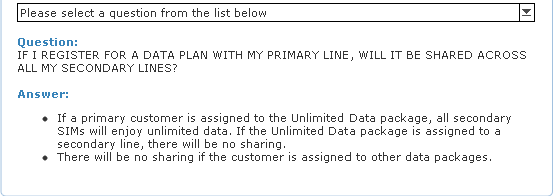
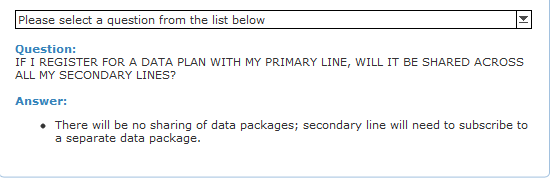


 now cause wherever I go and stop by, I'll take out my phone and do a speedtest. It really disappoint me a lot when compare the DL speed to at my house DL speed.


 Ping also


 5GB U Mobile not enough meh?




 0.2742sec
 0.56
0.56
 6 queries
 GZIP Disabled