Hi, welcome to this thread! Before you start posting on this thread, please spare a minute to read the below message. Thanks.
You can:
Discuss about phone/modem/settings for Maxis 3G/HS 3G.
Comment about Maxis 3G/HS 3G.
Ask for opinions on Maxis 3G/HS 3G.
You can't:
Discuss about piracy or illegal contents.
Request forummers to rent out their SIM cards here, this is not a trading platform.
REMINDER:
This package is already a discontinued plan, hence you will not be able to sign up as new subscribers.
Still, it's the best for you to check with Maxis if this plan is still allowable for now. We are not liable for any misinformation as we are not working for Maxis.
This is NOT Maxis Wireless Broadband thread! There is a separate Maxis WBB thread on this section. Check it out.
This post has been edited by fruitie: Mar 26 2012, 12:15 AM
Special credits to our master of trial and error, chuahcs79 for his contributions. He has tried different devices and used different types of booster to enhance his connection's speed and consistency. Those methods are proven workable and not forgetting they are also cost effective.
For your information, chuahcs79 is based in Penang and hence if your area is not within HSPA coverage, these methods might not work that well for you but they are definitely worth trying.
---------- Part 1:
Below are the methods proven to work in my area. These are however dependable on area, device, timing, distance from the cell signal tower base and network congestion within the same tower.
Booster
a) Windsurfer - Suitable for all USB modems - Download the template from HERE
b) Strainer - Suitable for USB stick modems - Suitable for areas with poor signal or bad connection's consistency - Alternatively, this can be used as directional antenna too
Huawei E1762's latest firmware updates As many of you are aware Huawei E1762 is one of the bundled modems for Maxis broadband registration, hence it shouldn't come to a surprise by seeing most of us (or people out there) using this modem. It is capable to run on 7.2Mbps download speed and 5.76Mbps upload speed.
Credits to cruxidex for his kindness to help out few poor souls out there who were having bad speed using the E1762.
The latest firmware: 11.126.10.00.00 If you are using E1762 with Aztech HW-5503G, hold your horses! Read the reminder in red first.
Else, please follow these easy peasy steps: 1) Download the firmware from here and only install the Update_11.126.10.00.00.B418.
2) After get the modem flashed to the latest firmware, it is time to upgrade your dashboard to a later version. Download from here. Install UTPS16.002.10.04.99_MAC16.001.30.00.99.
3) Done!
You will need to take note on these few important points before flashing your modem and dashboard. Spend 1 minute reading them, strongly advised by fruitie. 1) Do not fix the firmware, unless it is broken (slow). 2) OK, now you have decided to flash it; make sure you jot down your current firmware before you start doing anything. Can be obtained from your dashboard: Tools>Diagnostics 3) For those using this modem with TP-Link MR3420, basically not much issues can be found. MR3420 is a very flexible router unlike Aztech HW550-3G. 4) However, if you are using Aztech HW550-3G, before doing the above steps; please update your router to the latest firmware from here. 5) Proceed with the modem+dashboard flashes. In order for it to use on your Aztech HW550-3G router, select RAS (modem) on your dashboard before plugging it into your router. By default, it should be NDIS. 6) Now you should be able to use it on your Aztech router with no issues.
If you feel that your previous firmware does better job than the new one, you may still possible to download the old firmware from DC Files. Optional: You can also use cruxidex's uploaded file here.
Note: Perform all the steps on your own risk, we are not liable for any issues which may occur during or after the firmware flash.
Part 2: Mobile phones as modem and conclusion in next post...
This post has been edited by fruitie: Apr 22 2012, 02:47 PM
a) Sony Ericsson Phones - Recommended phones: SE W705, SE Yari U100 and SE Elm - I have been connecting them to the TP-Link's TL-MR3420, a 3G router. This is to show you how much the signal strength has gained using these SE phones as modem.
b) Nokia Phone - Recommended phone: Nokia X3-02 - My favourite phone. Why? I direct connect it with the stock USB cable to my PC and it can get quite a maximised speed in my area as I believe the 3G 900MHz band is stronger in my area. -Proven by results from Speedtest.net
Friendly reminder: As phones generally generate more heats compared to designated USB modems, please take precautions steps such as using a cooler pad underneath the phone or station it near to a fan or an air-conditioned system to avoid any unwanted incidents. Please try this on your own risk.
Conclusion: Phones are easier to get better signal in my area. I have tested with almost all available USB modems such as the Huawei E1762, E270, D-Link DWM 151, ZTE MF627, ZTE MF600, UMG1831 (credits to leecwai), SE phones and Nokia phone. Some areas are only running on 3G 2100 MHz band, while some areas like mine are running on both 2100MHz and 900 MHz 3G band.
In my area 900MHz is proven to have stronger signal and that's the reason phones can easily grab better signal than modem. If you are using phone to do tethering for 24/7, you will need to keep the phone cool all the time, make sure you get a spare battery and open the back cover or place it on top of a laptop cooler pad. It might reduce some of the heats. SE phones are much cooler than Nokia phone when it comes to tethering based on my experience.
If you are using or planning to buy a USB modem, please remember to buy those which support dual 3G 900MHz and 2100 MHz band modem.
Note: Big thanks to chuahcs79 for his experiments. Above finding is done by chuahcs79 and edited and compiled by fruitie.
Next post: Now you have a good device, good connection. What's next? Share the love, share out your connection. fruitie has some recommendations for you.
With the advancement of technology, fruitie personally recommends all the Maxis 3G Internet Unlimited users to have a 3G router. You can easily share this high speed connection with your family members or simply for your iPad or mobile phones.
3G routers are proven to have better connectivity and stability compared to direct plug-in USB modems. Of course, one can easily buy a MiFi device and connection can be shared via WiFi with few simple steps. However, if you are not a mobile person, 3G routers are always a better and cheaper choice than a MiFi. With a router, you can choose to connect using LAN (more stable than WiFi) or simply with just WiFi. If you have a ready USB modem then you can plug it to your router without wasting it, this is something MiFi can't have.
2) Aztech - HW550-3G(I'm using this and quite satisfied with its performance) http://www.aztech.com/prod_3g_hw550.html -Not an easy to be tamed router as it doesn't simply compatible with any modem, you may need to update your router with the latest firmware if your modem is not accepted. You just have to try. Discussion thread: https://forum.lowyat.net/index.php?showtopic=1966992
-----
However, computing technology makes life easier. Windows 7 is capable enough to turn your modem into a "virtual router" and you can share out the 3G connection with just some simple tweaks.
Read this tutorial for better understanding. The illustrations will actually help a lot! Credits to the original author, Damien from MakeTechEasier.
Comments: I have tried this method, all is well except that it is not working with my iPad.
This post has been edited by fruitie: May 5 2012, 07:15 PM
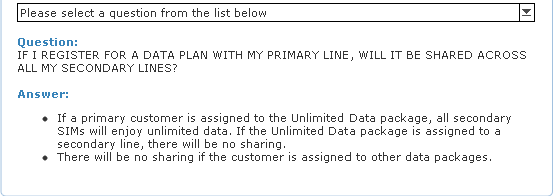
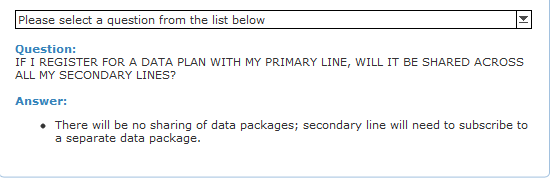
Guy, latest news from maxis CS who call me for clarification about multi-sim.
So, this is old FAQ: And, this is new FAQ: can see what has been changed? Yup, no more data sharing benefit for multi-sim.
Anyway, still got good news: Existing multi-sim user can continue this benefit.
then, new subscriber wouldn't have this data sharing feature anymore even though his/her main line has unlimited data plan.
Is it? Then no more sharing and renting out SIM card for those new subscribers. Thank God, mine is an old multi-SIM holder. Do you know when did this plan get changed?



 Mar 26 2012, 12:14 AM, updated 14y ago


 Before you start posting on this thread, please spare a minute to read the below message. Thanks.
 Quote
Quote







 0.0247sec
 0.82
0.82
 6 queries
 GZIP Disabled