

QUOTE(MasBoleh! @ Jun 6 2013, 01:29 PM)
Yeah sure 
Anyway, you got the same problem with mine?

Nope, just recently bought a new Vivobook S400. Anyway, you got the same problem with mine?
ASUS A | N | U Series Combined Thread V5, 4 threads about ASUS filled!
|
|
 Jun 6 2013, 01:46 PM Jun 6 2013, 01:46 PM
|
 
All Stars
17,467 posts Joined: May 2008 From: Lazada   
|
QUOTE(MasBoleh! @ Jun 6 2013, 01:29 PM) Yeah sure Nope, just recently bought a new Vivobook S400. Anyway, you got the same problem with mine? |
|
|
|
|
|
Jun 8 2013, 12:14 PM
|

Junior Member
156 posts Joined: Sep 2010 
|
Was wondering.. Do Asus service centre service laptop which is already over the warranty period?
|
|
|
Jun 8 2013, 01:08 PM
|
|
All Stars
17,467 posts Joined: May 2008 From: Lazada
|
QUOTE(Flo_2010 @ Jun 8 2013, 12:14 PM) Was wondering.. Do Asus service centre service laptop which is already over the warranty period? Dont get your question.  |
|
|
Jun 8 2013, 02:17 PM
|
|
Junior Member
156 posts Joined: Sep 2010
|
QUOTE(NightFelix @ Jun 8 2013, 01:08 PM) Dont get your question. Because my laptop hard disk having bad sectors.. But the warranty period is over mean more than 2 yrs old.. Thought of bringing it to Lowyat Asus service centre.. Since I came from far.. Just want to make sure it can be done...This post has been edited by Flo_2010: Jun 8 2013, 02:25 PM |
|
|
Jun 9 2013, 12:57 AM
|

Junior Member
100 posts Joined: Mar 2011
|
a big disaster for my X42DE..previously i asked for guide on how to open up the laptop...and i did it..reapply the thermal paste..screw back eveything...and there goes the sad part..laptop can turn on..but then no activity at all..black screen without anything at all..no blinking hdd indicator..fan spinning..HDD sounds like running..ram changed and test..also same thing..just the power led and caps lock led are light up...i suppose either mobo or processor fried..any recommendation to perform before i send it to ASUS..warranty over already
 |
|
|
Jun 9 2013, 01:04 AM
|

Senior Member
2,337 posts Joined: Dec 2008 From: KING CANNEL JB
|
QUOTE(Flo_2010 @ Jun 8 2013, 02:17 PM) Because my laptop hard disk having bad sectors.. But the warranty period is over mean more than 2 yrs old.. Thought of bringing it to Lowyat Asus service centre.. Since I came from far.. Just want to make sure it can be done... yes they take in you're laptop for repaire but with charge... but they might just tell you buy new hard drive from outside and they help you install window to you're new hard drive.. but if you have/made recovery disk from your ori hdd? if you do just use recovery disk to install into your new hdd.. good luck |
|
|
|
|
|
Jun 9 2013, 01:06 AM
|
|
Senior Member
2,337 posts Joined: Dec 2008 From: KING CANNEL JB
|
QUOTE(guohaolee @ Jun 9 2013, 12:57 AM) a big disaster for my X42DE..previously i asked for guide on how to open up the laptop...and i did it..reapply the thermal paste..screw back eveything...and there goes the sad part..laptop can turn on..but then no activity at all..black screen without anything at all..no blinking hdd indicator..fan spinning..HDD sounds like running..ram changed and test..also same thing..just the power led and caps lock led are light up...i suppose either mobo or processor fried..any recommendation to perform before i send it to ASUS..warranty over already gosh... un exp should not open your notebook... should just bring it to asus first time let them re-apply the thermal paste... but u still can bring it into service center... good luck mate...  x edit: they will charge you for service cause after the warranty and you do it youre self and it seem non operational now This post has been edited by Unseen83: Jun 9 2013, 01:07 AM |
|
|
Jun 9 2013, 01:09 AM
|
|
Junior Member
100 posts Joined: Mar 2011
|
QUOTE(Unseen83 @ Jun 9 2013, 01:06 AM) gosh... un exp should not open your notebook... should just bring it to asus first time let them re-apply the thermal paste... but u still can bring it into service center... good luck mate... hi, yea...learnt a big lesson...anyway..any shop nearby subang that can help me deliver it to asus service centre?x edit: they will charge you for service cause after the warranty and you do it youre self and it seem non operational now |
|
|
Jun 9 2013, 01:20 AM
|
|
Senior Member
2,337 posts Joined: Dec 2008 From: KING CANNEL JB
|
QUOTE(guohaolee @ Jun 9 2013, 01:09 AM) hi, yea...learnt a big lesson...anyway..any shop nearby subang that can help me deliver it to asus service centre? no better you bring it personnelly to service center, or just use any notebook shop who do service but at you're own risk but sure they more exp then you but ask price before hand and try identify what the damage.. really important cause u dont want to be surprise with bill later and if one shop say mobo is broken go to another shop and ask them what the problem , short word go around local notebook service center... see best price and notebook skillz.. good luck |
|
|
Jun 9 2013, 03:20 AM
|

Senior Member
2,702 posts Joined: Aug 2011 From: UNKNOWN
|
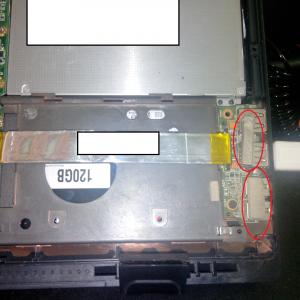
does anyone know where I could find replacement beside service center?
ribbon cable connecting main mobo to 2 usb port & audio jacks kinda broken. [WTB] ribbon cable ASUS A43s 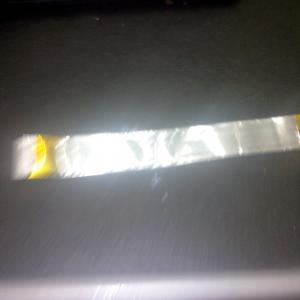
This post has been edited by ErgoProxi: Jun 9 2013, 03:25 AM |
|
|
Jun 9 2013, 03:44 AM
|
|
Senior Member
2,702 posts Joined: Aug 2011 From: UNKNOWN
|
edited
This post has been edited by ErgoProxi: Jun 9 2013, 03:45 AM |
|
|
Jun 9 2013, 10:16 AM
|
|
Junior Member
156 posts Joined: Sep 2010
|
QUOTE(Unseen83 @ Jun 9 2013, 01:04 AM) yes they take in you're laptop for repaire but with charge... but they might just tell you buy new hard drive from outside and they help you install window to you're new hard drive.. Ok, thanks for the info! but if you have/made recovery disk from your ori hdd? if you do just use recovery disk to install into your new hdd.. good luck |
|
|
Jun 9 2013, 05:43 PM
|
|
Senior Member
2,337 posts Joined: Dec 2008 From: KING CANNEL JB
|
QUOTE(ErgoProxi @ Jun 9 2013, 03:20 AM) does anyone know where I could find replacement beside service center? hmm a lot shop behind screen inside low yat have... bring the wired ribbon u want to replace have scout inside low yat they always on 3-4 floor... ribbon cable connecting main mobo to 2 usb port & audio jacks kinda broken. [WTB] ribbon cable ASUS A43s
good luck |
|
|
|
|
|
Jun 9 2013, 05:44 PM
|
|
Senior Member
2,337 posts Joined: Dec 2008 From: KING CANNEL JB
|
QUOTE(Flo_2010 @ Jun 9 2013, 10:16 AM) Ok, thanks for the info! replace hdd and restore window should not be more then RM400... that depend HDD price for 1 TB hdd RM220.00 edit: http://www.lazada.com.my/Western-Digital-H...1TB-436615.html price 500GB hdd RM150.00 edit: http://www.lazada.com.my/Western-Digital-H...0GB-436616.html my recommend buy hdd outside go asus service center say to them hadd con need restore into new hdd.. This post has been edited by Unseen83: Jun 9 2013, 05:50 PM |
|
|
Jun 10 2013, 02:17 AM
|

Junior Member
235 posts Joined: Dec 2009
|
im so confused with my laptop. On the bottom left showed "A43S" as my model. But when I'm using the "Model automatic detection" , it stated that my laptop model is K43SD ... then I search my model using my serial number, it stated that my model is A43SD .. K43SD and A43SD both have same specification.
Then i checked back of my laptop, it stated that my model is A43S and my MB VER(idk what it is) is K43SD This post has been edited by PainHacker: Jun 10 2013, 02:52 AM |
|
|
Jun 12 2013, 02:25 AM
|

Junior Member
123 posts Joined: Feb 2008 From: On the Ivy Bridge 
|
QUOTE(guohaolee @ Jun 9 2013, 12:57 AM) a big disaster for my X42DE..previously i asked for guide on how to open up the laptop...and i did it..reapply the thermal paste..screw back eveything...and there goes the sad part..laptop can turn on..but then no activity at all..black screen without anything at all..no blinking hdd indicator..fan spinning..HDD sounds like running..ram changed and test..also same thing..just the power led and caps lock led are light up...i suppose either mobo or processor fried..any recommendation to perform before i send it to ASUS..warranty over already from my experience which happens all the time. check back your connection especially those small2 stuff and also your connection for display(to the monitor) sometimes it's just that. If you can't trouble shoot disassemble and re-assemble back . Should do fine. Proc isn't easy to fry no worries. Except if you spill thermal paste or applied too many thermal paste and it leaks to the pins on the proc . other than that you should be fine just some minor problem. well thats what i hope good luck. |
|
|
Jun 12 2013, 08:07 PM
|
|
Junior Member
100 posts Joined: Mar 2011
|
QUOTE(holloway @ Jun 12 2013, 02:25 AM) from my experience which happens all the time. check back your connection especially those small2 stuff and also your connection for display(to the monitor) sometimes it's just that. If you can't trouble shoot disassemble and re-assemble back hi, but my thermal paste i used is eletrically non coductivity..so i doubt it wont affect? maybe is because of the display adapter connectors that i never removed..cause asus used a very sticky tape to hold it..so i did not removed it... Should do fine. Proc isn't easy to fry no worries. Except if you spill thermal paste or applied too many thermal paste and it leaks to the pins on the proc . other than that you should be fine just some minor problem. well thats what i hope good luck.but is it possible that because of the connector there's no hdd response or when i plug out to a monitor also no response at all? |
|
|
Jun 13 2013, 01:48 AM
|
|
Senior Member
2,702 posts Joined: Aug 2011 From: UNKNOWN
|
|
|
|
Jun 13 2013, 10:05 AM
|

Junior Member
87 posts Joined: Apr 2009
|
Hi.
Where can i get a replacement fan for A53s...? Mine broke (Y) |
|
|
Jun 13 2013, 05:48 PM
|
|
Junior Member
123 posts Joined: Feb 2008 From: On the Ivy Bridge
|
QUOTE(guohaolee @ Jun 12 2013, 08:07 PM) hi, but my thermal paste i used is eletrically non coductivity..so i doubt it wont affect? maybe is because of the display adapter connectors that i never removed..cause asus used a very sticky tape to hold it..so i did not removed it.. Probably just tighten back the connection, any lights up? power cable maybe? the one connecting from ur power button to the mobo?but is it possible that because of the connector there's no hdd response or when i plug out to a monitor also no response at all? |
| Change to: |  0.0285sec 0.0285sec
 0.54 0.54
 6 queries 6 queries
 GZIP Disabled GZIP Disabled
Time is now: 3rd December 2025 - 11:35 AM |
 Quote
Quote