

QUOTE(bravobronzo @ May 16 2007, 01:57 PM)
i cant surf my streamyx..my YM and skype online but cant surf...how to resolve a??anyone?

did you put the dns server or not??it should be 202.188.0.133
202.188.1.5
Streamyx Streamyx SNR Margin, --Read here if you face disconnections--
|
|
 May 16 2007, 02:19 PM May 16 2007, 02:19 PM
Return to original view | Post
#41
|
 
Senior Member
9,572 posts Joined: Jun 2005 From: Terengganu Darul Iman   
|
QUOTE(bravobronzo @ May 16 2007, 01:57 PM) i cant surf my streamyx..my YM and skype online but cant surf...how to resolve a??anyone? did you put the dns server or not??it should be 202.188.0.133 202.188.1.5 |
|
|
|
|
|
May 22 2007, 10:14 PM
Return to original view | Post
#42
|
|
Senior Member
9,572 posts Joined: Jun 2005 From: Terengganu Darul Iman
|
QUOTE(adriankhoo153 @ May 22 2007, 11:09 PM) Just when i puji them my line down to 4db today..Damn! My adsl light blinking again.. When will this ever end?? When will their tmnut cust service say Dun worry sir, it'a all done. U won;t face this problem again instead of we are still processing. Yeah rite, been processing for a week liau don't puji them loll..   |
|
|
May 30 2007, 10:36 AM
Return to original view | Post
#43
|
|
Senior Member
9,572 posts Joined: Jun 2005 From: Terengganu Darul Iman
|
QUOTE(phillys @ May 30 2007, 11:27 AM) Thanks for the reply. I have just tried that but unfortunately I couldn't see anything on the screen related to SNR Margin or Line Attenuation. Below is a screen shot of the system summary page. try find modem status in there, |
|
|
Jun 4 2007, 10:50 AM
Return to original view | Post
#44
|
|
Senior Member
9,572 posts Joined: Jun 2005 From: Terengganu Darul Iman
|
QUOTE(adriankhoo153 @ Jun 3 2007, 11:01 PM) SNR at night always at 10-15db only but morning or afternoon can go up to 20db...Hmm wonder why maybe humidity factor |
|
|
Jun 7 2007, 05:20 PM
Return to original view | Post
#45
|
|
Senior Member
9,572 posts Joined: Jun 2005 From: Terengganu Darul Iman
|
QUOTE(adriankhoo153 @ Jun 7 2007, 06:17 PM) Jumper?? Which jumper? We can set jumoer our own? What do u mean by check back?? jumper in the TM exchange (MDF)or in the cabinet,and you can't to do it yourself, |
|
|
Jun 7 2007, 07:07 PM
Return to original view | Post
#46
|
|
Senior Member
9,572 posts Joined: Jun 2005 From: Terengganu Darul Iman
|
QUOTE(evolution120 @ Jun 7 2007, 06:55 PM) may i know SNR Margin izit this meaning? not, not at all****************************USB DSL TEST GUI*************************** ******************************************************************************** * DSL GUI Version : 1.09 * Driver Version : A.2 * Hardware Version : 500B * Firmware Version : 43E2EA3A * Operating System: Whistler build: 2600 * Number of Processor : 1 * Processor Architecture : INTEL * Processor Level : 15 * Processor Model : 5 * Processor Stepping : 19 * Memory Usage : 51% * Total Physical Memory : 804769792 * Available Physical Memory : 393949184 * Total Virtual Memory : 2147352576 * Available Virtual Memory : 2112851968 * Start Time : Thursday, June 7, 2007 17:52 ******************************************************************************** ******************************************************************************** DSL TEST CONFIGURATION INTERFACE TEST CONFIGURATION : TEST : ENABLED MODEM TEST CONFIGURATION : TEST : ENABLED EXPECTED DSL MODE : G.DMT DATA MODE TIMEOUT : 60 VPI : 0 VCI : 35 LINE TEST CONFIGURATION : TEST : DISABLED OAM_VPI : 0 OAM_VCI : 0 NUMBER OF CELLS TO SEND : 0 OAM LOOPBACK TYPE : F5E2E NETWORK TEST CONFIGURATION : TEST : DISABLED EXPECTED DRIVER TYPE : WAN EXPECTED ENCAPSULATION : BRIDGE_LLC ******************************************************************************** ******************************************************************************** DSL TEST RESULTS 1 - INTERFACE TEST RESULTS : The interface test is passed 2 - MODEM TEST RESULTS : MODEM test is requested but is not done yet 3 - LINE TEST RESULTS : LINE test is not requested 4 - NETWORK TEST RESULTS : Network test is not requested ******************************************************************************** ******************************************************************************** CMV CONFIGURATION 1 - DIAG02 : 0 2 - DIAG03 : 0 3 - DIAG22 : 0 4 - DIAG23 : 1 5 - DIAG25 : 26 6 - DIAG47 : 0 7 - DIAG49 : 1A 8 - DIAG51 : 3C0936 9 - DIAG52 : 3C0C72 10 - DIAG53 : 0 11 - DIAG54 : 0 12 - INFO10 : 43E2EA3A 13 - INFO08 : 1C 14 - INFO14 : 0 15 - OPTN00 : 8002C444 16 - OPTN02 : 0 17 - OPTN04 : 0 17 - OPTN07 : 0 18 - PSDM01 : 23E77 19 - RATE00 : 200010 20 - STAT00 : 82208210 ******************************************************************************** ********************************************************************************  |
|
|
|
|
|
Jun 7 2007, 09:40 PM
Return to original view | Post
#47
|
|
Senior Member
9,572 posts Joined: Jun 2005 From: Terengganu Darul Iman
|
QUOTE(evolution120 @ Jun 7 2007, 09:43 PM) erm.. my modem brand is Aztech, model is ADSL USB DSL 206U (is a USB modem.. kinda cheap.. jz RM88..) i think your modem also can't to check this, never use this model before, can't give any comment on it,if i m wrong, den can teach me how 2 check that thing? i dunno how 2 check.. but if it have the manual try refer to it |
|
|
Jun 8 2007, 03:26 AM
Return to original view | Post
#48
|
|
Senior Member
9,572 posts Joined: Jun 2005 From: Terengganu Darul Iman
|
QUOTE(pixma @ Jun 8 2007, 01:20 AM) 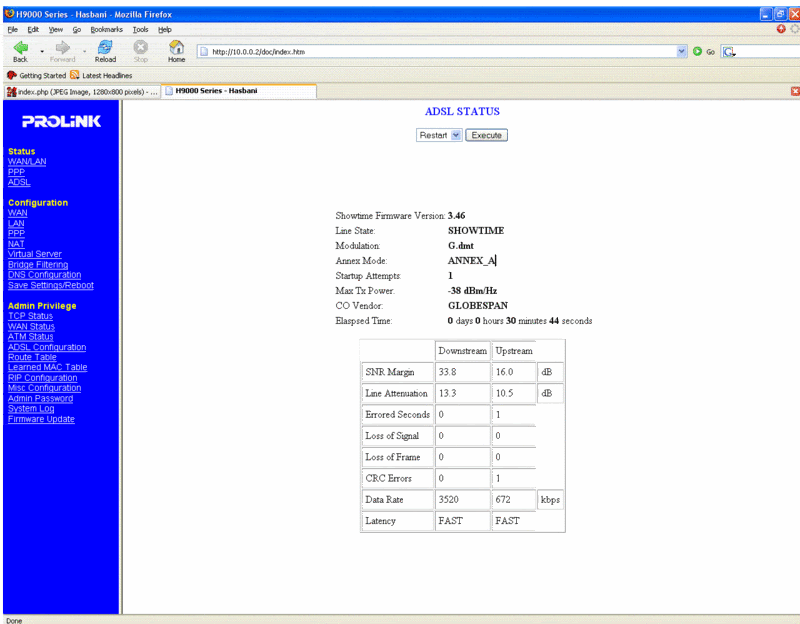 |
|
|
Jun 12 2007, 09:26 PM
Return to original view | Post
#49
|
|
Senior Member
9,572 posts Joined: Jun 2005 From: Terengganu Darul Iman
|
QUOTE(ahpek26 @ Jun 12 2007, 09:59 PM) Is this good? your snr margin look like problem,[attachmentid=246504] Anything I should report to them about? (Using 512k Package) do you face disconnection problem when using streamyx? |
|
|
Jun 13 2007, 01:35 AM
Return to original view | Post
#50
|
|
Senior Member
9,572 posts Joined: Jun 2005 From: Terengganu Darul Iman
|
QUOTE(ahpek26 @ Jun 12 2007, 10:33 PM) Nope, 24/7 online no dc, ever =\ (unless intentional) Though when I ping yahoo.com usually its around 404-418ms and google.com is around 309-311ms (If your interested, but I don't think it's relative to the problem.. no?). And page loading is fast (google 1s,yahoo 4-5s, with or without proxy). Oh 1 more thing, not using VPN (any service). QUOTE SN Margin (AKA Signal to Noise Margin or Signal to Noise Ratio) Relative strength of the DSL signal to Noise ratio. 6dB is the lowest dB manufactures specify for modem to be able to synch. In some instances interleaving* can help raise the noise margin to an acceptable level. The higher the number the better for this measurement. > 6dB or below is bad and will experience no synch or intermittent synch problems > 7dB-10dB is fair but does not leave much room for variances in conditions > 11dB-20dB is good with no synch problems > 20dB-28dB is excellent > 29dB or above is outstanding your upload speed is ok or not?? |
|
|
Jun 18 2007, 04:09 PM
Return to original view | Post
#51
|
|
Senior Member
9,572 posts Joined: Jun 2005 From: Terengganu Darul Iman
|
QUOTE(FrozenPrince @ Jun 18 2007, 04:51 PM) ADSL Firmware Ver : FwVer:3.3.2.5_A_TC3084 HwVer:T14.F7_0.0 not ok i think Line State : Showtime Modulation : G.DMT Annex Mode : ANNEX_A Downstream Upstream SNR Margin : 8.0 13.0 db Line Attenuation : 63.5 31.5 db Data Rate : 1024 512 kbps Is the stat above is ok for my connection? I'm having problem with this streamyx of mine..felt slow..and utorrent can only reach max speed of 15kB/s..previously can reach up to 60 and above.. your line attenuation too high |
|
|
Jun 22 2007, 05:35 AM
Return to original view | Post
#52
|
|
Senior Member
9,572 posts Joined: Jun 2005 From: Terengganu Darul Iman
|
ok,please don't off topic yaa..
now in this thread discussing about snr margin, not about change the ip address or what ever.. please mention that...  |
|
|
Jul 24 2007, 07:27 PM
Return to original view | Post
#53
|
|
Senior Member
9,572 posts Joined: Jun 2005 From: Terengganu Darul Iman
|
my opinion, maybe the modem is not suitable for your line
you need a luck to get a stable modem with TM line maybe i got wrong ,, ehehheehe |
|
|
Aug 21 2007, 08:06 AM
Return to original view | Post
#54
|
|
Senior Member
9,572 posts Joined: Jun 2005 From: Terengganu Darul Iman
|
QUOTE(mintec @ Aug 12 2007, 02:02 AM) Just wanted to share my joy with all you guys. I got my Streamyx Line about 3 years ago but never had a stable connection. Always disconnect esp. during rain but sometimes even in fine weather! My phone line is about 30 years old. i think it quite ok..1. Complaint to the 1300 no. and the technician came and said I was running parallel lines. 2. Complaint to 1300, technician came while I was out and said everything was ok. 3. Complaint to 1300, technician didn't come. Called and was told technician came and I told him everything was fine. 4. Complaint to 1300, technician came and lowered the line from 1024kbps to 512kbps cos he said it'll be stable. 5. Complaint to 1300, technician came and said my line is old and asked me to report to Telekom (100) to change the line. 6. Complaint to 100, technician came and replaced the line from nearest pole to my house. 7. Complaint to 100, technician came while I was out and told my sis that everything seems ok. 8. Complaint to 100, technician came and replaced the line from the pole with the black box (4th pole from my house) right up to my modem. * I've made many other complaints but they refuse to make the reports. After complaint no. 8, my connection is stable for the past 2 weeks. How does my stats look? Connection Status Connected Us Rate (Kbps) 256 Ds Rate (Kbps) 512 US Margin 23 DS Margin 30 Trained Modulation GDMT LOS Errors 0 DS Line Attenuation 51 US Line Attenuation 31 Peak Cell Rate 603 cells per sec CRC Rx Fast 52 CRC Tx Fast 2 CRC Rx Interleaved 0 CRC Tx Interleaved 0 Path Mode Fast Path DSL Statistics Near End F4 Loop Back Count 0 Near End F5 Loop Back Count 0 |
|
|
Jan 13 2008, 04:54 PM
Return to original view | Post
#55
|
|
Senior Member
9,572 posts Joined: Jun 2005 From: Terengganu Darul Iman
|
QUOTE(scorps @ Apr 2 2007, 01:24 PM) distribution point box refer to my previous post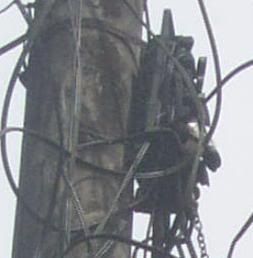 |
| Change to: |  0.0444sec 0.0444sec
 1.21 1.21
 7 queries 7 queries
 GZIP Disabled GZIP Disabled
Time is now: 11th December 2025 - 04:15 AM |
 Quote
Quote