Outline ·
[ Standard ] ·
Linear+
SAMSUNG GALAXY NOTE™ | V6, Thread closed. Please continue to V7.
|
benny888
|
 Jan 10 2012, 10:20 PM Jan 10 2012, 10:20 PM
|
Gadget Freak


|
QUOTE(wcshin @ Jan 10 2012, 10:08 PM) i tried 2 remove bootanimation.zip (ICS) by renaming it 2 bootamination.zip.off. end up it shows 2 stock bootanimation. anyway i can totally remove bootanimation? i 1 a faster startup... anyone can help? thanks... The phone will use default bootanimation. The file bootanimation is by developer n will be execited if found. If you delete or rename thd phone will use default. You cannot improve booting up time removing it
Added on January 10, 2012, 10:22 pmQUOTE(ogiveyakuza @ Jan 10 2012, 10:12 PM) i will try to look into it...regarding sygic, the prob i'm facing rite now is same with others...it drains the battery a lot even after we closed the app n gps... Never faced such issues. You must exit from app properly to close it. Select menu/EXIT This post has been edited by benny888: Jan 10 2012, 10:27 PM |
|
|
|
|
|
honamd77
|
Jan 10 2012, 10:23 PM
|
|
|
QUOTE(ogiveyakuza @ Jan 10 2012, 10:12 PM) i will try to look into it...regarding sygic, the prob i'm facing rite now is same with others...it drains the battery a lot even after we closed the app n gps... try read this..maybe can help understand how JD+ operate  » Click to show Spoiler - click again to hide... « This is how the JD Plus works (no need for JD Ultimate b/c we don't have many of the functions it supports. I just copied this from another thread the OP started awhile ago and I was trying to helps him out there.
If you set it to custom, the go into the settings tab on the right and then all the way at the bottom, there is two buttons to push, The first in Interactive which will pull up Juice Defender for up for any app that isn't already configured and the other is Configure Apps. This is the one that you can customize on an app-to-app basis where if you are no using an app and the screen is locked, it kills the radio/data traffic for that app.
Say you are listening to IHeartRadio, this you would want either Enable or Enable/off (which means the screen will be locked but the radio/data will be working). Now take the browser. It you are not using the browser, then you don't need it transmitting data right? So you would set that one to Enable (which means that it will only enable data traffic when that app is being used).
Juice Defender only works when the screen is locked, don't forget and all widgets are battery drains b/c all they really are is a monitoring app and if it is tied to something like FB or G+, then that data will be running constantly.
Examples:
Gmail = Enable (not enable/off b/c then it will keep your radio/data open)
Beautiful Widgets = Enable/off
mClock/Clockr = Enable/off
Angry Birds = Disable (with this and something like Adfree, no more ads in Angry Birds even though the ads are embedded in the .apk)
SMS/MMS = Enable or Do Nothing (why would you push disable)
Enable = Radio/data on when app is in use (front)
Enable/off = Radio/data on for background apps (when screen is locked)
Disable = Disables radio/data traffic completely when that app is running
Do Nothing = What is says.
I have been using JD+ for over a year on 3 different phones and have noticed a considerable difference in battery life, even on a crappy Motorola phone. Just takes some time to figure out YOUR settings and what YOU like. I have also used it on Stock kernel and had no problems either. credit - http://forum.xda-developers.com |
|
|
|
|
|
ogiveyakuza
|
Jan 10 2012, 10:55 PM
|
|
|
QUOTE(benny888 @ Jan 10 2012, 10:20 PM) The phone will use default bootanimation. The file bootanimation is by developer n will be execited if found. If you delete or rename thd phone will use default. You cannot improve booting up time removing it
Added on January 10, 2012, 10:22 pmNever faced such issues. You must exit from app properly to close it. Select menu/EXIT yes, i exit properly..menu n exit...it still showed on my battery usage..n the percentage is increasing not decreasing....when i google it, some of user experience it...
Added on January 10, 2012, 10:56 pmQUOTE(honamd77 @ Jan 10 2012, 10:23 PM) try read this..maybe can help understand how JD+ operate » Click to show Spoiler - click again to hide... « This is how the JD Plus works (no need for JD Ultimate b/c we don't have many of the functions it supports. I just copied this from another thread the OP started awhile ago and I was trying to helps him out there.
If you set it to custom, the go into the settings tab on the right and then all the way at the bottom, there is two buttons to push, The first in Interactive which will pull up Juice Defender for up for any app that isn't already configured and the other is Configure Apps. This is the one that you can customize on an app-to-app basis where if you are no using an app and the screen is locked, it kills the radio/data traffic for that app.
Say you are listening to IHeartRadio, this you would want either Enable or Enable/off (which means the screen will be locked but the radio/data will be working). Now take the browser. It you are not using the browser, then you don't need it transmitting data right? So you would set that one to Enable (which means that it will only enable data traffic when that app is being used).
Juice Defender only works when the screen is locked, don't forget and all widgets are battery drains b/c all they really are is a monitoring app and if it is tied to something like FB or G+, then that data will be running constantly.
Examples:
Gmail = Enable (not enable/off b/c then it will keep your radio/data open)
Beautiful Widgets = Enable/off
mClock/Clockr = Enable/off
Angry Birds = Disable (with this and something like Adfree, no more ads in Angry Birds even though the ads are embedded in the .apk)
SMS/MMS = Enable or Do Nothing (why would you push disable)
Enable = Radio/data on when app is in use (front)
Enable/off = Radio/data on for background apps (when screen is locked)
Disable = Disables radio/data traffic completely when that app is running
Do Nothing = What is says.
I have been using JD+ for over a year on 3 different phones and have noticed a considerable difference in battery life, even on a crappy Motorola phone. Just takes some time to figure out YOUR settings and what YOU like. I have also used it on Stock kernel and had no problems either. credit - http://forum.xda-developers.comok, thnx bro This post has been edited by ogiveyakuza: Jan 10 2012, 10:56 PM |
|
|
|
|
|
honamd77
|
Jan 10 2012, 11:18 PM
|
|
|
QUOTE(ogiveyakuza @ Jan 10 2012, 10:55 PM) small matter bro..as long can help  ps : any owner Note from Kuantan ?.i need learning about root stuff. after reading (this thread and other thread) look awesome with root stuff. example..ad free,that's cool maaa... |
|
|
|
|
|
Hico
|
Jan 10 2012, 11:21 PM
|
|
|
QUOTE(honamd77 @ Jan 10 2012, 11:18 PM) small matter bro..as long can help ps : any owner Note from Kuantan ?.i need learning about root stuff. after reading (this thread and other thread) look awesome with root stuff. example..ad free,that's cool maaa... have u root ur device? or still pure stock rom?? |
|
|
|
|
|
noprob
|
Jan 10 2012, 11:25 PM
|
|
|
i think note more responsive after 2.3.6 updated, but prefer older keyboard layout
|
|
|
|
|
|
honamd77
|
Jan 10 2012, 11:29 PM
|
|
|
QUOTE(Hico @ Jan 10 2012, 11:21 PM) have u root ur device? or still pure stock rom?? still virgin..i guess  after read and read..root stuff look nice.but humble super duper noob on Android, to scared DIY root stuff.just use launcher to 'make-up' my Note  |
|
|
|
|
|
AMDunFreak
|
Jan 10 2012, 11:30 PM
|
|
|
QUOTE(noprob @ Jan 10 2012, 11:25 PM) i think note more responsive after 2.3.6 updated, but prefer older keyboard layout try to download swiftkey x.. one month free trial... i only love this keyboard... very convenient... |
|
|
|
|
|
Hico
|
Jan 10 2012, 11:33 PM
|
|
|
QUOTE(honamd77 @ Jan 10 2012, 11:29 PM) still virgin..i guess after read and read..root stuff look nice.but humble super duper noob on Android, to scared DIY root stuff.just use launcher to 'make-up' my Note ooh no wonder..with root, u can do many things like backup system and app incl data, remove advertisement, install custom rom, edit some internal file which cannot access incl mute the camera shutter sound etc etc.. one most important thing is cwm backup..backup everything in case got any problem after install custom rom, u can restore back everything exactly like when u backup..  it is kinda useful ..tats why i root it..but keep in mind, u might void the warranty if u root or install custom rom lo.so be prepared for it .. but so far, they still can claim the warranty eventhough root or install custom rom.. This post has been edited by Hico: Jan 10 2012, 11:35 PM |
|
|
|
|
|
honamd77
|
Jan 10 2012, 11:37 PM
|
|
|
QUOTE(Hico @ Jan 10 2012, 11:33 PM) ooh no wonder..with root, u can do many things like backup system and app incl data, remove advertisement, install custom rom, edit some internal file which cannot access incl mute the camera shutter sound etc etc.. one most important thing is cwm backup..backup everything in case got any problem after install custom rom, u can restore back everything exactly like when u backup.. it is kinda useful ..tats why i root it.. huhu..poison me  need face to face learning..baru cepat 'tangkap'  |
|
|
|
|
|
Hico
|
Jan 10 2012, 11:37 PM
|
|
|
QUOTE(AMDunFreak @ Jan 10 2012, 11:30 PM) try to download swiftkey x.. one month free trial... i only love this keyboard... very convenient... duno why, i still prefer swype if use in portrait .. if landscape, i just have to press the key one by one as the keyboard become wider lol.. hard to swype so far from one end to another 
Added on January 10, 2012, 11:39 pmQUOTE(honamd77 @ Jan 10 2012, 11:37 PM) huhu..poison me need face to face learning..baru cepat 'tangkap' just follow the step closely.. is easy actually.. try and learn ..i also did like this b4.. root is ok..install custom rom then might face some problem only if not careful or no luck.. but if u got backup, then is still ok loh..can restore back again ..i always do like this.. after try the rom, dun like, then restore back to last rom i used.. This post has been edited by Hico: Jan 10 2012, 11:39 PM |
|
|
|
|
|
Hunz
|
Jan 10 2012, 11:42 PM
|
|
|
I'm thinking of getting this phone from DIGI tomorrow. Wondering Digi store still got stock or not
|
|
|
|
|
|
Hico
|
Jan 10 2012, 11:45 PM
|
|
|
QUOTE(Hunz @ Jan 10 2012, 11:42 PM) I'm thinking of getting this phone from DIGI tomorrow. Wondering Digi store still got stock or not better check with them. i heard many digi store run out of stock..or can try get from digi online store too.. |
|
|
|
|
|
honamd77
|
Jan 10 2012, 11:46 PM
|
|
|
QUOTE(Hico @ Jan 10 2012, 11:37 PM) just follow the step closely.. is easy actually.. try and learn ..i also did like this b4.. root is ok..install custom rom then might face some problem only if not careful or no luck.. but if u got backup, then is still ok loh..can restore back again ..i always do like this.. after try the rom, dun like, then restore back to last rom i used.. huhu..if based on reading and watching (utube tutorial),think can DIY.but afraid in term BRICK. some say if brick..closely phone cannot used anymore (dunno its correct @ not).but look cool with root stuff.tempting to try it (so far just not much time to do it,job rushing by now) This post has been edited by honamd77: Jan 10 2012, 11:47 PM |
|
|
|
|
|
AMDunFreak
|
Jan 10 2012, 11:48 PM
|
|
|
time to poison people why rooting + custom rom is great!!
|
|
|
|
|
|
Hunz
|
Jan 10 2012, 11:49 PM
|
|
|
QUOTE(Hico @ Jan 10 2012, 11:45 PM) better check with them. i heard many digi store run out of stock..or can try get from digi online store too.. Digi online store is out of stock.. i guess i need to slam their shop haha |
|
|
|
|
|
Hico
|
Jan 10 2012, 11:53 PM
|
|
|
QUOTE(honamd77 @ Jan 10 2012, 11:46 PM) huhu..if based on reading and watching (utube tutorial),think can DIY.but afraid in term BRICK. some say if brick..closely phone cannot used anymore (dunno its correct @ not).but look cool with root stuff.tempting to try it (so far just not much time to do it,job rushing by now) rooting will not easily brick ur phone..only install custom rom might have the possibilities.. not need so worry so much..i used to be like u..but after i root my old device, and install the app which cant get without root..i am addicted lol...but i dun really everyday play with different custom rom..dun have so much time also..but saying the truth..custom rom is so much smoother than stock rom..rooting takes less than 10 minutes also.. ps: if really brick, then get a usb jig or send to service centre
Added on January 10, 2012, 11:54 pmQUOTE(Hunz @ Jan 10 2012, 11:49 PM) Digi online store is out of stock.. i guess i need to slam their shop haha they always announce the stock in fb for the online store.. but i guess they only bring in few unit each time.. cos within few hours, it will run out of stock again.. This post has been edited by Hico: Jan 10 2012, 11:54 PM |
|
|
|
|
|
honamd77
|
Jan 10 2012, 11:56 PM
|
|
|
QUOTE(Hico @ Jan 10 2012, 11:53 PM) rooting will not easily brick ur phone..only install custom rom might have the possibilities.. not need so worry so much..i used to be like u..but after i root my old device, and install the app which cant get without root..i am addicted lol...but i dun really everyday play with different custom rom..dun have so much time also..but saying the truth..custom rom is so much smoother than stock rom..rooting takes less than 10 minutes also.. ps: if really brick, then get a usb jig or send to service centre +999 |
|
|
|
|
|
AMDunFreak
|
Jan 10 2012, 11:59 PM
|
|
|
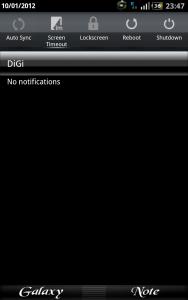
Rooting allow you to install map with navigation in malaysia! Custom rom that i'm using now Rocket Rom V15 has 14 toggle button. look at the print screen. personally i like the extra button data, airplane, and lockscreen (disable lock screen when i use the original flip case) swipe on the toggle bar to the right to see more of the buttons. can directly go to their individual setting by long press. on custom rom, got slower slow speed. stock is 200mhz, custom rom is 100mhz.. when the phone is idling on custom rom, save battery juice. next is under volting.. after root and custom rom, can undervolt the CPU voltage.. but i haven't test it out yet. Attached thumbnail(s)


|
|
|
|
|
|
iqtidar
|
Jan 11 2012, 12:01 AM
|
New Member

|
|
|
|
|
|



 Quote
Quote


 0.0191sec
 0.47
0.47
 6 queries
 GZIP Disabled