


SΛMSUNG Galaxy W (I8150) Official Thread V3, Be a WISE user - Please read 1st page
SΛMSUNG Galaxy W (I8150) Official Thread V3, Be a WISE user - Please read 1st page
|
|
 Jan 19 2012, 04:35 PM Jan 19 2012, 04:35 PM
Return to original view | Post
#141
|
 
Senior Member
2,248 posts Joined: Sep 2010 
|
@and.inc: wow, tell me more about it? i m totally clueless about this
|
|
|
|
|
|
Jan 19 2012, 04:59 PM
Return to original view | Post
#142
|
|
Senior Member
2,248 posts Joined: Sep 2010
|
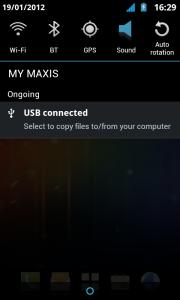
Some screen shot if you update to cris555 ICS theme.
Notice that the pull down menu has transparent effect Most icon has been changed to ICS theme as well.The screen off effect has CRT animation, something like this: Attached thumbnail(s) 
|
|
|
Jan 19 2012, 05:42 PM
Return to original view | Post
#143
|
|
Senior Member
2,248 posts Joined: Sep 2010
|
NICE mrlonely! i think better dont install ICS theme first if you want to check if 1.8ghz is stable on your phone or not.
let it run for a day or 2 first... |
|
|
Jan 19 2012, 07:50 PM
Return to original view | Post
#144
|
|
Senior Member
2,248 posts Joined: Sep 2010
|
QUOTE(infernoaswen @ Jan 19 2012, 06:42 PM) Yay new rom...once i reach home i will download & flash it...now still working...sigh... Use standard CWM method.Btw the Rom u upload...flashing is using which method? odin? i haven't download yet...still working...  |
|
|
Jan 20 2012, 03:04 PM
Return to original view | Post
#145
|
|
Senior Member
2,248 posts Joined: Sep 2010
|
QUOTE(Amroth @ Jan 20 2012, 01:15 AM) this is my 3rd time re-flashing cow's OC rom..apparently, titanium backup screwed the whole system when restoring my apps..damn.. THANKS! nice to get some feedback.it's fast alright, but i notice the zeam launcher uses around 3% of battery usage though...i just hope it doesn't affect battery drain...huhu |
|
|
Jan 20 2012, 03:06 PM
Return to original view | Post
#146
|
|
Senior Member
2,248 posts Joined: Sep 2010
|
QUOTE(wajahebat @ Jan 20 2012, 02:10 AM) Using android assistant as my utilities...works flawlessly...currently getting bout 90-120 free memory...after connect to my pc..defrag the system and my sd card,got some speed improvement on the system :-) HUH? defrag phone? are u sure? sd card is like SSD, no need to defrag de! |
|
|
|
|
|
Jan 20 2012, 03:07 PM
Return to original view | Post
#147
|
|
Senior Member
2,248 posts Joined: Sep 2010
|
QUOTE(and.inc @ Jan 20 2012, 02:47 AM) Bad idea since Zeam is locked in memory I had set Regina Launcher to be default it went to blank screen...removed it and let Zeam take in charge somehow, in my testing, OnDemand seem more stable than Interactive in OC mode  Had to remove battery n reboot.... Added on January 20, 2012, 4:41 amGuys best to reduce to 1.5GHz on demand I am getting a blank screen n still phone. Had to remove battery n reboot...before on 1.8 GHz interactive..... My wild guess must be set on On Demand....Anyone can confirm ?  thanks for testing, keep those feedback coming Added on January 20, 2012, 3:08 pm QUOTE(Lucasadu @ Jan 20 2012, 10:04 AM) Mr.Cowcow after you install CWM, use its backup feature to backup your entire phone. it is important. if anything wrong, you can use CWM to restore your phone completely as it was before.... you are my hero....lol you rom its so fascinating ! guess tomorrow i will start use it! btw, is there anyway to use back the stock rom after it? and.... im now in 2.3.6, b4 this, while in 2.3.5, i rooted. will got problem if i use your rom in 2.3.6? no problem if u use 2.3.6 Added on January 20, 2012, 3:10 pm QUOTE(alcllee @ Jan 20 2012, 11:23 AM) Hello guys... I flashed RZRecovery to my bootloader and when I do a nandroid backup, it show some message like this: it is dangerous to let your internal sd card 0 mb.backup path on /sdcard/nandroid/xxxx-20110120-xxxx and needs (~646mb) 0mb available .....Bla Bla..... Backup failed! 0mb used. But then I check back the folder /sdcard/nandroid/xxxx-20110120-xxxx it contain 4 files sum of 650mb. Does that mean my backup ran successfully? (boot.img, cache.tar, data.tar, system.tar) Thanks in this case, i recommend you to change to use ClockWorkMode. it can do the backup into your external sd card instead. after backup, u can delete the /sdcard/nandroid This post has been edited by cowithgun: Jan 20 2012, 03:10 PM |
|
|
Jan 20 2012, 03:12 PM
Return to original view | Post
#148
|
|
Senior Member
2,248 posts Joined: Sep 2010
|
QUOTE(Cliffrison @ Jan 20 2012, 03:06 PM) Cow can give me the multiupload link for your new rom again? The OC ROM? I can't continue my download from MU cuz this SOPA thingy   http://www.multiupload.com/7EPWW1GQP0 |
|
|
Jan 20 2012, 03:25 PM
Return to original view | Post
#149
|
|
Senior Member
2,248 posts Joined: Sep 2010
|
QUOTE(Cliffrison @ Jan 20 2012, 03:21 PM) non OC version Here is the non-oc version: http://www.multiupload.com/44TODYXXQFI'm not heavy user, so no need to OC first remember to give feedback!  |
|
|
Jan 20 2012, 05:52 PM
Return to original view | Post
#150
|
|
Senior Member
2,248 posts Joined: Sep 2010
|
QUOTE(eekhai @ Jan 20 2012, 05:08 PM) i want to get this right to install ur rom Sorry! I have not use ROM Manager before. But it should be the same. I just use CWM or RZ Recovery to install the update.zip.1. download rom manager from market. 2. Backup original rom using nandroid 3. download ur rom into internal memory as in .zip file 4. flash using CMR 5. wait then reboot 6. end please tell me if I'm wrong or missing something....tq |
|
|
Jan 20 2012, 06:03 PM
Return to original view | Post
#151
|
|
Senior Member
2,248 posts Joined: Sep 2010
|
QUOTE(eekhai @ Jan 20 2012, 05:58 PM) can u show me the cwm method ? Read here? http://forum.xda-developers.com/showthread.php?t=1441662just found that there r no galaxy w model in rom manager |
|
|
Jan 20 2012, 09:26 PM
Return to original view | Post
#152
|
|
Senior Member
2,248 posts Joined: Sep 2010
|
QUOTE(and.inc @ Jan 20 2012, 06:59 PM) While downloading happened again blank screen n still. Will investigate in this!!! PROMISE! thanks for the feedback...1.5GHz OD Am going back to none OC ROM... This post has been edited by cowithgun: Jan 20 2012, 09:27 PM |
|
|
Jan 20 2012, 10:43 PM
Return to original view | Post
#153
|
|
Senior Member
2,248 posts Joined: Sep 2010
|
QUOTE(eekhai @ Jan 20 2012, 09:59 PM) The instruction still not clear... unzip the recovery-clockwork...zip. you till get an .IMG file. copy this img file into your sdcard.I downloaded the cwm file from the link, then recovery-clockwork-5.5.0.4-ancora.zip -> for flashing in adb shell Don't flash the zip file, but extract and flash the img file. --->>>???????? what does it meant???? can i just copy the .img file that i downloaded to my sd card, the boot it pressing the recovery 3 buttons n enable the recovery??? then, use adb and excute the dd command... |
|
|
|
|
|
Jan 20 2012, 10:48 PM
Return to original view | Post
#154
|
|
Senior Member
2,248 posts Joined: Sep 2010
|
ya, make sure u put the recovery.img to your internal sd
good luck! warning, dont MISTYPE anything |
|
|
Jan 21 2012, 12:11 AM
Return to original view | Post
#155
|
|
Senior Member
2,248 posts Joined: Sep 2010
|
based on feedback i get so far, most FC only start appear after user recover their app using Titanium or something...
this could be due to permission problem... anyone encouter FC even if not restoring any app? |
|
|
Jan 21 2012, 12:19 AM
Return to original view | Post
#156
|
|
Senior Member
2,248 posts Joined: Sep 2010
|
i encountered multiple FC after i tried to restore mmssms.db ...
it's permission problem. got nothing to do with ROM...i believed Titanium also backup the mmssms.db, so, i think need to use "fix permission" in Titanium or something. i m not using Titanium btw... |
|
|
Jan 21 2012, 12:30 AM
Return to original view | Post
#157
|
|
Senior Member
2,248 posts Joined: Sep 2010
|
i m not familiar with any backup app!!! i mostly do the backup myself.
i copy the APK out, which is in /data/app then i backup it's data, which is in /data/data for sms, i copy the /data/data/com.android.providers.telephony/databases after install, i just copy them back i m more like the hand-ons guy This post has been edited by cowithgun: Jan 21 2012, 12:31 AM |
|
|
Jan 21 2012, 01:17 AM
Return to original view | Post
#158
|
|
Senior Member
2,248 posts Joined: Sep 2010
|
QUOTE(eekhai @ Jan 21 2012, 12:50 AM) @cow yupI'm going to flash the rom now, i backup the current rom using cwm, and if anything wrong i just recover it using the cwm, am i right? |
|
|
Jan 21 2012, 10:55 AM
Return to original view | Post
#159
|
|
Senior Member
2,248 posts Joined: Sep 2010
|
QUOTE(Amroth @ Jan 21 2012, 09:38 AM) nope...i use titanium backup to uninstall the buddies widget..now the fc error gone nice! i think most of the problem is due to recovery of app.there is another way to get the OC kernel but keep everything else: http://forum.xda-developers.com/showthread...40#post21636240 |
|
Topic ClosedOptions
|
| Change to: |  0.0247sec 0.0247sec
 0.85 0.85
 7 queries 7 queries
 GZIP Disabled GZIP Disabled
Time is now: 11th December 2025 - 01:05 AM |
 Quote
Quote