

ok...done...
about my process...
how to reduce it to normal ok below 100 proces...even better if get 60 plus process like u acid..
HP Pavillion DV6-6XXX series Owners Lounge V5, >9000 owners. Like a boss.
HP Pavillion DV6-6XXX series Owners Lounge V5, >9000 owners. Like a boss.
|
|
 Apr 30 2012, 11:19 PM Apr 30 2012, 11:19 PM
|
 
Junior Member
277 posts Joined: Aug 2010 
|
ok...done...
about my process... how to reduce it to normal ok below 100 proces...even better if get 60 plus process like u acid.. |
|
|
|
|
|
Apr 30 2012, 11:34 PM
|

Senior Member
6,612 posts Joined: Jan 2003 From: Tomorrow 
|
Well.. depend on what program u need at startup.
U got CCleaner? Open Startup section and then Save to text file. » Click to show Spoiler - click again to hide... « Attach it here. |
|
|
Apr 30 2012, 11:49 PM
|
|
Junior Member
277 posts Joined: Aug 2010
|
done...but why mine are difrent result compare with u...

|
|
|
Apr 30 2012, 11:51 PM
|
|
Senior Member
6,612 posts Joined: Jan 2003 From: Tomorrow
|
Sure its different.. coz u installed alot of stuffs.
 Upload the text file u just save and post it here? |
|
|
Apr 30 2012, 11:57 PM
|
|
Junior Member
277 posts Joined: Aug 2010
|
OK...
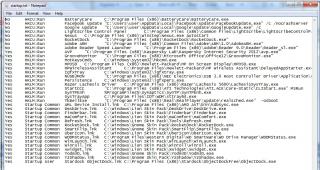
|
|
|
May 1 2012, 12:05 AM
|
|
Senior Member
6,612 posts Joined: Jan 2003 From: Tomorrow
|
attach it as text file.. not as picture... easier for me to check.
 |
|
|
|
|
|
May 1 2012, 12:06 AM
|
|
Junior Member
277 posts Joined: Aug 2010
|
ok...
wait up... Added on May 1, 2012, 12:08 amNo HKCU:Run BatteryCare C:\Program Files (x86)\BatteryCare\BatteryCare.exe No HKCU:Run Facebook Update "C:\Users\user\AppData\Local\Facebook\Update\FacebookUpdate.exe" /c /nocrashserver No HKCU:Run Google Update "C:\Users\user\AppData\Local\Google\Update\GoogleUpdate.exe" /c No HKCU:Run LightScribe Control Panel C:\Program Files (x86)\Common Files\LightScribe\LightScribeControlPanel.exe -hidden No HKCU:Run Nexus C:\Program Files (x86)\Winstep\Nexus.exe autostart No HKCU:Run RocketDock "C:\Program Files (x86)\RocketDock\RocketDock.exe" No HKLM:Run Adobe ARM "C:\Program Files (x86)\Common Files\Adobe\ARM\1.0\AdobeARM.exe" No HKLM:Run Adobe Reader Speed Launcher "C:\Program Files (x86)\Adobe\Reader 9.0\Reader\Reader_sl.exe" Yes HKLM:Run AVP "C:\Program Files (x86)\Kaspersky Lab\Kaspersky Internet Security 2012\avp.exe" Yes HKLM:Run GrooveMonitor "C:\Program Files (x86)\Microsoft Office\Office12\GrooveMonitor.exe" Yes HKLM:Run HotKeysCmds C:\Windows\system32\hkcmd.exe Yes HKLM:Run HPOSD C:\Program Files (x86)\Hewlett-Packard\HP On Screen Display\HPOSD.exe Yes HKLM:Run HPWirelessAssistant C:\Program Files\Hewlett-Packard\HP Wireless Assistant\DelayedAppStarter.exe 120 C:\Program Files\Hewlett-Packard\HP Wireless Assistant\HPWA_Main.exe /hidden Yes HKLM:Run IgfxTray C:\Windows\system32\igfxtray.exe Yes HKLM:Run NUSB3MON "C:\Program Files (x86)\NEC Electronics\USB 3.0 Host Controller Driver\Application\nusb3mon.exe" Yes HKLM:Run Persistence C:\Windows\system32\igfxpers.exe Yes HKLM:Run Razer Lachesis Driver C:\Program Files (x86)\Razer\Lachesis 5600\LachesisSysTray.exe Yes HKLM:Run StartCCC "C:\Program Files (x86)\ATI Technologies\ATI.ACE\Core-Static\CLIStart.exe" MSRun Yes HKLM:Run SynTPEnh %ProgramFiles%\Synaptics\SynTP\SynTPEnh.exe Yes HKLM:Run SysTrayApp C:\Program Files\IDT\WDM\sttray64.exe Yes HKLM:Run TkBellExe "C:\Program Files (x86)\Real\RealPlayer\update\realsched.exe" -osboot Yes Startup Common AML Device Install.lnk C:\Program Files (x86)\AMD AVT\bin\kdbsync.exe Yes Startup Common DeskDrive.lnk C:\Windows\Lion Skin Pack\DeskDrive\DeskDrive.exe Yes Startup Common Finderbar.lnk C:\Windows\Lion Skin Pack\Finderbar\Finderbar.exe Yes Startup Common maComfort.lnk C:\Windows\Lion Skin Pack\maComfort\maComfort.exe Yes Startup Common Refresh.lnk C:\Windows\Lion Skin Pack\Tools\Refresh.cmd Yes Startup Common RocketDock.lnk C:\Windows\Gnome Skin Pack\RocketDock\RocketDock.exe Yes Startup Common SmartFlip.lnk C:\Windows\Gnome Skin Pack\SmartFlip\SmartFlip.exe Yes Startup Common UberIcon.lnk C:\Windows\Lion Skin Pack\UberIcon\UberIcon.exe Yes Startup Common WDDMStatus.lnk C:\Program Files\Western Digital\WD SmartWare\WD Drive Manager\WDDMStatus.exe Yes Startup Common WinLaunch.lnk C:\Windows\Lion Skin Pack\WinLaunch\WinLaunch.exe Yes Startup Common Winroll.lnk C:\Windows\Lion Skin Pack\Winroll\winroll.exe Yes Startup Common xwidget.lnk C:\Windows\Lion Skin Pack\xwidget\xwidget.exe Yes Startup Common Yodm3D.lnk C:\Windows\Gnome Skin Pack\Yodm3D\Yodm3D.exe Yes Startup Common YzShadow.lnk C:\Windows\Gnome Skin Pack\YzShadow\YzShadow.exe Yes Startup User Stardock ObjectDock.lnk C:\Program Files (x86)\Stardock\ObjectDockFree\ObjectDock.exe This post has been edited by amie_the_fakes3: May 1 2012, 12:08 AM |
|
|
May 1 2012, 12:16 AM
|
|
Junior Member
277 posts Joined: Aug 2010
|
my google oso have problem...every 5 minute appear alert and normal again...
done full scan my sistem using kaspersky not have virus... 
|
|
|
May 1 2012, 12:29 AM
|
|
Senior Member
6,612 posts Joined: Jan 2003 From: Tomorrow
|
Did you install custom theme pack? So many stuffs at startup.. if you don't use them, just disable from CCleaner.
QUOTE Yes Startup Common DeskDrive.lnk C:\Windows\Lion Skin Pack\DeskDrive\DeskDrive.exe Yes Startup Common Finderbar.lnk C:\Windows\Lion Skin Pack\Finderbar\Finderbar.exe Yes Startup Common maComfort.lnk C:\Windows\Lion Skin Pack\maComfort\maComfort.exe Yes Startup Common Refresh.lnk C:\Windows\Lion Skin Pack\Tools\Refresh.cmd Yes Startup Common RocketDock.lnk C:\Windows\Gnome Skin Pack\RocketDock\RocketDock.exe Yes Startup Common SmartFlip.lnk C:\Windows\Gnome Skin Pack\SmartFlip\SmartFlip.exe Yes Startup Common UberIcon.lnk C:\Windows\Lion Skin Pack\UberIcon\UberIcon.exe Yes Startup Common WDDMStatus.lnk C:\Program Files\Western Digital\WD SmartWare\WD Drive Manager\WDDMStatus.exe Yes Startup Common WinLaunch.lnk C:\Windows\Lion Skin Pack\WinLaunch\WinLaunch.exe Yes Startup Common Winroll.lnk C:\Windows\Lion Skin Pack\Winroll\winroll.exe Yes Startup Common xwidget.lnk C:\Windows\Lion Skin Pack\xwidget\xwidget.exe Yes Startup Common Yodm3D.lnk C:\Windows\Gnome Skin Pack\Yodm3D\Yodm3D.exe Yes Startup Common YzShadow.lnk C:\Windows\Gnome Skin Pack\YzShadow\YzShadow.exe Yes Startup User Stardock ObjectDock.lnk C:\Program Files (x86)\Stardock\ObjectDockFree\ObjectDock.exe You can disable these too. QUOTE Yes HKLM:Run SysTrayApp C:\Program Files\IDT\WDM\sttray64.exe Yes HKLM:Run TkBellExe "C:\Program Files (x86)\Real\RealPlayer\update\realsched.exe" -osboot Yes HKLM:Run IgfxTray C:\Windows\system32\igfxtray.exe Yes HKLM:Run NUSB3MON "C:\Program Files (x86)\NEC Electronics\USB 3.0 Host Controller Driver\Application\nusb3mon.exe" Yes HKLM:Run Persistence C:\Windows\system32\igfxpers.exe Yes HKLM:Run GrooveMonitor "C:\Program Files (x86)\Microsoft Office\Office12\GrooveMonitor.exe" Yes HKLM:Run HotKeysCmds C:\Windows\system32\hkcmd.exe Added on May 1, 2012, 12:31 amWhen virus notification appear in Kaspersky, does your Google Chrome running that time and have Facebook open? This post has been edited by Acid_RuleZz: May 1 2012, 12:31 AM |
|
|
May 1 2012, 12:49 AM
|
|
Junior Member
277 posts Joined: Aug 2010
|
all theme are disable and delete...
virus alert are when i open facebook... |
|
|
May 1 2012, 12:55 AM
|
|
Senior Member
6,612 posts Joined: Jan 2003 From: Tomorrow
|
I don't know whether the virus come from FB apps u using or FB ads. You can check here how to remove it manually but i think KIS already blocked the intrusion. :hmmL
|
|
|
May 1 2012, 12:55 AM
|
|
Junior Member
277 posts Joined: Aug 2010
|
my current temp reading
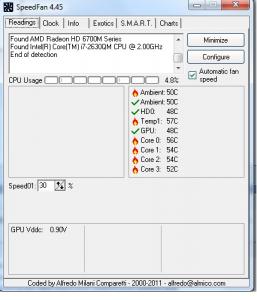
Added on May 1, 2012, 12:55 amlook like its back to normal... This post has been edited by amie_the_fakes3: May 1 2012, 12:55 AM |
|
|
May 1 2012, 01:01 AM
|
|
Junior Member
277 posts Joined: Aug 2010
|
what i realized did how many google.exe*32 running...i calculate almost 15 times...
refer this pic... 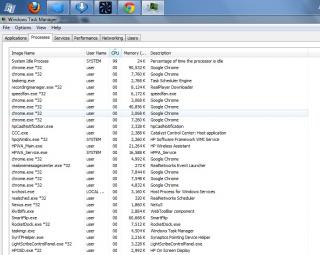
|
|
|
|
|
|
May 1 2012, 01:10 AM
|
|
Senior Member
6,612 posts Joined: Jan 2003 From: Tomorrow
|
It's normal for Google Chrome. It will open multiple instances for every tabs/websites/extensions.
» Click to show Spoiler - click again to hide... « |
|
|
May 1 2012, 01:37 AM
|
|
Junior Member
277 posts Joined: Aug 2010
|
so..it will not harm my sistem...
|
|
|
May 1 2012, 01:42 AM
|
|
Senior Member
6,612 posts Joined: Jan 2003 From: Tomorrow
|
yup.. it won't.
|
|
|
May 1 2012, 11:55 AM
|

Senior Member
541 posts Joined: Jan 2008
|
Hi guys
 Recently i installed leshcat Catalyst 12.3 WHQL UnifL in hoping to fix my saints row 3 crash. It did.But then i encounter problems which is my lcd become blank after entering sleep mode. Thus i decided to uninstalled leshcat Catalyst 12.3 WHQL UnifL and went back to the old driver. But now the switchable graphic option in the right click is gone and there's no HD6770M shown on my device manager what should i do Recently i installed leshcat Catalyst 12.3 WHQL UnifL in hoping to fix my saints row 3 crash. It did.But then i encounter problems which is my lcd become blank after entering sleep mode. Thus i decided to uninstalled leshcat Catalyst 12.3 WHQL UnifL and went back to the old driver. But now the switchable graphic option in the right click is gone and there's no HD6770M shown on my device manager what should i do  |
|
|
May 1 2012, 12:34 PM
|
|
Senior Member
6,612 posts Joined: Jan 2003 From: Tomorrow
|
Are u using Fixed switching?
Try reinstall the driver or use Leshcat 12.2 WHQL UP5. Make sure u tick HP Patch and latest Intel driver before extracting. Also download and extract the file in attachment into DriverSweeper main folder (Default: C:\Program Files (x86)\Phyxion.net\Driver Sweeper). This will enable the option to clean Intel HD driver and AMD APP SDK(OpenCL) driver which usually failed to remove. Attached File(s)  Filters.zip ( 1.19k )
Number of downloads: 24
Filters.zip ( 1.19k )
Number of downloads: 24 |
|
|
May 1 2012, 03:00 PM
|
|
Senior Member
541 posts Joined: Jan 2008
|
QUOTE(Acid_RuleZz @ May 1 2012, 12:34 PM) Are u using Fixed switching? I just used the driver sweeper, Installed back the leshcat 12.3 and everything went back to normal Try reinstall the driver or use Leshcat 12.2 WHQL UP5. Make sure u tick HP Patch and latest Intel driver before extracting. Also download and extract the file in attachment into DriverSweeper main folder (Default: C:\Program Files (x86)\Phyxion.net\Driver Sweeper). This will enable the option to clean Intel HD driver and AMD APP SDK(OpenCL) driver which usually failed to remove.   even when i put into sleep mode,the lcd resumes normally. I cant thank you enough even when i put into sleep mode,the lcd resumes normally. I cant thank you enough  Thank you very much! Thank you very much!  |
|
|
May 1 2012, 04:14 PM
|

Senior Member
2,227 posts Joined: May 2010  
|
QUOTE(soul_star @ May 1 2012, 03:00 PM) I just used the driver sweeper, Installed back the leshcat 12.3 and everything went back to normal buy him a new hp dv6 with ivy bridge+kepler base gpu even when i put into sleep mode,the lcd resumes normally. I cant thank you enough Thank you very much! |
|
Topic ClosedOptions
|
| Change to: |  0.0193sec 0.0193sec
 0.40 0.40
 6 queries 6 queries
 GZIP Disabled GZIP Disabled
Time is now: 6th December 2025 - 02:01 PM |
 Quote
Quote

