Welcome Guest ( Log In | Register )

Bump Topic Topic Closed RSS Feed

Outline · [ Standard ] · Linear+

 How to type combination (n,C,r) in Microsoft Word?, Mathematics Typing

views
     
TSCLian
post Nov 27 2011, 10:41 PM, updated 15y ago

Enthusiast
*****
Senior Member
743 posts

Joined: Oct 2010
From: Malaysia

Em.....

I am having trouble looking for a solution to insert combination notation in Microsoft Word.

I have been searching over the internet but i found no solution.

Does any of you know how to insert that notation?

Most importantly, i want to type the 'n'. I know to insert the 'C' and 'r'.

thanks in advance.

de|phantom
post Nov 28 2011, 12:11 AM

▣⌇▣ Rest In Peace ▣⌇▣
*****
Senior Member
891 posts

Joined: Sep 2011
From: ٩͡[๏̯͡๏]۶ Purgatory©


try insert symbol.. what do u mean c and r?? u mean these © ®??
TSCLian
post Nov 28 2011, 12:17 AM

Enthusiast
*****
Senior Member
743 posts

Joined: Oct 2010
From: Malaysia

QUOTE(de|phantom @ Nov 28 2011, 12:11 AM)
try insert symbol.. what do u mean c and r?? u mean these © ®??
*
Do you remember, in mathematics statistics, we learn a chapter which is known as Permutation and Combination.

In combination, we use n, C, r.

In permutation, we use n, P, r.

I am having trouble typing the 'n'.
clon12
post Nov 28 2011, 12:23 AM

let's learn together!
*******
Senior Member
2,919 posts

Joined: Mar 2009


Press ALT+252 ⁿ << here.
TSCLian
post Nov 28 2011, 12:27 AM

Enthusiast
*****
Senior Member
743 posts

Joined: Oct 2010
From: Malaysia

QUOTE(clon12 @ Nov 28 2011, 12:23 AM)
Press ALT+252 ⁿ << here.
*
thanks for the reply.

sorry, i cannot understand.

Hold down 'Alt' and press 252 one-by-one?
It doesn't give me anything.

how about the small n?
clon12
post Nov 28 2011, 12:32 AM

let's learn together!
*******
Senior Member
2,919 posts

Joined: Mar 2009


Hold down ALT and press 252 and let go of the ALT afterwards. After you did that it will show up this > ⁿ
TSCLian
post Nov 28 2011, 12:41 AM

Enthusiast
*****
Senior Member
743 posts

Joined: Oct 2010
From: Malaysia

QUOTE(clon12 @ Nov 28 2011, 12:32 AM)
Hold down ALT and press 252 and let go of the ALT afterwards. After you did that it will show up this > ⁿ
*
brother, it doesn't work. After i had pressed those buttons, Undo option poped up only.

btw, i am using Microsoft office 2007.

May be different from what u r using?
exentric_nova
post Nov 28 2011, 12:43 AM

I Am Serious
******
Senior Member
1,702 posts

Joined: Jan 2003
From: Semenyih


QUOTE(CLian @ Nov 28 2011, 12:41 AM)
brother, it doesn't work. After i had pressed those buttons, Undo option poped up only.

btw, i am using Microsoft office 2007.

May be different from what u r using?
*
are you on a laptop or desktop? it must be done on the numpad.
TSCLian
post Nov 28 2011, 12:54 AM

Enthusiast
*****
Senior Member
743 posts

Joined: Oct 2010
From: Malaysia

QUOTE(exentric_nova @ Nov 28 2011, 12:43 AM)
are you on a laptop or desktop? it must be done on the numpad.
*
on a laptop. will try it now.

Thanks. smile.gif

This post has been edited by CLian: Nov 28 2011, 12:54 AM
TSCLian
post Nov 28 2011, 01:01 AM

Enthusiast
*****
Senior Member
743 posts

Joined: Oct 2010
From: Malaysia

It doesn't work.

I am on laptop, even if i turn on the Num Lock, i still can't get that symbol.

i held down 'Alt' and press 252 then release Alt. What i got is a question mark. sad.gif
fino_abama
post Nov 28 2011, 01:20 AM

On my way
****
Senior Member
520 posts

Joined: Sep 2009


QUOTE(CLian @ Nov 28 2011, 01:01 AM)
It doesn't work.

I am on laptop, even if i turn on the Num Lock, i still can't get that symbol.

i held down 'Alt' and press 252 then release Alt. What i got is a question mark. sad.gif
*
1) click on the Insert tab
2) click on Equation
3) click on Script and you should see what you are looking for
RitzyHoke
post Nov 28 2011, 01:34 AM

On my way
****
Junior Member
575 posts

Joined: Dec 2008


1. Type nCr
2. Highlight 'n', press "Ctrl + Shift + +" or the 'superscript' button (the place with the bold, italic and underline)
3. Highlight 'r', press "Ctrl + =" or 'subscript'
LightningFist
post Nov 28 2011, 01:54 AM

Minion of the Damned
Group Icon
VIP
3,965 posts

Joined: Apr 2009
What version of Word? Just use the sub and super scripts... or the equation function which will easily allow you to type nCr
TSCLian
post Nov 28 2011, 10:14 AM

Enthusiast
*****
Senior Member
743 posts

Joined: Oct 2010
From: Malaysia

QUOTE(RitzyHoke @ Nov 28 2011, 01:34 AM)
1. Type nCr
2. Highlight 'n', press "Ctrl + Shift + +" or the 'superscript' button (the place with the bold, italic and underline)
3. Highlight 'r', press "Ctrl + =" or 'subscript'
*
brother, it works in normal typing mode.

but, it doesn't work in equation mode.
I am typing mathematics. The style of fonts is based on equation mode.

the problem is the 'n'. sad.gif


Added on November 28, 2011, 10:19 am
QUOTE(LightningFist @ Nov 28 2011, 01:54 AM)
What version of Word? Just use the sub and super scripts... or the equation function which will easily allow you to type nCr
*
i am using 2007 version.
U try it yourself, it won't work.

Click the Insert tab and click Equation/the 'pi' symbol.
From the Script menu, no one script is suitable for me to type the 'n'. I am just able to type the C and r.
No equation function is suitable also.

For normal typing, it works.
But, i am typing in equation mode. It doesn't work.

tq

This post has been edited by CLian: Nov 28 2011, 10:19 AM

clon12
post Nov 28 2011, 10:56 AM

let's learn together!
*******
Senior Member
2,919 posts

Joined: Mar 2009


I think because you are not using a keypad? Alt keys can only be used with keypads .
RitzyHoke
post Nov 28 2011, 11:00 AM

On my way
****
Junior Member
575 posts

Joined: Dec 2008


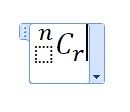
You can always type our normally and set your font to cambria + italic xD

Equation ... what I did was I picked the 2nd one (the one with the subscript) then in the place where the "C" goes, I clicked left subscript-superscript. Not exactly the perfect one ... but it works? sweat.gif
user posted image
TSCLian
post Nov 28 2011, 11:21 AM

Enthusiast
*****
Senior Member
743 posts

Joined: Oct 2010
From: Malaysia

QUOTE(RitzyHoke @ Nov 28 2011, 11:00 AM)
You can always type our normally and set your font to cambria + italic xD

Equation ... what I did was I picked the 2nd one (the one with the subscript) then in the place where the "C" goes, I clicked left subscript-superscript. Not exactly the perfect one ... but it works?  sweat.gif
user posted image
*
thanks. U are smart. thumbup.gif

Topic ClosedOptions
 

Change to:
| Lo-Fi Version
0.0169sec    0.66    5 queries    GZIP Disabled
Time is now: 15th December 2025 - 03:04 AM