Outline ·
[ Standard ] ·
Linear+
How to type combination (n,C,r) in Microsoft Word?, Mathematics Typing
|
RitzyHoke
|
 Nov 28 2011, 01:34 AM Nov 28 2011, 01:34 AM
|

|
1. Type nCr
2. Highlight 'n', press "Ctrl + Shift + +" or the 'superscript' button (the place with the bold, italic and underline)
3. Highlight 'r', press "Ctrl + =" or 'subscript'
|
|
|
|
|
|
RitzyHoke
|
Nov 28 2011, 11:00 AM
|
|
|
You can always type our normally and set your font to cambria + italic xD Equation ... what I did was I picked the 2nd one (the one with the subscript) then in the place where the "C" goes, I clicked left subscript-superscript. Not exactly the perfect one ... but it works?  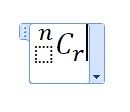 |
|
|
|
|



 Quote
Quote
 0.0171sec
 0.94
0.94
 6 queries
 GZIP Disabled