QUOTE(RitzyHoke @ Nov 28 2011, 01:34 AM)
1. Type nCr
2. Highlight 'n', press "Ctrl + Shift + +" or the 'superscript' button (the place with the bold, italic and underline)
3. Highlight 'r', press "Ctrl + =" or 'subscript'
brother, it works in normal typing mode.
but, it doesn't work in equation mode.
I am typing mathematics. The style of fonts is based on equation mode.
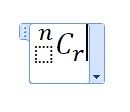
the problem is the 'n'.

Added on November 28, 2011, 10:19 amQUOTE(LightningFist @ Nov 28 2011, 01:54 AM)
What version of Word? Just use the sub and super scripts... or the equation function which will easily allow you to type nCr
i am using 2007 version.
U try it yourself, it won't work.
Click the Insert tab and click Equation/the 'pi' symbol.
From the Script menu, no one script is suitable for me to type the 'n'. I am just able to type the C and r.
No equation function is suitable also.
For normal typing, it works.
But, i am typing in equation mode. It doesn't work.
tq
This post has been edited by CLian: Nov 28 2011, 10:19 AM 

 Nov 27 2011, 10:41 PM, updated 15y ago


 Quote
Quote







 0.0160sec
 0.47
0.47
 5 queries
 GZIP Disabled