

QUOTE(Qash-M @ Jun 5 2012, 10:27 AM)
I wonder if those who still using normal old Astro can still see ch.100 & ch.200...? 

No point because the old astro I think do not support VOD (no ethernet port) 
Astro B.yond Episode IV (Version 9.0), The New World of Entertainment
|
|
 Jun 5 2012, 01:12 PM Jun 5 2012, 01:12 PM
Return to original view | Post
#61
|
 
Junior Member
213 posts Joined: Oct 2010 From: Kedah 
|
QUOTE(Qash-M @ Jun 5 2012, 10:27 AM) I wonder if those who still using normal old Astro can still see ch.100 & ch.200...? No point because the old astro I think do not support VOD (no ethernet port) |
|
|
|
|
|
Jun 5 2012, 06:31 PM
Return to original view | Post
#62
|
|
Junior Member
213 posts Joined: Oct 2010 From: Kedah
|
QUOTE(jamesleetech @ Jun 5 2012, 06:07 PM) Its a bit complicated but I do understand your valid explanation and I have to accept that you are right and I am wrong about the video content download using our broadband connection. I did make a detailed check for more info and found out that Astro have actually chosen to use our broadband to download the VOD video content. I noticed there are 3 option in VOD Settings menu. One of it if we choose, we do not need to wait until download is completely finish to be able to watch. By choosing this option, you can watch while you download it, provided that there is enough buffer. There is no video jerking although I used only 1 Mbps speed.This will cause problems for people who have mobile internet broadband (Maxis, Celcom, etc) and use the mobile telco wifi modem (with ethernet ports) or USB modem connected to wifi router with ethernet ports. This is because of the monthly data quota from such mobile telcos. A fair warning should be announced for such broadband connections. So people... take note of this. After subscribing at RM 10 per month, there is a waiting period for full download of selected movie/content to complete before you can watch the content. Its not the same as Youtube video streaming with buffering. This is what I understood from the "waiting time period" (Refer below). Here is the link for the setup requirement for Byond PVR, Byond IPTV and Byond box... http://byond.digitalfive.com/setup.htm The setup guide for Byond PVR and Byond is the same. No setup is required for Byond IPTV. People who are interested in the VOD service should read the setup guide, link here (PDF file)... http://byond.digitalfive.com/assets/VOD_Connectivity_Guide.pdf Below is the image extracted from Page 19 of the setup guide which shows the "waiting period before can start watching"... » Click to show Spoiler - click again to hide... « The normal runtime for a full length movie is about 90 to 120 minutes. Ok, to make it simple, lets say I have a 1 Mbps connection and want to watch a 90 minute SD movie as "Catch Up"... that means after confirming selection, I have to wait about 90 minutes before I can watch it. And that is only 1 SD movie... what about if I want to select more SD movies... then I will choose to pre-select early a few. No problem since I can just leave my modem switched on for many hours to finish download and then watch the next day or later. Just make sure the modem is not switched off during download, because the period to complete will increase. There are questions that I am not sure of the answer yet. What will happen if a 90 minute movie is downloaded at 20 % and I switched off the modem which breaks the download. When I switched on my modem later, I am guessing that the download will continue from where it stopped, I hope so. If not, a lot of time is wasted to redownload from beginning. What happens if I interrupted the download a few times by switching of the modem a few times ? Will there be a slight possibility that the downloaded video become corrupted ? I think that such corruption is not likely but, still can happen. Also remember that TM streamyx do have Fair Usage Policy which throttles to snail speed when too much download is detected... and... for many people with 1 Mbps speed streamyx, usually can only get about 70% actual speed. So... the actual time to finish download may not be as good as shown on paper. From what I understood after reading from the VOD Setup Guide and my phone call to Astro Cust Supp... the Byond PVR, Byond IPTV and Byond boxes uses our internet broadband to download the VOD video content and as I have explained earlier, there is a "waiting period" to finish download before we can watch. PVR recording service must already be subscribed. For Byond box which don't have internal harddisk, either the PVR EASi or WD My Passport AV (320 GB) external USB harddisk is needed. _______________________________________________________ If anyone find any part of my info here as not accurate, please correct me. Thanks. I did try to disconnect the broadband connection while the download process is still running at ~20% and it stopped. Once I reconnect back, it start downloading again from where it stopped  |
|
|
Jun 5 2012, 09:28 PM
Return to original view | Post
#63
|
|
Junior Member
213 posts Joined: Oct 2010 From: Kedah
|
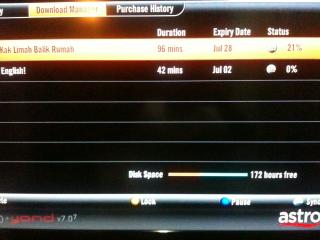
QUOTE(jamesleetech @ Jun 5 2012, 07:03 PM) Because I did not subscribe to Superpack 3 or PVR Service for my Byond (not PVR), I cannot enter into the "Video On Demand" menu. A message appears that says "my smartcard is not authorized for PVR funtion..." Now I know that there's an option to watch and download at the same time. Good news that there is no jerking with your 1 Mbps speed and downloads continue from where it stopped earlier. Thanks for the info. There is option:1. Remind me when ready to play (default) 2. Playback manually 3. Playback automatically - once I press download, after a few seconds it will play the movie. From the download percentage, it is still running. You should try it. |
|
|
Jun 6 2012, 09:40 AM
Return to original view | Post
#64
|
|
Junior Member
213 posts Joined: Oct 2010 From: Kedah
|
QUOTE(chikana @ Jun 5 2012, 09:28 PM) There is option: 1. Remind me when ready to play (default) 2. Playback manually 3. Playback automatically - once I press download, after a few seconds it will play the movie. From the download percentage, it is still running. You should try it. Attached thumbnail(s) 

|
|
|
Jun 6 2012, 09:43 AM
Return to original view | Post
#65
|
|
Junior Member
213 posts Joined: Oct 2010 From: Kedah
|
QUOTE(jamesleetech @ Jun 5 2012, 11:36 AM) Astro On-The-Go screenshots from computer internet browser... » Click to show Spoiler - click again to hide... « on the go on iPad |
|
|
Jun 6 2012, 09:50 AM
Return to original view | Post
#66
|
|
Junior Member
213 posts Joined: Oct 2010 From: Kedah
|
QUOTE(chikana @ Jun 6 2012, 09:43 AM) on the go on iPad Attached thumbnail(s) 
|
|
|
|
|
|
Jun 6 2012, 08:41 PM
Return to original view | Post
#67
|
|
Junior Member
213 posts Joined: Oct 2010 From: Kedah
|
QUOTE(jamesleetech @ Jun 6 2012, 04:08 PM) Thanks for the pics from inside "Video On Demand" of the PVR. Since I did not subscribe to PVR service, my Byond cannot view inside the "VOD" menu.' Maybe 2 represent 2 tuner?I noticed that from the pics of your Byond PVR, the software version is 7.02 (a smaller superscript text of 2) and for my Byond (not PVR) is only 7.0. |
|
|
Jun 7 2012, 01:46 PM
Return to original view | Post
#68
|
|
Junior Member
213 posts Joined: Oct 2010 From: Kedah
|
Anyone know any news on ABN? They said want to launch in June. Now already June, still quiet.....
|
|
|
Jun 7 2012, 10:39 PM
Return to original view | Post
#69
|
|
Junior Member
213 posts Joined: Oct 2010 From: Kedah
|
QUOTE(Raz @ Jun 7 2012, 10:09 PM) Any update on this ? Does everyone else decoder also start with the homepage ? Any way to change this behavior so it starts directly to the TV channel ? Thanks |
|
|
Jun 9 2012, 11:59 PM
Return to original view | Post
#70
|
|
Junior Member
213 posts Joined: Oct 2010 From: Kedah
|
QUOTE(seankks @ Jun 8 2012, 11:08 PM) Anyone can help with my problem? Btw I tried the reset code which is 977 and is not working It should work to reset by using 977.It is normal when you standby the TV using astro remote and when on again, it doesnt go to hdmi in. Then you have to use av button to select again hdmi in.  |
|
|
Jun 13 2012, 01:17 PM
Return to original view | Post
#71
|
|
Junior Member
213 posts Joined: Oct 2010 From: Kedah
|
QUOTE(Qash-M @ Jun 12 2012, 09:32 PM)  9 HD channel in 1 transponder? "Nice" compression quality, Assthrow...  |
|
|
Jun 15 2012, 11:33 PM
Return to original view | Post
#72
|
|
Junior Member
213 posts Joined: Oct 2010 From: Kedah
|
QUOTE(Qash-M @ Jun 15 2012, 06:29 PM) [attachmentid=2895343][attachmentid=2895344][attachmentid=2895353] I think you use HD TV and viewed SD channel. This is as expected as compression artifacts will become very obvious.One word: FAIL.   |
|
|
Jun 18 2012, 06:58 AM
Return to original view | Post
#73
|
|
Junior Member
213 posts Joined: Oct 2010 From: Kedah
|
QUOTE(RAMChYLD @ Jun 17 2012, 10:57 PM) It's for the better. Do you think they want to invest million ringgit to upgrade existing MPEG-2 encoders and at the end give it free MPEG-4 decoders to customer? Dream on.......MPEG-4 = better quality image + more free bandwidth Sumore, change all STB happened before in 2005 when they phase out Philips decoder for Nokia + Thomson. If they can do it once they can do it again without problems. But knowing assteruk, they'd more likely stick with MPEG-2 and force more in-house channels down people's throat... |
|
|
|
|
|
Jun 18 2012, 02:48 PM
Return to original view | Post
#74
|
|
Junior Member
213 posts Joined: Oct 2010 From: Kedah
|
QUOTE(gtiwtks @ Jun 18 2012, 01:54 PM) HI Guyz, how much is your freespace?Anyone facing recorded SD programs (AOD) missing from time to time? Other recorded HD programs no problem. How to solve it? Any solution? Thanks. Added on June 18, 2012, 2:48 pm QUOTE(kernel123 @ Jun 18 2012, 02:33 PM) hye guys.i have a curiousity about the quality of HD channel on astro beyond.what is the resolution of channel being displayed on that chennel.is it 720p and 1080p ? and is it in par as the quality of HD channel transferred using fibre optics which is Astro IPTV that using TIME fibre network? I think 1080i This post has been edited by chikana: Jun 18 2012, 02:48 PM |
|
|
Jun 19 2012, 01:53 PM
Return to original view | Post
#75
|
|
Junior Member
213 posts Joined: Oct 2010 From: Kedah
|
QUOTE(Qash-M @ Jun 19 2012, 10:47 AM) On the other info: could be one of the test channel (wonder where's Mustika HD...?) |
|
|
Jun 19 2012, 05:44 PM
Return to original view | Post
#76
|
|
Junior Member
213 posts Joined: Oct 2010 From: Kedah
|
QUOTE(gtiwtks @ Jun 19 2012, 05:14 PM) Still got 240hrs to go what is your Byond version no?Added on June 19, 2012, 5:16 pm So far only SD discovered. Finish recording. After few days, the recorded program will be missing from my recorded list. Strange... |
|
|
Jun 21 2012, 12:47 PM
Return to original view | Post
#77
|
|
Junior Member
213 posts Joined: Oct 2010 From: Kedah
|
QUOTE(Qash-M @ Jun 21 2012, 11:58 AM) Lol they Suspect your hdd got problem. Bcoz when you pause or rewind and play back, it takes from hdd. Today: [attachmentid=2905589][attachmentid=2905592] |
|
|
Jun 21 2012, 11:00 PM
Return to original view | Post
#78
|
|
Junior Member
213 posts Joined: Oct 2010 From: Kedah
|
QUOTE(Qash-M @ Jun 21 2012, 10:34 PM) If it was that, they would've called me sometimes ago. (FB post) I have experience almost the same problem like you when I just installed PVR less than a month and what their response was, the HDD had defect from factory. They swapped mine to the new one. |
|
|
Jun 22 2012, 11:18 AM
Return to original view | Post
#79
|
|
Junior Member
213 posts Joined: Oct 2010 From: Kedah
|
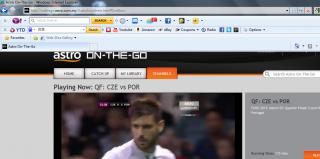
QUOTE(jamesleetech @ Jun 22 2012, 06:49 AM) Yes, Astro On-The-Go is browser independent which, at the present time, works for the PC (desktop & laptop) and Apple Iphone but not android phones/tablets. I do not have problem on Safari (ver=5.1.7), Firefox (ver=13.0.1), IE (ver=8) and Chrome (ver=19.0.1084.56 m)The video embedded in Astro On-The-Go is encoded using Microsoft Silverlight so this plug-in is required for the video to play from the internet browser. The latest version is Silverlight 5 (5.1.10411.0) Was Microsoft Silverlight plug-in installed ? If not, then funny that it was not automatically installed when the "video play" was clicked. Yes or no, try install/update it again. Also try updating the browsers (Firefox, Chrome, IE) to the latest version. You should update IE to version 9. » Click to show Spoiler - click again to hide... « Anyway, to install/re-install/update Microsoft Silverlight, then go here... http://www.microsoft.com/getsilverlight/Get-Started/Install/Default.aspx Silverlight installation will automatically identify all the browsers such as Firefox and IE if present. If required, the Microsoft .NET Framework will also be automatically installed or updated during Silverlight installation. After properly installing Silverlight and updated to IE 9, IF you still have problems, then there should be other causes which I will not be able to help you further. The problem to play the Silverlight embedded video could be caused by OS corruption, incompatible browser add-ons or BHO (Browser Helper Objects) such as toolbars, worms and virus, or various browser add-ons and etc. So I hope others here can provide further help or suggestions. By the way, what I am able to watch in Astro On-The-Go for Euro Cup is only video "highlights" of previous matches, NO Live videos of any matches. Mmm... maybe good for people who wants to catch-up on important parts of any matches but not good for me because I can watch live matches from Astro Channel 801 (eventhough not all matches). I don't subscribe to Superpack, Sports Pack and never pay the RM 50 Unmissable pack.  My silverlight version is 4.1.10329.0. Attached thumbnail(s) 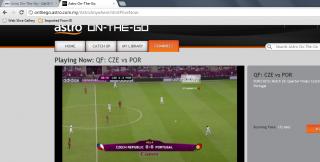


|
|
|
Jun 27 2012, 10:42 PM
Return to original view | Post
#80
|
|
Junior Member
213 posts Joined: Oct 2010 From: Kedah
|
QUOTE(Uncle 6 @ Jun 27 2012, 07:45 PM) Satu lagi project terbengkalai? Abandoned Buried N  more hope more hope |
|
Topic ClosedOptions
|
| Change to: |  0.0719sec 0.0719sec
 0.32 0.32
 7 queries 7 queries
 GZIP Disabled GZIP Disabled
Time is now: 10th December 2025 - 11:48 PM |
 Quote
Quote
