

 also their features is wayyy too much
  I really need some time to explore from A-Z.
This post has been edited by gotdamsg: Nov 19 2011, 04:40 PM
Unifi Draytek Vigor 2130n, Just received today!.. First impression.
|
|
  Nov 18 2011, 02:29 PM, updated 13y ago Nov 18 2011, 02:29 PM, updated 13y ago
Show posts by this member only | Post
#1
|
 
Junior Member
380 posts Joined: Nov 2004 From: selangor, malaysia  
|
Hey guys, today I just received my new wireless router to replace the stock orange TM router. Their design is very nice
also their features is wayyy too much I really need some time to explore from A-Z.This post has been edited by gotdamsg: Nov 19 2011, 04:40 PM |
|
|
|
|
|
Nov 18 2011, 02:59 PM
Show posts by this member only | Post
#2
|

Senior Member
1,741 posts Joined: Mar 2008
|
i usually put my modem below the table, coz my table already full of things ==
|
|
|
Nov 18 2011, 03:03 PM
Show posts by this member only | Post
#3
|
|
Junior Member
380 posts Joined: Nov 2004 From: selangor, malaysia
|
below? the higher the better for the signal, am I correct?
 |
|
|
Nov 18 2011, 07:47 PM
Show posts by this member only | Post
#4
|

Senior Member
4,880 posts Joined: Jan 2003 From: KL/PJ 
|
What's the damage? Just Plug & Play ?
|
|
|
Nov 19 2011, 09:08 AM
Show posts by this member only | Post
#5
|
|
Junior Member
380 posts Joined: Nov 2004 From: selangor, malaysia
|
It's plug and play and compatible with Unifi. + all the enterprise features. They will soon release a new firmware which will add on a new features
Damn nice!I will upload the snapshot of control panel and full features of the router soon. |
|
|
Nov 19 2011, 04:06 PM
Show posts by this member only | Post
#6
|

Junior Member
261 posts Joined: Sep 2011
|
naise... welcome to club
 i hv non-wireless 2130 |
|
|
|
|
|
Nov 19 2011, 04:55 PM
Show posts by this member only | Post
#7
|

Senior Member
1,026 posts Joined: Jan 2003 From: Kuala Lumpur, Malaysia
|
What is the price & where to get this nice gadget?
|
|
|
Nov 19 2011, 05:20 PM
Show posts by this member only | Post
#8
|

Senior Member
5,697 posts Joined: Nov 2007 From: A Place Where God And Master Of TroubleMaker Exist 
|
QUOTE(ldragon @ Nov 19 2011, 04:55 PM) What is the price & where to get this nice gadget?   yah...i wanna to ask this too yah...i wanna to ask this too |
|
|
Nov 19 2011, 08:24 PM
Show posts by this member only | Post
#9
|

Senior Member
6,779 posts Joined: Jan 2009 From: SEGI Heaven
|
hmm...got usb port feature??
|
|
|
Nov 19 2011, 11:52 PM
|
|
Junior Member
380 posts Joined: Nov 2004 From: selangor, malaysia
|
Got two USB port and port for a 3.5G network backup. I will post further details and snapshot of the device when I am back home
|
|
|
Nov 20 2011, 05:22 AM
|

Senior Member
4,461 posts Joined: Jan 2003
|
 This post has been edited by Moogle Stiltzkin: Jul 15 2017, 08:25 AM |
|
|
Nov 23 2011, 10:52 AM
|
|
Junior Member
380 posts Joined: Nov 2004 From: selangor, malaysia
|
Here are the images of the control panel and it's features.
          This post has been edited by gotdamsg: Nov 23 2011, 11:03 AM |
|
|
Nov 23 2011, 11:51 AM
|
|
Junior Member
168 posts Joined: Oct 2008
|
QUOTE(gotdamsg @ Nov 23 2011, 10:52 AM) Here are the images of the control panel and it's features. Just a question, the USB is to plug in the USB modem right? If I am using huawai E220 maxis BB that required conect application in oder to make teh connecttion to maxis network. if I plug in the USB modem into this router, without the connect application, can i surf the net? |
|
|
|
|
|
Nov 23 2011, 11:59 AM
|
|
Junior Member
380 posts Joined: Nov 2004 From: selangor, malaysia
|
USB is to plug the USB modem or other USB peripherals such as printer, disk shares etc..
Regarding your question on maxis bb, I am in doubt.. maybe you need to key in the key strings here.  Uploaded with ImageShack.us Remaining screens...       This post has been edited by gotdamsg: Nov 23 2011, 12:08 PM |
|
|
Nov 23 2011, 12:12 PM
|

Senior Member
1,941 posts Joined: Jan 2003
|
what is the price of thie wireless router?
|
|
|
Nov 23 2011, 12:14 PM
|
|
Junior Member
380 posts Joined: Nov 2004 From: selangor, malaysia
|
Here are the prices.
Vigor 2130 (no wireless) @ RM510 Vigor 2130n (with wireless N) @ RM820 |
|
|
Nov 23 2011, 12:39 PM
|
|
Junior Member
261 posts Joined: Sep 2011
|
QUOTE(gotdamsg @ Nov 23 2011, 12:14 PM) Here are the prices. what about the promo price rm480 for wireless one.... is over? means u pay rm820 for ur 2130n???Vigor 2130 (no wireless) @ RM510 Vigor 2130n (with wireless N) @ RM820 another forumer said she bought for rm480 the wireless one (2130n)... i was thinking sell the one i hv then buy the wireless version... the one i have is non wireless but i bought long ago ....no promotion that time u bought from http://www.draytek-malaysia.com/ ??? also how is the wireless?? is it good range? |
|
|
Nov 23 2011, 12:44 PM
|
|
Junior Member
380 posts Joined: Nov 2004 From: selangor, malaysia
|
the RM480 for the wireless version is a limited time promo. just few units for that price. very very limited.
Yes I bought from Draytek Malaysia. The range of the signal is good. They will soon release a new firmware which will add up more new features. |
|
|
Nov 23 2011, 12:46 PM
|
|
Senior Member
1,941 posts Joined: Jan 2003
|
wow.. RM820... don't think its a ideal price for home user...
|
|
|
Nov 23 2011, 12:53 PM
|
|
Junior Member
261 posts Joined: Sep 2011
|
QUOTE(gotdamsg @ Nov 23 2011, 12:44 PM) the RM480 for the wireless version is a limited time promo. just few units for that price. very very limited. oh so u bought rm480Yes I bought from Draytek Malaysia. The range of the signal is good. They will soon release a new firmware which will add up more new features. the wireless how much is the transfer speed? if u hv desktop and laptop... can u pls try transfer HD movie from desktop to laptop using wireless and tell the speed.... thanks i want to make sure its worth i sell my nonwireless den buy the wireless one before promo is over... |
|
|
Nov 23 2011, 02:49 PM
|
|
Senior Member
5,697 posts Joined: Nov 2007 From: A Place Where God And Master Of TroubleMaker Exist
|
QUOTE(gotdamsg @ Nov 23 2011, 12:14 PM) Here are the prices. wait wait....this thing its replacing the black TM thing or just replace the router?Vigor 2130 (no wireless) @ RM510 Vigor 2130n (with wireless N) @ RM820 |
|
|
Nov 23 2011, 03:05 PM
|
|
Junior Member
380 posts Joined: Nov 2004 From: selangor, malaysia
|
What is black TM thing?
This will replace the wireless router provided by TM. |
|
|
Nov 23 2011, 03:45 PM
|
|
Senior Member
5,697 posts Joined: Nov 2007 From: A Place Where God And Master Of TroubleMaker Exist
|
QUOTE(gotdamsg @ Nov 23 2011, 03:05 PM) What is black TM thing? theres is 3 main component TM giving rite?This will replace the wireless router provided by TM. 1 is D-link wireless router,STB and BTU rite? Dlink its wireless router,STB its hyyp tv and BTU that black things |
|
|
Nov 23 2011, 03:48 PM
|
|
Junior Member
380 posts Joined: Nov 2004 From: selangor, malaysia
|
This will replace the Dlink wireless router. STB and BTU will remain the same.
|
|
|
Nov 23 2011, 03:54 PM
|
|
Senior Member
5,697 posts Joined: Nov 2007 From: A Place Where God And Master Of TroubleMaker Exist
|
QUOTE(gotdamsg @ Nov 23 2011, 03:48 PM) This will replace the Dlink wireless router. STB and BTU will remain the same. aik...aint its expensive? buying a extra good wireless will do aint it? if u nid stronger wireless coverage |
|
|
Nov 25 2011, 11:08 AM
|
|
Senior Member
1,941 posts Joined: Jan 2003
|
Just gotten mine @ RM480 + RM15 postage
Haven't get a chance to unbox it... Will try it out by tonight when I get back home... Bank in yesterday at 11:30 noon and got it by pos laju this morning... fast delivery... |
|
|
Nov 26 2011, 05:29 PM
|
|
Junior Member
261 posts Joined: Sep 2011
|
hi gotdamsg
bro did u test the one i ask?? let me know pls QUOTE(thankyou @ Nov 25 2011, 11:08 AM) Just gotten mine @ RM480 + RM15 postage Haven't get a chance to unbox it... Will try it out by tonight when I get back home... Bank in yesterday at 11:30 noon and got it by pos laju this morning... fast delivery...  bro can u test the one i ask before about the wireless? using wireless N try transfer between wireless laptop and ur desktop HD movie and tell the speed... thaanks bro |
|
|
Nov 26 2011, 06:17 PM
|

Senior Member
4,038 posts Joined: Aug 2005 From: Earth
|
Personally Mikrotik replacement much more worth it
|
|
|
Nov 26 2011, 08:07 PM
|
|
Senior Member
1,941 posts Joined: Jan 2003
|
bro izzat, I will try n let you know ok...
MX510, I have Mikrotik RB750 too... I have to admit it is a very good router... but the quality of the router is too lousy... I bought it on feb 2011 from SG and only get to enjoy for few weeks... the adapter just gave up on lightning stike through power socket... what I don't understand was none of devices connected at the same power socket spoilt except Mikrotik... tried to bring back to the company but the company is gone... sigh... right now I'm not too sure if it affected the router or just the adapter itself.... |
|
|
Nov 26 2011, 10:10 PM
|

Senior Member
603 posts Joined: Dec 2008
|
QUOTE(gotdamsg @ Nov 23 2011, 12:14 PM) Here are the prices. For that kind of price, the specs for wireless router is just mediocre.Vigor 2130 (no wireless) @ RM510 Vigor 2130n (with wireless N) @ RM820 Draytek brand is well known over-priced Western brand sold in pound sterling currency.Not a wise decision. With that kind of pricing level you're better off getting a high end Asus(Black Diamond or N16) or Buffalo model that is cheaper. You can also buy 3 sets of the TP-Link TL-WR1043D with an excess of RM800. It has only 64Mb RAM + 8Mb Flash. In comparison the Asus RT-56U has a 500MHz processor from Ralink with double amount of RAM-128MB with 8MB flash.You may disregard this factor, but for 3rd party firmware, this is a VERY important feature. Now that's not just it. In about a year's time we'll even start seeing dual core CPU routers coming out the market. Just wait. This post has been edited by iipohbee: Nov 26 2011, 10:37 PM |
|
|
Nov 26 2011, 10:32 PM
|
|
Senior Member
1,941 posts Joined: Jan 2003
|
iipohbee, I agree at RM820 for 2130n is overprice especially you can have a good hardware + 3rd party software (DD-WRT) to do the same functionality!
I was trying to look for some all-in-one gigabit wireless router but was down with limited choice for Unifi... with RM480, i think its still somehow "reasonable" price for the features... |
|
|
Nov 26 2011, 11:23 PM
|
|
Junior Member
261 posts Joined: Sep 2011
|
QUOTE(iipohbee @ Nov 26 2011, 10:10 PM) For that kind of price, the specs for wireless router is just mediocre. yes bro i disregard that factor Draytek brand is well known over-priced Western brand sold in pound sterling currency.Not a wise decision. With that kind of pricing level you're better off getting a high end Asus(Black Diamond or N16) or Buffalo model that is chaper. You can also buy almost buy 3 sets of the TP-Link TL-WR1043D with an excess of RM800. It has only 64Mb RAM + 8Mb Flash. In comparison the Asus RT-56U has a 500MHz processor from Ralink with double amount of RAM-128MB with 8MB flash.You may disregard this factor, but for 3rd party firmware, this is a VERY important feature. Now that's not just it. In about a year's time we'll even start seeing dual core CPU routers coming out the market. Just wait. fancy hardwares SPECS dun matter in real life is what matter not specs... like amd bulldozer 8 core cpu new architetcture but den .... ahh.. but i still waiting for amd to pull together NEVER INTEL go to smallnetbuilder and australia forum whirlpool and read what ppls say about vigor most of them are coming form WRT610n or asus or other super high speed box i hv been use non-wireless 2130 that i bought more than year ago at first with streamyx 4mbps and now Unifi.. i hv been so impress that i go around advise anyone who wan high end to buy one.... its class alone not using the same broadcom/TI/ralink common stuffs u see in all others... no crash no reboot no feature that dun work actually dir615 cpu is higher....  but compare the two in p2p or many user.. but compare the two in p2p or many user..i send email ask about cpu speed.. they told me its 200mhz lol i was whaaaaaat???   den they explain to me many of the feature is hardware accelerate with own chip.. den challenge me to crash the router with any software if i can lol how can 200mhz cpu reach 800mbps route speed  if i go to the shell and check the load cpu its idle... and i see in the data flow page 7 active user and 4 my housemate are torrenting each with 1000-1500+ session... qos and bandwidth limit enabled but still its idle... they r right the cpu is not doing load.. haha i pay rm490 for NO wireless... and still after a year the price online is like before it didn drop...its worth it really a great router that u jus install den forget ts and thankyou got same model as me... how izit? |
|
|
Nov 26 2011, 11:32 PM
|
|
Senior Member
603 posts Joined: Dec 2008
|
Please do not ignore the memory storage for the router's OS.
It's a very crucial feature for future upgrades when new features come in demand. You're not going to be able to load the full package of the 3rd party firmware such as customized VPN support, CPU overclocking and ISP customizations without the extra storage. This refers to a RM800 piece of hardware that was reviewed back in March 2010? |
|
|
Nov 27 2011, 04:29 AM
|
|
Junior Member
261 posts Joined: Sep 2011
|
QUOTE(iipohbee @ Nov 26 2011, 11:32 PM) Please do not ignore the memory storage for the router's OS. lates firmware release 2 months ago... nuff saidIt's a very crucial feature for future upgrades when new features come in demand. You're not going to be able to load the full package of the 3rd party firmware such as customized VPN support, CPU overclocking and ISP customizations without the extra storage. This refers to a RM800 piece of hardware that was reviewed back in March 2010? what r u talking about? customized VPN?? lol see the vpn menu bro can reach 800mbps at stock... overclock it?? isp customisation mean like vlan tagging for unifi which already supported? what u wan to do? put TM logo? read what real broadband 150mbps user from netherland r saying not me.. jus search in the forum i post up like i say in my sig.. 1 to 3 user tp-link is best choise.. very2 great price and stable for p2p but if wan spend 400+ on anything toprange vigor is king |
|
|
Nov 27 2011, 04:14 PM
|

Moderator
6,180 posts Joined: Oct 2004 
|
Specs does not matter? I don't think so. Some specs do matter, especially the RAM memory, it is really crucial on the performance.
You cannot compare CPU based on speed only, Cisco 4900 series router/switch, guess what? It has only 266 mhz CPU on board, and the throughput is 70 million packet per second, switching capacity is approx 90 gigabit per second, all running on 266 mhz CPU only. Different CPU architecture and type does matter too. It is a nice product nonetheless, just that the price is a bit too demanding. |
|
|
Nov 29 2011, 07:25 AM
|

Junior Member
178 posts Joined: Oct 2005 From: Johor Bahru 
|
Hurm, it's a good router actually. Last time I used tplink load balancer at my shop. My customer always whining about lagging and delay while playing online games (HON and Blackshot, it's around 40-50 people playing BS on peak hour, oh my, this game is using p2p protocol to establish connection). The tplink can't handle too much sessions on peak hours, sometime the device hang! I decided to change to better enterprise router, on the first place im going peplink. The price was overy budget RM6.5k (Peplink 380). So I change to Draytek Vigor 3200 which had 4 WANs.
Guess what, with no fancy firewall rules, no bandwidth and sessions limit, the router easily handle 60 PCs and fully utilize 4x4mbps Streamyx. This month I will be open 2nd floor with 30 more PCs, I hope it will do the job perfectly! And the great thing is, today my unifi will be install. It BIZ20 x 4!  FYI, draytek 3200 is unifi compatible and I can get rid those dlink router FYI, draytek 3200 is unifi compatible and I can get rid those dlink router This post has been edited by izzani: Nov 29 2011, 07:58 AM |
|
|
Nov 29 2011, 11:31 AM
|
|
Senior Member
1,941 posts Joined: Jan 2003
|
Bro izzat80, I do not have 300mbps wireless client card so I couldn't test it out for you...
This is what you've requested: 2130n location: downstair living hall File Transfer: Sitting beside 2130n router  File Transfer: Upstair bedroom at the end of the house "door closed"  This post has been edited by thankyou: Nov 29 2011, 11:31 AM |
|
|
Nov 29 2011, 12:36 PM
|
|
Junior Member
261 posts Joined: Sep 2011
|
QUOTE(izzani @ Nov 29 2011, 07:25 AM) Hurm, it's a good router actually. Last time I used tplink load balancer at my shop. My customer always whining about lagging and delay while playing online games (HON and Blackshot, it's around 40-50 people playing BS on peak hour, oh my, this game is using p2p protocol to establish connection). The tplink can't handle too much sessions on peak hours, sometime the device hang! I decided to change to better enterprise router, on the first place im going peplink. The price was overy budget RM6.5k (Peplink 380). So I change to Draytek Vigor 3200 which had 4 WANs. wow 4 wan.. bro mind sharing the diagnos data flow screen when ur shop is full!!! curious just wan to see if u dun mind Guess what, with no fancy firewall rules, no bandwidth and sessions limit, the router easily handle 60 PCs and fully utilize 4x4mbps Streamyx. This month I will be open 2nd floor with 30 more PCs, I hope it will do the job perfectly! And the great thing is, today my unifi will be install. It BIZ20 x 4! FYI, draytek 3200 is unifi compatible and I can get rid those dlink router  on my router not even 1 page full hv 7 housemate and when hv guest reach 12... not more.. but u 50 must be many page on my router not even 1 page full hv 7 housemate and when hv guest reach 12... not more.. but u 50 must be many page 4 x 20 total 80 of SUPER... i wan test torrent download 1080p HD on that how long ??  QUOTE(thankyou @ Nov 29 2011, 11:31 AM) Bro izzat80, I do not have 300mbps wireless client card so I couldn't test it out for you... thanks very2 much broo This is what you've requested: 2130n location: downstair living hall File Transfer: Sitting beside 2130n router File Transfer: Upstair bedroom at the end of the house "door closed" rly appreciat u testing... nice collection of HD goods u hv there haha those speed good... too bad u dun hv wireless N full speed device to test full capable of router anyway thanks bro  This post has been edited by izzat80: Nov 29 2011, 12:48 PM |
|
|
Nov 29 2011, 09:59 PM
|
|
Junior Member
178 posts Joined: Oct 2005 From: Johor Bahru
|
Draytek 3200 Specification
CPU: Danube-S Memory: 64MB NAT: 100000 sessions 64 concurrent VPN tunnels 10 concurrent SSL VPN tunnels This is a business model, many features are hardware-accelerated with dedicated chips, including packet forwarding and VPN.. looking at it from cpu/ram perspective doesn't give it justice.. but rather real world performance. Quote from Draytek's Tech Support Some more, draytek staff called and guide me through phone around 9pm. He helped me until I can connect to Unifi!  This post has been edited by izzani: Nov 29 2011, 10:02 PM |
|
|
Dec 22 2011, 10:41 AM
|

Junior Member
43 posts Joined: Mar 2011
|
hi forum
Im interested in this... can someone confirm is it fully smooth with xbox360 (open nat and upnp)? also the wireless doesn't drop for ipad/iphone? xtreamer, xbox, NAS in the network Streaming 1080p from NAS and p2p seeds running all the time. Not many torrent downloads ~few gigs per day. There is good upload traffic though, see my nickname I need a device that can manage seeding and smooth game play. Is this a suitable router for me? word from existing xbox owners would be nice... THANKS |
|
|
Dec 23 2011, 12:03 AM
|
|
Senior Member
1,026 posts Joined: Jan 2003 From: Kuala Lumpur, Malaysia
|
Received the Draytek on 20th Dec.

Have been busy testing this unit vs my previous setup Mikrotik RB250GS + Asus RT-N16 + DD-WRT. Pretty happy with Draytek 2130n. |
|
|
Dec 23 2011, 12:58 PM
|
|
Junior Member
380 posts Joined: Nov 2004 From: selangor, malaysia
|
wowww great!..
|
|
|
Dec 23 2011, 03:47 PM
|
|
Junior Member
261 posts Joined: Sep 2011
|
QUOTE(ldragon @ Dec 23 2011, 12:03 AM) Received the Draytek on 20th Dec. cool...what that oren box for?
Have been busy testing this unit vs my previous setup Mikrotik RB250GS + Asus RT-N16 + DD-WRT. Pretty happy with Draytek 2130n. |
|
|
Dec 23 2011, 08:47 PM
|
|
Senior Member
1,026 posts Joined: Jan 2003 From: Kuala Lumpur, Malaysia
|
That box is the Broadband router 4 port switch without Wi-Fi.
|
|
|
Dec 29 2011, 02:12 PM
|
|
Junior Member
43 posts Joined: Mar 2011
|
neway so i got this
after install can stream and work but for upnp now I'm confused, refer to picture. How is it there is a speed setting for Upnp?  
before in my linksys the upnp is for auto-open then close the ports right? no need manual forward and all that. So if got utorrent enable upnp then enable in router, can get open port (green status) automatically... same for xbox can get open nat. this router it opens the port but I need to specify speed? isnt upnp just for opening and closing ports? sometimes the unifi speed test is higher than what i subscribe. upload speed always higher. so should it be 6m if got 5m unifi? also it says it supports DLNA, anyone tried streaming directly from the router to hdtv? that would be neat no need for streaming device/player. Already got the new xtreamer but just curious. If got second hdtv no need to buy another xtreamer  |
|
|
Dec 30 2011, 09:57 AM
|
|
Junior Member
261 posts Joined: Sep 2011
|
it extra feature la.. u can set the speed for upnp client...
if u want no limit just put 6mb if got 5mb... like u say dlna look interesting.... dun think i hv any device that hv that... just normal tv no fancy stuffs.. if u try it tell how is it |
|
|
Dec 31 2011, 09:24 PM
|
|
Junior Member
43 posts Joined: Mar 2011
|
QUOTE(izzat80 @ Dec 30 2011, 09:57 AM) it extra feature la.. u can set the speed for upnp client... try d if u want no limit just put 6mb if got 5mb... like u say dlna look interesting.... dun think i hv any device that hv that... just normal tv no fancy stuffs.. if u try it tell how is it You will need to put a USB thumbdrive or disk to install it. did you try the new firmware? now I can view the QoS real time stat  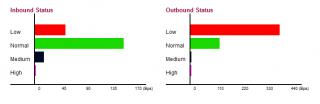
I'm seeding full speed and downloading, then I view youtube video automatically QoS reduce torrent download (red one).. and the green (youtube video) takes priority. the black is skype I was making a call, was perfect clear! this baby is epic still dont know the high. Red = torrent/p2p, green = browsing. black = skype/voice. purple = ? dont know yet never see it move before UNIFI FTW. Man I was missing much with the old crappy connection. I downloaded gigs and gigs. unifi is EPIC |
|
|
Jan 2 2012, 12:41 PM
|
|
Junior Member
261 posts Joined: Sep 2011
|
QUOTE(goodseeder @ Dec 31 2011, 09:24 PM) try d its looks cool I will try it You will need to put a USB thumbdrive or disk to install it. did you try the new firmware? now I can view the QoS real time stat
I'm seeding full speed and downloading, then I view youtube video automatically QoS reduce torrent download (red one).. and the green (youtube video) takes priority. the black is skype I was making a call, was perfect clear! this baby is epic still dont know the high. Red = torrent/p2p, green = browsing. black = skype/voice. purple = ? dont know yet never see it move before UNIFI FTW. Man I was missing much with the old crappy connection. I downloaded gigs and gigs. unifi is EPIC yes unifi is great i remember i was excite like this when i got it first... after a while nothing left to download... all HDD is full hahaha |
|
|
Jan 3 2012, 01:15 PM
|
|
Junior Member
43 posts Joined: Mar 2011
|
Regarding the external USB drive, I was told using ext3fs (linux file system) gives much better read/write performance.
With NTFS it wasn't fast, but to use ext3fs you have to format the HDD, meaning lose all data on the drive, because you are changing the filesystem.  I don't have linux, but there is a format tool in the router BUT my external HDD is packed with content and I have no place to move it. Have any tried the ext3fs? Is there a big jump? Is it worth it to reformat? I don't think any of my friends has 1TB laying around for me to use so need to get rid of the 1080p collection  . And after doing this the HDD will not be usable in windows right? Since its a linux file system. Ahh man . And after doing this the HDD will not be usable in windows right? Since its a linux file system. Ahh man |
|
|
Jan 3 2012, 02:51 PM
|
|
Junior Member
380 posts Joined: Nov 2004 From: selangor, malaysia
|
I found a lot of techniques to read and write ext3 file system on Windows. you may try google around :-)
|
|
|
Jan 4 2012, 07:29 PM
|
|
Junior Member
43 posts Joined: Mar 2011
|
|
|
|
Jan 5 2012, 04:42 PM
|
|
Junior Member
261 posts Joined: Sep 2011
|
QUOTE(gotdamsg @ Jan 3 2012, 02:51 PM) I found a lot of techniques to read and write ext3 file system on Windows. you may try google around :-) if u find good one already share lah..... we needs to google again?» Click to show Spoiler - click again to hide... « QUOTE(goodseeder @ Jan 4 2012, 07:29 PM) but.... is there app that can integrate with win and not open manual to do all? dun think so....anyway why need to access? if u put the hdd with vigor, u can access from share direct... why u need to put it back to windows? just make the hdd permanet attached to vigor router...  |
|
|
Jan 5 2012, 05:46 PM
|
|
Junior Member
380 posts Joined: Nov 2004 From: selangor, malaysia
|
found a lot but haven't tried it yet.. so I didn't know which one is working best
I will let you all know once I got the chance to do it |
|
|
Jan 8 2012, 02:02 AM
|
|
Junior Member
43 posts Joined: Mar 2011
|
QUOTE(izzat80 @ Jan 5 2012, 04:42 PM) if u find good one already share lah..... we needs to google again? » Click to show Spoiler - click again to hide... « but.... is there app that can integrate with win and not open manual to do all? dun think so.... anyway why need to access? if u put the hdd with vigor, u can access from share direct... why u need to put it back to windows? just make the hdd permanet attached to vigor router... QUOTE(gotdamsg @ Jan 5 2012, 05:46 PM) found a lot but haven't tried it yet.. so I didn't know which one is working best Yup, I think thats what I'm gonna do. I will keep my current HD for my use and buy a new HD just for the Vigor and attach it, format to linux file system and leave it there permanently for use by the router I will let you all know once I got the chance to do it |
|
|
Jan 16 2012, 02:16 PM
|
|
Junior Member
10 posts Joined: May 2005
|
Looks like this wireless router is good.
I do have a question, as the current TM provided DIR-615 is just not working for me - my front upstairs room can't get the signal from the wireless AP situated at the ground floor back room. I would like to know whether with 2130n setup at the downstairs backroom, can reach the upstairs front room? Anyone with similar setup? |
|
|
Jan 16 2012, 03:11 PM
|
|
Senior Member
1,941 posts Joined: Jan 2003
|
I actually put at my house living hall and i don't know if this consider as front? and my bedroom is actually located upstair back of the house...
with DIR-615, i barely can get signal and sometime the line broken... but with 2130n, I can have at least 3 - 4 bars of signal when i move my notebook til the edge of the room. If i stay near the door of my room, I can actually get full bar! As for iPhone/iPad, 1 bar at the edge of the room, 2 - 3 bars near the door of the room... Conclusion, it is actually quite strong for the signal... If you need any further technical detail, i guess I can spend sometime to give you the dbi signal strength if you want... |
|
|
Jan 16 2012, 03:30 PM
|
|
Junior Member
10 posts Joined: May 2005
|
QUOTE(thankyou @ Jan 16 2012, 03:11 PM) I actually put at my house living hall and i don't know if this consider as front? and my bedroom is actually located upstair back of the house... Thanks! with DIR-615, i barely can get signal and sometime the line broken... but with 2130n, I can have at least 3 - 4 bars of signal when i move my notebook til the edge of the room. If i stay near the door of my room, I can actually get full bar! As for iPhone/iPad, 1 bar at the edge of the room, 2 - 3 bars near the door of the room... Conclusion, it is actually quite strong for the signal... If you need any further technical detail, i guess I can spend sometime to give you the dbi signal strength if you want... This gives me anidea about the signal strength. Currently i'm using a repeater which i'm trying to avoid unless necessary. I wonder whether 2130n antenna allows stronger signal strength compared to Asus RT-N56 ? |
|
|
Jan 16 2012, 04:19 PM
|
|
Senior Member
1,941 posts Joined: Jan 2003
|
Never own an Asus RT-N56 so I can't comment on that...
|
|
|
Jan 16 2012, 05:13 PM
|

Junior Member
361 posts Joined: Jun 2007
|
QUOTE(jameskam @ Jan 16 2012, 03:30 PM) Thanks! I don't think the signal is stronger than Asus RT-N56 but even at 2-3 bar, the signal is stable and never drop. This gives me anidea about the signal strength. Currently i'm using a repeater which i'm trying to avoid unless necessary. I wonder whether 2130n antenna allows stronger signal strength compared to Asus RT-N56 ? Later, will experiment with a higher dBi antenna to see if the signal improve. |
|
|
Jan 16 2012, 08:34 PM
|
|
Junior Member
43 posts Joined: Mar 2011
|
happy with the draytek wireless range also, covers the entire place comfortably
and the three antennas are detachable, they can be replaced/upgraded easily |
|
|
Jan 16 2012, 10:29 PM
|

Junior Member
257 posts Joined: Aug 2011 From: Kuala Lumpur
|
Good to learn about Draytek here, but the price is too high for us to get one just to try and test it
|
|
|
Jan 17 2012, 10:53 AM
|
|
Senior Member
1,941 posts Joined: Jan 2003
|
I'm facing one very annoying problem!
My company VPN (PPTP & L2TP) keep disconnecting! From time to time, the connection will just suddenly freeze but the connection remain "Connected" I have to reconnect the VPN in order to re-establish my SSH/Remote Connection... When i change this back to TM D-Link router, everything is back to normal! |
|
|
Jan 17 2012, 11:06 AM
|
|
Junior Member
43 posts Joined: Mar 2011
|
send email to the support. I sent to them to help me setup my network itunes server, very responsive
|
|
|
Jan 17 2012, 01:03 PM
|
|
Junior Member
261 posts Joined: Sep 2011
|
QUOTE(thankyou @ Jan 17 2012, 10:53 AM) I'm facing one very annoying problem! no need send email i think i knw why like thisMy company VPN (PPTP & L2TP) keep disconnecting! From time to time, the connection will just suddenly freeze but the connection remain "Connected" I have to reconnect the VPN in order to re-establish my SSH/Remote Connection... When i change this back to TM D-Link router, everything is back to normal! there is builtin vpn server in vigor... since u r using ur company vpn server.... u dun need vigor vpn and it conflict maybe go to vpn menu and disable all vpn service can see there is vpn passthru aso... |
|
|
Jan 31 2012, 03:13 PM
|
|
Junior Member
43 posts Joined: Mar 2011
|
owners of 2130, install the new firmware its waay better
torrent downloader now works great. The trick is must use the ext3 file system on the hard drive not fat/ntfs 
lol don't mind all red lines. got to hide those torrents haha Just get a empty hard drive then attach to your router, then format using ext3 file system. After you plug the HDD, use the format tool available in the router menu.. And now you got a good NAS! That ext filesystem is much better than NTFS/FAT.. Copying to/from router shared folders now are faster also |
|
|
Jan 31 2012, 03:16 PM
|
|
Senior Member
1,814 posts Joined: Dec 2008
|
QUOTE(goodseeder @ Jan 31 2012, 03:13 PM) owners of 2130, install the new firmware its waay better i see ur speed slow what happen torrent speedtorrent downloader now works great. The trick is must use the ext3 file system on the hard drive not fat/ntfs
lol don't mind all red lines. got to hide those torrents haha Just get a empty hard drive then attach to your router, then format using ext3 file system. After you plug the HDD, use the format tool available in the router menu.. And now you got a good NAS! That ext filesystem is much better than NTFS/FAT.. Copying to/from router shared folders now are faster also |
|
|
Jan 31 2012, 04:06 PM
|
|
Junior Member
43 posts Joined: Mar 2011
|
QUOTE(logit85 @ Jan 31 2012, 03:16 PM) i see ur speed slow what happen torrent speed yea it doesn't go as high as bitcomet on my PC.there are specific highs and lows in the day, see my weekly graph when using built-in: 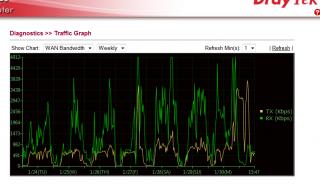
See the waves? its constant. TM enforcing something? the client in router not encrypted I think. when I disable the router torrent and download with my PC using bitcomet the speed is constant maximum so it could be that This post has been edited by goodseeder: Jan 31 2012, 04:08 PM |
|
|
Feb 2 2012, 01:32 PM
|
|
Senior Member
1,941 posts Joined: Jan 2003
|
Somehow with the new V1.5.2 beta firmware installed, the VPN disconnection no longer appear...
Will have more testing before any further comment! Good start! |
|
|
Feb 4 2012, 12:01 PM
|
|
Junior Member
43 posts Joined: Mar 2011
|
QUOTE(thankyou @ Feb 2 2012, 01:32 PM) Somehow with the new V1.5.2 beta firmware installed, the VPN disconnection no longer appear... thankyou maybe you can help me with somethingWill have more testing before any further comment! Good start! I'm trying to play a game called Left 4 Dead 2 with my friend and this game supports LAN play. I tried to use hamachi, I get an ip like 5.48.7.5 then my friend installed hamachi also, he gets IP: 5.77.1.9 But I can never find him in lobby, after research it appears L4D doesn't allow it. The IP must be the same except last digit. For example: me: 192.168.1.10 my friend: 192.168.1.15 Then it will work. I saw in some forum that people use VPN to play. from my understanding VPN allow other to join my local network right? In vigor2130n how can I let me friend get IP 192.168.1.15 and act like local? |
|
|
Feb 4 2012, 03:27 PM
|
|
Junior Member
261 posts Joined: Sep 2011
|
QUOTE(goodseeder @ Feb 4 2012, 12:01 PM) thankyou maybe you can help me with something can...I'm trying to play a game called Left 4 Dead 2 with my friend and this game supports LAN play. I tried to use hamachi, I get an ip like 5.48.7.5 then my friend installed hamachi also, he gets IP: 5.77.1.9 But I can never find him in lobby, after research it appears L4D doesn't allow it. The IP must be the same except last digit. For example: me: 192.168.1.10 my friend: 192.168.1.15 Then it will work. I saw in some forum that people use VPN to play. from my understanding VPN allow other to join my local network right? In vigor2130n how can I let me friend get IP 192.168.1.15 and act like local? ask ur friend to use win7 vpn wizard... and he need to key in ur ip... can see it from online status in ur vigor router... go to vpn option. enable pptp then add new user.. then put user name and password and give static ip... like u say 192.168.1.15... make sure u tick allow pptp.. i attach pic for u u just need add usr for ur friend.. i actually did same but for sharing folder not vpn but is same gaming time Attached thumbnail(s) 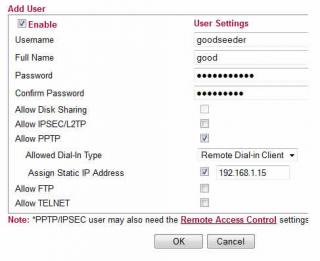
|
|
|
Feb 4 2012, 09:58 PM
|
|
Junior Member
43 posts Joined: Mar 2011
|
QUOTE(izzat80 @ Feb 4 2012, 03:27 PM) can... THANKS a lot ask ur friend to use win7 vpn wizard... and he need to key in ur ip... can see it from online status in ur vigor router... go to vpn option. enable pptp then add new user.. then put user name and password and give static ip... like u say 192.168.1.15... make sure u tick allow pptp.. i attach pic for u u just need add usr for ur friend.. i actually did same but for sharing folder not vpn but is same gaming time I will try it with my friend tomorrow and see how it goes |
|
|
Feb 5 2012, 05:20 AM
|

Senior Member
1,820 posts Joined: May 2010 From: Kuala Lumpur
|
Draytek 2130N user reporting in ...
So far Uptime : 30d 11:09:10 Transferred A LOT over LAN (few TB at least), downloading on Usenet and torrents constantly, and perfectly stable. Much more reliable than the original DLink and the TP Link I used after that as a replacement, still happy Might change to the Beta firmware soon |
|
|
Feb 5 2012, 01:09 PM
|
|
Junior Member
43 posts Joined: Mar 2011
|
QUOTE(rjb123 @ Feb 5 2012, 05:20 AM) Draytek 2130N user reporting in ... Yea its great. I sent many emails to support asking about all things I think if I send anymore they will refund and ask for the router back lolSo far Uptime : 30d 11:09:10 Transferred A LOT over LAN (few TB at least), downloading on Usenet and torrents constantly, and perfectly stable. Much more reliable than the original DLink and the TP Link I used after that as a replacement, still happy Might change to the Beta firmware soon But I understand more about networking now. Anyways regarding the beta firmware there are different versions The first file I got when I asked about it was named v2130_r25xx.all Then I asked if there are any updates and they sent me a newer one: v2130_r2623.all And all of them are called 1.5.2beta They also said the final is soon. So keep that uptime counting for now haha |
|
|
Feb 5 2012, 04:51 PM
|
|
Senior Member
1,814 posts Joined: Dec 2008
|
here my thread link http://forum.lowyat.net/index.php?showtopic=2158882&hl=
and my post http://forum.lowyat.net/topic/2168543 that thread see Post #4Post #4 all read i hope u will understand my problem wireless very sad ur vigor 2130n how is wireless u can ping ur router how many ms u go away downstairs like 2bar and 3bar u can ping how many ms for about stable so my router is Linksys WRT610N V2 that no problem downstaris pc desktop signal is 2 bar and 3 bar but internet very fast no problem and my bro pc desktop 10metter++ away but internet very fast no problem i naver test ping i think ping very stable so be lowest no timeour and no 1xxx ms like that pls read both full so pls help me i just asking ping vigor 2130n router ms and internet faster for wireless like that let say so my router is Linksys WRT610N V2 that no problem downstaris pc desktop signal is 2 bar and 3 bar but internet very fast no problem and my bro pc desktop 10metter++ away but internet very fast no problem i naver test ping i think ping very stable so be lowest no timeour and no 1xxx ms i think 1ms or 10ms for downstairs pc desktop signal 2 bar and 3 bar and my bro pc desktop also full signal 5 bar afther my router Linksys WRT610N V2 already death then i bought new router ASUS RT-N16 downstars pc desktop internet very also and my bro pc desktop 10metter++ away internet very slow ping very high  that wifi unstable why that wifi unstable why ur vigor 2130n can u go away to get signal 2bar and 3bar how internet fast or slow about wireless stable ur vigor 2130n how is wireless u can ping ur router how many ms u go away downstairs like 2bar and 3bar u can ping how many ms for about stable pls test it for wireless ping vigor 2130n router ip address show me screenshot |
|
|
Feb 6 2012, 02:18 AM
|
|
Senior Member
1,941 posts Joined: Jan 2003
|
QUOTE(goodseeder @ Feb 5 2012, 01:09 PM) Yea its great. I sent many emails to support asking about all things I think if I send anymore they will refund and ask for the router back lol Actually 2623 is not the latest one. I had mine updated to 2640But I understand more about networking now. Anyways regarding the beta firmware there are different versions The first file I got when I asked about it was named v2130_r25xx.all Then I asked if there are any updates and they sent me a newer one: v2130_r2623.all And all of them are called 1.5.2beta They also said the final is soon. So keep that uptime counting for now haha You can get the latest one from the following link: ftp://ftp.draytek.pl/Seria_2130/Firmware/1.5.2_BETA/ |
|
|
Feb 6 2012, 08:32 AM
|
|
Junior Member
261 posts Joined: Sep 2011
|
QUOTE(goodseeder @ Feb 5 2012, 01:09 PM) Yea its great. I sent many emails to support asking about all things I think if I send anymore they will refund and ask for the router back lol i finally upgrade my router...But I understand more about networking now. Anyways regarding the beta firmware there are different versions The first file I got when I asked about it was named v2130_r25xx.all Then I asked if there are any updates and they sent me a newer one: v2130_r2623.all And all of them are called 1.5.2beta They also said the final is soon. So keep that uptime counting for now haha i installed v2130_r2650.all recevied this morning firmware is oni two days old released but my uptime counter reset... 
|
|
|
Feb 6 2012, 12:54 PM
|
|
Junior Member
43 posts Joined: Mar 2011
|
I was curious to try 2650 so I sent another email
the guy said:QUOTE build 2650 is not public and I only sent it to one person so I think I know who you got this number from. say hi to the old timer! Changes are minimal. Really its the same for users in Malaysia; in recent builds changes mostly concern VOIP, VOIP models are not even imported locally. The code running on your router is exactly the same among these builds. The final will be out soon and you'll be able to download it from official site. lol yea I guess I will just wait fed up with my emails I guess hahaha. Seems he knows you well |
|
|
Feb 6 2012, 04:51 PM
|
|
Junior Member
261 posts Joined: Sep 2011
|
QUOTE(goodseeder @ Feb 6 2012, 12:54 PM) I was curious to try 2650 so I sent another email yes.. i think im first owner here.. i buy long ago standard price not promo and that time i call speak not email the guy said:lol yea I guess I will just wait fed up with my emails I guess hahaha. Seems he knows you well |
|
|
Feb 15 2012, 01:12 AM
|
|
Junior Member
43 posts Joined: Mar 2011
|
L4D2 works like charm! My friends ip in my network became 192.168.1.201
smooth play! Thanks izzat. Unifi symmetrical speed it feels just like LAN play! Much better than hamachi! I guess because this way is direct |
|
|
Feb 15 2012, 03:02 PM
|
|
Senior Member
603 posts Joined: Dec 2008
|
With over RM800, I'm better off getting an Asus RT-N66U aka the Dark Knight.
Only cost around USD$180-190(not even RM600) Broadcom chipset. Maximum simultaneous connections: http://www.smallnetbuilder.com/lanwan/rout...-max-simul-conn It can do twice as many as the Draytek2130n Built quality is way better coming from the top motherboard manufacturer and superb quality heatsink that is as heavy as a brick. Asus Malaysia provides 1 to 1 replacement as they were challlenged by TP-Link previously. |
|
|
Feb 15 2012, 06:08 PM
|
|
Junior Member
43 posts Joined: Mar 2011
|
QUOTE(iipohbee @ Feb 15 2012, 03:02 PM) With over RM800, I'm better off getting an Asus RT-N66U aka the Dark Knight. its rm480 for vigor2130n.. I don't think I will need to replace this baby anytime soon. But as you said, for cheap hardware you need 1-to-1 replacementOnly cost around USD$180-190(not even RM600) Broadcom chipset. Maximum simultaneous connections: http://www.smallnetbuilder.com/lanwan/rout...-max-simul-conn It can do twice as many as the Draytek2130n Built quality is way better coming from the top motherboard manufacturer and superb quality heatsink that is as heavy as a brick. Asus Malaysia provides 1 to 1 replacement as they were challlenged by TP-Link previously. Its worth it. I own one, you don't seem to. As a satisfied customer with the superb hardware and the nice service by the people working there. I want to say all your nonsense is exactly that, nonsense. » Click to show Spoiler - click again to hide... « you go around in broadband topics trying to start arguments, I saw your whining about Unifi and TM or the bandwidth pipe stuff blablahh I for one am very happy with Unifi despite what you say, its the best internet in malaysia, and I tried the majority |
|
|
Feb 15 2012, 07:49 PM
|
|
Junior Member
261 posts Joined: Sep 2011
|
QUOTE(goodseeder @ Feb 15 2012, 01:12 AM) L4D2 works like charm! My friends ip in my network became 192.168.1.201 smooth play! Thanks izzat. Unifi symmetrical speed it feels just like LAN play! Much better than hamachi! I guess because this way is direct yes vpn is better..actually hamachi not bad... but for some game like urs not working so just use vpn... also in win7 super easy to use (just click start >>> type vpn in search) first one the wizard... next put ip next... thats it!! ignore that guy la... see my reply him in this thread even.. he repeating again same bs.. here and /k also... search lyn rt n56 see owenr feedbacks first.. |
|
|
Feb 15 2012, 10:36 PM
|
|
Senior Member
603 posts Joined: Dec 2008
|
QUOTE(goodseeder @ Feb 15 2012, 06:08 PM) its rm480 for vigor2130n.. I don't think I will need to replace this baby anytime soon. But as you said, for cheap hardware you need 1-to-1 replacement Its worth it. I own one, you don't seem to. As a satisfied customer with the superb hardware and the nice service by the people working there. I want to say all your nonsense is exactly that, nonsense. QUOTE(gotdamsg @ Nov 23 2011, 12:14 PM) Here are the prices. Sudah harga turun ka bro? No demand? Tak laku? Vigor 2130 (no wireless) @ RM510 Vigor 2130n (with wireless N) @ RM820 Price dropped by half with less demand? QUOTE(goodseeder @ Feb 15 2012, 06:08 PM) you go around in broadband topics trying to start arguments, I saw your whining about Unifi and TM or the bandwidth pipe stuff blablahh We are talking about hardware here kiddo. What's with the ISP service promotion now on a hardware thread? I for one am very happy with Unifi despite what you say, its the best internet in malaysia, and I tried the majority Your post seems more like an argument inciter than mine. I'm just making the public aware of a new router model that all. |
|
|
Feb 16 2012, 12:18 AM
|
|
Junior Member
261 posts Joined: Sep 2011
|
QUOTE(iipohbee @ Feb 15 2012, 10:36 PM) Sudah harga turun ka bro? No demand? Tak laku? here we ago again....u dun see this is owner thread? why u come here try convince us we r wrong and stupid for buying? we already buy man... its too late Price dropped by half with less demand? We are talking about hardware here kiddo. What's with the ISP service promotion now on a hardware thread? Your post seems more like an argument inciter than mine. I'm just making the public aware of a new router model that all. since u always use smallnetbuilder.... do u check the forum ? go there... also my fav forum: http://forums.whirlpool.net.au/forum/82?g=56 read the feedbacks about each... vigor king man and if u wan to make the (public aware of new model) like u say... go to unifi thread... the word router is not even in title of this thread... only ppls who know this come inside here so get out and promo ur super asus in main unifi thread lah..sure got much more ppls see it there the only kiddo here is u not goodseeder or anyone else... its U.. iipohbee the clueless spamming bee |
|
|
Feb 17 2012, 03:36 AM
|

All Stars
11,456 posts Joined: Oct 2007 From: KL
|
Hi Vigor owners, any of you use the VPN server on the 2130? How fast is it using 3DES or AES128?
My friend thinking of getting one for the office. Currently he has an Asus n56u but VPN from him to his supplier's VPN server is problematic. i.e.: doesn't really work from what he tells me. Now he needs incoming VPN but not a dedicated box or server so that's why I suggested to him the Vigor. Only 2 or 3 person needs to use at any one time. Anyway he's gonna give me the n56u if I can get something working for him. :-) PS: does the Asus n56u have a VPN server built-in? This post has been edited by soonwai: Feb 17 2012, 03:37 AM |
|
|
Feb 17 2012, 11:42 AM
|
|
Junior Member
43 posts Joined: Mar 2011
|
QUOTE(soonwai @ Feb 17 2012, 03:36 AM) Hi Vigor owners, any of you use the VPN server on the 2130? How fast is it using 3DES or AES128? Not sure if its the same as what you ask but I'm doing this. Hamachi did not work with L4D2 so I enabled VPN in the vigor and my friend used the Windows vpn wizard to join my network, see izzat post I followed itMy friend thinking of getting one for the office. Currently he has an Asus n56u but VPN from him to his supplier's VPN server is problematic. i.e.: doesn't really work from what he tells me. Now he needs incoming VPN but not a dedicated box or server so that's why I suggested to him the Vigor. Only 2 or 3 person needs to use at any one time. Anyway he's gonna give me the n56u if I can get something working for him. :-) PS: does the Asus n56u have a VPN server built-in? In the game his IP is 192.168.1.201, just like a local LAN IP What type is that or what is the speed no idea This post has been edited by goodseeder: Feb 17 2012, 11:43 AM |
|
|
Feb 17 2012, 12:18 PM
|
|
All Stars
11,456 posts Joined: Oct 2007 From: KL
|
QUOTE(goodseeder @ Feb 17 2012, 11:42 AM) Not sure if its the same as what you ask but I'm doing this. Hamachi did not work with L4D2 so I enabled VPN in the vigor and my friend used the Windows vpn wizard to join my network, see izzat post I followed it Exactly what we want to do also sans the gaming part. :-) What are the ping times like with the VPN? What encryption do you set for the connection? The speed I was asking about is how fast it takes, for example, to copy a file from your friend's PC to yours. Because the encryption will slow things down for sure. If you got time, maybe you can just copy a file for me and see how long it takes. Thanks in advance.In the game his IP is 192.168.1.201, just like a local LAN IP What type is that or what is the speed no idea This post has been edited by soonwai: Feb 17 2012, 12:21 PM |
|
|
Feb 17 2012, 04:17 PM
|
|
Junior Member
43 posts Joined: Mar 2011
|
QUOTE(soonwai @ Feb 17 2012, 12:18 PM) Exactly what we want to do also sans the gaming part. :-) What are the ping times like with the VPN? What encryption do you set for the connection? The speed I was asking about is how fast it takes, for example, to copy a file from your friend's PC to yours. Because the encryption will slow things down for sure. If you got time, maybe you can just copy a file for me and see how long it takes. Thanks in advance. Ok I will check with my friend tonight when he goes online. I usually call my friend on skype and we speak then he joins using VPN to my network so we can playI guess using skype to send file will not use VPN right? How do I copy to see the VPN speed? |
|
|
Feb 17 2012, 07:44 PM
|
|
All Stars
11,456 posts Joined: Oct 2007 From: KL
|
QUOTE(goodseeder @ Feb 17 2012, 04:17 PM) Ok I will check with my friend tonight when he goes online. I usually call my friend on skype and we speak then he joins using VPN to my network so we can play Once he's connected to your VPN. If he's got File Sharing on, you should be able to see him in My Networks. Just drag and drop as usual after that. Thanks, man.I guess using skype to send file will not use VPN right? How do I copy to see the VPN speed? |
|
|
Feb 17 2012, 08:15 PM
|
|
Senior Member
1,026 posts Joined: Jan 2003 From: Kuala Lumpur, Malaysia
|
|
|
|
Feb 18 2012, 02:59 PM
|
|
All Stars
11,456 posts Joined: Oct 2007 From: KL
|
QUOTE(ldragon @ Feb 17 2012, 08:15 PM) Thanks, exactly what I was looking for. |
|
|
Feb 18 2012, 04:02 PM
|
|
Senior Member
1,026 posts Joined: Jan 2003 From: Kuala Lumpur, Malaysia
|
|
|
|
Feb 18 2012, 04:41 PM
|
|
Junior Member
43 posts Joined: Mar 2011
|
QUOTE(soonwai @ Feb 17 2012, 07:44 PM) Once he's connected to your VPN. If he's got File Sharing on, you should be able to see him in My Networks. Just drag and drop as usual after that. Thanks, man. joined just now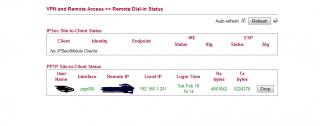
ping 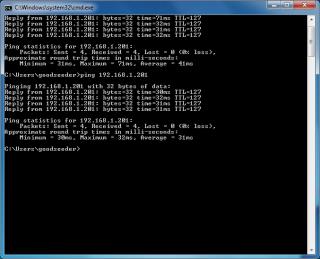
the sharing he said not interested to do now play first |
|
|
Feb 19 2012, 04:36 AM
|
|
Senior Member
1,820 posts Joined: May 2010 From: Kuala Lumpur
|
Still happy with my Draytek here
System Uptime : 44d 10:26:45 |
|
|
Feb 20 2012, 07:33 PM
|
|
Junior Member
261 posts Joined: Sep 2011
|
QUOTE(rjb123 @ Feb 19 2012, 04:36 AM) Still happy with my Draytek here still 1.5.1? jus upgrade to 1.5.2beta bro... enjoy the new stuffsSystem Uptime : 44d 10:26:45 they say will release 1.5.2 final for long keep saying coming soon... i give up waiting then upgrade... very2 stable and new stuff worth break the uptime counter This post has been edited by izzat80: Feb 20 2012, 07:36 PM |
|
|
Feb 21 2012, 12:22 PM
Show posts by this member only | IPv6 | Post
#96
|
|
All Stars
11,456 posts Joined: Oct 2007 From: KL
|
@izzat80
My IPv6 config for my Mikrotik RB750GL as requested. CODE /interface 6to4 add disabled=no local-address=175.139.x.x name=6to4 remote-address=unspecified /ipv6 address add address=2002:XXXX:XXXX::1/16 advertise=no comment=6to4public disabled=no eui-64=no interface=6to4 add address=2002:XXXX:XXXX:1::1/64 advertise=yes comment=6to4subnet disabled=no eui-64=no interface=ether2 /ipv6 route add disabled=no distance=1 dst-address=2000::/3 gateway=::192.88.99.1%6to4 175.139.x.x is current IP address. 2002:XXXX:XXXX:1::1 is the IPv6 address calculated based on the above IP. Just convert to hex. This needs to be updated every time you get an IP from UniFi. On my router, I run a script to update it automatically whenever the IPv4 address changes. Can you do schedule scripts on the 2130n? IPv6 DNS from OpenDNS: 2620::ccd::2 and 2620::ccc::2 As you can see, there're not that many things to set. Most of the settings goes into IPv6 >> WAN General Setup on the 2130n. Not sure about the route. You'll need to create a route to 192.88.99.1 which is the IPv6 any cast relay. Another option is to try Hurricane Electric. They have a forum there which might be helpful. Once your router is set up and is advertising the IPv6 subnet, your PCs should pick it up automatically. I'm using OS X and I think Vista and 7 should work with no configuration on your part. You might need to install something for XP. If you use 6to4 anycast relay, you get assigned a /48 which means you have 65536 /64 subnets at your disposal. You can assign an IPv6 address to everything in your house including the ants. Have fun. Looking forward to seeing your IPv6 tag. ps: I had probs with the browser preferring to connect to LYN with IPv4 instead of IPv6. Let me know if you encounter this. This post has been edited by soonwai: Feb 21 2012, 12:34 PM |
|
|
Feb 23 2012, 08:15 PM
|
|
Junior Member
261 posts Joined: Sep 2011
|
QUOTE(soonwai @ Feb 21 2012, 12:22 PM) @izzat80 soonwai very2 thanks for ur useful detail replyHave fun. Looking forward to seeing your IPv6 tag. ps: I had probs with the browser preferring to connect to LYN with IPv4 instead of IPv6. Let me know if you encounter this. I think it work!!!!! but where to setup 6to4 thing? do i hv ipv6 tag? first... i convert my ipv4 to ipv6 like u said... i use this link: http://www.subnetonline.com/pages/subnet-c...6-converter.php then i go to vigor ipv6 menu and choose static ipv6 and key in the ip 
but got no ipv6 gateway.... the gateway is telekom right? do they hv ipv6 gateway? so this one i jus leave empty after i click ok (apply setting for ipv6 static ip) my connection drop and reconnect and now in online stats i got ipv6 ip also above it my ipv4...see the online stat: 
so now how to test if it works? i pm u my ipv6 u try to ping? This post has been edited by izzat80: Feb 23 2012, 08:36 PM |
|
|
Feb 24 2012, 12:27 PM
|
|
All Stars
11,456 posts Joined: Oct 2007 From: KL
|
QUOTE(izzat80 @ Feb 23 2012, 08:15 PM) soonwai very2 thanks for ur useful detail reply No probs but I think your config is not right. Are you using the 6to4 relay?I think it work!!!!! but where to setup 6to4 thing? do i hv ipv6 tag? so now how to test if it works? i pm u my ipv6 u try to ping? Let's say you're using 6to4 relay. And your UniFi IPv4 address is: 175.139.160.5 Your IPv6 address prefix is always: 2002:AF8B:A005:1:: The AF8B:A005 part is obtained from 175.139.160.5 = AF.8B.A0.05 (dec to hex for each quad) This IPv6 address is always reserved for this particular IPv4 based on the simple formula above. The gateway for 6to4 is always 192.88.99.1. Hope that helps. I haven't had time to look at the 2130n web config. When I do, I'll see if I can work it out. Anyway if it works, try and ping Facebook. Their IPv6 address is: www.v6.facebook.com 2620:0:1cfe:face:b00c::3 On a Mac, I use ping6 instead of ping, not sure about Windows. You're in Windows right? Once you have it working (including IPv6 DNS), you should be able to browse as usual to www.v6.facebook.com. www.v6.facebook.com will not work if you're still on IPv4. Don't test on forum.lowyat.net because it's dual-stacked, i.e.: running both IPv4 and IPv6, so you can't tell easily if you're on one or the other. |
|
|
Feb 25 2012, 04:10 AM
|
|
Junior Member
261 posts Joined: Sep 2011
|
QUOTE(soonwai @ Feb 24 2012, 12:27 PM) No probs but I think your config is not right. Are you using the 6to4 relay? thanks bro... Don't test on forum.lowyat.net because it's dual-stacked, i.e.: running both IPv4 and IPv6, so you can't tell easily if you're on one or the other. i think i understand how it work but not sure how 6to4 relay is... is it SERVIS or just (configuration)?? see what i do now: 1) convert my ipv4 to ipv6 as per ur instruction.. so now its in format 2002:converted part here:1:: 2) go to vigor ipv6 wan setup and choose STATIC ipv6.. pls see screenshot 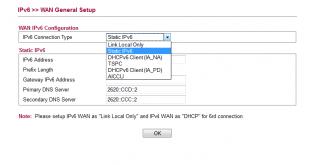
btw the other one i try but hv some kind of user name and password need... the tunnel i mean 3) i setup dns as u gave me.... primary: 2620::ccd::2 second: 2620::ccc::2 4) the ipv6 gateway as u said is 192.88.99.1 so i need to convert this as per step 1 to ipv6 format then key in router right? one thing... after i apply the new setting for static ipv6... the vigor auto drop the line and dial to tm again... so now my tm ip is not the same.... is this correct way for 4to6 relay bro? |
|
|
Feb 26 2012, 04:13 AM
Show posts by this member only | IPv6 | Post
#100
|
|
All Stars
11,456 posts Joined: Oct 2007 From: KL
|
QUOTE(izzat80 @ Feb 25 2012, 04:10 AM) i think i understand how it work but not sure how 6to4 relay is... is it SERVIS or just (configuration)?? It's a service, run by volunteers and free. IETF says it's to ease the transition of IP to IPv6. It's easy to setup but no so reliable because the 6to4 relays come and go. Free mah.And sorry for not coming back to you earlier. I just had a better look at the 2130n simulator and it doesn't support 6to4 relay but it does support tunnelbrokers such as Hurricane Electric, he.net. I think you use the option TSPC. Sign up for a HE account first. Tunnelbrokers such as HE use 6in4 and is actually more reliable than 6to4 relays since it's managed by an actual company which in the case of Hurricane Electric, decided to make it free. Actually quite a few 6to4 relays also belong to he.net. |
|
|
Feb 27 2012, 12:30 AM
|
|
Junior Member
261 posts Joined: Sep 2011
|
QUOTE(soonwai @ Feb 26 2012, 04:13 AM) It's a service, run by volunteers and free. IETF says it's to ease the transition of IP to IPv6. It's easy to setup but no so reliable because the 6to4 relays come and go. Free mah. icic... i finally get it thanks bro... i was jus want to have the ipv6 tag try it but in that case just wait for tm to jump ipv6 first... |
|
|
Feb 27 2012, 02:20 AM
|
|
All Stars
11,456 posts Joined: Oct 2007 From: KL
|
QUOTE(izzat80 @ Feb 27 2012, 12:30 AM) icic... i finally get it No probs, me too, just want to try only. There's really no benefit right now to use IPv6. If anything it's a bit slower since it has to go through multiple relays. thanks bro... i was jus want to have the ipv6 tag try it but in that case just wait for tm to jump ipv6 first... |
|
|
Mar 1 2012, 03:10 AM
|
|
Senior Member
1,941 posts Joined: Jan 2003
|
New beta firmware was released yesterday!
ftp://ftp.draytek.pl/Seria_2130/Firmware/...v2130_r2653.zip |
|
|
Mar 12 2012, 01:16 AM
|

Junior Member
219 posts Joined: Dec 2005 From: around selangor
|
VPN tested ok.. ping success .. but DOTA game cant see.. is there any prob that i misS??
|
|
|
Mar 12 2012, 08:16 PM
|
|
Junior Member
43 posts Joined: Mar 2011
|
QUOTE(fazryle @ Mar 12 2012, 01:16 AM) VPN tested ok.. ping success .. but DOTA game cant see.. is there any prob that i misS?? Windows firewall!If using Win7 click Start then just type Allow There in the list first choice. Add your game to the list |
|
|
Mar 15 2012, 09:10 PM
|
|
Junior Member
219 posts Joined: Dec 2005 From: around selangor
|
thnks.. will try .. hope sucess
|
|
|
Mar 18 2012, 01:40 AM
|
|
Senior Member
1,820 posts Joined: May 2010 From: Kuala Lumpur
|
Still going strong here the 2130N
72D WAN uptime not bad! |
|
|
Mar 18 2012, 02:19 PM
|
|
Junior Member
380 posts Joined: Nov 2004 From: selangor, malaysia
|
yeah, its an awesome device right
|
|
|
Mar 18 2012, 03:40 PM
|
|
Senior Member
1,820 posts Joined: May 2010 From: Kuala Lumpur
|
Yep, couldn't be happier
Although the Wifi signal in my condo isn't great due to such thick concrete walls But that's not the router's fault! |
|
|
Mar 29 2012, 03:24 AM
|
|
Junior Member
219 posts Joined: Dec 2005 From: around selangor
|
why sometime my wireless connected but data not received? i need to restart the router
|
|
|
Mar 29 2012, 05:55 PM
|
|
Senior Member
1,026 posts Joined: Jan 2003 From: Kuala Lumpur, Malaysia
|
fazryle, update your laptop or desktop wireless drivers
|
|
|
May 23 2012, 11:05 AM
|
|
Junior Member
380 posts Joined: Nov 2004 From: selangor, malaysia
|
Firmware Version: 1.5.2
Built Date: May 11, 2012 Applied Models: Vigor2130, Vigor2130n, Vigor2130Vn The Vigor2130 series are the routers with high speed in data transmission through WAN port and LAN ports. With hardware NAT acceleration, the rate of Vigor2130 series can be greater than 800 Mbps almost. New Features Add web content filter powered by BPjM. Add Traffic Graph. Add Linux file system ext2/ext3. Add USB temperature sensor and SMS alert. Add Management WAN for TR-069 management. Add Relay Agent for DHCP connection. Support auto-reboot. Support Web Portal & E-Bulletin. Support block HTTPS web host for URL filter. Support X.509 in IPSec. Support IPTV WAN and IGMP Proxy for IPTV application. Support Samsung B3730 4G (LTE) usb modem Support dual 3G/56K modem as backup WAN. Support policy route. Improvement Improved: Change printer server from lprng to dray-lpd to reduce memory usage. Improved: Support static IP address assignment for remote dial in PPTP. Improved: Add TFTP Firmware Upgrade mode in WUI. Improved: Support more 3G modems. Improved: Add new TR-069 parameters and speed up the response time. Improved: Add NetBios name display in data flow monitor page. Improved: Add more options for key life time and phase I proposal for IPSec. Improved: Add TwoDNS, dtdns.com, tzo.com, dynami.co.za, ht.net ddns.com.cn, dnsomatic.com, selfhost.de, dnsdynamic.org, dnsexit.com, ovh.com, namecheap.com as Dynamic DNS providers. Improved: Bandwidth management can apply to the second subnet. Improved: Add the field of service name in PPPoE mode. Improved: Add IPv6 feature on Diagnostics>>Ping and Diagnostics>>Trace Router. Fixed: iPhone4 cannot create PPTP tunnel. Fixed: "Replace" mode within Digit Map can't work correctly. Fixed: An error occurs in IP Address when registered from VoIP WAN. Fixed: RTP TOS of VoIP cannot be modified. Fixed: Incoming P2P VoIP call doesn’t work. Fixed: Web content filter powered by Commtouch supports HTTPS protocol. Fixed: An IP error occurs in PPPoE Connect on Demand mode. |
|
|
Jun 6 2012, 06:13 PM
|
|
Junior Member
33 posts Joined: Jan 2011
|
Hi all Draytek owner here...
i read the post here see u all use till so happy with so i oso interested to get 1 as well but i hv to few question here.... 1)Is the Draytek u guys using is Dual Band?? 2)I was planning to get a vpn because i need it for my xbox...is that easy to config?? 3)Netgear n Draytek compare which 1 is easy to setup?? Sry to my bad english here....hope all the sifu can help me here....i was hope to buy a gd router to use for longterm....TQ |
|
|
Jun 8 2012, 02:19 PM
|
|
Junior Member
43 posts Joined: Mar 2011
|
QUOTE(chester2007 @ Jun 6 2012, 06:13 PM) Hi all Draytek owner here... hii read the post here see u all use till so happy with so i oso interested to get 1 as well but i hv to few question here.... 1)Is the Draytek u guys using is Dual Band?? 2)I was planning to get a vpn because i need it for my xbox...is that easy to config?? 3)Netgear n Draytek compare which 1 is easy to setup?? Sry to my bad english here....hope all the sifu can help me here....i was hope to buy a gd router to use for longterm....TQ Since no sifu answered I will try to help 1 I don't think so. I dont see any dual band option in the WLAN setting 2. VPN works smooth, using it myself. 3. In the product page you can click Live demo and see the interface. decide for yourself! http://www.draytek.com.my/2130.html Then click Live Demo |
|
|
Aug 2 2012, 01:10 PM
|
|
Junior Member
380 posts Joined: Nov 2004 From: selangor, malaysia
|
Hey, for LAN 4 (IPTV) what's the blinking colour? Why mine is blinking orange? I thought it is supposed yellow like others..

This post has been edited by gotdamsg: Aug 2 2012, 01:20 PM |
|
|
Aug 5 2012, 12:39 AM
|

Junior Member
376 posts Joined: Jun 2006
|
Dear owners, i was thinking to replace our company unifi router to this model. Can it handle 40-50 users?
Coz the Asus RT-N13U B1 hangs randomly suspected it cannot handle the burden. |
|
|
Aug 5 2012, 12:58 AM
|
|
Senior Member
1,026 posts Joined: Jan 2003 From: Kuala Lumpur, Malaysia
|
alijoe, I would suggest :
Vigor 2920 / Vigor 2920n |
|
|
Oct 23 2012, 09:28 AM
|

Senior Member
1,022 posts Joined: Jan 2003
|
I have been using this 2130n for the past week.
Connected Apple Airport Extreme via cable with 2 SSID (2.4 and 5Ghz) Also using the 2130 wireless for a few other devices. I find that the Draytek wifi is horribly slow but accessing wifi via the Airport Extreme is super fast with practically NO LAG. Any advise as how to fix the Draytek wifi? Some forums say that a factory default reset is required which I just read this morning. I am on the latest firmware but many has suggested to revert to 1.5.1 Cheers |
|
|
Oct 24 2012, 11:08 AM
|
|
Junior Member
261 posts Joined: Sep 2011
|
QUOTE(natzakaria @ Oct 23 2012, 09:28 AM) I have been using this 2130n for the past week. try change channel bro... don use 1 or 6 coz many other wireless this the defaultConnected Apple Airport Extreme via cable with 2 SSID (2.4 and 5Ghz) Also using the 2130 wireless for a few other devices. I find that the Draytek wifi is horribly slow but accessing wifi via the Airport Extreme is super fast with practically NO LAG. Any advise as how to fix the Draytek wifi? Some forums say that a factory default reset is required which I just read this morning. I am on the latest firmware but many has suggested to revert to 1.5.1 Cheers |
|
|
Oct 24 2012, 11:12 AM
|
|
Senior Member
1,022 posts Joined: Jan 2003
|
Settled.
Reflashed and reconfigured now its super duper fast - worth my subs for unifi 20mbps. Video and TV streaming no buffer lol |
|
|
Dec 18 2012, 12:02 AM
|
|
Junior Member
178 posts Joined: Oct 2005 From: Johor Bahru
|
For home : 2130n / 2130
For lan shop or office : 2920n / 2920 If you are planning to get more than 100mbps (BIZ50 x 3) then 3200 / 3200n If you looking for imbaness 200mbps (BIZ50 x 4) then 3900 I owned all router above except 3900, soon to purchase from Mr Abdullah |
|
|
Dec 19 2012, 10:29 AM
|

Senior Member
8,025 posts Joined: Feb 2005 From: Planet Boleland
|
Anyone using Dual USB Modem ( 2# Huawei E372 on Maxis ) to do load balancing on this beauty?
How is the USB modem performance on this Router? Thanks Added on December 19, 2012, 10:32 am QUOTE(natzakaria @ Oct 24 2012, 11:12 AM) Settled. Nat, you ditched Mikrotik ?Reflashed and reconfigured now its super duper fast - worth my subs for unifi 20mbps. Video and TV streaming no buffer lol This post has been edited by digilife: Dec 19 2012, 10:32 AM |
|
|
Dec 19 2012, 11:34 AM
|
|
Senior Member
1,022 posts Joined: Jan 2003
|
Ditched the Mikrotik - its back in the box and soon will be offering in the WTS section
|
|
|
Dec 19 2012, 01:13 PM
|
|
All Stars
11,456 posts Joined: Oct 2007 From: KL
|
QUOTE(natzakaria @ Dec 19 2012, 11:34 AM) Ditched the Mikrotik - its back in the box and soon will be offering in the WTS section Hi nat, which model Mikrotik do you have? I'll be interested to take it off you. Let me know the details and best price please. |
|
|
Dec 19 2012, 02:12 PM
|
|
Senior Member
1,022 posts Joined: Jan 2003
|
I have this RB751U-2HnD
Just offer me via PM as I dont think this thread will welcome other makes and especially not sales related of other makers |
|
|
Jan 9 2013, 05:40 PM
|

Junior Member
438 posts Joined: Mar 2008 From: Klang
|
Where can I buy this thing , sir!
|
|
|
Jan 9 2013, 05:45 PM
|
|
Senior Member
8,025 posts Joined: Feb 2005 From: Planet Boleland
|
|
|
|
Jan 9 2013, 06:39 PM
|
|
Senior Member
1,022 posts Joined: Jan 2003
|
Thinking of selling mine - warranty until mid 2013 but still not sure
|
|
|
Jan 9 2013, 06:50 PM
|
|
Senior Member
8,025 posts Joined: Feb 2005 From: Planet Boleland
|
QUOTE(natzakaria @ Jan 9 2013, 06:39 PM) Thinking of selling mine - warranty until mid 2013 but still not sure nat, which model is yours ? the 751 ?PM me your best price thanks |
|
|
Jan 9 2013, 09:31 PM
|
|
Senior Member
1,022 posts Joined: Jan 2003
|
No I am thinking of selling my draytek - want to try others
|
|
|
Jan 10 2013, 11:33 AM
|

Senior Member
1,200 posts Joined: Feb 2010 From: Kuala Lumpur
|
this is a so old thread
btw tbh nvr heard this brand b4 hmm |
|
|
Jan 10 2013, 01:42 PM
|
|
Junior Member
178 posts Joined: Oct 2005 From: Johor Bahru
|
QUOTE(natzakaria @ Jan 9 2013, 09:31 PM) No I am thinking of selling my draytek - want to try others what draytek model? |
|
|
Jan 10 2013, 01:52 PM
|
|
Senior Member
1,022 posts Joined: Jan 2003
|
PM u instead
|
|
|
Jan 10 2013, 10:30 PM
|
|
Senior Member
1,026 posts Joined: Jan 2003 From: Kuala Lumpur, Malaysia
|
natzakaria, try ASUS RT-AC66U
|
|
|
Jan 14 2013, 12:24 AM
|
|
Junior Member
219 posts Joined: Dec 2005 From: around selangor
|
who know latest price for 2130n?
|
|
|
Jan 14 2013, 12:31 AM
|
|
Senior Member
8,025 posts Joined: Feb 2005 From: Planet Boleland
|
QUOTE(fazryle @ Jan 14 2013, 12:24 AM) who know latest price for 2130n? RM480 `~ promo price |
|
|
Jan 14 2013, 12:34 AM
|
|
Junior Member
219 posts Joined: Dec 2005 From: around selangor
|
look like same price last time i buy ,, thinking to buy for my 2nd house..
|
|
|
Jan 14 2013, 12:40 AM
|
|
Senior Member
8,025 posts Joined: Feb 2005 From: Planet Boleland
|
QUOTE(fazryle @ Jan 14 2013, 12:34 AM) look like same price last time i buy ,, thinking to buy for my 2nd house.. so you are using it now?may i ask, how is the support on usb modem? |
|
|
Jan 14 2013, 12:44 AM
|
|
Junior Member
219 posts Joined: Dec 2005 From: around selangor
|
im using it till now draytek 2130n. owh , sory cant help regarding usb modem , never use it . most of time if got prob , do mail the support . they will assist u.
This post has been edited by fazryle: Jan 14 2013, 12:45 AM |
|
|
Jan 14 2013, 12:51 AM
|
|
Senior Member
8,025 posts Joined: Feb 2005 From: Planet Boleland
|
QUOTE(fazryle @ Jan 14 2013, 12:44 AM) im using it till now draytek 2130n. owh , sory cant help regarding usb modem , never use it . most of time if got prob , do mail the support . they will assist u. have you used Asus RT N16 before ?my N16 works perfect with USB modem ZTE MF680 although this modem is not on its list of compatible modems what do you think are the greatest feature on Draytek over other brands? thanks |
|
|
Jan 14 2013, 01:04 AM
|
|
Junior Member
219 posts Joined: Dec 2005 From: around selangor
|
never use asus router before . willing to try soon .
.. currently my house using more then 10client ( including hp/table) . this unit(draytek) seem stable and consistent . i already compare with microtik & Default Router TM(Dlink). i like Draytek more.. .. for extra usb thing , just use twice for torrenting / NAS . just for trying purpose . seem ok too..This post has been edited by fazryle: Jan 14 2013, 01:05 AM |
|
|
Jan 14 2013, 01:08 AM
|
|
Senior Member
8,025 posts Joined: Feb 2005 From: Planet Boleland
|
I understands that its easier to configure compared to Mikrotik but if you knoe the tricks on Mikrotik, it beat Draytek ~ based on the same class of router. For router ~ Stability and Options to suit one uses is the key in choosing them.
|
|
|
Jan 14 2013, 01:10 AM
|
|
Senior Member
1,386 posts Joined: Nov 2012
|
QUOTE(fazryle @ Jan 14 2013, 01:04 AM) never use asus router before . willing to try soon . wah u using unifi what package u use 20mbps ??? biz or vip .. currently my house using more then 10client ( including hp/table) . this unit(draytek) seem stable and consistent . i already compare with microtik & Default Router TM(Dlink). i like Draytek more.. .. for extra usb thing , just use twice for torrenting / NAS . just for trying purpose . seem ok too.. |
|
|
Jan 14 2013, 01:16 AM
|
|
Junior Member
219 posts Joined: Dec 2005 From: around selangor
|
QUOTE(digilife @ Jan 14 2013, 01:08 AM) I understands that its easier to configure compared to Mikrotik but if you knoe the tricks on Mikrotik, it beat Draytek ~ based on the same class of router. For router ~ Stability and Options to suit one uses is the key in choosing them. more user friendly . its only for home . if office use , i more to scripting/code base (cisco/3com)router ..QUOTE(pakji @ Jan 14 2013, 01:10 AM) wah u using unifi what package u use 20mbps ??? biz or vip nah . only 10Mbps . mostly 24/7 running full speed internet . |
|
|
Jan 14 2013, 01:17 AM
|
|
Senior Member
1,386 posts Joined: Nov 2012
|
QUOTE(fazryle @ Jan 14 2013, 01:16 AM) more user friendly . its only for home . if office use , i more to scripting/code base (cisco/3com)router .. oh biz10 or vip10nah . only 10Mbps . mostly 24/7 running full speed internet . |
|
|
Jan 14 2013, 01:19 AM
|
|
Junior Member
219 posts Joined: Dec 2005 From: around selangor
|
QUOTE(pakji @ Jan 14 2013, 01:17 AM) oh biz10 or vip10 home user . VIP 10 |
|
|
Jan 14 2013, 01:24 AM
|
|
Senior Member
1,386 posts Joined: Nov 2012
|
QUOTE(fazryle @ Jan 14 2013, 01:19 AM) home user . VIP 10 ohh thx |
|
|
Jan 14 2013, 09:08 AM
|

Senior Member
1,393 posts Joined: Aug 2006 From: Sungai Petani
|
Just contacted draytek malaysia and they confirms the rm480 promo is still available.
|
|
|
Jan 14 2013, 09:58 AM
|
|
Junior Member
219 posts Joined: Dec 2005 From: around selangor
|
QUOTE(nyunyu @ Jan 14 2013, 09:08 AM) Just contacted draytek malaysia and they confirms the rm480 promo is still available. without discount?i think the promo never end .. since so many competitor with range 500 |
|
|
Jan 15 2013, 11:15 AM
|
|
Junior Member
178 posts Joined: Oct 2005 From: Johor Bahru
|
if u guys really have funds, buy 2920.. worth every penny,
the best is smart qos function, i can help u configure for free =) ============================================= just received my 3900  This post has been edited by izzani: Jan 15 2013, 11:16 AM |
|
|
Jan 15 2013, 11:22 AM
|
|
Junior Member
219 posts Joined: Dec 2005 From: around selangor
|
nice one. how much is it? does it come with wreless?
|
|
|
Jan 15 2013, 11:55 PM
|
|
Junior Member
380 posts Joined: Nov 2004 From: selangor, malaysia
|
I believe 3900 is RM2980 with 10% discount promo. I don't know it's still valid or not
|
|
|
Jan 16 2013, 08:55 AM
|
|
Junior Member
219 posts Joined: Dec 2005 From: around selangor
|
suitable for enterprise. any special features?
|
|
|
Jan 26 2013, 08:10 AM
|

Senior Member
3,008 posts Joined: Sep 2005 From: T.T.D.I, Bukit Damansara
|
Received my Vigor2130n yesterday.
Upgraded from tplink 1043ND.. lol. Loving the session limit + bandwidth limit feature.. now I can let these buggers PPS and torrent till kingdom come. So far I haven't seen the CPU load go beyond 55%. (around 30 users but some are away) |
|
|
Mar 21 2013, 09:27 PM
|

Senior Member
650 posts Joined: Sep 2006 From: Klang>Melbourne>OUG>PJ>KL
|
QUOTE(nyunyu @ Jan 14 2013, 09:08 AM) Just contacted draytek malaysia and they confirms the rm480 promo is still available. Just got myself RM480,Any wifi repeater recommend for virgor 2130n? |
|
|
Mar 21 2013, 09:28 PM
|
|
Senior Member
650 posts Joined: Sep 2006 From: Klang>Melbourne>OUG>PJ>KL
|
QUOTE(nyunyu @ Jan 14 2013, 09:08 AM) Just contacted draytek malaysia and they confirms the rm480 promo is still available. Just got myself RM480,Any wifi repeater recommend for virgor 2130n? |
|
|
Mar 26 2013, 11:43 AM
|
|
Junior Member
219 posts Joined: Dec 2005 From: around selangor
|
QUOTE(DjKenji @ Mar 21 2013, 09:28 PM) Just got myself RM480, i think , any wifi repeater suitable . if u have less budget , get tplink .. if higher , asus canAny wifi repeater recommend for virgor 2130n? |
|
|
Mar 26 2013, 12:00 PM
|
 
Elite
8,408 posts Joined: Jul 2008 
|
QUOTE(DjKenji @ Mar 21 2013, 09:28 PM) Just got myself RM480, Get a powerline and setup a second AP using a cheapo router Eg TP-LINK 1043NDAny wifi repeater recommend for virgor 2130n? |
|
|
Mar 26 2013, 12:14 PM
|
|
Senior Member
1,022 posts Joined: Jan 2003
|
Thinking of selling mine
|
|
|
Mar 26 2013, 12:45 PM
|
|
Senior Member
8,025 posts Joined: Feb 2005 From: Planet Boleland
|
QUOTE(natzakaria @ Mar 26 2013, 12:14 PM) Thinking of selling mine Which one, you have a few routers |
|
|
Mar 26 2013, 12:46 PM
|
|
Senior Member
8,025 posts Joined: Feb 2005 From: Planet Boleland
|
QUOTE(blacktubi @ Mar 26 2013, 12:00 PM) Get a powerline and setup a second AP using a cheapo router Eg TP-LINK 1043ND Care to elaborate the setup ?Thanks |
|
|
Mar 26 2013, 12:51 PM
|
|
Elite
8,408 posts Joined: Jul 2008
|
QUOTE(digilife @ Mar 26 2013, 12:46 PM) Care to elaborate the setup ? Vigor > PowerLine.Thanks PowerLine > 1043ND at second spot. Disable DHCP those on 1043ND and setup it as AP for Vigor. |
|
|
Mar 26 2013, 12:56 PM
|
|
Senior Member
1,022 posts Joined: Jan 2003
|
QUOTE(digilife @ Mar 26 2013, 12:45 PM) Which one, you have a few routers True Thinking of selling the 2130n |
|
|
Mar 26 2013, 01:48 PM
|
|
Senior Member
8,025 posts Joined: Feb 2005 From: Planet Boleland
|
QUOTE(blacktubi @ Mar 26 2013, 12:51 PM) Vigor > PowerLine. need any LAN cable or via wireless ?PowerLine > 1043ND at second spot. Disable DHCP those on 1043ND and setup it as AP for Vigor. QUOTE(natzakaria @ Mar 26 2013, 12:56 PM) True Can you PM me an attractive price to ponder ? Thinking of selling the 2130n Btw, can i use Open VPN on this Vigor? |
|
|
Mar 26 2013, 01:57 PM
|
|
Elite
8,408 posts Joined: Jul 2008
|
QUOTE(digilife @ Mar 26 2013, 01:48 PM) need any LAN cable or via wireless ? Both router is linked via power line Can you PM me an attractive price to ponder ? Btw, can i use Open VPN on this Vigor? Simple and low cost |
|
|
Mar 26 2013, 02:07 PM
|
|
Senior Member
8,025 posts Joined: Feb 2005 From: Planet Boleland
|
QUOTE(blacktubi @ Mar 26 2013, 01:57 PM) Both router is linked via power line apa ni powerline , can show jpeg ?Simple and low cost |
|
|
Mar 26 2013, 02:09 PM
|
|
Elite
8,408 posts Joined: Jul 2008
|
QUOTE(digilife @ Mar 26 2013, 02:07 PM) apa ni powerline , can show jpeg ?  Basically it uses your house power line as a LAN cable. |
|
|
Mar 26 2013, 02:25 PM
|
|
Senior Member
8,025 posts Joined: Feb 2005 From: Planet Boleland
|
Will CAT6E cable do a better job ?
Btw, how much each Powerline cost ? |
|
|
Mar 26 2013, 04:19 PM
|
|
Junior Member
261 posts Joined: Sep 2011
|
QUOTE(digilife @ Mar 26 2013, 02:25 PM) Will CAT6E cable do a better job ? from what i test myself this how they are arrange:Btw, how much each Powerline cost ? 1>> LAN cable: bestest stability/speed 2>> good power line (need to make sure ur building is not many phase of electrical.. else the powerline will not work).... 3>> wireless bridge LAN cable always king bro ALWAYS but sometime ppl dont have choice and force use powerline.. which is not bad but of cos if u can use LAN.. no need to think about it go LAN |
|
|
Mar 26 2013, 04:51 PM
|
|
Senior Member
8,025 posts Joined: Feb 2005 From: Planet Boleland
|
QUOTE(izzat80 @ Mar 26 2013, 04:19 PM) from what i test myself this how they are arrange: Thanks bro, 1>> LAN cable: bestest stability/speed 2>> good power line (need to make sure ur building is not many phase of electrical.. else the powerline will not work).... 3>> wireless bridge LAN cable always king bro ALWAYS but sometime ppl dont have choice and force use powerline.. which is not bad but of cos if u can use LAN.. no need to think about it go LAN connected via wire is still the best |
|
|
Mar 28 2013, 01:31 AM
|
|
Senior Member
650 posts Joined: Sep 2006 From: Klang>Melbourne>OUG>PJ>KL
|
QUOTE(blacktubi @ Mar 26 2013, 12:51 PM) Vigor > PowerLine. dude thanks. PowerLine > 1043ND at second spot. Disable DHCP those on 1043ND and setup it as AP for Vigor. what firmware will do on TP-LINK 1043ND Unifi user Question Can i use two 1043ND router at second & third spot via powerline? |
|
|
Mar 28 2013, 07:37 AM
|
|
Elite
8,408 posts Joined: Jul 2008
|
QUOTE(DjKenji @ Mar 28 2013, 01:31 AM) dude thanks. You don't need customize anything since you doesn't use it to connect Unifiwhat firmware will do on TP-LINK 1043ND Unifi user Question Can i use two 1043ND router at second & third spot via powerline? It only serves as a WIFI AP Sure you can setup a thirdAP |
|
|
Jan 24 2018, 09:48 AM
|
|
Senior Member
3,008 posts Joined: Sep 2005 From: T.T.D.I, Bukit Damansara
|
anyone still using this?
if yes, any issues so far? I bought 4 units that are still operating till now but it's not for my personal use. I wonder if the app blocker (or whatever the name is I forgot, to block pps torrent etc) still work since those apps are constantly updated and the vigor2130n firmware is no longer being updated? thinking of migrating to mikrotik if they fail. the oldest unit was bought in 2012 IIRC. |
|
|
Jul 14 2018, 09:24 PM
|
|
Senior Member
3,008 posts Joined: Sep 2005 From: T.T.D.I, Bukit Damansara
|
another bump! lol
really, you guys don't use this anymore? vigor 2130n is ready for 800Mbps with the hardware NAT, eh this is an excerpt from the manual With hardware NAT acceleration, the rate of Vigor2130 series can be greater than 900 Mbps almost. With the development of NGN (Next Generation Network), you may recently hear the news about FTTx deployment in your local area or even have already subscribed the unbundling last mile service (e.g. VDSL2) from local ITSP for FTTx. As adopting FTTx, the main question for end users is whether your legacy router could fully utilize its bandwidth or not. |
| Change to: |  0.1039sec 0.1039sec
 0.74 0.74
 6 queries 6 queries
 GZIP Disabled GZIP Disabled
Time is now: 6th December 2025 - 01:25 PM |
 Quote
Quote
