Welcome Guest ( Log In | Register )

Bump Topic Topic Closed RSS Feed
7 Pages < 1 2 3 4 5 > » Bottom

Outline · [ Standard ] · Linear+

 SAMSUNG GALAXY NOTE™ | V3, RRP RM2299

views
     
stringfellow
post Nov 22 2011, 11:27 PM

Ultrawide | 4K | VR
********
Senior Member
11,305 posts

Joined: Jan 2003
QUOTE(jasonhoch @ Nov 22 2011, 04:33 PM)
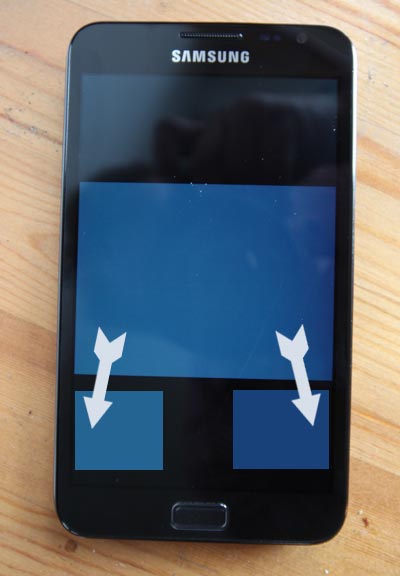
Yes. The touch screen is not responsive at the bottom area when ac adapter is plugged in.

I am one of the lucky guys who got this issue. I bought from digi at the second day of launching. sad.gif
*
Careful. Look at the charger, and you'll see that the third pin that is foldable is nothing but a dummy plastic. That pin is supposed to be the grounding pin, and in some old or improperly installed wall outlets, without the grounding pin, leaking current that is supposed to travel back through the grounding pin will turn your device into a live wire electrical conducting device. This is apparent on Macs which are made of aluminum, which why users tend to get these tiny electrical shocks when touching the aluminum body.

The Note however is made of plastic,therefore less conductive. Even so, electricity will travel through the easiest route, which in turn, from the microUSB point plugged into the Note, the closest metal conducting surface will be the lower part of the screen, hence the haywiring screen/touch capability.

Part of the reason why it is desirable to get a three pin plug charger in the first place, but also need to make sure the third pin earths/grounds the device it's charging too. In these modern days, companies that sells electronics assumes that proper grounding of power outlet at their potential customer's homes are done based on a first world standards, unfortunately Malaysia isn't. Only houses specifically builds and asks for these groundings to be built will have them, and therefore will not exhibit these current leakages. It is made worse if you are using extensions, or extending wall outlets from a single old outlet build 10-20 years ago.

My advice is to pick an outlet that is not shared(extension cord), and see if the touch screen still exhibit such flaws. Keep moving to one that will allow your touch screen to work properly and stay charging it at that outlet ONLY.
stringfellow
post Nov 23 2011, 01:17 AM

Ultrawide | 4K | VR
********
Senior Member
11,305 posts

Joined: Jan 2003
QUOTE(ozone9 @ Nov 23 2011, 01:01 AM)
Dear Stringfellow,
Thanks for your recomendation...n great sharing!
Tried the "3" Music player.....extremely good,infact better than iOS music player.Automatically download cover:)

About yr modding,r u using ADW EX launcher,3D UI(can`t seems to find)
Pls advise...Thanks
*
Follow this tutorial.


What you need is ADW EX and Multi Live Wallpaper. Then follow his recommendations on that YouTube clip. I modified his recommendations based on what I want, so I kept my dock (he didn't), set my icon settings (text size/size of icon, etc) to look nice enough for both portrait and landscape (he maintained and locked his orientation to landscape only). My Multi Live Wallpaper is set on random, getting wallpaper rotation on a single picture folder (he sets his 1st and 3rd screen on individual specific seeing). I kept my saturation and opacity to the max, to complement Samsung's own "Vivid" display screen settings. I maintained his icon theme pack (ADW Elegant), and since I love my widgets as transparent background as possible with text unaltered, this is just perfect for me.

I use "3" based on his recommendations, using the Wall view. I also use his Messaging Metro Beta to replace the stock Note messaging. Also use the WP7Contacts and WP7Dialer, and changed the stock appdrawer that comes with Note, and ADW's own appdrawer (grid icons arrangements are boring to me) to AltDrawer by downloading it from here. Your default font will be used for AltDrawer, so choose wisely, I use my Handel Gothic font to maintain that futuristic looks.

I share a lot of similarity and taste of what coldfustion has in modding the looks of his Note, but added my own touches to make my own Note look unique.

End result? This is how my Note now looks like:


I still haven't changed the lock screen though, I like the preset Note lock screen. Kinda giving the impression to unsuspecting users thinking that my Note is still stock, but once unlocked....WHOA! tongue.gif

This post has been edited by stringfellow: Nov 23 2011, 01:19 AM
stringfellow
post Nov 23 2011, 01:54 AM

Ultrawide | 4K | VR
********
Senior Member
11,305 posts

Joined: Jan 2003
Looking for a pouch or holster to carry the Note around, otherwise it'll be in the Muzetto pocket.

Looking if this is available locally.

http://www.ebay.co.uk/itm/180753381765?ssP...984.m1432.l2649

Am pretty happy with the Note as it is, without a case. Would like that Samsung logo at the back to show anyway, otherwise people may mistake me carrying an old fat iPaQ at first glance. tongue.gif
stringfellow
post Nov 23 2011, 02:57 PM

Ultrawide | 4K | VR
********
Senior Member
11,305 posts

Joined: Jan 2003
QUOTE(stella_purple @ Nov 23 2011, 02:24 PM)
is anyone having screen problem with samsung galaxy note?  unsure.gif

http://forum.xda-developers.com/showthread.php?t=1336187
*
Those ban dings are because of the Galaxy Note screen supporting up to 24bit colors, and the white wallpapers being used are of 16bit color or lower. You need to find higher resolution wallpapers for the Note. This is not your average Android device anymore, this is a super phone by all definition. Including the screen. I had to select and find all my wallpapers, even my widgets to check if these color banding appears. My previous Google Search bar widget also has ban dings even when it is supposed to be transparent so I had to modify it.


Added on November 23, 2011, 3:01 pm
QUOTE(duxz @ Nov 23 2011, 02:05 PM)
cynox, i went to check out adw ex... looks great overall but the icons damn small. I m old and need reading glasses to find my icons lol
*
QUOTE(Cynox @ Nov 23 2011, 02:12 PM)
yes, dun know why all the icons are so small.  sweat.gif  Me old man also - but so far haven't find an icon packs with BIG icons yet.
*
Change the icons size in the settings. You can change it further as a system-wise option in Spare Parts +. Otherwise if you're comfortable with it, set it so that only the icon shows and not the labels, you can allocate it so that it takes bigger space.

Other than that, I'm glad I'm not that old. tongue.gif Fat icons makes it looks like child's device.


Added on November 23, 2011, 3:02 pm
QUOTE(mydragoon @ Nov 23 2011, 08:17 AM)
actually, u can add other epub books. smile.gif

you just need to let kobo detect the epub file first. i had one epub file on my SD card. when i click on import function in kobo, it will ask for permission to scan... allow it... and shortly after that, the epub is detected and added to my shelf (i think it will actually ask you what books to add).
*
Not ePub purchased from iBookStore, there's a level of DRM on that ePiub that will not allow addition into Kobo. Standard DRM-free ePubs can be imported into any reader as long as the reader supports it.

This post has been edited by stringfellow: Nov 23 2011, 03:02 PM
stringfellow
post Nov 23 2011, 03:33 PM

Ultrawide | 4K | VR
********
Senior Member
11,305 posts

Joined: Jan 2003
QUOTE(kevinboey86 @ Nov 23 2011, 12:58 PM)
but on samsung side i can't seem to find galaxy note phone model on their drop down menu
*
If you're trying to get additional download info, the model info is there. If you're planning to use Samsung Dive, all you need to do is sign in into your Samsung account in your Note, log into your Dive account and it will automatically detect your Note. You can edit your Note information (your phone number for example) inside the Dive website.

This post has been edited by stringfellow: Nov 23 2011, 03:36 PM
stringfellow
post Nov 23 2011, 05:18 PM

Ultrawide | 4K | VR
********
Senior Member
11,305 posts

Joined: Jan 2003
QUOTE(razin @ Nov 23 2011, 05:03 PM)
user posted image

Sygic is the best for Note....
*
But Sygic sometimes loses location signal because of its low powered needs. So it's either low power/lose signals sometimes but save battery, or high power but maintain signal?

I'm not really griping that much, I love Sygic. Map details can be improved but to get where I need to go , it's relatively accurate. If I need any more accuracy, I'd turn to Google Maps as backup.
stringfellow
post Nov 23 2011, 06:01 PM

Ultrawide | 4K | VR
********
Senior Member
11,305 posts

Joined: Jan 2003
QUOTE(xiphone4 @ Nov 23 2011, 05:43 PM)
Guys I have a question, what is this Samsung sync for? And I can't seems to sync, what is the function?
*
Create an account at www.Samsung.com/my. Then log into that Samsung sync option. Open www.samsungdive.com. Log into that with the same credentials. You can now track your Samsung device, call or send remote SMS via the Web browser or remote wipe/lock the phone.

This post has been edited by stringfellow: Nov 23 2011, 06:36 PM
stringfellow
post Nov 23 2011, 07:24 PM

Ultrawide | 4K | VR
********
Senior Member
11,305 posts

Joined: Jan 2003
QUOTE(mysai @ Nov 23 2011, 06:49 PM)
Man, that's cool.  Other than Lookout, this is a cool one to remotely reach your phone.  But what if the SIM card has been changed and the number?
*
Then edit the number at Samsungdive.com. It's that simple. The tracking only works if you sign in through the device itself. To invoke ringing or SMS on the phone, you need the signed in device to have the right phone number, otherwise it won't ring/SMS.

Otherwise, it will just track and remote wipe only.
stringfellow
post Nov 23 2011, 08:57 PM

Ultrawide | 4K | VR
********
Senior Member
11,305 posts

Joined: Jan 2003
In Pavilion, saw a group of windowshoppers, with one of them using the Note. Sat next to me, saw my customization and looked back at their stock TouchWiz, suffice to say that "envious" is the least likely description of what the owner felt when saw mine.
More like "mouth hung open in burning jealousy" tongue.gif

Moral of the story: Make the device yours. Especially when the stock UI look is as dull as watching paint dry. tongue.gif
stringfellow
post Nov 24 2011, 11:57 AM

Ultrawide | 4K | VR
********
Senior Member
11,305 posts

Joined: Jan 2003
I see lots of people monitoring battery, monitoring misbehaving apps, flashing ROM here and there in the name of trying to save battery or checking which one is smoother than the other, etc.....when do you guys start USING the Note? There will come a time where the constant monitoring and tweaking has to stop and you start "using" your Note isn't it? Stick with A ROM/configuration, tweak it properly ONCE, and be done with.

When does the tweaking stops and the using starts? rolleyes.gif
stringfellow
post Nov 24 2011, 12:04 PM

Ultrawide | 4K | VR
********
Senior Member
11,305 posts

Joined: Jan 2003
QUOTE(nickgoh @ Nov 24 2011, 12:00 PM)
anyone of you face the same screen hue problem?

http://forum.xda-developers.com/showthread.php?t=1336187
*
Explained before. Most possible suspect is color banding because of low-resolution lower bit color assets. Good example is the XDA app, try check it with your Note. When you open the app, there's color banding of yellow, orang and brown, because the image asset of the app is still catering to the lower-spec Android phones. IF they change the image asset to higher 24-bit image asset, the color banding disappears, but shittier Android phone will not be able to cope on displaying the higher 24-bit images. Hence why the image asset is stuck at lower bit image.

To avoid this, pick a higher resolution asset/wallpaper, preferably 24bit image. Any lower assets will introduce color banding back into the mix.

This post has been edited by stringfellow: Nov 24 2011, 12:06 PM
stringfellow
post Nov 24 2011, 12:15 PM

Ultrawide | 4K | VR
********
Senior Member
11,305 posts

Joined: Jan 2003
QUOTE(nickgoh @ Nov 24 2011, 12:00 PM)
anyone of you face the same screen hue problem?

http://forum.xda-developers.com/showthread.php?t=1336187
*
This guy is trying to illustrate the same problem you described, but I don't see any issues here.


The moire effect is from the poor video capture of his recording device, and I personally tried on my Note, there aren't any color banding even on pure white wallpapers or that Google homepage. In fact, from that Youtube clip, I don't even see what the problem is, and I've seen his video in full-blown 1080p. Am I blind?

If the issue is the uneven white color gradient from the center of the screen towards the screen edge, then it's valid. AMOLED doesn't emit backlight, each individual pixels produces its own light/color. But before jumping onto conclusion, maybe what he needs is to check on a total solid background and see if there's uneven brightness. Like this.

user posted image

IF that wallpaper has color gradient, then it is not a defect, it is a design. IF it is indeed a solid color wallpaper with no color gradient, then Houston, we have a problem.

I'm just glad that mine is perfect.


Added on November 24, 2011, 12:19 pm
QUOTE(blunderboy @ Nov 24 2011, 12:15 PM)
Ouch... The usage go along with it...  whistling.gif 

Maybe for those who already familiar with Android, They will be have no problem but for a first timer like me, I would like to explore until I know the phone very well... Tweaking the is one area of it...
*
Yes, I understand, but when are you gonna stop tweaking and start using it? It is after all, a phone and tablet right? When are you gonna start using it as a phone and tablet?

My advice, stop worrying too much about the device, pick a ROM/kernel/theme and be done with. New ROMs/kernels will never stop appearing, so does that means you'll never stop tweaking? Buy an RM2k device just to tweak? Just like benchmark junkies on gaming desktops who continue tweaking their desktops just to get the highest 3DMark score, instead of using their already awesome gaming desktop to do what it is supposed to, playing games?

This post has been edited by stringfellow: Nov 24 2011, 12:34 PM
stringfellow
post Nov 24 2011, 12:40 PM

Ultrawide | 4K | VR
********
Senior Member
11,305 posts

Joined: Jan 2003
QUOTE(uniquexme @ Nov 24 2011, 12:37 PM)
where should i place photos and songs in my sd card?
*
Anywhere? That's why when you first turn on your Android device, it'll do a media search running.

Plus if you use third party media players, you can point it to a folder you created on a particular location. As for photos, you can place them anywhere, and Gallery will cull them together based on their location.
stringfellow
post Nov 24 2011, 12:51 PM

Ultrawide | 4K | VR
********
Senior Member
11,305 posts

Joined: Jan 2003
QUOTE(razin @ Nov 24 2011, 12:46 PM)
stringfellow,
I think it is human nature to explore, especially male smile.gif
When I successfully update my SGS to 2.3.4 I stop tweaking. Froyo have problem with GPS and heat...
Same here...after getting the "suitable" setting for my Note..that's it....
Anyone having issue with "Malaysian Today" portal? It quitted on me few times..donno if phone, or browser, or portal ads....
*
Yes, but you don't continually explore until you never settle down somewhere. I encourage folks wanting to find out about the inner workings of the things they like, but that shouldn't detract them from the reason why they buy it in the first place: to use it.

You had the right mindset, you "settled down" after a particular standard is met. Some continue tweaking and changing, without even using their devices. C'mon, that is the job of the device manufacturer and Android, not you. You're an end-user, a consumer, not a developer.
stringfellow
post Nov 24 2011, 01:48 PM

Ultrawide | 4K | VR
********
Senior Member
11,305 posts

Joined: Jan 2003
QUOTE(mydragoon @ Nov 24 2011, 01:33 PM)
i consider myself very new to android. my opinion is... as first timer... i use the phone as it is first. use it for months... then know what i like or dislike... then only start to look for solutions that addresses my likes and dislikes.


Added on November 24, 2011, 1:39 pm
i noticed that for songs and using the stock music player...
* on SD card, you can put it anywhere
* on phone, its the music folder located inside Samsung folder.

songs located in these folders will get 'recognised' by the player.

i found out last night... coz i placed some songs i wanted as ringtones in the ringtones folder. the stock music player would not detect them. but i could go to the ringtone folder, click and play the songs.
*
I don't use the stock music player, looks dull to me, plus IIANM, no ability to get album art, which is important to me. Even in the several cases that I do wanna check out the music I transferred and use the default stock music player, my music is centralized in one folder only, in my 64GB SDXC, so no problems there.

Which is why the advantage is with third party players, videos or audio. "DICE"(video) and "3"(audio) have options to point to the location of your movies and songs in a separate folder. Neater and easier to manage that way.


Added on November 24, 2011, 1:57 pm
QUOTE(uniquexme @ Nov 24 2011, 01:29 PM)
ok thank you.

Guys, wanna share some info with you all. Juz few days ago before i come overseas for outstation work, i transfer all my apps to my newly bought Transcend 16GB Class 10 Micro SD Card (@ RM99 from Lowyat), it keeps restarting itself, so i did a reset, erase everything that i have downloaded and install everything again, its ok now. so i might be suspecting that it might be the fake memory card. Also i told u guys about the lag, esp when u press the application icon, it stills display blank page instead of application list. Now everything is ok. so i think its best to store all apps inside the phone memory and media on the SD Card.

But it might also be i downloaded a lot of apps maybe a few cause the continuous reset. since i was only give less than 30sec upon each reset, i dun have enough time to move back the apps to phone memory.

so best bet is to save in phone memory. thanks
*
The easier route to alleviate this is to actually format the card from inside the Note itself. I had random reboots on the Note with the 16GB and 64GB cards I had. The 16GB wasn't formatted in the first place, I purchased, I slip it in, detected in the Storage setting, an I assume it's good to go. That's where the reboots starts. The 64GB wasn't even detected unless I format it inside the Note first. After format, no more reboots.

Android OS is very finicky when it comes to handling media scanning on external storage devices. If it detects a non-compatible or corrupt IO, kernel panics happens, hence the reboot. Sometimes it's the power draw from other services/apps(misbehaving ones) that affect IO to the card reader, and when that happens, again kernel panics, and reboot. Which is why, sometimes it is beneficial to have phones that does not rely on external cards, like the Galaxy Nexus or the iPhone. You want stability, not random reboots. Eliminating random reboots with Android phones with card slots sometimes is like playing Russian roulette, you pick an SD card and pray it is fully compatible with your phone, and not cause kernel panics. Which is why, picking from an established brand like Sandisk is all the more important. Not because it is more expensive, but it is more stable, than the relatively less-wellknown brands like Apacer even if they are cheaper.

This post has been edited by stringfellow: Nov 24 2011, 01:57 PM
stringfellow
post Nov 24 2011, 02:52 PM

Ultrawide | 4K | VR
********
Senior Member
11,305 posts

Joined: Jan 2003
It's part of the Note's sound scheme lah. IF you replace it the framework-res.apk, then you get any other sound/lock animation you want.

All other phones have their own specific lock sounds what. Don't tell me you think there's a hard drive inside the Note! doh.gif
stringfellow
post Nov 24 2011, 06:11 PM

Ultrawide | 4K | VR
********
Senior Member
11,305 posts

Joined: Jan 2003
QUOTE(jjamain @ Nov 24 2011, 06:10 PM)
That called flasholic for the good of community who looking for the best and different from the rest.
*
When do you start using your phone?
stringfellow
post Nov 24 2011, 06:21 PM

Ultrawide | 4K | VR
********
Senior Member
11,305 posts

Joined: Jan 2003
QUOTE(jjamain @ Nov 24 2011, 06:14 PM)
It took 5-10 mins for me to flash for better performance and extended UI.

I hv unifi where download big file is not a problem smile.gif
*
What about restoring apps? My last count on the number of apps and services I've backed up on TitaniumBackup is close to 300 elements, not to mention ebooks, PDFs, emails, SMSes, work files, and app save datas. To restore those will take time. If you leave your Note barebones with no apps, of course la flash/restore takes 5-10 minutes. Those who have finally decided to USE their devices instead of going flash-crazy, will have a hard and long time restoring their apps and files back in working order. Do you have nothing much installed on your Note?

Bottom line is, a line has to be drawn somewhere. I always like improved performance, but when custom ROMs appearing like mushroom after a rainy day, when do you stop flashing and start USING your Note?
stringfellow
post Nov 24 2011, 06:31 PM

Ultrawide | 4K | VR
********
Senior Member
11,305 posts

Joined: Jan 2003
QUOTE(jjamain @ Nov 24 2011, 06:28 PM)
In your case. Find rom that flash with no wipe. No changes on Data and apps..
*
My question remains. Have you ever used your phone, or all this while, all you did was flashing nonstop? When does an Android phone becomes a phone, when all it has become is a flashing device?
stringfellow
post Nov 24 2011, 06:57 PM

Ultrawide | 4K | VR
********
Senior Member
11,305 posts

Joined: Jan 2003
QUOTE(ben3232 @ Nov 24 2011, 06:46 PM)
any1 got wifi signal low problem.......or is samsung problem like sgs 2 oso have this problem.......my modem in room when i go out my room , my note wifi from 3bar go to 1bar .....if go back my room then back to full 3bar....
*
Isn't that what LOGICALLY should happen? You want your Note to RETAIN signal reception when moving AWAY from the source? doh.gif

7 Pages < 1 2 3 4 5 > » Top
Topic ClosedOptions
 

Change to:
| Lo-Fi Version
0.0467sec    0.24    7 queries    GZIP Disabled
Time is now: 7th December 2025 - 04:21 AM