Outline ·
[ Standard ] ·
Linear+
Unifi Official TM UniFi High Speed Broadband Thread V13, FREE Installation & 1-month subscription
|
IwanAGP
|
 Jan 4 2012, 02:42 AM Jan 4 2012, 02:42 AM
|

|
QUOTE(rjb123 @ Jan 4 2012, 02:30 AM) Sorry, actually I meant Astro but via TIME line ... I saw the cost is similar to UniFi but as I'm bound to my VIP20 contract I was considering to get Astro/TIME line at the same time , and use a load balancing router. Mostly my downloads are via Usenet which can have 20+ connections so can be spread between 2 internet connections   It's nice your place got both UniFi and TIME. Why don't you try with the lowest package first. But mind you, you need to subscribe to its astro IPTV channels only you can 'ADD-ON' broadband as it's just a supplement of its IPTV. If you get what I mean.  Anyway, you should just try it out first. Maybe you can ask ur neighbours if you know any who is using TIME. When TM Cap started, terminate unifi  |
|
|
|
|
|
Max
|
Jan 4 2012, 09:02 AM
|
|
|
im facing problem starting yesterday evening 6.30pm till now..
lost internet connection.. DSL went off..
after about half-hour, modem : DSL up.. internet blinking.. voip still red
IPTV working, but no internet access (orange earth icon). telephone have dial-tone but cannot make call.
router status, trying to connect.. but still not connected..
reboot all device several times.. still no internet.. but IPTV working..
anybody know what happen?
anyway, i already call unifi last night n opened a case report.
|
|
|
|
|
|
rattan
|
Jan 4 2012, 01:13 PM
|
Droid

|
QUOTE(Max @ Jan 4 2012, 09:02 AM) im facing problem starting yesterday evening 6.30pm till now.. lost internet connection.. DSL went off.. after about half-hour, modem : DSL up.. internet blinking.. voip still red IPTV working, but no internet access (orange earth icon). telephone have dial-tone but cannot make call. router status, trying to connect.. but still not connected.. reboot all device several times.. still no internet.. but IPTV working.. anybody know what happen? anyway, i already call unifi last night n opened a case report. VOIP red indicates something wrong somewhere. Are you on a highrise ? |
|
|
|
|
|
Max
|
Jan 4 2012, 01:26 PM
|
|
|
yeap. high-rise.
|
|
|
|
|
|
rattan
|
Jan 4 2012, 01:28 PM
|
Droid
|
QUOTE(Max @ Jan 4 2012, 01:26 PM) best you make an official report to TM technical department. They will dispatch technician to rectify the issue. |
|
|
|
|
|
IwanAGP
|
Jan 4 2012, 01:29 PM
|
|
|
QUOTE(Max @ Jan 4 2012, 09:02 AM) im facing problem starting yesterday evening 6.30pm till now.. lost internet connection.. DSL went off.. after about half-hour, modem : DSL up.. internet blinking.. voip still red IPTV working, but no internet access (orange earth icon). telephone have dial-tone but cannot make call. router status, trying to connect.. but still not connected.. reboot all device several times.. still no internet.. but IPTV working.. anybody know what happen? anyway, i already call unifi last night n opened a case report. QUOTE(Max @ Jan 4 2012, 01:26 PM) You confirm IPTV working? You can view the channels?? If i'm not wrong, IPTV uses internet. If internet on router is down, it's impossible for IPTV to work... |
|
|
|
|
|
Max
|
Jan 4 2012, 01:45 PM
|
|
|
yeap.. IPTV working.. i can see all free channels..
only internet + voip problem..
thats why im abit confused.. even in router status, still trying to connect..
|
|
|
|
|
|
ubsacc2004
|
Jan 4 2012, 02:32 PM
|
|
|
QUOTE(Max @ Jan 4 2012, 01:45 PM) yeap.. IPTV working.. i can see all free channels.. only internet + voip problem.. thats why im abit confused.. even in router status, still trying to connect.. for me IPTV not working. internet and phone is working. since last friday.
Added on January 4, 2012, 2:34 pmQUOTE(rattan @ Jan 4 2012, 01:13 PM) VOIP red indicates something wrong somewhere. Are you on a highrise ? haha VOIP1 is green color but always got error code 108001. they said technician will come to rectify my problem but until now no call fr technician. This post has been edited by ubsacc2004: Jan 4 2012, 02:34 PM |
|
|
|
|
|
beast921
|
Jan 4 2012, 02:48 PM
|
|
|
hmm.... today: speed on VIP5: IP 208.xx.xx.xxx  This post has been edited by beast921: Jan 4 2012, 02:49 PM This post has been edited by beast921: Jan 4 2012, 02:49 PM |
|
|
|
|
|
xiiao2norm
|
Jan 4 2012, 05:07 PM
|
New Member

|
QUOTE(beast921 @ Jan 4 2012, 02:48 PM) hmm.... today: speed on VIP5: IP 208.xx.xx.xxx Wah why so slow de??? its vip 20 leh.. my vip 5 cepat lagi awak leh :/
Added on January 4, 2012, 5:08 pmQUOTE(xiiao2norm @ Jan 4 2012, 05:07 PM) Wah why so slow de??? .. empty of gb ?? |
|
|
|
|
|
igor_is300
|
Jan 4 2012, 05:13 PM
|
|
|
QUOTE(jolmy @ Dec 31 2011, 08:26 PM) For those using VDSL (copper), if you are using the Huawei (black modem), that device heats up quite fast that I had to put it on top of notebook cooler fan! But last month TM guys changed mine to the ZTE which is standing type & has many ventilation holes, and no overheating problem with that. Not sure about those using the Alcatel fiber BTU. If it does overheat fast enough, you might just have to make more space for it and consider place it on top of notebook cooler fan. QUOTE(YouDontKnowMyName @ Dec 31 2011, 08:33 PM) my DIR-615 is stacked on top of my modem and it DOES generate lots of heat. i got pretty worried, so i bought a RM5 USB fan and plugged it into my DIR-615's USB port and direct the fan at the modem and router. so far, everything's been pretty good  Thanks for the replies guys, I already solved the problem by relocating the modem and router while using the USB powered fan to cool down the fibre modem  Here's the setup. 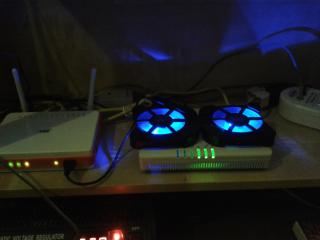
|
|
|
|
|
|
ThE-HunTeD
|
Jan 4 2012, 05:14 PM
|
Getting Started
|
New Unifi user checking in.
Unifi User: ThE-HunTeD - VIP5
Looking into changing the router. Does the asus RT-N13U have good QoS function. I would like to know if it can set bandwidth allocation + application prioritization
|
|
|
|
|
|
rattan
|
Jan 4 2012, 05:15 PM
|
Droid
|
QUOTE(igor_is300 @ Jan 4 2012, 05:13 PM) Thanks for the replies guys, I already solved the problem by relocating the modem and router while using the USB powered fan to cool down the fibre modem Here's the setup.
Wow that looks like very cool. Very bling bling...  |
|
|
|
|
|
xiiao2norm
|
Jan 4 2012, 05:19 PM
|
New Member
|
QUOTE(igor_is300 @ Jan 4 2012, 05:13 PM) Thanks for the replies guys, I already solved the problem by relocating the modem and router while using the USB powered fan to cool down the fibre modem Here's the setup.
Wow.. yeng leh.. how much it cost for the fan..can i ask what is the d-link usb cable for.?? o.O |
|
|
|
|
|
rattan
|
Jan 4 2012, 05:20 PM
|
Droid
|
QUOTE(xiiao2norm @ Jan 4 2012, 05:19 PM) Wow.. yeng leh.. how much it cost for the fan..can i ask what is the d-link usb cable for.?? o.O the cable is powering up the fan |
|
|
|
|
|
rayzy22
|
Jan 4 2012, 05:20 PM
|
|
|
QUOTE(Max @ Jan 4 2012, 09:02 AM) im facing problem starting yesterday evening 6.30pm till now.. lost internet connection.. DSL went off.. after about half-hour, modem : DSL up.. internet blinking.. voip still red IPTV working, but no internet access (orange earth icon). telephone have dial-tone but cannot make call. router status, trying to connect.. but still not connected.. reboot all device several times.. still no internet.. but IPTV working.. anybody know what happen? anyway, i already call unifi last night n opened a case report. face the same shiat...IPTV plus youtube working but not wifi.landed house.anyone know ho to rectify this?i'm on my first week with unifi  |
|
|
|
|
|
rattan
|
Jan 4 2012, 05:25 PM
|
Droid
|
QUOTE(rayzy22 @ Jan 4 2012, 05:20 PM) face the same shiat...IPTV plus youtube working but not wifi.landed house.anyone know ho to rectify this?i'm on my first week with unifi Using LAN cable can browse internet ? |
|
|
|
|
|
rayzy22
|
Jan 4 2012, 05:35 PM
|
|
|
don't have LAN cable coz thought wireless better, less messy n safer
|
|
|
|
|
|
kimyee73
|
Jan 4 2012, 06:03 PM
|
|
|
QUOTE(ubsacc2004 @ Jan 2 2012, 01:05 PM) haha i have same questions but some forumers replied me so far no media player at malaysia selling compatible with pps. I think there is one, not sure what is the name, probably ppstv or something. Try look for it during pc fair. I got the brochure during pc fair but have it no more. |
|
|
|
|
|
igor_is300
|
Jan 4 2012, 06:24 PM
|
|
|
QUOTE(rattan @ Jan 4 2012, 05:15 PM) Wow that looks like very cool. Very bling bling... At first, I thought the blue LED was annoying but somehow after a while I can live with it, lol. QUOTE(xiiao2norm @ Jan 4 2012, 05:19 PM) Wow.. yeng leh.. how much it cost for the fan..can i ask what is the d-link usb cable for.?? o.O I bought it from Sri Comp, the typical notebook/laptop cooler for RM11. It's powered by USB, so luckily the Dlink router has a USB port built-in |
|
|
|
|



 Quote
Quote








 0.0293sec
 0.21
0.21
 6 queries
 GZIP Disabled