Outline ·
[ Standard ] ·
Linear+
Tp Link TL-MR3420 3G/3.75G router owner club V1
|
kizwan
|
 Oct 25 2012, 06:11 PM Oct 25 2012, 06:11 PM
|

|
Yes, according to OpenWRT wiki.
I want to buy dual-band router, anyone know any seller in garage sales? This is router raya. Hehe. One of my notebook have Intel 5300 wireless card which does support dual-band.
This post has been edited by kizwan: Oct 25 2012, 06:13 PM
|
|
|
|
|
|
kizwan
|
Oct 26 2012, 09:17 PM
|
|
|
QUOTE(teyking2003 @ Oct 26 2012, 08:05 PM) regarding the openwrt firmware, if i only have 1 internet connection 3G in my home, how to update the package? i cannot follow the tutorial video to plug in the lan cable to blue port how arr? QUOTE(mushashi87 @ Oct 26 2012, 08:07 PM) to all sifus i am doing open wrt flashing for my mr3420. Here is the problem i tried to update the update list but it shows bad address. As per first post if the update link failed i change it over to on the first line. #src/gz attitude_adjustment http://downloads.openwrt.org/snapshots/trunk/ar71xx/packagessrc/gz attitude_adjustment http://downloads.openwrt.org/attitude_adju...eneric/packagesPlease help sifu sifu  » Click to show Spoiler - click again to hide... « [attachmentid=3122171] [attachmentid=3122172] Holy cow now i click update list nothing appear..... not even bad address appear swt What you guys need to do are:- - Connect 3G modem directly to your computer
- Connect computer to TP Link router using network cable. On TP Link connect the cable to LAN port, not WAN port
- Enabled Internet Connection Sharing (ICS) on the 3G adapter
(Win 7: Control Panel\Network and Internet\Network and Sharing Center >> Change adapter settings. Then right-click the 3G adapter >> Properties >> Sharing >> "Allow other network users to connect through this computer's Internet connection". Under "Home networking connection", choose the ethernet/LAN port) - After ICS is enabled, the ethernet/LAN port will get IP address 192.168.137.1. What you need to do is add secondary IP address, e.g. 192.168.1.10
(Win 7: Control Panel\Network and Internet\Network and Sharing Center >> Change adapter settings. Then right-click the 3G adapter >> Properties >> Networking >> "Internet Protocol Version 4 (TCP/IPv4)" >> Properties >> Advanced >> "IP address" >> "Add..." >> IP address: 192.168.1.10 & Subnet mask: 255.255.255.0) - Connect to router using Putty (SSH). Just enter IP adress 192.168.1.1 & click Open. It will ask you username & password. Username will be root & password that you set.
- Enter this command (press enter after typing the command):-
CODE route add default gw 192.168.1.10 - Enter this command (press enter after typing the command):-
CODE vi /etc/resolv.conf
- Press "O" button on the keyboard
- Type nameserver 8.8.8.8
- Press "ESC" button on the keyboard
- Type : and w and q & press Enter button. - If you do this correctly, you should now be able to install the packages. Good luck!
This post has been edited by kizwan: Oct 26 2012, 11:06 PM |
|
|
|
|
|
kizwan
|
Oct 26 2012, 10:04 PM
|
|
|
QUOTE(mushashi87 @ Oct 26 2012, 09:50 PM) Tried connecting using putty but it says connection timeout. Follow exactly how you guided. Can you ping 192.168.1.1 from your computer? Did you open http://192.168.1.1 in browser & set the password? |
|
|
|
|
|
kizwan
|
Oct 26 2012, 10:40 PM
|
|
|
When you enter first command, it will not display any output. It's ok, just continue with next step.
This post has been edited by kizwan: Oct 26 2012, 10:40 PM
|
|
|
|
|
|
kizwan
|
Oct 26 2012, 10:48 PM
|
|
|
Press ":" & "w" & "q" buttons are basically like typing ":wq" (without quote).
|
|
|
|
|
|
kizwan
|
Oct 26 2012, 10:56 PM
|
|
|
You forgot colon ":". It should be ":wq" not ";wq".
This post has been edited by kizwan: Oct 26 2012, 10:57 PM
|
|
|
|
|
|
kizwan
|
Oct 26 2012, 11:07 PM
|
|
|
Congratulations! After you have installed all the packages, you just need to reboot the router & disabled Internet Connection Sharing on your computer.
|
|
|
|
|
|
kizwan
|
Oct 26 2012, 11:41 PM
|
|
|
What do you see in drop-down menu?
|
|
|
|
|
|
kizwan
|
Oct 26 2012, 11:51 PM
|
|
|
Try save & apply and reboot your router. If USB0 is correct, it should make a connection on next boot.
|
|
|
|
|
|
kizwan
|
Nov 1 2012, 08:52 PM
|
|
|
QUOTE(ajoi57 @ Nov 1 2012, 05:30 PM) My router led is still on like normal. At starting the sys led will blinking fast and after that its stay.. If i plug wan, wan led lights up like normal and if i plug 3g, vice versa. Is that consider brick? I already check that im not sharing the connection, but at network map it say multi something(forgot the full name) i think maybe because of that i cant access luci. But where to disable the sharing network? Did you connect your computer to yellow port on the tp-link router? Did you check whether your computer did get IP address 192.168.1.x? This post has been edited by kizwan: Nov 1 2012, 08:53 PM |
|
|
|
|
|
kizwan
|
Nov 1 2012, 10:04 PM
|
|
|
QUOTE(noobandroid @ Nov 1 2012, 09:18 PM) a little weird on how it translate signal rate, signal quality is 17,99 , means what?? dunno how interpret "17" is the value of relative signal strength. Here is mine, signal strength 99,99:-  |
|
|
|
|
|
kizwan
|
Nov 1 2012, 10:29 PM
|
|
|
QUOTE(noobandroid @ Nov 1 2012, 10:06 PM) bad news for me? or what? Do you experienced any slow connection? Lag when playing online games like BF3? If not, it's not bad. |
|
|
|
|
|
kizwan
|
Nov 2 2012, 12:12 AM
|
|
|
QUOTE(ajoi57 @ Nov 1 2012, 11:11 PM) I can get full wifi signal with Network disabled. Poor connection. from the router on my phone but ofcoz have no internet connection. and the Light lights up like normal. but still, cant open 192.168.1.1. is that consider my router is brick? Not necessarily. Did you get an IP address on the computer (wifi) or phone? |
|
|
|
|
|
kizwan
|
Nov 3 2012, 10:31 PM
|
|
|
QUOTE(caterpiez @ Nov 3 2012, 08:59 AM) Got this error when tried to update list CODE Downloading http://downloads.openwrt.org/attitude_adjustment/12.09-beta/ar71xx/generic/packages/Packages.gz.
wget: bad address 'downloads.openwrt.org'
Collected errors:
* opkg_download: Failed to download http://downloads.openwrt.org/attitude_adjustment/12.09-beta/ar71xx/generic/packages/Packages.gz, wget returned 1. Try changed first line to this also error both 3G connection and extra LAN connection CODE #src/gz attitude_adjustment http://downloads.openwrt.org/snapshots/trunk/ar71xx/packages
src/gz attitude_adjustment http://downloads.openwrt.org/attitude_adjustment/12.09-beta/ar71xx/generic/packages After I typed ":", "w", "q" and pressed "Enter" nothing happen only this line appear "root@OpenWrt:~#" with blinking green.Is it ok?  Please confirm that your settings are correct. Please run two commands in putty & post the screenshot here. Also try ping IP 192.168.1.10 & 192.168.137.1 from putty & post screenshot here.  |
|
|
|
|
|
kizwan
|
Nov 4 2012, 10:30 PM
|
|
|
QUOTE(caterpiez @ Nov 4 2012, 11:36 AM) 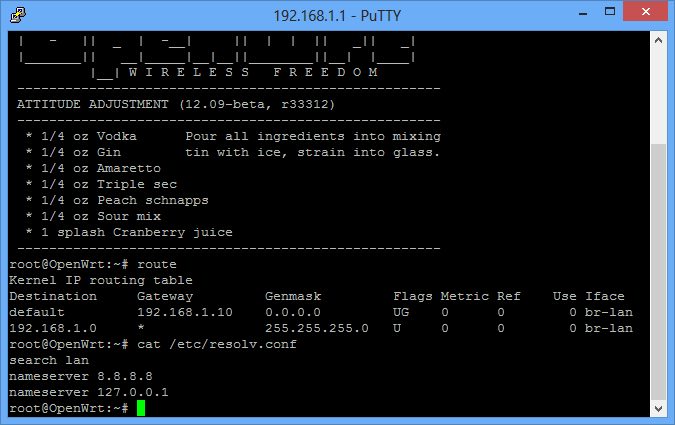 I noticed my interfaced is still br-lan. Maybe this is the main problem  I'm using Windows 8 Pro and connecting my modem using MDMA since E367 latest firmware incompatible with HUAWEI dashboard  Regarding the ping IP address, I never got back the replied after 10 minutes waiting  br-lan is correct. The settings are correct though. If you can't ping, then Internet Connection Sharing (ICS) is not done correctly. Check ICS again (watch Chuah's youtube video). |
|
|
|
|
|
kizwan
|
Nov 7 2012, 10:25 PM
|
|
|
QUOTE(digilife @ Nov 7 2012, 08:34 PM) Chuah, you should try your hands on TP-Link TL-WR1043ND, MR3420 is too easy for you already, no more fun for you liao......  I'm eyeing this: TP-Link TL-WDR4300OpenWRT wiki page here: http://wiki.openwrt.org/toh/tp-link/tl-wdr4300No one tested with 3G yet. |
|
|
|
|





 Quote
Quote

 0.0479sec
 0.30
0.30
 7 queries
 GZIP Disabled