Welcome Guest ( Log In | Register )

Bump Topic Topic Closed RSS Feed
4 Pages < 1 2 3 4 >Bottom

Outline · [ Standard ] · Linear+

 Tp Link TL-MR3420 3G/3.75G router owner club V1

views
     
hairul
post Oct 24 2012, 10:54 AM

** Learn From The Mistake **
*****
Senior Member
944 posts

Joined: Jan 2003
From: SHAH ALAM


QUOTE(valuebuyer @ Oct 20 2012, 09:16 PM)
Did you try 320u before? Can run at this speed?
My 754s never hit that fast sad.gif
*
754S is NOT DC-HSPA Modem/Mifi. Its LTE Modem/Mifi. You need to buy 753S that Support DC-HSPA.
if you're using 754S, you can run speed up to HSPA+ only unless the area got LTE network

This post has been edited by hairul: Oct 24 2012, 12:16 PM
hairul
post Oct 28 2012, 08:06 PM

** Learn From The Mistake **
*****
Senior Member
944 posts

Joined: Jan 2003
From: SHAH ALAM


My Cooling System.
Using Cooler Master Fan 120 X 120 x 25mm..
Bought this Fan Not because its Cheap (RM 19), but the CFM is High Enuff (90 CFM) compare to other Expensive DC Cooling Fan. (Modem Cover its open)
http://www.lelong.com.my/cooler-master-90c...3-07-Sale-P.htm


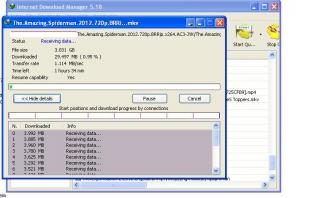
IDM.JPG
My Current Speed Via IDM (8 COnnection)
Coverage Strenght Less than 19%, I think no need for External Antenna cause IDM speed now
very acceptable (1MBps/1000KBps)

This post has been edited by hairul: Oct 29 2012, 11:52 AM


Attached thumbnail(s)
Attached Image Attached Image
hairul
post Oct 29 2012, 10:16 AM

** Learn From The Mistake **
*****
Senior Member
944 posts

Joined: Jan 2003
From: SHAH ALAM


QUOTE(digilife @ Oct 28 2012, 08:26 PM)
The signal interference from the step down transformer is killing your 3G signal dude............. icon_idea.gif

Cant you just buy an AC Fan  doh.gif
*
Actually Its not killing my signal strength, still maintain at below 20% even before installing the power supply..
Im using this power supply because i can add maximum 5-6 cooling Fan.

AC fan can harm to my kids.


Added on October 29, 2012, 10:25 am
QUOTE(chuahcs79 @ Oct 28 2012, 08:35 PM)
90 cfm , but how many Am or V the fan need ?

still think direct modify it to connect AC power much easier and take so much space  sweat.gif
*
Only 0.45Amp , 12VDC....
DC current is safe for childrens and even cheaper that AC. Mostly AC Fan Blade are from Metal
Safety come first..

Actually you can use AC-DC Adapter to save the space (Adjustable Voltage 3V-12V) . The power supply that i bought , i can use for others DC application, not just for cooling fan only.

user posted image

This post has been edited by hairul: Oct 29 2012, 11:48 AM

hairul
post Oct 29 2012, 02:48 PM

** Learn From The Mistake **
*****
Senior Member
944 posts

Joined: Jan 2003
From: SHAH ALAM


QUOTE(chuahcs79 @ Oct 29 2012, 01:21 PM)
i personally using 1.1Amp ~ 3.0Amp,

so anything lower than 1Amp consider low power for me, laugh.gif
*
hehehe.. so how much your CFM?
hairul
post Oct 30 2012, 08:14 AM

** Learn From The Mistake **
*****
Senior Member
944 posts

Joined: Jan 2003
From: SHAH ALAM


QUOTE(ajoi57 @ Oct 30 2012, 02:06 AM)
tried flashing openwrt right now. and now have no idea how to share the internet to router using cable...
*
Already flashing wrt? normally if using LAN its plug & play for stock firmware.
hairul
post Oct 31 2012, 08:27 AM

** Learn From The Mistake **
*****
Senior Member
944 posts

Joined: Jan 2003
From: SHAH ALAM


QUOTE(chuahcs79 @ Oct 31 2012, 04:45 AM)
the other video tutor still uploading in youtube,

the upload speed is horrible tonight, when i need higher upload, it give dl instead doh.gif sweat.gif

guess will only able to post the video tomorrow,

sorry guys, be patience notworthy.gif
*
Last nite maxis speed horrible..only can get download speed up to 300KBps instead 1MBps.. huhuh
hairul
post Oct 31 2012, 08:29 AM

** Learn From The Mistake **
*****
Senior Member
944 posts

Joined: Jan 2003
From: SHAH ALAM


QUOTE(chulk @ Oct 30 2012, 11:32 PM)
do you think Astro dish is much better option?
*
Try using Signal Finder (Android) and point the antena toward to the tower..
hairul
post Oct 31 2012, 09:02 AM

** Learn From The Mistake **
*****
Senior Member
944 posts

Joined: Jan 2003
From: SHAH ALAM


QUOTE(chulk @ Oct 31 2012, 09:01 AM)
yeah I still try to figure out how to do it....this thread I away to long.....u know which page is it?
*
Use you Phone and disable SIM security.....

This post has been edited by hairul: Oct 31 2012, 09:02 AM
hairul
post Oct 31 2012, 10:17 AM

** Learn From The Mistake **
*****
Senior Member
944 posts

Joined: Jan 2003
From: SHAH ALAM


QUOTE(chulk @ Oct 31 2012, 09:06 AM)
you mean, plug the sim card into the phone, disable it?
and it won't ask for pin again when I use it in modem?
*
As per ajoi say, use any phone to disable the SIM security.

hairul
post Nov 2 2012, 10:43 AM

** Learn From The Mistake **
*****
Senior Member
944 posts

Joined: Jan 2003
From: SHAH ALAM


Seems like sudah kena racun dgn Openwrt...
hairul
post Nov 5 2012, 08:16 AM

** Learn From The Mistake **
*****
Senior Member
944 posts

Joined: Jan 2003
From: SHAH ALAM


QUOTE(chulk @ Nov 5 2012, 01:38 AM)
how about a 30 feets lan cable?  blush.gif
*
Either you bought Low Resistant Cable or homeplug. But im using homeplug , cause Skybx need stable internet connection. Wifi not so stable even only 1 meter distance.

For Power adapter, you might use this type. Make sure the Fan Amp are lower than the Adapter.
More easier & dont have any kids in your home, go to Pasar Road, buy a 220/240VAC Cooling Fan + 3 Pin Plug.

The high CFM are better.

user posted image

This post has been edited by hairul: Nov 5 2012, 08:18 AM
hairul
post Nov 7 2012, 09:53 PM

** Learn From The Mistake **
*****
Senior Member
944 posts

Joined: Jan 2003
From: SHAH ALAM


im wonder, why when connect wifi by using phone/tablet, its can only use internet for 1-2 minute, but not pc even wifi still connected.
hairul
post Nov 7 2012, 10:42 PM

** Learn From The Mistake **
*****
Senior Member
944 posts

Joined: Jan 2003
From: SHAH ALAM


QUOTE(fruitie @ Nov 7 2012, 10:01 PM)
Change your WiFi channel. smile.gif
*
Sudah try.. Channel 6 - 11. B , G & N... all laready try..
Maybe need to use channel 1..
hairul
post Nov 7 2012, 10:57 PM

** Learn From The Mistake **
*****
Senior Member
944 posts

Joined: Jan 2003
From: SHAH ALAM


QUOTE(blacktubi @ Nov 7 2012, 10:48 PM)
Channel 11 + Wireless G
WPA2 Encryption

Final solution = Flash it to OpenWRT
*
Already try..... only problem with Mobile device, not PC.
BTW, waiting your good news about antenna & Tower location..
hairul
post Nov 7 2012, 11:14 PM

** Learn From The Mistake **
*****
Senior Member
944 posts

Joined: Jan 2003
From: SHAH ALAM


QUOTE(kizwan @ Nov 7 2012, 10:25 PM)
I'm eyeing this: TP-Link TL-WDR4300

OpenWRT wiki page here: http://wiki.openwrt.org/toh/tp-link/tl-wdr4300

No one tested with 3G yet.
*
I Dont think its 3G router..... but can modify to 3G?
hairul
post Nov 7 2012, 11:44 PM

** Learn From The Mistake **
*****
Senior Member
944 posts

Joined: Jan 2003
From: SHAH ALAM


QUOTE(blacktubi @ Nov 7 2012, 11:02 PM)
doh.gif
Sorry for that
Please PM me again, my PM had been flooded, maybe some lost
*
Already PM you.... thumbup.gif
hairul
post Nov 10 2012, 12:32 AM

** Learn From The Mistake **
*****
Senior Member
944 posts

Joined: Jan 2003
From: SHAH ALAM


QUOTE(chuahcs79 @ Nov 9 2012, 09:43 PM)
my TL-MR3420 V1 ( on stock firmware ) + E372 huawei set ( 33 TX ) + Panel antenna ( from blacktubi )
speed is super stable @ 1.7 ~ 1.85MB/s this hour  rclxms.gif

[attachmentid=3147895]
*
Any effect on speed & stabilty by using maxis default DNS ? i saw you key-in manually 8.8.8.8 / 8.8.4.4

This post has been edited by hairul: Nov 10 2012, 12:38 AM
hairul
post Nov 10 2012, 05:13 AM

** Learn From The Mistake **
*****
Senior Member
944 posts

Joined: Jan 2003
From: SHAH ALAM


QUOTE(chuahcs79 @ Nov 10 2012, 01:07 AM)
yeah that's the main point  brows.gif

maxis DNS many occassion is always down or buggy before  sweat.gif
*
Thanks for the advice both of you... rclxms.gif tongue.gif

This post has been edited by hairul: Nov 10 2012, 05:14 AM
hairul
post Nov 12 2012, 07:38 AM

** Learn From The Mistake **
*****
Senior Member
944 posts

Joined: Jan 2003
From: SHAH ALAM


QUOTE(ibnuasad @ Nov 12 2012, 01:54 AM)
Assuming you're using OpenWRT like in the #1 post,

1) Login to 192.168.1.1
2) Go to Network > DHCP & DNS > DNS Forwardings
3) [attachmentid=3151195]
4) Save & Apply
5) Reboot router
6) Check status @ http://tunlr.net/status/  (make sure you added /tunlr.net/184.82.222.5  @ Step #3)
Source: Tunlr Forums

EDIT:
With DNSMasq, dns queries to the specified domains will go through Tunlr. All other non-specified domains will go through your default dns service.
*
This DNS mostly people use for what? Other that stream Video?

One more, im wonder if OpenWRT have firmware that update just normal firmware?
Choose files, and waiting its Flashing? 1GB Size firmware also can... Hehehe

One have 1 internet connecting, hard to use openwrt

This post has been edited by hairul: Nov 12 2012, 08:18 AM
hairul
post Nov 12 2012, 02:17 PM

** Learn From The Mistake **
*****
Senior Member
944 posts

Joined: Jan 2003
From: SHAH ALAM


QUOTE(twhong_91 @ Nov 12 2012, 02:05 PM)
sorry but im totally confused in this and im not a tech savvy.

am i supposed to reset it through the following website?
[attachmentid=3151740]
*
Reset at Small button on the router its self.
After that, need to configure again in router website.

From what i saw, if u able to login to its default ID/PASS, then its already reset

This post has been edited by hairul: Nov 12 2012, 02:30 PM

4 Pages < 1 2 3 4 >Top
Topic ClosedOptions
 

Change to:
| Lo-Fi Version
0.0548sec    0.97    7 queries    GZIP Disabled
Time is now: 11th December 2025 - 05:56 AM