Welcome Guest ( Log In | Register )

Bump Topic Topic Closed RSS Feed
125 Pages < 1 2 3 4 > » Bottom

Outline · [ Standard ] · Linear+

Hardware NEW MacBook | Pro | Air Users Thread Version 8.0, MacBook Users, Spill Your Guts Here!

views
     
ronaldkh
post Oct 11 2011, 10:13 PM

Casual
***
Junior Member
332 posts

Joined: Oct 2011
QUOTE(BRY7 @ Oct 11 2011, 09:22 PM)
if you're worried about it getting scratches, don't worry it won't happen.
but if you find the glossy screen annoying, keeps on seeing reflection of yourself on the screen.
then get the antiglare one
*
Thanks for your advice. smile.gif
TSstringfellow
post Oct 11 2011, 10:18 PM

Ultrawide | 4K | VR
********
Senior Member
11,305 posts

Joined: Jan 2003
I changed mine from 2010 11" MBA to the 2011 11" MBA Ultimate config (4GB RAM, 1.8GHz Core i7, 256GB Flash Storage), and did not turn back. I'm so used to carry such light weight that anything heavier would be a a burden.

I can now add Photoshop CS5.5, FCE and Plex to its previous usage, particularly enamored by Plex. Imagine an HTPC interface, 1.5TB external drive powered by USB plugged into the MBA, and Displayport/HDMI it to an HDTV. MY work requires traveling and staying in hotels and I've turned the MBA into a very portable HTPC with Plex, plugged into the HDTVs at the hotels I'm staying.
digitalz
post Oct 11 2011, 10:28 PM

The only thing we have to fear is fear itself.
*******
Senior Member
2,030 posts

Joined: Oct 2011


QUOTE(stringfellow @ Oct 11 2011, 10:18 PM)
I changed mine from 2010 11" MBA to the 2011 11" MBA Ultimate config (4GB RAM, 1.8GHz Core i7, 256GB Flash Storage), and did not turn back. I'm so used to carry such light weight that anything heavier would be a a burden.

I can now add Photoshop CS5.5, FCE and Plex to its previous usage, particularly enamored by Plex. Imagine an HTPC interface, 1.5TB external drive powered by USB plugged into the MBA, and Displayport/HDMI it to an HDTV. MY work requires traveling and staying in hotels and I've turned the MBA into a very portable HTPC with Plex, plugged into the HDTVs at the hotels I'm staying.
*
So your verdict is that it's a great deal? I do my work on laptops and pcs as well so it'll be good for me as well. The only bad part is on the whole Microsoft Office vs the whole Mac Office thing. That restricts part of my work to my PC. cry.gif
TSstringfellow
post Oct 11 2011, 10:32 PM

Ultrawide | 4K | VR
********
Senior Member
11,305 posts

Joined: Jan 2003
I have Office for Mac 2011 as well, but I admit, I'm more of a consumer rather than a creator, hence my usage for that is more to read documents rather than create them.

Personally, this is the biggest improvement since the MBA was introduced. And I've been there since the beginning, since the MBA was still fitted with 60GB HDDs.

Also, I moved between the two sizes, and opted for 11". Reason being, it's meant to be portable, and I'd like to shave as much weight and volume off the travel bags I carry each day with me. The 11" fits in my Muzetto meant for the iPad, and that allows me to move around quite effortlessly.

This post has been edited by stringfellow: Oct 11 2011, 10:34 PM
digitalz
post Oct 11 2011, 10:41 PM

The only thing we have to fear is fear itself.
*******
Senior Member
2,030 posts

Joined: Oct 2011


I am working in a industry where I have to consume, process and create. That is why Office is somewhat important to me as well.

Personally, since I started using it on 2010, it's been great apart from the problem above. Won't want to turn my back on it now.
KKW
post Oct 11 2011, 11:39 PM

Look at all my stars!!
*******
Senior Member
2,954 posts

Joined: Apr 2008


Hi,
I'm using my MBP with external screen.
I just wondering can I watch full screen video without make the other screen blank/black as well?
Any software can make me full use of both screen so I can enjoy doing my assignment while watching movie smile.gif
olivur
post Oct 12 2011, 12:47 AM

ollie ollie oxen free
******
Senior Member
1,283 posts

Joined: Jul 2011
it should be within the application's preference. untick "black out other screens while in full screen", or along those lines.
dawn152
post Oct 12 2011, 01:18 AM

Casual
***
Junior Member
419 posts

Joined: Jul 2006
From: PJ, Selangor
QUOTE(stringfellow @ Oct 11 2011, 10:18 PM)
I changed mine from 2010 11" MBA to the 2011 11" MBA Ultimate config (4GB RAM, 1.8GHz Core i7, 256GB Flash Storage), and did not turn back. I'm so used to carry such light weight that anything heavier would be a a burden.

I can now add Photoshop CS5.5, FCE and Plex to its previous usage, particularly enamored by Plex. Imagine an HTPC interface, 1.5TB external drive powered by USB plugged into the MBA, and Displayport/HDMI it to an HDTV. MY work requires traveling and staying in hotels and I've turned the MBA into a very portable HTPC with Plex, plugged into the HDTVs at the hotels I'm staying.
*
How's the performance of Photoshop on the Air?

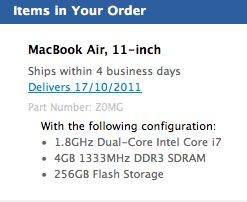
I've ordered the same exact model as yours and will (hopefully) be getting it this week (or next week. Apple delivery time lies sometimes, right? Lol). I own a 2010 13" MBA and was conflicted initially whether to upgrade to the 11" or the 13", especially since I could get the maxed out 13" at a cheaper price than a maxed out 11" (based on the quotes that bruceleestore gave me). But ultimately, I've decided that I want it as portable and taking up as little space as possible when I travel/move around. Also, I looked at my order details earlier and the "part number" gave me a chuckle.
user posted image

ZOMG is right, Apple. tongue.gif

I think right now is one of the best times to upgrade your machines, what with the introduction of Thunderbolt and hopefully the Ivy bridge next year (or end of this year, please Apple?. I'm dying, just dying to upgrade my Macbook Pro. sad.gif ) Not just evolutionary updates, but actual useful new technologies.

This post has been edited by dawn152: Oct 12 2011, 01:24 AM

olivur
post Oct 12 2011, 01:24 AM

ollie ollie oxen free
******
Senior Member
1,283 posts

Joined: Jul 2011
more so "please intel". the release date of the ivy bridge is pretty much set in stone, though. ._x
dawn152
post Oct 12 2011, 01:33 AM

Casual
***
Junior Member
419 posts

Joined: Jul 2006
From: PJ, Selangor
^ Don't crush my dreams, olivur. tongue.gif

I'm still hoping though since it isn't totally implausible for Apple to get a new technology before it's been officially released, most specifically from Intel. It has happened before. Plus, the rumor mill on this one is quite supportive of the chance of a 2011 release.

I guess I'll just sit here with my wallet, waiting patiently (or impatiently).
olivur
post Oct 12 2011, 01:40 AM

ollie ollie oxen free
******
Senior Member
1,283 posts

Joined: Jul 2011
mhm. but the rumour is that there'll be a refresh to the current 2011 line up while still utilizing the sandy bridge chip.

but i'm with you on this one. after the iphone 4s debacle (purely imho. before anyone goes apenuts on me for saying that), it would be interesting to see how apple tackles their next few machine updates :p
TSstringfellow
post Oct 12 2011, 01:42 AM

Ultrawide | 4K | VR
********
Senior Member
11,305 posts

Joined: Jan 2003
QUOTE(dawn152 @ Oct 12 2011, 01:18 AM)
How's the performance of Photoshop on the Air?

I've ordered the same exact model as yours and will (hopefully) be getting it this week (or next week. Apple delivery time lies sometimes, right? Lol). I own a 2010 13" MBA and was conflicted initially whether to upgrade to the 11" or the 13", especially since I could get the maxed out 13" at a cheaper price than a maxed out 11" (based on the quotes that bruceleestore gave me). But ultimately, I've decided that I want it as portable and taking up as little space as possible when I travel/move around. Also, I looked at my order details earlier and the "part number" gave me a chuckle.

user posted image

ZOMG is right, Apple.  tongue.gif

I think right now is one of the best times to upgrade your machines, what with the introduction of Thunderbolt and hopefully the Ivy bridge next year (or end of this year, please Apple?. I'm dying, just dying to upgrade my Macbook Pro.  sad.gif ) Not just evolutionary updates, but actual useful new technologies.
*
Effects addition takes some times, but the 2011 additions makes its more than usable, actually pleasurable to use. The SSD helps speed things up too. It is advisable to do all this on a larger screen, so ACD, HDTV or any external display is a godsend for your eyes. Processing-wise, it is very much a productive little machine.

P/S: ZOMG indeed! wink.gif Trust me, you will ZOMG when you get yours, congratulations!
dawn152
post Oct 12 2011, 02:02 AM

Casual
***
Junior Member
419 posts

Joined: Jul 2006
From: PJ, Selangor
@olivur, Ugh, a Sandy bridge upgrade would be the worst case scenario for me cause I will have no choice but to buy it. I'm hanging on by a thread with my current machines, which admittedly are all around 3 years old (except for the MBA). sad.gif

@stringfellow, Thanks for the info/quick overview. That doesn't sound too bad. The heaviest task that I'm planning to do on the MBA is converting video files while I'm on location (which will be slow but will help speed things up exponentially when I go to the editing room later). Other than that, I think it will handle most of the things I do rather well (or I hope it will). Do you have any intent to purchase the Apple Thunderbolt display? That might be the progression of my current plan of multiple Mac upgrades. Gradually, of course, cause I don't print money. tongue.gif

And thanks. I'm really excited for the MBA to arrive and positive that I'll be ZOMG-ing all over the place. biggrin.gif

This post has been edited by dawn152: Oct 12 2011, 02:03 AM
olivur
post Oct 12 2011, 02:18 AM

ollie ollie oxen free
******
Senior Member
1,283 posts

Joined: Jul 2011
it wouldn't be all too slow seeing how mbas come equipped with ssd's. with an 8gb ram upgrade you could be pretty much productive while on the go.

i would strongly advice against jumping the gun on the potential macbook pro refresh models as the ivy bridge release is pretty much set in stone, which is march~april 2012 :P
selvenz
post Oct 12 2011, 06:41 AM

Enthusiast
*****
Senior Member
841 posts

Joined: Mar 2005
From: PJ


i habd a MBP 13i7 2011 but switched to MBA 13i5 and have not looked back since !
super zippy and since i only serious work i use it for is office 2011 works great with out a hiccup.

got a mac mini recently after advice from maestro string installed 8gb ram and plex (BLISS) works as intended and no looking back on mac.
once you go mac theres no turning back
tinkerbel
post Oct 12 2011, 02:31 PM

Fanaddict!
Group Icon
VIP
13,495 posts

Joined: Dec 2006
From: KL, Malaysia


@KKW,
Try using RealPlayer to play your movies; it can play as a full screen on your external monitor and you can continue working on ur Mac's screen. With VLC on the other hand, I think I get the black/blank screen on my laptop.
olivur
post Oct 12 2011, 02:53 PM

ollie ollie oxen free
******
Senior Member
1,283 posts

Joined: Jul 2011
QUOTE(tinkerbel @ Oct 12 2011, 02:31 PM)
@KKW,
Try using RealPlayer to play your movies; it can play as a full screen on your external monitor and you can continue working on ur Mac's screen.  With VLC on the other hand, I think I get the black/blank screen on my laptop.
*
._.

QUOTE(olivur @ Oct 12 2011, 12:47 AM)
it should be within the application's preference. untick "black out other screens while in full screen", or along those lines.
*
http://forum.videolan.org/viewtopic.php?f=12&t=92114

QUOTE
I'm not familiar with VLC on the iPad. However, in the desktop VLC version there's a checkbox called 'Black Screens in Fullscreen mode' under VLC-->Preferences...-->Video. Unchecking it should prevent the 'other' screen from going black when watching fullscreen.
Maybe this is of use to you?

macduck
post Oct 12 2011, 06:22 PM

Getting Started
**
Junior Member
90 posts

Joined: Feb 2011
QUOTE(stringfellow @ Oct 11 2011, 08:59 PM)
Interference from your neighbor's WiFi? Try switching to difference channels on your WiFi router and see if that fixes it.
*
have to do it on router or in computer?

anyways thanks for your advise on the disk permission now my PS5 is back at full speed again!!! TQ!!

can wait few more months for SSD price to drop hahahhaa...
ronaldkh
post Oct 13 2011, 12:29 PM

Casual
***
Junior Member
332 posts

Joined: Oct 2011
How can I pick Malaysia as my country when setting up my Mac? There are only Western countries available.

EDIT: Solved.

This post has been edited by ronaldkh: Oct 13 2011, 01:59 PM
KKW
post Oct 13 2011, 12:39 PM

Look at all my stars!!
*******
Senior Member
2,954 posts

Joined: Apr 2008


QUOTE(olivur @ Oct 12 2011, 12:47 AM)
it should be within the application's preference. untick "black out other screens while in full screen", or along those lines.
*
It works!
Thanks sis notworthy.gif

QUOTE(tinkerbel @ Oct 12 2011, 02:31 PM)
@KKW,
Try using RealPlayer to play your movies; it can play as a full screen on your external monitor and you can continue working on ur Mac's screen.  With VLC on the other hand, I think I get the black/blank screen on my laptop.
*
I use RealPlayer and VLC got some lagging on my MBP..
Currently I'm using MPlayer OSX Extended no lag at all.. work like charm.. biggrin.gif

This post has been edited by KKW: Oct 13 2011, 12:43 PM

125 Pages < 1 2 3 4 > » Top
Topic ClosedOptions
 

Change to:
| Lo-Fi Version
0.0259sec    0.73    6 queries    GZIP Disabled
Time is now: 22nd December 2025 - 07:17 AM