Outline ·
[ Standard ] ·
Linear+
HP Pavillion DV6-6XXX series Owners Lounge V4, -162 owners. Y U NO INTEL + AMD CFX!!
|
TSAcid_RuleZz
|
 Oct 20 2011, 09:44 PM Oct 20 2011, 09:44 PM
|

|
^ Cool.  I need help from 6100 series owners.. can u open regedit and go to HKEY_LOCAL_MACHINE\SYSTEM\ControlSet001\Control\Class\{4D36E968-E325-11CE-BFC1-08002BE10318}There will be 2 subfolders name 0000 and 0001. Need your help to export both folders and attach them here.  Kindly name folder 0000 as Intel and folder 00001 as AMD.  |
|
|
|
|
|
TSAcid_RuleZz
|
Oct 20 2011, 11:33 PM
|
|
|
Thank you.  |
|
|
|
|
|
TSAcid_RuleZz
|
Oct 21 2011, 12:22 PM
|
|
|
QUOTE(trustmeiamlegit @ Oct 20 2011, 11:40 PM) maaaaaaaaybe ... to detect the lid, whehter it is closed or not... maaaybe la.. not sure  but the position is directly on top of the HSF. QUOTE(spicediablo @ Oct 21 2011, 09:16 AM) I didn't notice any magnet at the bottom left area. Could u take a snapshot of ur screen? you can't see it. take a metal stuff and it hover around bottom left side area of the bezel. |
|
|
|
|
|
TSAcid_RuleZz
|
Oct 21 2011, 01:16 PM
|
|
|
QUOTE(lee_what2004 @ Oct 21 2011, 12:41 PM) That magnet is to trigger the sleep mechanism when you close the lid.. You can try by hovering magnet around the area on the body then the laptop will sleep.. i see. but there is no magnet in the bottom cover. how it detect it?  |
|
|
|
|
|
TSAcid_RuleZz
|
Oct 21 2011, 02:34 PM
|
|
|
QUOTE(louisfjh @ Oct 21 2011, 02:31 PM) 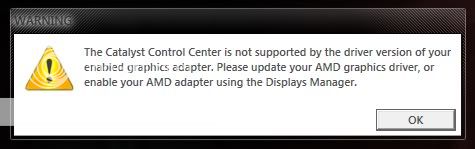 wat is this problem when i start up wif intel GC??? with battery without power adapter which driver version and what your device manager show under display adapter? |
|
|
|
|
|
TSAcid_RuleZz
|
Oct 21 2011, 02:45 PM
|
|
|
QUOTE(lee_what2004 @ Oct 21 2011, 01:24 PM) i see, btw this is the contact area for the magnet.  |
|
|
|
|
|
TSAcid_RuleZz
|
Oct 21 2011, 04:11 PM
|
|
|
QUOTE(lee_what2004 @ Oct 21 2011, 02:49 PM) Is there any other magnet on the lid ? or try use magnet on that area? Mine in on the upper center of the lid, trigger is on the below the touchpad left button... failed to find magnet to test.  QUOTE(thyeun @ Oct 21 2011, 03:58 PM) can i ask something i buy my hp at a reseller shop do i still need to fax my hp care pack registration form? or hp reseller shop will do it for me? i think u still need to register and activate your carepack yourself. QUOTE(louisfjh @ Oct 21 2011, 04:03 PM) intel or radean driver??? hmm.. both? This post has been edited by Acid_RuleZz: Oct 21 2011, 04:15 PM |
|
|
|
|
|
TSAcid_RuleZz
|
Oct 22 2011, 12:26 AM
|
|
|
^ It is recommended to update everything.. what update available for you right now?
|
|
|
|
|
|
TSAcid_RuleZz
|
Oct 22 2011, 01:36 AM
|
|
|
QUOTE(anson-san @ Oct 22 2011, 12:39 AM) Did anyone of you having the problem where laptop will suddenly hang for long time, then after clicked restart, it will "failed" to enter to bios, just remain at black screen? I checked the event log, under application log there's error for ATI: ATI EEU failed to post message to CCC Any solution for this? Reinstall the driver for ATI? My driver is the latest one as I just updated it 2 days ago. T___T second time having this problem already.. I guess driver issue since this guy also had the same problem. Did you enable taskbar autohide? |
|
|
|
|
|
TSAcid_RuleZz
|
Oct 22 2011, 10:34 AM
|
|
|
^ purge the driver and try install HP latest 8.830.6.3000 |
|
|
|
|
|
TSAcid_RuleZz
|
Oct 22 2011, 03:10 PM
|
|
|
uninstall everything, wipe the driver with driver cleaner, reinstall hp driver and restart.
|
|
|
|
|
|
TSAcid_RuleZz
|
Oct 22 2011, 05:48 PM
|
|
|
QUOTE(louisfjh @ Oct 22 2011, 04:38 PM) can give the link to dl the driver?? do it on intel GC driver rite? & driver cleaner is the driver sweeper?? yeah driversweeper. 1. Download. 2. Uninstall AMD driver, Reboot. 3. Enter safemode and sweep AMD display driver, reboot. 4. Install the new HP driver, reboot. |
|
|
|
|
|
TSAcid_RuleZz
|
Oct 22 2011, 07:54 PM
|
|
|
yeah right.  |
|
|
|
|
|
TSAcid_RuleZz
|
Oct 22 2011, 09:21 PM
|
|
|
QUOTE(louisfjh @ Oct 22 2011, 08:39 PM) the download u gave me is onliy driver rite?? so i also ned to install CCC software rite?? er.. make this GC driver so troublesome >< many problem No. Driver from HP give u px profile, display driver, switchable component & CCC. If u need AVIVO, OpenCL driver, HydraVision & Drag&Drop converting u need to overwrite with driver from AMD. |
|
|
|
|
|
TSAcid_RuleZz
|
Oct 23 2011, 12:24 AM
|
|
|
^ meh.. maybe u can update the audio driver. others can ignore.
|
|
|
|
|
|
TSAcid_RuleZz
|
Oct 23 2011, 11:51 AM
|
|
|
^ Yes. |
|
|
|
|
|
TSAcid_RuleZz
|
Oct 23 2011, 09:59 PM
|
|
|
you can ignore Gpu-Z.
Added on October 23, 2011, 10:08 pmQUOTE(overloadedx @ Oct 23 2011, 09:59 PM) Acid, is eboostr really useful? Ive seen it from your desktop screenshot. and btw,which amd driver are u using and which do u think is the best? IMO, eboostr improved my system response.. but i only use ram as cache drive. My cache/disk hit ratio is 60%. You can try any of these drivers... AMD 11.5b, DNA 11.5b, DNA 11.8.3, AMD 11.9. Right now i'm trying leaked AMD driver.. 8.892.x.xxx. This post has been edited by Acid_RuleZz: Oct 23 2011, 10:08 PM |
|
|
|
|
|
TSAcid_RuleZz
|
Oct 23 2011, 10:58 PM
|
|
|
how u get that warning? |
|
|
|
|
|
TSAcid_RuleZz
|
Oct 24 2011, 10:35 AM
|
|
|
nope. didn't get that error.
|
|
|
|
|
|
TSAcid_RuleZz
|
Oct 24 2011, 11:37 AM
|
|
|
QUOTE(ngkhanmein @ Oct 24 2011, 11:23 AM) alejandro.. selling fake beats headphone? some declare it please. Yup. His warranty are not from Hwee Seng which is the only authorized dealer Monster product in SEA i think. http://forum.lowyat.net/topic/1947592http://forum.lowyat.net/topic/1975894 |
|
|
|
|



 Quote
Quote

 0.0427sec
 1.01
1.01
 7 queries
 GZIP Disabled