Welcome Guest ( Log In | Register )

Bump Topic Topic Closed RSS Feed
125 Pages « < 72 73 74 75 76 > » Bottom

Outline · [ Standard ] · Linear+

 HP Pavillion DV6-6XXX series Owners Lounge V4, -162 owners. Y U NO INTEL + AMD CFX!!

views
     
lee_what2004
post Nov 25 2011, 02:47 PM

*stare* ji--------
Group Icon
Elite
14,813 posts

Joined: Nov 2006


Right click My Computer
Properties
Disk Management
Then right click your existing partition C or D,
Shrink Volume
Then decide how much you want to shrink the partition so you got the space for your hidden files
Then OK
Right click the "Unallocated Space"
Create Volume,
Then OK
Copy your private files there
Then go back Disk Management,
Right click the new partition
Change Drive letters
Remove
OK

If want to access, go back Disk Management, right click that space, change Drive letter, add new letter to it..
kayrolSPIKE
post Nov 25 2011, 03:07 PM

New Member
*
Junior Member
36 posts

Joined: Jul 2011


QUOTE(lee_what2004 @ Nov 25 2011, 02:47 PM)
Right click My Computer
Properties
Disk Management
Then right click your existing partition C or D,
Shrink Volume
Then decide how much you want to shrink the partition so you got the space for your hidden files
Then OK
Right click the "Unallocated Space"
Create Volume,
Then OK
Copy your private files there
Then go back Disk Management,
Right click the new partition
Change Drive letters
Remove
OK

If want to access, go back Disk Management, right click that space, change Drive letter, add new letter to it..
*
okey thanks.. and why i can't shrink about 1gb??
it says i can shrink 685 MB only...

and i wana ask about the HP_TOOLS disk partition it appears after i update all components with hp support assistant..why eh?
Attached Image
Ikmal91
post Nov 25 2011, 03:10 PM

Suck On My Banana
******
Senior Member
1,183 posts

Joined: Dec 2009
From: Behind You


QUOTE(kayrolSPIKE @ Nov 25 2011, 03:07 PM)
okey thanks.. and why i can't shrink about 1gb??
it says i can shrink 685 MB only...

and i wana ask about the HP_TOOLS disk partition it appears after i update all components with hp support assistant..why eh?
Attached Image
*
Same here.
Oh and uh....why need to hide a folder?
Prawn? brows.gif
lee_what2004
post Nov 25 2011, 03:25 PM

*stare* ji--------
Group Icon
Elite
14,813 posts

Joined: Nov 2006


Try defragment the HDD first, then shrink again.
or use 3rd party software to shrink.

HP_TOOLS is created by HP Support Assistant, it used it to access your BIOS.
You can delete it.
kayrolSPIKE
post Nov 25 2011, 03:40 PM

New Member
*
Junior Member
36 posts

Joined: Jul 2011


QUOTE(Ikmal91 @ Nov 25 2011, 03:10 PM)
Same here.
Oh and uh....why need to hide a folder?
Prawn? brows.gif
*
errr....HAHA
drool.gif
nothing..just need some private spaces ...my younger brother always using my dv6...HAHA

QUOTE(lee_what2004 @ Nov 25 2011, 03:25 PM)
Try defragment the HDD first, then shrink again.
or use 3rd party software to shrink.

HP_TOOLS is created by HP Support Assistant, it used it to access your BIOS.
You can delete it.
*
okey how to delete this???


and the RECOVERY partition is for recover my windows rite???
in 1st post that guide start using this laptop recommended to recover in other cd...
if anything happen to my laptop, can i recover from this partition??
lee_what2004
post Nov 25 2011, 04:06 PM

*stare* ji--------
Group Icon
Elite
14,813 posts

Joined: Nov 2006


Right click the partition, delete..

You can recover using the partition, if the HDD isn't kaput or you install new HDD...
spicediablo
post Nov 25 2011, 04:25 PM

Getting Started
**
Junior Member
114 posts

Joined: Apr 2006


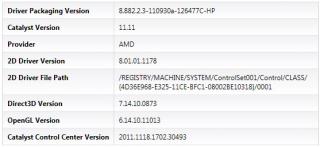
Updated my intel driver through device manager. Now on version 8.882.2.3000 then realized my ATI driver was older than before upgrade so I had to reinstall 11.11a again.

Before 11.11a
Attached Image

After 11.11a

Attached Image
SUSngkhanmein
post Nov 25 2011, 04:37 PM

カラカラ Karakara
*******
Senior Member
7,727 posts

Joined: Jan 2010
From: Ara Damansara, Petaling Jaya & Batu Pahat, Johor.


spicediablo: uninstall it all included control panel the driver at there.
spicediablo
post Nov 25 2011, 04:40 PM

Getting Started
**
Junior Member
114 posts

Joined: Apr 2006


QUOTE(ngkhanmein @ Nov 25 2011, 04:37 PM)
spicediablo: uninstall it all included control panel the driver at there.
*
ngkhanmein: Mine is already latest version. U mean uninstall AMD catalyst install manager from control panel?
SUSngkhanmein
post Nov 25 2011, 04:41 PM

カラカラ Karakara
*******
Senior Member
7,727 posts

Joined: Jan 2010
From: Ara Damansara, Petaling Jaya & Batu Pahat, Johor.


device manager > display adapter > uninstall all!
lee_what2004
post Nov 25 2011, 04:42 PM

*stare* ji--------
Group Icon
Elite
14,813 posts

Joined: Nov 2006


Don't need to do it again sleep.gif
SUSngkhanmein
post Nov 25 2011, 04:42 PM

カラカラ Karakara
*******
Senior Member
7,727 posts

Joined: Jan 2010
From: Ara Damansara, Petaling Jaya & Batu Pahat, Johor.


just keep the very 1st driver that u bought the lappy earlier.
spicediablo
post Nov 25 2011, 04:44 PM

Getting Started
**
Junior Member
114 posts

Joined: Apr 2006


QUOTE(ngkhanmein @ Nov 25 2011, 04:42 PM)
just keep the very 1st driver that u bought the lappy earlier.
*
Sorry i cant brain...if i uninstall from device manager, means no more that driver. How to keep the 1st driver?
SUSngkhanmein
post Nov 25 2011, 04:44 PM

カラカラ Karakara
*******
Senior Member
7,727 posts

Joined: Jan 2010
From: Ara Damansara, Petaling Jaya & Batu Pahat, Johor.


QUOTE(lee_what2004 @ Nov 25 2011, 05:42 PM)
Don't need to do it again sleep.gif
*
got those previous driver still at there since unused just del it.


Added on November 25, 2011, 4:47 pm
QUOTE(spicediablo @ Nov 25 2011, 05:44 PM)
Sorry i cant brain...if i uninstall from device manager, means no more that driver. How to keep the 1st driver?
*
right click on the update driver... > browser file > there got a lot previous driver.

i found out del it will be come more stable. mine from very early till 11.9 got at least 15++

This post has been edited by ngkhanmein: Nov 25 2011, 04:47 PM
spicediablo
post Nov 25 2011, 04:52 PM

Getting Started
**
Junior Member
114 posts

Joined: Apr 2006


QUOTE(ngkhanmein @ Nov 25 2011, 04:44 PM)
got those previous driver still at there since unused just del it.


Added on November 25, 2011, 4:47 pm
right click on the update driver... > browser file > there got a lot previous driver.

i found out del it will be come more stable. mine from very early till 11.9 got at least 15++
*
arggg... I cant find it. Any snapshot? I selected update driver and browse file but then it will ask me to find the driver which I wanna install... sweat.gif
Andy89
post Nov 25 2011, 05:01 PM

New Member
*
Junior Member
25 posts

Joined: Oct 2009
From: sabah,KK


is it worth to buy now dv6? or dv7? the price of dv6 rm 3199? how about DV7?
SUSngkhanmein
post Nov 25 2011, 05:07 PM

カラカラ Karakara
*******
Senior Member
7,727 posts

Joined: Jan 2010
From: Ara Damansara, Petaling Jaya & Batu Pahat, Johor.


tmr i print screen for u.
lee_what2004
post Nov 25 2011, 05:10 PM

*stare* ji--------
Group Icon
Elite
14,813 posts

Joined: Nov 2006


QUOTE(Andy89 @ Nov 25 2011, 05:01 PM)
is it worth to buy now dv6? or dv7? the price of dv6 rm 3199? how about DV7?
*
Which DV6?
DV7 is not official in Malaysia.
spicediablo
post Nov 25 2011, 05:12 PM

Getting Started
**
Junior Member
114 posts

Joined: Apr 2006


QUOTE(ngkhanmein @ Nov 25 2011, 05:07 PM)
tmr i print screen for u.
*
Thanks!! Sorry to trouble u bro but I noob....today only heard can selectively uninstall old drivers... doh.gif
SUSngkhanmein
post Nov 25 2011, 05:45 PM

カラカラ Karakara
*******
Senior Member
7,727 posts

Joined: Jan 2010
From: Ara Damansara, Petaling Jaya & Batu Pahat, Johor.


device manager > display adapters > ati xxx right click > update driver software... > browse my computer for driver s/w > let me pick > u will notice a lot previous driver..

uninstall it at the display adapters there depend which old driver u wanna del it.

125 Pages « < 72 73 74 75 76 > » Top
Topic ClosedOptions
 

Change to:
| Lo-Fi Version
0.0329sec    0.37    6 queries    GZIP Disabled
Time is now: 3rd December 2025 - 03:55 AM