Welcome Guest ( Log In | Register )

Bump Topic Topic Closed RSS Feed

Outline · [ Standard ] · Linear+

 Windows 8 – The Developer Preview, 6.2.8102.winmain_win8m3.110830-1739

views
     
TSstasio
post Sep 14 2011, 08:18 AM, updated 14y ago

10k Club
********
All Stars
18,504 posts

Joined: Oct 2007
From: P.Jaya
Windows 8 – The Developer Preview

Windows Developer Preview English, 32-bit (x86)-2.82 GB

http://wdp.dlws.microsoft.com/WDPDL/9B8DFD...bit-English.iso
Sha 1 hash - 4E0698BBABE01ED27582C9FC16AD21C4422913CC
Includes a disk image file (.iso) to install the Windows Developer Preview and Metro style apps on a 32-bit PC.

Windows Developer Preview English, 64-bit (x64)-3.63 GB

http://wdp.dlws.microsoft.com/WDPDL/9B8DFD...bit-English.iso
Sha 1 hash – 79DBF235FD49F5C1C8F8C04E24BDE6E1D04DA1E9
Includes a disk image file (.iso) to install the Windows Developer Preview and Metro style apps on a 64-bit PC.

Windows Developer Preview with developer tools English, 64-bit (x64)-4.83 GB


http://wdp.dlws.microsoft.com/WDPDL/9B8DFD...h-Developer.iso
Sha 1 hash - 6FE9352FB59F6D0789AF35D1001BD4E4E81E42AF
All of the following come on a disk image file (.iso). See below for installation instructions.
64-bit Windows Developer Preview
Windows SDK for Metro style apps
Microsoft Visual Studio 11 Express for Windows Developer Preview
Microsoft Expression Blend 5 Developer Preview
28 Metro style apps including the BUILD Conference app

CODE
Windows 8 Developer Preview Build 8102.winmain_win8m3.110830-1739 was compiled on August 30, 2011, some two weeks ago, and still belongs to the Milestone 3 stage of the development process.

According to Steven Sinofsky, President, Windows and Windows Live Division, a lot of work has already gone into building Windows 8, including 2 million installs internally, 9.3 million performance tests, 1 trillion telemetry data points analyzed, and in excess of 380,000 hours of compatibility testing.

Just a reminder, Windows 8 will deliver the same full PC experience whether it’s running on traditional computers or tablets / slates and additional next-generation form factors.

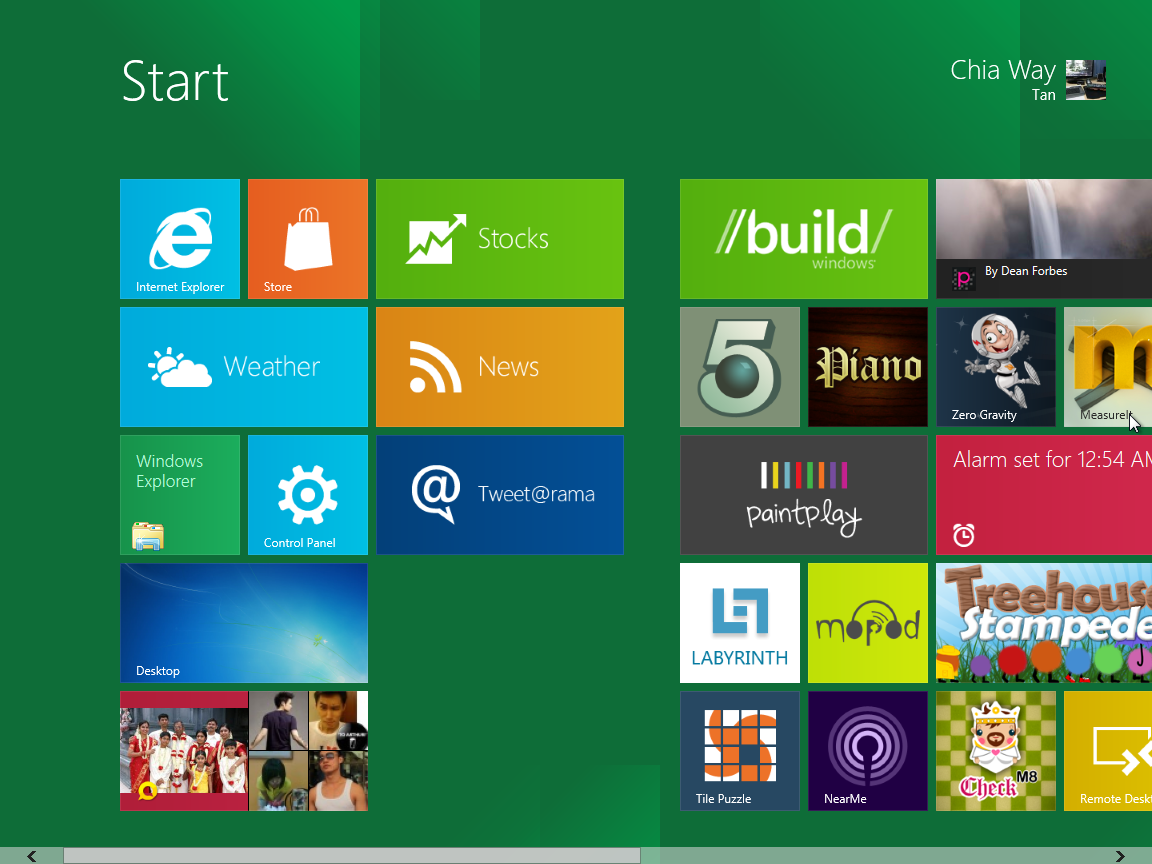
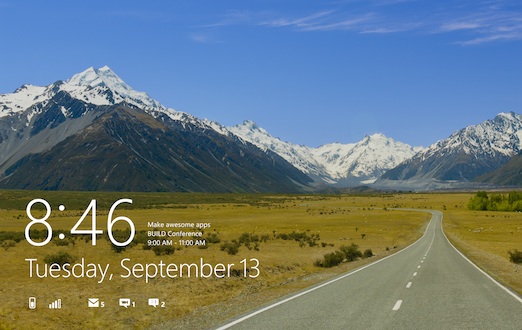
Featuring support for ARM-based chipsets, but also for x86 and x64 CPUs, Windows 8 is optimized for touch devices and that’s why the new Metro UI Start Screen takes center-stage pushing the desktop to the background.

Windows 8 comes with Internet Explorer 10 (IE10), a new Metro platform for immersive applications, enhanced performance, its own Windows Store, and so much more.

Sinofsky made it clear that there are hundreds of new features in Windows 8 that await to be discovered, so early adopters should download Windows 8 Developer Preview Build 8102 M3 as soon as it becomes available and start testing.
System Requirements

Windows Developer Preview works great on the same hardware that powers Windows Vista and Windows 7:

   1 gigahertz (GHz) or faster 32-bit (x86) or 64-bit (x64) processor
   1 gigabyte (GB) RAM (32-bit) or 2 GB RAM (64-bit)
   16 GB available hard disk space (32-bit) or 20 GB (64-bit)
   DirectX 9 graphics device with WDDM 1.0 or higher driver
   Taking advantage of touch input requires a screen that supports multi-touch


http://blogs.msdn.com/b/b8/archive/2011/09...er-preview.aspx
http://msdn.microsoft.com/en-us/windows/home/
user posted image

user posted image

user posted image

user posted image

This post has been edited by stasio: Feb 29 2012, 05:58 PM
one_guy
post Sep 14 2011, 08:32 AM

Ethuasiast!!
*****
Senior Member
926 posts

Joined: Oct 2005
From: Johor&Penang


Yeeeha.... that's i'm waiting for...
Just start downloading this morning around 7.30am...
joanneway
post Sep 14 2011, 08:44 AM

Casual
***
Junior Member
310 posts

Joined: Aug 2011
From: Singapore


foc?
one_guy
post Sep 14 2011, 08:47 AM

Ethuasiast!!
*****
Senior Member
926 posts

Joined: Oct 2005
From: Johor&Penang


Yup foc since it's only for developer testing...
joanneway
post Sep 14 2011, 08:59 AM

Casual
***
Junior Member
310 posts

Joined: Aug 2011
From: Singapore


if we bought retail win 7 can auto upgrade to win 8 foc??
TSstasio
post Sep 14 2011, 09:01 AM

10k Club
********
All Stars
18,504 posts

Joined: Oct 2007
From: P.Jaya
QUOTE(joanneway @ Sep 14 2011, 08:59 AM)
if we bought retail win 7 can auto upgrade to win 8 foc??
*
No,
only clean install.
SehTC
post Sep 14 2011, 09:21 AM

Getting Started
**
Junior Member
135 posts

Joined: Nov 2004
From: Setia Alam<->Banting<->Shah Alam


Hm.. sorry for question.
FOC which mean no need registration & no expiry?

How about hardware driver, can use Win7 driver?
Thanks.

Thanks Mr.Stasio for the guiden.

This post has been edited by SehTC: Sep 14 2011, 01:21 PM
normeck
post Sep 14 2011, 09:32 AM

Look at all my stars!!
*******
Senior Member
3,158 posts

Joined: Dec 2006


this windows need specific LCD (desktop) if wanna use touchscreen?
FarCry3r
post Sep 14 2011, 09:43 AM

Where did my ♥ go?
*******
Senior Member
6,543 posts

Joined: Dec 2004
From: Miri


QUOTE(normeck @ Sep 14 2011, 09:32 AM)
this windows need specific LCD (desktop) if wanna use touchscreen?
*
I believe any touchscreen LCD will work as there's no specific requirement for one.
TSstasio
post Sep 14 2011, 09:48 AM

10k Club
********
All Stars
18,504 posts

Joined: Oct 2007
From: P.Jaya
QUOTE(SehTC @ Sep 14 2011, 09:21 AM)
Hm.. sorry for question.
FOC which mean no need registration & no expiry?

How about hardware driver, can use Win7 driver?
Thanks.
*
No activation needed.
Product keys for versions are located in sources/product.
I using dualboot on same HD.

This post has been edited by stasio: Sep 14 2011, 12:26 PM
FarCry3r
post Sep 14 2011, 09:53 AM

Where did my ♥ go?
*******
Senior Member
6,543 posts

Joined: Dec 2004
From: Miri


QUOTE(SehTC @ Sep 14 2011, 09:21 AM)
Hm.. sorry for question.
FOC which mean no need registration & no expiry?

How about hardware driver, can use Win7 driver?
Thanks.
*
Windows 8 is still in development, don't expect anything FOC when it's RTM. Even if Microsoft have promotions for it, it would be for anyone that bought Windows 7 at a specific time, just like the Windows 7 promotions.
rikimtasu
post Sep 14 2011, 09:54 AM

Tired...
*****
Senior Member
760 posts

Joined: Apr 2008


QUOTE(stasio @ Sep 14 2011, 09:01 AM)
No,
only clean install.
*
Nope,Windows Developer Preview (32-bit or 64-bit) still can keep file,unless you are talking about Windows Developer Preview with developer tools.
TSstasio
post Sep 14 2011, 10:07 AM

10k Club
********
All Stars
18,504 posts

Joined: Oct 2007
From: P.Jaya
QUOTE(rikimtasu @ Sep 14 2011, 09:54 AM)
Nope,Windows Developer Preview (32-bit or 64-bit) still can keep file,unless you are talking about Windows Developer Preview with developer tools.
*
Just tried "Upgrade" from 7989 with normal 64-bit version.
Fail...... wink.gif
CODE
"You can’t upgrade this prerelease version of Windows"


This post has been edited by stasio: Sep 14 2011, 10:09 AM
joanneway
post Sep 14 2011, 10:39 AM

Casual
***
Junior Member
310 posts

Joined: Aug 2011
From: Singapore


so dual boot works right?
TSstasio
post Sep 14 2011, 10:44 AM

10k Club
********
All Stars
18,504 posts

Joined: Oct 2007
From: P.Jaya
QUOTE(joanneway @ Sep 14 2011, 10:39 AM)
so dual boot works right?
*
Yes, just installed on another partition and works well. nod.gif
Extracted ISO with rar or 7-zip and run setup with clean install (in previous 7989 Build OS) .

This post has been edited by stasio: Sep 14 2011, 10:51 AM
joanneway
post Sep 14 2011, 10:54 AM

Casual
***
Junior Member
310 posts

Joined: Aug 2011
From: Singapore


if using dual boot, the boot time for both OS will be slow right?
momoyuen
post Sep 14 2011, 10:59 AM

Getting Started
**
Junior Member
119 posts

Joined: Jul 2008
dual boot didn't make your os slow to boot, it depends on your hardware actually, smile.gif
TSstasio
post Sep 14 2011, 11:59 AM

10k Club
********
All Stars
18,504 posts

Joined: Oct 2007
From: P.Jaya
Expires date 12.March 2012.

user posted image
one_guy
post Sep 14 2011, 01:17 PM

Ethuasiast!!
*****
Senior Member
926 posts

Joined: Oct 2005
From: Johor&Penang


QUOTE(stasio @ Sep 14 2011, 10:44 AM)
Yes, just installed on another partition and works well. nod.gif
Extracted ISO with rar or 7-zip and run setup with clean install (in previous 7989 Build OS) .
*
Can we installed at same partition that current windows running?
H4XF4XTOR
post Sep 14 2011, 01:26 PM

【ツ】PANDAMON 【ツ】
*******
Senior Member
3,081 posts

Joined: May 2011
From: ▁ ▂ ▃ ▄ ▅ ▆ █ 100 %


wow...thanks ..
but i believe system requiremnt not much different than 7 rite..except those touchscreen
FarCry3r
post Sep 14 2011, 01:47 PM

Where did my ♥ go?
*******
Senior Member
6,543 posts

Joined: Dec 2004
From: Miri


Hmmmm... Office line is way too slow... Still have 3+ more hours to complete the 32-bit download, then still have 64-bit, 64-bit with Tools, Server version... hmmm... sad.gif
sickx
post Sep 14 2011, 03:30 PM

:)
******
Senior Member
1,232 posts

Joined: Dec 2005


question,if i install this windows on my win 7,can i revert back to win 7?will it be like reverting back to win xp from win 7 last time?


freddy manson
post Sep 14 2011, 03:34 PM

ðñê hêll ð£ å gµ¥
*******
Senior Member
4,858 posts

Joined: Jun 2006
From: Tawau, Sabah


QUOTE(FarCry3r @ Sep 14 2011, 01:47 PM)
Hmmmm... Office line is way too slow... Still have 3+ more hours to complete the 32-bit download, then still have 64-bit, 64-bit with Tools, Server version... hmmm... sad.gif
*
rclxms.gif
give a heads up review later aye?

QUOTE(sickx @ Sep 14 2011, 03:30 PM)
question,if i install this windows on my win 7,can i revert back to win 7?will it be like reverting back to win xp from win 7 last time?
*
i dont think so.. only clean install available~
no 'Update' option~
cocooh
post Sep 14 2011, 03:56 PM

✔ Awesomeness ✔
*******
Senior Member
2,789 posts

Joined: Jul 2010
From: Silicon Valley


QUOTE(sickx @ Sep 14 2011, 03:30 PM)
question,if i install this windows on my win 7,can i revert back to win 7?will it be like reverting back to win xp from win 7 last time?
*
Nop
joanneway
post Sep 14 2011, 03:57 PM

Casual
***
Junior Member
310 posts

Joined: Aug 2011
From: Singapore


use vmware

This post has been edited by joanneway: Sep 14 2011, 03:57 PM
sickx
post Sep 14 2011, 04:49 PM

:)
******
Senior Member
1,232 posts

Joined: Dec 2005


so..dual boot is the safest way,huh? hmm.gif
joanneway
post Sep 14 2011, 04:54 PM

Casual
***
Junior Member
310 posts

Joined: Aug 2011
From: Singapore


not really safe for dual boot but u can install w8 on wmware!
wkkm007
post Sep 14 2011, 05:04 PM

Look at all my stars!!
*******
Senior Member
3,123 posts

Joined: Sep 2008
From: OUG - Muhibbah LRT


@ stasio cepatnya rclxms.gif
nak try but low quota cry.gif 5GB je iOS 5, Android custom rom update win 8 bla-bla ...
Lucassss
post Sep 14 2011, 05:54 PM

fanboy.
*******
Senior Member
2,878 posts

Joined: Nov 2010


So how's the performance on this? Very tempted to try it myself. smile.gif
Kyl3
post Sep 14 2011, 06:01 PM

Newbie
******
Senior Member
1,221 posts

Joined: Mar 2006


Performance is rather bad on my virtualbox, will install it on a physical machine tomorrow biggrin.gif
XterNalz
post Sep 14 2011, 06:17 PM

Casual
***
Junior Member
330 posts

Joined: Apr 2007
From: Malacca/Jurong/Hsinchu


Memory consumption is lower than 7. Apparently, in terms of gaming, it performs better.
wkkm007
post Sep 14 2011, 06:40 PM

Look at all my stars!!
*******
Senior Member
3,123 posts

Joined: Sep 2008
From: OUG - Muhibbah LRT


If tak paham Windows 8 run on ARM how to play full PC(Window game) eg: COD, Assassin's Creed hmm.gif


Added on September 14, 2011, 6:41 pmI can sure pwn iOS kau-kau


Added on September 14, 2011, 6:47 pmWP7 still on smartphone (small screen), and W8 for tablet, pc, notebook and netbook (big screen). Win CE no more edi ah?

This post has been edited by wkkm007: Sep 14 2011, 06:47 PM
fariz
post Sep 14 2011, 06:50 PM

Tan Sri F
Group Icon
VIP
16,825 posts

Joined: Jan 2003
From: Siberia
QUOTE(wkkm007 @ Sep 14 2011, 06:40 PM)
If tak paham Windows 8 run on ARM how to play full PC(Window game) eg: COD, Assassin's Creed  hmm.gif
*
why do you want to play Windows game on ARM-based tablet?
XeactorZ
post Sep 14 2011, 09:32 PM

♥ PandaDog ♥
*********
All Stars
31,609 posts

Joined: Aug 2010
lol expired date is next year march
then means windows 8 around that time release ?
TSstasio
post Sep 15 2011, 02:21 AM

10k Club
********
All Stars
18,504 posts

Joined: Oct 2007
From: P.Jaya
QUOTE(XeactorZ @ Sep 14 2011, 09:32 PM)
lol expired date is next year march
And you have 2x30 days re-arm possibility. biggrin.gif
Silverfire
post Sep 15 2011, 03:45 AM

Cruxiaer
*******
Senior Member
4,947 posts

Joined: Nov 2007


Installed, had some fun with it biggrin.gif

user posted image
user posted image
user posted image
user posted image
user posted image
user posted image
joeboto
post Sep 15 2011, 03:51 AM

insert title
*****
Senior Member
913 posts

Joined: Jun 2006


so i successfully installed this in my lappy. now, i have a question.

before this i use windows 7 dual boot with xp using easy bcd 2.0. however, after install this ver of w8, i cant go into xp anymore. i still can boot into 7 through the build in w8 boot menu.

any ideas?

edited: done. just installed newer easybcd, set the default os to win7. walla! rclxms.gif

This post has been edited by joeboto: Sep 15 2011, 04:05 AM
Masamune
post Sep 15 2011, 05:32 AM

Just A Kid
******
Senior Member
1,228 posts

Joined: Nov 2006
From: Moscow,Russia and Klang,Selangor


Guys, quick question. All my windows 7 application can it still run on this developer preview? Any compatibility issues? How bout games? war3 etc
rikimtasu
post Sep 15 2011, 09:19 AM

Tired...
*****
Senior Member
760 posts

Joined: Apr 2008


QUOTE(Masamune @ Sep 15 2011, 05:32 AM)
Guys, quick question. All my windows 7 application can it still run on this developer preview? Any compatibility issues? How bout games? war3 etc
*
Sure you can! It is still build on windows 7,so everything works on windows 7 should work on it,and you allway can do this:
user posted image
wkkm007
post Sep 15 2011, 10:39 AM

Look at all my stars!!
*******
Senior Member
3,123 posts

Joined: Sep 2008
From: OUG - Muhibbah LRT


QUOTE(fariz @ Sep 14 2011, 04:50 PM)
why do you want to play Windows game on ARM-based tablet?
*
Syok loh no need bring ugly big gaming laptop laugh.gif
wkkm007
post Sep 15 2011, 10:51 AM

Look at all my stars!!
*******
Senior Member
3,123 posts

Joined: Sep 2008
From: OUG - Muhibbah LRT


Déjà vu
user posted image
http://www.everythingusb.com/logitech-wire...hpad-21328.html

QUOTE
Smartphones and tablets open the era of touch interface. Now, almost everything associated with user interactivity has something to do with touch including the recent MS multi-touch mouse and Windows 8's overhauled GUI.


Good for ppl using normal monitor like me icon_rolleyes.gif


Added on September 15, 2011, 10:55 amQualcomm's Snapdragon Powering Windows 8 Prototype PCs
http://www.pcmag.com/article2/0,2817,2392930,00.asp
wow


Added on September 15, 2011, 11:11 am500000-copies-of-windows-8-developer-preview-downloaded-within-24-hours-of-release
http://www.redmondpie.com/500000-copies-of...urs-of-release/

percuma ma laugh.gif
If macam iOS 5 kena bayar sure kurang smile.gif

This post has been edited by wkkm007: Sep 15 2011, 11:14 AM
unequalteck
post Sep 15 2011, 11:44 AM

Custom member title
*******
Senior Member
2,690 posts

Joined: Dec 2008
From: Kota Kinabalu Current: Wangsa Maju


good one smile.gif
will try it today. any bug or issue found?
sai86
post Sep 15 2011, 11:46 AM

StilL LearninG
*******
Senior Member
4,934 posts

Joined: Sep 2008
From: Setapak


Using this 1 will do also right from d 1st page "Windows Developer Preview English, 64-bit (x64)-3.63 GB"?

and can i install it using USB? dun hav DVD-RW laugh.gif
heck, unifi damn syok, 3.63gb only need 1 hr @ 550+kb/s thumbup.gif

This post has been edited by sai86: Sep 15 2011, 11:48 AM
shirley_andy
post Sep 15 2011, 11:48 AM

VR Hardware Solution Provider
*******
Senior Member
2,631 posts

Joined: Jun 2009
what's the option if I wanna continue using my win7 but wanna try this win8 beta? can install on portable external hdd?
rikimtasu
post Sep 15 2011, 12:02 PM

Tired...
*****
Senior Member
760 posts

Joined: Apr 2008


QUOTE(shirley_andy @ Sep 15 2011, 11:48 AM)
what's the option if I wanna continue using my win7 but wanna try this win8 beta? can install on portable external hdd?
*
One of the option is to create a new blank partion for this thing.The rest is pretty much the same for windows 7,so it should work too.
sai86
post Sep 15 2011, 12:16 PM

StilL LearninG
*******
Senior Member
4,934 posts

Joined: Sep 2008
From: Setapak


QUOTE(rikimtasu @ Sep 15 2011, 12:02 PM)
One of the option is to create a new blank partion for this thing.The rest is pretty much the same for windows 7,so it should work too.
*
workable if i create a partition on my SSD? hmm.gif left 100gb, thought of make a partition of 50gb for this window 8.
thought some1 stated before not workable on a new partition on d same hdd. hmm.gif
shirley_andy
post Sep 15 2011, 12:34 PM

VR Hardware Solution Provider
*******
Senior Member
2,631 posts

Joined: Jun 2009
ya I only got one internal HDD, and not much space left to create any partition... portable external HDD can't handle?
zeronehza
post Sep 15 2011, 12:37 PM

Malaysian Real Madrid Supporter Club
******
Senior Member
1,704 posts

Joined: Jan 2003
From: Hogoh Pahang Hogoh

that metro ui.. still can access by mouse click or just fingers touch?
shirley_andy
post Sep 15 2011, 01:02 PM

VR Hardware Solution Provider
*******
Senior Member
2,631 posts

Joined: Jun 2009
QUOTE(zeronehza @ Sep 15 2011, 12:37 PM)
that metro ui.. still can access by mouse click or just fingers touch?
*
both
wkkm007
post Sep 15 2011, 01:54 PM

Look at all my stars!!
*******
Senior Member
3,123 posts

Joined: Sep 2008
From: OUG - Muhibbah LRT


QUOTE(zeronehza @ Sep 15 2011, 10:37 AM)
that metro ui.. still can access by mouse click or just fingers touch?
*
Logitech Wireless Touchpad, First Multi-touch Device, My 1st post in this page rclxms.gif Use this thumbup.gif


Added on September 15, 2011, 1:55 pmTouchscreen will become minyak 1 sweat.gif

This post has been edited by wkkm007: Sep 15 2011, 01:55 PM
aku_ker
post Sep 15 2011, 02:06 PM

Casual
***
Junior Member
438 posts

Joined: Mar 2005


ANyone dual boot this? how is the booting time? Microsoft said booting time only take 5 sec.

This post has been edited by aku_ker: Sep 15 2011, 02:07 PM
zeronehza
post Sep 15 2011, 02:15 PM

Malaysian Real Madrid Supporter Club
******
Senior Member
1,704 posts

Joined: Jan 2003
From: Hogoh Pahang Hogoh

QUOTE(wkkm007 @ Sep 15 2011, 01:54 PM)
Logitech Wireless Touchpad, First Multi-touch Device, My 1st post in this page rclxms.gif Use this thumbup.gif


Added on September 15, 2011, 1:55 pmTouchscreen will become minyak 1 sweat.gif
*
owh.. also can use touchpad device ya.. nice !! biggrin.gif
Irishcoffee
post Sep 15 2011, 02:23 PM

ilX / Espressivo
*******
Senior Member
2,994 posts

Joined: Jan 2003
From: Behind You

i tried the new w8 UI
not user friendly with mouse ,i just feel something wrong with it
when entering the start tiles , i gt feeling to drag it with mouse , but cant move instead a scroll bar at btm doh.gif doh.gif doh.gif
but the UI is smooth and fast even in vmware with 1 core and 1gb ram

This post has been edited by Irishcoffee: Sep 15 2011, 02:26 PM
mengsuan
post Sep 15 2011, 02:51 PM

9W2NNS
Group Icon
Staff
10,459 posts

Joined: Sep 2005
From: Puchong

Major issue. Metro UI isn't supposed to work on screen resolution lesser than 768px of height. However Metro loaded on my netbook that has only 600px of height. Consequences is, I cannot launch most of the apps on Metro tiles. I'm only able to click on Control Panel, Desktop and Windows Explorer. The rest just do nothing.
chocobo7779
post Sep 15 2011, 02:57 PM

Power is nothing without control
********
All Stars
14,674 posts

Joined: Sep 2010
QUOTE(mengsuan @ Sep 15 2011, 02:51 PM)
Major issue. Metro UI isn't supposed to work on screen resolution lesser than 768px of height. However Metro loaded on my netbook that has only 600px of height. Consequences is, I cannot launch most of the apps on Metro tiles. I'm only able to click on Control Panel, Desktop and Windows Explorer. The rest just do nothing.
*
Well, this is a developer preview ma.... blush.gif
There may quite a few bugs and refining to do with. sweat.gif
mengsuan
post Sep 15 2011, 03:10 PM

9W2NNS
Group Icon
Staff
10,459 posts

Joined: Sep 2005
From: Puchong

I think there should be some registry entry that I can modify for Metro to work for now. Just, no one took the trouble to look deeply into Windows 8 tongue.gif
craxors
post Sep 15 2011, 04:39 PM

Look at all my stars!!
*******
Senior Member
2,539 posts

Joined: Dec 2007
i cant find media player.... sweat.gif
TSstasio
post Sep 15 2011, 05:01 PM

10k Club
********
All Stars
18,504 posts

Joined: Oct 2007
From: P.Jaya
Rename shsxs.dll to shsxs.dll.old in C:\windows\system32 folder, log off, log back on:
- old start menu back
- old task manager back (needs a few seconds to load)
- new explorer presented
biggrin.gif
rikimtasu
post Sep 15 2011, 05:17 PM

Tired...
*****
Senior Member
760 posts

Joined: Apr 2008


QUOTE(mengsuan @ Sep 15 2011, 02:51 PM)
Major issue. Metro UI isn't supposed to work on screen resolution lesser than 768px of height. However Metro loaded on my netbook that has only 600px of height. Consequences is, I cannot launch most of the apps on Metro tiles. I'm only able to click on Control Panel, Desktop and Windows Explorer. The rest just do nothing.
*
It worked fine for me,may be you need a larger resolution?
FarCry3r
post Sep 15 2011, 07:04 PM

Where did my ♥ go?
*******
Senior Member
6,543 posts

Joined: Dec 2004
From: Miri


QUOTE(mengsuan @ Sep 15 2011, 02:51 PM)
Major issue. Metro UI isn't supposed to work on screen resolution lesser than 768px of height. However Metro loaded on my netbook that has only 600px of height. Consequences is, I cannot launch most of the apps on Metro tiles. I'm only able to click on Control Panel, Desktop and Windows Explorer. The rest just do nothing.
*
It's already addressed before that Microsoft doesn't recommend screen height lower than 768px, but I believe Microsoft have attend to the problem smile.gif
shojikun
post Sep 15 2011, 07:22 PM

エオルゼア
******
Senior Member
1,475 posts

Joined: Dec 2007
From: Sharyalan


eh installing on vmware player.. but i put as Windows 7 x64 can de?


Added on September 15, 2011, 7:25 pmdamn.. dunno what happen but i cant seem to install it :<

This post has been edited by shojikun: Sep 15 2011, 07:25 PM
ayam001
post Sep 15 2011, 09:51 PM

Getting Started
**
Junior Member
160 posts

Joined: Oct 2010
is it have any hardware spec requirement?


iRadiation
post Sep 15 2011, 09:55 PM

On my way
****
Senior Member
504 posts

Joined: Feb 2010
QUOTE(ayam001 @ Sep 15 2011, 09:51 PM)
is it have any hardware spec requirement?
*
Basically, if your machine is capable of running Windows 7, then Win8 shouldn't be a problem.

This post has been edited by iRadiation: Sep 15 2011, 09:55 PM
mengsuan
post Sep 15 2011, 09:58 PM

9W2NNS
Group Icon
Staff
10,459 posts

Joined: Sep 2005
From: Puchong

QUOTE(rikimtasu @ Sep 15 2011, 05:17 PM)
It worked fine for me,may be you need a larger resolution?
*
Yup, things worked when I use external display with higher resolution.
ben3003
post Sep 15 2011, 10:26 PM

10k Club
********
All Stars
10,859 posts

Joined: Jan 2003
From: Sarawak


if i install this, will i need to format my previous win 7 drive?
cocooh
post Sep 15 2011, 10:39 PM

✔ Awesomeness ✔
*******
Senior Member
2,789 posts

Joined: Jul 2010
From: Silicon Valley


QUOTE(Silverfire @ Sep 15 2011, 03:45 AM)
Installed, had some fun with it biggrin.gif

» Click to show Spoiler - click again to hide... «

*
I guess a spoiler is needed sleep.gif
rikimtasu
post Sep 15 2011, 11:24 PM

Tired...
*****
Senior Member
760 posts

Joined: Apr 2008


Tried to add windows 7 back to WDP bcd and boot it...it failed.
May it doesn't like my custom boot screen on my windows 7 partition.
Oh yeah,the GUI multiboot is on PBR to MBR,so may be it can be ported to windows 7 back with some works.
ckorweng
post Sep 16 2011, 12:57 AM

Getting Started
**
Junior Member
69 posts

Joined: Nov 2010
I don't understand. Isn't Windows 8 made solely for PC only? Why is Microsoft implementing touch screen features? Since when did the LCD monitor became a tablet? What do I do with my mouse then? What the fish?

QUESTIONS QUESTIONS QUESTIONS!
Eoma
post Sep 16 2011, 12:59 AM

- ,. -
Group Icon
Elite
4,603 posts

Joined: Jan 2003
From: PJ


QUOTE(sai86 @ Sep 15 2011, 12:16 PM)
workable if i create a partition on my SSD? hmm.gif  left 100gb, thought of make a partition of 50gb for this window 8.
thought some1 stated before not workable on a new partition on d same hdd. hmm.gif
*
Yes it does work. My 64GB SSD partitioned into 39GB (Win 7 - primary) and 20GB (Win 8).


QUOTE(aku_ker @ Sep 15 2011, 02:06 PM)
ANyone dual boot this? how is the booting time? Microsoft said booting time only take 5 sec.
*
I am dual booting. No lar, not 5 sec, but pretty fast, as fast if not slightly faster than Win 7. This is on a SSD though.

QUOTE(ckorweng @ Sep 16 2011, 12:57 AM)
I don't understand. Isn't Windows 8 made solely for PC only? Why is Microsoft implementing touch screen features? Since when did the LCD monitor became a tablet? What do I do with my mouse then? What the fish?

QUESTIONS QUESTIONS QUESTIONS!
*
They are also addressing the Windows tablet space. With Windows 8 also capable running on ARM processors, expect to see a lot more tablets built for Windows 8.

This post has been edited by Eoma: Sep 16 2011, 01:01 AM
wkkm007
post Sep 16 2011, 12:48 PM

Look at all my stars!!
*******
Senior Member
3,123 posts

Joined: Sep 2008
From: OUG - Muhibbah LRT


QUOTE(ckorweng @ Sep 15 2011, 10:57 PM)
I don't understand. Isn't Windows 8 made solely for PC only? Why is Microsoft implementing touch screen features? Since when did the LCD monitor became a tablet? What do I do with my mouse then? What the fish?

QUESTIONS QUESTIONS QUESTIONS!
*
Check my previous page 1st post smile.gif


Added on September 16, 2011, 12:49 pmGet Windows 8 Metro Start Menu On Windows 7 Using Newgen
http://www.redmondpie.com/get-windows-8-me...7-using-newgen/

This post has been edited by wkkm007: Sep 16 2011, 12:49 PM
sai86
post Sep 17 2011, 12:16 AM

StilL LearninG
*******
Senior Member
4,934 posts

Joined: Sep 2008
From: Setapak


wta, y d VM cant use d dled win 8 x64bit iso? its says "fatal error : no bootable medium found".
i'm sure hell i did choose tat iso, but i juz cant boot it inside d vmare sad.gif

strange, d x64bit iso i dled is juz 2gb while 1st page state 3.63gb hmm.gif
but i can extract d file juz fine rclxub.gif
____________________________________________________________________________________________________________________________________________________________________
nvm, i guess my dl at office is screwed, now re-dl n it state 3.63gb doh.gif sad.gif
so ya all did try to play games on d window?

This post has been edited by sai86: Sep 17 2011, 12:19 AM
unequalteck
post Sep 17 2011, 11:25 AM

Custom member title
*******
Senior Member
2,690 posts

Joined: Dec 2008
From: Kota Kinabalu Current: Wangsa Maju


how to print screeen?


Added on September 17, 2011, 11:36 amlol i got it. cant find where is the paint haha
now found it. solved

This post has been edited by unequalteck: Sep 17 2011, 11:36 AM
mengsuan
post Sep 17 2011, 09:08 PM

9W2NNS
Group Icon
Staff
10,459 posts

Joined: Sep 2005
From: Puchong

QUOTE(FarCry3r @ Sep 15 2011, 07:04 PM)
It's already addressed before that Microsoft doesn't recommend screen height lower than 768px, but I believe Microsoft have attend to the problem smile.gif
*
I manage to get Metro UI to work by enabling downscaling by changing Display1_DownScalingSupported registry key.

http://mengsuan.blogspot.com/2011/09/getti...n-netbooks.html
DavidLMK
post Sep 18 2011, 12:35 AM

Getting Started
**
Junior Member
195 posts

Joined: Jun 2008
From: Johor Bahru


my live messenger got problem with windows 8. cant see anyone online

fulat
post Sep 18 2011, 12:48 AM

Look at all my stars!!
*******
Senior Member
8,472 posts

Joined: Oct 2004


QUOTE(DavidLMK @ Sep 18 2011, 12:35 AM)
my live messenger got problem with windows 8. cant see anyone online
*
no problem here signed in. if u cant see anyone its not WDP fault. should be the server or really none of ya contact go online. try exit live messenger and sign in again

This post has been edited by fulat: Sep 18 2011, 12:48 AM
vannhanz
post Sep 18 2011, 04:15 AM

New Member
*
Junior Member
33 posts

Joined: Feb 2011


already boot to my P4 system...
with 1GB ram..and no graphic card...
hahahaha
....
nice...i like...
boot use thumbdrive,....

thanx!!!

user posted image

Uploaded with ImageShack.us

user posted image

Uploaded with ImageShack.us

user posted image

Uploaded with ImageShack.us
cybpsych
post Sep 18 2011, 09:23 AM

---------------------
*********
All Stars
65,324 posts

Joined: Jan 2003
Microsoft has released 8 new updates for Windows 8 Developer Preview which can be downloaded and installed using Windows Updates.

Note: The updates modify the build tag of Windows 8 developer preview from 8102.101.winmain_win8m3.110830 to 8102.109.winmain_win8m3.110912


Following are the new updates:

KB2608612 http://support.microsoft.com/kb/2608612:

QUOTE
This update fixes a situation when applications stop responding when they send synchronous messages to a suspended application that is created for Windows Developer Preview. Microsoft Office PowerPoint 2010 without a service pack is a common application that encounters this issue.


KB2614194 http://support.microsoft.com/kb/2614194:

QUOTE
On a computer that is running Windows Developer Preview (codenamed "Windows 8"), input text that should display right-to-left in Internet Explorer is mirrored.


KB2616150 http://support.microsoft.com/kb/2616150:

QUOTE
This update fixes two issues that occur when you log on to a computer that is running Windows Developer Preview:

Issue 1 - When you log on to a computer that is running Windows Developer Preview, a blank green screen appears. However, the start screen should be displayed.

Issue 2 - When you log on to a computer that is running Windows Developer Preview, you cannot use the keyboard to move through the Tile grid and select an application or Tile.


KB2616619 http://support.microsoft.com/kb/2616619:

QUOTE
This update fixes a situation when Windows Store client crashes at startup and displays a black screen in Windows Developer Preview.


KB2616676 http://support.microsoft.com/kb/2616676:

QUOTE
The update revokes the trust of DigiNotar root certificates by putting them in the Microsoft Untrusted Certificate Store.


KB2617028 http://support.microsoft.com/kb/2617028:

QUOTE
This update fixes lack of notifications and restart problem with multiple image tile templates in Windows Developer Preview.


KB2617868 http://support.microsoft.com/kb/2617868:

QUOTE
This update fixes a situation when Windows Developer Preview still consumes battery power when Windows Developer Preview moves from sleep mode to hibernation.


KB2618032 http://support.microsoft.com/kb/2618032:

QUOTE
This update fixes the  error 0x000000D1 when you install Windows Phone SDK 7.1 Release Candidate on Windows Developer Preview.


This post has been edited by cybpsych: Sep 18 2011, 09:24 AM
TSstasio
post Sep 18 2011, 09:58 AM

10k Club
********
All Stars
18,504 posts

Joined: Oct 2007
From: P.Jaya
Already updated yesterday automatic with Windows Update.
ravewar
post Sep 18 2011, 12:55 PM

*Retired Drifter & M-ITX Fan*
****
Senior Member
686 posts

Joined: Jan 2003


kinda nice interface....

but too bad no touch screen LCD sad.gif

feels weird "scrolling" using mouse scroll...prolly it scrolls horizontally when mouse scrolling vertically... sweat.gif

i have to say bootup is very fast with ssd...even faster than win7 with ssd... rclxms.gif ...and seems to display nicely on a 42" plasma....easier to the eyes than the current win7 on the same rig.... hmm.gif
heavy rain
post Sep 18 2011, 01:07 PM

Casual
***
Junior Member
351 posts

Joined: Jun 2010


can i install using pendrive or external hardisk?
mengsuan
post Sep 18 2011, 02:13 PM

9W2NNS
Group Icon
Staff
10,459 posts

Joined: Sep 2005
From: Puchong

QUOTE(heavy rain @ Sep 18 2011, 01:07 PM)
can i install using pendrive or external hardisk?
*
Yes sure
heavy rain
post Sep 18 2011, 02:50 PM

Casual
***
Junior Member
351 posts

Joined: Jun 2010


QUOTE(mengsuan @ Sep 18 2011, 02:13 PM)
Yes sure
*
tq and can we change the green background?
TSstasio
post Sep 18 2011, 02:57 PM

10k Club
********
All Stars
18,504 posts

Joined: Oct 2007
From: P.Jaya
QUOTE(heavy rain @ Sep 18 2011, 02:50 PM)
tq and can we change the green background?
*
Found nice web page "How to..." for WDP here:
http://full-windows8.blogspot.com/
Btw,
if you hate the green:
(Coming soon, for those who can't stand the green - a blue metro theme for WDP.)
http://thounsell.deviantart.com/art/Blue-M...iew-1-258876643
biggrin.gif

This post has been edited by stasio: Sep 18 2011, 03:13 PM
slrgt
post Sep 18 2011, 02:57 PM

New Member
*
Junior Member
47 posts

Joined: May 2010


i dual boot my window
how to remove window 8?
TSstasio
post Sep 18 2011, 03:01 PM

10k Club
********
All Stars
18,504 posts

Joined: Oct 2007
From: P.Jaya
QUOTE(slrgt @ Sep 18 2011, 02:57 PM)
i dual boot my window
how to remove window 8?
*
Look at link above.
devD
post Sep 19 2011, 12:12 PM

New Member
*
Junior Member
34 posts

Joined: Jul 2010


Installed Win8 in dual boot with Win7 on Asus A42JK.

LAN does not work. Jmicron lan card driver is not accepted by Win8. However Wifi does work.

Any suggestions?
TSstasio
post Sep 19 2011, 12:27 PM

10k Club
********
All Stars
18,504 posts

Joined: Oct 2007
From: P.Jaya
QUOTE(devD @ Sep 19 2011, 12:12 PM)
Installed Win8 in dual boot with Win7 on Asus A42JK.

LAN does not work. Jmicron lan card driver is not accepted by Win8. However Wifi does work.

Any suggestions?
*
If WiFi working,start Windows Update and you will get driver for LAN from Microsoft.
devD
post Sep 19 2011, 12:38 PM

New Member
*
Junior Member
34 posts

Joined: Jul 2010


QUOTE(stasio @ Sep 19 2011, 12:27 PM)
If WiFi working,start Windows Update and you will get driver for LAN from Microsoft.
*
Did already.

Tried the Win7 drivers but that is not accepted.


TSstasio
post Sep 19 2011, 12:44 PM

10k Club
********
All Stars
18,504 posts

Joined: Oct 2007
From: P.Jaya
QUOTE(devD @ Sep 19 2011, 12:38 PM)
Did already.

Tried the Win7 drivers but that is not accepted.
*
Here is latest Jmicron Ethernet driver:
ftp://211.75.121.162/Ethernet/Windows/JMC...0.31.6_WHQL.zip

Btw,
MS is going to release a Public Beta arround early October !! rclxms.gif
(reliable information from today)

CODE
MS coding now pre-beta,
MS planned to release the Beta for the 30th Sep. and the targeted build is the 8130, sadly, this will be delayed.


user posted image

This post has been edited by stasio: Sep 19 2011, 03:50 PM
mengsuan
post Sep 19 2011, 03:31 PM

9W2NNS
Group Icon
Staff
10,459 posts

Joined: Sep 2005
From: Puchong

Probably Developer Preview couldn't be updated to Beta without a reinstallation right?
TSstasio
post Sep 19 2011, 03:42 PM

10k Club
********
All Stars
18,504 posts

Joined: Oct 2007
From: P.Jaya
QUOTE(mengsuan @ Sep 19 2011, 03:31 PM)
Probably Developer Preview couldn't be updated to Beta without a reinstallation right?
*
Not sure yet. hmm.gif
Anyway,any new info I'll post here.


Edit:
From "reliable source":

CODE
Im not for update build to build, but i have tried it, from m2 to pre beta, upgrade working fine.
Ex: Installed a M2, updated to 7989, updated to WDP, updated to Pre-Beta = working.

Also working downgrading.


smile.gif

Edit:
QUOTE(heavy rain @ Sep 18 2011, 02:50 PM)
tq and can we change the green background?
*
Replace the green Windows 8 WDP start menu & logon menu with this vibrant blue background:
http://cdan007.deviantart.com/#/d4acpls

This post has been edited by stasio: Sep 20 2011, 10:26 AM
tech3910
post Sep 19 2011, 05:52 PM

Anonymous
*******
Senior Member
5,644 posts

Joined: Feb 2008
From: Heaven to HELL


side note: the windows 7 USB tool works with windows 8 iso.
siksa
post Sep 22 2011, 05:54 PM

T_T
******
Senior Member
1,016 posts

Joined: Jan 2003


QUOTE(mengsuan @ Sep 19 2011, 03:31 PM)
Probably Developer Preview couldn't be updated to Beta without a reinstallation right?
*
cant install win8 64bit on my acer ao522 c-50 4gb ram stuck at 80%(expanding window files),what version did you use???
mengsuan
post Sep 23 2011, 08:47 AM

9W2NNS
Group Icon
Staff
10,459 posts

Joined: Sep 2005
From: Puchong

I have installed 32 bit and 64 bit with developer tools. All has no problem. Do a file hash check, see if it matches Microsoft's MD5.
siksa
post Sep 23 2011, 09:09 AM

T_T
******
Senior Member
1,016 posts

Joined: Jan 2003


QUOTE(mengsuan @ Sep 23 2011, 08:47 AM)
I have installed 32 bit and 64 bit with developer tools. All has no problem. Do a file hash check, see if it matches Microsoft's MD5.
*
the Sha 1 hash - 6FE9352FB59F6D0789AF35D1001BD4E4E81E42AF is correct,how to check the MD5???


tried it on virtualbox and it work. hmm.gif

This post has been edited by siksa: Sep 23 2011, 11:57 AM
mengsuan
post Sep 23 2011, 09:25 PM

9W2NNS
Group Icon
Staff
10,459 posts

Joined: Sep 2005
From: Puchong

Could be some driver incompatibility at the moment. Just hold on for the next release. smile.gif
siksa
post Sep 24 2011, 12:29 PM

T_T
******
Senior Member
1,016 posts

Joined: Jan 2003


QUOTE(mengsuan @ Sep 23 2011, 09:25 PM)
Could be some driver incompatibility at the moment. Just hold on for the next release. smile.gif
*
will keep that in mind thanks.
shirley_andy
post Sep 24 2011, 09:22 PM

VR Hardware Solution Provider
*******
Senior Member
2,631 posts

Joined: Jun 2009
just installed and tried,

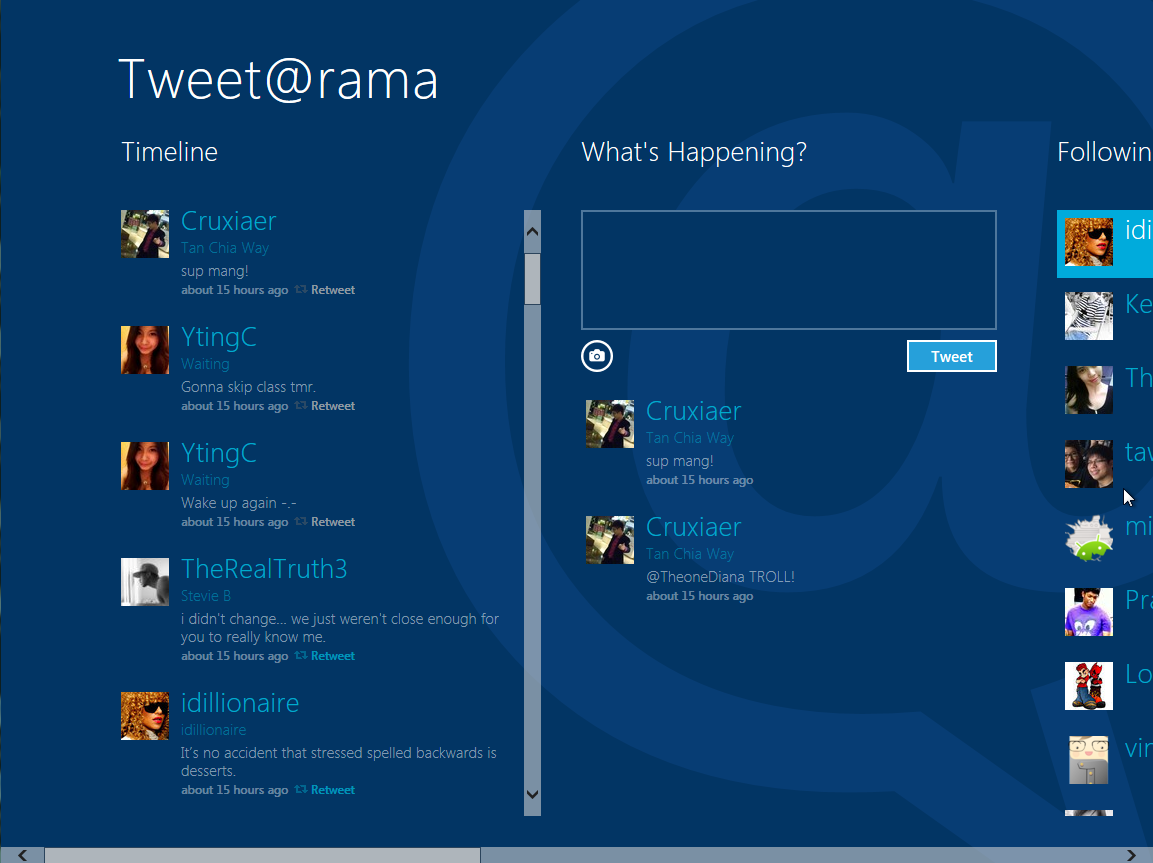
what I don't like is its troublesome if I wanna close a program(must use task mngr), and very troublesome if wanna switch between programmes, eg switching Socialite to Tweet@rama, either need to alt+tab or click start, can't click at task bar..
TSstasio
post Sep 24 2011, 09:36 PM

10k Club
********
All Stars
18,504 posts

Joined: Oct 2007
From: P.Jaya
QUOTE(shirley_andy @ Sep 24 2011, 09:22 PM)
just installed and tried,

what I don't like is its troublesome if I wanna close a program(must use task mngr), and very troublesome if wanna switch between programmes, eg switching Socialite to Tweet@rama, either need to alt+tab or click start, can't click at task bar..
*
Here is nice application:
Metro UI Tweaker for Windows 8
http://www.thewindowsclub.com/metro-ui-twe...dows-8-released

user posted image

This post has been edited by stasio: Sep 25 2011, 04:25 PM
tech3910
post Sep 25 2011, 05:03 PM

Anonymous
*******
Senior Member
5,644 posts

Joined: Feb 2008
From: Heaven to HELL


QUOTE(shirley_andy @ Sep 24 2011, 09:22 PM)
just installed and tried,

what I don't like is its troublesome if I wanna close a program(must use task mngr), and very troublesome if wanna switch between programmes, eg switching Socialite to Tweet@rama, either need to alt+tab or click start, can't click at task bar..
*
the way it intended to work is, u dun hav to close it manually.
whenever u done wit an app A, just switch to next app B.
app A will b put in pause modem which wont use any resource. it will auto close after a while idling.

problem is, when i wanna open a lot of apps, & no longer need it, then when i switch app using alt+tab, those unwanted apps haven't close.
meaning i hav to scroll through more apps to get to the 1 i actually wan.

also an issue, wat i u r running something inappropriate & u wanna close it immediately...... unsure.gif
shirley_andy
post Sep 25 2011, 06:17 PM

VR Hardware Solution Provider
*******
Senior Member
2,631 posts

Joined: Jun 2009
QUOTE(tech3910 @ Sep 25 2011, 05:03 PM)
the way it intended to work is, u dun hav to close it manually.
whenever u done wit an app A, just switch to next app B.
app A will b put in pause modem which wont use any resource. it will auto close after a while idling.

*
but although it don't use any resource from the CPU, but it uses up RAM as shown when I access task manager to check..

another problem I face is I can't get some programme to work cuz it says it fail to connect to internet to check whether that programme safe to use or not..
tech3910
post Sep 26 2011, 09:04 AM

Anonymous
*******
Senior Member
5,644 posts

Joined: Feb 2008
From: Heaven to HELL


QUOTE(shirley_andy @ Sep 25 2011, 06:17 PM)
but although it don't use any resource from the CPU, but it uses up RAM as shown when I access task manager to check..

another problem I face is I can't get some programme to work cuz it says it fail to connect to internet to check whether that programme safe to use or not..
*
i guess once the unused apps clog up certain amount of ram, a mechanism will trigger to close the unwanted apps.

dis developer preview looks more like OS for smartphone for noob, where the user doesn't bother to close apps.

i hope microsoft will understand this as advanced windows user would like more control over their OS.
FarCry3r
post Sep 26 2011, 09:54 AM

Where did my ♥ go?
*******
Senior Member
6,543 posts

Joined: Dec 2004
From: Miri


QUOTE(tech3910 @ Sep 26 2011, 09:04 AM)
i guess once the unused apps clog up certain amount of ram, a mechanism will trigger to close the unwanted apps.

dis developer preview looks more like OS for smartphone for noob, where the user doesn't bother to close apps.

i hope microsoft will understand this as advanced windows user would like more control over their OS.
*
As the name implies, it's a preview for developers, so don't expect it to include features for the end users. smile.gif
tech3910
post Sep 26 2011, 10:30 AM

Anonymous
*******
Senior Member
5,644 posts

Joined: Feb 2008
From: Heaven to HELL


QUOTE(FarCry3r @ Sep 26 2011, 09:54 AM)
As the name implies, it's a preview for developers, so don't expect it to include features for the end users. smile.gif
*
i worried coz microsoft seems to focus the interface a little bit too much on tablet.
wile the interface is cool, it's not really practical for keyboard & mouse.

anyway, another problem......
wat if 1 of the apps, which i dun wan it to close, but i leave it idle for too long & it auto closes.
does it resume the next time i reopen it?
FarCry3r
post Sep 26 2011, 10:51 AM

Where did my ♥ go?
*******
Senior Member
6,543 posts

Joined: Dec 2004
From: Miri


QUOTE(tech3910 @ Sep 26 2011, 10:30 AM)
i worried coz microsoft seems to focus the interface a little bit too much on tablet.
wile the interface is cool, it's not really practical for keyboard & mouse.
*
Microsoft should focus on the touch interface. The default interface should be pretty much like the previous version, why should there any radical changes to it?


QUOTE(tech3910 @ Sep 26 2011, 10:30 AM)
anyway, another problem......
wat if 1 of the apps, which i dun wan it to close, but i leave it idle for too long & it auto closes.
does it resume the next time i reopen it?
*
I believe there will be a way for an apps to 'resume' just like in Windows Phone 7. smile.gif
qsxwdc
post Sep 26 2011, 06:04 PM

New Member
*
Junior Member
37 posts

Joined: Sep 2011
i do hope they have that apps
sanderz
post Oct 19 2011, 10:54 PM

Vista Outside
*******
Senior Member
3,586 posts

Joined: Apr 2008
From: Desert


Thanks for the nice sharing, installed on my test hard drive~

user posted image

user posted image

user posted image

user posted image

The start menu has changed~ tongue.gif

This post has been edited by sanderz: Oct 19 2011, 10:55 PM
coolman128
post Dec 10 2011, 10:34 PM

Casual
***
Junior Member
415 posts

Joined: Aug 2005
any feedback so far ???
one_guy
post Dec 14 2011, 02:30 PM

Ethuasiast!!
*****
Senior Member
926 posts

Joined: Oct 2005
From: Johor&Penang


Very confuse at first....
Wanna try find shutdown button...
Lastly use power button to shutdown...huhu
asaiful99
post Dec 14 2011, 02:41 PM

New Member
*
Junior Member
8 posts

Joined: Aug 2011
QUOTE(joanneway @ Sep 14 2011, 10:39 AM)
so dual boot works right?
*
Yes. Dual boot is supported by Windows 8. But you have to careful when you try to install windows 8. You must have to select advance installation to have dual boot. You can learn more about the topic at http://www.techyv.com/questions/unable-boot-windows-8

Thank You. smile.gif

Topic ClosedOptions
 

Change to:
| Lo-Fi Version
0.0374sec    1.09    5 queries    GZIP Disabled
Time is now: 14th December 2025 - 12:00 AM