Outline ·
[ Standard ] ·
Linear+
Official N45/N55 Club ♥ V3, Updated on steps for reformat
|
Mohammad.2mt
|
 Sep 15 2011, 12:53 AM Sep 15 2011, 12:53 AM
|
Getting Started


|
QUOTE(lakost @ Sep 15 2011, 12:47 AM) ah i see.what kind of noise? Something like a buzz sound when you do something when you are idle everything is OK. I have updated the audio driver and the problem is solved and also I have Asus SonicMaster but I am not sure it was bundled with the new driver or it was installed with the last one. |
|
|
|
|
|
Mohammad.2mt
|
Sep 15 2011, 12:13 PM
|
Getting Started
|
QUOTE(htpkevin @ Sep 15 2011, 09:02 AM) asus's deadline is near. Hopefully they can really come up with something good. BTW, anyone has luck in getting caddy/crucial m4 ssd? Hope so.  I thought you were looking for it  |
|
|
|
|
|
Mohammad.2mt
|
Sep 15 2011, 01:15 PM
|
Getting Started
|
QUOTE(ineser @ Sep 15 2011, 01:03 PM) Sadly I went to see the laptop, it has only 2x 3.0 usb  The info on website is misleading It has 2 USB3 and 1 USB2. |
|
|
|
|
|
Mohammad.2mt
|
Sep 15 2011, 06:53 PM
|
Getting Started
|
Guys a question
Anyone knows if I use 60GB limitation of 5Mb UNIFI what will be my speed after that?
Is there any website to monitor the traffic limitation?
This post has been edited by Mohammad.2mt: Sep 15 2011, 06:53 PM
|
|
|
|
|
|
Mohammad.2mt
|
Sep 15 2011, 07:15 PM
|
Getting Started
|
QUOTE(Sridev Pro Designer @ Sep 15 2011, 07:05 PM) Good news for N45 users. Asus has finally released the new BIOS http://www.facebook.com/asusmalaysia/posts/280758695269689Did you test it? Does it solve the problem? I cannot install it now. |
|
|
|
|
|
Mohammad.2mt
|
Sep 15 2011, 07:23 PM
|
Getting Started
|
QUOTE(htpkevin @ Sep 15 2011, 07:19 PM) wow, new bios? ok ok, i download and test now.
Added on September 15, 2011, 7:20 pmoh crap my uni blocks the website. Can anyone upload to hotfile/fileserve/filesonic? |
|
|
|
|
|
Mohammad.2mt
|
Sep 15 2011, 08:10 PM
|
Getting Started
|
Are frequencies same as before?
This post has been edited by Mohammad.2mt: Sep 15 2011, 08:11 PM
|
|
|
|
|
|
Mohammad.2mt
|
Sep 15 2011, 08:45 PM
|
Getting Started
|
QUOTE(lim_kobe2005 @ Sep 15 2011, 08:41 PM) Open WinFlash program and browse the downloaded Bios and push start button. Then it will request to restart. That's it. It is better to do not do it without battery. |
|
|
|
|
|
Mohammad.2mt
|
Sep 15 2011, 09:29 PM
|
Getting Started
|
QUOTE(lim_kobe2005 @ Sep 15 2011, 08:47 PM) ok..got it.
Added on September 15, 2011, 9:11 pmfinish flashed..after i click exit..then the winflash is stopped working...then i restart by myself. anway, the bios update successful. try playing left for dead2, but i found out there's still same problem...the graph is up and down... i restart then play again...it's super smooth... there is no problem in graph and playing games? |
|
|
|
|
|
Mohammad.2mt
|
Sep 15 2011, 10:59 PM
|
Getting Started
|
QUOTE(htpkevin @ Sep 15 2011, 10:57 PM) cannot force turboboost..... don really know how to do that xD. One problem down, another rises.... The problem is still there which problem went down? |
|
|
|
|
|
Mohammad.2mt
|
Sep 16 2011, 02:51 PM
|
Getting Started
|
QUOTE(lim_kobe2005 @ Sep 16 2011, 02:33 PM) 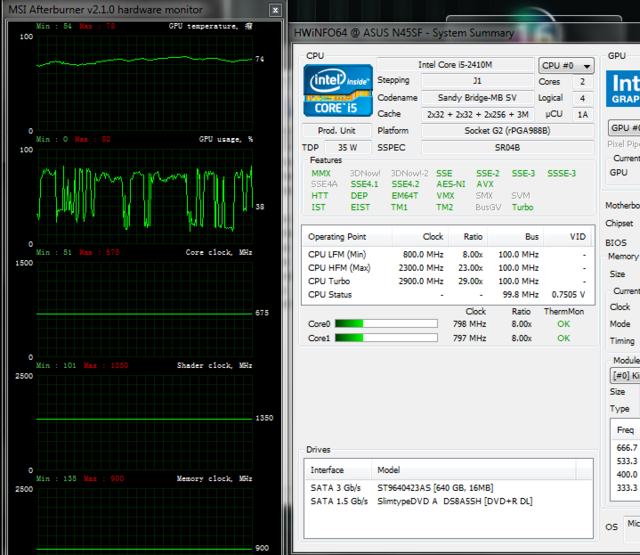 the cpu frequency is 798mhz when lag...gpu clock is smooth, gpu usage is up n down. Post it on Asus Malaysia Facebook Page.
Added on September 16, 2011, 3:32 pmI think what exactly they did in this Bios is trying to decrease GPU usage so when your usage is less your GPU will not be under stress and there will not be any undeclocking issue. They did not try to fix the problem at all.  because they know it is not a software problem. This post has been edited by Mohammad.2mt: Sep 16 2011, 03:32 PM |
|
|
|
|
|
Mohammad.2mt
|
Sep 16 2011, 04:54 PM
|
Getting Started
|
QUOTE(arslow @ Sep 16 2011, 04:19 PM) hmm,it seems to be the newest driver is not as loud as the default one.Back to the old driver i guess! 
Added on September 16, 2011, 4:50 pmreinstalled back 6397.Much louder than 6438,definitely keeping it. I am using 6449 and it is OK. |
|
|
|
|
|
Mohammad.2mt
|
Sep 16 2011, 07:15 PM
|
Getting Started
|
QUOTE(htpkevin @ Sep 16 2011, 06:50 PM) So far if i just switch to power mode and play games, my game will lag. If i throttle it and disable it only smooth. Need to spam asus again>.< btw, anyone found anywhere got sell crucial m4 ady? I found Crucial M4 in Amazon and it was so cheap something around 100USD which it will be RM300 I have no experience to buy from Amazon is it safe and good deal? |
|
|
|
|
|
Mohammad.2mt
|
Sep 16 2011, 08:30 PM
|
Getting Started
|
QUOTE(Shunz @ Sep 16 2011, 08:07 PM) You mean this http://amzn.to/oJGJat ? There's always people doing Amazon shopping bulk, you can try PM them. Its officially from Crucial amazon so it should be safe. No not this one but there were many like this with $5 shipping cost this shipping cost is for anywhere like Malaysia or just USA? |
|
|
|
|
|
Mohammad.2mt
|
Sep 17 2011, 10:35 PM
|
Getting Started
|
Guys I found something so strange.
When I run MSI Afterburner as long as my laptop is idle the graph is too smooth but when I try to do something like opening internet browser or whatever that run HDD it start Underclocking.
It can be two things
First thing is HDD problem that effect GPU.
Second can be not enough power that when HDD start to work it goes more that 90W.
If it is the second one I can test it with stressing CPU when I am running GPU test to see it will start underclocking because of power or not but it must be a test that stress just CPU not HDD and I had not any idea what program can do that.
PS:I am still running 213 BIOS.
This post has been edited by Mohammad.2mt: Sep 17 2011, 10:37 PM
|
|
|
|
|
|
Mohammad.2mt
|
Sep 17 2011, 10:54 PM
|
Getting Started
|
QUOTE(Acid_RuleZz @ Sep 17 2011, 10:46 PM) But HDD only use few watts.. i doubt it will affect GPU. Was that tested with TurboBoost off? That is why I think this is not power problem maybe something is wrong with HDD No everything was normal and I run MSI on performance mode whit power brick without battery. |
|
|
|
|
|
Mohammad.2mt
|
Sep 18 2011, 12:05 AM
|
Getting Started
|
QUOTE(Acid_RuleZz @ Sep 17 2011, 11:38 PM) I see.. if u need something to stress CPU and not HDD, Prime95 will do just fine. Thanks I can confirm this is a power problem with 100% using CPU, GPU was working on 203MHz most of the time  This post has been edited by Mohammad.2mt: Sep 18 2011, 12:06 AM This post has been edited by Mohammad.2mt: Sep 18 2011, 12:06 AM |
|
|
|
|
|
Mohammad.2mt
|
Sep 18 2011, 12:40 AM
|
Getting Started
|
QUOTE(Acid_RuleZz @ Sep 18 2011, 12:21 AM) Time to bombard Asus FB page again. They must recall all N45SFs and they know what is the problem but they are trying to reduce the problem and say we solved it to avoid changing any laptop. |
|
|
|
|
|
Mohammad.2mt
|
Sep 18 2011, 12:50 AM
|
Getting Started
|
QUOTE(Trance4eva @ Sep 18 2011, 12:46 AM) i think they are trying to save money le once they found out they are actually suppose to provide N45SF with 120W adapter......but they came out with another idea. Mod the BIOS and tell us problem solve. Just my opinion I think the problem is worse than that and in my opinion even 120W power brick cannot solve the problem and probably Mainboard or VGA must be changed. |
|
|
|
|
|
Mohammad.2mt
|
Sep 18 2011, 08:48 PM
|
Getting Started
|
Asus Malaysia
"Dear all, thank you for your kind feedback. We shall look into the issue again and find for another solution. We apologize for any inconvenience caused."
I am sure they know what cause the problem they are trying to save money and prevent recalling N45SFs.
|
|
|
|
|



 Quote
Quote
 0.0445sec
 0.71
0.71
 7 queries
 GZIP Disabled