Welcome Guest ( Log In | Register )

Bump Topic Topic Closed RSS Feed
171 Pages « < 86 87 88 89 90 > » Bottom

Outline · [ Standard ] · Linear+

 Official N45/N55 Club ♥ V3, Updated on steps for reformat

views
     
lim_kobe2005
post Sep 15 2011, 08:47 PM

Getting Started
**
Junior Member
211 posts

Joined: Aug 2006
From: Petaling Jaya


QUOTE(Mohammad.2mt @ Sep 15 2011, 08:45 PM)
Open WinFlash program and browse the downloaded Bios and push start button.
Then it will request to restart.
That's it.
It is better to do not do it without battery.
*
ok..got it.


Added on September 15, 2011, 9:11 pm
QUOTE(Mohammad.2mt @ Sep 15 2011, 08:45 PM)
Open WinFlash program and browse the downloaded Bios and push start button.
Then it will request to restart.
That's it.
It is better to do not do it without battery.
*
finish flashed..after i click exit..then the winflash is stopped working...then i restart by myself.
anway, the bios update successful.

try playing left for dead2, but i found out there's still same problem...the graph is up and down...

i restart then play again...it's super smooth...

This post has been edited by lim_kobe2005: Sep 15 2011, 09:27 PM
edragon84
post Sep 15 2011, 09:27 PM

Getting Started
**
Junior Member
58 posts

Joined: May 2008


How come u got different graph result wit kevin? Bios successfully upgraded?

This post has been edited by edragon84: Sep 15 2011, 09:30 PM
Mohammad.2mt
post Sep 15 2011, 09:29 PM

Getting Started
**
Junior Member
110 posts

Joined: Jul 2011
From: Kuala Lumpur


QUOTE(lim_kobe2005 @ Sep 15 2011, 08:47 PM)
ok..got it.


Added on September 15, 2011, 9:11 pm

finish flashed..after i click exit..then the winflash is stopped working...then i restart by myself.
anway, the bios update successful.

try playing left for dead2, but i found out there's still same problem...the graph is up and down...

i restart then play again...it's super smooth...
*
there is no problem in graph and playing games?
edragon84
post Sep 15 2011, 09:32 PM

Getting Started
**
Junior Member
58 posts

Joined: May 2008


Kobe can give a confirm answer? Gonna buy this weekend, tks
alvu12
post Sep 15 2011, 09:34 PM

New Member
*
Newbie
0 posts

Joined: Sep 2011
From: Estonia


Hi again, today i have to give away my White Asus N55SF (wrong display)!

I have to wait till Monday, they will send me this Asus:
http://www.galador.ee/catalog/product/1393...80-intel-core-i
+ i will get 8gb ram, extra year full warranty and i dont have to pay extra cash (Black version price- White price = ca 100€)

I did not want i7 version, because that version is not available right now (will have to wait 1,5 months)... Waiting 3 days is painful enough:)!

Maybe someday i will find a shop where i can buy i7 processor with good price and upgrade my i5:)!

What do You all think, was that good deal:O?

This post has been edited by alvu12: Sep 15 2011, 09:36 PM
lim_kobe2005
post Sep 15 2011, 09:38 PM

Getting Started
**
Junior Member
211 posts

Joined: Aug 2006
From: Petaling Jaya


QUOTE(Mohammad.2mt @ Sep 15 2011, 09:29 PM)
there is no problem in graph and playing games?
*
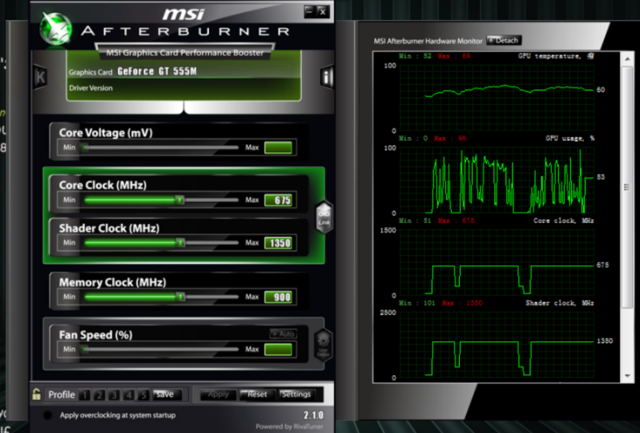
user posted image

this one is the latest...i think same with kevin..the clock is smooth, but the usage is up and down...
i just try with left for dead 2, it's smooth except when there is big crowd of zombies coming..then can see the lag..... sad.gif
lim_kobe2005
post Sep 15 2011, 09:40 PM

Getting Started
**
Junior Member
211 posts

Joined: Aug 2006
From: Petaling Jaya


QUOTE(edragon84 @ Sep 15 2011, 09:32 PM)
Kobe can give a confirm answer? Gonna buy this weekend, tks
*
still got some lag due to the usage fluctuation...but it's better than before....
htpkevin
post Sep 15 2011, 09:42 PM

Regular
******
Senior Member
1,052 posts

Joined: Feb 2006
hmm, so far i only got those 3 games. all same usage fluctuation. Graph super smooth. But still the game lags
Trance4eva
post Sep 15 2011, 09:42 PM

Regular
******
Senior Member
1,801 posts

Joined: Sep 2010
QUOTE(Mohammad.2mt @ Sep 15 2011, 08:45 PM)
Open WinFlash program and browse the downloaded Bios and push start button.
Then it will request to restart.
That's it.
It is better to do not do it without battery.
*
i nvr trust 3rd party program...
use Asus Easy Flash is the most safest way

to go to BIOS menu, spam F2 during boot up and look for Asus easy flash, Make sure you unextract ur BIOS to a folder so u can find it at the BIOS menu
edragon84
post Sep 15 2011, 09:43 PM

Getting Started
**
Junior Member
58 posts

Joined: May 2008


Play game smooth and lag when crowd. Sound logic to me. Totally dun understand the graph,Are n55 user get same graph?
Trance4eva
post Sep 15 2011, 09:44 PM

Regular
******
Senior Member
1,801 posts

Joined: Sep 2010
QUOTE(edragon84 @ Sep 15 2011, 09:43 PM)
Play game smooth and lag when crowd. Sound logic to me. Totally dun understand the graph,Are n55 user get same graph?
*
L4D2 le....even my GT550M does not lag when got alot crowd
htpkevin
post Sep 15 2011, 09:46 PM

Regular
******
Senior Member
1,052 posts

Joined: Feb 2006
dunno, now i wanna run some test. Now i will try to fix my cpu at 2.3ghz and disable turboboost and use power saving and play games. see how it works
lim_kobe2005
post Sep 15 2011, 09:46 PM

Getting Started
**
Junior Member
211 posts

Joined: Aug 2006
From: Petaling Jaya


QUOTE(htpkevin @ Sep 15 2011, 09:42 PM)
hmm, so far i only got those 3 games. all same usage fluctuation. Graph super smooth. But still the game lags
*
so have the same graph as me? got try the latest driver?
Trance4eva
post Sep 15 2011, 09:46 PM

Regular
******
Senior Member
1,801 posts

Joined: Sep 2010
QUOTE(htpkevin @ Sep 15 2011, 09:46 PM)
dunno, now i wanna run some test. Now i will try to fix my cpu at 2.3ghz and disable turboboost and use power saving and play games. see how it works
*
u cannot disable turboboost....
htpkevin
post Sep 15 2011, 09:48 PM

Regular
******
Senior Member
1,052 posts

Joined: Feb 2006
QUOTE(Trance4eva @ Sep 15 2011, 09:46 PM)
u cannot disable turboboost....
*
can use throttlestop


GUYS, GOOD NEWS. i use throttlestop fix my cpu at 2.3ghz and disable turbo, and in power saving mode, i play assassin's creed brotherhood super smooth. Now gonna try other game again
Trance4eva
post Sep 15 2011, 09:52 PM

Regular
******
Senior Member
1,801 posts

Joined: Sep 2010
QUOTE(htpkevin @ Sep 15 2011, 09:48 PM)
can use throttlestop
GUYS, GOOD NEWS. i use throttlestop fix my cpu at 2.3ghz and disable turbo, and in power saving mode, i play assassin's creed brotherhood super smooth. Now gonna try other game again
*
so does this means it's the CPU problem now?? hmm.gif
PoorVenderz
post Sep 15 2011, 09:52 PM

Casual
***
Junior Member
380 posts

Joined: Jun 2011
From: Subang Jaya
QUOTE(htpkevin @ Sep 15 2011, 09:48 PM)
can use throttlestop
GUYS, GOOD NEWS. i use throttlestop fix my cpu at 2.3ghz and disable turbo, and in power saving mode, i play assassin's creed brotherhood super smooth. Now gonna try other game again
*
thumbup.gif
edragon84
post Sep 15 2011, 09:57 PM

Getting Started
**
Junior Member
58 posts

Joined: May 2008


Is turbo boost can boost the speed to 2.9 ? If disable it then become
slow process speed
Acid_RuleZz
post Sep 15 2011, 10:01 PM

ミウ ❤
*******
Senior Member
6,612 posts

Joined: Jan 2003
From: Tomorrow


If disabling TurboBoost fixed the problem that mean not enuff juice from the brick to me. hmm.gif

What if u force TurboBoost with ThrottleStop, will it lag?
htpkevin
post Sep 15 2011, 10:08 PM

Regular
******
Senior Member
1,052 posts

Joined: Feb 2006
err, i just tried crysis 2, i'm currently still fixing cpu@2.3ghz and turboboost disabled, and power saving mode. So this means there are still possibility not enough juice from the brick i guess...

171 Pages « < 86 87 88 89 90 > » Top
Topic ClosedOptions
 

Change to:
| Lo-Fi Version
0.0275sec    0.77    6 queries    GZIP Disabled
Time is now: 18th December 2025 - 04:29 PM