Welcome Guest ( Log In | Register )

21 Pages « < 17 18 19 20 21 >Bottom

Outline · [ Standard ] · Linear+

 Samsung Galaxy 5 - CyanogenMod 7.1 Thread

views
     
zam_changloon
post Nov 10 2011, 06:02 PM

Getting Started
**
Junior Member
71 posts

Joined: Feb 2009


QUOTE(starz92 @ Nov 10 2011, 09:32 AM)
updated to v1.7.2 hotfix1 and what i can say so far is that the wifi works great like never before in the previous version!
*
I just flashed today.. So far so good... thumbup.gif

For those who would like to change your bootanimation.. You can try this one..

BOOTAMINATION

Very simple steps... I've used the 2nd method (Via - Root Explorer)

U might see the bootanimation here -- > Preview. Sharing is caring... icon_rolleyes.gif

alexysc
post Nov 10 2011, 11:54 PM

Getting Started
**
Junior Member
60 posts

Joined: Jan 2011
QUOTE(zam_changloon @ Nov 10 2011, 06:02 PM)
I just flashed today.. So far so good...  thumbup.gif

For those who would like to change your bootanimation.. You can try this one..

BOOTAMINATION

Very simple steps... I've used the 2nd method (Via - Root Explorer)

U might see the bootanimation here -- > Preview. Sharing is caring...  icon_rolleyes.gif
*
I just change to this bootanimation. This is a beauty! Thanks zam. thumbup.gif
starz92
post Nov 11 2011, 11:14 AM

Regular
******
Senior Member
1,679 posts

Joined: Jan 2010
From: Penang
QUOTE(zam_changloon @ Nov 10 2011, 06:02 PM)
I just flashed today.. So far so good...  thumbup.gif

For those who would like to change your bootanimation.. You can try this one..

BOOTAMINATION

Very simple steps... I've used the 2nd method (Via - Root Explorer)

U might see the bootanimation here -- > Preview. Sharing is caring...  icon_rolleyes.gif
*
this is great! thanks a lot smile.gif
vccy
post Nov 11 2011, 08:59 PM

Getting Started
**
Junior Member
227 posts

Joined: Oct 2007
From: MELAKA


I would like to ask. every time we backup the rom, the rom is backup to which folder? plan to delete some of the old backup. Thanks


Added on November 11, 2011, 9:18 pm
QUOTE(zam_changloon @ Nov 10 2011, 07:02 PM)
I just flashed today.. So far so good...  thumbup.gif

For those who would like to change your bootanimation.. You can try this one..

BOOTAMINATION

Very simple steps... I've used the 2nd method (Via - Root Explorer)

U might see the bootanimation here -- > Preview. Sharing is caring...  icon_rolleyes.gif
*
this boot animation is really good. thanks thumbup.gif

This post has been edited by vccy: Nov 11 2011, 09:18 PM
alexysc
post Nov 11 2011, 11:08 PM

Getting Started
**
Junior Member
60 posts

Joined: Jan 2011
QUOTE(vccy @ Nov 11 2011, 08:59 PM)
I would like to ask. every time we backup the rom, the rom is backup to which folder? plan to delete some of the old backup. Thanks


Added on November 11, 2011, 9:18 pm

this boot animation is really good. thanks  thumbup.gif
*
The backup is in the ClockWorkMod Folder in your sdcard.


Added on November 12, 2011, 5:06 pmHi Guys,

Nice MIUI Theme from http://forum.xda-developers.com/showthread.php?t=1189723

Just download the 'Transparent' zip file, extract it and install the .apk file.

This post has been edited by alexysc: Nov 12 2011, 05:06 PM
Schuan
post Nov 13 2011, 08:52 AM

Getting Started
**
Junior Member
69 posts

Joined: Jan 2011


Hi, Im just wondering, Is Papago M8 version can be supported in Galaxy 5?
alexysc
post Nov 13 2011, 12:52 PM

Getting Started
**
Junior Member
60 posts

Joined: Jan 2011
QUOTE(Schuan @ Nov 13 2011, 08:52 AM)
Hi, Im just wondering, Is Papago M8 version can be supported in Galaxy 5?
*
Do you have the link to download? Thanks.
vccy
post Nov 13 2011, 06:35 PM

Getting Started
**
Junior Member
227 posts

Joined: Oct 2007
From: MELAKA


My adw laucher abit laggy. Any way to solve it? I am using the ADW version 1.3.3.1.


Added on November 13, 2011, 6:37 pm
QUOTE(alexysc @ Nov 12 2011, 12:08 AM)
The backup is in the ClockWorkMod Folder in your sdcard.


Added on November 12, 2011, 5:06 pmHi Guys,

Nice MIUI Theme from http://forum.xda-developers.com/showthread.php?t=1189723

Just download the 'Transparent' zip file, extract it and install the .apk file.
*
thanks thumbup.gif

This post has been edited by vccy: Nov 13 2011, 06:37 PM
kimimaro_kun
post Nov 13 2011, 07:38 PM

I Am Whatever You Say I Am
****
Senior Member
669 posts

Joined: Jan 2006
From: Anfield


QUOTE(slaughterer @ Nov 9 2011, 03:22 PM)
updated to v1.7.2 + htfx 1...
have problem with notification bar...
when press the sound button, it didn't go silent or vibrate mode again...need to adjust manually by go to setting...
for brightness also same..cannot change to deem mode again after change to bright mode..
*
agree.. i also face the same prob.. doh.gif

QUOTE(zam_changloon @ Nov 10 2011, 06:02 PM)
I just flashed today.. So far so good...  thumbup.gif

For those who would like to change your bootanimation.. You can try this one..

BOOTAMINATION

Very simple steps... I've used the 2nd method (Via - Root Explorer)

U might see the bootanimation here -- > Preview. Sharing is caring...  icon_rolleyes.gif
*
nice sharing zam.. thx bro thumbup.gif
kimimaro_kun
post Nov 13 2011, 07:44 PM

I Am Whatever You Say I Am
****
Senior Member
669 posts

Joined: Jan 2006
From: Anfield


QUOTE(alexysc @ Nov 11 2011, 11:08 PM)
The backup is in the ClockWorkMod Folder in your sdcard.


Added on November 12, 2011, 5:06 pmHi Guys,

Nice MIUI Theme from http://forum.xda-developers.com/showthread.php?t=1189723

Just download the 'Transparent' zip file, extract it and install the .apk file.
*
bro, can u help me by sharing the apk file?
having prob download it from the site doh.gif
alexysc
post Nov 13 2011, 11:26 PM

Getting Started
**
Junior Member
60 posts

Joined: Jan 2011
QUOTE(kimimaro_kun @ Nov 13 2011, 07:44 PM)
bro, can u help me by sharing the apk file?
having prob download it from the site  doh.gif
*
I've uploaded the .apk file for you. Link : http://www.multiupload.com/WFD25FO3M4

Enjoy! tongue.gif
vccy
post Nov 14 2011, 09:55 AM

Getting Started
**
Junior Member
227 posts

Joined: Oct 2007
From: MELAKA


Wanna ask, does samsung galaxy S plus can use cyanogen rom? and all the bootmanager? cos my friend wanna try the rom after he saw my G5. LOL

btw alex, i cant dl the ramscript97 online from the link you share here last time. has it been removed?
kimimaro_kun
post Nov 14 2011, 10:13 AM

I Am Whatever You Say I Am
****
Senior Member
669 posts

Joined: Jan 2006
From: Anfield


QUOTE(alexysc @ Nov 13 2011, 11:26 PM)
I've uploaded the .apk file for you. Link : http://www.multiupload.com/WFD25FO3M4

Enjoy!  tongue.gif
*
thx bro.. thumbup.gif wub.gif notworthy.gif
alexysc
post Nov 14 2011, 02:45 PM

Getting Started
**
Junior Member
60 posts

Joined: Jan 2011
QUOTE(vccy @ Nov 14 2011, 09:55 AM)
Wanna ask, does samsung galaxy S plus can use cyanogen rom? and all the bootmanager? cos my friend wanna try the rom after he saw my G5. LOL

btw alex, i cant dl the ramscript97 online from the link you share here last time. has it been removed?
*
Yes, Galaxy S can use Cyanogen Roms. But make very sure that the particular rom is meant for Galaxy S or else flashing the wrong roms will brick the phone. You can search around for Galaxy S Cyanogen Roms like samfirmware and follow the instructions.

97Ramscript - I think they have removed the download link. But don't worry, I have uploaded it for you and anyone who wants it.

Link - http://www.multiupload.com/USJ76JXMQ7

Enjoy bro! tongue.gif
alexysc
post Nov 14 2011, 03:17 PM

Getting Started
**
Junior Member
60 posts

Joined: Jan 2011
Hi Guys,

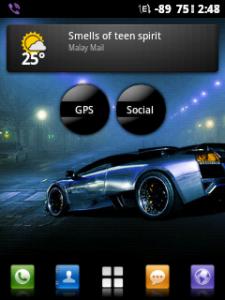
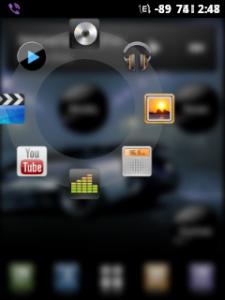
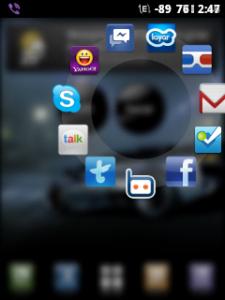
Circle Launcher :

I'm using this circle launcher, which is actually a widget. It's neat and does not clutter the screens.

You can download the Circle Launcher Light version from the Market for free or the paid version (also free download here - http://www.mediafire.com/?voc22a6seg7lg20 ) tongue.gif

For icon packs you can download here :
http://www.4shared.com/android/8GSZIoSA/Ci...l?cau2=403tNull

You can name your widget (e.g. MAIN - for your most used apps like camera, browers, etc.; GPS - for all your apps concerning with GPS like Papago, GPS Test, Maps, etc ; SOCIAL - for social networking apps, like FB, Messenger, Twitter, etc..). There are many options which you can tweak the widget, like blur image when tapped (like mine), different icons (but I like this black round icon).

It saves the cluttering of the screens and you can use only a few screens ( I use only four screens).

I post here some of my phone's screenshots. I'm using Zeam Launcher with Circle Launcher Widget and MIUI theme plus 97ramscript and my phone is extremely responsive and fast!

Currently using CM v.1.7.2 + HF1.

Attached Image Attached Image Attached Image Attached Image Attached Image

This post has been edited by alexysc: Nov 14 2011, 03:27 PM
vccy
post Nov 14 2011, 06:22 PM

Getting Started
**
Junior Member
227 posts

Joined: Oct 2007
From: MELAKA


QUOTE(alexysc @ Nov 14 2011, 03:45 PM)
Yes, Galaxy S can use Cyanogen Roms. But make very sure that the particular rom is meant for Galaxy S or else flashing the wrong roms will brick the phone. You can search around for Galaxy S Cyanogen Roms like samfirmware and follow the instructions.

97Ramscript - I think they have removed the download link. But don't worry, I have uploaded it for you and anyone who wants it.

Link - http://www.multiupload.com/USJ76JXMQ7

Enjoy bro!  tongue.gif
*
QUOTE(alexysc @ Nov 14 2011, 04:17 PM)
Hi Guys,

Circle Launcher :

I'm using this circle launcher, which is actually a widget. It's neat and does not clutter the screens.

You can download the Circle Launcher Light version from the Market for free or the paid version (also free download here - http://www.mediafire.com/?voc22a6seg7lg20tongue.gif

For icon packs you can download here :
http://www.4shared.com/android/8GSZIoSA/Ci...l?cau2=403tNull

You can name your widget (e.g. MAIN - for your most used apps like camera, browers, etc.;  GPS - for all your apps concerning with GPS like Papago, GPS Test, Maps, etc ; SOCIAL - for social networking apps, like FB, Messenger, Twitter, etc..). There are many options which you can tweak the widget, like blur image when tapped (like mine), different icons (but I like this black round icon).

It saves the cluttering of the screens and you can use only a few screens ( I use only four screens).

I post here some of my phone's screenshots. I'm using Zeam Launcher with Circle Launcher Widget and MIUI theme plus 97ramscript and my phone is extremely responsive and fast!

Currently using CM v.1.7.2 + HF1.
Attached Image Attached Image Attached Image Attached Image Attached Image
*
nice one bro. and many thanks. notworthy.gif

kimimaro_kun
post Nov 14 2011, 06:57 PM

I Am Whatever You Say I Am
****
Senior Member
669 posts

Joined: Jan 2006
From: Anfield


QUOTE(alexysc @ Nov 14 2011, 03:17 PM)
Hi Guys,

Circle Launcher :

» Click to show Spoiler - click again to hide... «


downloading... thx 4 sharing thumbup.gif
vccy
post Nov 15 2011, 05:24 PM

Getting Started
**
Junior Member
227 posts

Joined: Oct 2007
From: MELAKA


I dled papago from this thread and copy it to my G5 papago. But when i launch it. it said cant load map. Pls help.
alexysc
post Nov 15 2011, 05:40 PM

Getting Started
**
Junior Member
60 posts

Joined: Jan 2011
QUOTE(vccy @ Nov 15 2011, 05:24 PM)
I dled papago from this thread and copy it to my G5 papago. But when i launch it. it said cant load map. Pls help.
*
You need to put the Map into the MAPS FOLDER in the NAVISEA FOLDER which is in the sdcard.
vccy
post Nov 15 2011, 05:46 PM

Getting Started
**
Junior Member
227 posts

Joined: Oct 2007
From: MELAKA


QUOTE(alexysc @ Nov 15 2011, 06:40 PM)
You need to put the Map into the MAPS FOLDER in the NAVISEA FOLDER which is in the sdcard.
*
I did. but still said fail to load map. sweat.gif

21 Pages « < 17 18 19 20 21 >Top
 

Change to:
| Lo-Fi Version
0.0283sec    0.43    6 queries    GZIP Disabled
Time is now: 3rd December 2025 - 01:57 PM