


Official N45/N55 Club ♥ V2, Closed :)
Official N45/N55 Club ♥ V2, Closed :)
|
|
 Aug 26 2011, 12:39 AM Aug 26 2011, 12:39 AM
Return to original view | Post
#201
|
 
Senior Member
9,790 posts Joined: Jun 2008 From: Rubber Duck Pond  
|
This thread is going faster than a bullet train...version 3 soon?
|
|
|
|
|
|
Aug 26 2011, 09:30 AM
Return to original view | Post
#202
|
|
Senior Member
9,790 posts Joined: Jun 2008 From: Rubber Duck Pond
|
I am waiting for Ihone 4 8Gb...shall see how low it will cost
 |
|
|
Aug 26 2011, 11:18 AM
Return to original view | Post
#203
|
|
Senior Member
9,790 posts Joined: Jun 2008 From: Rubber Duck Pond
|
QUOTE(Watta?? @ Aug 26 2011, 11:17 AM) err.. mine didn't turn grey at all.. its just showing a colourful box with green and purple. Tat means ur GT 555M is in use...did u open anything? |
|
|
Aug 26 2011, 11:22 AM
Return to original view | Post
#204
|
|
Senior Member
9,790 posts Joined: Jun 2008 From: Rubber Duck Pond
|
QUOTE(Watta?? @ Aug 26 2011, 11:21 AM) nope.. nothing at all.. just using mozilla to online only.. and i didn't load any videos in my browser Click the icon..did it shows anything running? |
|
|
Aug 26 2011, 11:26 AM
Return to original view | Post
#205
|
|
Senior Member
9,790 posts Joined: Jun 2008 From: Rubber Duck Pond
|
Tat means u r using GT555M eventhough u didnt open any programs that uses it.U guys must be using the old driver.
|
|
|
Aug 26 2011, 11:28 AM
Return to original view | Post
#206
|
|
Senior Member
9,790 posts Joined: Jun 2008 From: Rubber Duck Pond
|
QUOTE(simon3041 @ Aug 26 2011, 11:27 AM) yeah old... wat's the link for latest one? or u juz get from driver disc... Latest driver u can get at Nvidia website.It should be 280.26.I modded the inf file to install coz i cannot directly install it. |
|
|
|
|
|
Aug 26 2011, 11:33 AM
Return to original view | Post
#207
|
|
Senior Member
9,790 posts Joined: Jun 2008 From: Rubber Duck Pond
|
QUOTE(Watta?? @ Aug 26 2011, 11:31 AM) whats the problem making it unable to install properly? must i mod the inf file to install or i can just wait for the next update and install it normally? The drivers uploaded at Asus website r made specifically for our model and thus the drivers u downloaded from Asus website,u cant install directly.U have to mod the inf file to tell the installer to detect the graphic card properly and where to install it.Btw,there r ppl who manage to install it directly.Perhaps u can try download the latest driver and try installing first. |
|
|
Aug 26 2011, 11:35 AM
Return to original view | Post
#208
|
|
Senior Member
9,790 posts Joined: Jun 2008 From: Rubber Duck Pond
|
QUOTE(IvanWong1989 @ Aug 26 2011, 11:33 AM) u can wait geh... XD the reason is this... nvidia release driver.... but it doesn't guarantee to be 100%compatible with our notebooks... THAT.. hav to see the manufacturer adi... the manufacturer hav to ... take nvidia driver.... modify it... and post it at their site as update... thing is. manufactureres are 1)slowpoke 2)lazy.. lolx so basically we are just taking the new driver and mod them faster than the manufacturers.... if they even care.. lolx   |
|
|
Aug 26 2011, 11:49 AM
Return to original view | Post
#209
|
|
Senior Member
9,790 posts Joined: Jun 2008 From: Rubber Duck Pond
|
QUOTE(Watta?? @ Aug 26 2011, 11:42 AM) where do i download it? i cant even find the n55 at our asus website.. Latest Nvidia driver should be here.http://www.nvidia.com/Download/index.aspx?lang=en-us Added on August 26, 2011, 11:51 amThe got display N series at Asus Malaysia..but never put detailed information   This post has been edited by Duckies: Aug 26 2011, 11:51 AM |
|
|
Aug 26 2011, 12:22 PM
Return to original view | Post
#210
|
|
Senior Member
9,790 posts Joined: Jun 2008 From: Rubber Duck Pond
|
No CPU throttling so far.Manage to play games smoothly
 |
|
|
Aug 26 2011, 12:48 PM
Return to original view | Post
#211
|
|
Senior Member
9,790 posts Joined: Jun 2008 From: Rubber Duck Pond
|
QUOTE(Ikmal91 @ Aug 26 2011, 12:38 PM)  Why Devour no confirm with me yet? Why Devour no confirm with me yet? |
|
|
Aug 26 2011, 02:00 PM
Return to original view | Post
#212
|
|
Senior Member
9,790 posts Joined: Jun 2008 From: Rubber Duck Pond
|
QUOTE(Sky04 @ Aug 26 2011, 01:51 PM) N55sf i5 user. Please help >.< N55SF core i5 is definitely HD+ resolution.N55SF core i7 on the other hand is HD resolution.From the laptop box, does its states that the resolution is 1366x768. only when you on the laptop and check the screen resolution, it is reachable until 1600x900. does that mean the screen is hd+? |
|
|
Aug 26 2011, 02:05 PM
Return to original view | Post
#213
|
|
Senior Member
9,790 posts Joined: Jun 2008 From: Rubber Duck Pond
|
QUOTE(Sky04 @ Aug 26 2011, 02:04 PM) surprisingly, when I call to alot of shop, they just keep telling me the i5 model stated there is 1366x768 only. I don't know why is it, but they say the box doesn't stats it is a HD+ . If evreything going according to plan, I will be getting my n55sf i5 hd+ tonight =) The brightness and contrast r slightly lower but it feels great if u r staring for a long time.It wont make ur eyes pain How is the screen look like with movies on a matte screen?  |
|
|
|
|
|
Aug 26 2011, 02:16 PM
Return to original view | Post
#214
|
|
Senior Member
9,790 posts Joined: Jun 2008 From: Rubber Duck Pond
|
QUOTE(lakost @ Aug 26 2011, 02:15 PM) Playing ACB at mid resolution now lol. Mid resolution or settings?I tot GT 555M can play ACB at high settings?The CPU temp is 94max while GPU is 80-ish. Zzz..makes me scare play games lol morewhat didnt use cooler lol |
|
|
Aug 26 2011, 05:23 PM
Return to original view | Post
#215
|
|
Senior Member
9,790 posts Joined: Jun 2008 From: Rubber Duck Pond
|
QUOTE(arslow @ Aug 26 2011, 04:58 PM) owners of n55sf,is the shift key on the left of the keyboard small or big?bcoz in the review they say european model the Shift button is small,and the US model is normal sized?can confirm? Should be normal sized |
|
|
Aug 26 2011, 05:32 PM
Return to original view | Post
#216
|
|
Senior Member
9,790 posts Joined: Jun 2008 From: Rubber Duck Pond
|
QUOTE(Trance4eva @ Aug 26 2011, 05:26 PM) oh yea Duckies, your screen is 1600x900 right??? can go desktop>right click>Screen resolution and take a ss...i wanna see tq  i still feel kinda weird why N55SF i5 got HD+ and i7 does not QUOTE(arslow @ Aug 26 2011, 05:28 PM) Btw,Duckies,have u tried gaming in 1366x768?i noe for today games,most probably u wont have to do that as games are not that demanding yet for the GT555m,but who knows in the future? 1366 x 768 resolutions?It can handle 1600 x 900 games well.It's up to how u put the settings..u cant expect GT 555M to run smoothly for Crysis 2 Directx 11 or Metro 2033.So far Civilization 5,COD series and Assassins Creed Brotherhood works good at mid-high combo settings The reason i ask this is since the native resolution of this laptop is 1600x900,will everything look fuzzy and blurry if u lower down to just HD resolution? This post has been edited by Duckies: Aug 26 2011, 05:32 PM Attached thumbnail(s) 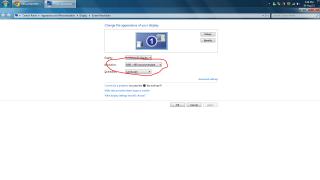
|
|
|
Aug 26 2011, 05:35 PM
Return to original view | Post
#217
|
|
Senior Member
9,790 posts Joined: Jun 2008 From: Rubber Duck Pond
|
QUOTE(Trance4eva @ Aug 26 2011, 05:34 PM) ACB medium setting with resolution 1600x900 smooth??? I play medium-high combo settings.So far so good Btw,compare the previous screenshots with this 1.Things slightly smaller when in HD+ compared to HD. This post has been edited by Duckies: Aug 26 2011, 05:35 PM Attached thumbnail(s) 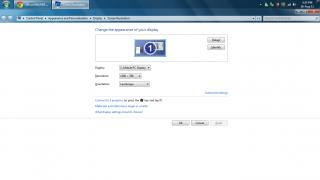
|
|
|
Aug 26 2011, 05:36 PM
Return to original view | Post
#218
|
|
Senior Member
9,790 posts Joined: Jun 2008 From: Rubber Duck Pond
|
QUOTE(IvanWong1989 @ Aug 26 2011, 05:35 PM) metro 2033.. crysis 2 directx 11.... *opens the club cant handle me* nonono.. gt555m stil cant handle them at high i bet!! |
|
|
Aug 26 2011, 05:38 PM
Return to original view | Post
#219
|
|
Senior Member
9,790 posts Joined: Jun 2008 From: Rubber Duck Pond
|
QUOTE(Trance4eva @ Aug 26 2011, 05:37 PM) 1600x900 does not strain ur eyes meh??? I enlarge everything when i am browsing lol.Usual font is 12-14...i use 18  The resolutions is better in HD+ when u r gaming but strains ur eye a bit when u browse for long time  This post has been edited by Duckies: Aug 26 2011, 05:39 PM |
|
|
Aug 26 2011, 05:46 PM
Return to original view | Post
#220
|
|
Senior Member
9,790 posts Joined: Jun 2008 From: Rubber Duck Pond
|
QUOTE(arslow @ Aug 26 2011, 05:44 PM) So when u put HD rezolution,things still look sharp la,but just larger,correct? Slightly blur but no big deal.U compare the screenshots i posted juz now Picture means a thousand words |
|
Topic ClosedOptions
|
| Change to: |  0.0221sec 0.0221sec
 0.46 0.46
 7 queries 7 queries
 GZIP Disabled GZIP Disabled
Time is now: 9th December 2025 - 04:46 AM |
 Quote
Quote