Radeon will go thru Intel HD then output to HDMI i think... coz thats how it goes when i use the VGA output. I'm using Radeon but i need to use Intel Graphic Properties to change resolutions and multi-monitor mode.
okay thks, will go through more testing to check whether it accelerates graphics from Radeon during HDMI mode
hi guys, can anyone tell me where is the pause button?? after purchase then only i notice there seem to be missing a pause button..
QUOTE(Acid_RuleZz @ Aug 28 2011, 12:10 AM)
Don't have.
For media playback pause is Fn+F7
fuuuuu... i just notice the Pause key is at right shift.
QUOTE(joonwei23 @ Aug 28 2011, 04:03 AM)
^ teach teach ! the normal looks dull to me already.
Download and extract to folder.. make shortcut of either 'ThinTask - Autohide OFF.bat' or 'ThinTask - Autohide On.bat' and paste it into your startup folder.
fuuuuu... i just notice the Pause key is at right shift. Download and extract to folder.. make shortcut of either 'ThinTask - Autohide OFF.bat' or 'ThinTask - Autohide On.bat' and paste it into your startup folder.
& if i paste autohide in.. next time wan set it not autohide so ned delete the autohide.bat & paste the autohide off in or just can untick the autohide in taskbar properties??
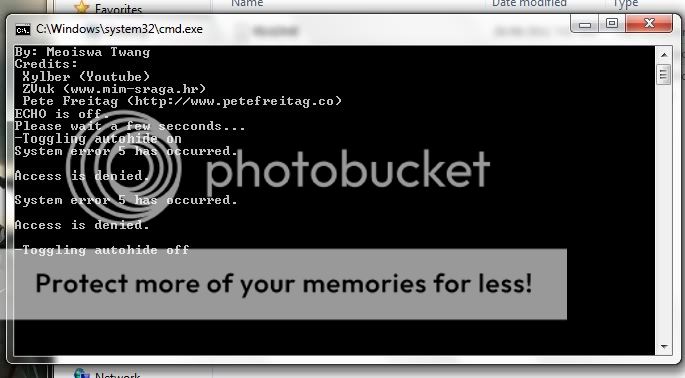
Added on August 28, 2011, 7:14 amerm... y my taskbar cant bcome thin @@
Added on August 28, 2011, 7:20 am
This post has been edited by louisfjh: Aug 28 2011, 07:20 AM
I have tried the hdmi cable with my desktop to tv, same thing happened, the tv shows 'No Signal'. The cable is Prostar 1.3b from Carrefour, I guess it is either cable fault or my LG LCD hdmi port fault. Hai~
Microsoft Windows SDK for Windows 7 and .NET Framework 4. when installing MS Windows SDK for Win7. At installation option screen, untick everything except Windows Performance Toolkit under Common Utilities.
open start menu and run Command Prompt as Administrator. Type or copy paste this cmd into Command Prompt.
Added on August 28, 2011, 7:10 am & if i paste autohide in.. next time wan set it not autohide so ned delete the autohide.bat & paste the autohide off in or just can untick the autohide in taskbar properties??
Added on August 28, 2011, 7:14 amerm... y my taskbar cant bcome thin @@
Added on August 28, 2011, 7:20 am
» Click to show Spoiler - click again to hide... «
Maybe u need to disable UAC.
I'm using Elune theme + Token icon. Need to manually change the icons.
& if i paste autohide in.. next time wan set it not autohide so ned delete the autohide.bat & paste the autohide off in or just can untick the autohide in taskbar properties?? Added on August 28, 2011, 7:14 amerm... y my taskbar cant bcome thin @@ Added on August 28, 2011, 7:20 amhttp://i499.photobucket.com/albums/rr356/louisfjh/Untitled-6.jpg
That one after you run the "ThinTask - Autohide OFF.bat" or you restart and startup come out like that ?


 Aug 28 2011, 01:33 AM


 Quote
Quote




 0.0234sec
 1.18
1.18
 6 queries
 GZIP Disabled