Welcome Guest ( Log In | Register )

Bump Topic Topic Closed RSS Feed
5 Pages  1 2 3 > » Bottom

Outline · [ Standard ] · Linear+

 SAMSUNG GALAXY ACE Official Thread V3, Mid Range Phone, Released Date Feb 2011

views
     
CuriOu5
post Aug 10 2011, 11:12 AM

Casual
***
Junior Member
380 posts

Joined: Apr 2007
From: Malaysia
QUOTE(coolyl91 @ Aug 9 2011, 09:50 PM)
Hi guys, i got question about a2sdgui. Isn't the coderom v2-2B already hav a2sdgui this app? What do u mean by setup a2sd which is shown in this web site ''http://forum.xda-developers.com/showthread.php?t=1172684''? Do i still need to do so based on the web site to get the best effect? effect like transfer all the things include apps into sd card? Because currently i onli hav my dalvik cache transfered to sd card whereas my internal memory still contained some data. I am wondering whether all the apps can be fully transferred to sd card without leaving any data on my internal memory as we guys noe sga has low internal memory  cry.gif
*
Not advisable to transfer all apps and data to sd card. Some needed in the internal memory for smooth operation. You may delete some of the useless apps that are sitting in the internal memory that cannot be moved to sd card.

If you are wondering why your internal memory is low given you have not installed too many apps, check your log directory. One way is to use Root Explorer or similar app. Go to /data/log and see all the log files. Internal memory may be used up by these log files. It's safe to delete them if you do not know how to read them. Once I discovered 90MB was used up by log files. Deleted them all and have never seen the low memory message thereafter.


Added on August 10, 2011, 11:18 am
QUOTE(tlts @ Aug 10 2011, 11:14 AM)
new owner reporting in by the way internal memory 158 mb it will be nice if every thing save on sd card  biggrin.gif

good phone  thumbup.gif
*
You can install all non essential apps to sd card. Read how to in the forum.


Added on August 10, 2011, 11:20 am
QUOTE(CuriOu5 @ Aug 10 2011, 12:12 PM)
Not advisable to transfer all apps and data to sd card. Some needed in the internal memory for smooth operation. You may delete some of the useless apps that are sitting in the internal memory that cannot be moved to sd card.

If you are wondering why your internal memory is low given you have not installed too many apps, check your log directory. One way is to use Root Explorer or similar app. Go to /data/log and see all the log files. Internal memory may be used up by these log files. It's safe to delete them if you do not know how to read them. Once I discovered 90MB was used up by log files. Deleted them all and have never seen the low memory message thereafter.


Added on August 10, 2011, 11:18 am

You can install all non essential apps to sd card. Read how to in the forum.
*
Recommended program to get your GPS lock into satellite fast. Download FasterFix and set Current server to Asia.

This post has been edited by CuriOu5: Aug 10 2011, 11:20 AM
CuriOu5
post Aug 10 2011, 06:30 PM

Casual
***
Junior Member
380 posts

Joined: Apr 2007
From: Malaysia
QUOTE(vincent_hong @ Aug 10 2011, 01:52 PM)
any1 using papago X5? i have problem copying the file to my root directory.. it says “Cannot copy StringInput_EN:The path is too deep”.. watz wrong?
*
No issue whatsoever. What file are you copying.
CuriOu5
post Aug 11 2011, 11:46 AM

Casual
***
Junior Member
380 posts

Joined: Apr 2007
From: Malaysia
QUOTE(vincent_hong @ Aug 10 2011, 11:37 PM)
The NaviSea folder lor...
*
Is your phone rooted. Try installing the map directly to the phone instead of copying.
CuriOu5
post Aug 18 2011, 01:53 PM

Casual
***
Junior Member
380 posts

Joined: Apr 2007
From: Malaysia
QUOTE(l4nunm4l4y4 @ Aug 18 2011, 02:21 PM)
Dear Sifus,
Just bought one yesterday and I have managed to root mine.

Was wondering, how do I install the widgets mentioned in post#5?
Do I take a photo of the barcode and then install the icon or something? 

Thanks so much.
*


For widgets you need to install it to your internal memory for it to automatically load every time you re-boot the phone. Once you install the widget, touch your homescreen for about two seconds and a pop menu appear for you to widget you want to place on the homescreen.

For the QR bar code you need a QR reader not the camera. Point the QR reader to thr QR code and click on the link when it appeared on the screen.

CuriOu5
post Aug 30 2011, 11:23 PM

Casual
***
Junior Member
380 posts

Joined: Apr 2007
From: Malaysia
QUOTE(icewolf3 @ Aug 30 2011, 09:46 PM)
When i first got my phone, i only had 30mb left for any additional apps. 120mb was used for existing apps in the phone. Now after changing to gb, the existing apps installed only takes up 26mb. Ace max storage only until 162mb... I could be wrong.

As for games, i have no tried hvga games yet.
*
I got the same issue as you only about 25MB left with only about 20 apps installed. I discovered that the log files consumed the internal memory. After deleting all the log files I got 120MB of internal memory and still on froyo. If you are wondering what happen to your internal memory, go to /data/log directory to check whether log files are taking up the memory. Your need root explorer or similar to access your internal memory.

This post has been edited by CuriOu5: Aug 30 2011, 11:26 PM
CuriOu5
post Sep 1 2011, 12:26 AM

Casual
***
Junior Member
380 posts

Joined: Apr 2007
From: Malaysia
QUOTE(danielcmugen @ Aug 31 2011, 01:22 AM)
Yes, but I use it only 2 clear app cache. Those apps that can be put into sd card will be moved to sd card by default automatically, NO NEED app2sd. Isnt all ace like this? Why u guys still say need 2 use app2sd 2 move moveable apps into sd card? My ace will auto move moveable apps into sd WITHOUT using app2sd. Are our aces different rclxub.gif ?


Added on August 31, 2011, 12:38 am
How come I cant find log directory? Whats root explorer? rclxub.gif rclxub.gif
*


Attached thumbnail(s)
Attached Image
CuriOu5
post Sep 1 2011, 01:26 AM

Casual
***
Junior Member
380 posts

Joined: Apr 2007
From: Malaysia
QUOTE(rukaman @ Sep 1 2011, 02:10 AM)
Hi all, newbie here! just bought ACE 2 weeks ago.
Same problem = autoshutdown screen + quick drain battery.
anywho, will try to root my ACE,quite nervous smile.gif


Added on September 1, 2011, 1:13 am

I bought at lowyat(samsung store) for RM850 plus an in car charger.2GB memory card smile.gif
*
Use SuperClickOne to root your phone. Just follow the instruction. Quite easy. Suggest update to gingerbread (if haven't) first before rooting it.
CuriOu5
post Sep 1 2011, 10:33 PM

Casual
***
Junior Member
380 posts

Joined: Apr 2007
From: Malaysia
QUOTE(renyyz @ Sep 1 2011, 11:10 PM)
Why i cant use dolphin hd n poweramp app anymore?? When i open app, its force close. Restart, reinstall still same. Before this ok. Weird....
*
That's why I am staying clear of gingerbread at the moment as some apps with not work well with gingerbread. Maybe I update it in a few months time when most of the apps will have the gingerbread issues resolved. From the forum the performance of gingerbread is not significant over froyo.
CuriOu5
post Sep 1 2011, 11:10 PM

Casual
***
Junior Member
380 posts

Joined: Apr 2007
From: Malaysia
QUOTE(jass80 @ Sep 1 2011, 11:46 PM)
is the SOD problem still exist in SGA?

if yes, can get the GB update at Samsung Service Centre?
*
Why do people say SGA has SOD issue. I had only about 2 SOD since owning the SGA for 5 months and this was due to the apps I installed. Since deleted the apps have not had a SOD.
CuriOu5
post Sep 3 2011, 11:40 PM

Casual
***
Junior Member
380 posts

Joined: Apr 2007
From: Malaysia
QUOTE(joanalooidog @ Sep 4 2011, 12:36 AM)
is there official release for ginger bread in kies? any link??
*
Gingerbread not on kies yet. To update you need to go to Samsung service centre. Takes about half an hour to update depends on the number task during then.
CuriOu5
post Sep 5 2011, 10:14 AM

Casual
***
Junior Member
380 posts

Joined: Apr 2007
From: Malaysia
QUOTE(Dannyl @ Sep 5 2011, 10:46 AM)
Manage Applications > choose an app.  Is the 'Move to SD card' button enabled?  If it is, you can move it.  Some apps automatically install to SD.  Some cannot move to SD becos the dev did not take advantage of this feature, or it is a system app.
*
See http://forum.xda-developers.com/showthread.php?t=720739. All apps can be moved/install to SDcard. I have set my SetInstallLocation to 2 which mean all my apps installation with automatically install to SDcard. For example I have uninstall Gmail and install to SDcard. Widgets can be moved to SDcard but should remain in internal memory.

This post has been edited by CuriOu5: Sep 5 2011, 10:17 AM
CuriOu5
post Sep 5 2011, 06:15 PM

Casual
***
Junior Member
380 posts

Joined: Apr 2007
From: Malaysia
QUOTE(joanalooidog @ Sep 5 2011, 06:01 PM)
i understand, some apps are already installed in SD(shown in APP2SD), those which are not movable remains in the phone.
But the thing is even phone only apps is less than 10, each size is less than 3MB, the remaining internal memory is still around 30mb.
What actually has used up the internal memory????? or is it really APP2SD not workable for SGA?
*
See post #604 and #632 in this forum.
CuriOu5
post Sep 5 2011, 09:26 PM

Casual
***
Junior Member
380 posts

Joined: Apr 2007
From: Malaysia
QUOTE(MerzadNazmi @ Sep 5 2011, 10:15 PM)
tommorow, i will try to install the DXKPB to my phone. it's been quite a while, but i don't really remember how to pair the files to odin, if i'm not mistaken, APBOOT goes to BOOT, MODEM goes to Phone,  CODE goes to PDA and finally multi CSC goes to CSC, right? =p anyway, what is the surefire way to root a gingerbread? the first post made no mention and should probably be updated.. Thanks!
*
Rooting gingerbread is quite easy. Download one zip file and cold boot.
CuriOu5
post Sep 5 2011, 09:42 PM

Casual
***
Junior Member
380 posts

Joined: Apr 2007
From: Malaysia
QUOTE(joanalooidog @ Sep 5 2011, 10:36 PM)
I already done that before posting.........my log is only 5MB
*
Check your dalvik cache which may also use up internal memory for apps you have deleted. Your contact file is it unusually high.
CuriOu5
post Sep 6 2011, 03:23 PM

Casual
***
Junior Member
380 posts

Joined: Apr 2007
From: Malaysia
QUOTE(BanG_DeaD @ Sep 6 2011, 04:04 PM)
Hello.. i'm completely noob here and i want to update my dad's ACE..
Which one is the best to download?
user posted image
Now, i'm looking at the KPB and KPH.. Which should i use?

Btw, now my dad's phone has contacts, applications, sms, images and etc... How can i backup as many things as possible without rooting..? all i know is for the images which is by using the microSD card..

Thanks in advance!  notworthy.gif  notworthy.gif  notworthy.gif  notworthy.gif

PS. can i not insert the microSD when updating?
*
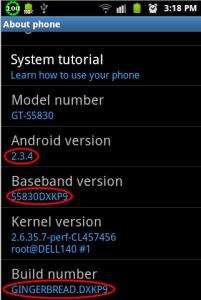
Now is already 2.3.4

This post has been edited by CuriOu5: Sep 6 2011, 03:25 PM


Attached thumbnail(s)
Attached Image
CuriOu5
post Sep 6 2011, 03:43 PM

Casual
***
Junior Member
380 posts

Joined: Apr 2007
From: Malaysia
QUOTE(BanG_DeaD @ Sep 6 2011, 04:29 PM)
so i should download the KPH? It's the only 2.3.4 i see (the picture)...  blush.gif


Added on September 6, 2011, 3:30 pmoh wait.. i see other firmwares.. lol didnt scroll down.. wait arh


Added on September 6, 2011, 3:32 pmsaw this.. i guess this is the right one?
user posted image
drool.gif
*
Wouldn't it be easier to take it to Samsung Service Centre to upgrade. Go during off peak (ie not lunch hour). You need to back up all the data. If you have a gmail account sync the contact to your gmail accounts. After upgrade you can sync back the contact from gmail to the phone. SMS can be back-up by using the apps SMS Backup and restore. Apps can be reinstalled if you have the apk files.
CuriOu5
post Sep 6 2011, 04:48 PM

Casual
***
Junior Member
380 posts

Joined: Apr 2007
From: Malaysia
QUOTE(seme @ Sep 6 2011, 05:43 PM)
upgraded to gingerbread..

but i forgot to backup my papago apps.. sad.gif
*
Reinstall-loh.
CuriOu5
post Sep 6 2011, 09:38 PM

Casual
***
Junior Member
380 posts

Joined: Apr 2007
From: Malaysia
GPS affected.


CuriOu5
post Sep 6 2011, 11:51 PM

Casual
***
Junior Member
380 posts

Joined: Apr 2007
From: Malaysia
QUOTE(handsomehow @ Sep 7 2011, 12:16 AM)
hi my fellow frens, did any1 u guyz facing Galaxy Ace faced the auto close issue? any 1 can help me? i recently bought a Galaxy Ace about a week but it already auto closed for 6 times.... any1 has the solution?
*
It could be one of the apps you installed that is causing the auto close. What was the last app you installed.
CuriOu5
post Sep 7 2011, 01:04 PM

Casual
***
Junior Member
380 posts

Joined: Apr 2007
From: Malaysia
QUOTE(jefrina @ Sep 7 2011, 01:54 PM)
who upgrade from service centre? what is the yours baseband version KPB or KC1 or KPH
*
See post #751 on page 38.

This post has been edited by CuriOu5: Sep 7 2011, 01:05 PM

5 Pages  1 2 3 > » Top
Topic ClosedOptions
 

Change to:
| Lo-Fi Version
0.0434sec    0.70    7 queries    GZIP Disabled
Time is now: 8th December 2025 - 07:56 AM