

QUOTE(jefrina @ Sep 7 2011, 02:25 PM)
ok, so u upgrade form service centre?...on the picture look like KPB or KP9?

KP9SAMSUNG GALAXY ACE Official Thread V3, Mid Range Phone, Released Date Feb 2011
|
|
 Sep 7 2011, 01:30 PM Sep 7 2011, 01:30 PM
Return to original view | Post
#21
|
 
Junior Member
380 posts Joined: Apr 2007 From: Malaysia 
|
QUOTE(jefrina @ Sep 7 2011, 02:25 PM) ok, so u upgrade form service centre?...on the picture look like KPB or KP9? KP9 |
|
|
|
|
|
Sep 7 2011, 02:27 PM
Return to original view | Post
#22
|
|
Junior Member
380 posts Joined: Apr 2007 From: Malaysia
|
QUOTE(jefrina @ Sep 7 2011, 03:24 PM) Oh ok...is there any difference Between Both?.. No idea. Guess it's the location. |
|
|
Sep 7 2011, 02:39 PM
Return to original view | Post
#23
|
|
Junior Member
380 posts Joined: Apr 2007 From: Malaysia
|
QUOTE(icewolf3 @ Sep 7 2011, 03:31 PM) btw, i accidentally uninstall my google maps. and now it seems like i can't install from market. is it because i updated to GB so now market don't support or is it my phone is rooted or is it because google maps do not support galaxy ace? Check to see whether it is still in /system/app and look for Maps.apk. File size 6.4MB. If it is there you can re-install from there.Whether rooted or not can still work. Gingerbread also can work. This post has been edited by CuriOu5: Sep 7 2011, 02:48 PM |
|
|
Sep 7 2011, 04:14 PM
Return to original view | Post
#24
|
|
Junior Member
380 posts Joined: Apr 2007 From: Malaysia
|
QUOTE(icewolf3 @ Sep 7 2011, 03:52 PM) it's no longer in there. how ar...now in android market, it written there "installed" but there's none in my phone. it also written there my phone is not compatible. PM your email to me an I email you the file. |
|
|
Sep 7 2011, 10:05 PM
Return to original view | Post
#25
|
|
Junior Member
380 posts Joined: Apr 2007 From: Malaysia
|
Did you accidentally switch it off or reduce vibration to zero in the settings
|
|
|
Sep 8 2011, 11:31 AM
Return to original view | Post
#26
|
|
Junior Member
380 posts Joined: Apr 2007 From: Malaysia
|
QUOTE(izzoe @ Sep 8 2011, 12:22 PM) Maybe because the version of NFS u are running is for 2.2.1.. It's different AFAIK.. U can download the 2.3.3 version at a website but i cant promote warez here(I think?).. Confirm you need the gingerbread version to play the game. Bad news is you have to start all over again. |
|
|
|
|
|
Sep 8 2011, 12:17 PM
Return to original view | Post
#27
|
|
Junior Member
380 posts Joined: Apr 2007 From: Malaysia
|
QUOTE(Aquariusdenz @ Sep 8 2011, 12:57 PM) after using Gingerbread for more than one week.. i can say that i never encounter SOD anymore.. Just don't install apps that conflict with the OS. |
|
|
Sep 8 2011, 01:23 PM
Return to original view | Post
#28
|
|
Junior Member
380 posts Joined: Apr 2007 From: Malaysia
|
QUOTE(icewolf3 @ Sep 8 2011, 01:41 PM) anyone with virgin ace (have not rooted before) with official Gingerbread can detect google maps in Android Market? I uninstalled google maps when using froyo to free up internal memory. When I recovered almost 90MB from the log files I managed to installed it from android market then without any compatibility issue. Subsequently I uninstalled it again under froyo. However was surprise to see in again in gingerbread although in the android market it says installed but not compatible to SGA.Or people with Ace Froyo can still detect Google maps in Market i asked all these because i'm wondering is it because we updated to GB that's why we cannot use many google app from Android Market. can help? It is usable under gingerbread. Below screen shots from the apps. Under gingerbread I'm unable to reset GPS settings under LBSTESTMODE and the *#*#3214789650#*#* code doesn't work anymore. Tried AngryGPS also nothing happen. Attached thumbnail(s) 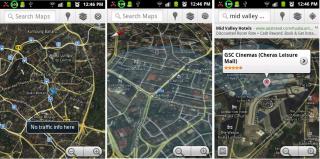
|
|
|
Sep 8 2011, 02:00 PM
Return to original view | Post
#29
|
|
Junior Member
380 posts Joined: Apr 2007 From: Malaysia
|
QUOTE(icewolf3 @ Sep 8 2011, 02:29 PM) So meaning, what Google replied to me is true. Google Maps (some of the other Google apps as well) is no longer available for Msia. Hmm....i miss chrome to phone app. Even Youtube is no longer available for Msia. i know i can just download somewhere else for it but just the thought of not able to use it 'officially' kinda sad. Only issue cannot reset GPS settings in gingerbread.The YouTube app is there. See below. thanks everyone for helping. Added on September 8, 2011, 1:34 pmoh ya...may i know the version between a rooted kernel and a none rooted kernel? mine written there root@DELL#1. even i have unrooted it, the kernel still says root. what's the name of the stock GB kernel version? Phone details see #751 on page 38. Attached thumbnail(s) 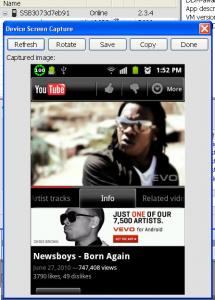
|
|
|
Sep 8 2011, 02:31 PM
Return to original view | Post
#30
|
|
Junior Member
380 posts Joined: Apr 2007 From: Malaysia
|
Accidentally discover the short cut to make call or message.
In your contacts, if you slide the contact to the right, the phone will immediately call that person. If you slide to the left it will select messaging for you. Try it. Attached thumbnail(s) 
|
|
|
Sep 8 2011, 05:48 PM
Return to original view | Post
#31
|
|
Junior Member
380 posts Joined: Apr 2007 From: Malaysia
|
QUOTE(Monster1998 @ Sep 8 2011, 06:11 PM) hi agn>< 1. Connect the USB cable between phone and computer.erm...how can i transfer songs form pc to phone?!@-@ 2. Install the driver if haven't 3. Follow diagram below (Fig 1- 5) 4. In computer look for the drive for your phone ( I have named my Galaxy Ace) 5. Copy your songs and paste it into a directory in the phone/sdcard. 6. Once completed "Disconnect storage from PC" - Fig.6 This post has been edited by CuriOu5: Sep 8 2011, 05:51 PM Attached thumbnail(s) 
|
|
|
Sep 8 2011, 11:02 PM
Return to original view | Post
#32
|
|
Junior Member
380 posts Joined: Apr 2007 From: Malaysia
|
QUOTE(scoop7 @ Sep 8 2011, 11:39 PM) after reading for few pages regarding upgrading to GB. i found there is some good points i.e. no more SOD, better battery life... also found some bad points of using GB i.e. no google maps, youtube.... Not true on Google maps and YouTube. I'm.on gingerbread 2.3 and both the said apps are working. See post #827 @ #830 on page 42. Only thing is I can't tweak GPS settings. Angrygps or the code *#*#3214789650#*#* not executable in gingerbread.it's a bit tiring to read thru several pages regarding pros & cons of GB. any sifus here wanna comment if it's really worth it to upgrade to GB? found that GB upgrade will be coming thru KIES SOS |
|
|
Sep 9 2011, 12:19 PM
Return to original view | Post
#33
|
|
Junior Member
380 posts Joined: Apr 2007 From: Malaysia
|
QUOTE(LordNed @ Sep 9 2011, 01:12 PM) I upgraded to gingerbread 2 days ago, it got smoother, free up alot phone memory. Battery life also improved. google maps and youtube are working fine. Battery indicator shows more accurate reading. The only thing I Don like now is the delay for waking up the phone. I need to wait for around 2 second after pressing Home button for the locked screen to appear... Not in mine, up in under 1 second. You installed to many apps is it.Added on September 9, 2011, 1:13 pmFor Gingerbread unit only. Kindly try keying the code *#*#1472365#*#* for GPS Test (Improvement of the GPS configuration change?) and see whether it works with you unit. Mine nothing happen after keying the code. Before gingerbread up date my unit can lock into satellites usually under 1 minute. After upgrade to gingerbread in takes about 3 - 5 minutes to lock into satellites. Anyone has the secret code for tweaking the GPS configuration. This post has been edited by CuriOu5: Sep 9 2011, 01:18 PM |
|
|
|
|
|
Sep 9 2011, 02:03 PM
Return to original view | Post
#34
|
|
Junior Member
380 posts Joined: Apr 2007 From: Malaysia
|
QUOTE(myFoRza @ Sep 9 2011, 03:00 PM) use this That's for AGPS setting. Looking for the code to execute AngryGPS similar to LBSTESTMODE (*#*#3214789650#*#*) in froyo.*#*#1575#*#* This post has been edited by CuriOu5: Sep 9 2011, 02:07 PM |
|
|
Sep 9 2011, 04:45 PM
Return to original view | Post
#35
|
|
Junior Member
380 posts Joined: Apr 2007 From: Malaysia
|
QUOTE(ahaks89 @ Sep 9 2011, 03:47 PM) i have force all phones apps to SD but still the memory in the phone is not reduced.... it is about 3 apps is in my phone memory... Do you mean internal storage or memory. If its phone memory it will not reduce until you tell the phone not to load apps on startup. Moving apps to sdcard will only increase internal storage.Added on September 9, 2011, 4:48 pm QUOTE(CuriOu5 @ Sep 9 2011, 05:45 PM) Do you mean internal storage or memory. If its phone memory it will not reduce until you tell the phone not to load apps on startup. Moving apps to sdcard will only increase internal storage. You can go to settings-applications-manage applications and force close application that you do not want it to run and the memory will increase.This post has been edited by CuriOu5: Sep 9 2011, 04:48 PM |
|
|
Sep 11 2011, 10:25 PM
Return to original view | Post
#36
|
|
Junior Member
380 posts Joined: Apr 2007 From: Malaysia
|
QUOTE(mynewuser @ Sep 11 2011, 01:25 PM) Sorry, friend just retired from galaxy ace and move to galaxy S plus. At least the phone come with 2GB internal storage for you to install program. No need to think about how many internal storage left. Do you really need so much internal storage. How many apps will you use. I have installed 60 apps including games and still have 80MB left. SGS+ is twice the price of SGA. With the 60 apps many of them I hardly use.SGSP much more responsive compare to ace. This post has been edited by CuriOu5: Sep 11 2011, 10:26 PM |
|
|
Sep 12 2011, 09:50 AM
Return to original view | Post
#37
|
|
Junior Member
380 posts Joined: Apr 2007 From: Malaysia
|
You can transfer files using Bluetooth but slow if the files are big.
|
|
|
Sep 13 2011, 12:22 AM
Return to original view | Post
#38
|
|
Junior Member
380 posts Joined: Apr 2007 From: Malaysia
|
QUOTE(tommy2b @ Sep 12 2011, 11:41 AM) hi guys,my ace occur a s/w problem. One of the apps if causing your launcher to fail. After i installed viper I encountered the same problem as yours. Same error message. when i click on home it will pop up a error box which got the error msg : " The application Samsung Home(process com.sec.andriod.app.twlauncher) has stopped unexpectedly.Please try again." and i Force close. Do anyone know what is the problem and how to solve it? T.T Thank you To overcome it I turned on the wifi. On my computer went to android market and installed Launcher Pro to the handphone. Since then I was using Launch pro until I upgraded to gingerbread . Set the launcher default to Launcher pro until you identify the culprit. |
|
|
Sep 13 2011, 01:04 PM
Return to original view | Post
#39
|
|
Junior Member
380 posts Joined: Apr 2007 From: Malaysia
|
QUOTE(passola88 @ Sep 13 2011, 03:16 AM) hye guys.... To root or not to root, you decide. i already upgrade my SGA to 2.3.4 GB DXKPB using odin, so did i need to root back my SGA? If you want to root, check it out here http://www.samfirmware.com/apps/forums/top...bread-on-s5670- |
|
|
Sep 13 2011, 05:26 PM
Return to original view | Post
#40
|
|
Junior Member
380 posts Joined: Apr 2007 From: Malaysia
|
QUOTE(kiien_kyan @ Sep 13 2011, 05:42 PM) SGA so weird.. i bought it back and got SOD few times, then saw this thread n gotta noe it's normal.. When on froyo SOD happened after installing or update apps. Some free apps causing problem. After uninstall no more SOD.then after that no more SOD for quite a long time, but 2days ago,it start SOD again and quite frequent..wat the... any1 after upgrade to GB faced SOD? isit gingerbread solve the problem? In gingerbread is the same and maybe worst if install apps not gingerbread compatible. =D |
|
Topic ClosedOptions
|
| Change to: |  0.0420sec 0.0420sec
 1.18 1.18
 7 queries 7 queries
 GZIP Disabled GZIP Disabled
Time is now: 9th December 2025 - 12:26 PM |
 Quote
Quote