

QUOTE(annoymous1234 @ Nov 8 2011, 10:22 PM)
i think is vol down not up.. not sure

Vol down for download mode.. i cannot flash any rom without recovery..Samsung Galaxy S Plus (I-9001) Official Thread V1, Galaxy S Plus 1.4ghz speed !! Join in !!
|
|
 Nov 8 2011, 10:28 PM Nov 8 2011, 10:28 PM
|
 
Junior Member
411 posts Joined: Nov 2010 
|
QUOTE(annoymous1234 @ Nov 8 2011, 10:22 PM) i think is vol down not up.. not sure Vol down for download mode.. i cannot flash any rom without recovery.. |
|
|
|
|
|
Nov 8 2011, 10:37 PM
|

Senior Member
7,617 posts Joined: Mar 2009
|
QUOTE(kayro @ Nov 8 2011, 10:28 PM) Vol down for download mode.. i cannot flash any rom without recovery.. y not go to xda, u see the thread easy root unroot method, there TS got upload one file, it allows ur phone to enter recovery without u manually doing it |
|
|
Nov 8 2011, 10:48 PM
|
|
Junior Member
22 posts Joined: Dec 2009
|
QUOTE(haziqmck7 @ Nov 8 2011, 10:09 PM) try update ur kies 1st... ok. thanks. dah boleh update.  |
|
|
Nov 8 2011, 10:56 PM
|
|
Senior Member
1,696 posts Joined: Dec 2010
|
QUOTE(mbf584 @ Nov 8 2011, 10:48 PM) ok. thanks. dah boleh update. no biggies.. .hope u can update it smoothly.many cmplain stuck during update.. |
|
|
Nov 8 2011, 11:46 PM
|
|
Junior Member
22 posts Joined: Dec 2009
|
QUOTE(haziqmck7 @ Nov 8 2011, 10:56 PM) no biggies.. yes.. I dah berjaya update tp makan masa. lbh kurang 1 jam lbh. mgkn speed ternet slow. .hope u can update it smoothly.many cmplain stuck during update.. |
|
|
Nov 8 2011, 11:53 PM
|
|
Senior Member
1,696 posts Joined: Dec 2010
|
QUOTE(mbf584 @ Nov 8 2011, 11:46 PM) yes.. I dah berjaya update tp makan masa. lbh kurang 1 jam lbh. mgkn speed ternet slow. good ...lucky 4 u...that time when i update...need to do it twice...coz stuck..lol |
|
|
|
|
|
Nov 8 2011, 11:59 PM
|

Junior Member
161 posts Joined: Oct 2008 From: Shah Alam 
|
QUOTE(kayro @ Nov 8 2011, 10:28 PM) Vol down for download mode.. i cannot flash any rom without recovery.. @kayroenter the Recover Mode this way: (credit goes to Riversource from XDA) - Switch phone off - Press Vol+ and Power Button - as soon as the "SAMSUNG" appears release both buttons - as soon as the "Android out of the Box" appears, press the Menu button. Remark: Don't press the Home Button during power on! Otherwise you will enter the RAM Dump mode. hopefully this will help u  |
|
|
Nov 9 2011, 12:34 AM
|
|
Junior Member
23 posts Joined: Jun 2011
|
new user here..n this is my first smartphone...
if i update 2.3.5..do i need to factory data reset??? |
|
|
Nov 9 2011, 01:38 AM
|

Junior Member
24 posts Joined: Nov 2011
|
QUOTE(shadowlove @ Nov 7 2011, 10:40 PM) Let me teach you how yo do it. First you restore the default setting in Access Point Names, you tick the Use packet data, you try to sent one mms,after you successfully sent one, you go in the Access points names. there will be 2 APN there. you delete APN for the internet one. Done. you can sent and receive mms but no charge for internet because the access point is deleted. Reminder : you need to do it all over again next time you reboot phone,understand? after delete the APN internet ... left another APN mms ...so need to tick the use packet data box everytime while i wan to send mms ? |
|
|
Nov 9 2011, 02:58 AM
|

Junior Member
216 posts Joined: Jul 2010 
|
still can't update firmware..
can someone teach how to update using odin.. i already donlod the file that are needed.. then i dont know what to do.. some one help me.. |
|
|
Nov 9 2011, 03:47 AM
|

Junior Member
294 posts Joined: Jan 2008 From: Kuantan
|
where to download the ori firmware?already root so kies ddnt recognize phone
|
|
|
Nov 9 2011, 07:26 AM
|
|
Junior Member
113 posts Joined: Jul 2011
|
QUOTE(junkang89 @ Nov 9 2011, 01:38 AM) after delete the APN internet ... left another APN mms ... I left the Use Packet data tick all the time cause i have free mms with Digi plan, the main point here is i dont have to worry about any internet charges because the internet VPN is deleted. I just need to pay for MMS only. However, you need to repeat the steps all over again when u restart phone or else mms wont workso need to tick the use packet data box everytime while i wan to send mms ? |
|
|
Nov 9 2011, 09:12 AM
|

Senior Member
2,549 posts Joined: Dec 2004 From: Sungai Petani, Kedah
|
QUOTE(taq_gt @ Nov 9 2011, 03:47 AM) where to download the ori firmware?already root so kies ddnt recognize phone Please try this -> http://www.mediafire.com/?t35dodf2b2fb0As it publish at this website -> http://muabanraovat.org/huong-dan-up-rom-a...01-4926813.html Added on November 9, 2011, 9:29 am QUOTE(shredder90 @ Nov 9 2011, 02:58 AM) still can't update firmware.. You need this file ODIN & AriesVE.ops file. Refer attachment.can someone teach how to update using odin.. i already donlod the file that are needed.. then i dont know what to do.. some one help me.. You also need the ROM -> http://hotfile.com/dl/133852231/1083d2e/GT...1DXKJ1.rar.html Pass: sampro.pl Fully charge your phone. Backup all your file and contact. Hard reset your phone. Now turn Off and ON your phone again to enter into the downloading mode. To enter into the downloading mode just press volume DOWN key and Home button along with the power button, altogether simultaneously. Refer to the below video to find how to enter your Android mobile into the downloading mode. http://www.youtube.com/watch?feature=playe...d&v=JwFCKDC7OQ4 After the phone is in downloading mode, connect it with the PC (or Laptop) using the USB Cable. As soon as you connect the USB cable the COM Port Mapping block in the Odin tool will be turn into yellow color indicating that all the necessary drivers have been installed successfully. Now, in the Odin tool click on the OPS and Select One package and choose the ROM files as shown in the ODIN.jpg below. Once all the files are selected as given above click on ‘Start’ option to initiate the process of firmware updation. This firmware updation process may take few minutes so don’t interrupt the process in the middle or else you need to start the process again from the beginning. As soon as the process completes your phone will restarts automatically. If the process is taking more time than the usual then disconnect the cable and follow the whole procedure again from the beginning. Now turn OFF your mobile and enter into the recovery mode. To enter into the recovery mode Switch phone off - Press Vol+ and Power Button - as soon as the "SAMSUNG" appears release both buttons - as soon as the "Android out of the Box" appears, press the Menu button. Now your phone is in recovery mode, so choose the options like wipe data/ factory reset and wipe cache partition. The touch interface will not work in the recovery mode so use volume UP & DOWN keys in order to scroll UP & Down. In the process of firmware update, some of the cache files will generates in your phone in order to damage some applications of your phone. So, to avoid any such damage on your phone we need to clean up all the cache files from the phone. Refer to the above video tutorial to get a better idea on cleaning of cache files. After clearing all the cache files form the phone, just reboot it using the option ‘reboot system now’, and enter the language preferences and the Google account preferences again so that you can bring back your phone into the normal mode. This post has been edited by mynewuser: Nov 9 2011, 12:57 PM Attached thumbnail(s) 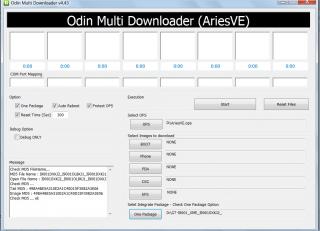
Attached File(s)  ODIN.zip ( 202.9k )
Number of downloads: 16
ODIN.zip ( 202.9k )
Number of downloads: 16 |
|
|
|
|
|
Nov 9 2011, 12:29 PM
|

Junior Member
734 posts Joined: Jul 2009
|
i'm having problem with this phone..
my battery life sucks.. i didn't switch on the wifi, bluetooth,gps or anything..even the brightness is set low.. suspect the gingerbread bug issue.. anyone have the solution? |
|
|
Nov 9 2011, 01:07 PM
|
|
Junior Member
161 posts Joined: Oct 2008 From: Shah Alam
|
QUOTE(leon898 @ Nov 9 2011, 12:29 PM) i'm having problem with this phone.. update using latest kies... then update OS latest one v 2.3.5 my battery life sucks.. i didn't switch on the wifi, bluetooth,gps or anything..even the brightness is set low.. suspect the gingerbread bug issue.. anyone have the solution?  this update really improved battery life...  |
|
|
Nov 9 2011, 01:19 PM
|
|
Junior Member
734 posts Joined: Jul 2009
|
QUOTE(niesma84 @ Nov 9 2011, 01:07 PM) update using latest kies... then update OS latest one v 2.3.5 really? good know! this update really improved battery life... if i update, will it avoid warranty? how about apps and contact in my phone? sorry for noob question..i'm new here.  |
|
|
Nov 9 2011, 01:31 PM
|

Senior Member
1,604 posts Joined: Oct 2004 From: Seremban
|
Turn off live wallpaper as well.
|
|
|
Nov 9 2011, 02:03 PM
|

Junior Member
157 posts Joined: Dec 2010
|
QUOTE(shredder90 @ Nov 8 2011, 03:35 PM) hold 'home' key + 'back' key.. thanks! |
|
|
Nov 9 2011, 02:41 PM
|
|
Junior Member
161 posts Joined: Oct 2008 From: Shah Alam
|
QUOTE(leon898 @ Nov 9 2011, 01:19 PM) really? good know! nope it wont void bcoz it was latest official firmware from Samsung Malaysia if i update, will it avoid warranty? how about apps and contact in my phone? sorry for noob question..i'm new here. ... anything happen can claim waranty QUOTE(sakuraba @ Nov 9 2011, 02:03 PM) thanks! @sakurabaHold back key then press home......opposite way...okay |
|
|
Nov 9 2011, 03:51 PM
|

Junior Member
19 posts Joined: Sep 2007
|
QUOTE(Essilor @ Nov 8 2011, 04:42 PM) 1.4ghz.. Thanks..Added on November 9, 2011, 3:54 pmI want 2 buy SGS+ but dunno where 2 buy..Is it worth to buy at SEP(one utama)? or other place? This post has been edited by kumarss: Nov 9 2011, 03:54 PM |
|
Topic ClosedOptions
|
| Change to: |  0.0294sec 0.0294sec
 1.41 1.41
 6 queries 6 queries
 GZIP Disabled GZIP Disabled
Time is now: 19th December 2025 - 05:34 AM |
 Quote
Quote