Welcome Guest ( Log In | Register )

128 Pages « < 7 8 9 10 11 > » Bottom

Outline · [ Standard ] · Linear+

 Official ASUS N53S/43S Club V3, Review, Discuss or ask Anything here

views
     
springfall
post Jul 16 2011, 10:49 PM

Spring and fall helping Summer and winter
*******
Senior Member
4,072 posts

Joined: Mar 2011
From: μετά
any1 tried the new atk pack? it screwed my atk, none media button works..


Added on July 16, 2011, 11:22 pmany1 doing updates on ur sn/sv, remember to REMOVE the previous version be4 installing newer, po4gear, expressgate,atk,splendit, do atk last
camera update didnt work, @trance how it went?

This post has been edited by springfall: Jul 16 2011, 11:22 PM
IvanWong1989
post Jul 17 2011, 12:08 AM

!StringTheory!
*******
Senior Member
4,297 posts

Joined: Jul 2009


rclxm9.gif huhu got myself rapoo wireless keyboard and mouse set frm it fair.

btw..


anyone here using those headphones??? my ears hurt..zzz
lee_what2004
post Jul 17 2011, 12:27 AM

*stare* ji--------
Group Icon
Elite
14,813 posts

Joined: Nov 2006


What headphone ?
IvanWong1989
post Jul 17 2011, 12:35 AM

!StringTheory!
*******
Senior Member
4,297 posts

Joined: Jul 2009


QUOTE(lee_what2004 @ Jul 17 2011, 12:27 AM)
What headphone ?
*
cheapo avf headphones oli... haha

erm.. i wear specs... so when wear for long period it presses the ears onto the spec frame.... hurt my ears..zzzz

i tried thr... short while it's ok..... zzz...

i totally forgot about this problem....


any solution??

actually any headphone me wear aso pain afta half hour.... the damn spec legs pressing in... but i sooooooo wan headphones czthey sound awesome... sigh cry.gif


any solution? hmm.gif
TSTrance4eva
post Jul 17 2011, 12:45 AM

Regular
******
Senior Member
1,801 posts

Joined: Sep 2010
QUOTE(springfall @ Jul 16 2011, 10:49 PM)
any1 tried the new atk pack? it screwed my atk, none media button works..


Added on July 16, 2011, 11:22 pmany1 doing updates on ur sn/sv, remember to REMOVE the previous version be4 installing newer, po4gear, expressgate,atk,splendit, do atk last
camera update didnt work, @trance how it went?
*
all the latest driver works for me....but boot up really slow. Add another 30secs. After i reinstalled all the driver back, i forgotten to clean my registry doh.gif then i realize wads the prob

So after you installed the latest driver, rmb to clean ur registry via CCleaner
lee_what2004
post Jul 17 2011, 12:47 AM

*stare* ji--------
Group Icon
Elite
14,813 posts

Joined: Nov 2006


@IvanWong1989, contact lens laugh.gif
IvanWong1989
post Jul 17 2011, 12:51 AM

!StringTheory!
*******
Senior Member
4,297 posts

Joined: Jul 2009


QUOTE(lee_what2004 @ Jul 17 2011, 12:47 AM)
@IvanWong1989, contact lens laugh.gif
*
i dun luk gud witout specs man... lolx....


dang... it's hurting...zzzz


shouldn't had bought it...zzzz

even witout glasses it stil hurts....zzzz icon_question.gif icon_question.gif

anyway....

lee what sifu..


n43sl at rm2380 gud deal??? hmm.gif


lee_what2004
post Jul 17 2011, 12:53 AM

*stare* ji--------
Group Icon
Elite
14,813 posts

Joined: Nov 2006


Sounds good enough..
springfall
post Jul 17 2011, 12:55 AM

Spring and fall helping Summer and winter
*******
Senior Member
4,072 posts

Joined: Mar 2011
From: μετά
QUOTE(Trance4eva @ Jul 17 2011, 02:45 AM)
all the latest driver works for me....but boot up really slow. Add another 30secs. After i reinstalled all the driver back, i forgotten to clean my registry  doh.gif  then i realize wads the prob

So after you installed the latest driver, rmb to clean ur registry via CCleaner
*
i hate it when asus updates will nvr work unless u uninstall it and reinstall it.. rebooting is a pain and the registry it leaves is annoying...

@ivan try cloth based cusion headphones. AVF makes ok headphones but their synthetic leather muffs are stiff and uncomfy. i wear over ears cans and i wear specs works 4 me
IvanWong1989
post Jul 17 2011, 01:06 AM

!StringTheory!
*******
Senior Member
4,297 posts

Joined: Jul 2009


QUOTE(springfall @ Jul 17 2011, 12:55 AM)
i hate it when asus updates will nvr work unless u uninstall it and reinstall it.. rebooting is a pain and the registry it leaves is annoying...

@ivan try cloth based cusion headphones. AVF makes ok headphones but their synthetic leather muffs are stiff and uncomfy. i wear over ears cans and i wear specs works 4 me
*
mine is cushion de.... also pain leh.. pressing on my outer ear.....

zzz..... just slightly slightly pressing oli... but after half hour use..zzz pain neh... now aso just tahan the pain oli.zzzz

i duwan to let go of this baby leh... any suggestions?????

sigh....

i can think of any now....zzzz anybody suggestios??? lolx.. i knw this waaaaay off topic sorry..... but google din turn up anything gud..... gomenasai.... hope anybody gt idea......
springfall
post Jul 17 2011, 01:10 AM

Spring and fall helping Summer and winter
*******
Senior Member
4,072 posts

Joined: Mar 2011
From: μετά
QUOTE(IvanWong1989 @ Jul 17 2011, 03:06 AM)
mine is cushion de.... also pain leh.. pressing on my outer ear.....

zzz..... just slightly slightly pressing oli... but after half hour use..zzz pain neh... now aso just tahan the pain oli.zzzz

i duwan to let go of this baby leh... any suggestions?????

sigh....

i can think of any now....zzzz anybody suggestios??? lolx.. i knw this waaaaay off topic sorry..... but google din turn up anything gud..... gomenasai.... hope anybody gt idea......
*
is urs rectangular type muffs? maybe try getting a bowling ball and put the headphones on it.. make the size abit bigger n looser then not soo tight on ur head
IvanWong1989
post Jul 17 2011, 01:20 AM

!StringTheory!
*******
Senior Member
4,297 posts

Joined: Jul 2009


QUOTE(springfall @ Jul 17 2011, 01:10 AM)
is urs rectangular type muffs? maybe try getting a bowling ball and put the headphones on it.. make the size abit bigger n looser then not soo tight on ur head
*
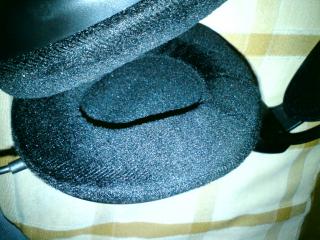
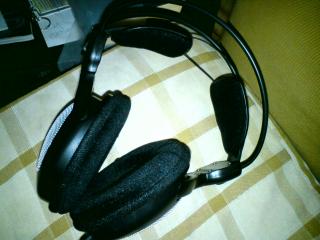
er....photo...
Attached Image

Attached Image


sigh.... it sound nice..... just this prob. sigh... maybe it's too tight.. hmm.gif


edit:

that is gud idea put on bowling ball to make it loose... yeah.. just might try that.... but use helmet instead.. hehe.. no bowling ball lying around... tongue.gif

This post has been edited by IvanWong1989: Jul 17 2011, 01:22 AM
TSTrance4eva
post Jul 17 2011, 01:30 AM

Regular
******
Senior Member
1,801 posts

Joined: Sep 2010
QUOTE(springfall @ Jul 17 2011, 12:55 AM)
i hate it when asus updates will nvr work unless u uninstall it and reinstall it.. rebooting is a pain and the registry it leaves is annoying...

@ivan try cloth based cusion headphones. AVF makes ok headphones but their synthetic leather muffs are stiff and uncomfy. i wear over ears cans and i wear specs works 4 me
*
I spend 3 hrs to try and error all the driver including finding what is the source of the slow boot up doh.gif
Then i realize all the problem is solve using CCleaner.

Take my advice, just uninstall everything that ur gonna replace>restart>install all the new driver>restart then only use CCleaner to clean registry.
When they ask to restart Now b4 u done installing other driver, just say no

Oh yea, just a reminder, for P4G and FastBoot you have to set everything back....also including what ur power button does or closing the lid does
springfall
post Jul 17 2011, 01:57 AM

Spring and fall helping Summer and winter
*******
Senior Member
4,072 posts

Joined: Mar 2011
From: μετά
QUOTE(Trance4eva @ Jul 17 2011, 03:30 AM)
I spend 3 hrs to try and error all the driver including finding what is the source of the slow boot up  doh.gif
Then i realize all the problem is solve using CCleaner.

Take my advice, just uninstall everything that ur gonna replace>restart>install all the new driver>restart then only use CCleaner to clean registry.
When they ask to restart Now b4 u done installing other driver, just say no

Oh yea, just a reminder, for P4G and FastBoot you have to set everything back....also including what ur power button does or closing the lid does
*
yep, i lost 2 hours rebooting many times.. p4gear setting lost...fast boot i use old version, new cannot work somehow...got update ur intel wifi drivers? intel say old but cannot update..
TSTrance4eva
post Jul 17 2011, 02:04 AM

Regular
******
Senior Member
1,801 posts

Joined: Sep 2010
QUOTE(springfall @ Jul 17 2011, 01:57 AM)
yep, i lost 2 hours rebooting many times.. p4gear setting lost...fast boot i use old version, new cannot work somehow...got update ur intel wifi drivers? intel say old but cannot update..
*
lol i dun want to interrupt the wifi. My wifi now is ok i scared if i update then something will go wrong.
You try 1st then i follow laugh.gif
springfall
post Jul 17 2011, 02:17 AM

Spring and fall helping Summer and winter
*******
Senior Member
4,072 posts

Joined: Mar 2011
From: μετά
QUOTE(Trance4eva @ Jul 17 2011, 04:04 AM)
lol i dun want to interrupt the wifi. My wifi now is ok i scared if i update then something will go wrong.
You try 1st then i follow  laugh.gif
*
the 1 from asus.com cannot work forsomereason... intel cannot detect the drivers too but say old..soo funny
juz asking ur hd3000 what version? izzit 15.22.1.64.2361 or 15.22.1.64.22xx
15.22.1.64.2361 cannot install for mine, say some installation failed, closing


Added on July 17, 2011, 2:21 amwificounsole3 works juz un then reinstall

This post has been edited by springfall: Jul 17 2011, 02:21 AM
TSTrance4eva
post Jul 17 2011, 02:26 AM

Regular
******
Senior Member
1,801 posts

Joined: Sep 2010
the latest 15.22.1.64.2361
weird hmm.gif my can install smoothly. I just install over, i din uninstall the old.
Oh yea, i dl the Intel driver from Intel Web and not Asus web

the driver ur talking bout...that got problem....is which driver?? wifi or LAN??
springfall
post Jul 17 2011, 02:32 AM

Spring and fall helping Summer and winter
*******
Senior Member
4,072 posts

Joined: Mar 2011
From: μετά
stuff from asus that works 17_07_11 version
Audio_Realtek_ALC269_SRS_Win7_32_64_Z6016257- not recommended, old version; get @ realtek driver site
Splendid_N53S_Z1020031- works, re then un
TurboBoost_Monitor_Win7_32_Win7_64_z104004-unness but 4 fun
ExpressGate_Cloud_Win7_32_Win7_64_Z2188405-not ness no changes... infct possibility of ruining ur express gate.. reinstall it 3 times for me to work
USB3_Fresco_Win7_64_Z3011012__ must but little diff
Power4Gear_Hybrid_Win7_32_Win7_64_Z1143____must!! un n re
ATKPackage_WIN7_32_WIN7_64_z100007_____must!! un n re
Touchpad_Elantech_Win7_64_z70516-works but un n re
VGA_Intel_Win7_64_Z815102253-works but newer on intel drivers
Chipset_Intel_WIN7_32_64_z9201015___must!!
VGA_nVidia_N11X_N12X_R260_Win7_64_Z817126639- very old but works, get from nvidia site
Fastboot_Win7_64_Z108- works but some missing for me
Bluetooth_WIN7_32_WIN7_64_z625600-leave it, no diff
CardReader_Alcor_WIN7_32_WIN7_64_z181726026-works
Camera_Chicony_9236_Win7_64_Z21031310;
Camera_Chicony_9059_CR_Win7_64_Z061005200450;
Camera_Azurewave_2S002_CL_Win7_64_Z5854000207--- unzip n try install each 1, will fix the bug where when msn n skype operate together, webcam fails, diff laptop diff effect, ur choise
Wireless_Console_3_WIN7_32_WIN7_64_z3019-works, no diff 2 me
___
others some are old n some fail, lan, wifi, some screwed my system, dunwan install ardy...
happy updating


Added on July 17, 2011, 2:35 am
QUOTE(Trance4eva @ Jul 17 2011, 04:26 AM)
the latest 15.22.1.64.2361
weird  hmm.gif  my can install smoothly. I just install over, i din uninstall the old.
Oh yea, i dl the Intel driver from Intel Web and not Asus web

the driver ur talking bout...that got problem....is which driver?? wifi or LAN??
*
some intel wifi/lan drivers will screw u horribelly.. my advise no touchhy...
the driver that gt problem is the hd3000... i keep install cannot work but un , re can work.. strange... but during installation, comp went blk for 1 min, worry it failed but then it went ok~ laugh.gif

This post has been edited by springfall: Jul 17 2011, 02:35 AM

TSTrance4eva
post Jul 17 2011, 03:07 AM

Regular
******
Senior Member
1,801 posts

Joined: Sep 2010
QUOTE(springfall @ Jul 17 2011, 02:32 AM)
» Click to show Spoiler - click again to hide... «

*
1. You dl the wong Realtek driver le sweat.gif The one you mention comes with SRS Premium Sound. SRS only works only SRS certified speakers like Altec Lansing or JBL. If you want the latest, go the the 1st page and find my post. Make sure you check the latest Audio driver version. Sometimes the Audio is better than current....sometimes it just screw up the speaker sound. For now i stick with the Audio driver that come preinstalled because i tried Audio_Realtek_Win7_64_Z6016378 (not latest) and it totally screw up SonicMaster

2. Better to leave touch pad alone. I think updating wont do any diff

3. Chipset don't have to update le....i think. It's like updating BIOS. The Chipset driver came preinstalled

4. I dl the latest fast boot and it works fine. If yours cannot work it means something happened during installation. You have to reinstall again till it works.


The comp blink for 1 min cause it's switching between Nvidia and Intel. I had to reboot twice till the driver is fully installed


PS: for audio driver, updating to latest does not mean it produce better sound. Sometimes it just screw up the speakers....sometimes it makes it better. It's just like updating graphic driver. Have to try and error.

This post has been edited by Trance4eva: Jul 17 2011, 03:10 AM
springfall
post Jul 17 2011, 03:41 AM

Spring and fall helping Summer and winter
*******
Senior Member
4,072 posts

Joined: Mar 2011
From: μετά
» Click to show Spoiler - click again to hide... «

lol,i hav been using srs.. but seems fine, no probs soo far
chipset update shuan le bah dun wan rollback anymore..
touchpad no diff, infact i juz realised cannot rotate for some reason... rollback!!!!!

128 Pages « < 7 8 9 10 11 > » Top
 

Change to:
| Lo-Fi Version
0.0269sec    0.29    6 queries    GZIP Disabled
Time is now: 1st December 2025 - 08:00 AM