Welcome Guest ( Log In | Register )

Bump Topic Topic Closed RSS Feed
126 Pages « < 108 109 110 111 112 > » Bottom

Outline · [ Standard ] · Linear+

 HP Pavillion DV6-6XXX series Owners Lounge V2, - 91 owners!! FUUUUUUUUUUUUU!!

views
     
louisfjh
post Aug 2 2011, 02:26 AM

Getting Started
**
Junior Member
257 posts

Joined: May 2008


QUOTE(john5449 @ Aug 2 2011, 12:48 AM)
hi guys, i got line issue on my screen while i playing movie...i installed CCC v11.7...should i revert to 11.5b? Thanks!
*
same wif me..some time i play game also have the line...wat problem huh??? setting??? rclxub.gif


Added on August 2, 2011, 2:28 ambcus of this kind line problem, stun & hang problem... i still not yet solve my video player problem...
test on many player.. some will hang & stun @@
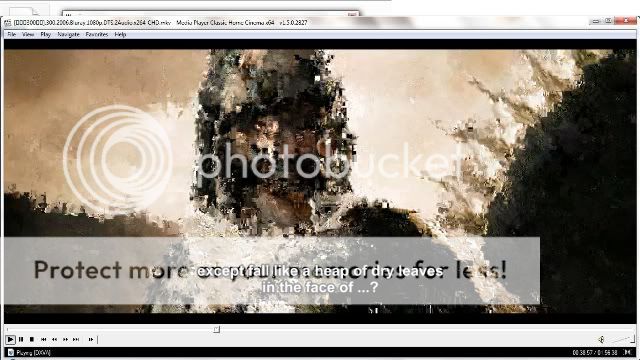
some have square square....
will try MPCHC wif real alternative soon.... now busying my work stuff @@

This post has been edited by louisfjh: Aug 2 2011, 02:28 AM
lee_what2004
post Aug 2 2011, 02:54 AM

*stare* ji--------
Group Icon
Elite
14,813 posts

Joined: Nov 2006


Square square can be video quality problem..
TSAcid_RuleZz
post Aug 2 2011, 03:19 AM

ミウ ❤
*******
Senior Member
6,612 posts

Joined: Jan 2003
From: Tomorrow


Just finished reapply thermal paste.. and the result is quite good. thumbup.gif
Before with IntelBurnTest my max temps could reach 93c, now only 86c altho its night time.

» Click to show Spoiler - click again to hide... «


QUOTE(Luwk @ Aug 2 2011, 12:39 AM)
Haiz the AMD driver always not responding ... how could i play game ....
*
I think you should send your unit to HP SC already. sweat.gif Or try to do a fresh install.

QUOTE(john5449 @ Aug 2 2011, 12:48 AM)
hi guys, i got line issue on my screen while i playing movie...i installed CCC v11.7...should i revert to 11.5b? Thanks!
*
You should use any driver that works best for you.
lee_what2004
post Aug 2 2011, 03:27 AM

*stare* ji--------
Group Icon
Elite
14,813 posts

Joined: Nov 2006


Which paste ?
louisfjh
post Aug 2 2011, 03:28 AM

Getting Started
**
Junior Member
257 posts

Joined: May 2008


QUOTE(lee_what2004 @ Aug 2 2011, 02:54 AM)
Square square can be video quality problem..
*
not video quality problem... player or setting problem... & not abit square but very serious d square like last time i print screen show that....


Added on August 2, 2011, 3:29 am
QUOTE(Acid_RuleZz @ Aug 2 2011, 03:19 AM)
Just finished reapply thermal paste.. and the result is quite good.  thumbup.gif
Before with IntelBurnTest my max temps could reach 93c, now only 86c altho its night time.

» Click to show Spoiler - click again to hide... «

I think you should send your unit to HP SC already.  sweat.gif  Or try to do a fresh install.
You should use any driver that works best for you.
*
bring to hp reapply thermal paste???

This post has been edited by louisfjh: Aug 2 2011, 03:29 AM
lee_what2004
post Aug 2 2011, 03:32 AM

*stare* ji--------
Group Icon
Elite
14,813 posts

Joined: Nov 2006


Don't think HP would do so in 3 am laugh.gif
louisfjh
post Aug 2 2011, 03:33 AM

Getting Started
**
Junior Member
257 posts

Joined: May 2008


QUOTE(lee_what2004 @ Aug 2 2011, 03:32 AM)
Don't think HP would do so in 3 am laugh.gif
*
ops.. do it himself.... i didnt realise the just.. i tot today.. LOL

This post has been edited by louisfjh: Aug 2 2011, 03:33 AM
lee_what2004
post Aug 2 2011, 03:34 AM

*stare* ji--------
Group Icon
Elite
14,813 posts

Joined: Nov 2006


Which printscreen ?
Found it, did you tried the instruction I gave last time ?

This post has been edited by lee_what2004: Aug 2 2011, 03:35 AM
louisfjh
post Aug 2 2011, 03:37 AM

Getting Started
**
Junior Member
257 posts

Joined: May 2008


user posted image
this print screen...
& the noob quality u mention..i watch megamind RMVB format at other player quality nice but wif real player then many noob square...@@
lee_what2004
post Aug 2 2011, 03:40 AM

*stare* ji--------
Group Icon
Elite
14,813 posts

Joined: Nov 2006


Open MPC-HC, go to Option, Open Internal Filter, on the right box,
find H264/AVC (DXVA) and VC1 (DXVA), untick both, then OK, then close MPC-HC.
Try again the movie.
TSAcid_RuleZz
post Aug 2 2011, 03:41 AM

ミウ ❤
*******
Senior Member
6,612 posts

Joined: Jan 2003
From: Tomorrow


QUOTE(lee_what2004 @ Aug 2 2011, 03:27 AM)
Which paste ?
*
ArticSilver.. don't have IC7 at my disposal at the moment. cry.gif
louisfjh
post Aug 2 2011, 03:43 AM

Getting Started
**
Junior Member
257 posts

Joined: May 2008


1 day test & tried too many player... also forget wat player hang & stun, wat player square, wat player have line, wat player no sound = =
so will try clean registry, then install MPCHC & real alternative later...
now still drawing my work @@

oh yea the clean registry question...
use ccleaner to clean registry, is it at the registry tab then scan for issue & fix all selected issue??
then i no do back up is it ok???
& this registry can always clean?? it will cause some software or apps or games not working after clean?

thank sifu
lee_what2004
post Aug 2 2011, 03:49 AM

*stare* ji--------
Group Icon
Elite
14,813 posts

Joined: Nov 2006


Yes, registry tab, scan issue and fix all.
No need backup, never did I and no problem till now.

QUOTE(Acid_RuleZz @ Aug 2 2011, 03:41 AM)
ArticSilver.. don't have IC7 at my disposal at the moment.  cry.gif
*
How's the stock paste ? Poorly done ?

This post has been edited by lee_what2004: Aug 2 2011, 03:50 AM
TSAcid_RuleZz
post Aug 2 2011, 03:54 AM

ミウ ❤
*******
Senior Member
6,612 posts

Joined: Jan 2003
From: Tomorrow


QUOTE(lee_what2004 @ Aug 2 2011, 03:49 AM)
How's the stock paste ? Poorly done ?
*
Quite... forgot to take picture before i clean it. doh.gif
And it overflown underneath the plastic cover. shakehead.gif

Proc
» Click to show Spoiler - click again to hide... «

Gpu
» Click to show Spoiler - click again to hide... «


Added on August 2, 2011, 3:57 amMoar pictars

The Heatsink Fan
» Click to show Spoiler - click again to hide... «

Dual outlet
» Click to show Spoiler - click again to hide... «


Added on August 2, 2011, 4:07 amOh right.. first i thought i wanted to check the serial number on that i7 to confirm that it is stepping B3 but as u can see on the pictar, there is nothing inscribed on that die. sweat.gif

This post has been edited by Acid_RuleZz: Aug 2 2011, 04:07 AM
Efalex
post Aug 2 2011, 04:49 AM

Casual
***
Junior Member
361 posts

Joined: Jun 2007
QUOTE(Acid_RuleZz @ Aug 2 2011, 03:54 AM)
Quite... forgot to take picture before i clean it.  doh.gif
And it overflown underneath the plastic cover.  shakehead.gif

Proc
» Click to show Spoiler - click again to hide... «

Gpu
» Click to show Spoiler - click again to hide... «


Added on August 2, 2011, 3:57 amMoar pictars

The Heatsink Fan
» Click to show Spoiler - click again to hide... «

Dual outlet
» Click to show Spoiler - click again to hide... «


Added on August 2, 2011, 4:07 amOh right.. first i thought i wanted to check the serial number on that i7 to confirm that it is stepping B3 but as u can see on the pictar, there is nothing inscribed on that die. sweat.gif
*
From the manual, seems like need to remove a lot of things. Do you need to remove the front cover and the keyboard to gain access to the processor and the heatsink? If i just remove the back plate and back cover, would it be enough?

To confirm whether your chipset is B3 or not, try download HWinfo64 and see whether it reveal the chipset version of your laptop. It confirm mine.
TSAcid_RuleZz
post Aug 2 2011, 05:02 AM

ミウ ❤
*******
Senior Member
6,612 posts

Joined: Jan 2003
From: Tomorrow


^ You need to remove the keyboard and the top cover.


Added on August 2, 2011, 5:06 amI don't know if 6108TX is build differently.

This post has been edited by Acid_RuleZz: Aug 2 2011, 05:06 AM
Efalex
post Aug 2 2011, 05:11 AM

Casual
***
Junior Member
361 posts

Joined: Jun 2007
That's a bit too much of dissambly. I can dissamble it but I can't say I can reassemble it again...
Just wish it was built for easy access like my old Inspiron 1420, just 15 minute and walla, thermal paste application complete.
louisfjh
post Aug 2 2011, 06:38 AM

Getting Started
**
Junior Member
257 posts

Joined: May 2008


haiz.. MPCHC & real alternative lite same canot for me.....
cannot play RMVB format movie & MKV movie the sound or movie like delay.. sound not match the movie & the movie like slow motion @@ dam

& after i install the MPCHC there show me i no install the latest directX, is it cause me play movie have problem??


Added on August 2, 2011, 6:51 am
QUOTE(arslow @ Aug 1 2011, 07:35 AM)
you could try to install Splayer.Simple player with built in codecs! thumbup.gif
got auto download subtitle also smile.gif
*
is this??
http://www.splayer.org/index.en.html

i think ned try more other player le.. my fren recommend those china player, xun lei kan kan, feng bao... @@

This post has been edited by louisfjh: Aug 2 2011, 06:51 AM
TSAcid_RuleZz
post Aug 2 2011, 07:09 AM

ミウ ❤
*******
Senior Member
6,612 posts

Joined: Jan 2003
From: Tomorrow


Thats weird.. what RMVB format u trying to play? Got any link for me to dl?
RiverDrifte
post Aug 2 2011, 07:55 AM

Getting Started
**
Junior Member
56 posts

Joined: Jan 2005
From: Pee Jay


I think i know what is louis's problem. Its not the player's fault. Its the file! Please try playing with another file and confirm the pixelation. cause i got 1 ahem video that keep getting pixelated and another normal video that is fine. I keep getting frustrated that my ahem video can't be played. By copying again a fresh copy from my desktop, the video is playing fine already. My guess is that there is lost/corrupted data because I used external HDD to transfer at first but second time I used the LAN to transfer.

btw, Acid

did you done any ESD precaution when handling the proc and gpu? If the thermal paste is really not that good. Might be changing mine too this weekend. you said IC7 is good? what is best? for how much? *lazy to search* haha.

126 Pages « < 108 109 110 111 112 > » Top
Topic ClosedOptions
 

Change to:
| Lo-Fi Version
0.0275sec    0.49    6 queries    GZIP Disabled
Time is now: 3rd December 2025 - 12:12 PM