Welcome Guest ( Log In | Register )

Bump Topic Topic Closed RSS Feed
4 Pages < 1 2 3 4 >Bottom

Outline · [ Standard ] · Linear+

 Digital TV Station Malaysia, How do I tune to digital TV station?

views
     
AV_2018
post Sep 2 2019, 08:04 PM

Casual
***
Junior Member
451 posts

Joined: Apr 2018
QUOTE(joshhd @ Sep 2 2019, 05:13 PM)
I'm using Samsung UHD TV... How to enable the HbbTV function?
I press Red button on TV3, and few RTM channels, it shows "Not Available".

Not supported ah?
*
Make sure HbbTV apps are enabled in the TV settings and the TV is connected to Internet. If still don't have then TV doesn't support. So far I tested MYTV Advanced 1st gen and Sony Bravia Android TV can access HbbTV via red button whereas one Panasonic TV doesn't appear the red button prompt.
AV_2018
post Sep 23 2019, 12:28 PM

Casual
***
Junior Member
451 posts

Joined: Apr 2018
QUOTE(carerra @ Sep 23 2019, 11:25 AM)
I am using DTV.
When viewing 8TV for example, if using ATV, the TV screen display is FULL SCREEN.
But when switch to DTV, the TV screen is not full screen.
Anyone experiencing this problem?
Can fix this problem?
Or is broadcast signal problem?

PS : NTV7 also the same problem but TV3 is OK.
*
If you mean black bars at the sides, check your TV's aspect ratio setting.
AV_2018
post Sep 23 2019, 01:07 PM

Casual
***
Junior Member
451 posts

Joined: Apr 2018
QUOTE(carerra @ Sep 23 2019, 01:03 PM)
Yes, the black bars on the side.
But I can;t seems to find the setting in the TV.
At the TV DISPLAY MODE, there is only 1 option which is AUTO.
Will check the setting again.
*
Usually there's a button for aspect ratio on the remote.
AV_2018
post Oct 2 2019, 03:13 PM

Casual
***
Junior Member
451 posts

Joined: Apr 2018
Got this SMS...
Attached Image
AV_2018
post Oct 7 2019, 10:57 AM

Casual
***
Junior Member
451 posts

Joined: Apr 2018
QUOTE(carerra @ Oct 7 2019, 10:45 AM)
My TV can only receive 9 digital channels, namely TV3,NTV7,8TV,TV9,BNC,AL HIJRAH,CJ WOWX2,GO SHOP.
RTM channels and Radio channels cannot receive.
Even in analog, RTM ch is very very snowy(basically cannot watch).
Is it different broadcast station?
*
For digital channels, the RTM channels are on another different frequency.
AV_2018
post Oct 15 2019, 03:12 PM

Casual
***
Junior Member
451 posts

Joined: Apr 2018
QUOTE(dark.knight @ Oct 15 2019, 10:46 AM)
The signal strength is about 50% or less, definitely not 70-80% range.
*
QUOTE(ajay67 @ Oct 15 2019, 11:00 AM)
Anyway, i think overall your signal strength is weak at 50%. in order to get both MUX you need to achieve 80% IMO.
*
From my experience, it is possible to receive both MUX with DIY indoor antenna at ~50% signal strength. The important thing is the signal quality has to be >80%. Of course for outdoor antenna should get >80% or even >90% signal strength with 100% signal quality. Besides using good quality RG6 cable, HDMI cable that are transmitting a 1080P signal should be kept away from the antenna cable as well as it may interfere in some cases and cause a drop in signal quality.
AV_2018
post Oct 18 2019, 02:18 PM

Casual
***
Junior Member
451 posts

Joined: Apr 2018
QUOTE(rae0724 @ Oct 18 2019, 11:28 AM)
hi i am quite slow to update
but which tv have built-in/DVB-T2? to receive the channels?
budget around rm500-600
*
Need to see the specifications of the TV. Most new TVs should support it but check the specifications to confirm. Also some although support DVB-T2 but doesn't support all features. What I'm quite certain is all Sony Bravia Android TV supports DVB-T2 properly with HbbTV, LCN, Dolby Digital Plus, HE-AACv2, HD subtitles etc.
AV_2018
post Oct 20 2019, 10:59 AM

Casual
***
Junior Member
451 posts

Joined: Apr 2018
QUOTE(nunogomes21 @ Oct 19 2019, 07:39 PM)
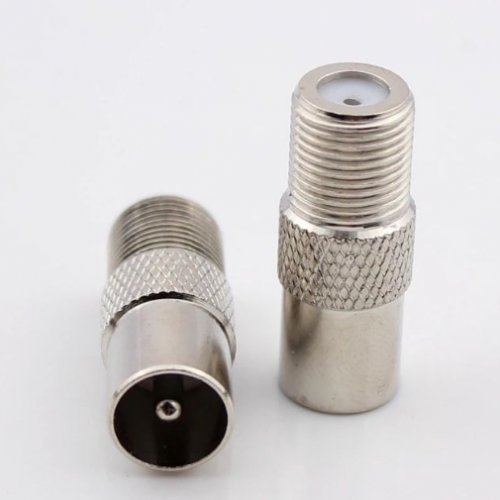
But i already have a tv with built it DVBT2. Can i cause by the cable since i am not using RG6 type cable. I did went to hardware shop to survey the RG6 cable but they said its only for astro since the cable connection end is screw type and not suitable for connection to tv or wall mounted socket. Any idea how to use the RG6 cable for digital tv?
*
QUOTE(joshhd @ Oct 19 2019, 09:33 PM)
As for the connector, you can use this connector socket:
user posted image
So anytime, you can just screw this connector socket, and connect to your TV to receive digital TV.

https://shopee.com.my/F-Type-Screw-Connecto...2699.2822820814
*The link above is just for reference. I'm not affiliated to this seller.
*
I just directly terminate my RG6 with Beiling-Lee/PAL connectors.
AV_2018
post Oct 20 2019, 07:50 PM

Casual
***
Junior Member
451 posts

Joined: Apr 2018
QUOTE(nunogomes21 @ Oct 19 2019, 06:27 PM)
The signal level for channel 45 is 80% with 100% signal quality whereas for channel 49 is only 26% with zero signal quality.
*
In addition, for DVB-T2 frequencies that are near 680MHz, a properly shielded and terminated RG6 cable is needed and it shall be kept as far away from HDMI ports and cables as possible or at least not in parallel. This is because some HDMI cables transmitting 1080p signal can interfere with such frequencies and cause the signal quality to drop. This is from my experience and confirmed by the HDMI clock frequency in the HDMI 1.3 specification. To test if it is HDMI interference, turn off all HDMI source devices when monitoring DVB-T2 signal levels.

This post has been edited by AV_2018: Oct 20 2019, 07:51 PM
AV_2018
post Oct 20 2019, 10:14 PM

Casual
***
Junior Member
451 posts

Joined: Apr 2018
QUOTE(joshhd @ Oct 20 2019, 09:55 PM)
Is it every HDMI devices will have such interference, or only certain kind of devices?
*
So far from my experience, it's devices that are transmitting 1080p60 signal such as AV Receiver and laptop. The moment the signal is off, the signal quality of DVB-T2 increases. Probably depends on HDMI cable used too (how good is the shielding) and the HDMI clock frequency used by the devices (whether is has harmonics that are similar to the DVB-T2 frequency). But since repositioning my cables and changing to RG6, the DVB-T2 signal quality doesn't get affected no matter the HDMI devices are transmitting or not. It's now stable at 90-100 signal quality.

I also used to have degraded signal during heavy rain but it's now stable after repositioning the antenna.

This post has been edited by AV_2018: Oct 20 2019, 10:19 PM
AV_2018
post Oct 20 2019, 10:22 PM

Casual
***
Junior Member
451 posts

Joined: Apr 2018
QUOTE(Hzz @ Oct 20 2019, 10:11 PM)
I really pening right now as I've tried to scan the channels but until now received nothing. I don't know whether my decoder broke down or what.

I bought a 5e antenna from shopee that come with rg6 cable but still got no signal. Quality is never above 60% meanwhile strength is always 0%. That makes me really pening. Meanwhile on decoder after scan has finished and no channels received it shows "empty database".

Need some advice from all sifus here
*
What decoder are you using? Got signal quality but totally no signal strength seems like faulty decoder. Usually can't have quality if there is totally no signal.
AV_2018
post Oct 20 2019, 10:49 PM

Casual
***
Junior Member
451 posts

Joined: Apr 2018
QUOTE(dayojah @ Oct 20 2019, 10:41 PM)
Sounds like you have a cheapo hdmi cable
*
Or cheapo antenna cable. But can't say cheap also; some affordable cables might be better shielded than more expensive cables.
AV_2018
post Oct 21 2019, 10:52 AM

Casual
***
Junior Member
451 posts

Joined: Apr 2018
QUOTE(dayojah @ Oct 21 2019, 09:35 AM)
Cable does not wear out with age, it is spoiled by water getting in or rubbing against something
*
Some cables do wear out with age. Can see the rubber/PVC change texture over time even if just mounted on indoor wall or kept in a drawer after a really long time. But usually it's spoiled by sunlight and other factors.
AV_2018
post Oct 21 2019, 10:55 AM

Casual
***
Junior Member
451 posts

Joined: Apr 2018
Digital TV reception may be affected by improper antenna installation and fake decoders - SoyaCincau.com
AV_2018
post Oct 21 2019, 11:40 AM

Casual
***
Junior Member
451 posts

Joined: Apr 2018
QUOTE(joshhd @ Oct 21 2019, 11:25 AM)
According to the company, frequency restack (within 470-690MHz) can be done in 6 months after analogue switch off. So have to wait for few months then only we shall see some improvements.

*
If using an outdoor antenna with strong signal strength and properly shielded and terminated coaxial cable, it should be unaffected by HDMI cables. Anyway, hope they'll change to a lower frequency so that it isn't affected by wet roofs and HDMI interference. Even 650MHz and below is an improvement compared to 682MHz. Hope the bitrates will be increased too as there is some micro-blocking during fast motion and complex scenes.

Addon: Those using 3rd party decoder might want to make sure resolution is set to 1080i instead of 1080p or it may interfere with itself. From experience it seems 1080i doesn't interfere when 1080p does. I suspect it's because when at 1080p, some devices use a higher HDMI TMDS frequency which interferes with certain MUX frequency. A properly shielded and terminated RG6 or HDMI cable and a strong DVB-T2 reception should prevent interference issues though.

This post has been edited by AV_2018: Oct 21 2019, 12:45 PM
AV_2018
post Oct 21 2019, 08:54 PM

Casual
***
Junior Member
451 posts

Joined: Apr 2018
For indoor antenna, better DIY a folded-dipole or loop and connect with good RG6 cable and plugs. From my experience, this works better than the antenna bought from supermarket.
AV_2018
post Oct 22 2019, 11:12 AM

Casual
***
Junior Member
451 posts

Joined: Apr 2018
QUOTE(dayojah @ Oct 22 2019, 07:46 AM)
2) Cables tend to radiate more in the VHF than the UHF due to their length, I have seen this in the SIRIM labs many times. The source can be Ethernet, hdmi ( my link above shows plenty of low uhf ), switched mode power supplies and any computer.

3) I have seen MATV systems having to install a low pass filter to reduce LTE interference in Europe

4) If the cable is not marked, it is probably rubbish.
*
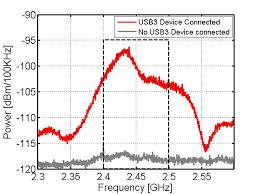
It depends on what signals are being carried by the cable. It won't radiate frequencies that are not present in the signal being carried. USB3.0 interferes with 2.4GHz Wi-Fi and HDMI interferes with certain DVB-T2 frequencies depending on the resolution being transmitted. Ethernet probabaly radiates at lower frequency.

Example of USB3.0 emissions which clearly interferes with 2.4GHz WiFi. The emissions are in a wider frequency instead of some peaks because USB3.0 uses spread-spectrum clock.
user posted image

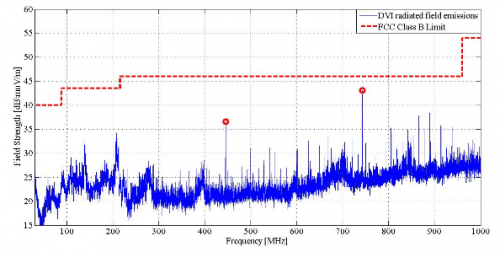
And here's an example of DVI emissions which is similar to HDMI and may interfere with certain DVB-T2 MUX depending on frequency of MUX and the resolution being transmitted with HDMI.
user posted image

LTE shouldn't interfere if it's a different frequency with enough separation.

Yup, unmarked cables are usually poor quality.

This post has been edited by AV_2018: Oct 22 2019, 11:42 AM
AV_2018
post Oct 22 2019, 12:05 PM

Casual
***
Junior Member
451 posts

Joined: Apr 2018
QUOTE(joshhd @ Oct 22 2019, 11:43 AM)
1. Let say MYTV to restack its muxes to 474MHz, 490MHz, 506MHz, on top of the benefits mentioned earlier (like better coverage), what are the ways for viewers to prevent interference from other devices like Ethernet, HDMI, and so on, since you say lower frequencies tend to radiate more?

4. Does that mean every DTT viewers in Malaysia must use a low pass filter (4G LTE filter) to prevent interference, even if the DTT muxes are on 474, 490 and 506MHz? If yes, then why MCMC or any telcos didn't mention that such issue will arise if 700MHz is use for 4G/5G, like they kept quiet about it?

6. Besides HDMI, cable, antenna, geographical factors.... What are the other possible reasons that may cause viewers to not able to receive DTT signals that we haven't talk about?
*
1. Depends on signal being carried by the cable. See graphs in my post above. Not always lower frequency radiate more.

4. LTE shouldn't be interfering if there is enough frequency/channel separation. 500 and 700 should be far enough. Also can use better quality LTE transmitters or filters at the transmitters to prevent it from transmitting too much out-of-band noise. From a DVB paper I read, other countries use low-pass filter to filter out 800MHz LTE signal from interfering with their 700+MHz DTT signals because their highest DTT channel only has 1MHz separation from their LTE band. It also depends on how good is the selectivity of the DVB-T2 tuner used.

6. Wet surfaces such as roofs and tree leaves as well as metal roofing may interfere too but this is classified as geographical? The decoder used is a factor too. Some decoders might be better at recovering the signal from lower SNR, interference and multi-path.

Update 6.27pm: more info added

This post has been edited by AV_2018: Oct 22 2019, 06:27 PM
AV_2018
post Oct 27 2019, 07:32 PM

Casual
***
Junior Member
451 posts

Joined: Apr 2018
QUOTE(Skylinestar @ Oct 27 2019, 06:48 PM)
Thanks for the tips.
I don't have any HDMI devices. Just a Hisense TV, placed next to my computer. But can interference affects one mux only? 100% quality on tv2 but 0% quality on tv3.
*
Interference will affect the MUX that is the same frequency as the interfering signal. There should be low chance of interference if the signal strength of DVB-T2 signal is strong and a good, shielded and properly terminated RG6 cable is used for the antenna.
AV_2018
post Oct 27 2019, 10:54 PM

Casual
***
Junior Member
451 posts

Joined: Apr 2018
QUOTE(joshhd @ Oct 27 2019, 10:30 PM)
All RG-6 cables are shielded, isn't it? It's either dual shield or quad shield. Are there un-shielded RG-6 cables out there anyway?

3. Which part of the RG6 cable are likely to cause harmful interference by HDMI first? Is it the F connector part that connects to digital TV box/IDTV or the outdoor UHF antenna? Or the RF interference can simply affect throughout the RG6 cable?

4. What if the HDMI cable that causes interference is positioned at very close to the outdoor UHF antenna? Will that affect the reception too?

*
Some cables might have poor quality shield but a proper RG6 cable should be ok. The shield has to be terminated properly too else it'll be less effective. The connector should be shielded as well.

3. Any poorly shielded part will potentialy let interference in. Poorly terminated shield is also an issue. The same principles apply to both the HDMI and RG6 shields.

4. Antenna whether indoor or outdoor can potentially pick up interference not only from HDMI but other sources.

I'm not expert in electromagnetic waves or interference so someone else might know better. Can't answer the other questions.

I can share my experience that using non-RG6 cable with indoor antenna placed near HDMI cable causes signal quality to drop. Changing cable position so that the HDMI cable is further away and not in parallel improves it slightly. Changing to RG6 with metal connectors and placing antenna further away produces 100% signal quality. No HDMI cables were changed. HDMI cables are NOT unknown brands with no HDMI logo type. Both the antenna cable and HDMI cable actually have ferrite beads as well which are supposed to suppress noise.

For outdoor antenna with 90% signal strength and connected with astro RG6 cable that has thick shield with metal connector, very near HDMI cables from PC and disc player doesn't seem to bother the signal quality at all. Stays at 100%.

But since I did not test different cables in exactly the same situations, can't pinpoint a specific factor for each result.

There are probably many factors here... The HDMI signal strength, HDMI cable length, HDMI shield quality, HDMI signal frequency/resolution, DVB-T2 signal strength, RG6 cable length, RG6 shield quality, DVB-T2 MUX frequency, placement of the cables etc. If the factors combine in certain combinations, interference may happen else it'll be okay.

For example, the following combinations will probably have interference issues.
- strong HDMI signal
- weak DVB-T2 signal
- BOTH antenna cable and HDMI cable poorly shielded
- cables placed near and parallel to each other
- the frequency of one of the harmonics of the HDMI signal for the currently transmitting resolution is being radiated by the cable and happens to overlap with the frequency of the DVB-T2 MUX being received.

Of couse anything else radiating similar frequencies to the DVB-T2 MUX other than HDMI will also cause interference. So it's easier to make the DVB-T2 signal more resistant by using good antenna and cables if possible instead of dealing one by one with the interference sources.

This post has been edited by AV_2018: Oct 27 2019, 11:25 PM

4 Pages < 1 2 3 4 >Top
Topic ClosedOptions
 

Change to:
| Lo-Fi Version
0.2094sec    0.51    7 queries    GZIP Disabled
Time is now: 3rd December 2025 - 02:13 PM