

Astro B.yond Episode III (Version 8.0), NEW WORLD OF ENTERTAINMENT
|
|
 Jul 5 2011, 12:27 AM Jul 5 2011, 12:27 AM
Return to original view | Post
#61
|
 
Senior Member
2,234 posts Joined: Feb 2007 
|
subscribe to superpack, at the same time pay promotional price of RM150 to upgrade to byond PVR, 500GB hard disk is already included inside byond PVR the only bad thing about byond PVR is that the installer will need to lay another cable into your house, this is because byond PVR has twin tuners, unless you pay an extra RM300 for a stacker-destacker device which only needed a single cable into your house |
 Quote
Quote|
|
|
|
|
Jul 5 2011, 12:49 AM
Return to original view | Post
#62
|
|
Senior Member
2,234 posts Joined: Feb 2007
|
QUOTE(MrSars @ Jul 5 2011, 12:36 AM) Like i said i got nothing knowledge about astro beyond. Coming to here i do notice got this pvr or normal one. RM150 includes Byond PVR + 2x20m RG-6 cable + 65cm satellite dish + dual output LNB + 4x F-connector + HDMI cable + remote control + av cable + labour So now i didnt say i want PVR so i get the normal one? So if choosing PVr i need to lay another cable into my house? Does this will be charge separately or it is free?   oh also 2x AA battery for the remote control  This post has been edited by neb: Jul 5 2011, 12:50 AM |
|
|
Jul 5 2011, 01:44 PM
Return to original view | Post
#63
|
|
Senior Member
2,234 posts Joined: Feb 2007
|
compression F-connector
 should be better than twist-on should be better than twist-on 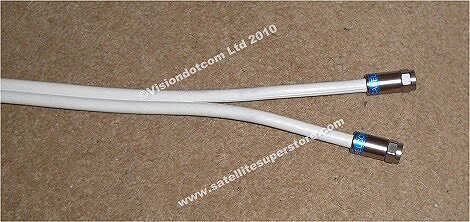 This post has been edited by neb: Jul 5 2011, 01:46 PM |
|
|
Jul 5 2011, 04:06 PM
Return to original view | Post
#64
|
|
Senior Member
2,234 posts Joined: Feb 2007
|
QUOTE(dxjb @ Jul 5 2011, 03:14 PM) the besi inside this thing of mine already wobbly and bengkok2..i cut out the wobbly part and walllaa..its ok again are you using compression connector already? can upload snapshot of your mod? |
|
|
Jul 5 2011, 07:56 PM
Return to original view | Post
#65
|
|
Senior Member
2,234 posts Joined: Feb 2007
|
QUOTE(eugenecctan @ Jul 5 2011, 05:15 PM) headache.. byond does not have composite video to rf modulator, need to buy oneI have 3 Tvs all together (2 LCD 1 CRT), currently my normal Astro decoder is connecting to my OLD Sony Wega TV. The agent is coming to my house to install Beyond HD PVR later... Not sure how to connect to 3 tvs.. if you are on HD service, can buy HDMI splitter to distribute HD video to your HDTV |
|
|
Jul 8 2011, 04:02 PM
Return to original view | Post
#66
|
|
Senior Member
2,234 posts Joined: Feb 2007
|
QUOTE(manx @ Jul 8 2011, 03:18 PM) guys, sharing satellite signal via splitter will interfere with SD channels reception, for example if you are watching HD channel on your byond box, other decoders when tuning to SD channel will have blank screen i have 1 question. i have 2 decoders at home, 1 with byond the other is nokia decoder. if i split the cable from the dish, will there be any quality loss? if let say i upgrade to PVR (with 2 tuners) can i use only 1 cable from dish and just split it using splitter near to the decoder? will it again causing any picture quality issue? byond PVR requires 2 output LNB |
|
|
|
|
|
Jul 9 2011, 12:19 AM
Return to original view | Post
#67
|
|
Senior Member
2,234 posts Joined: Feb 2007
|
QUOTE(nujikabane @ Jul 8 2011, 11:46 PM) 2.5' or 3.5' HDD ?   for WD my passport AV, only 2.5" scorpio hard drive can fit into the USB casing |
|
|
Jul 12 2011, 01:44 PM
Return to original view | Post
#68
|
|
Senior Member
2,234 posts Joined: Feb 2007
|
now astro has a promotion on byond PVR, subscribe to superpack and upgrade to PVR for RM150, call astro to make booking but this time don't tell them you got a faulty old decoder old decoder is your property, you have already paid for it ages ago This post has been edited by neb: Jul 12 2011, 01:45 PM |
|
|
Jul 15 2011, 08:10 PM
Return to original view | Post
#69
|
|
Senior Member
2,234 posts Joined: Feb 2007
|
QUOTE(orenhijau @ Jul 15 2011, 04:41 PM) Hi guys! I'm planning to bring my pvr decoder balik kampung for hari raya. My house there still have an old astro dish (the grey one). So can i just connect the cable to receive signal? bring along your dual-output LNB, some extra RG-6 cable and a few F-connectors when you reach your kampung, replace the old LNB and lay another cable into your house |
|
|
Jul 16 2011, 12:10 AM
Return to original view | Post
#70
|
|
Senior Member
2,234 posts Joined: Feb 2007
|
QUOTE(orenhijau @ Jul 15 2011, 11:25 PM) Thx. first generation philips dish, if LNB is black in colour, then you may run into problem, white colour LNB should be OK One tuner is good enough, my pvr is almost full with movies. One tuner is good enough, my pvr is almost full with movies. what if i have 2 dish. one is 1st gen philip dish, the other is 3rd gen thomson dish. I can connect to both tuner right? so no need to bring dual-o LNB? add 2-output splitter to single output LNB may trick byond PVR to work, try it out before balik kampung, choose splitter with single port power pass to be on the safe side |
|
|
Jul 18 2011, 11:25 PM
Return to original view | Post
#71
|
|
Senior Member
2,234 posts Joined: Feb 2007
|
QUOTE(Omochao @ Jul 18 2011, 10:47 PM) Guys, I just subscribed to Astro Byond, as I'm a big fan of korean dramas, most of the time I tune into S.One Channel...393. are you using HDMI digital sound or anolog sound(red/white audio out)?but the major problem is, that the people mouth doesn't syncs properly with the audio. I have tried setting the AUDIO DELAY in USER SETTINGS...but nothing can be done....I've tried the lowest delay and longest delay..but it is still the same. I think only digital audio can be adjusted for lip sync |
|
|
Jul 20 2011, 03:24 PM
Return to original view | Post
#72
|
|
Senior Member
2,234 posts Joined: Feb 2007
|
CNA can be received in many many countries (c-band footprint)
even in some parts of africayou will need a right equipment though  This post has been edited by neb: Jul 20 2011, 03:26 PM |
|
|
Jul 20 2011, 06:18 PM
Return to original view | Post
#73
|
|
Senior Member
2,234 posts Joined: Feb 2007
|
QUOTE(horseman @ Jul 20 2011, 05:57 PM) how can i improve on the pq of sd channel on the b.yond? any converter out there that i can look after? some high end av receivers have very advance video processing chipset, video feed through it may improve on SD picture quality |
|
|
|
|
|
Jul 25 2011, 09:29 PM
Return to original view | Post
#74
|
|
Senior Member
2,234 posts Joined: Feb 2007
|
QUOTE(meat @ Jul 25 2011, 08:50 PM) Ok. Seems less attractive to me now. for minimum subscription fee + RM20 HD fee, your will get these HD channels:What are the standard channels you get? (like in normal astro you get RTM, TV3, RIA, etc) I'm assuming ONE HD, is standard, any others? 393, 726, 720, 721, 706 
|
|
|
Aug 11 2011, 03:51 PM
Return to original view | Post
#75
|
|
Senior Member
2,234 posts Joined: Feb 2007
|
QUOTE(4th alphabet @ Aug 11 2011, 02:44 PM) 3) HD channels will play for 3 seconds (without sound), then the entire screen goes black with the words "Copy Protection Failed" at the top. you may have damaged HDMI's pin causing bad connectionlike what Andrewtst has suggested if HDMI cable's pin, then replace a new cable if HDTV HDMI's pin, then choose another TV's HDMI port also if byond HDMI pin, then replace byond  This post has been edited by neb: Aug 11 2011, 03:57 PM |
|
|
Aug 13 2011, 05:34 PM
Return to original view | Post
#76
|
|
Senior Member
2,234 posts Joined: Feb 2007
|
QUOTE(zeone @ Aug 13 2011, 02:03 PM) Fr wat I've seen (Sat Dish installed @my place), it's NOT a dual LNB...it's a SINGLE LNB with DUAL output... technically it is dual LNB packaged into a single casing piggyback on top of each other, each output is wired to a complete working LNB and can operated independently of each other outputAdded on August 13, 2011, 2:06 pmps. I chk-ed in Settings and it's stated as Universal SINGLE LNB. Added on August 13, 2011, 5:24 pmpps. Heavy rain juz now! Totally NO image! 30 mins later SD Channels returned...BUT all HD Channels still NOTHING! Only got much later when rain almost stopped!  Izzit like dat with Byond? |
|
|
Aug 14 2011, 03:15 PM
Return to original view | Post
#77
|
|
Senior Member
2,234 posts Joined: Feb 2007
|
QUOTE(vivre @ Aug 14 2011, 03:03 PM) Guys, im planning to bring back my b.yond decoder to my home during raya. can i just plug the satellite cable to the back of the decoder and expect it running flawlessly. i read somewhere that both dish and cable are no different with b.yond. should be no problem if yours is standard byond, byond pvr needs 2 satellite-dishes connectionbut watch out for very old first generation satellite dish, its black coloured Philips LNB may not be compatible with byond, white coloured LNB is OK better try it first on your neighbour's dish before hand |
|
|
Aug 16 2011, 12:38 PM
Return to original view | Post
#78
|
|
Senior Member
2,234 posts Joined: Feb 2007
|
for greater resistance to rain fade, get a 1m dish
current astro dish is only 0.65m in size, not suitable for our weather condition |
|
|
Aug 16 2011, 02:06 PM
Return to original view | Post
#79
|
|
Senior Member
2,234 posts Joined: Feb 2007
|
this hotel in KL uses 90cm offset-focus dish for astro reception
 This post has been edited by neb: Aug 16 2011, 02:11 PM |
|
|
Aug 16 2011, 03:09 PM
Return to original view | Post
#80
|
|
Senior Member
2,234 posts Joined: Feb 2007
|
read about the effect of cable shielding on signal
http://bluejeanscable.com/articles/shielding.htm astro gives us low quality rg6 cable, 2 layer shielding with only 60% coverage braid quad-shield rg6 should perform better on noise rejection the best cable is Precision video coaxial cable with 95% coverage braid This post has been edited by neb: Aug 16 2011, 03:12 PM |
|
Topic ClosedOptions
|

| Change to: |  0.0462sec 0.0462sec
 0.71 0.71
 7 queries 7 queries
 GZIP Disabled GZIP Disabled
Time is now: 1st December 2025 - 03:42 PM |
All Rights Reserved © 2002- 2025 Vijandren Ramadass (~unite against racism~)
Powered by Invision Power Board © 2025 IPS, Inc.