

Bump the AGP voltage to 1.8v (max). This will increase the NB voltage. Set ur Vdimm to 2.75v

INTEL OVERCLOCKING THREAD, TIPS,Q n A, Results...Great For NueBis
|
|
 Sep 22 2005, 02:47 AM Sep 22 2005, 02:47 AM
Return to original view | Post
#1
|
 
Elite
5,784 posts Joined: Jan 2003 From: Shah Alam   
|
barclaycard07 , What's ur CPU batch?how many caps does it have, u can check by turning the cpu over facing the pins and count the number of capacitors there. Generally, a 30caps will give u good overclocks.
Bump the AGP voltage to 1.8v (max). This will increase the NB voltage. Set ur Vdimm to 2.75v |
|
|
|
|
|
Sep 28 2005, 06:15 PM
Return to original view | Post
#2
|
|
Elite
5,784 posts Joined: Jan 2003 From: Shah Alam
|
QUOTE(abubin @ Sep 28 2005, 05:29 PM) try flashing the BIOS...reason: so that the option to shutdown the PC when cpu fan is not spinning will be turned off. Hornet, which Asus 865PE ur using? If it's P4P800, there's issue on AGP tearing n artifacts. It's a known issue. Try these:try taking out the board and fit test it with minimum stuff...take out HDD, fdd, cdroms and so on. If boot up successful, then either it's one of those items causing the problem or sometimes you have something shorting the motherboard somewhere. Once everything works fine. Carefull re-insert the motherboard into the casing and make absolutely sure that the motherboard is not being shorted anywhere especially those hexagon-gold-color-motherboard-raiser.  1) Update ur Mobo's Bios to the latest. 2) Increase Vagp to 1.6v |
|
|
Sep 28 2005, 07:08 PM
Return to original view | Post
#3
|
|
Elite
5,784 posts Joined: Jan 2003 From: Shah Alam
|
Probably try increasing the Vagp to 1.6v?
|
|
|
Sep 28 2005, 10:07 PM
Return to original view | Post
#4
|
|
Elite
5,784 posts Joined: Jan 2003 From: Shah Alam
|
Thanks for the tip there zt_lee, i didnt know bout the tweak there myself.
@evilnickwong . mmm 2.85v-->2.75v? Personally,after some tweaks and tests, i've got 257fsb @2.75v prime95/fold/3dmark stable. 2x512mb Hynix DT d43, MAM on, Performance= standard. CL 2.5-4-4-8. Vagp= 1.6v. Trying to hit the magical 260fsb.  Anyways, The AsusLiveUpdate doesn't work with SP2, oh well  @Hornet, well i think u got to manually set the parameter everytime This post has been edited by kucingfight: Sep 28 2005, 10:08 PM |
|
|
Sep 29 2005, 01:54 AM
Return to original view | Post
#5
|
|
Elite
5,784 posts Joined: Jan 2003 From: Shah Alam
|
Juz to note here, under the Performance mode in tw865, In theory, it should be able to enable/disable PAT. In the Case of Enabling it(865p families), and when it's double checked with CTIAW, it will only show Partially Enabled(not fully enabled), unlike the 875p which has Full PAT by default.
My point is tat,don be fooled thinking PAT is 100% on by juz enabling Peformance Mode in tw865. It's in fact, partially enabled |
|
|
Sep 29 2005, 02:21 PM
Return to original view | Post
#6
|
|
Elite
5,784 posts Joined: Jan 2003 From: Shah Alam
|
1. Automatic, it means default voltage, depends on ur cpu itself, 1.525v or 1.550v. U hav2 manually adjust to find the sweet spot when overclocking.
2. Tat's the voltage during 'idle' mod. Try stressing the cpu by folding or prime and the voltage will drop to 'load' probablt to around 1.55v 3. Try to keep below 1.65 if ur on Aircooling. Aso apply some good thermal compund |
|
|
|
|
|
Dec 20 2005, 11:05 PM
Return to original view | Post
#7
|
|
Elite
5,784 posts Joined: Jan 2003 From: Shah Alam
|
QUOTE(Shah81 @ Dec 6 2005, 02:20 PM) What is the max vcore can a prescott handle? My motherboard support up to 1.6v but a little bit scared to go above 1.5v....please advice thnx In most cases, the prescott will do well with stock voltages. it's clockspeed will scale high even on stock voltages. The main problem is to get good hsf to 'remove' that massive amount of heat. QUOTE(Shah81 @ Dec 8 2005, 03:25 AM) max is 50 under full load at current settings 1.43v for vcore. From ur sig, ur running on WC. it should cope with the emissive heat well. It performs as well or closed to any high End air coolersQUOTE(phunkydude @ Dec 8 2005, 03:46 AM) I want to break 4ghz~!!!!!... Ur cpu is going thru thermal throttling. Eventhough u've turned off the thermal control in the bios, it is the ThermalControl embedded in the chip itself that is controlling the throttling, to keep the CPU's temperature in a safe range by reducing the frequencybut hell shitt... i can't get anything further 240 fsb... meaning that max i can go is 3.6ghz ... aihh... i;m repeating over and over again in lyn on my ocing problem.. but till now... still no solution... sigh~``... anything above 240 fsb.. , it'll fluctuate like maddd... jumping like 3.6ghz -> 2.4ghz -> 2.8ghz -> 1.8ghz -> 3.5ghz -> 3.2ghz SIAW!!!!!!!!!!! and YES, i already turned off those bios settings such as, thermal control, spread spectrum.. bla bla.... Hell yea.. still can't get to 4ghz after tried for half a year already..!!! SOMEONE PLS GIVE ME MY 4GHZ...!!!! lolzzz.. 4ghz?probably 3.8ghz is a more realistic approach.U need a good WC setup or a Super high End HSF. The hyper48 isn't good enof. This post has been edited by kucingfight: Dec 20 2005, 11:18 PM |
|
|
Dec 20 2005, 11:12 PM
Return to original view | Post
#8
|
|
Elite
5,784 posts Joined: Jan 2003 From: Shah Alam
|
QUOTE(deathbringer @ Dec 10 2005, 12:25 PM) i have a P4 2.26Ghz Northwood (FSB 533), which i'm trying to overclock beyong 2.6ghz. Ur giga mobo is a decent overclocker. All u need is to get rid of the Aero4 and get a better HSF. OS based overclocking utility is rubbish. The good ole Bios provides better tweaking manipulation. Probably, ur cpu would do around 2.8ghz-3.2ghz with a high end HSF, also, u need to test and find the sweet spot.i'm too chicken to play with the overclocking settings in my bios (mobo=Gigabyte 8IK1100 875P), but gigabyte provides a software called Easytune which allows software overclocking within windows. Using that, everytime i try to get beyond 2.6ghz (increased my system bus from 133mhz to 155mhz), my pc just restarts by itself. I've taken the risk and bumped up the voltage of my vcore from 1.5000v to 1.5500v. Dare not go higher than that with my crappy CM Aero 4. But i still can't get past the 2.6ghz barrier. I heard that my chip can only achieve the max frequency of 2.6ghz coz that's the max internal clock that it could handle. Is that true? P/S: I've no idea what i just said just now.  QUOTE(phunkydude @ Dec 10 2005, 05:22 PM) yeah... i'm curious of what's internal clock ?????????????? I'm not sure what u mean by 'internal clock', Cpu Speed u mean? The best way to check if it's throttling is to run superPI. There's a stage where u'll get uber slow calculation time.mine shows internal clock 4ghz...`` is it the internal clock limitation???? To monitor the throttling activity, try downloading a program call 'ThrottleWatch'. Run some stress test eg; Prime95 with ThrottleWatch and u'll see whether the cpu is undergoing any throttling This post has been edited by kucingfight: Dec 20 2005, 11:24 PM |
|
|
Dec 20 2005, 11:15 PM
Return to original view | Post
#9
|
|
Elite
5,784 posts Joined: Jan 2003 From: Shah Alam
|
QUOTE(tong1774 @ Dec 10 2005, 11:51 AM) Oh not 915/925 chipset? Then u are save, just lock the PCI/AGP then u will be safe. If i'm not mistaken, he's on the adapted i865pe LGA based mobo |
|
|
Dec 21 2005, 02:50 AM
Return to original view | Post
#10
|
|
Elite
5,784 posts Joined: Jan 2003 From: Shah Alam
|
I'm juz qouting the range of overclocking ability. of course,with superb cooling like WC, u can push the chip further
|
|
|
Dec 23 2005, 12:15 AM
Return to original view | Post
#11
|
|
Elite
5,784 posts Joined: Jan 2003 From: Shah Alam
|
Let's see, ur looking for some high performers?
Here are some recommendations: Scythe NINJA , TT Big Typhoon, TR Si 120. AFAIK, the Ninja is the best..period. This post has been edited by kucingfight: Dec 23 2005, 12:17 AM |
|
|
Jan 11 2006, 02:42 PM
Return to original view | Post
#12
|
|
Elite
5,784 posts Joined: Jan 2003 From: Shah Alam
|
hoongji, do at least apply some cheapo silicone thermal paste.
btw, i've got a unused small tube of Zalman's thermal paste. you can hav it for free |
|
|
Jan 21 2006, 03:27 PM
Return to original view | Post
#13
|
|
Elite
5,784 posts Joined: Jan 2003 From: Shah Alam
|
QUOTE(tone @ Jan 21 2006, 02:30 PM) New burn-in processor method. That's mostly true for the 'E' Prescott Cpus. they scale high even on default voltage, 1.3-1.4v if u can keep the temps cool enough.Overclocked ur proc UNDER defaults voltage.. Results ! P4 630 3Ghz @ 3.825Ghz AT 1.34volts! Defaults 1.4volts!  method: 1)overclock proc at default voltage to max (prime stable) 2)under volts at one notch..prime again.. 3)keep under volts until prime95 unstable/error. ive successfully under volts my P4 630 to 1.34volts. from 1.4v,1.38,1.37,1.36,1.35 to 1.34volts. Runs colder & ROCK Stable. [attachmentid=88046] However, the earlier families "C" , 'B' , etc , will only respond well if additional voltage is applied. This post has been edited by kucingfight: Jan 21 2006, 03:28 PM |
|
|
|
|
|
Feb 23 2006, 07:30 PM
Return to original view | Post
#14
|
|
Elite
5,784 posts Joined: Jan 2003 From: Shah Alam
|
QUOTE(superpc @ Feb 3 2006, 10:07 AM) UCCC onli in 1GB bro... Here's mine as of my sig: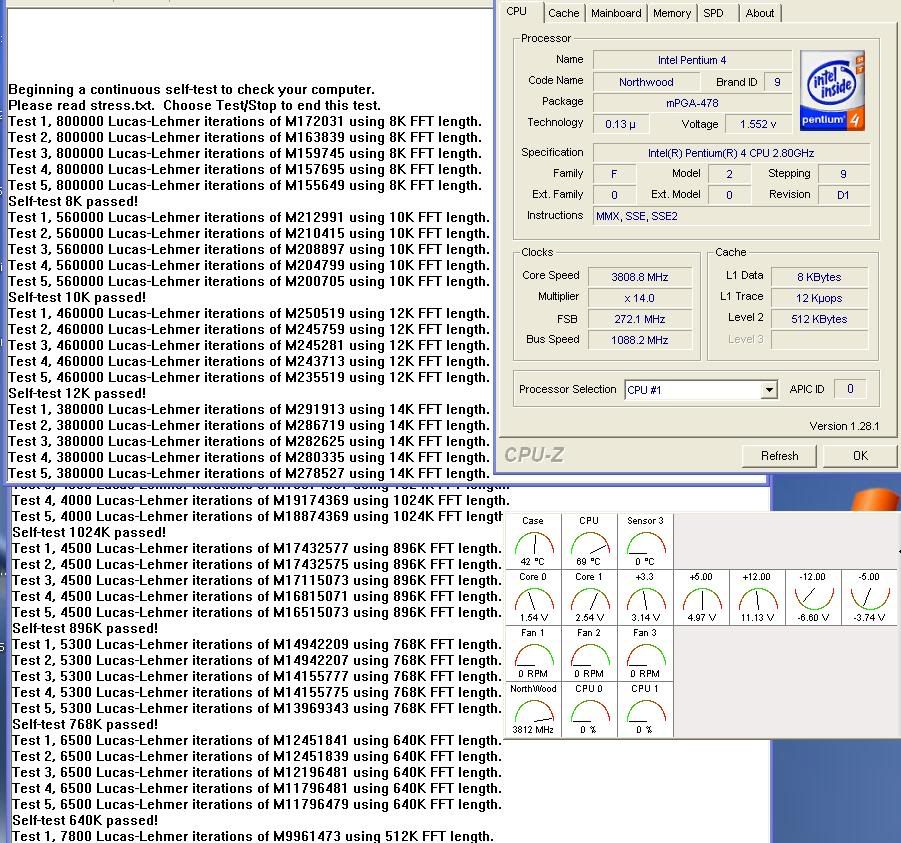 |
|
|
Feb 23 2006, 08:30 PM
Return to original view | Post
#15
|
|
Elite
5,784 posts Joined: Jan 2003 From: Shah Alam
|
tat was the previous Vtech 350w on Asus P4P800. Now back to AI7 and Enermax 431W
|
|
|
Mar 14 2006, 09:11 PM
Return to original view | Post
#16
|
|
Elite
5,784 posts Joined: Jan 2003 From: Shah Alam
|
Nope, changing the PSB doesnt affect the overclocking. Tried it myself.
|
|
|
Mar 22 2006, 09:35 PM
Return to original view | Post
#17
|
|
Elite
5,784 posts Joined: Jan 2003 From: Shah Alam
|
QUOTE(nelza_ax @ Mar 22 2006, 05:17 PM) noob SP2004/Prime95 ..which is better to burn in my RAM SP2004 or memtest86?  I don use memtest/86 --> Reason? Eventhough Memtest shows error free of a certain FSB speed, it sometimes will fail when tested with SP2004/Prime95 |
|
|
Mar 24 2006, 06:57 AM
Return to original view | Post
#18
|
|
Elite
5,784 posts Joined: Jan 2003 From: Shah Alam
|
QUOTE(fridaynite @ Mar 23 2006, 05:47 PM) i got a prob with my p4p800 and a celeron d 2.4ghz. Which HSF your using? Slap a kick A$s HSF+monstrous fan and your on ur way... set my DDR400 rams to 266mhz (ratio 1:1) and start pushing the fsb. can go up to 175mhz - DDR 350, celly at 3.14Ghz def voltage prime stable. But after 177mhz, the system becomes unstable no matter how much Vcore i pumped. why like that? anybody can help?  |
|
|
Jul 30 2007, 03:54 PM
Return to original view | Post
#19
|
|
Elite
5,784 posts Joined: Jan 2003 From: Shah Alam
|
probably, your MCH and/or CPU needs better cooling. Don trust the Hardware monitoring, touch the NB hsf and it burns your finger, telling you it's impossible to be 41C
Added on July 30, 2007, 4:10 pm QUOTE(rockmaniac85 @ Jul 28 2007, 07:49 PM) set both of em to +0.2V, then set fsb to 450MHz.. still orthos failed after 3 sec.. If u've not known, the P35s from giga will do 500+fsb @ default voltages. even on stock volt..it's burning hot, so it's not a gd idea to add more vMch.i can increase vMCH and vFSB to +0.3V, but would it work? when i set my orthos priority to 10, it seems stable.... normally i set my orthos priority at a default 1.. sorry, im actually quite a n00b in oc'ing... hope you guys can help.. thanx.. This post has been edited by kucingfight: Jul 30 2007, 04:11 PM |
|
|
Jul 30 2007, 04:32 PM
Return to original view | Post
#20
|
|
Elite
5,784 posts Joined: Jan 2003 From: Shah Alam
|
Did you remove the thermal gunk on the NB n replace it with AS5 or something? Weird, mine is burning hot, cant put my fingers for more than 3secs. I've replaced it with AS5.
|
|
Topic ClosedOptions
|
| Change to: |  0.0240sec 0.0240sec
 0.34 0.34
 7 queries 7 queries
 GZIP Disabled GZIP Disabled
Time is now: 5th December 2025 - 10:37 PM |
 Quote
Quote