Welcome Guest ( Log In | Register )

Outline · [ Standard ] · Linear+

Hardware [USER REVIEW] Sager/Clevo Horize NP8150 (P150HM), Gaming: i7-2720QM w/ NVIDIA GTX 485m

views
     
TSThis is a Lamp
post Mar 26 2011, 04:39 PM

Getting Started
**
Junior Member
189 posts

Joined: Jan 2011
New changes!

- Added Starcraft II, Darksiders, Lost Planet 2, Pro Evolution Soccer 2011 and NBA 2K11 benchmarks.
- Updated minor details regarding new secondary hard drive.

More coming soon (Call of Duty Black Ops and Battlefield Bad Company 2).
TSThis is a Lamp
post Mar 28 2011, 11:48 AM

Getting Started
**
Junior Member
189 posts

Joined: Jan 2011
Tried Bad Company 2 the other day with full settings, and nothing was lagging at all. Just got Shogun 2 as well, and will try that later. Lord of the Rings Online, Mass Effect 2, Civilization 5, Black Ops, Dawn of War II Retribution, and Dragon Age 2 are up later tonight.

750GB HDD works wonders biggrin.gif

Overclocking results will be up later tonight too.

smile.gif Busy busy!

Will get Crysis 2 sometime later this week. Currently busy with my cosplay costume haha tongue.gif

This post has been edited by This is a Lamp: Mar 28 2011, 12:03 PM
TSThis is a Lamp
post Mar 28 2011, 08:10 PM

Getting Started
**
Junior Member
189 posts

Joined: Jan 2011
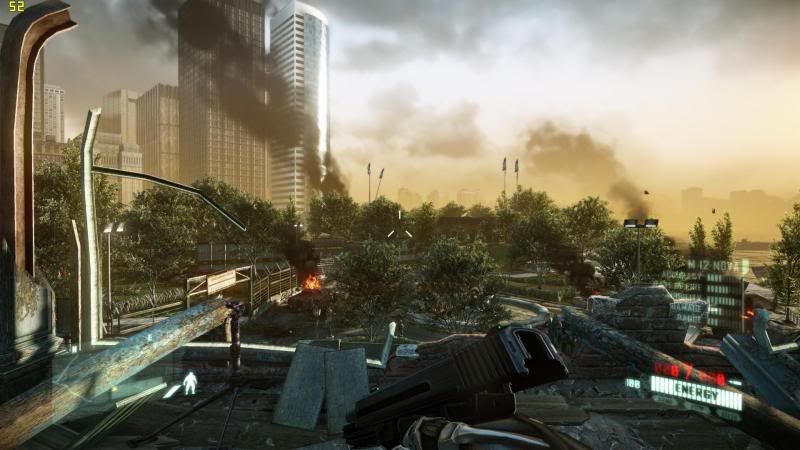
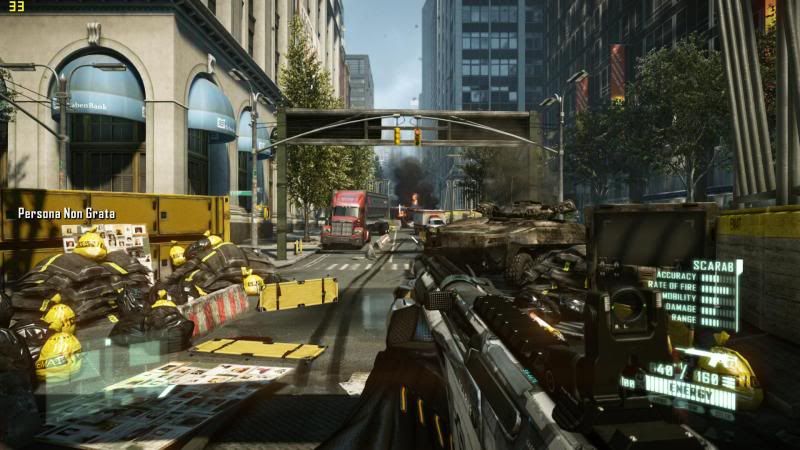
Added Crysis 2 in benchmarks smile.gif

user posted image

user posted image

This post has been edited by This is a Lamp: Mar 28 2011, 08:34 PM
TSThis is a Lamp
post Mar 29 2011, 08:23 AM

Getting Started
**
Junior Member
189 posts

Joined: Jan 2011
QUOTE(alucard1412 @ Mar 28 2011, 11:47 PM)
look like u live a nice life eh?  biggrin.gif
*
Haha if you say so. I'm pretty much tightening everything into a schedule these days. Very routined life on weekdays, and weekends go all out biggrin.gif!
TSThis is a Lamp
post Mar 31 2011, 06:03 AM

Getting Started
**
Junior Member
189 posts

Joined: Jan 2011
QUOTE(limhongwoon @ Mar 30 2011, 09:37 PM)
Do u pay any customs tax ?
*
No custom tax. rclxms.gif

QUOTE(Pewufod @ Mar 31 2011, 12:09 AM)
eh lamp what temp did you get when playing crysis
mine got as high as 90 degree c with FN+1
no cooler thou
*
Hmmm, was playing multiplayer all night last night. Was about 82C - 85C, without FN+1.

90C quite high though rolleyes.gif

This post has been edited by This is a Lamp: Mar 31 2011, 06:04 AM
TSThis is a Lamp
post Apr 1 2011, 11:30 AM

Getting Started
**
Junior Member
189 posts

Joined: Jan 2011
Okay guys, update.

Big problem came by with the laptop (don't think it's the laptop's fault).

Apparently my Corsair SSD wasn't detected on the BIOS and just sits there on POST since yesterday. So, I emailed my reseller regarding the problem. They replied that Corsair drives have detection problems on the NP8150/P150HM laptops due to their short SATA connectors hence not detected properly...

Weird huh. I will try to compensate that with my Seagate Momentus XT for now...there goes my free time in weekends.

So if you're ever going to buy this laptop, don't get a Corsair drive for it.


And so far, thanks for reading my review smile.gif. Benchmarks are to a halt until I sort the drives out.

This post has been edited by This is a Lamp: Apr 1 2011, 11:31 AM
TSThis is a Lamp
post Apr 1 2011, 12:15 PM

Getting Started
**
Junior Member
189 posts

Joined: Jan 2011
QUOTE(kahjye @ Apr 1 2011, 02:01 PM)
o mai...then u sent ur lappy to them already?
*
Nah. Don't need to. It's just the SSD's problem, not my laptop.

I will put a different drive, and use the SSD on my netbook.
TSThis is a Lamp
post Apr 6 2011, 09:19 AM

Getting Started
**
Junior Member
189 posts

Joined: Jan 2011
Updated BIOS to 1.01.06, and so far so good.

Still using the Momentus XT as primary drive and no problems found.
Later tonight will upload a gameplay video of Crysis 2, and benchmark for Dawn of War II Retribution.

QUOTE(rubrubrub @ Apr 5 2011, 02:39 AM)
what is the battery life like? and where did u download those games? =)
*
Battery life was about 2-3 hours, mid brightness power saver.

Was 2:30~ with balanced and mid brightness.

And download? Nahhh...I buy my games for online play haha (Love online smile.gif ). Some of them are from Steam, and some games I have already gotten them before I had my laptop.

QUOTE(ALeUNe @ Apr 5 2011, 04:03 AM)
I had the detection problem with my Vertex 2 initially.
What i did was, change the
1) AHCI to IDE -> Save changes & exit
2) The Vertex was detected in bios
3) Change back to ACHI, save and exit and the problem solved.

I hope you could solve the issue. Good luck.
*
Thanks for the suggestion.

I will try that tonight...although I filed an RMA for my Corsair. Reason why this RMA was done because I actually installed the Corsair drive into my netbook, but the BIOS did not detect it either. So I ruled out that the drive was inoperable, unfortunately.

Hopefully your suggestion will help sort the problem out; I still have my save games in that SSD ! sad.gif A Crucial C300 SSD is incoming to my doorstep in a week or so, and has been proven by my resellers that it works marvelously.

TSThis is a Lamp
post Apr 6 2011, 08:27 PM

Getting Started
**
Junior Member
189 posts

Joined: Jan 2011
QUOTE(iiee @ Apr 6 2011, 10:09 PM)
Hi bro, I am very interested about this laptop and am holding back to wait for matte screen from Sager, and it is finally available.  I am playing a game and wish to know how this laptop performs, would you be able to do the benchmark in high res? 

http://www.finalfantasyxiv.com/media/benchmark/na/

I am hoping for 4-5k points~
*
Haha sure. I have a copy myself...but the 30 day free trial didn't work so I couldn't make a character sad.gif .

Will do the benchmark tomorrow, pretty tired today tongue.gif. Will update you ASAP.
TSThis is a Lamp
post Apr 9 2011, 11:23 AM

Getting Started
**
Junior Member
189 posts

Joined: Jan 2011
QUOTE(iiee @ Apr 6 2011, 10:09 PM)
Hi bro, I am very interested about this laptop and am holding back to wait for matte screen from Sager, and it is finally available.  I am playing a game and wish to know how this laptop performs, would you be able to do the benchmark in high res? 

http://www.finalfantasyxiv.com/media/benchmark/na/

I am hoping for 4-5k points~
*
Sorry to disappoint you but the laptop got 2.8k points...4 - 5k points are still within the desktop range to be honest.

But it was still very playable throughout and I believe it can reach 3k if pushed a bit further.

user posted image

Next up will be Bulletstorm...just got it today smile.gif

Changes:
- Removed Pro Evolution Soccer 2011 image to make way for FFXIV Benchmark.

This post has been edited by This is a Lamp: Apr 9 2011, 11:30 AM
TSThis is a Lamp
post Apr 14 2011, 09:03 PM

Getting Started
**
Junior Member
189 posts

Joined: Jan 2011
QUOTE(robsworld2006 @ Apr 14 2011, 07:59 PM)
Hi there,

Great review,

I recently bought the P150HM from LBO as well and noticed that my graphics fan tend to cycle on and off. So every 10-20 seconds the fan will kick in for 5-10seconds then go off again.

A few other people have reported the same issue here: http://forum.notebookreview.com/sager-clev...ile-idling.html

I was just wondering if you have the same issue with your notebook? Is there a fix for this?
*
Have you tried flashing to the latest Firmware and BIOS? Some NBR users have fixed the issue by doing so.

My fans normally turn on but doesn't really have a cycle; this is because I'm using a secondary monitor as well, so the fans are always spinning at a constant rate.
TSThis is a Lamp
post Apr 19 2011, 01:04 PM

Getting Started
**
Junior Member
189 posts

Joined: Jan 2011
QUOTE(robsworld2006 @ Apr 15 2011, 04:03 PM)
Yeah I have actually 1.00.06 / ec 1.00.04 but I still have the problem so I was just wondering maybe if you can test it by not plugging into a secondary monitor. I did read on NBR that people say the issue is fixed but I seem to have this issue

Thanks again
*
I do not have this issue after disconnecting my secondary monitor.

What NVIDIA driver version have you got currently?
TSThis is a Lamp
post Apr 25 2011, 10:07 AM

Getting Started
**
Junior Member
189 posts

Joined: Jan 2011
QUOTE(azimlatip @ Apr 21 2011, 06:33 PM)
@This is a Lamp

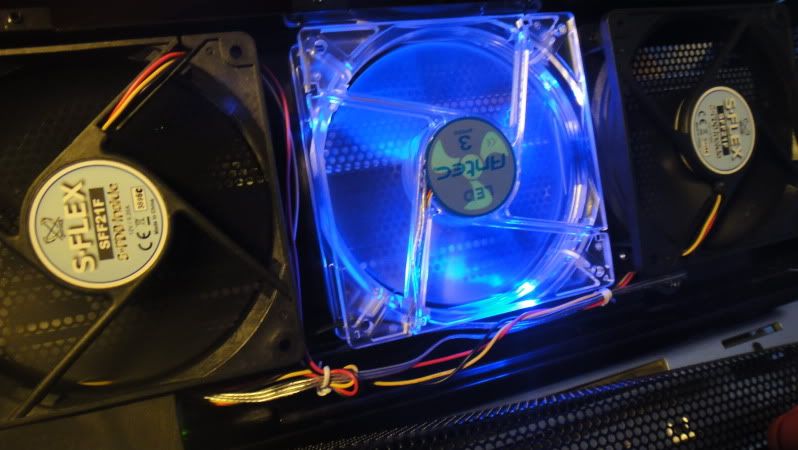
I know it seems a bit out of topic, but care to show your modded cooling fan? Haha. Does it really help with cooling the machine? smile.gif
*
It's actually on my sig, the picture that is. The stock fans don't have a high RPM, while the ones I modded in are desktop 120mm fans, which goes even faster. It does help very much in fact, due to the higher RPM and cycle.
user posted image

QUOTE(iiee @ Apr 24 2011, 05:11 PM)
60 is good enough, vsync if off may have screen tearing. 
FFXI max at 30 also ok. more than 60 cannot notice one


Added on April 24, 2011, 3:36 pmStill not yet decided on this laptop.  No expresscard, no built in WWAN, lauya keyboard...

The 4 screws to open bottom case, are they spring attached to the case type or normal loose screw?  Need to open 4 really troublesome ler.
*
I don't really think the keyboard is bad though. And 4 screws to open a laptop is MUCH MUCH better than many of the current laptop brands today. Try opening a HP laptop or a Toshiba laptop; you will have trouble getting to ALL the components in less than 5 minutes. The NP8150 opens up quick, and easy. I don't know what you mean by "troublesome".

They are of the normal loose screw, Philip head type. Two in the middle, two on corners.

This post has been edited by This is a Lamp: Apr 25 2011, 10:13 AM
TSThis is a Lamp
post Apr 27 2011, 07:04 AM

Getting Started
**
Junior Member
189 posts

Joined: Jan 2011
Hmmm...removing the back cover while gaming...don't get into the habit of that if you have a Clevo, because by itself, it runs pretty cool anyway and you're subjected to attract objects into the fan intakes as well as a pretty serious case of burns if you touch the two heatsinks.

And forgot to answer your FF online character question. I couldn't make a character because Squareenix screwed my payment system up, so I just gave up.
TSThis is a Lamp
post Apr 27 2011, 05:57 PM

Getting Started
**
Junior Member
189 posts

Joined: Jan 2011
QUOTE(Irfan2397 @ Apr 27 2011, 06:19 PM)
Thinking of getting this sager NP 780 all in include delivery is 14k is it worth it. 
PC(Desktop CPU): I7-960
Memory:12GB DDR3
Display: 17.3" (16:9) Full HD (1920x1080) LED-Backlit Display with upgrade to matte
OS: WIN 7 ULTI
Graphic: GTX 485m x2 sli
Storage: 80gb ssd
2nd Storage: 750 7200 sataII
3rd Storage: No Harddisk/
Wireless Card: Bigfoot networks Killer Wireless-N 1102
MS Office: Home and Student
Optical Disk Drive: 6x Blu Ray Burner + Reader + DVD Combo
Thermal Compound: IC Diamond
Sager Carrying Bag
Warranty: 1 Year US Sager warranty (Parts) + 1 Year Regional Carrying (Warranty and Regional Carrying can be extended)
Any thing need to remove?or upgrade?
*
Any budget limit?
TSThis is a Lamp
post Apr 29 2011, 06:50 AM

Getting Started
**
Junior Member
189 posts

Joined: Jan 2011
QUOTE(Irfan2397 @ Apr 28 2011, 01:59 AM)
Well need a lappy to play Crysis on ultra setting


Added on April 28, 2011, 12:12 am
My parents budget only 10k ao gonna sell my old lappy and ask my uncle a bit money biggrin.gif ,btw if with no harddisk and window and buy outside is it hard to install?
*
Haha, the Np8150 can already play Crysis 2 @ Ultra settings. If overclocked, it plays even better. I haven't posted the results of that yet though...haven't got the time.

QUOTE(likazar @ Apr 29 2011, 05:31 AM)
Hi all.

Im new here. the reason why i registered to lowyat forum is that so i can ask some help from u guys.

I just want to know whether this laptop is suitable for a uni student? or is there any other alternatives? preferably 14-inch
*
Aside from being a student, what are your other uses? Do you game a lot (this is a gaming machine)? Do you intend to carry it around everyday? How often will you carry it? Any budget limit?

QUOTE(8u8u @ Apr 29 2011, 07:19 AM)
14k! imba....  shocking.gif is sager the most expensive laptop?
*
It is expensive because:
1) It uses desktop processors
2) 2 GPU solution e.g. 485m SLi
3) 3 Hard drive bays

It is more or less, the most powerful/expensive laptop right now. I don't think any other laptop manufacturer can overcome the hurdle of placing a desktop processor in a laptop motherboard (maybe in the future...but it's pretty bleak at the moment).
TSThis is a Lamp
post Apr 29 2011, 07:42 AM

Getting Started
**
Junior Member
189 posts

Joined: Jan 2011
17" inch. Yeah very imba haha.

user posted image
TSThis is a Lamp
post Apr 29 2011, 07:53 AM

Getting Started
**
Junior Member
189 posts

Joined: Jan 2011
Yep. All Sagers are customizable (GPU, RAM, CPU, HDD, LCD, other things), except maybe the lower end mobility models (NP5170, NP5175, NP5160, NP5165...etc).

Currently the cheapest GAMING one would be about $1200 - 1300$USD...about RM3.8K without shipping. This is the NP8130, with Intel Core i7-2630QM, GTX 460m and 8GB RAM.

The mobility models are cheaper, about $800USD but they have the GT 555m/540m instead.
TSThis is a Lamp
post Apr 29 2011, 05:10 PM

Getting Started
**
Junior Member
189 posts

Joined: Jan 2011
QUOTE(likazar @ Apr 29 2011, 06:47 PM)
Lamp:
Yeah i know its a gaming lappy, n thats the main reason im considering it right now. awesome specs! besides, im a newsletter editor n always (almost everyday) use photoshop.

erm..budget limit i guess up to rm8k..

thnx bro


Added on April 29, 2011, 5:02 pmforgot to tell...i usually brings my laptop to class. uni is about 30-minute walk from my house
*
Mind you, that the laptop isn't really heavy but the adapter is very heavy! If you can afford exercising your shoulders then bringing it to Uni then the NP8150 isn't really that bad. I bring it out once in awhile. If your budget limit is up to RM8K, that's plenty to spend on things like SSDs and even enough for the GTX 485m. For me, I got this laptop for just its pure horsepower not portability. Another thing to note that it runs about 3 hours on balanced/power saver, so if you're not wanting the power adapter with you then this is something to think about smile.gif.

Hope it helps. Feel free to ask more questions before deciding smile.gif
TSThis is a Lamp
post Apr 29 2011, 06:11 PM

Getting Started
**
Junior Member
189 posts

Joined: Jan 2011
The laptop is 3kg ~

The adapter...um, I don't have a weighing machine around but it is like a text book. tongue.gif

3 Pages < 1 2 3 >Top
 

Change to:
| Lo-Fi Version
0.0255sec    0.32    6 queries    GZIP Disabled
Time is now: 6th December 2025 - 01:41 PM