

QUOTE(kahjye @ Apr 5 2011, 12:47 AM)
ini haram! 

hahah what? you don't pay and download from official website?Hardware [USER REVIEW] Sager/Clevo Horize NP8150 (P150HM), Gaming: i7-2720QM w/ NVIDIA GTX 485m
|
|
 Apr 5 2011, 01:02 AM Apr 5 2011, 01:02 AM
|
 
Senior Member
1,793 posts Joined: Oct 2008 From: UC Berkeley  
|
QUOTE(kahjye @ Apr 5 2011, 12:47 AM) ini haram! hahah what? you don't pay and download from official website? |
|
|
|
|
|
Apr 5 2011, 01:03 AM
|
|
Senior Member
3,098 posts Joined: Aug 2010 From: my house  
|
haram as in illegal lol! means pirate~
|
|
|
Apr 5 2011, 01:07 AM
|
|
Senior Member
1,793 posts Joined: Oct 2008 From: UC Berkeley
|
i think i know what it means. -)
|
|
|
Apr 5 2011, 01:26 AM
|

Senior Member
4,494 posts Joined: Feb 2009
|
QUOTE(rubrubrub @ Apr 5 2011, 01:02 AM) hahah what? you don't pay and download from official website? dont say something that everyone knows lar  but its illegal here mah hahahaa |
|
|
Apr 5 2011, 02:03 AM
|
 
VIP
9,692 posts Joined: Jan 2003 From: Mongrel Isle
|
QUOTE(This is a Lamp @ Apr 1 2011, 11:30 AM) Okay guys, update. I had the detection problem with my Vertex 2 initially. Big problem came by with the laptop (don't think it's the laptop's fault). Apparently my Corsair SSD wasn't detected on the BIOS and just sits there on POST since yesterday. So, I emailed my reseller regarding the problem. They replied that Corsair drives have detection problems on the NP8150/P150HM laptops due to their short SATA connectors hence not detected properly... Weird huh. I will try to compensate that with my Seagate Momentus XT for now...there goes my free time in weekends. So if you're ever going to buy this laptop, don't get a Corsair drive for it. And so far, thanks for reading my review  . Benchmarks are to a halt until I sort the drives out. . Benchmarks are to a halt until I sort the drives out.What i did was, change the 1) AHCI to IDE -> Save changes & exit 2) The Vertex was detected in bios 3) Change back to ACHI, save and exit and the problem solved. I hope you could solve the issue. Good luck. |
|
|
Apr 6 2011, 09:19 AM
|

Junior Member
189 posts Joined: Jan 2011
|
Updated BIOS to 1.01.06, and so far so good.
Still using the Momentus XT as primary drive and no problems found. Later tonight will upload a gameplay video of Crysis 2, and benchmark for Dawn of War II Retribution. QUOTE(rubrubrub @ Apr 5 2011, 02:39 AM) what is the battery life like? and where did u download those games? =) Battery life was about 2-3 hours, mid brightness power saver. Was 2:30~ with balanced and mid brightness. And download? Nahhh...I buy my games for online play haha (Love online ). Some of them are from Steam, and some games I have already gotten them before I had my laptop.QUOTE(ALeUNe @ Apr 5 2011, 04:03 AM) I had the detection problem with my Vertex 2 initially. Thanks for the suggestion. What i did was, change the 1) AHCI to IDE -> Save changes & exit 2) The Vertex was detected in bios 3) Change back to ACHI, save and exit and the problem solved. I hope you could solve the issue. Good luck. I will try that tonight...although I filed an RMA for my Corsair. Reason why this RMA was done because I actually installed the Corsair drive into my netbook, but the BIOS did not detect it either. So I ruled out that the drive was inoperable, unfortunately. Hopefully your suggestion will help sort the problem out; I still have my save games in that SSD !  A Crucial C300 SSD is incoming to my doorstep in a week or so, and has been proven by my resellers that it works marvelously. A Crucial C300 SSD is incoming to my doorstep in a week or so, and has been proven by my resellers that it works marvelously. |
|
|
|
|
|
Apr 6 2011, 08:09 PM
|

Junior Member
361 posts Joined: Apr 2005
|
Hi bro, I am very interested about this laptop and am holding back to wait for matte screen from Sager, and it is finally available. I am playing a game and wish to know how this laptop performs, would you be able to do the benchmark in high res?
http://www.finalfantasyxiv.com/media/benchmark/na/ I am hoping for 4-5k points~ This post has been edited by iiee: Apr 6 2011, 08:10 PM |
|
|
Apr 6 2011, 08:27 PM
|
|
Junior Member
189 posts Joined: Jan 2011
|
QUOTE(iiee @ Apr 6 2011, 10:09 PM) Hi bro, I am very interested about this laptop and am holding back to wait for matte screen from Sager, and it is finally available. I am playing a game and wish to know how this laptop performs, would you be able to do the benchmark in high res? Haha sure. I have a copy myself...but the 30 day free trial didn't work so I couldn't make a character http://www.finalfantasyxiv.com/media/benchmark/na/ I am hoping for 4-5k points~ . Will do the benchmark tomorrow, pretty tired today  . Will update you ASAP. . Will update you ASAP. |
|
|
Apr 9 2011, 11:23 AM
|
|
Junior Member
189 posts Joined: Jan 2011
|
QUOTE(iiee @ Apr 6 2011, 10:09 PM) Hi bro, I am very interested about this laptop and am holding back to wait for matte screen from Sager, and it is finally available. I am playing a game and wish to know how this laptop performs, would you be able to do the benchmark in high res? Sorry to disappoint you but the laptop got 2.8k points...4 - 5k points are still within the desktop range to be honest.http://www.finalfantasyxiv.com/media/benchmark/na/ I am hoping for 4-5k points~ But it was still very playable throughout and I believe it can reach 3k if pushed a bit further.  Next up will be Bulletstorm...just got it today Changes: - Removed Pro Evolution Soccer 2011 image to make way for FFXIV Benchmark. This post has been edited by This is a Lamp: Apr 9 2011, 11:30 AM |
|
|
Apr 14 2011, 05:59 PM
|
|
Newbie
2 posts Joined: Apr 2011
|
QUOTE(This is a Lamp @ Mar 16 2011, 10:57 PM) The keyboard has basic Clevo FN functions available in most Clevos (e.g disable touchpad, bluetooth/wireless, brightness). But I’m pretty sure not many of you have own one. One thing to note though that if you press FN+1, the fans will spin at MAX speed. Hi there, Great review, I recently bought the P150HM from LBO as well and noticed that my graphics fan tend to cycle on and off. So every 10-20 seconds the fan will kick in for 5-10seconds then go off again. A few other people have reported the same issue here: http://forum.notebookreview.com/sager-clev...ile-idling.html I was just wondering if you have the same issue with your notebook? Is there a fix for this? This post has been edited by robsworld2006: Apr 14 2011, 06:00 PM |
|
|
Apr 14 2011, 09:03 PM
|
|
Junior Member
189 posts Joined: Jan 2011
|
QUOTE(robsworld2006 @ Apr 14 2011, 07:59 PM) Hi there, Have you tried flashing to the latest Firmware and BIOS? Some NBR users have fixed the issue by doing so.Great review, I recently bought the P150HM from LBO as well and noticed that my graphics fan tend to cycle on and off. So every 10-20 seconds the fan will kick in for 5-10seconds then go off again. A few other people have reported the same issue here: http://forum.notebookreview.com/sager-clev...ile-idling.html I was just wondering if you have the same issue with your notebook? Is there a fix for this? My fans normally turn on but doesn't really have a cycle; this is because I'm using a secondary monitor as well, so the fans are always spinning at a constant rate. |
|
|
Apr 15 2011, 02:03 PM
|
|
Newbie
2 posts Joined: Apr 2011
|
QUOTE(This is a Lamp @ Apr 14 2011, 11:03 PM) Have you tried flashing to the latest Firmware and BIOS? Some NBR users have fixed the issue by doing so. Yeah I have actually 1.00.06 / ec 1.00.04 but I still have the problem so I was just wondering maybe if you can test it by not plugging into a secondary monitor. I did read on NBR that people say the issue is fixed but I seem to have this issueMy fans normally turn on but doesn't really have a cycle; this is because I'm using a secondary monitor as well, so the fans are always spinning at a constant rate. Thanks again |
|
|
Apr 19 2011, 01:04 PM
|
|
Junior Member
189 posts Joined: Jan 2011
|
QUOTE(robsworld2006 @ Apr 15 2011, 04:03 PM) Yeah I have actually 1.00.06 / ec 1.00.04 but I still have the problem so I was just wondering maybe if you can test it by not plugging into a secondary monitor. I did read on NBR that people say the issue is fixed but I seem to have this issue I do not have this issue after disconnecting my secondary monitor. Thanks again What NVIDIA driver version have you got currently? |
|
|
|
|
|
Apr 21 2011, 04:33 PM
|

Junior Member
19 posts Joined: Dec 2010 From: Neverland
|
@This is a Lamp
I know it seems a bit out of topic, but care to show your modded cooling fan? Haha. Does it really help with cooling the machine? |
|
|
Apr 24 2011, 03:03 PM
|
|
Junior Member
361 posts Joined: Apr 2005
|
QUOTE(This is a Lamp @ Apr 6 2011, 08:27 PM) Haha sure. I have a copy myself...but the 30 day free trial didn't work so I couldn't make a character yii... why cannot create character, until now FFXIV is till FOC because there are many areas need improvement and SquareEnix has no face to charge player until further notice. . About 3000 points ah, have to play in low resolution mode then. My desktop doing 6400 points and yet not able to max the framerate (60) at some places, some graphic options still need to be off. |
|
|
Apr 24 2011, 03:05 PM
|

Senior Member
3,725 posts Joined: Jul 2005 From: In /hardware/ 
|
@iiee
To max framerate passed over 60, need to turn off VSync |
|
|
Apr 24 2011, 03:11 PM
|
|
Junior Member
361 posts Joined: Apr 2005
|
60 is good enough, vsync if off may have screen tearing.
FFXI max at 30 also ok. more than 60 cannot notice one Added on April 24, 2011, 3:36 pmStill not yet decided on this laptop. No expresscard, no built in WWAN, lauya keyboard... The 4 screws to open bottom case, are they spring attached to the case type or normal loose screw? Need to open 4 really troublesome ler. This post has been edited by iiee: Apr 24 2011, 03:36 PM |
|
|
Apr 25 2011, 10:07 AM
|
|
Junior Member
189 posts Joined: Jan 2011
|
QUOTE(azimlatip @ Apr 21 2011, 06:33 PM) @This is a Lamp It's actually on my sig, the picture that is. The stock fans don't have a high RPM, while the ones I modded in are desktop 120mm fans, which goes even faster. It does help very much in fact, due to the higher RPM and cycle.I know it seems a bit out of topic, but care to show your modded cooling fan? Haha. Does it really help with cooling the machine? 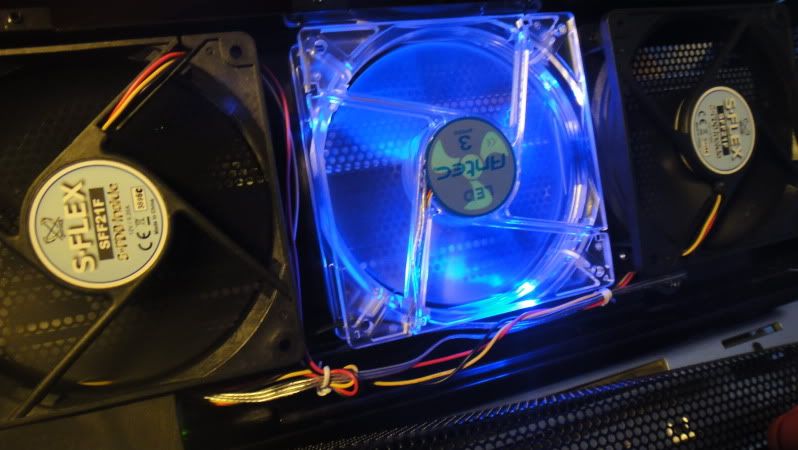 QUOTE(iiee @ Apr 24 2011, 05:11 PM) 60 is good enough, vsync if off may have screen tearing. I don't really think the keyboard is bad though. And 4 screws to open a laptop is MUCH MUCH better than many of the current laptop brands today. Try opening a HP laptop or a Toshiba laptop; you will have trouble getting to ALL the components in less than 5 minutes. The NP8150 opens up quick, and easy. I don't know what you mean by "troublesome".FFXI max at 30 also ok. more than 60 cannot notice one Added on April 24, 2011, 3:36 pmStill not yet decided on this laptop. No expresscard, no built in WWAN, lauya keyboard... The 4 screws to open bottom case, are they spring attached to the case type or normal loose screw? Need to open 4 really troublesome ler. They are of the normal loose screw, Philip head type. Two in the middle, two on corners. This post has been edited by This is a Lamp: Apr 25 2011, 10:13 AM |
|
|
Apr 26 2011, 11:54 AM
|
|
Junior Member
361 posts Joined: Apr 2005
|
the keyboard i say lauya is not because of the quality, but the layout (numpad), pg up pg down, del button.... and no backlit led ><; i like to steal steal do thing at dark.
About the screw, I am using Dell laptop, 1 screw to open the bottom case to work with ram, cpu, heatsink, fan, cards bla bla. the screw is attached to the case so it will not go missing. Whenever i play game i will open up bottom case to allow better air flow that is why i ask~ While i am taking too long time to consider buying, Z68 will come out next week, donno what clevo will do next... waiting like this forever no need buy liao. This post has been edited by iiee: Apr 26 2011, 11:57 AM |
|
|
Apr 26 2011, 11:56 AM
|
|
Senior Member
3,725 posts Joined: Jul 2005 From: In /hardware/
|
clevo is targeting for a very simple user who doesn't care much about the design and blink-blink function.
if you want backlit leyboard, pick alienware. |
| Change to: |  0.0276sec 0.0276sec
 0.92 0.92
 5 queries 5 queries
 GZIP Disabled GZIP Disabled
Time is now: 4th December 2025 - 10:25 PM |
 Quote
Quote