Welcome Guest ( Log In | Register )

22 Pages « < 5 6 7 8 9 > » Bottom

Outline · [ Standard ] · Linear+

 Popcorn Hour - Full HD Networked Media Player, A-410 - ESS Technology Sabre 24-bit DAC

views
     
TSgo4pch
post Jul 21 2011, 11:37 PM

Getting Started
**
Junior Member
162 posts

Joined: Jan 2011


Hi All,

Tips on Removing USB Device!

->Goto Main Menu
->Point to USB Device
->Press "File Mode" from the remote control
->Select "Remove USB Device" press enter
->A message prompted "Are you sure you want to remove the USN device?"
->Just select "OK" and press enter
->A message showing "USB Device Media Disconnected"
->Done


alucard89
post Jul 22 2011, 06:59 PM

Look at all my stars!!
*******
Senior Member
4,454 posts

Joined: Apr 2006
QUOTE(go4pch @ Jul 21 2011, 11:37 PM)
Hi All,

Tips on Removing USB Device!

->Goto Main Menu
->Point to USB Device
->Press "File Mode" from the remote control
->Select "Remove USB Device" press enter
->A message prompted "Are you sure you want to remove the USN device?"
->Just select "OK" and press enter
->A message showing "USB Device Media Disconnected"
->Done
*
Thanks for the tip biggrin.gif
Even I didn't find this info on the NMT forum.
xpilon
post Jul 24 2011, 09:20 PM

Getting Started
**
Junior Member
55 posts

Joined: Aug 2010


QUOTE(Kiding @ Jul 18 2011, 11:19 PM)
I got the popcorn A210 to replace my not-so-good xtreamer few weeks ago.

After a week of usage, I'm pretty satisfy the A210 performance, although the first one get faulty but quickly replaced with a new unit from the supplier.

Overall, the features and performance of A210 is pretty much better than xtreamer. of course it is not fair to compare it with xtreamer as the A210 price is 75% more expensive, but at least popcorn is able to delivery it, unlike xtreamer, telling you they have the features but couldn't deliver it or having problem to deliver.

The popcorn has the following features which I think are much better than xtreamer
1. YAMJ jukebox support
2. Bluray interactive menu support
3. High bitrate Full HD BDISO and BDMV playback via 100Mbps wired network
4. Beautiful GUI
5. MKV simple menu support
6. MKV PGS subtitles support

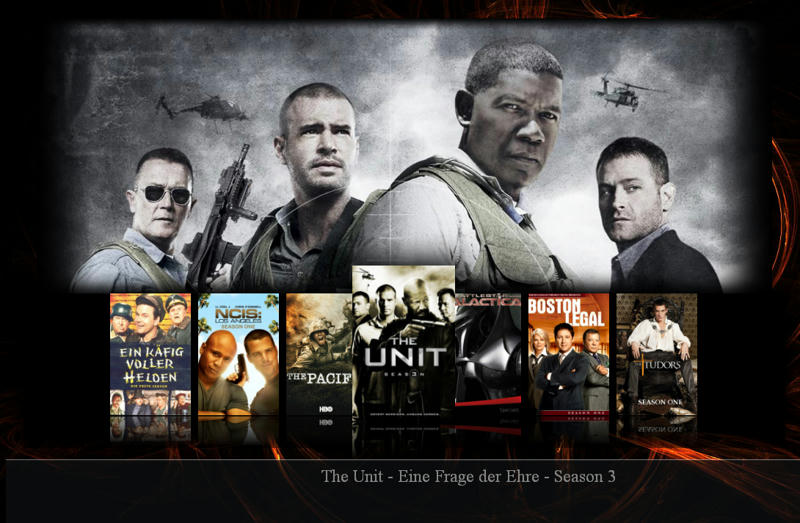
YAMJ with eversion flash skin

user posted image

YAMJ movie detail

user posted image

Bluray Interactive Menu

user posted image

MKV simple menu

user posted image

Media Info Overlay

user posted image
*
Hi,

How to create this kind of Jukebox? Can advised?
Thanks in advanced.


Added on July 24, 2011, 9:23 pm
QUOTE(alucard89 @ Jul 21 2011, 05:38 PM)
You could also try SabishGT skin, it's basically a pimped up version of Aeon
With other features borrowed from other skins
Also comes with an optional index page, looks nice  biggrin.gif

user posted image
*
hi bro,

How about you want? Look interesting. Can advised as well?
Popcorn Hour really deliver a very nice and stable products. thumbup.gif (thumb up).

Thanks in advanced, bro.

This post has been edited by xpilon: Jul 24 2011, 09:23 PM
alucard89
post Jul 25 2011, 10:05 AM

Look at all my stars!!
*******
Senior Member
4,454 posts

Joined: Apr 2006
QUOTE(xpilon @ Jul 24 2011, 09:20 PM)

hi bro,

How about you want? Look interesting. Can advised as well?
Popcorn Hour really deliver a very nice and stable products. thumbup.gif (thumb up).

Thanks in advanced, bro.
*
The really simple guide:

Get YAMJ(obviously)

Download your preferred skin and place in the skin folder.
Aeon

Download mediainfo cli and place it in the mediainfo folder in yamj.

Set up your movie/series location using YAMJ GUI Config
This needs to be placed in yamj folder.

Here's a video tutorial to help you with that


user posted image

Click My_YAMJ.cmd.

It should generate jukebox folder and index.htm file

Navigate and click index.htm to access your jukebox.

Done

Here's how it should look like

user posted image

user posted image

user posted image

user posted image

To make it easier for you, here's a pre configured YAMJ with Aeon skin

http://www.mediafire.com/?sastyq3ub41y0qc

But you'll still have to configure the path for your movies folder

If you need to use other skin like Eversion, just place it in the skin folder and rename it to 'default'
There's another way where you can specify the name of the skin to be used
but I won't delve into that since renaming it to default is the easiest method.

Now, do you play your movies from network share or HDD attached to PCH?

well
post Jul 25 2011, 10:32 PM

Getting Started
**
Junior Member
253 posts

Joined: Aug 2006


if i place my computer that contain mkv in my bedroom, and place popcorn hour in living with my tv, how can i playing mkv movie ?
ya i think not to put hdd into popcorn hour, issit possible?
alucard89
post Jul 25 2011, 11:18 PM

Look at all my stars!!
*******
Senior Member
4,454 posts

Joined: Apr 2006
QUOTE(well @ Jul 25 2011, 10:32 PM)
if i place my computer that contain mkv in my bedroom, and place popcorn hour in living with my tv, how can i playing mkv movie ?
ya i think not to put hdd into popcorn hour, issit possible?
*
You still can access your movies from network share without having to install hdd.
well
post Jul 25 2011, 11:22 PM

Getting Started
**
Junior Member
253 posts

Joined: Aug 2006


QUOTE(alucard89 @ Jul 26 2011, 12:18 AM)
You still can access your movies from network share without having to install hdd.
*
ya i mean what equipment i need still?homeplug?wifi adapter?is popcorn hour support wifi?
alucard89
post Jul 25 2011, 11:38 PM

Look at all my stars!!
*******
Senior Member
4,454 posts

Joined: Apr 2006
QUOTE(well @ Jul 25 2011, 11:22 PM)
ya i mean what equipment i need still?homeplug?wifi adapter?is popcorn hour support wifi?
*
Yes it does, you get the free wifi dongle anyway
Although homeplug might be a better choice
For me I just use LAN cable since my PC isn't that far from the TV.
well
post Jul 26 2011, 03:03 AM

Getting Started
**
Junior Member
253 posts

Joined: Aug 2006


QUOTE(alucard89 @ Jul 26 2011, 12:38 AM)
Yes it does, you get the free wifi dongle anyway
Although homeplug might be a better choice
For me I just use LAN cable since my PC isn't that far from the TV.
*
oic, thanks for your reply notworthy.gif
btw, what ur htpc spec? i scare mine cant run those 1080p fullhd movie smoothly
johnlimsk
post Jul 29 2011, 05:54 PM

Getting Started
**
Junior Member
56 posts

Joined: Apr 2011
QUOTE(well @ Jul 25 2011, 11:22 PM)
ya i mean what equipment i need still?homeplug?wifi adapter?is popcorn hour support wifi?
*
Heard about the homeplug before. Wonder how the speed like? Able to stream HD movies? Look very convenient to install.


Added on July 29, 2011, 5:55 pm
QUOTE(alucard89 @ Jul 25 2011, 10:05 AM)
The really simple guide:

Get YAMJ(obviously)

Download your preferred skin and place in the skin folder.
Aeon

Download mediainfo cli and place it in the mediainfo folder in yamj.

Set up your movie/series location using YAMJ GUI Config
This needs to be placed in yamj folder.

Here's a video tutorial to help you with that


user posted image

Click My_YAMJ.cmd.

It should generate jukebox folder and index.htm file

Navigate and click index.htm to access your jukebox.

Done

Here's how it should look like

user posted image

user posted image

user posted image

user posted image

To make it easier for you, here's a pre configured YAMJ with Aeon skin

http://www.mediafire.com/?sastyq3ub41y0qc

But you'll still have to configure the path for your movies folder

If you need to use other skin like Eversion, just place it in the skin folder and rename it to 'default'
There's another way where you can specify the name of the skin to be used
but I won't delve into that since renaming it to default is the easiest method.

Now, do you play your movies from network share or HDD attached to PCH?
*
Very nice movie jukebox. Well done brother.


This post has been edited by johnlimsk: Jul 29 2011, 05:55 PM
szehock
post Jul 31 2011, 04:50 PM

New Member
*
Newbie
13 posts

Joined: Jul 2011
Hi all,

Where can I get Popcorn Hours A-210 in Kuala Lumpur / Selangor area ?

What is the price ? Any promotion / sales?

Kindly provide the contacts.

I am new in media player. Looking for device can play HK, TW, Korean and China movie / series. Is A-210 provide ?

Another brand i am looking on is Asus O! Play HD2. Any comments on this brand ?

Thanks in advanced.
xpilon
post Jul 31 2011, 10:02 PM

Getting Started
**
Junior Member
55 posts

Joined: Aug 2010


QUOTE(alucard89 @ Jul 25 2011, 10:05 AM)
The really simple guide:

Get YAMJ(obviously)

Download your preferred skin and place in the skin folder.
Aeon

Download mediainfo cli and place it in the mediainfo folder in yamj.

Set up your movie/series location using YAMJ GUI Config
This needs to be placed in yamj folder.

Here's a video tutorial to help you with that


user posted image

Click My_YAMJ.cmd.

It should generate jukebox folder and index.htm file

Navigate and click index.htm to access your jukebox.

Done

Here's how it should look like

user posted image

user posted image

user posted image

user posted image

To make it easier for you, here's a pre configured YAMJ with Aeon skin

http://www.mediafire.com/?sastyq3ub41y0qc

But you'll still have to configure the path for your movies folder

If you need to use other skin like Eversion, just place it in the skin folder and rename it to 'default'
There's another way where you can specify the name of the skin to be used
but I won't delve into that since renaming it to default is the easiest method.

Now, do you play your movies from network share or HDD attached to PCH?
*
I play directly from 1TB HDD. Above look interesting but need time to figure it out.
Thank you so much.

ngboonaun
post Jul 31 2011, 10:08 PM

Getting Started
**
Junior Member
234 posts

Joined: Mar 2010
does Popcorn Hour support for HDDVD ISO?
TSgo4pch
post Jul 31 2011, 10:13 PM

Getting Started
**
Junior Member
162 posts

Joined: Jan 2011


QUOTE(szehock @ Jul 31 2011, 04:50 PM)
Hi all,

Where can I get Popcorn Hours A-210 in Kuala Lumpur / Selangor area ?

What is the price ? Any promotion / sales?

Kindly provide the contacts.

I am new in media player. Looking for device can play HK, TW, Korean and China movie / series. Is A-210 provide ?

Another brand i am looking on is Asus O! Play HD2. Any comments on this brand ?

Thanks in advanced.
*
Please refer to the link below for all our resellers lists.
http://www.hdm.my/reseller.php
alucard89
post Jul 31 2011, 11:42 PM

Look at all my stars!!
*******
Senior Member
4,454 posts

Joined: Apr 2006
QUOTE(xpilon @ Jul 31 2011, 10:02 PM)
I play directly from 1TB HDD. Above look interesting but need time to figure it out.
Thank you so much.
*
Like I said, just grab the mediafire link and configure the path to your HDD and you're done
Although you might need to install NMT apps and enable Samba share so you can access the HDD from your network
Unless you connect the A210 directly to your PC.


Added on July 31, 2011, 11:46 pm
QUOTE(johnlimsk @ Jul 29 2011, 05:54 PM)
Heard about the homeplug before. Wonder how the speed like? Able to stream HD movies? Look very convenient to install.


Added on July 29, 2011, 5:55 pm
Very nice movie jukebox. Well done brother.
*
I haven't tried using homeplug, from what I read it's pretty reliable but it depends on your internal wiring.

This post has been edited by alucard89: Jul 31 2011, 11:46 PM
TSgo4pch
post Aug 2 2011, 06:08 PM

Getting Started
**
Junior Member
162 posts

Joined: Jan 2011


QUOTE(ngboonaun @ Jul 31 2011, 10:08 PM)
does Popcorn Hour support for HDDVD ISO?
*
Popcorn Hour can playback the DVD contents from the TS Folder directly but not for the ISO files, Popcorn Hour not supported at the moment. Popcorn Hour can playback BD.ISO file perfectly with full BD navigation (BD Menu). Surprise there are still HD-DVD iso around out there.

Hope this answer your question.

Thanks.
ngboonaun
post Aug 2 2011, 08:43 PM

Getting Started
**
Junior Member
234 posts

Joined: Mar 2010
yeah,still got HDDVD around here laugh.gif
realtek can`t play it doh.gif
Eagles: Farewell Tour 1 – Live in Melbourne [HD DVD]
http://losslessalbum.com/2011/05/08/eagles...rne-hd-dvd.html

This post has been edited by ngboonaun: Aug 2 2011, 08:46 PM
xpilon
post Aug 3 2011, 10:50 PM

Getting Started
**
Junior Member
55 posts

Joined: Aug 2010


QUOTE(alucard89 @ Jul 31 2011, 11:42 PM)
Like I said, just grab the mediafire link and configure the path to your HDD and you're done
Although you might need to install NMT apps and enable Samba share so you can access the HDD from your network
Unless you connect the A210 directly to your PC.
Hi bro,

I havent settle my nmt apps yet bcos my hdd formated in NTFS. Hope can done it this coming weekend. Any problems encountered will call for your help.

Thanks.


TSgo4pch
post Aug 7 2011, 11:13 PM

Getting Started
**
Junior Member
162 posts

Joined: Jan 2011


Hi All,

Updated awards from European Consumers Choice

http://www.europeanconsumerschoice.org/hi-tech/popcorn-hour/

Thanks.
davidwee1987
post Aug 16 2011, 11:36 PM

Getting Started
**
Junior Member
69 posts

Joined: May 2006
Hi. I'm enjoying popcorn hour so far. May I have the guide to setup torrents download


Added on August 16, 2011, 11:39 pmHi. I'm enjoying popcorn hour so far. May I have the guide to setup torrents download model c200

This post has been edited by davidwee1987: Aug 16 2011, 11:39 PM

22 Pages « < 5 6 7 8 9 > » Top
 

Change to:
| Lo-Fi Version
0.0293sec    0.92    5 queries    GZIP Disabled
Time is now: 16th December 2025 - 11:10 PM