

Can anyone explain me all differences between fist and second batch. How I can identify second batch ? Can anyone post screens of first and second batch.
Thx.
Acer Aspire 5750G, Malaysia's 1st Sandy Bridge laptop
Acer Aspire 5750G, Malaysia's 1st Sandy Bridge laptop
|
|
 May 8 2011, 03:54 AM May 8 2011, 03:54 AM
Return to original view | Post
#1
|
 
Newbie
0 posts Joined: May 2011 
|
Can anyone explain me all differences between fist and second batch. How I can identify second batch ? Can anyone post screens of first and second batch.
Thx. |
|
|
|
|
|
May 8 2011, 04:53 PM
Return to original view | Post
#2
|
|
Newbie
0 posts Joined: May 2011
|
Is this first batch ?
 second batch ? 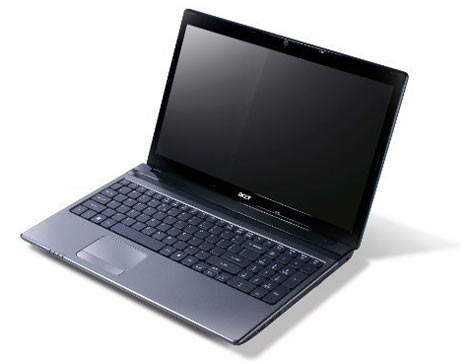 when was the second batch released ? This post has been edited by robocop0: May 8 2011, 05:16 PM |
|
|
May 8 2011, 05:37 PM
Return to original view | Post
#3
|
|
Newbie
0 posts Joined: May 2011
|
Then this one must be second one:
 In my country they start selling 5750g with old one design. But it has got bluetooth and vga with 1gb. I dont want buy it with unrepaired chipset. |
|
|
May 15 2011, 12:25 AM
Return to original view | Post
#4
|
|
Newbie
0 posts Joined: May 2011
|
Who know for what is this place ? 3Gmodule ?
 Btw in my country (Slovakia) they are selling black/grey models with fixed chipset, with bios 1.07 installed, bt included and 1gb VGA (i5model). Few days using no problem, without BSOD. |
|
|
May 15 2011, 01:24 AM
Return to original view | Post
#5
|
|
Newbie
0 posts Joined: May 2011
|
QUOTE(skycrawler @ May 15 2011, 12:57 AM) oh, that is not 5750G , that is 4750G, comes wif i5-2410M + GT520M (1Gb)..here is the thread for Acer 5750G.. No. This is 5750G. Acer is making versions with i7 and i5. You can look on this.   |
|
|
May 19 2011, 06:58 AM
Return to original view | Post
#6
|
|
Newbie
0 posts Joined: May 2011
|
Hi guys which version of bios are you using ?
I have v 1.07 and now I am wondering about upgrade to 1.10. From changelog is hard to know what is new  |
|
|
|
|
|
May 20 2011, 07:23 PM
Return to original view | Post
#7
|
|
Newbie
0 posts Joined: May 2011
|
Hello. I have a little problem with wifi. Sometimes it automaticaly turn on wifi after boot. No after restart but only when was notebook off for long time.
QUOTE(robocop0 @ May 19 2011, 06:58 AM) Hi guys which version of bios are you using ? I have v 1.07 and now I am wondering about upgrade to 1.10. From changelog is hard to know what is new |
|
|
May 20 2011, 09:26 PM
Return to original view | Post
#8
|
|
Newbie
0 posts Joined: May 2011
|
QUOTE(GooD_DaY @ May 20 2011, 08:39 PM) It is normal, 5750G will turn on wifi after u turn on ur laptop Is any way to disable it ? I want only enable it manualy by Fn+F3. |
|
|
May 21 2011, 08:20 PM
Return to original view | Post
#9
|
|
Newbie
0 posts Joined: May 2011
|
QUOTE(V 4 Vendetta @ May 21 2011, 02:03 PM) it is to important update the GC? Better fps in some games. Some bugs are fixed for what?  |
|
|
May 22 2011, 10:41 PM
Return to original view | Post
#10
|
|
Newbie
0 posts Joined: May 2011
|
QUOTE(lee_what2004 @ May 22 2011, 08:27 PM) Try this version, should be able to remember last settings.. I just tried new one version Launch manager 6.0.3 and it dont work because notebook turn on wifi when is windows booting. That means it must be bios problem, not driver.http://global-download.acer.com/GDFiles/Ap...BC=ACER&SC=PA_7 Is there anyone with bios 1.10 without this problem ? |
|
|
May 24 2011, 06:17 AM
Return to original view | Post
#11
|
|
Newbie
0 posts Joined: May 2011
|
Hello guys. What maximal temperature do you achieved during gameplay ? First week it was 2hours playing and max 83-84. Now after week in hot day I got on 90°C. I think it is enough high.
(model with core i5) |
|
|
Jun 5 2011, 05:58 PM
Return to original view | Post
#12
|
|
Newbie
0 posts Joined: May 2011
|
BIOS version ??
|
|
|
Jun 5 2011, 08:24 PM
Return to original view | Post
#13
|
|
Newbie
0 posts Joined: May 2011
|
You can try new one (v 1.10). Maybe this solves your problem.
|
|
|
|
|
|
Jun 11 2011, 01:40 AM
Return to original view | Post
#14
|
|
Newbie
0 posts Joined: May 2011
|
QUOTE(lakost @ Jun 10 2011, 11:34 PM) my SATA3 Port0 and SATA2 Port 2 i occupied. I dunnp what that mean lol. Im using Cooler Master U3 now, max temperature when gaming is 66.When im not using cooler is 90.Huge difference. QUOTE(lakost @ Jun 11 2011, 12:33 AM) but dont expect the bluee LED plastic cooler works effectively. I am using this blue led plastic cooler and I am still having temperatures like 80-90°C.if u can, always invest in a good aluminium cooler for your beloved laptop. Can you make more test with your Cooler Master U3. 1-2hours of gaming and monitoring temperatures? |
|
|
Jun 11 2011, 02:57 AM
Return to original view | Post
#15
|
|
Newbie
0 posts Joined: May 2011
|
QUOTE(lakost @ Jun 11 2011, 02:50 AM) 1hr of gaming my max temperature is 72 degrees with my U3 fan running between 50%-60% speed. It's nice. (Are you monitoring temp all the time in background?) ? Do you have all 3 fans at left side (side where is the notebook cooler) ? I am thinking about buying this cooler. Are you satisfied with this cooler ? Previously i set my fan speed at maximum and the temperature is 66 degrees. |
|
|
Jun 12 2011, 11:09 PM
Return to original view | Post
#16
|
|
Newbie
0 posts Joined: May 2011
|
btw guy if you run some processor stress test without notepad cooler how fast you reach on 80°C ? Because after 5 sec I have 70°C and after 10 sec i have 80°C. And when I stopped stress test after 10 sec it is again 50°C. I think there must be something wrong with thermal paste or sensors. Sometimes it jump from 45 to 60 for 2sec. I think it is physically impossible.
|
|
|
Jun 13 2011, 12:07 AM
Return to original view | Post
#17
|
|
Newbie
0 posts Joined: May 2011
|
QUOTE(lakost @ Jun 12 2011, 11:59 PM) i never run stress test on my lappy.i dont even know any software to use for the test.lol prime95, aida64, |
|
|
Jun 13 2011, 09:31 PM
Return to original view | Post
#18
|
|
Newbie
0 posts Joined: May 2011
|
Today I bought cooling pad U3 and still have temperatures 80-90°C on CPU during gameplay. But on GPU is only 73°C max. This is strange because cpu and gpu is connected to same cooler. I think there is bad thermal paste on CPU because first month of using there was max 83°C during gameplay without cooler.
|
|
|
Jun 18 2011, 03:01 AM
Return to original view | Post
#19
|
|
Newbie
0 posts Joined: May 2011
|
HMMM bios v 1.11
changelog: 1. Supports 'Graphic mode' item. 2. Fixes USB 3.0 can't be used if disable legacy USB. 3. Adds new project ID for Q5WV0 & Q5WVH. What is graphic mode ?  Manualy switching graphics in bios ? This post has been edited by robocop0: Jun 18 2011, 03:19 AM |
|
|
Jun 19 2011, 05:48 AM
Return to original view | Post
#20
|
|
Newbie
0 posts Joined: May 2011
|
QUOTE(otosan @ Jun 19 2011, 04:07 AM) this is what i have been waiting for so long... =b Do you have the new bios 1.11 ? It is Manualy switching graphics in bios or something else ? Added on June 19, 2011, 4:08 am Just download the new BIOS, Unzip, Open the "Windows" folder from the Unzipped file, and run the .exe And is there any other news what arent in changelog ? |
| Change to: |  0.0396sec 0.0396sec
 0.33 0.33
 7 queries 7 queries
 GZIP Disabled GZIP Disabled
Time is now: 12th December 2025 - 01:17 AM |
 Quote
Quote