Welcome Guest ( Log In | Register )

Outline · [ Standard ] · Linear+

 Acer Aspire 5750G, Malaysia's 1st Sandy Bridge laptop

views
     
Najmods
post Mar 10 2011, 07:13 PM

*mutter mutter mutter mutter*
*******
Senior Member
5,211 posts

Joined: Feb 2005
From: Konohana


I guess I put this info here since I don't think a lot of people will buy 4743 series laptop, but this is Optimus specific problem.

Anyone have problems playing GTA IV with Optimus? Specifically missing texture? I got a fix. Create commandline.txt in GTAIV directory and put "–availablevidmem 8".

The number 8 is the multiplier of the VRAM you got, sadly GTAIV only detect integrated Intel HD even if it run on dedicated card so your VRAM is around 50-200MB at most, so using this it will multiply the VRAM so it detect you have more VRAM and so it won't have missing texture.

Surprisingly even GT 520M is capable of playing GTAIV at medium setting and native resolution! This is astonishing as previous HD5470 with nearly similar spec is not capable of playing it at more than 1024x600 low detail without crawling to a standstill. The build-in benchmark tell I get average of 33fps at the specific setting shocking.gif
Najmods
post Mar 14 2011, 12:29 AM

*mutter mutter mutter mutter*
*******
Senior Member
5,211 posts

Joined: Feb 2005
From: Konohana


QUOTE(Eugene91 @ Mar 13 2011, 11:37 PM)
Go to the Nvidia Control Panel and configure there. Im not familiar with Nvidia Optimus, that's all I know smile.gif
*
I read there is problem PES with Optimus, but since I never bothered about football I never try it
Najmods
post Mar 14 2011, 01:04 AM

*mutter mutter mutter mutter*
*******
Senior Member
5,211 posts

Joined: Feb 2005
From: Konohana


Go to nvidia control panel, you could specify which program to use with what GPU
Najmods
post Mar 17 2011, 02:37 PM

*mutter mutter mutter mutter*
*******
Senior Member
5,211 posts

Joined: Feb 2005
From: Konohana


If anyone annoyed by treble of onboard speaker, I have a tweak. Download driver from other manufacturer here. Don't worry, if its the same codec, the driver will work.

It also shows how to identify your laptop codec inside, if its the same as 4743ZG, which is Realtek ALC269 I have further tweak to make it louder and sound better.
Najmods
post Mar 18 2011, 02:31 PM

*mutter mutter mutter mutter*
*******
Senior Member
5,211 posts

Joined: Feb 2005
From: Konohana


83C is a bit high, I thought the GPU would reach that high. Thankfully 4743ZG is much cooler, even under Crysis and overclocked GPU, temperature don't reach 70C for CPU and 65C for GPU
Najmods
post Mar 31 2011, 01:42 AM

*mutter mutter mutter mutter*
*******
Senior Member
5,211 posts

Joined: Feb 2005
From: Konohana


Fn+F3 is for Bluetooth and Wireless, install launch manager, if not you need to press it few times, as there is toggle switching bluetooth on, wifi off, both on or both off. With launch manager you can manually select it after pressing Fn+F3

BTW new nvidia Beta 270.51 for GT 5x0M is here. Performance were great for Crysis 2. Check it out
Najmods
post Mar 31 2011, 07:45 AM

*mutter mutter mutter mutter*
*******
Senior Member
5,211 posts

Joined: Feb 2005
From: Konohana


QUOTE(GooD_DaY @ Mar 31 2011, 07:09 AM)
U mean the driver for GT 540M?
But it's only beta~Will it be problematic later?hmm.gif
If yes, how to revert back to the old driver? And how bout BIOS? Can revert back also?
Thx~
biggrin.gif
*
It isn't problematic, if it works now why won't it work later, this isn't a time bomb. Don't be too negative with new things, give it a try before saying anything.

BIOS is something else, good thing is if you messed up everything you can make a USB recovery drive named crisis disk to recover the corrupted BIOS so there is no way you can bricked your laptop.

This post has been edited by Najmods: Mar 31 2011, 07:50 AM
Najmods
post Mar 31 2011, 11:46 AM

*mutter mutter mutter mutter*
*******
Senior Member
5,211 posts

Joined: Feb 2005
From: Konohana


QUOTE(GooD_DaY @ Mar 31 2011, 08:58 AM)
Ok is there any link to dl the driver u mention?
How about if i use my laptop and no problem occur, so it is unnecessary to update BIOS?
*
Its on nvidia site, beta download. If you not familiar with it you won't find it. Heres the link:

270.51 W7/Vista 32-bit

270.51 W7/Vista 64-bit

If there is no problem there's no need to flash the BIOS. For me it did have have problem (wrong GPU memory clock) and the new BIOS fix the problem.
Najmods
post Mar 31 2011, 03:19 PM

*mutter mutter mutter mutter*
*******
Senior Member
5,211 posts

Joined: Feb 2005
From: Konohana


QUOTE(angelbratz @ Mar 31 2011, 12:58 PM)
Where and how did u know that the GPU Memory wrong clock???

^.^

Can have the link of the Bios that u used?
*
Use monitoring software like GPU-Z, nvidia Inspector to check the GPU clock. I'm using 4743ZG, which is different from 5750G. I'm just posting because of the new driver is released.

QUOTE(angelbratz @ Mar 31 2011, 01:55 PM)
Acer site...

Im having a problem now...Cannot update Bios and cannot update the Graphic driver to the 270. beta...

Im having the new fixed version of 5750G...

anyone having the same problem as me?
*
I have the same problem as well, even with Acer own driver. What I did is to edit the .inf file itself, the PCI hardware ID must match exactly or the installer won't detect it. I will post how to modify to match your own card.

EDIT: Here's how. MAKE SURE you already install Intel graphic driver AND uninstall old nvidia driver before proceeding.

First open up device manager, look under display adapters and open up the nvidia GPU (or standard display adapter if you haven't install it). Open the properties for it, under details tab select Hardware ID as below. Note the highlighted item as this is important.
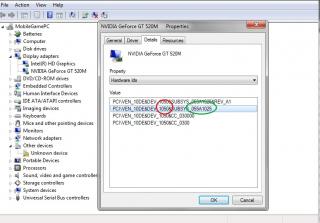
Attached Image

Now extract the installer, if you already try to install but it failed to detect the nvidia GPU, the folder is usually at C:\NVIDIA. Open it up, look under display driver folder, full link is C:\NVIDIA\DisplayDriver\270.51\Vista 64-bit\International\Display.Driver. There is plenty of INF file inside there but you need to only edit 4 of them, they are:

nvac.inf
nvam.inf
NVLT.inf
nvsm.inf

Remember the highlighted Hardware ID mentioned earlier? In my case the first one is '1050'. Open the INF file mentioned above and use F3 to find the '1050'. Once you find it you edit the number after SUBSYS_ to match the one on your laptop, as shown below. Do it on all four INF file mentioned. Edit every '1050' SUBSYS_ you can find

Attached Image

Run the installer again (C:\NVIDIA\DisplayDriver\270.51\Vista 64-bit\International) run setup.exe. The installer should now recognize your card and begin installing the driver.

If you think that's tough, this is as simple as editing text files in text documents. I think of this out of the blue last night at 2am and it works to my surprise. Enjoy your new driver. I'm enjoying Crysis 2 right now, the performance is a lot smoother as well

This post has been edited by Najmods: Apr 1 2011, 05:15 PM

Najmods
post Apr 1 2011, 10:07 AM

*mutter mutter mutter mutter*
*******
Senior Member
5,211 posts

Joined: Feb 2005
From: Konohana


QUOTE(Snowguy2068 @ Apr 1 2011, 06:43 AM)
no one answer my question ._.
*
Because no one knows. If there's people trying they already replied.

QUOTE(skycrawler @ Apr 1 2011, 07:38 AM)
Hey, how 2 update BIOS?
*
Download the BIOS, it includes instruction how to update BIOS, there is DOS and Windows version. The Windows version don't work in 64-bit environment so I suggest you make a bootable USB drive. DOS update is recommended over Windows
Najmods
post Apr 1 2011, 10:39 AM

*mutter mutter mutter mutter*
*******
Senior Member
5,211 posts

Joined: Feb 2005
From: Konohana


No, average PC use never even upgrade the BIOS even if there is problem in the first place.
Najmods
post Apr 1 2011, 11:43 AM

*mutter mutter mutter mutter*
*******
Senior Member
5,211 posts

Joined: Feb 2005
From: Konohana


QUOTE(GooD_DaY @ Apr 1 2011, 10:55 AM)
Even if there is problem also don't need top update the BIOS cause it won't solve the problem?
=.=
*
What kind of problem? No all problem can be fixed via BIOS update, and not all BIOS update is for fixing problems/bugs.
Najmods
post Apr 1 2011, 04:50 PM

*mutter mutter mutter mutter*
*******
Senior Member
5,211 posts

Joined: Feb 2005
From: Konohana


QUOTE(angelbratz @ Apr 1 2011, 02:20 PM)
I tried that method...somehow still cant Install  sweat.gif .... but...Thanks for the Tutorial ^.^ Maybe someone else can install using that method without uninstalling...

At the End...I uninstall ALL the drivers that is connected to the GPU via Windows Control Panel...Restart and Install the 270.

So far now everything is smooth.
*
You can or you can't? You say everything seems smooth, what is smooth? Driver installation?

Of course I recommend to uninstall the previous driver before updating to new driver. I never install driver by overwriting previous one.

QUOTE(GooD_DaY @ Apr 1 2011, 02:49 PM)
hmm.gif How about sometimes when playing games or watching movies, then suddenly crash and said driver not responding?
*
What do you guess? Omit everything but the last three words, you get the problem. I did get the error sometime but only because excessive overclocking. Do some stress test then, check the GPU temperature. If not, reinstall the driver. Reinstalling Optimus is pain though.

I just repaste my 4743ZG, some early testing seems promising, lower temperature at load. The HSF is huge, with two heatpipe as well.
Najmods
post Apr 1 2011, 06:07 PM

*mutter mutter mutter mutter*
*******
Senior Member
5,211 posts

Joined: Feb 2005
From: Konohana


QUOTE(angelbratz @ Apr 1 2011, 05:06 PM)
Smooth as in installing the Driver after uninstalling the 266 driver...

Maybe can update the post advising user to Uninstall...>,<

Nanti same like me...Dint uninstall old driver...assuming it can be upgraded just like that...
*
Since a lot of people tend to do that so I have updated my post.
Najmods
post Apr 1 2011, 09:28 PM

*mutter mutter mutter mutter*
*******
Senior Member
5,211 posts

Joined: Feb 2005
From: Konohana


QUOTE(GooD_DaY @ Apr 1 2011, 09:09 PM)
Yeah, I try Split Second and the temp is like 60-65C on HWMonitor but it crash. My fren's Acer and Qosmio with GT330 can still play when I crash(Lan game). Reinstall the same or previous driver if this happen? Y u say that reinstalling optimus is pain?
hmm.gif

rclxms.gif even though I not really know what is it? Lol~
*

Temperature looks good, it shouldn't cause crashing. Common sense man, if the current driver giving problem try newer one, or older if it have any, GT 500M series is still new and there is only one from nvidia site and it still beta. Optimus driver should be created by notebook manufacturer since they usually put different device string that even when slightly modified could cause the nvidia driver fail to detect the hardware, so that is the reason its a pain because the latest driver is usually provided by nvidia themself.

I thought you giving people advice on what laptop to buy at least knows what I talking about. I guess I'm wrong there. Just follow, you shouldn't have any problems. Don't be afraid, there is newbie from notebookreview forum that follows my instruction and successfully install the driver with no problem.
Najmods
post Apr 1 2011, 10:10 PM

*mutter mutter mutter mutter*
*******
Senior Member
5,211 posts

Joined: Feb 2005
From: Konohana


QUOTE(GooD_DaY @ Apr 1 2011, 09:59 PM)
Lol, I'm also human that know limited things right? =.=
So since there is only 1 driver and still in Beta process, I can't do anything about it le~
Sigh~
*
There is few modded ones from laptop2go, but I don't know whether those have GT 540M or not, last time I check there is only one driver for GT 520M. Which driver do you use now?
Najmods
post Apr 2 2011, 12:37 AM

*mutter mutter mutter mutter*
*******
Senior Member
5,211 posts

Joined: Feb 2005
From: Konohana


QUOTE(skycrawler @ Apr 2 2011, 12:20 AM)
Hey, how do I know whether my laptop is using is using 1 piece of 4Gb RAM or 2 piece of 2Gb RAM? (other than open it myself)
*
Download and run CPU-Z. On SPD tab check each RAM slots for sizes. Don't be too happy when you find out there is 4 slots, in reality most laptop only have two physical slots
Najmods
post Apr 11 2011, 12:40 AM

*mutter mutter mutter mutter*
*******
Senior Member
5,211 posts

Joined: Feb 2005
From: Konohana


I doubt it, I use my 4743ZG with earphone I could detect that it still uses some sort of equalizer or expander because it sounds radically different when I plugged it into my PC setup or X-Fi USB. It can even make mp3 sounds worse as well by revealing compression artifacts.

I found a method for overclocking the CPU, if its the same as 4743ZG you can try to remove the small wireless PCIe card and see the PLL underneath it. Before removing check first for any writing of 14.318MHz, that mean the PLL chip is nearby. If it looks like this I can help you with overclocking, just PM me for detail

user posted image
Najmods
post Apr 11 2011, 01:09 AM

*mutter mutter mutter mutter*
*******
Senior Member
5,211 posts

Joined: Feb 2005
From: Konohana


QUOTE(lee_what2004 @ Apr 11 2011, 12:59 AM)
SandyBridge CPU can OC via PLL ?
*
I dunno, guess not from the reading around. But its worth a try. My P6200 is Arrandale based so it could be different
Najmods
post Apr 11 2011, 01:16 AM

*mutter mutter mutter mutter*
*******
Senior Member
5,211 posts

Joined: Feb 2005
From: Konohana


QUOTE(GooD_DaY @ Apr 11 2011, 01:10 AM)
Najmods u have clear.fi on ur laptop?
*
No I clean install Windows so I haven't install it. I don't even know what is for. Onboard speaker is pretty bad, the Dolby enhancement don't do much either. You could install ALC269 driver from here (I recommend you download the ASUS driver) and use the equalizer to boost the sound a little bit, but the downside is when you plug in headphone your onboard speaker still on. I still haven't found the right driver that worked, if its the same as mine it would be ALC271x codec but its compatible with any Realtek driver actually.

2 Pages  1 2 >Top
 

Change to:
| Lo-Fi Version
0.0348sec    0.77    7 queries    GZIP Disabled
Time is now: 12th December 2025 - 11:34 AM