QUOTE(chandra tg @ Jan 25 2011, 11:41 AM)
Yes, L047. I bought at Lowyat.

Very special batch when there wasnt L043 batch in the market yet. Which shop u bought from?Sandy Bridge Overclocking V1, 2500K/2600K/2700K | LGA1155 P67.Z68.Z77
|
|
 Jan 25 2011, 11:45 AM Jan 25 2011, 11:45 AM
Return to original view | Post
#41
|
 
Elite
8,711 posts Joined: Nov 2007 From: Butterworth, PG / Machang, Kelantan   
|
QUOTE(chandra tg @ Jan 25 2011, 11:41 AM) Yes, L047. I bought at Lowyat. Very special batch when there wasnt L043 batch in the market yet. Which shop u bought from? |
|
|
|
|
|
Jan 25 2011, 07:38 PM
Return to original view | Post
#42
|
|
Elite
8,711 posts Joined: Nov 2007 From: Butterworth, PG / Machang, Kelantan
|
QUOTE(stasio @ Jan 25 2011, 06:32 PM) No,I am on UD7. Waiting for new proc bro. Stay tuned.owikh84, how is Ripjaws-X and UD7? Reading on G.Skill forum,also problem with 2133. |
|
|
Jan 25 2011, 07:43 PM
Return to original view | Post
#43
|
|
Elite
8,711 posts Joined: Nov 2007 From: Butterworth, PG / Machang, Kelantan
|
QUOTE(selfdz87 @ Jan 25 2011, 07:41 PM) aiyoh owikh buy new proc again?? nolah.. just another batch of 2600K. what 2700k??lol   |
|
|
Jan 25 2011, 09:04 PM
Return to original view | Post
#44
|
|
Elite
8,711 posts Joined: Nov 2007 From: Butterworth, PG / Machang, Kelantan
|
QUOTE(lichyetan @ Jan 25 2011, 09:01 PM) where u get ur source ? PM me... Penang Island lot of place sold out. same here bro. I asked my GF to buy for me at LYP which batch of i7 2600k good or 2500k good ? what is ur limitation of ur current proc ? The whole Penang is out of stock since 2 weeks ago. But I heard new stock will reach on 27th, so by Friday u can grab one. |
|
|
Jan 25 2011, 09:23 PM
Return to original view | Post
#45
|
|
Elite
8,711 posts Joined: Nov 2007 From: Butterworth, PG / Machang, Kelantan
|
QUOTE(lichyetan @ Jan 25 2011, 09:08 PM) ya. some shops here also told me 27th. Hopefully can get them. Maybe will go for i5 2500k first. 2500K is good enuf bro, less heat as compared to HT featured 2600K. mobo availability in Penang, I really hv no idea coz never bought here before.  |
|
|
Jan 25 2011, 10:03 PM
Return to original view | Post
#46
|
|
Elite
8,711 posts Joined: Nov 2007 From: Butterworth, PG / Machang, Kelantan
|
QUOTE(Paca @ Jan 25 2011, 09:38 PM) why is my BCLK changed to 99.8 in the CPUZ? Don't worry it is normal. There would be discrepancies in the voltage and freq between BIOS and software.i just changed my multiplier to 45 and core voltage 1.28.then i opened CPUz it say 99.8 so the clock is at 4.4 something.is this normal or what? and 1 more thing.the core voltage i set in the BIOS is 1.28 but when i open hwmonitor it say 1.29~1.30.izzit normal or im just plain noob? The most accurate determination is by multimeter on the sensor points To see 100 BLCK in CPU-Z u can set the BIOS to 100.2 or 1002 |
|
|
|
|
|
Jan 25 2011, 10:13 PM
Return to original view | Post
#47
|
|
Elite
8,711 posts Joined: Nov 2007 From: Butterworth, PG / Machang, Kelantan
|
QUOTE(kevink82 @ Jan 25 2011, 10:04 PM) owik gonna sell ur m4e?? keke hmm. don't think will be selling that fast bro.I saw some sellers revised the price up abit already This board is more friendly to me since I can put my D2X on the PCIEx1, UD7 is blocked by the evil NF200 heatsink, what a flaw design UD7 Putting D2X on other PCIE slot will just offsetting the needs for NF200 chip. Anyway will keep playing both boards till I get bored |
|
|
Jan 25 2011, 11:11 PM
Return to original view | Post
#48
|
|
Elite
8,711 posts Joined: Nov 2007 From: Butterworth, PG / Machang, Kelantan
|
QUOTE(louislkw @ Jan 25 2011, 07:19 PM) Attached link is the latest bios for Asus P8H67-M Evo. Pls flash it to solve the power cycling issue and better OC performance. Post #1 updated to include Latest BIOS for all brands of mobos.http://www.box.net/shared/d6da2l3lg5 All other which are not available will be up quite soon.  Below is the list of compiled bios update for different model which some are not make official yet. Solved power cycling issue and better OC performance. P8P67 (v. 1253): http://www.box.net/shared/tqma59kmnx P8P67 EVO (v. 1253): http://www.box.net/shared/2bog0kn6ta P8P67 PRO (v. 1253): http://www.box.net/shared/dfmdqkzkhy P8P67 Deluxe (v. 1253): http://www.box.net/shared/brfo715x36 Maximus IV Extreme (v. 0802): http://www.box.net/shared/0rpx35z5he P8H67-M EVO (v. 1253): http://www.box.net/shared/d6da2l3lg5 Any user who need Asrock P67 bios update? pls let me know. Request for Asus P8P67 LE has been submitted. Stay tuned. Dear Moderator & Owikh84, can you guys copy all the boards latest bios to first page of this thread to avoid confusion. Many Thanks. Pls bookmark this LINKfor more "LIVE" updates |
|
|
Jan 26 2011, 10:43 AM
Return to original view | Post
#49
|
|
Elite
8,711 posts Joined: Nov 2007 From: Butterworth, PG / Machang, Kelantan
|
QUOTE(kevink82 @ Jan 26 2011, 10:28 AM) any more news on new batch? hope to get one that will be cooler to run Look at previous posts new stock will only reach us tomoro. Unless the courier guys can tell u its batch im sure nobody knows. Going to hunt some 2600Ks later haha |
|
|
Jan 26 2011, 08:38 PM
Return to original view | Post
#50
|
|
Elite
8,711 posts Joined: Nov 2007 From: Butterworth, PG / Machang, Kelantan
|
QUOTE(chandra tg @ Jan 26 2011, 07:41 PM) The first one Im using 45x, Voltage 1.310v. Its stable with prime 95 and intel burn test. Increase vcore one notch & see. Since u didnt alter anythg other than vcore from 4.5 to 4.8. To prove stability, Should run IBT at least 20 runs and ram at least 2GB.Dram Frequency still at default, 1333, 1.5v. TPU EPU disable. Vram @ ultra high. The second one i try to increase 48x,Voltage 1.37v. Dram frequency @default, 1.5v. Can Stable at intel burn test, but when i try Prime 95 got Blue screen. Should i increase the voltage? Any suggestion frm mod? Still newbie. |
|
|
Jan 27 2011, 11:26 AM
Return to original view | Post
#51
|
|
Elite
8,711 posts Joined: Nov 2007 From: Butterworth, PG / Machang, Kelantan
|
Nice Sankoko. Whats ur VCCIO/VTT and VCCSA?
|
|
|
Jan 27 2011, 02:33 PM
Return to original view | Post
#52
|
|
Elite
8,711 posts Joined: Nov 2007 From: Butterworth, PG / Machang, Kelantan
|
Thanks for sharing louis! So many bugs and bug fixes!
|
|
|
Jan 28 2011, 11:08 PM
Return to original view | Post
#53
|
|
Elite
8,711 posts Joined: Nov 2007 From: Butterworth, PG / Machang, Kelantan
|
QUOTE(cstkl1 @ Jan 28 2011, 08:07 PM) so are u getting M4E as mobo of choice? |
|
|
|
|
|
Feb 2 2011, 09:30 AM
Return to original view | Post
#54
|
|
Elite
8,711 posts Joined: Nov 2007 From: Butterworth, PG / Machang, Kelantan
|
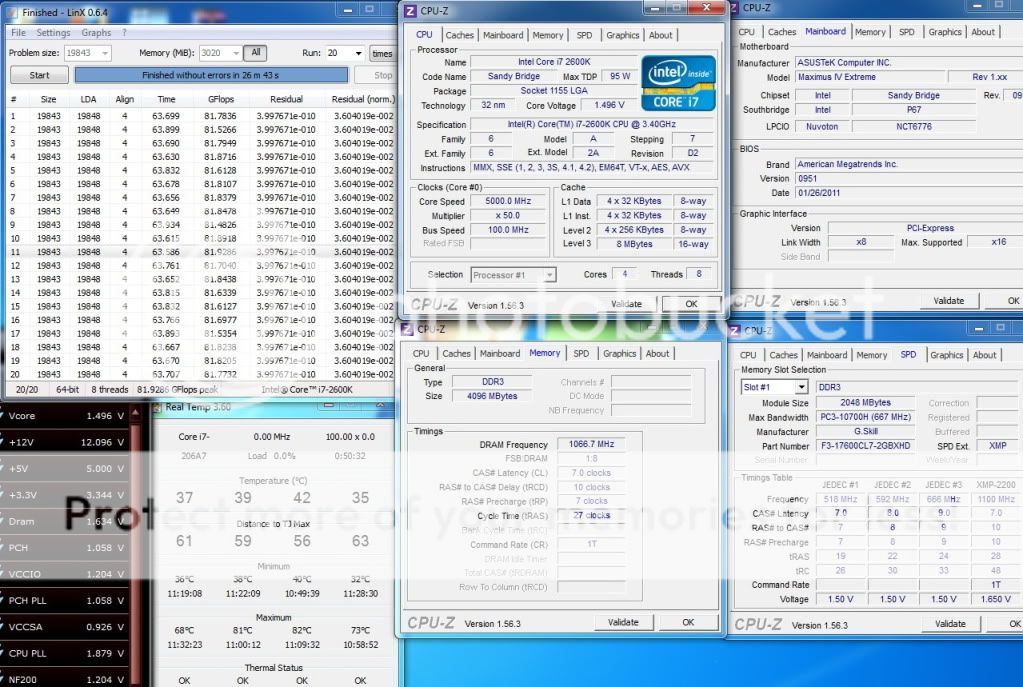
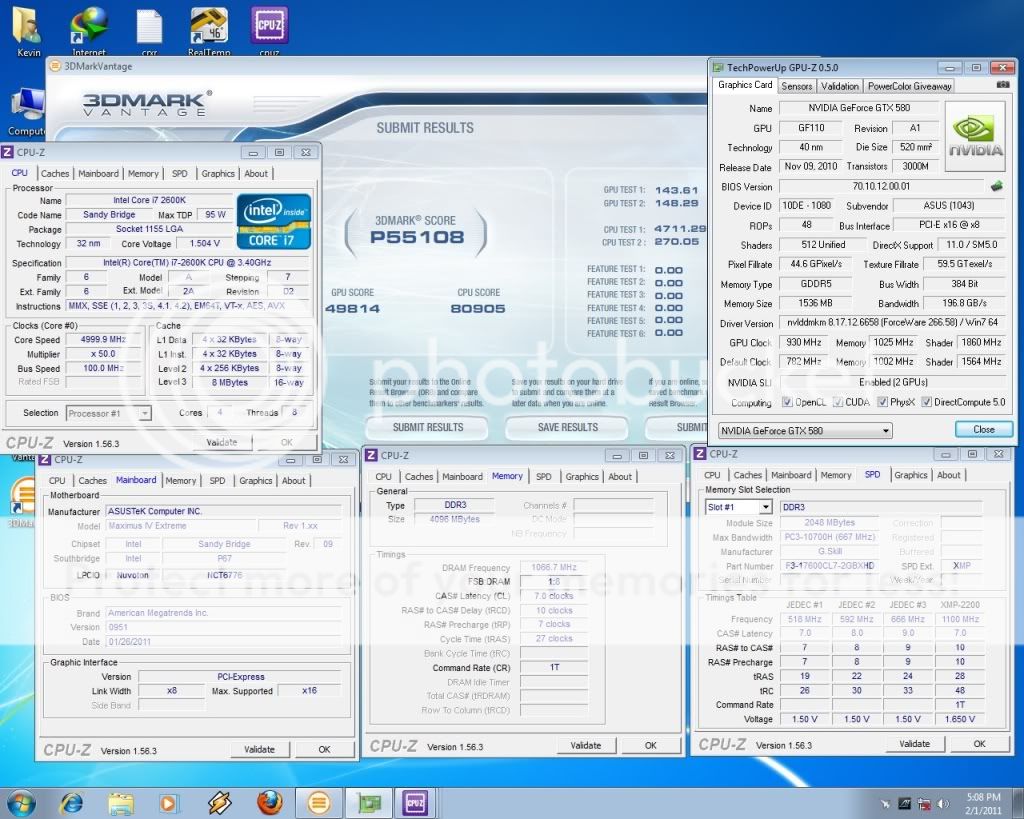
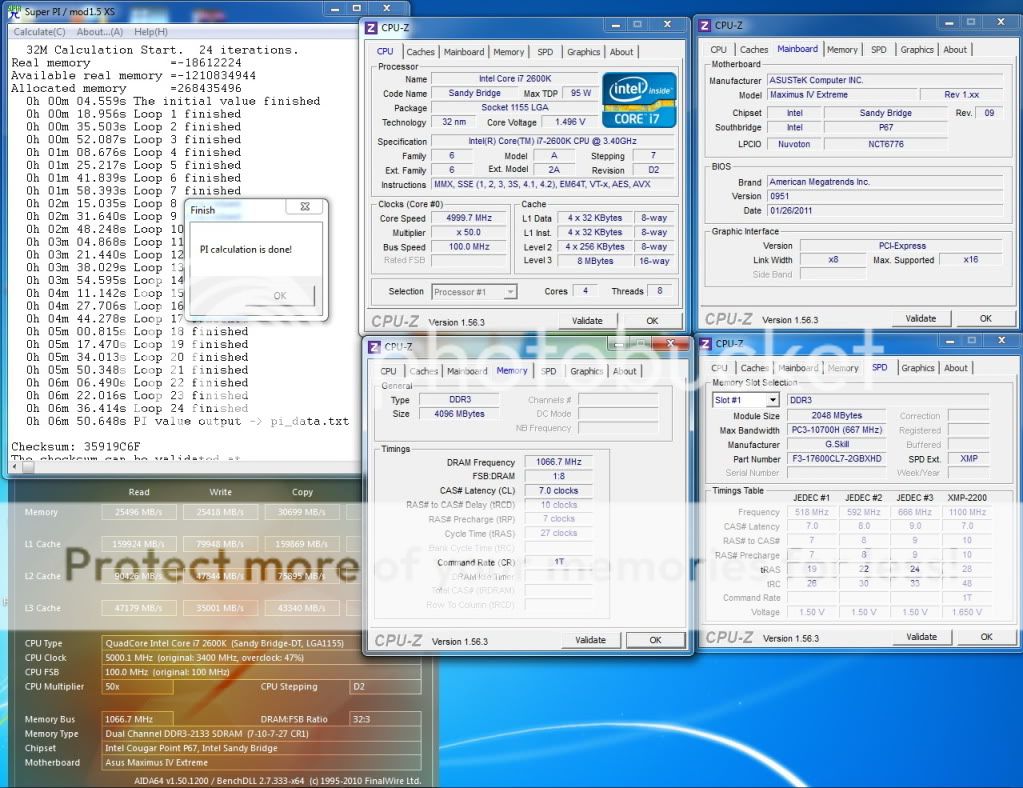
Intel Core i7 2600K @ 5.0GHz HT ON (4C/8T)
Watercooled Asus Maximus IV Extreme 0951 2x2GB GSkill RipjawsX 2200C7 @ 2133Mhz 7-10-7-27-1T 2x MSI GTX580SLI, 930/4100Mhz Corsair AX1200 LinX: » Click to show Spoiler - click again to hide... « Vantage: » Click to show Spoiler - click again to hide... « Pi 32M: » Click to show Spoiler - click again to hide... « |
|
|
Feb 2 2011, 02:29 PM
Return to original view | Post
#55
|
|
Elite
8,711 posts Joined: Nov 2007 From: Butterworth, PG / Machang, Kelantan
|
QUOTE(cstkl1 @ Feb 2 2011, 10:50 AM) nice LinX failed whenever i set CPU PLL lower than 1.85v.but isnt ure glops again bugged with the cpu pll. i get 84 on 4.7 HT on i found that the pll volage seriously gives inconsistent bug linx runs I got 84GFlops at 1.80v but just cant pass 20 runs. Vcore also will affect GFlops but cooling is limiting my job. Will see later if i could make it. |
|
|
Feb 2 2011, 06:35 PM
Return to original view | Post
#56
|
|
Elite
8,711 posts Joined: Nov 2007 From: Butterworth, PG / Machang, Kelantan
|
Maximus tends to BCLK up itself from 100 to 101.5, while other mobos is still 98.5 at default lol. I got 84GFlops when up vcore a few notches and BCLK shot up itself to 101.5 during LinX.
Added on February 2, 2011, 6:57 pm QUOTE(monsh @ Feb 2 2011, 05:20 PM) @owikh84 GFlops will either up or down. GFlops will be constant once ure at optimum vcore. The GFlops wont increase after this point. GFlops increases when BCLK is increased. But GFlops will drop when u push CPU PLL higher. Means CPU is not giving the actual performance in terms of GFlops when u alter the CPU PLL.vCore affects GFlops ? higher vcore less gFlops ? This post has been edited by owikh84: Feb 2 2011, 06:57 PM |
|
|
Feb 3 2011, 08:36 AM
Return to original view | Post
#57
|
|
Elite
8,711 posts Joined: Nov 2007 From: Butterworth, PG / Machang, Kelantan
|
GSkill RipjawsX 2200C7 2x2GB @ 2240 7-10-7-27-1T 1.65v
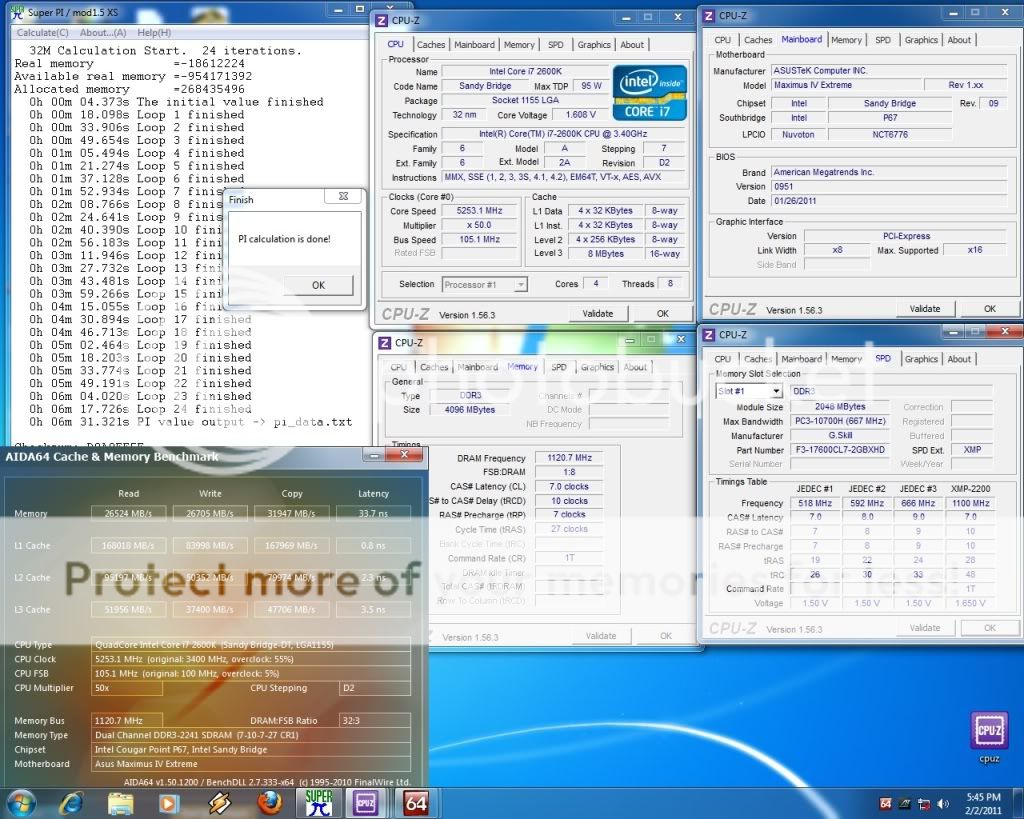 Patriot Viper II Sector5 2400C9 2x2GB @ 2240 7-10-8-27-1T 1.75v - 2400MHz, no boot 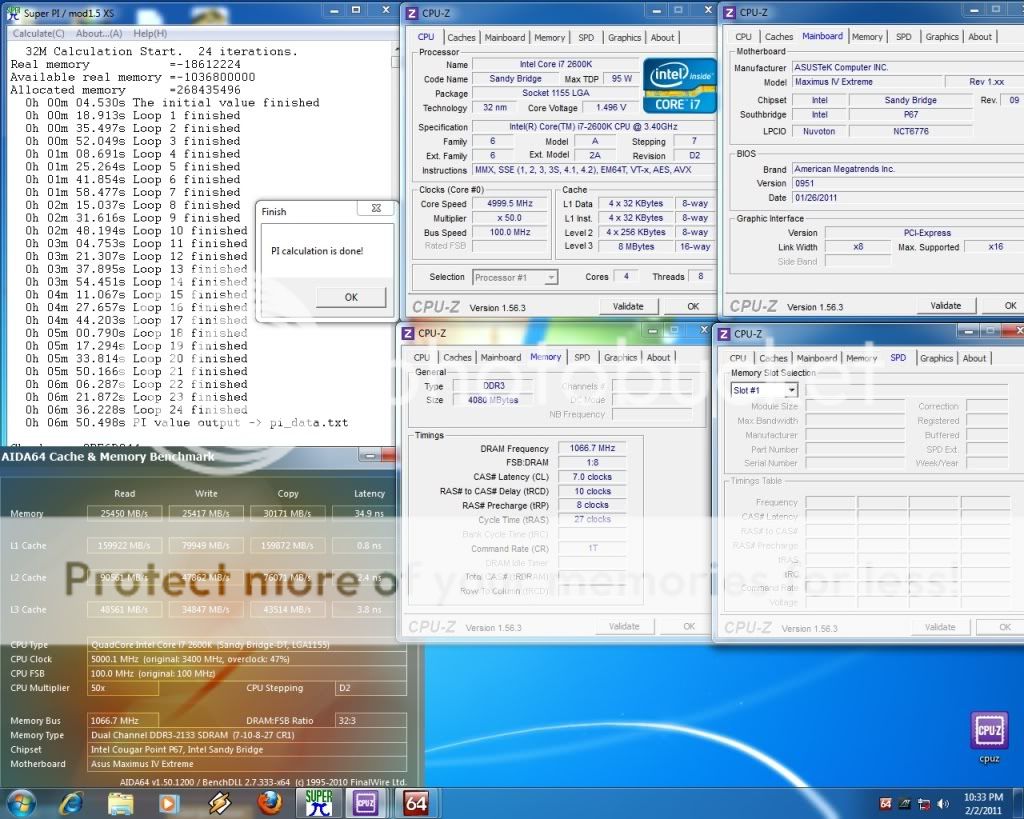 Corsair DomGT 2000C7 2x2GB @ 1866 7-7-7-20-1T 1.7v - 2133MHz C7,C8,C9 is bootable but failed 32M 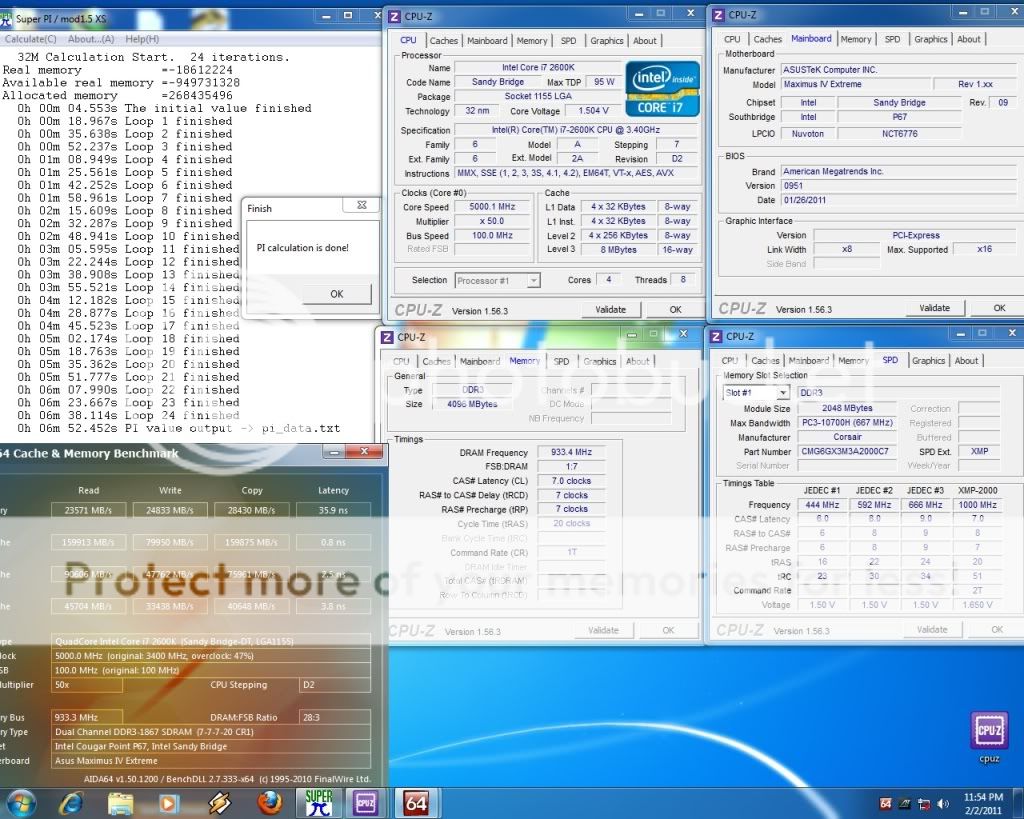 This post has been edited by owikh84: Feb 9 2011, 06:42 AM |
|
|
Feb 3 2011, 12:09 PM
Return to original view | Post
#58
|
|
Elite
8,711 posts Joined: Nov 2007 From: Butterworth, PG / Machang, Kelantan
|
Asus has issued a product recall recently.
http://event.asus.com/2011/SandyBridge/notice/ Heard Giga will offer refund to affected buyers. So i will hv to return 2 boards lol. |
|
|
Feb 3 2011, 05:26 PM
Return to original view | Post
#59
|
|
Elite
8,711 posts Joined: Nov 2007 From: Butterworth, PG / Machang, Kelantan
|
Im not worried coz when the new replacement board arrives then only swap one to one with them. Stil got another one for spare.
Hit 85glops when i bump vcore from 1.5v to 1.51v, but fail LinX at 19. |
|
|
Feb 4 2011, 09:11 AM
Return to original view | Post
#60
|
|
Elite
8,711 posts Joined: Nov 2007 From: Butterworth, PG / Machang, Kelantan
|
Some BSOD codes:
0x50 = RAM timings/Frequency add DDR3 voltage or add QPI/VTT 0x1E = add more vcore 0x3B = add more vcore 0xD1 = add QPI/VTT voltage “0x9C = QPI/VTT most likely, but increasing vcore has helped in some instances” 0X109 = add DDR3 voltage 0x0A = add QPI/VTT voltage More info: http://www.overclock.net/intel-general/910...guide-p67a.html |
|
Topic ClosedOptions
|
| Change to: |  0.0422sec 0.0422sec
 0.69 0.69
 7 queries 7 queries
 GZIP Disabled GZIP Disabled
Time is now: 3rd December 2025 - 08:09 PM |
 Quote
Quote