Outline ·
[ Standard ] ·
Linear+
Dual Monitor!, Share ur dual-monitor experience!
|
TSLionheartTwb
|
 Dec 27 2010, 08:25 PM, updated 15y ago Dec 27 2010, 08:25 PM, updated 15y ago
|
Getting Started


|
What i know is that atleast the cpu (graphic card) should have two ends (D-sub and DVI) to connect to two different monitor.
Chose expand the desktop under screen resolution and
Now you can have fun dragging the windows from one screen to another!
thats a really great experience if you wanna watch some movie while surfing net
or video chat during online gaming!
I was able to tried dual screens (20' and 19') since i ve gt one extra LCD at home
but unfortunately the BenQ LCD is blinking all the time. Annoying.
Anyone else here tried dual monitors or even triple screens?
share your experience in using it
|
|
|
|
|
|
shumu
|
Dec 30 2010, 09:15 AM
|
New Member
|
My friend wanted dual monitor also so i told him to buy another monitor which looks the same as his current one. I got the video card for him HD 5450 at 185 at ikano. So he gave me his whole system with 2 monitors for 2 days which i set it up for him. Installed graphic driver and those utilities that help manage dual monitors.
His old monitor was a samsung 23" and his new one is 24", not a very visible difference, as long as they can support the same resolution 1920x1200. Its really a nice sight coz i got him some wallpapers but is has to be 3840x1200, very nice. But preferably the monitors with as thin borders as possible, so theres not much gap in between the pictures.
|
|
|
|
|
|
frey_zero
|
Dec 30 2010, 11:12 PM
|
|
|
QUOTE(LionheartTwb @ Dec 27 2010, 08:25 PM) I was able to tried dual screens (20' and 19') since i ve gt one extra LCD at home but unfortunately the BenQ LCD is blinking all the time. Annoying. im using Hybrid technology AMD 790GX + ATI HD4890.. primary Monitor that i play game i connect to GC n other i connect to my mobo using VGA... but i think it true about Benq.. my LCD always make fun of me... it blink like disco light... to solve this mystery you need to drop half hard at carpet floor.. not to hard..  |
|
|
|
|
|
TSLionheartTwb
|
Dec 31 2010, 01:17 AM
|
Getting Started
|
Yea...cool man.. The next desktop i own i will aim for a dual or more monitor
can you explain more bout "drop half hard at carpet floor " ==
you mean smash it? LOL
|
|
|
|
|
|
frey_zero
|
Dec 31 2010, 06:30 AM
|
|
|
QUOTE(LionheartTwb @ Dec 31 2010, 01:17 AM) "drop half hard at carpet floor " == you mean smash it? LOL you can call that again.. that the polite way...  |
|
|
|
|
|
kyzson69
|
Dec 31 2010, 04:25 PM
|
|
|
well for me it make my design life much flexible and wide view.... its really good way for me to do my design
|
|
|
|
|
|
riku2replica
|
Jan 2 2011, 07:58 PM
|
|
|
Been doing that for the past few years. Convenient for multi-tasking.  But not for gaming. |
|
|
|
|
|
dajacksparrow
|
Jan 3 2011, 12:07 AM
|
New Member
|
I must find another monitor..
do you think using vga splitter is good?
|
|
|
|
|
|
cwl_ykh
|
Jan 3 2011, 05:38 PM
|
|
|
vga splitter is only split ur display with the same thing on 2 monitors... better get a GC to do this....
|
|
|
|
|
|
D.Sync
|
Jan 5 2011, 05:49 PM
|
|
|
Dual monitor is not an ideal choice for gaming, but it's perfect with 3 monitors.
If you are using ATi video card (the HD series), you can use the Eyefinity to setup a unified wide view for your desktop (wider perspective so to speak), compared to the 'Extended' desktop feature.
|
|
|
|
|
|
Jet23sky
|
Jan 7 2011, 03:42 PM
|
|
|
Cause gaming for dual monitor u end up using one monitor ( except other games such as supreme commander series. ). Even if u're planning to use one screen on gaming and another for surfing or watching movie. It might not be a good choice cause everything you click your browser or your movie application, the game itself will automatically minimize back to desktop. So it is quite a hassle to do so. But then if you are using for watching movie, + surfing net or surfing net + playing facebook game or photo editing. Then it is good for you.
|
|
|
|
|
|
D.Sync
|
Jan 8 2011, 10:30 PM
|
|
|
Using ATi Eyefinity technology will certainly expand the peripheral vision by threefold when using 3 monitors  |
|
|
|
|
|
shirley_andy
|
Jan 13 2011, 01:05 AM
|
|
|
I'm using my old CRT monitor for dual screen » Click to show Spoiler - click again to hide... « |
|
|
|
|
|
Jinster
|
Jan 13 2011, 10:32 AM
|
|
|
wow~
why don't u use 2 nike shoe boxes?
|
|
|
|
|
|
TSLionheartTwb
|
Jan 14 2011, 12:23 AM
|
Getting Started
|
wow ~ haha.. messy but cool!!
|
|
|
|
|
|
shirley_andy
|
Jan 14 2011, 02:43 AM
|
|
|
QUOTE(Jinster @ Jan 13 2011, 10:32 AM) wow~ why don't u use 2 nike shoe boxes? too light, will shake QUOTE(LionheartTwb @ Jan 14 2011, 12:23 AM) wow ~ haha.. messy but cool!! thanks |
|
|
|
|
|
ponomariov
|
Jan 14 2011, 11:05 PM
|
|
|
well dual monitor is very useful. I am using for work .. one for email constantly and the other for my working desktop.
|
|
|
|
|
|
boringbrick
|
Jan 22 2011, 05:18 PM
|
|
|
i always see nice dual monitor wallpapers on the net, too bad im using laptop lol |
|
|
|
|
|
riedz90
|
Jan 25 2011, 11:54 AM
|
Getting Started
|
im dual monitor user..  it's fun+easy when got dual monitor..  i use main monitor for work(adobe, 3D) and other 1 monitor for ym,skype n movie..  |
|
|
|
|
|
MrJinggles
|
Jan 25 2011, 12:12 PM
|
|
|
My next goal would be something like this... 
|
|
|
|
|
|
riedz90
|
Jan 25 2011, 05:38 PM
|
Getting Started
|
QUOTE(MrJinggles @ Jan 25 2011, 12:12 PM) My next goal would be something like this...
wow  later i can borrow ur monitor..  |
|
|
|
|
|
monsh
|
Jan 31 2011, 02:15 AM
|
|
|
programmer desktop . me soon to be  now got 2 monitors dual setup is always nice . it extends the meaning of multitasking |
|
|
|
|
|
shajack
|
Jan 31 2011, 10:17 AM
|
|
|
Got 2 monitor also...one for firefox,one for ie...but since using ati,sometime freeze while moving mpc or wmp to next monitor...rarely hv this trouble using nvidia...
|
|
|
|
|
|
jeopardise
|
Feb 1 2011, 10:00 AM
|
|
|
I remembered in 2001 I bought Matrox Millenium G400 Dualhead Max AGP just to enjoy dual monitor with desktop spanning and games. It is really cool for multitasking. Nvidia and ATI technologies in multimonitor aren't that good at that times.
I work with graphic design, video editing and programming (php/html/asp) at most times and really need large and extended desktop space.
My next purchase would be another used monitor and dedicated GPU (low power) to drive the monitor. Seems if I connect 1 GPU to multiple monitors will force a GPU to clock faster to supply greater graphic demand even in idle.
Perhaps needs a better VESA table mount as the next monitor need to be rotated and easy management. My desk is has very limited space and different monitor types looks so ugly on the same PC.
|
|
|
|
|
|
dakwan5555
|
Feb 18 2011, 06:35 AM
|
Getting Started
|
I have dual monitor setup using 32" LCD TV screen (HDMI) and 19" LCD monitor (DVI-D) on my 9500 OC GC. Great for viewing movies n be online at the same time.... hehehe
This post has been edited by dakwan5555: Feb 19 2011, 10:09 AM
|
|
|
|
|
|
Toast_Me
|
Feb 20 2011, 10:45 PM
|
Getting Started
|
wow , nice , something nice to be try int his year
|
|
|
|
|
|
dakwan5555
|
Feb 21 2011, 03:19 PM
|
Getting Started
|
QUOTE(Toast_Me @ Feb 20 2011, 10:45 PM) wow , nice , something nice to be try int his year A word of caution thought...... Once you go DS, you'll never want to go back |
|
|
|
|
|
abubin
|
Feb 21 2011, 06:39 PM
|
|
|
not really...i have no problem going back to single monitor which I am doing at work. At home I have dual monitor and the second monitor I have the background changing pictures every 2 min. Nice big photoframe for me.... I watch movies in that second monitor also while i continue to work or do other stuffs in the main monitor. |
|
|
|
|
|
fred_durt
|
Feb 24 2011, 11:58 PM
|
New Member
|
any tutorial to dual monitor?
|
|
|
|
|
|
Maximilius
|
Feb 25 2011, 01:38 AM
|
|
|
QUOTE(fred_durt @ Feb 24 2011, 11:58 PM) any tutorial to dual monitor? Have a graphic card that supports more than 1 output. Most graphics cards (even low end) have at least 2 output, VGA and DVI. Connect 2 monitors to it, and select extended desktop in your display properties. |
|
|
|
|
|
dakwan5555
|
Feb 25 2011, 02:44 AM
|
Getting Started
|
How about 3 or 4 monitor? How to setup?
|
|
|
|
|
|
Maximilius
|
Feb 25 2011, 02:59 AM
|
|
|
QUOTE(dakwan5555 @ Feb 25 2011, 02:44 AM) How about 3 or 4 monitor? How to setup? I use dual video card (ATI 5770 crossfire) and connect to 3 monitors. 2 x 42" LCD connecting using HDMI and 1 x 24" LCD using DVI. Of course you can use a video card that does have 3 output but based on my experience, the image is a bit sluggish. Also you need to be sure you have enough power to run those. I'm using 700W power supply. You can use the Windows Display Properties to setup. But most video cards have their own program to run and manage the display much better. If you are looking for some budget type, you can probably get a VGA or DVI splitter. |
|
|
|
|
|
fred_durt
|
Feb 25 2011, 11:09 AM
|
New Member
|
QUOTE(Maximilius @ Feb 25 2011, 01:38 AM) Have a graphic card that supports more than 1 output. Most graphics cards (even low end) have at least 2 output, VGA and DVI. Connect 2 monitors to it, and select extended desktop in your display properties. tq!  |
|
|
|
|
|
wanna be hi-tech
|
Feb 25 2011, 10:39 PM
|
|
|
QUOTE(D.Sync @ Jan 5 2011, 05:49 PM) Dual monitor is not an ideal choice for gaming, but it's perfect with 3 monitors. If you are using ATi video card (the HD series), you can use the Eyefinity to setup a unified wide view for your desktop (wider perspective so to speak), compared to the 'Extended' desktop feature. yeah ...EYEFINITY man...will have fun... |
|
|
|
|
|
wanna be hi-tech
|
Feb 25 2011, 10:44 PM
|
|
|
QUOTE(shirley_andy @ Jan 13 2011, 01:05 AM) I'm using my old CRT monitor for dual screen » Click to show Spoiler - click again to hide... « bro jus want to ask...u using the crt to view the same view on ur laptop or ..... |
|
|
|
|
|
Maximilius
|
Feb 26 2011, 11:24 AM
|
|
|
QUOTE(wanna be hi-tech @ Feb 25 2011, 10:44 PM) bro jus want to ask...u using the crt to view the same view on ur laptop or ..... That is extended desktop. If he was using duplicate view option, the icons would appear on the CRT as well. But in this case, it isn't  |
|
|
|
|
|
shirley_andy
|
Feb 27 2011, 01:10 AM
|
|
|
ya it can be set as "extended" or "duplicate"
when playing 2 player games eg PES 2011 then I'll change it to duplicate but when normal racing session I'd use extended to view information on the CRT while racing on the laptop.
|
|
|
|
|
|
ntw
|
Mar 2 2011, 04:23 AM
|
|
|
so im using a 1920x1080 monitor for my laptop with 1366x768 display. i cant manage to make the two of them merge perfectly together, is it possible to do?
|
|
|
|
|
|
shirley_andy
|
Mar 2 2011, 11:01 AM
|
|
|
nope not possible, it is possible IF u use "extended" but if u use "duplicate" then the reso will be the smaller of the two..
|
|
|
|
|
|
tolong
|
Mar 3 2011, 09:40 PM
|
New Member
|
triple monitor
|
|
|
|
|
|
xemse89
|
Mar 4 2011, 03:17 PM
|
|
|
actually 2 monitors is not enough if you really wanted to indulge in 180 angle view,4 monitors should do the trick nicely
|
|
|
|
|
|
Kr0ll3R
|
Mar 5 2011, 04:51 AM
|
|
|
QUOTE(Jet23sky @ Jan 7 2011, 03:42 PM) Cause gaming for dual monitor u end up using one monitor ( except other games such as supreme commander series. ). Even if u're planning to use one screen on gaming and another for surfing or watching movie. It might not be a good choice cause everything you click your browser or your movie application, the game itself will automatically minimize back to desktop. So it is quite a hassle to do so. But then if you are using for watching movie, + surfing net or surfing net + playing facebook game or photo editing. Then it is good for you. Is it true? Anyone can confirm it? Going to make Dual Monitor but if it's true, then I might as well save up for bigger size monitor. This post has been edited by Kr0ll3R: Mar 5 2011, 04:52 AM |
|
|
|
|
|
shirley_andy
|
Mar 5 2011, 10:21 AM
|
|
|
QUOTE(Kr0ll3R @ Mar 5 2011, 04:51 AM) Is it true? Anyone can confirm it? Going to make Dual Monitor but if it's true, then I might as well save up for bigger size monitor. yes its true for most games, cuz normally games are full screen mode, so when u click on the other monitor with other application on, the game will minimize... but some game won't minimize, they'll become windows mode instead. its only useful to see information on another monitor without clicking it(eg telemetry or updates on twitter/chat) while ur in the game |
|
|
|
|
|
Kr0ll3R
|
Mar 5 2011, 06:08 PM
|
|
|
QUOTE(shirley_andy @ Mar 5 2011, 10:21 AM) yes its true for most games, cuz normally games are full screen mode, so when u click on the other monitor with other application on, the game will minimize... but some game won't minimize, they'll become windows mode instead. its only useful to see information on another monitor without clicking it(eg telemetry or updates on twitter/chat) while ur in the game Oh, thx for the info! This post has been edited by Kr0ll3R: Mar 5 2011, 06:08 PM |
|
|
|
|
|
InvinCibleXz
|
Mar 6 2011, 07:55 PM
|
Getting Started
|
QUOTE(MrJinggles @ Jan 25 2011, 12:12 PM) My next goal would be something like this...
Lol.. damn many monitors.. How to put so many monitor? |
|
|
|
|
|
Kr0ll3R
|
Mar 8 2011, 05:27 AM
|
|
|
QUOTE(InvinCibleXz @ Mar 6 2011, 07:55 PM) Lol.. damn many monitors.. How to put so many monitor? Eyefinity, bro. |
|
|
|
|
|
BeastX
|
Mar 8 2011, 12:59 PM
|
|
|
From almost 4 years ago.... Well before Eyefinity..... have yet to try one Eyefinity yet...may get the 6 series... » Click to show Spoiler - click again to hide... « This post has been edited by BeastX: Mar 8 2011, 12:59 PM |
|
|
|
|
|
Cool Tech
|
Mar 9 2011, 11:36 AM
|
Getting Started
|
I always wish to use dual monitor in works...there are plenty of works i need to follow up....i wanna knw is dat possible i connect a monitor to a laptop and i use that monitor as extra monitor to my laptop?
Any idea on this?
|
|
|
|
|
|
shirley_andy
|
Mar 9 2011, 12:00 PM
|
|
|
QUOTE(Cool Tech @ Mar 9 2011, 11:36 AM) I always wish to use dual monitor in works...there are plenty of works i need to follow up....i wanna knw is dat possible i connect a monitor to a laptop and i use that monitor as extra monitor to my laptop? Any idea on this? ya possible, there's a CRT monitor connected to my laptop here's pic » Click to show Spoiler - click again to hide... « |
|
|
|
|
|
ericpires
|
Mar 9 2011, 12:43 PM
|
|
|
Can you use PC connect to dual display on a Normal TV? now new TV maybe like those old model wan
|
|
|
|
|
|
Cool Tech
|
Mar 9 2011, 01:30 PM
|
Getting Started
|
QUOTE(shirley_andy @ Mar 9 2011, 12:00 PM) ya possible, there's a CRT monitor connected to my laptop here's pic » Click to show Spoiler - click again to hide... « hi! thanks...hope it works with LED screen as well...i just gonna use dat to do some photoshop works! single screen cant promise efficiency! |
|
|
|
|
|
DarkEmotion88
|
Mar 9 2011, 06:01 PM
|
|
|
QUOTE(BeastX @ Mar 8 2011, 12:59 PM) From almost 4 years ago.... Well before Eyefinity..... have yet to try one Eyefinity yet...may get the 6 series... » Click to show Spoiler - click again to hide... « this is full of win. teach me how to make this setup =D |
|
|
|
|
|
shirley_andy
|
Mar 9 2011, 10:21 PM
|
|
|
QUOTE(Cool Tech @ Mar 9 2011, 01:30 PM) hi! thanks...hope it works with LED screen as well...i just gonna use dat to do some photoshop works! single screen cant promise efficiency! yes LCD monitor is possible too, as long as its VGA slot |
|
|
|
|
|
shirley_andy
|
Mar 9 2011, 10:23 PM
|
|
|
QUOTE(ericpires @ Mar 9 2011, 12:43 PM) Can you use PC connect to dual display on a Normal TV? now new TV maybe like those old model wan yes its possible to get a duplicated screen on the TV using this  but i don't think possible to get an extend screen on the TV, only duplicated |
|
|
|
|
|
adie_add22
|
Mar 10 2011, 08:01 PM
|
New Member
|
been thinking to use eyefinity, but now don't have money, at least want to use 2 monitor |
|
|
|
|
|
darkddly
|
Mar 12 2011, 12:05 AM
|
|
|
but some games cant play in dual monitor. especially old games..lulz
|
|
|
|
|
|
BeastX
|
Mar 12 2011, 11:44 AM
|
|
|
QUOTE(darkddly @ Mar 12 2011, 12:05 AM) but some games cant play in dual monitor. especially old games..lulz With eyefinity it's easy.... though you need to do some software hacking.... games from 4-6 years back (even as far as 8 years) has been running happily with 3 monitors (with matrox's TH2go Analog... since 2006)... Am a member of Widescreengaming forum....
Added on March 12, 2011, 11:46 amQUOTE(DarkEmotion88 @ Mar 9 2011, 06:01 PM) this is full of win. teach me how to make this setup =D Dual screen since 2000..... My max record was 9, I believe, may test 12 with 1 or 2 ATI HD6xxx series cards. This post has been edited by BeastX: Mar 13 2011, 12:30 PM |
|
|
|
|
|
darkddly
|
Mar 12 2011, 07:26 PM
|
|
|
QUOTE(BeastX @ Mar 12 2011, 11:44 AM) With eyefinity it's easy.... though you need to do some software hacking.... games from 4-6 years back (even as far as 8 years) has been running hasppily with 3 monitors (with matrox's TH2go Analog... since 2006)... Am a member od Widescreengaming forum....
Added on March 12, 2011, 11:46 amDual screen since 2000..... My max record was 9, I believe, may test 12 with 1 or 2 ATI HD6xxx series cards. lulz..i'm not sure, however when i play battle realm, it comes out display error.have to off the other one only can use... |
|
|
|
|
|
huzzLEE_82
|
Mar 17 2011, 01:09 PM
|
|
|
i'm still stuck with 5870 GC..no money atm to upgrade..
wanna knows is it suffice for a 5870 eyefinity with tripple monitors with 1920x1080 resolution each one....
1920x1080 tripple monitor = 5760x1080
do notes that i do heavy gaming load...
|
|
|
|
|
|
firstsight
|
Apr 29 2011, 04:53 PM
|
Getting Started
|
QUOTE(huzzLEE_82 @ Mar 17 2011, 01:09 PM) i'm still stuck with 5870 GC..no money atm to upgrade.. wanna knows is it suffice for a 5870 eyefinity with tripple monitors with 1920x1080 resolution each one.... 1920x1080 tripple monitor = 5760x1080 do notes that i do heavy gaming load... i think only 6 series ATI can suffice 3 monitors~ maybe you will need crossfire~
Added on April 29, 2011, 4:57 pmQUOTE(BeastX @ Mar 8 2011, 12:59 PM) From almost 4 years ago.... Well before Eyefinity..... have yet to try one Eyefinity yet...may get the 6 series... » Click to show Spoiler - click again to hide... « gosh!! i damn like this!! how you do this? how many card? This post has been edited by firstsight: Apr 29 2011, 04:57 PM |
|
|
|
|
|
annoymous1234
|
Apr 30 2011, 12:40 PM
|
|
|
dual monitor is awesome when u play certain games. when i play F1 i was like wow the field of view is so huge. u can see every corner clearly.
|
|
|
|
|
|
Economics Crisis
|
Oct 12 2011, 07:04 PM
|
|
|
QUOTE(annoymous1234 @ Apr 30 2011, 12:40 PM) dual monitor is awesome when u play certain games. when i play F1 i was like wow the field of view is so huge. u can see every corner clearly. triple monitor are the best for me |
|
|
|
|
|
manutd #1 fan
|
Oct 12 2011, 07:26 PM
|
Getting Started
|
use dual monitor at my work place. you might need to try this setup, use first monitor in horizontal for your normal usage & second one in vertical. the vertical one is very convenient when browsing the internet. trust me. :D:D just my 2 cent. |
|
|
|
|
|
DrBlueBox
|
Oct 12 2011, 09:21 PM
|
|
|
Been using dual monitor since 2004 when I was at Uni. Our tech lecturer let me lend our uni's old and unused CRT, and my first dual monitor setup was with the FX5500 card. Granted it was only two 15" CRT at 1024*768 each but it was cool as no other students can fathom how it was done.
Now running dual monitor at workplace and triple monitor at home. The extra space is a must for work, especially during coding or photoshop
|
|
|
|
|
|
H4XF4XTOR
|
Oct 12 2011, 10:16 PM
|
|
|
Crossfire FTW!!!
btw anyone knows best website for dual monitor wallpaper
|
|
|
|
|
|
DrBlueBox
|
Oct 22 2011, 12:13 AM
|
|
|
|
|
|
|
|
|
fridel
|
Oct 25 2011, 02:25 AM
|
|
|
that was too much |
|
|
|
|
|
H4XF4XTOR
|
Oct 28 2011, 04:31 PM
|
|
|
wow..jelly so many monitor u got  |
|
|
|
|
|
Economics Crisis
|
Oct 30 2011, 11:26 PM
|
|
|
man thats ridiculous
3 monitor is good enough why u need that much ? =.=
|
|
|
|
|
|
affirmative90
|
Oct 31 2011, 12:23 AM
|
Getting Started
|
i just got my 2nd monitor few weeks back. must say, i love it! XD this setup is done in campus.  |
|
|
|
|
|
Hitmanz
|
Nov 1 2011, 08:59 PM
|
|
|
you definitely need a good prcessor and graphics card
|
|
|
|
|
|
DrBlueBox
|
Nov 8 2011, 03:56 AM
|
|
|
QUOTE(Hitmanz @ Nov 1 2011, 08:59 PM) you definitely need a good prcessor and graphics card no you don't. Any low end processor and a low end graphic card can do dual output. I am using an RM99 HD5450 to power 2 extra monitors for my PC, and that is the cheapest card you can get in the market today |
|
|
|
|
|
Allentiew
|
Nov 12 2011, 12:40 PM
|
Getting Started
|
eyesfinity 3 monitor ady powerful for gaming ady ....
hahaha....
to many monitor don hav place to put la....
room small only...
|
|
|
|
|
|
levinlee
|
Nov 13 2011, 02:06 PM
|
New Member
|
Hey, i would like ask, I am currently using dual-monitor on my laptop which is connect to a samsung lcd screen.. and I am using extended screen.. well, is it ok if I using it for long term?
|
|
|
|
|
|
Economics Crisis
|
Nov 14 2011, 12:51 PM
|
|
|
QUOTE(levinlee @ Nov 13 2011, 02:06 PM) Hey, i would like ask, I am currently using dual-monitor on my laptop which is connect to a samsung lcd screen.. and I am using extended screen.. well, is it ok if I using it for long term? yes no problem..why not |
|
|
|
|
|
Jganne
|
Nov 16 2011, 08:55 AM
|
Getting Started
|
QUOTE(levinlee @ Nov 13 2011, 02:06 PM) Hey, i would like ask, I am currently using dual-monitor on my laptop which is connect to a samsung lcd screen.. and I am using extended screen.. well, is it ok if I using it for long term? yeah you're OK |
|
|
|
|
|
BenSow
|
Nov 21 2011, 11:05 PM
|
|
|
If you drag a windows to the edge of the screen does it expand to half of one monitor or one monitor?
|
|
|
|
|
|
DrBlueBox
|
Nov 21 2011, 11:11 PM
|
|
|
QUOTE(BenSow @ Nov 21 2011, 11:05 PM) If you drag a windows to the edge of the screen does it expand to half of one monitor or one monitor? Half |
|
|
|
|
|
BenSow
|
Nov 21 2011, 11:32 PM
|
|
|
QUOTE(DrBlueBox @ Nov 21 2011, 11:11 PM) So it still treats them like separate.. cool |
|
|
|
|
|
angleteh
|
Nov 23 2011, 10:29 AM
|
New Member
|
QUOTE(Jet23sky @ Jan 7 2011, 03:42 PM) Cause gaming for dual monitor u end up using one monitor ( except other games such as supreme commander series. ). Even if u're planning to use one screen on gaming and another for surfing or watching movie. It might not be a good choice cause everything you click your browser or your movie application, the game itself will automatically minimize back to desktop. So it is quite a hassle to do so. But then if you are using for watching movie, + surfing net or surfing net + playing facebook game or photo editing. Then it is good for you. any solution to this problem? want to try 1 monitor for gaming, another for surfing d web. is it possible? |
|
|
|
|
|
riku2replica
|
Nov 23 2011, 12:23 PM
|
|
|
QUOTE(angleteh @ Nov 23 2011, 10:29 AM) any solution to this problem? want to try 1 monitor for gaming, another for surfing d web. is it possible? If ur game on full screen, then i'm afraid it can't. Thought i haven't fully tested dual screen with 1 on full Screen(not window). On my student days, I dual screen alot, but alt+tab works for normal applications, not gaming. |
|
|
|
|
|
Norazam
|
Nov 23 2011, 01:35 PM
|
|
|
QUOTE(angleteh @ Nov 23 2011, 10:29 AM) any solution to this problem? want to try 1 monitor for gaming, another for surfing d web. is it possible? yes it is posibble,, but every time you click on the internet browser on the other monitor the game monitor will turn into window mode.. |
|
|
|
|
|
angleteh
|
Nov 23 2011, 01:58 PM
|
New Member
|
QUOTE(Norazam @ Nov 23 2011, 01:35 PM) yes it is posibble,, but every time you click on the internet browser on the other monitor the game monitor will turn into window mode.. thats what i wanted to do.. i want to play game in the first monitor and in the same time surfing d web in the second monitor.. but so far couldnt find any solution to this.. |
|
|
|
|
|
Norazam
|
Nov 23 2011, 02:02 PM
|
|
|
waaa... i do it all the time.. np here
just choose extend this display in the multiple display in the display setting in the control panel hahahahhaha
This post has been edited by Norazam: Nov 23 2011, 02:04 PM
|
|
|
|
|
|
riku2replica
|
Nov 23 2011, 02:33 PM
|
|
|
QUOTE(angleteh @ Nov 23 2011, 01:58 PM) thats what i wanted to do.. i want to play game in the first monitor and in the same time surfing d web in the second monitor.. but so far couldnt find any solution to this.. What can i understand from ur questions is u wanted to scroll ur mouse across the game to web browser. That is not possible if ur game is FPS/RTS type as it will lock ur mouse within the screen. Correct me if i'm wrong. |
|
|
|
|
|
angleteh
|
Nov 23 2011, 03:47 PM
|
New Member
|
QUOTE(riku2replica @ Nov 23 2011, 02:33 PM) What can i understand from ur questions is u wanted to scroll ur mouse across the game to web browser. That is not possible if ur game is FPS/RTS type as it will lock ur mouse within the screen. Correct me if i'm wrong. ok.. thx! |
|
|
|
|
|
Norazam
|
Nov 23 2011, 03:51 PM
|
|
|
QUOTE(riku2replica @ Nov 23 2011, 02:33 PM) What can i understand from ur questions is u wanted to scroll ur mouse across the game to web browser. That is not possible if ur game is FPS/RTS type as it will lock ur mouse within the screen. Correct me if i'm wrong. not for battlefield 3 you can scroll to the second monitor...while playing the game |
|
|
|
|
|
happyboy1234
|
Nov 23 2011, 04:03 PM
|
New Member
|
hi how can i put dual screen in my laptop ?
|
|
|
|
|
|
riku2replica
|
Nov 23 2011, 05:33 PM
|
|
|
QUOTE(happyboy1234 @ Nov 23 2011, 04:03 PM) hi how can i put dual screen in my laptop ? Sorry? in ur laptop? *shrugs* |
|
|
|
|
|
markjason
|
Nov 24 2011, 01:21 AM
|
New Member
|
DualHead2Go and TripleHead2Go are external multi monitor adapters that let you connect two or three monitors to your laptop or desktop computer. They connect to the video output of your system and use its existing GPU to provide high-quality, uncompressed graphics and video across all monitors. These little black boxes are perfect to bring multi-monitor functionality to computers with one monitor, such as systems with integrated graphics or with no available expansion slots, or systems that are already closed and validated.
Connects two or three monitors to your system, and lets you see more, do more.
Supports VGA, DVI or DisplayPort monitors or projectors running standard or widescreen resolutions
Works with laptops and desktop computers, PC or Mac
|
|
|
|
|
|
slier81
|
Nov 28 2011, 05:13 AM
|
|
|
using dual monitor for my programming work
one for my editor, and another monitor for ebook, browser and programming api manual
nice indeed
|
|
|
|
|
|
BenSow
|
Dec 6 2011, 04:22 PM
|
|
|
Hey guys is it possible to play game on one monitor and do work on the other without the game pausing or minimizing?
|
|
|
|
|
|
DrBlueBox
|
Dec 6 2011, 04:23 PM
|
|
|
QUOTE(BenSow @ Dec 6 2011, 04:22 PM) Hey guys is it possible to play game on one monitor and do work on the other without the game pausing or minimizing? Use windowed mode in your game |
|
|
|
|
|
Gmruleme
|
Dec 8 2011, 04:44 PM
|
|
|
QUOTE(BenSow @ Dec 6 2011, 05:22 PM) Hey guys is it possible to play game on one monitor and do work on the other without the game pausing or minimizing?  why do u want to do that LOL. focus and work on one thing is enough |
|
|
|
|
|
hans7474
|
Dec 13 2011, 12:48 PM
|
Getting Started
|
QUOTE(BenSow @ Dec 6 2011, 04:22 PM) Hey guys is it possible to play game on one monitor and do work on the other without the game pausing or minimizing? you alt+enter your game..sure can mah.. |
|
|
|
|
|
Ulysses
|
Dec 13 2011, 01:20 PM
|
|
|
QUOTE(DrBlueBox @ Dec 6 2011, 04:23 PM) Use windowed mode in your game i think windowed mode consume more ram than full screen... |
|
|
|
|
|
fridel
|
Dec 18 2011, 12:55 PM
|
|
|
QUOTE(Ulysses @ Dec 13 2011, 02:20 PM) i think windowed mode consume more ram than full screen... eh..sure r? |
|
|
|
|
|
fiqqyz
|
Dec 18 2011, 09:57 PM
|
New Member
|
Anybody can recommend a good tv brand to dual screen with my pc? If can specify the model would be helpful |
|
|
|
|
|
fridel
|
Dec 19 2011, 01:45 AM
|
|
|
QUOTE(fiqqyz @ Dec 18 2011, 10:57 PM) Anybody can recommend a good tv brand to dual screen with my pc? If can specify the model would be helpful yr monitor res? |
|
|
|
|
|
fiqqyz
|
Dec 19 2011, 06:58 AM
|
New Member
|
QUOTE(fridel @ Dec 19 2011, 01:45 AM) yr monitor res? 1920x1080 This post has been edited by fiqqyz: Dec 19 2011, 06:58 AM |
|
|
|
|
|
bananay8k
|
Dec 20 2011, 11:39 AM
|
New Member
|
I have a LCD 32" connected and a 21" normal monitor. The connection is to enable me to watch downloaded high resolution movie. It seems slow now. I need to get a i7. |
|
|
|
|
|
cwkuan
|
Dec 22 2011, 05:00 PM
|
Getting Started
|
Can combine multiple PC into 1 virtual PC with 1 keyboard & mouse with this FreeFlow Technology. So can play game & suft etc without pausing games. http://us.adder.com/products/freeflowhttp://us.adder.com/products/adder-ccs4usb |
|
|
|
|
|
ultranus
|
Jan 14 2012, 09:06 AM
|
New Member
|
how many monitor maximum can be combined?  QUOTE(cwkuan @ Dec 22 2011, 05:00 PM) Can combine multiple PC into 1 virtual PC with 1 keyboard & mouse with this FreeFlow Technology. So can play game & suft etc without pausing games. http://us.adder.com/products/freeflowhttp://us.adder.com/products/adder-ccs4usb |
|
|
|
|
|
DrBlueBox
|
Jan 14 2012, 10:53 AM
|
|
|
That would suck, especially in FPS and RTS gaming where you are moving your mouse outside the monitor boundary. Usually the executable will contain the mouse inside the game itself if it detects the edge, but if you say it won't pause the game, would that mean either
CASE 1:
in game, you cannot change monitor since the mouse is locked inside the executable region
CASE 2:
In FPS or RTS, if you move your mouse outside the monitor boundary, you leave the game and go inside another monitor, which would render teh game useless especially in RTS where you need to move the mouse to the monitor's border to move around the map
|
|
|
|
|
|
cwkuan
|
Jan 14 2012, 05:14 PM
|
Getting Started
|
it can go mixture of multiple screens from multiple PC. but fore safe maybe at 4 PCs at 1 screen each or 4 PCs with 2 screens each. It is part of the new KVM switch technology that enable you to automatically switch from PC to PC with the advance mouse movement detection. You have to define each screens resolution and combine orientation and upload the configuration into the KVM switch. When your mouse movement slightly across the edge of a sceens, the KVM switch automatically switch to another PC. What DrBlueBox has described is the normal scenario for multi-screen PC. And won't happen to this. This is something new! Checked this youtube video http://www.youtube.com/watch?feature=playe...d&v=XpfdyOaI4BIOr search youtube with this keywoard "ADDER CCS4USB" |
|
|
|
|
|
darkddly
|
Jan 15 2012, 01:36 AM
|
|
|
lulz..i tak mahu main dual, however i only got 1 besar 1 kecik monitor..dual pun no use..lololol
|
|
|
|
|
|
H4XF4XTOR
|
Jan 16 2012, 12:26 PM
|
|
|
QUOTE(darkddly @ Jan 15 2012, 01:36 AM) lulz..i tak mahu main dual, however i only got 1 besar 1 kecik monitor..dual pun no use..lololol it doesnt need to be exact same res for both monitor... ive did that back then for the purpose of multitask.. |
|
|
|
|
|
darkddly
|
Jan 16 2012, 01:10 PM
|
|
|
QUOTE(H4XF4XTOR @ Jan 16 2012, 12:26 PM) it doesnt need to be exact same res for both monitor... ive did that back then for the purpose of multitask.. yep, afree with only..only for multitask purpose...lulz |
|
|
|
|
|
H4XF4XTOR
|
Jan 16 2012, 01:12 PM
|
|
|
QUOTE(darkddly @ Jan 16 2012, 01:10 PM) yep, afree with only..only for multitask purpose...lulz one to watch something,the other one microsoft word... well just like the old days |
|
|
|
|
|
darkddly
|
Jan 16 2012, 01:19 PM
|
|
|
QUOTE(H4XF4XTOR @ Jan 16 2012, 01:12 PM) one to watch something,the other one microsoft word... well just like the old days mine will flick non stop if i use the old 1 to watch movie.. This post has been edited by darkddly: Jan 16 2012, 01:20 PM |
|
|
|
|
|
H4XF4XTOR
|
Jan 16 2012, 01:20 PM
|
|
|
QUOTE(darkddly @ Jan 16 2012, 01:19 PM) mine will flick non stop if i use the old 1 to watch movie.. beat me,one flat screen and one crt monitor..... but still doing fine..... |
|
|
|
|
|
DrBlueBox
|
Jan 16 2012, 01:27 PM
|
|
|
|
|
|
|
|
|
H4XF4XTOR
|
Jan 16 2012, 01:40 PM
|
|
|
QUOTE(DrBlueBox @ Jan 16 2012, 01:27 PM) how do you attach that top monitor? |
|
|
|
|
|
SUSj_petrucci
|
Jan 16 2012, 02:04 PM
|
New Member
|
QUOTE(DrBlueBox @ Jan 16 2012, 01:27 PM) LOL google,ie,firefox iinm, all on a different screen!! |
|
|
|
|
|
DrBlueBox
|
Jan 16 2012, 02:23 PM
|
|
|
QUOTE(H4XF4XTOR @ Jan 16 2012, 01:40 PM) how do you attach that top monitor? Z68 = onboard Intel = 2 additional output =p |
|
|
|
|
|
H4XF4XTOR
|
Jan 16 2012, 02:25 PM
|
|
|
QUOTE(DrBlueBox @ Jan 16 2012, 02:23 PM) Z68 = onboard Intel = 2 additional output =p i mean how u make it hang like that lor |
|
|
|
|
|
DrBlueBox
|
Jan 16 2012, 02:34 PM
|
|
|
QUOTE(H4XF4XTOR @ Jan 16 2012, 02:25 PM) i mean how u make it hang like that lor box behind the first monitor |
|
|
|
|
|
H4XF4XTOR
|
Jan 16 2012, 02:41 PM
|
|
|
QUOTE(DrBlueBox @ Jan 16 2012, 02:34 PM) box behind the first monitor hahahahaha,ok..thats what i thought to |
|
|
|
|
|
ElaineChewMeow
|
Jan 17 2012, 10:11 AM
|
|
|
QUOTE(H4XF4XTOR @ Jan 16 2012, 03:41 PM) hahahahaha,ok..thats what i thought to i see wut u did there. show urs monitor. =D |
|
|
|
|
|
H4XF4XTOR
|
Jan 17 2012, 12:20 PM
|
|
|
QUOTE(ElaineChewMeow @ Jan 17 2012, 10:11 AM) i see wut u did there. show urs monitor. =D me no longer use dual monitor la |
|
|
|
|
|
darkddly
|
Jan 22 2012, 11:24 PM
|
|
|
QUOTE(ElaineChewMeow @ Jan 17 2012, 10:11 AM) i see wut u did there. show urs monitor. =D show urs |
|
|
|
|
|
ElaineChewMeow
|
Jan 23 2012, 10:28 PM
|
|
|
QUOTE(darkddly @ Jan 23 2012, 12:24 AM) show urs my dual monitor is coming soon... reserved with a forummer dy~ get me blessed that the seller wont ffk~  |
|
|
|
|
|
darkddly
|
Jan 24 2012, 01:03 PM
|
|
|
QUOTE(ElaineChewMeow @ Jan 23 2012, 10:28 PM) my dual monitor is coming soon... reserved with a forummer dy~ get me blessed that the seller wont ffk~ erapa inch and how much? cant wait to see urs. |
|
|
|
|
|
kaiser_falco
|
Jan 24 2012, 02:26 PM
|
|
|
my current dual monitor set up and btw gaming is done on my lg 42 lw 570 3d tv( previously was samsung but spoilt after 1 years plus usage) and the second one wall mounted is dell 2707 lcd is for monitoring current pc health,oc and few other stuff like ts3 and such. 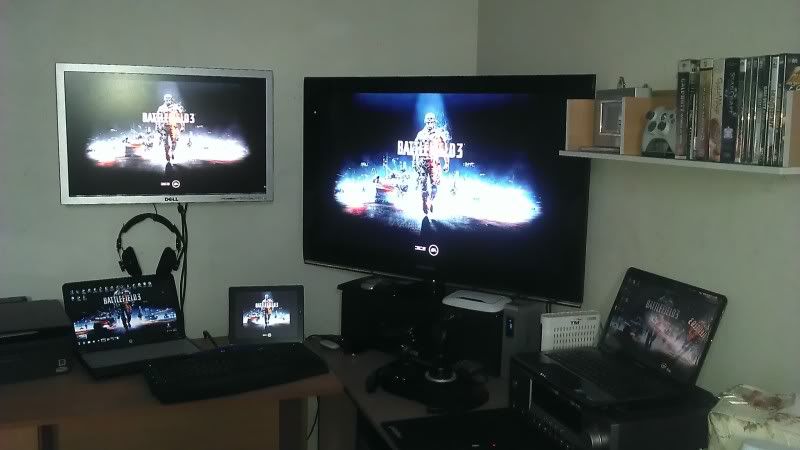 This post has been edited by kaiser_falco: Jan 24 2012, 02:27 PM This post has been edited by kaiser_falco: Jan 24 2012, 02:27 PM |
|
|
|
|
|
ElaineChewMeow
|
Jan 24 2012, 10:11 PM
|
|
|
QUOTE(kaiser_falco @ Jan 24 2012, 03:26 PM) my current dual monitor set up and btw gaming is done on my lg 42 lw 570 3d tv( previously was samsung but spoilt after 1 years plus usage) and the second one wall mounted is dell 2707 lcd is for monitoring current pc health,oc and few other stuff like ts3 and such. dafuq~ even i got mine pun i need saupei~ |
|
|
|
|
|
H4XF4XTOR
|
Jan 26 2012, 02:39 AM
|
|
|
QUOTE(kaiser_falco @ Jan 24 2012, 02:26 PM) my current dual monitor set up and btw gaming is done on my lg 42 lw 570 3d tv( previously was samsung but spoilt after 1 years plus usage) and the second one wall mounted is dell 2707 lcd is for monitoring current pc health,oc and few other stuff like ts3 and such. » Click to show Spoiler - click again to hide... « fuuuuuuuuuuuuuu hardcore gamer spotted |
|
|
|
|
|
NaShRiCk
|
Jan 26 2012, 02:49 AM
|
Getting Started
|
QUOTE(kaiser_falco @ Jan 24 2012, 02:26 PM) my current dual monitor set up and btw gaming is done on my lg 42 lw 570 3d tv( previously was samsung but spoilt after 1 years plus usage) and the second one wall mounted is dell 2707 lcd is for monitoring current pc health,oc and few other stuff like ts3 and such. This one is like 180 view can get while gaming.. haha
Added on January 26, 2012, 3:00 amQUOTE(shirley_andy @ Jan 13 2011, 01:05 AM) I'm using my old CRT monitor for dual screen » Click to show Spoiler - click again to hide... « legend crt..
Added on January 26, 2012, 3:02 amQUOTE(DrBlueBox @ Oct 22 2011, 12:13 AM) hahaha.. I Smell UTM.. which fac? This post has been edited by NaShRiCk: Jan 26 2012, 03:02 AM |
|
|
|
|
|
darkddly
|
Jan 28 2012, 06:29 PM
|
|
|
holy fu...6 monitors with 6gc ar?
p/s:looks like 6gc's
|
|
|
|
|
|
' or 1=1 --
|
Feb 2 2012, 11:04 AM
|
|
|
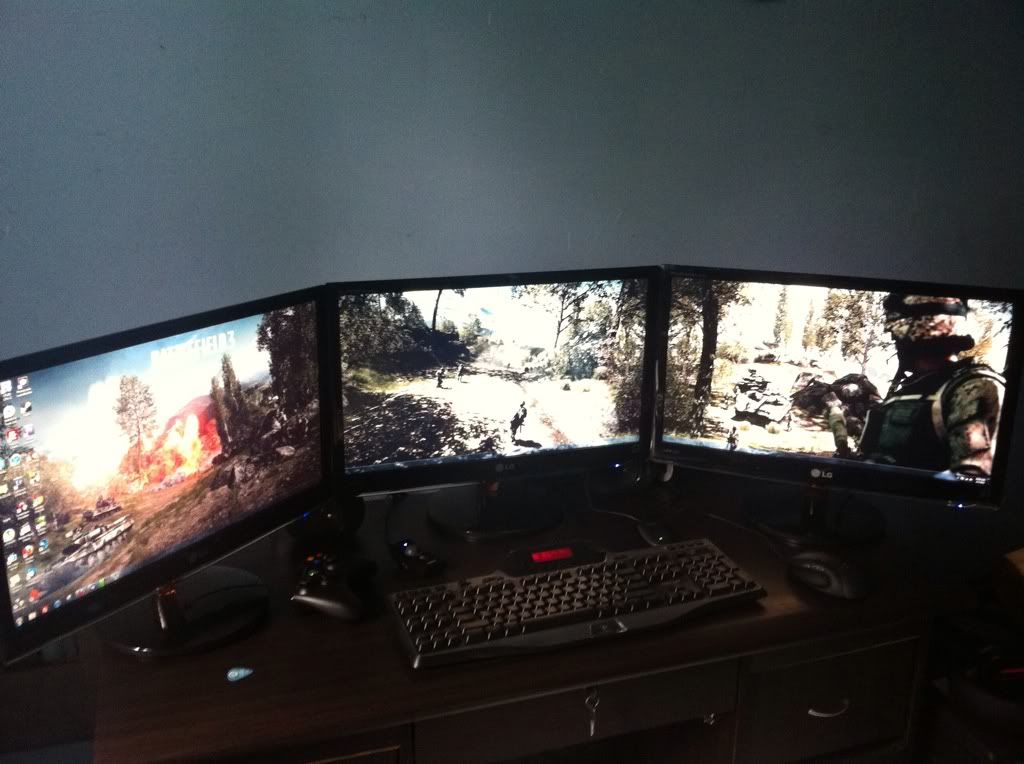 driving and fps games are really great with multi monitors 5760 x 1080 wallpapers are kinda limited tho. This post has been edited by ' or 1=1 --: Feb 2 2012, 11:10 AM |
|
|
|
|
|
Tamiya
|
Feb 2 2012, 05:03 PM
|
|
|
Wow.. great setup there |
|
|
|
|
|
suns8630
|
Feb 2 2012, 05:12 PM
|
|
|
I am having ACER AX 3950 ..now using only one monitor .. would like to try to use dual monitor ..on the back panel only 1 available HDMI .. so can i fix another monitor into this HDMI connection ... !!!
kasi tahu yaaah ... ooooooohh .. yes .. .. RM 500 budget can get HDMI monitor kaaah ... kasi recommend ...ok .. !!
kam sia kam sia ... !! thank you..
|
|
|
|
|
|
DrBlueBox
|
Feb 2 2012, 05:23 PM
|
|
|
QUOTE(NaShRiCk @ Jan 26 2012, 02:49 AM) hahaha.. I Smell UTM.. which fac? Manada faculty. Jalan Semarak kat KL sana |
|
|
|
|
|
Langiler
|
Feb 2 2012, 11:02 PM
|
|
|
QUOTE(kaiser_falco @ Jan 24 2012, 02:26 PM) my current dual monitor set up and btw gaming is done on my lg 42 lw 570 3d tv( previously was samsung but spoilt after 1 years plus usage) and the second one wall mounted is dell 2707 lcd is for monitoring current pc health,oc and few other stuff like ts3 and such. HOLLY! woot! it look like a art display gallery.. nice setup btw, haha QUOTE(' or 1=1 -- @ Feb 2 2012, 11:04 AM) driving and fps games are really great with multi monitors 5760 x 1080 wallpapers are kinda limited tho. Pergh, awesome, eyefinity! btw, the wallpaper is actual game screen shot? |
|
|
|
|
|
' or 1=1 --
|
Feb 3 2012, 12:33 PM
|
|
|
QUOTE(Langiler @ Feb 2 2012, 11:02 PM) HOLLY! woot! it look like a art display gallery.. nice setup btw, haha Pergh, awesome, eyefinity! btw, the wallpaper is actual game screen shot? Im on the green camp, nvidia surround. XD And the wallpaper, Im not sure,i got this off some website. |
|
|
|
|
|
zaire103
|
Feb 3 2012, 01:55 PM
|
New Member
|
QUOTE(' or 1=1 -- @ Feb 2 2012, 11:04 AM) driving and fps games are really great with multi monitors 5760 x 1080 wallpapers are kinda limited tho. perghhh..... nicee~~ im happy for u hahaha XD |
|
|
|
|
|
Langiler
|
Feb 3 2012, 07:32 PM
|
|
|
QUOTE(' or 1=1 -- @ Feb 3 2012, 12:33 PM) Im on the green camp, nvidia surround. XD And the wallpaper, Im not sure,i got this off some website. wow, nvidia!!! i only have ATI atm, and might change to Nvidia too. hehe |
|
|
|
|
|
fridel
|
Feb 3 2012, 08:28 PM
|
|
|
QUOTE(' or 1=1 -- @ Feb 3 2012, 01:33 PM) Im on the green camp, nvidia surround. XD And the wallpaper, Im not sure,i got this off some website. I wonder it cost u how much for triple monitor setup? |
|
|
|
|
|
' or 1=1 --
|
Feb 3 2012, 09:41 PM
|
|
|
QUOTE(Langiler @ Feb 3 2012, 07:32 PM) wow, nvidia!!! i only have ATI atm, and might change to Nvidia too. hehe one thing to take notice tho. Try to get cards with more than 1gb ram each. Games like battlefield 3 eats up vram like crazy. QUOTE(fridel @ Feb 3 2012, 08:28 PM) I wonder it cost u how much for triple monitor setup? Its about rm3.5k altogether including the gpus not all games work with 3 monitor setups tho unfortunately and it can get a bit dizzying at first  haha! But u can set the resolution back to regular 1920x1080 and u can play normally with the middle screen again on the fly whenever u need to. |
|
|
|
|
|
ElaineChewMeow
|
Feb 16 2012, 09:15 AM
|
|
|
Here im back, i got my external Monitor for my laptop dy, but cannot set it to full 1080res, the max in the laptop is 1366x768 only, i belip all u know how to customise that. btw my laptop is 4736G. monitor AOC e2239Fwh, the monitor is not even can be touch screen eventho the spec in the website saying so. bought from a forummer, stilll under warranty. dear all sifu's, help pls~ pm me if dun want to spoil the tered. |
|
|
|
|
|
emohardstyle
|
Feb 19 2012, 11:29 AM
|
Getting Started
|
in my opinion ... 1 monitor is better just saying |
|
|
|
|
|
ALBHmiri
|
Feb 19 2012, 01:26 PM
|
Getting Started
|
QUOTE(' or 1=1 -- @ Feb 2 2012, 11:04 AM) driving and fps games are really great with multi monitors 5760 x 1080 wallpapers are kinda limited tho. What nvidia series u using?
Added on February 19, 2012, 1:29 pmQUOTE(emohardstyle @ Feb 19 2012, 11:29 AM) in my opinion ... 1 monitor is better just saying If i had extra money then i will make more display This post has been edited by ALBHmiri: Feb 19 2012, 01:29 PM |
|
|
|
|
|
visualfoley
|
Feb 19 2012, 09:26 PM
|
|
|
i do own 42 inch plasma tv, but maybe will sell it for dual monitors, but not for gaming.
It is for design. Easy for tracing and etc etc.
What do u guys think?
is it worth it?
The monitor that im going to look for is the AOC 23 inch IPS panel.
Opinion?
|
|
|
|
|
|
flodder
|
Feb 20 2012, 07:28 AM
|
|
|
I tried DVI, VGA and even TV output but the resolutions is same what we did only once desktop cannot have different 3 types of resolutions
|
|
|
|
|
|
laurelgt
|
Feb 21 2012, 07:34 PM
|
|
|
QUOTE(visualfoley @ Feb 19 2012, 09:26 PM) i do own 42 inch plasma tv, but maybe will sell it for dual monitors, but not for gaming. It is for design. Easy for tracing and etc etc. What do u guys think? is it worth it? The monitor that im going to look for is the AOC 23 inch IPS panel. Opinion? The choice for IPS panel is right IMO. But what brand to go i leave it to the sifu-s here. Good luck |
|
|
|
|
|
Uncle Ron
|
Feb 28 2012, 03:20 PM
|
|
|
QUOTE(' or 1=1 -- @ Feb 2 2012, 11:04 AM) driving and fps games are really great with multi monitors 5760 x 1080 wallpapers are kinda limited tho. I really hope i can make same like this too... |
|
|
|
|
|
computer_maniac
|
Feb 28 2012, 10:19 PM
|
New Member
|
hye.. i want to ask something... i have tried dual monitor...i'm using acer lcd both 17" vga... my problem is when i use vga to dvi coverter for my 2nd monitor it don't detect but it's okay when i use my mobo vga for 2nd monitor... my GC is asus nvidia GT 430..i have updated the latest driver.... thanx 4 all who answer my question.. |
|
|
|
|
|
flodder
|
Feb 29 2012, 07:22 AM
|
|
|
I've tried before but resolutions only with 1 setting cannot set different monitor/tv different resolutions?
|
|
|
|
|
|
Uncle Ron
|
Mar 6 2012, 01:59 PM
|
|
|
My friends said if u wanna do multiple monitor is better u get's the amd gc but someone said nvidia is much better if u wanna do for graphic work but not for multiple. It's true? |
|
|
|
|
|
DrBlueBox
|
Mar 6 2012, 03:10 PM
|
|
|
QUOTE(Uncle Ron @ Mar 6 2012, 01:59 PM) My friends said if u wanna do multiple monitor is better u get's the amd gc but someone said nvidia is much better if u wanna do for graphic work but not for multiple. It's true? Depends. AMD's Eyefinity is good for more than two monitors on one card due to it using a DisplayPort connector that has it's own clock, something that nVidia still don't have. Not only that, each monitor in an Eyefinity setup is independent thus you can use monitors with varying size or resolutions and mix them up and it will still work. Nvidia on the other hand could only support two monitors per card, and 3 if you are using SLi (nVision mode). The problem with nVision is that you can only use 3 exact same monitors, and they are configured as one large monitor instead of 3 separate ones, something that for me is an issue as I don't want one large space, I just want multiple workspaces. for graphic work, it's due to popular graphic softwares like the ones from Adobe are optimised to use nVidia's CUDA technology. But unless you are doing a very large graphic work or video editing involving a lot of HD vidz, the difference can't be detected in real life. This post has been edited by DrBlueBox: Mar 6 2012, 03:11 PM |
|
|
|
|
|
Uncle Ron
|
Mar 6 2012, 03:24 PM
|
|
|
QUOTE(DrBlueBox @ Mar 6 2012, 03:10 PM) Depends. AMD's Eyefinity is good for more than two monitors on one card due to it using a DisplayPort connector that has it's own clock, something that nVidia still don't have. Not only that, each monitor in an Eyefinity setup is independent thus you can use monitors with varying size or resolutions and mix them up and it will still work. Nvidia on the other hand could only support two monitors per card, and 3 if you are using SLi (nVision mode). The problem with nVision is that you can only use 3 exact same monitors, and they are configured as one large monitor instead of 3 separate ones, something that for me is an issue as I don't want one large space, I just want multiple workspaces. for graphic work, it's due to popular graphic softwares like the ones from Adobe are optimised to use nVidia's CUDA technology. But unless you are doing a very large graphic work or video editing involving a lot of HD vidz, the difference can't be detected in real life. Owh, but if i do hybrid with amd & nvidia can i get advantage for both gc like amd for different size monitor and nvidia for cuda? |
|
|
|
|
|
poyol
|
Mar 6 2012, 03:27 PM
|
|
|
Sharing my setup at work..  |
|
|
|
|
|
Uncle Ron
|
Mar 6 2012, 03:48 PM
|
|
|
QUOTE(poyol @ Mar 6 2012, 03:27 PM) Sharing my setup at work.. I see DELL 17 INCH LCD on right! am i right? |
|
|
|
|
|
DrBlueBox
|
Mar 6 2012, 03:48 PM
|
|
|
QUOTE(Uncle Ron @ Mar 6 2012, 03:24 PM) Owh, but if i do hybrid with amd & nvidia can i get advantage for both gc like amd for different size monitor and nvidia for cuda? Yes. I am doing just that actually. GTX570 SLi --> main gaming monitor/Adobe Premiere, HD5450 --> 3 other monitors |
|
|
|
|
|
Uncle Ron
|
Mar 6 2012, 03:57 PM
|
|
|
QUOTE(DrBlueBox @ Mar 6 2012, 03:48 PM) Yes. I am doing just that actually. GTX570 SLi --> main gaming monitor/Adobe Premiere, HD5450 --> 3 other monitors if I do that is it will take a lot of electricity? Scared my electricity bil will extremely high later... |
|
|
|
|
|
DrBlueBox
|
Mar 6 2012, 04:03 PM
|
|
|
QUOTE(Uncle Ron @ Mar 6 2012, 03:57 PM) if I do that is it will take a lot of electricity? Scared my electricity bil will extremely high later... Not really, since the HD5450 is not a powerful/power hungry card. |
|
|
|
|
|
Jinster
|
Mar 6 2012, 04:04 PM
|
|
|
if u want more monitors together with awesomeness, u need the ooomph from GCs and sacrifice more money into the bills lol
|
|
|
|
|
|
Uncle Ron
|
Mar 6 2012, 04:09 PM
|
|
|
QUOTE(DrBlueBox @ Mar 6 2012, 04:03 PM) Not really, since the HD5450 is not a powerful/power hungry card. Owh, but i already own AMD HD 6870 151 watt gc so which one nVidia gc i need to buy for low power consumption but still great!
Added on March 6, 2012, 4:29 pmQUOTE(Jinster @ Mar 6 2012, 04:04 PM) if u want more monitors together with awesomeness, u need the ooomph from GCs and sacrifice more money into the bills lol U r right... LoL... Actually i'm not doin' for awesomeness but for large space... Haha... This post has been edited by Uncle Ron: Mar 6 2012, 04:29 PM |
|
|
|
|
|
shufaz
|
Mar 8 2012, 11:14 AM
|
Getting Started
|
I use 2 monitors... when working one will be where all the tutorial/reference/instructions and other one is actual working space... save me a lot of time and very efficient. sorry didn't read any other posts, just responding to the thread title. |
|
|
|
|
|
clayton-chew
|
Mar 9 2012, 03:16 AM
|
|
|
 Here's mine, LG 32" HD LCD TV + SAMSUNG LED 24" HD MONITOR Have to use two screen for my workspace because intensive usage on 3D Max, AutoCAD, Photoshop, and Premier+Aftereffects... Two more LCD to come  , gonna install on wall on the left to save space in my home office. |
|
|
|
|
|
abubin
|
Mar 9 2012, 02:22 PM
|
|
|
QUOTE(Jinster @ Mar 6 2012, 04:04 PM) if u want more monitors together with awesomeness, u need the ooomph from GCs and sacrifice more money into the bills lol This is not true. Multi monitor doesn't need super powerful GC. That only apply when you want to play games in multi monitor. For normal windows usages like browsing or typing letters and so on, just a normal GC that support multi monitor will do. You can still play games under 1 monitor if your GC not powerful enough. No need to waste money on GC just for normal desktop usage. |
|
|
|
|
|
Jinster
|
Mar 9 2012, 02:53 PM
|
|
|
well believe me or not, slight lag can be felt if the required hardware aren't matched properly...something like bottleneck would occur.
|
|
|
|
|
|
domcobb
|
Mar 13 2012, 03:43 PM
|
Getting Started
|
QUOTE(DrBlueBox @ Mar 6 2012, 03:48 PM) Yes. I am doing just that actually. GTX570 SLi --> main gaming monitor/Adobe Premiere, HD5450 --> 3 other monitors Wow. Does that make up 4 monitors? |
|
|
|
|
|
Uncle Ron
|
Mar 19 2012, 08:09 AM
|
|
|
QUOTE(*-a|i3n-* @ Mar 13 2012, 05:54 PM) 
my old rig  Still cool la bro! Btw can i know what size ur both monitor? |
|
|
|
|
|
*-a|i3n-*
|
Mar 19 2012, 09:10 AM
|
|
|
22 17
|
|
|
|
|
|
Christopher_LKL
|
Mar 19 2012, 09:14 AM
|
|
|
24 22 19, alot of Remote Desktop and VM... so technically the more the better lol
|
|
|
|
|
|
Uncle Ron
|
Mar 19 2012, 05:20 PM
|
|
|
QUOTE(*-a|i3n-* @ Mar 19 2012, 09:10 AM) Owh, I see... Same like me only the different My 17inch Monitor is not wide one... QUOTE(Christopher_LKL @ Mar 19 2012, 09:14 AM) 24 22 19, alot of Remote Desktop and VM... so technically the more the better lol Picture please ! ! |
|
|
|
|
|
ScOttY_PanG
|
Mar 20 2012, 03:35 PM
|
|
|
i did have 6 monitors for my office |
|
|
|
|
|
faeizx
|
Mar 23 2012, 02:27 PM
|
Getting Started
|
QUOTE(frey_zero @ Dec 30 2010, 11:12 PM) im using Hybrid technology AMD 790GX + ATI HD4890.. primary Monitor that i play game i connect to GC n other i connect to my mobo using VGA... but i think it true about Benq.. my LCD always make fun of me... it blink like disco light... to solve this mystery you need to drop half hard at carpet floor.. not to hard.. my mobo dun have vga socket but my graphic card have vga,dvi and hdmi..still can do it? |
|
|
|
|
|
frey_zero
|
Mar 23 2012, 06:31 PM
|
|
|
QUOTE(faeizx @ Mar 23 2012, 02:27 PM) my mobo dun have vga socket but my graphic card have vga,dvi and hdmi..still can do it? if ATI radeon 6 series you can make trifinity... |
|
|
|
|
|
Kasumi
|
Mar 25 2012, 05:15 PM
|
New Member
|
So, my parents are getting a new computer (a Mac) and the old infected CPU and LCD monitor are getting thrown out. I'm trying to save the monitor by using it as a 2nd monitor for my laptop. Is it possible?
And I apologise but I'm pretty tech illiterate so can please dumb it down for me?
|
|
|
|
|
|
Jinster
|
Mar 25 2012, 09:11 PM
|
|
|
perhaps let us know the specifications or the model name or something of the monitor or hardware u r planning to reuse..so that everyone here can help u
|
|
|
|
|
|
Kasumi
|
Mar 26 2012, 08:15 PM
|
New Member
|
Erm, the monitor is a Samsung, 14 inches I think. Not sure about resolution but I think it's 1280x1024.
I'm sorry but what do you mean by hardware? If you're asking if I'm planning to reuse anything else; nope, just monitor.
|
|
|
|
|
|
ElaineChewMeow
|
Mar 26 2012, 08:17 PM
|
|
|
I think U better state the Monitor model n ur laptop model.
We'll see using what to connect to your laptop n the monitor.
|
|
|
|
|
|
darkddly
|
Apr 5 2012, 10:14 PM
|
|
|
i think can le..plug in the monitor cable to laptop can use alread what..
|
|
|
|
|
|
881118
|
Apr 9 2012, 02:14 AM
|
|
|
i have 1 27" monitor landscape mode
another 23" monitor potrait mode, left side of main monitor
the wallpaper in main monitor was ok, but the wallpaper in the 23" monitor has black bar on top and bottom
how to make sure both monitor wallpaper fit nicely?
|
|
|
|
|
|
streetmonkey
|
Apr 24 2012, 06:53 PM
|
Getting Started
|
hi all...i wanna ask which monitor should i use to make eyefinity setup? i wanna find monitor with the thinnest border so that the gap between 2 display will be smaller. which 22~24 monitor u guyz recommend?
|
|
|
|
|
|
Hilmax
|
Apr 28 2012, 01:56 PM
|
|
|
QUOTE(streetmonkey @ Apr 24 2012, 06:53 PM) hi all...i wanna ask which monitor should i use to make eyefinity setup? i wanna find monitor with the thinnest border so that the gap between 2 display will be smaller. which 22~24 monitor u guyz recommend? |
|
|
|
|
|
Owen Yeap
|
May 16 2012, 01:35 PM
|
New Member
|
me too~ too bad!
|
|
|
|
|
|
darkddly
|
May 22 2012, 06:48 PM
|
|
|
QUOTE(chaosneo @ May 21 2012, 02:46 PM) just to share my experience. although this is three monitor but i hope some info here helps.

i put the side monitors slightly behind the center one to minimize the bezel effect. as you can see the samsung monitors has huge bezel. if side by side can almost reach up to 3cm. how much total ini? |
|
|
|
|
|
chaosneo
|
May 23 2012, 12:12 AM
|
|
|
Bro,
how much in total what?QUOTE(darkddly @ May 22 2012, 06:48 PM)
|
|
|
|
|
|
darkddly
|
May 23 2012, 09:00 AM
|
|
|
QUOTE(chaosneo @ May 23 2012, 12:12 AM) Bro,
how much in total what? monitor plus ur rig casing..lolololol cun la... |
|
|
|
|
|
chaosneo
|
May 23 2012, 09:16 AM
|
|
|
the three monitors, all also more than 3 years of history, one i brought from my friend, one belongs to myself, and one i brought from my brother. so i can't really pinpoint the actual value of how much i paid for these three monitors but i can estimate maybe rm1500++ , of course, that time i brought it was a lot of years ago. now you can get THREE 22" with FHD at less than rm1.2k
i just hope that the monitors can last for a few more years, if one is damage, it would be hard to find that model and not feasible to replace it with the same old model.
my casing is another thing. total is 6K, in hope to last for 5years of gaming or more until then, just change the GPU. i think nowdays is getting cheaper if you want to setup a triple monitor setup. a single GTX680 or ATI card can do triple monitor easily and three monitors are not that expensive anymore. for example, 21.5" Samsung is just at rm395.
rm395 x 3 = rm1,185.
my speakers G51 was also from 4 years ago, brought at rm300-400, can't remember, 2nd hand i got it. everything looks cool but a lot of things from ancient time already hahaha QUOTE(darkddly @ May 23 2012, 09:00 AM) monitor plus ur rig casing..lolololol cun la...
|
|
|
|
|
|
darkddly
|
May 23 2012, 09:33 PM
|
|
|
QUOTE(chaosneo @ May 23 2012, 09:16 AM) the three monitors, all also more than 3 years of history, one i brought from my friend, one belongs to myself, and one i brought from my brother. so i can't really pinpoint the actual value of how much i paid for these three monitors but i can estimate maybe rm1500++ , of course, that time i brought it was a lot of years ago. now you can get THREE 22" with FHD at less than rm1.2k
i just hope that the monitors can last for a few more years, if one is damage, it would be hard to find that model and not feasible to replace it with the same old model.
my casing is another thing. total is 6K, in hope to last for 5years of gaming or more until then, just change the GPU. i think nowdays is getting cheaper if you want to setup a triple monitor setup. a single GTX680 or ATI card can do triple monitor easily and three monitors are not that expensive anymore. for example, 21.5" Samsung is just at rm395.
rm395 x 3 = rm1,185.
my speakers G51 was also from 4 years ago, brought at rm300-400, can't remember, 2nd hand i got it. everything looks cool but a lot of things from ancient time already hahaha  wa..6k..mine only 3k...cun le ur settings...lol..too bad mine cant move or do anythin with it for now. ;p |
|
|
|
|
|
seth11
|
May 24 2012, 01:56 AM
|
New Member
|
I got the asus ati 6970 CU II, supports up to 6 monitors... Prices should be cheaper now as their next higher end card is on the market. But this is enough for all yur gaming needs.
|
|
|
|
|
|
Uncle Ron
|
Jun 6 2012, 01:00 PM
|
|
|
QUOTE(chaosneo @ May 21 2012, 02:46 PM) just to share my experience. although this is three monitor but i hope some info here helps.
i put the side monitors slightly behind the center one to minimize the bezel effect. as you can see the samsung monitors has huge bezel. if side by side can almost reach up to 3cm. QUOTE(chaosneo @ May 23 2012, 09:16 AM) the three monitors, all also more than 3 years of history, one i brought from my friend, one belongs to myself, and one i brought from my brother. so i can't really pinpoint the actual value of how much i paid for these three monitors but i can estimate maybe rm1500++ , of course, that time i brought it was a lot of years ago. now you can get THREE 22" with FHD at less than rm1.2k
i just hope that the monitors can last for a few more years, if one is damage, it would be hard to find that model and not feasible to replace it with the same old model.
my casing is another thing. total is 6K, in hope to last for 5years of gaming or more until then, just change the GPU. i think nowdays is getting cheaper if you want to setup a triple monitor setup. a single GTX680 or ATI card can do triple monitor easily and three monitors are not that expensive anymore. for example, 21.5" Samsung is just at rm395.
rm395 x 3 = rm1,185.
my speakers G51 was also from 4 years ago, brought at rm300-400, can't remember, 2nd hand i got it. everything looks cool but a lot of things from ancient time already hahaha I don't think all ancient model is no good bcoz sometime some model from ancient is more better than a latest one ! Btw awesome setup bro ! This post has been edited by Uncle Ron: Jun 6 2012, 01:02 PM |
|
|
|
|
|
darkskies
|
Jun 10 2012, 07:55 PM
|
|
|

My messy table*Lazy to position nicely* Currently lookin for nice 3840x1200 wallpapers... Seems like very little. Mostly 3840x1080... |
|
|
|
|
|
chong82
|
Jun 11 2012, 05:46 PM
|
Getting Started
|
Anyone having nvidia surround setup?
Any problem with 4 monitors or 2 (1 Main display and 1 Accessories Display) ?
|
|
|
|
|
|
chaosneo
|
Jun 12 2012, 10:24 AM
|
|
|
i was thinking of setting up four monitors...
3 monitor - GTX590
1 monitor - 8800GT
but cannot afford one monitor yet... hahaha...
|
|
|
|
|
|
pstar
|
Jun 16 2012, 01:10 AM
|
New Member
|
quadruple monitor
1 for pron, 1 for av, 1 for d3, 1 for dota2
|
|
|
|
|
|
lrockm
|
Jun 18 2012, 03:15 PM
|
Getting Started
|
its good for work ~~ i'm doing so for my work ~~ but I never try playing games with 2 monitor ~~
|
|
|
|
|
|
lawtm
|
Jun 27 2012, 02:47 PM
|
|
|
QUOTE(chaosneo @ May 21 2012, 02:46 PM) just to share my experience. although this is three monitor but i hope some info here helps.
i put the side monitors slightly behind the center one to minimize the bezel effect. as you can see the samsung monitors has huge bezel. if side by side can almost reach up to 3cm. brother nice many monitor.........u ply forex???????? |
|
|
|
|
|
Economics Crisis
|
Jun 29 2012, 07:40 PM
|
|
|
QUOTE(chaosneo @ May 21 2012, 02:46 PM) just to share my experience. although this is three monitor but i hope some info here helps.
i put the side monitors slightly behind the center one to minimize the bezel effect. as you can see the samsung monitors has huge bezel. if side by side can almost reach up to 3cm. look professional |
|
|
|
|
|
UserU
|
Jun 30 2012, 12:06 AM
|
CSONLINE2.NET - FREE COUNTER-STRIKE

|
Wow, 3 monitors. If only PC components wouldn't be outdated so fast, I would like to have a second monitor for multitasking |
|
|
|
|
|
biosfree
|
Jun 30 2012, 06:41 PM
|
Getting Started
|
wow...so naise..la....wat if longer than this
Added on June 30, 2012, 6:42 pmhow mch d cost..desktop
This post has been edited by biosfree: Jun 30 2012, 06:42 PM
|
|
|
|
|
|
Uncle Ron
|
Jul 4 2012, 08:37 AM
|
|
|
QUOTE(5w4tch @ Jul 3 2012, 11:19 PM) Kinda handy when I do coding... Ur setup is like mine b4... |
|
|
|
|
|
mi-g
|
Jul 8 2012, 12:55 AM
|
|
|
QUOTE(chaosneo @ May 21 2012, 02:46 PM) just to share my experience. although this is three monitor but i hope some info here helps.
i put the side monitors slightly behind the center one to minimize the bezel effect. as you can see the samsung monitors has huge bezel. if side by side can almost reach up to 3cm. bro where u buy that table? how much is it? |
|
|
|
|
|
night
|
Jul 8 2012, 12:15 PM
|
|
|
QUOTE(mi-g @ Jul 8 2012, 12:55 AM) bro where u buy that table? how much is it? I think IKEA do sell this table. Remember seeing that table at IKEA. |
|
|
|
|
|
continuum
|
Jul 28 2012, 08:31 AM
|
New Member
|
Thats an awesome setup bro
|
|
|
|
|
|
lwk523
|
Sep 20 2012, 10:47 PM
|
|
|
Any one can recommended me dual monitor tools ?
|
|
|
|
|
|
KenDiriwan
|
Sep 20 2012, 10:56 PM
|
|
|
QUOTE(chaosneo @ May 23 2012, 09:16 AM) the three monitors, all also more than 3 years of history, one i brought from my friend, one belongs to myself, and one i brought from my brother. so i can't really pinpoint the actual value of how much i paid for these three monitors but i can estimate maybe rm1500++ , of course, that time i brought it was a lot of years ago. now you can get THREE 22" with FHD at less than rm1.2k
i just hope that the monitors can last for a few more years, if one is damage, it would be hard to find that model and not feasible to replace it with the same old model.
my casing is another thing. total is 6K, in hope to last for 5years of gaming or more until then, just change the GPU. i think nowdays is getting cheaper if you want to setup a triple monitor setup. a single GTX680 or ATI card can do triple monitor easily and three monitors are not that expensive anymore. for example, 21.5" Samsung is just at rm395.
rm395 x 3 = rm1,185.
my speakers G51 was also from 4 years ago, brought at rm300-400, can't remember, 2nd hand i got it. everything looks cool but a lot of things from ancient time already hahaha I miss those series of Samsung back then, infact the one i have is 931BW, sooo sexy. How i wish they still in production |
|
|
|
|
|
chaosneo
|
Oct 8 2012, 09:45 AM
|
|
|
this maybe not so related but do let me share it anyway,
how does Diablo 3 fares on triple screen monitor? totally cheating! hahahaha
Pros:
1. on the left and right of the screen, you see monster spawning far away before you even reach them. especially good for scouting elite & rare monsters abilities.
2. some boss fights are extremely useful.
3. some range abilities has quite far range, in which this case, i can cast or shoot almost one screen away, far from triggering enemy into detecting my presence.
Cons:
1. Team Players information is too far on the left side on the left screen.
2. Inventory Page opens too far to the right side on the right screen.
3. When in stores, the Store page opens on far left and your inventory opens on far right, totally long mouse travels but then again, with some shortcuts buttons, this can be easily nullified.
|
|
|
|
|
|
dangeroom
|
Dec 3 2012, 05:02 AM
|
New Member
|
QUOTE(boringbrick @ Jan 22 2011, 05:18 PM) i always see nice dual monitor wallpapers on the net, too bad im using laptop lol still can use dual monitor with lappy as long as ur lappy have an extra extension vga slot for additional monitor which most laptop has it....just patch the 2nd monitor and do the step by step configuration refer : http://www.computerhope.com/issues/ch000801.htm and Walla...multitasking is enable |
|
|
|
|
|
winkiedilwy
|
Feb 4 2013, 11:48 AM
|
|
|
1st monitor: laptop's 15.6" 1366x768
2nd monitor: Acer 22" 1920x1080, extended via HDMI cable.
|
|
|
|
|
|
kosuke09211
|
Feb 5 2013, 11:02 AM
|
|
|
1st monitor acer 17 inch (forget what model)
2nd monitor dell s2330mx
normally the dell monitor is for me playing GAMES
and the acer monitor is just for facebook chat or others xD
i like playing game in full screen
|
|
|
|
|
|
pali_5373
|
Feb 7 2013, 01:01 PM
|
Getting Started
|
3 x BenQ XL2420T powered by 2 x EVGA GTX 670 4Gb FTW+ so far so good game played BATTLEFIELD 3 BATMAN ARKHAM CITY TRANSFORMER FALL OF CYBERTRON all setting set to MAX  This post has been edited by pali_5373: Feb 7 2013, 01:09 PM
 |
|
|
|
|
|
kelirulol
|
May 4 2013, 11:43 AM
|
New Member
|
always wanted 3 mons...looking forward to that day... » Click to show Spoiler - click again to hide... « |
|
|
|
|
|
shirley_andy
|
May 4 2013, 04:27 PM
|
|
|
used to think 3 screens are great to use as racing simulators...
but the fact hits me when I think deep, that during full concentration, I probably won't use the other 2 monitors any more than 10% in a race.
|
|
|
|
|
|
gyver
|
May 5 2013, 10:08 PM
|
|
|
Wow! You guys setup so cool. Mine is just dual laptop to CRT monitor. Hahaha... for working. Gaming on PC to 42 inch old plasma.
|
|
|
|
|
|
Celestia
|
May 30 2013, 02:16 PM
|
|
|
all those 3 monitors gaming, its my dream setup
I using single 24inch + 40in tv as secondary for movies lol
need get another 2x 24in and i'm all done
one day
|
|
|
|
|
|
GameFr3ak
|
May 31 2013, 02:53 PM
|
|
|
The bezels are an eyesore..
|
|
|
|
|
|
UserU
|
Jun 1 2013, 10:07 AM
|
CSONLINE2.NET - FREE COUNTER-STRIKE
|
With a 23" and a 20" running alongside, multitasking is a breeze |
|
|
|
|
|
ZoidbergFry
|
Jun 11 2013, 09:06 AM
|
|
|
got question here,if i have a 18" and a 22" dual monitor,how to i config the wallpaper so that it can fit full screen in both monitors? because now when i set a wall paper,its not in full screen on my 22" monitor
|
|
|
|
|
|
amxpayne67
|
Jun 11 2013, 04:43 PM
|
|
|
QUOTE(ZoidbergFry @ Jun 11 2013, 09:06 AM) got question here,if i have a 18" and a 22" dual monitor,how to i config the wallpaper so that it can fit full screen in both monitors? because now when i set a wall paper,its not in full screen on my 22" monitor You have to change the resolution on your 22" monitor to match with the resolution of your 18" monitor. That's how i do with my 21" and 19" monitor. This post has been edited by amxpayne67: Jun 11 2013, 04:43 PM |
|
|
|
|
|
ZoidbergFry
|
Jun 12 2013, 11:02 AM
|
|
|
QUOTE(amxpayne67 @ Jun 11 2013, 04:43 PM) You have to change the resolution on your 22" monitor to match with the resolution of your 18" monitor. That's how i do with my 21" and 19" monitor. but if i do that the display will look blur..any other way? |
|
|
|
|
|
amxpayne67
|
Jun 12 2013, 11:37 AM
|
|
|
QUOTE(ZoidbergFry @ Jun 12 2013, 11:02 AM) but if i do that the display will look blur..any other way? Unless you want to do eyefinity, but i think that you want to extend desktop to second monitor right? Then you have to match the resolution of your 18" monitor because your 18" monitor couldn't match to your 22" monitor. Can you tell me the maximum resolution on both of your monitor? This post has been edited by amxpayne67: Jun 12 2013, 11:38 AM |
|
|
|
|
|
ZoidbergFry
|
Jun 12 2013, 01:49 PM
|
|
|
QUOTE(amxpayne67 @ Jun 12 2013, 11:37 AM) Unless you want to do eyefinity, but i think that you want to extend desktop to second monitor right? Then you have to match the resolution of your 18" monitor because your 18" monitor couldn't match to your 22" monitor. Can you tell me the maximum resolution on both of your monitor? 1600x1200 max on the 20" |
|
|
|
|
|
amxpayne67
|
Jun 12 2013, 01:54 PM
|
|
|
QUOTE(ZoidbergFry @ Jun 12 2013, 01:49 PM) Now how about the resolution on the 18" monitor? For the wallpaper to look good on both monitor, you need same resolution or resolution with same height. Mine using 1440 X 900 on both monitor so i can put 2880 x 900 wallpaper. Try this method first see if can work. First, right click on your desktop and choose personalize. Then click desktop background, you will see on the top that says picture location. Change to your actual picture location and change your picture position to tiles. Good luck~ This post has been edited by amxpayne67: Jun 12 2013, 01:55 PM |
|
|
|
|
|
ZoidbergFry
|
Jun 12 2013, 02:19 PM
|
|
|
QUOTE(amxpayne67 @ Jun 12 2013, 01:54 PM) Now how about the resolution on the 18" monitor? For the wallpaper to look good on both monitor, you need same resolution or resolution with same height. Mine using 1440 X 900 on both monitor so i can put 2880 x 900 wallpaper. Try this method first see if can work. First, right click on your desktop and choose personalize. Then click desktop background, you will see on the top that says picture location. Change to your actual picture location and change your picture position to tiles. Good luck~ woot it works if i change the resolution,but then again the 20" monitor can put lesser icons (expected)..thanks for your help |
|
|
|
|
|
amxpayne67
|
Jun 12 2013, 02:23 PM
|
|
|
QUOTE(ZoidbergFry @ Jun 12 2013, 02:19 PM) woot it works if i change the resolution,but then again the 20" monitor can put lesser icons (expected)..thanks for your help No problem bro  |
|
|
|
|
|
SUSmenj
|
Jun 14 2013, 08:48 PM
|
|
|
This is mine.  This post has been edited by menj: Jun 14 2013, 08:53 PM This post has been edited by menj: Jun 14 2013, 08:53 PM |
|
|
|
|
|
teng_08
|
Jun 18 2013, 05:20 PM
|
|
|
QUOTE(chaosneo @ May 21 2012, 02:46 PM) just to share my experience. although this is three monitor but i hope some info here helps.
i put the side monitors slightly behind the center one to minimize the bezel effect. as you can see the samsung monitors has huge bezel. if side by side can almost reach up to 3cm. dude, what speaker stand r u using? good for surround sound. heheh... |
|
|
|
|
|
teng_08
|
Jun 18 2013, 05:25 PM
|
|
|
QUOTE(kaiser_falco @ Jan 24 2012, 02:26 PM) my current dual monitor set up and btw gaming is done on my lg 42 lw 570 3d tv( previously was samsung but spoilt after 1 years plus usage) and the second one wall mounted is dell 2707 lcd is for monitoring current pc health,oc and few other stuff like ts3 and such. Where did u get the wall mount device for ur Dell 2707? U bought from local store or direct from Dell? Nice setup btw. |
|
|
|
|
|
ZeroKunz
|
Jun 22 2013, 01:32 AM
|
Getting Started
|
QUOTE(kaiser_falco @ Jan 24 2012, 02:26 PM) my current dual monitor set up and btw gaming is done on my lg 42 lw 570 3d tv( previously was samsung but spoilt after 1 years plus usage) and the second one wall mounted is dell 2707 lcd is for monitoring current pc health,oc and few other stuff like ts3 and such. seriously nice monitors u have there |
|
|
|
|
|
chaosneo
|
Jun 24 2013, 10:52 AM
|
|
|
QUOTE(teng_08 @ Jun 18 2013, 05:20 PM) dude, what speaker stand r u using? good for surround sound. heheh...
speaker stand came from Ikea. It is originally a lamp stand that clamps onto table so it works well here with a little bit of modding. yes it is good for surround, really feel the awesome effects especially in games like BF3 where bullets zipping pass from left to right.
was planning to make it 7.1 or 7.2 but the last two rear speakers i have problem attaching to my chair to position it slightly behind my head. ops... a bit off topic here... |
|
|
|
|
|
teng_08
|
Jun 24 2013, 11:32 AM
|
|
|
QUOTE(chaosneo @ Jun 24 2013, 10:52 AM) hi bro,
speaker stand came from Ikea. It is originally a lamp stand that clamps onto table so it works well here with a little bit of modding. yes it is good for surround, really feel the awesome effects especially in games like BF3 where bullets zipping pass from left to right.
was planning to make it 7.1 or 7.2 but the last two rear speakers i have problem attaching to my chair to position it slightly behind my head. ops... a bit off topic here... Ohh... smart idea. Yeah, I like ur overall set up. After seeing the way u hook up ur speaker, I cannot imagine the joy of having that kind of surround sound when playing BF3. Syiok giler ! As for me I'm only using headset  |
|
|
|
|
|
Viol3t
|
Jun 28 2013, 12:26 PM
|
New Member
|
QUOTE(kaiser_falco @ Jan 24 2012, 02:26 PM) my current dual monitor set up and btw gaming is done on my lg 42 lw 570 3d tv( previously was samsung but spoilt after 1 years plus usage) and the second one wall mounted is dell 2707 lcd is for monitoring current pc health,oc and few other stuff like ts3 and such. This the real gaming experience ! |
|
|
|
|
|
XeNoGeaR
|
Jul 1 2013, 04:33 PM
|
Getting Started
|
QUOTE(teng_08 @ Jun 24 2013, 11:32 AM) Ohh... smart idea. Yeah, I like ur overall set up. After seeing the way u hook up ur speaker, I cannot imagine the joy of having that kind of surround sound when playing BF3. Syiok giler ! As for me I'm only using headset super cool, |
|
|
|
|
|
yeahh
|
Jul 4 2013, 12:59 PM
|
|
|
just wondering if anyone has tried these 2 softwares for dual display ultramon displayfusion apparently if lets say one monitor's max reso is 1600x1200 and the other monitor is 1920 x 1080 ... by right ... BOTH monitor's reso is supposed to be set maximum as 1600 x 1200 right? these softwares apparently are able to utilise individual monitors' max reso .. meaning one monitor gets their 1600 x 1200 and the other gets their 1920 x 1080 .. i have yet to test this out as I am still surveying my 2nd monitor ... cheers |
|
|
|
|
|
ZoidbergFry
|
Jul 5 2013, 04:06 PM
|
|
|
got a question here,say i have a dual monitor and i shut 1 down,does the working monitor still takes up gc resources or does the gc oni consumes resources for 1?
|
|
|
|
|
|
amxpayne67
|
Jul 5 2013, 05:11 PM
|
|
|
» Click to show Spoiler - click again to hide... « QUOTE(ZoidbergFry @ Jul 5 2013, 04:06 PM) got a question here,say i have a dual monitor and i shut 1 down,does the working monitor still takes up gc resources or does the gc oni consumes resources for 1? That's easy. Nope. Your GC will detect the monitor that has been shut off. |
|
|
|
|
|
UserU
|
Jul 5 2013, 08:57 PM
|
CSONLINE2.NET - FREE COUNTER-STRIKE
|
QUOTE(ZoidbergFry @ Jul 5 2013, 04:06 PM) got a question here,say i have a dual monitor and i shut 1 down,does the working monitor still takes up gc resources or does the gc oni consumes resources for 1? If you're mentioning switching it off by pressing on the monitor's power button then yes, the GC will still consume some resources as your cursor can move beyond the first monitor's borders. Else if you've turned it off through the power socket, then the resources will be allocated to the first one. |
|
|
|
|
|
ZoidbergFry
|
Jul 8 2013, 09:51 AM
|
|
|
QUOTE(UserU @ Jul 5 2013, 08:57 PM) If you're mentioning switching it off by pressing on the monitor's power button then yes, the GC will still consume some resources as your cursor can move beyond the first monitor's borders. Else if you've turned it off through the power socket, then the resources will be allocated to the first one. QUOTE(amxpayne67 @ Jul 5 2013, 05:11 PM) » Click to show Spoiler - click again to hide... «
That's easy. Nope. Your GC will detect the monitor that has been shut off. i think to be safe when im not using the other monitor i disable it at my control panel, ie let windows only display 1 monitor..then the other one stuts down completely..haha..thanks for the suggestions |
|
|
|
|
|
amxpayne67
|
Jul 8 2013, 11:38 AM
|
|
|
Not to worry bro the GC were smart enough not to use that much resources if shut down. It will use some RAM though, but not by that much, probably in idle mode.
|
|
|
|
|
|
cenation1314
|
Jul 18 2013, 11:10 PM
|
New Member
|
QUOTE(ZoidbergFry @ Jul 5 2013, 04:06 PM) got a question here,say i have a dual monitor and i shut 1 down,does the working monitor still takes up gc resources or does the gc oni consumes resources for 1? well if u're playing games u wun get that 100% efficiency from your gc that's for sure...probably better to just switch back to single display...besides, once u switch automatically the other monitor goes on sleeping mode so u dun even need to press the off switch please correct me if I am wrong |
|
|
|
|
|
ZoidbergFry
|
Jul 19 2013, 08:27 AM
|
|
|
QUOTE(cenation1314 @ Jul 18 2013, 11:10 PM) well if u're playing games u wun get that 100% efficiency from your gc that's for sure...probably better to just switch back to single display...besides, once u switch automatically the other monitor goes on sleeping mode so u dun even need to press the off switch please correct me if I am wrong well from wat i hav been reading,i concluded that even if i shut down 1 monitor while using the other,it still takes up gc resources because u can still drag things over to the other (shut downed) monitor... therefore its better to right click and switch back to display on only 1 monitor and then shut down the other for maximum efficiency... |
|
|
|
|
|
cenation1314
|
Jul 19 2013, 08:42 AM
|
New Member
|
QUOTE(ZoidbergFry @ Jul 19 2013, 08:27 AM) well from wat i hav been reading,i concluded that even if i shut down 1 monitor while using the other,it still takes up gc resources because u can still drag things over to the other (shut downed) monitor... therefore its better to right click and switch back to display on only 1 monitor and then shut down the other for maximum efficiency... yup i totally agree with u....not only gpu resources but ram resources also... i'm just wondering if we can do a shortcut for it instead or going on the normal way to turn back the display...any ideas? |
|
|
|
|
|
ZoidbergFry
|
Jul 19 2013, 09:04 AM
|
|
|
QUOTE(cenation1314 @ Jul 19 2013, 08:42 AM) yup i totally agree with u....not only gpu resources but ram resources also... i'm just wondering if we can do a shortcut for it instead or going on the normal way to turn back the display...any ideas? yeah agree it does take up some ram resources,i seen some software for what ur asking but i din try it out because to me,i can leave that monitor control window open and click on it any time i wan to change the settings.. also i was thinking why waste the space to install something tat is aready there.. |
|
|
|
|
|
cenation1314
|
Jul 19 2013, 09:08 AM
|
New Member
|
QUOTE(ZoidbergFry @ Jul 19 2013, 09:04 AM) yeah agree it does take up some ram resources,i seen some software for what ur asking but i din try it out because to me,i can leave that monitor control window open and click on it any time i wan to change the settings.. also i was thinking why waste the space to install something tat is aready there.. so far what i did was macroing one of my keys to direct open that window. but not very efficient as sometime it gets it wrong... |
|
|
|
|
|
ZoidbergFry
|
Jul 19 2013, 09:15 AM
|
|
|
QUOTE(cenation1314 @ Jul 19 2013, 09:08 AM) so far what i did was macroing one of my keys to direct open that window. but not very efficient as sometime it gets it wrong... i see,i google dual monitor control software and some useful softwares came up the las time i check it out.. but for me,so far no problem.. |
|
|
|
|
|
cenation1314
|
Jul 19 2013, 09:21 AM
|
New Member
|
QUOTE(ZoidbergFry @ Jul 19 2013, 09:15 AM) i see,i google dual monitor control software and some useful softwares came up the las time i check it out.. but for me,so far no problem.. wow i just googled it and you're right, there is a lot of interesting software....have u find any reviews for them yet? |
|
|
|
|
|
ZoidbergFry
|
Jul 19 2013, 09:26 AM
|
|
|
QUOTE(cenation1314 @ Jul 19 2013, 09:21 AM) wow i just googled it and you're right, there is a lot of interesting software....have u find any reviews for them yet? nope but i did go thru some features for some of the softwares and i find its almost the same thing... also i dun nid some of the features so i decided not to try out.. |
|
|
|
|
|
cenation1314
|
Jul 19 2013, 10:17 AM
|
New Member
|
QUOTE(ZoidbergFry @ Jul 19 2013, 09:26 AM) nope but i did go thru some features for some of the softwares and i find its almost the same thing... also i dun nid some of the features so i decided not to try out.. SoftTH seems pretty cool software....what do you think? |
|
|
|
|
|
ZoidbergFry
|
Jul 19 2013, 10:21 AM
|
|
|
QUOTE(cenation1314 @ Jul 19 2013, 10:17 AM) SoftTH seems pretty cool software....what do you think? written there alpha ver..means still under testing? got bugs they din fix yet.. |
|
|
|
|
|
ZoidbergFry
|
Jul 19 2013, 10:25 AM
|
|
|
QUOTE(cenation1314 @ Jul 19 2013, 10:17 AM) SoftTH seems pretty cool software....what do you think? eah but the beta ver till now nvr release so i think can go for it..but i feel it may not support new games.. |
|
|
|
|
|
cenation1314
|
Jul 19 2013, 10:26 AM
|
New Member
|
QUOTE(ZoidbergFry @ Jul 19 2013, 10:21 AM) written there alpha ver..means still under testing? got bugs they din fix yet.. aiyo i just thought wanna test it.... any recommendation for something similar? |
|
|
|
|
|
ZoidbergFry
|
Jul 19 2013, 10:33 AM
|
|
|
QUOTE(cenation1314 @ Jul 19 2013, 10:26 AM) aiyo i just thought wanna test it.... any recommendation for something similar? i did rmb seeing some ok-ish ones but din try them out so dun reli dare recommend u.. |
|
|
|
|
|
cenation1314
|
Jul 19 2013, 10:37 AM
|
New Member
|
QUOTE(ZoidbergFry @ Jul 19 2013, 10:33 AM) i did rmb seeing some ok-ish ones but din try them out so dun reli dare recommend u.. can at least tell me the name of that software so that i can check it out? |
|
|
|
|
|
ZoidbergFry
|
Jul 19 2013, 10:47 AM
|
|
|
QUOTE(cenation1314 @ Jul 19 2013, 10:37 AM) can at least tell me the name of that software so that i can check it out? Synergy,DisplayFusion,Dual Monitor Tools maby can try out these |
|
|
|
|
|
cenation1314
|
Jul 19 2013, 11:26 AM
|
New Member
|
QUOTE(ZoidbergFry @ Jul 19 2013, 10:47 AM) Synergy,DisplayFusion,Dual Monitor Tools maby can try out these ok thanks a lot....i will definitely check it out |
|
|
|
|
|
ZoidbergFry
|
Jul 19 2013, 11:53 AM
|
|
|
QUOTE(cenation1314 @ Jul 19 2013, 11:26 AM) ok thanks a lot....i will definitely check it out no problem |
|
|
|
|
|
skydrake
|
Jul 27 2013, 12:57 PM
|
|
|
looks fun with dual display! going to setup new CPU, isit possible to display with primary 1 20" LCD monitor and 1 40" TV? coz I really needs more space to display reading text on the side while working space on primary screen. I guess it should not have any problem as long as my GC support 2 output right? anyone able to confirm me or anyone had tested? I know the outputare not rerecommended for size difrences but since I oredi have this lcd n TV in my bedroom.
|
|
|
|
|
|
gxthelord
|
Sep 21 2013, 01:43 AM
|
|
|
hi guys recently I also just set up my dual screen. One thing I noticed that the main icons like wifi/time/clock date located at the Bottom Right is only displayed at Screen No1. and Not Screen No2. Is it possible to duplicate those screen on Screen 2? Anyway both monitor are running on max res of 1680x1050 Here's pic to let u guys understand more. Circled the part of the icon mentioned 
|
|
|
|
|
|
chron3z
|
Sep 21 2013, 07:04 AM
|
New Member
|
QUOTE(gxthelord @ Sep 20 2013, 11:13 PM) hi guys recently I also just set up my dual screen. One thing I noticed that the main icons like wifi/time/clock date located at the Bottom Right is only displayed at Screen No1. and Not Screen No2. Is it possible to duplicate those screen on Screen 2? Anyway both monitor are running on max res of 1680x1050 Here's pic to let u guys understand more. Circled the part of the icon mentioned
Yes, it is possible, but you need a multiple monitor software to do that. I have tested a lot of them, and the one I found best for now is Actual Multiple Monitors. Works great. I have used it for over a year now with my triple monitor setup. This post has been edited by chron3z: Sep 21 2013, 07:05 AM |
|
|
|
|
|
gxthelord
|
Sep 21 2013, 02:15 PM
|
|
|
QUOTE(chron3z @ Sep 21 2013, 07:04 AM) Yes, it is possible, but you need a multiple monitor software to do that. I have tested a lot of them, and the one I found best for now is Actual Multiple Monitors. Works great. I have used it for over a year now with my triple monitor setup. thx for sharing will look into that soon. btw wanna ask one more thing is do u use both onboard graphics and gpu together for dual display or just gpu? if anyone use both gpu n onboard graphics do let me know. What I've read so far is enable igpu on bios and set it as main display first in order for it to work. |
|
|
|
|
|
chron3z
|
Sep 21 2013, 09:29 PM
|
New Member
|
QUOTE(gxthelord @ Sep 21 2013, 11:45 AM) thx for sharing will look into that soon. btw wanna ask one more thing is do u use both onboard graphics and gpu together for dual display or just gpu? if anyone use both gpu n onboard graphics do let me know. What I've read so far is enable igpu on bios and set it as main display first in order for it to work. sorry my mobo got no onboard gpu just using my 7870 for all the monitors why would you want to use both? |
|
|
|
|
|
gxthelord
|
Sep 21 2013, 09:39 PM
|
|
|
QUOTE(chron3z @ Sep 21 2013, 09:29 PM) sorry my mobo got no onboard gpu just using my 7870 for all the monitors why would you want to use both? cuz my board have this interesting feature called Virtu Universal VMP which sort of combines both GPU and IGPU to give best performance but currently still kinda buggy and not supported on all games But the main reason is that I have a HDMI-DVI Converter that I would like to use on one of my display but my GTX 650 only provides micro-hdmi instead of standard hdmi L&== |
|
|
|
|
|
chron3z
|
Sep 21 2013, 09:48 PM
|
New Member
|
QUOTE(gxthelord @ Sep 21 2013, 07:09 PM) cuz my board have this interesting feature called Virtu Universal VMP which sort of combines both GPU and IGPU to give best performance but currently still kinda buggy and not supported on all games But the main reason is that I have a HDMI-DVI Converter that I would like to use on one of my display but my GTX 650 only provides micro-hdmi instead of standard hdmi L&== well i trust you've downloaded the latest drivers from lucid. i personally have no experience with this quite interesting technology. and maybe you have to buy a microhdmi to dvi converter. but if you want, you can try using the microhdmi to hdmi converter that usually bundles with gpu nowadays though as the saying goes, less cables/converters, less chance of failure good luck in your venture |
|
|
|
|
|
gxthelord
|
Sep 21 2013, 10:28 PM
|
|
|
QUOTE(chron3z @ Sep 21 2013, 09:48 PM) well i trust you've downloaded the latest drivers from lucid. i personally have no experience with this quite interesting technology. and maybe you have to buy a microhdmi to dvi converter. but if you want, you can try using the microhdmi to hdmi converter that usually bundles with gpu nowadays though as the saying goes, less cables/converters, less chance of failure good luck in your venture XD yup still havent got chance to test it out yet but I already downloaded and install the Actual Multiple Monitor you mentioned. It works like a charm. Btw I'm using Win8 x64 it somehow miracly bring back the start menu on one of my display and when I press it, it shows something like this. 
Does your appears like this as well? |
|
|
|
|
|
chron3z
|
Sep 21 2013, 10:39 PM
|
New Member
|
QUOTE(gxthelord @ Sep 21 2013, 07:58 PM) XD yup still havent got chance to test it out yet but I already downloaded and install the Actual Multiple Monitor you mentioned. It works like a charm. Btw I'm using Win8 x64 it somehow miracly bring back the start menu on one of my display and when I press it, it shows something like this.
Does your appears like this as well? oh my lol i'm using win7 for my pc, so had no idea that the start page will appear like that is it usable though? |
|
|
|
|
|
gxthelord
|
Sep 21 2013, 10:45 PM
|
|
|
QUOTE(chron3z @ Sep 21 2013, 10:39 PM) oh my lol i'm using win7 for my pc, so had no idea that the start page will appear like that is it usable though? Just got a BSOD just now and had to restore to earlier point  I think it got corrupted with my other visual tweaking tools that's why. I guess I have to uninstall all the other visuals stuff before continuing. Will get back here after finish And yup it works well and all buttons are working just got the wierd start screen there lol |
|
|
|
|
|
Rhadykall
|
Sep 23 2013, 10:25 PM
|
|
|
Is there any way to make the taskbar extend to both monitors? I used to have to shift the taskbar to right side or left side (vertically).
|
|
|
|
|
|
miyakochan89
|
Sep 25 2013, 02:03 PM
|
|
|
Hey all,
Just wanna check, my graphic comes with one VGA and one DVI Port. I am not sure if I could do extended monitor with this.
|
|
|
|
|
|
SUSflar3star
|
Sep 26 2013, 07:45 AM
|
|
|
i on occasion use dual monitor also no issues sli , 2 graphics , multiple ports , tutup mata cucuk satu cukup |
|
|
|
|
|
Kaka23
|
Dec 6 2015, 08:39 AM
|
|
|
Anybody doing dual monitor setup for shares or Forex trading?
|
|
|
|
|
|
ipaqfreak
|
Dec 16 2015, 03:12 PM
|
Getting Started
|
My Dual Monitor journey... hook up with a dual non gaming output DVI display card, with 2 pcs 25" full hd 1080*1920 before that with 24" 1200*1920 also with combi with 19" vertical arrangment... also combi with a hp touchsmart 520.... 1 screen for HDMI for PS4 and VGA for XBOX360, DVI for PC 1 Screen, HDMI for PS3, VGA for laptop, DVI for PC.... this is the current config..... 


more pic coming This post has been edited by ipaqfreak: Dec 16 2015, 03:17 PM |
|
|
|
|
|
Kaka23
|
Dec 20 2015, 07:27 AM
|
|
|
QUOTE(ipaqfreak @ Dec 16 2015, 03:12 PM) My Dual Monitor journey... hook up with a dual non gaming output DVI display card, with 2 pcs 25" full hd 1080*1920 before that with 24" 1200*1920 also with combi with 19" vertical arrangment... also combi with a hp touchsmart 520.... 1 screen for HDMI for PS4 and VGA for XBOX360, DVI for PC 1 Screen, HDMI for PS3, VGA for laptop, DVI for PC.... this is the current config.....
more pic coming Pic Pic |
|
|
|
|
|
microuniver
|
Jan 20 2016, 06:47 PM
|
New Member
|
dual monitor is effective to coding the website design. It much faster. --------------------
Foreign Company Registration Options in Singapore |
|
|
|
|
|
xphr3ak
|
Dec 7 2016, 01:09 PM
|
|
|
QUOTE(Rhadykall @ Sep 23 2013, 10:25 PM) Is there any way to make the taskbar extend to both monitors? I used to have to shift the taskbar to right side or left side (vertically). This one. https://sourceforge.net/projects/dualmonitortb/ |
|
|
|
|
|
Rhadykall
|
Dec 7 2016, 01:16 PM
|
|
|
QUOTE(xphr3ak @ Dec 7 2016, 01:09 PM) Lol more than 3 years has passed since I posted that but thanks nonetheless  |
|
|
|
|
|
xphr3ak
|
Dec 7 2016, 01:30 PM
|
|
|
QUOTE(Rhadykall @ Dec 7 2016, 01:16 PM) Lol more than 3 years has passed since I posted that but thanks nonetheless Ha ha ha.. Just realized it was 2013.. Sorry man. |
|
|
|
|
|
Rhadykall
|
Dec 7 2016, 01:45 PM
|
|
|
QUOTE(xphr3ak @ Dec 7 2016, 01:30 PM) Ha ha ha.. Just realized it was 2013.. Sorry man. No worries man. I've even downloaded the program from the link you provided  |
|
|
|
|
|
kurogetsu
|
Jan 1 2017, 11:31 PM
|
Getting Started
|
i got 1 samsung syncmaster, and then boom a new IPS panel emerge. thus i wanna try that as well, so I bought a Dell S2415H. I first tried pairing it with my R9 290 (I'm a noob), as it was my first time I took quite a while to understand the mechanic... any idea on how to combine the screen into one? not 2 screen on 2 monitors? i'm using gtx 1060 now.. thanks
|
|
|
|
|
|
joblessman
|
Mar 17 2017, 01:46 PM
|
Getting Started
|
Is it possible to set up 3/4 monitors with just 1 HDMI port? I mean i do have other ports as well, but I just want to use the HDMI port and connect it to multiple screens, but sadly i have only 1 hdmi port.
Im using a GTX960. And I'm currently using 2 DELL SE2417HG.
Will a splitter work? Does it just clone the screen or allow extended desktop?
Thanks..
|
|
|
|
|
|
kewong94
|
Mar 18 2017, 03:05 AM
|
New Member
|
QUOTE(joblessman @ Mar 17 2017, 01:46 PM) Is it possible to set up 3/4 monitors with just 1 HDMI port? I mean i do have other ports as well, but I just want to use the HDMI port and connect it to multiple screens, but sadly i have only 1 hdmi port. Im using a GTX960. And I'm currently using 2 DELL SE2417HG. Will a splitter work? Does it just clone the screen or allow extended desktop? Thanks.. Splitter will kill your resolution. I tried it once and it decreased my resolution to 800x600 for both monitors. Use a converter, i.e. HDMI to DVA. |
|
|
|
|
|
adam0908
|
Mar 18 2017, 11:02 PM
|
New Member
|
I have two monitor...18 inchi and 24 inchi ..how to connect two monitors in one window.....
|
|
|
|
|
|
ralgrado
|
May 24 2017, 05:03 PM
|
New Member
|
park
|
|
|
|
|
|
1depp1
|
Mar 29 2018, 04:19 PM
|
|
|
parking
|
|
|
|
|
|
ckdenion
|
May 5 2018, 04:53 PM
|
|
|
QUOTE(adam0908 @ Mar 18 2017, 11:02 PM) I have two monitor...18 inchi and 24 inchi ..how to connect two monitors in one window..... just connect both your monitor to your graphics card and on as usual. then in graphics control setting enable the 2nd display |
|
|
|
|
|
R4yMoNd
|
May 6 2018, 04:30 PM
|
|
|
Triple Monitor here... 
|
|
|
|
|
|
C.K lang
|
May 11 2018, 05:47 PM
|
New Member
|
I must find another monitor..
|
|
|
|
|
|
shahrul09
|
Nov 8 2018, 11:56 AM
|
|
|
Can I ask whether we can use smart TV as a pc monitor? What is the downside?
|
|
|
|
|
|
1024kbps
|
Nov 12 2018, 05:52 PM
|
|
|
QUOTE(shahrul09 @ Nov 8 2018, 11:56 AM) Can I ask whether we can use smart TV as a pc monitor? What is the downside? There's no down side, but if your TV is large and you sit far away you will have hard time to read the text on TV. |
|
|
|
|
|
CCleaner
|
Nov 14 2018, 09:07 AM
|
New Member
|
QUOTE(1024kbps @ Nov 12 2018, 05:52 PM) There's no down side, but if your TV is large and you sit far away you will have hard time to read the text on TV. Is it advisable to use a 32inch TV as a monitor? Do I need to sit faraway if I put the tv on the computer table I'm using on? |
|
|
|
|
|
1024kbps
|
Nov 14 2018, 07:24 PM
|
|
|
QUOTE(CCleaner @ Nov 14 2018, 09:07 AM) Is it advisable to use a 32inch TV as a monitor? Do I need to sit faraway if I put the tv on the computer table I'm using on? Depends on your usage, of course sitting too near the display would look pixelated. |
|
|
|
|
|
enteraname1
|
May 5 2019, 03:09 PM
|
Getting Started
|
can recommend which monitor good for dual monitor system?
|
|
|
|
|
|
1024kbps
|
May 5 2019, 10:14 PM
|
|
|
QUOTE(enteraname1 @ May 5 2019, 03:09 PM) can recommend which monitor good for dual monitor system? Generally any monitor will be fine, depends on ur budget, but getting identical display would be nicer. |
|
|
|
|
|
enteraname1
|
May 5 2019, 10:21 PM
|
Getting Started
|
QUOTE(1024kbps @ May 5 2019, 10:14 PM) Generally any monitor will be fine, depends on ur budget, but getting identical display would be nicer. I see. Thanks ! |
|
|
|
|
|
greenladybug656 P
|
May 11 2019, 09:14 PM
|
New Member
|
|
|
|
|
|
|
mat2021
|
Nov 22 2020, 02:32 PM
|
New Member
|
hi someone can help me to setup trading station
|
|
|
|
|
|
myway1985
|
Nov 23 2020, 02:51 PM
|
|
|
QUOTE(mat2021 @ Nov 22 2020, 02:32 PM) hi someone can help me to setup trading station wat u need? pm u |
|
|
|
|



 Quote
Quote

























































 0.1785sec
 0.60
0.60
 6 queries
 GZIP Disabled