


Click Picture to preview

LQ Preview :

My Latest Modding

Show off your Desktop !, [IMAGE HEAVY !]
|
|
 May 13 2011, 07:29 PM May 13 2011, 07:29 PM
Return to original view | Post
#141
|
 
Senior Member
2,789 posts Joined: Jul 2010 From: Silicon Valley  
|
Click Picture to preview LQ Preview :
My Latest Modding |
|
|
|
|
|
May 14 2011, 09:48 AM
Return to original view | Post
#142
|
|
Senior Member
2,789 posts Joined: Jul 2010 From: Silicon Valley
|
 Click to view LQ Preview : 
Sweet Purple  |
|
|
May 31 2011, 06:07 PM
Return to original view | Post
#143
|
|
Senior Member
2,789 posts Joined: Jul 2010 From: Silicon Valley
|
|
|
|
May 31 2011, 11:07 PM
Return to original view | Post
#144
|
|
Senior Member
2,789 posts Joined: Jul 2010 From: Silicon Valley
|
QUOTE(yangchee98 @ May 31 2011, 06:38 PM) os? Ubuntu 11.04   |
|
|
Jun 3 2011, 01:59 PM
Return to original view | Post
#145
|
|
Senior Member
2,789 posts Joined: Jul 2010 From: Silicon Valley
|
QUOTE(monsh @ Jun 3 2011, 03:33 AM) blardy nice weih ! Inspiration how u all learn to play with these things man >.<" |
|
|
Jun 3 2011, 02:20 PM
Return to original view | Post
#146
|
|
Senior Member
2,789 posts Joined: Jul 2010 From: Silicon Valley
|
QUOTE(farkinid @ Jun 3 2011, 02:17 PM) CODE ~$ sudo apt-get install Inspiration Reading package lists... Done Building dependency tree Reading state information... Done E: Couldn't find package Inspiration  Inspiration comes from brain , not debs or repos Inspiration comes from brain , not debs or repos Try www.digitalvanity.me |
|
|
|
|
|
Jun 7 2011, 11:48 PM
Return to original view | Post
#147
|
|
Senior Member
2,789 posts Joined: Jul 2010 From: Silicon Valley
|
gnome 3
 

|
|
|
Jun 11 2011, 03:09 PM
Return to original view | Post
#148
|
|
Senior Member
2,789 posts Joined: Jul 2010 From: Silicon Valley
|
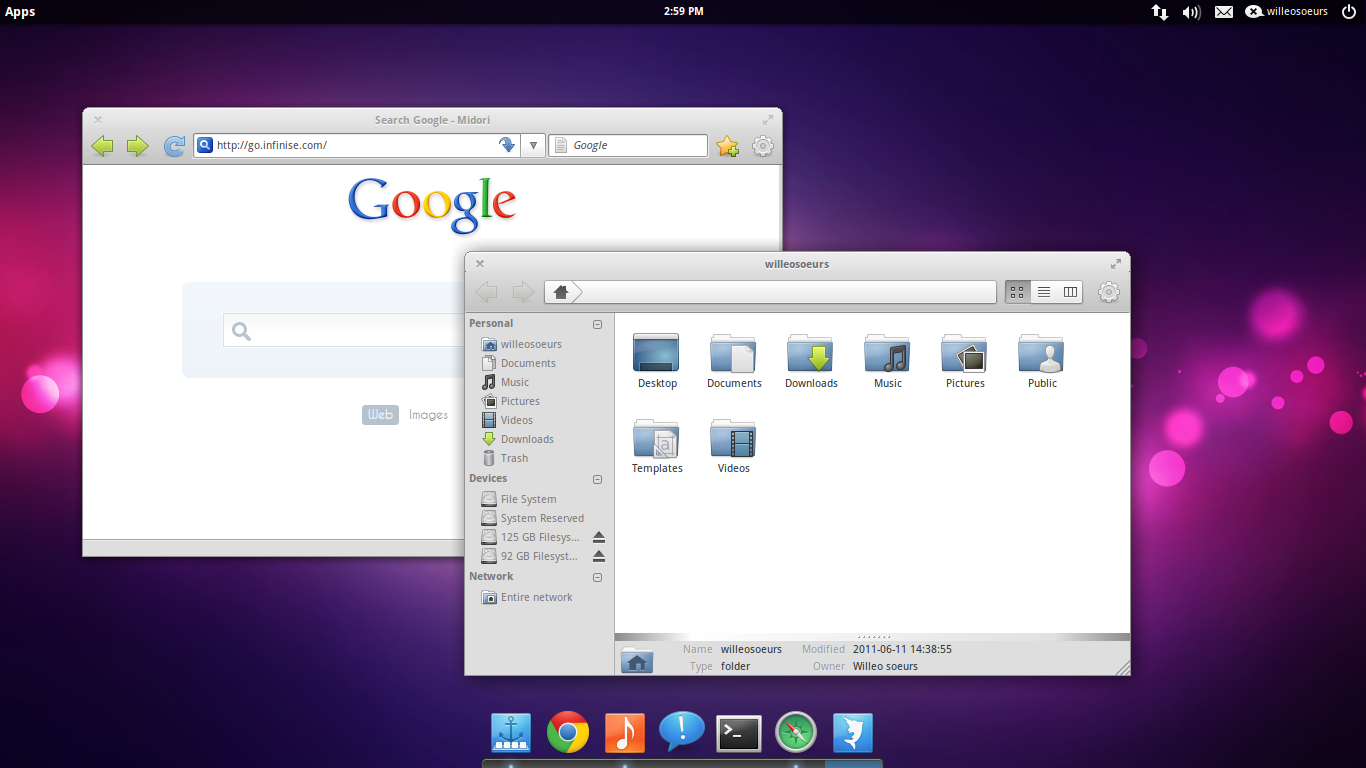 Custom built Elementary OS on top of Linux Mint 11 Lightweight and currently using Pantheon , its custom session manager |
|
|
Jun 11 2011, 09:41 PM
Return to original view | Post
#149
|
|
Senior Member
2,789 posts Joined: Jul 2010 From: Silicon Valley
|
QUOTE(G-17 @ Jun 11 2011, 08:22 PM) Yeah, it's mainly made for Media Centers or HTPCs, though you can run it on just about any modern computer without much fuss. Update : Reinstall ubuntu 11.04 and re-run the "refurbishing" script from Elementary OS repo You could also go the Hello Kitty Linux route if your girlfriend is into that sort of stuff, though I don't recommend it (for obvious reasons) >_< Mind telling us what exactly you "custom built", cos I can't see anything that doesn't look like standard Gnome with Elementary themes. Don't get me wrong, it looks great...... but I just can''t tell what's what the difference is. O_o? The script currently removes any "unnecessary" daemons and stuffs which brings more speed Have to try it to know the differences |
|
|
Jun 12 2011, 12:40 AM
Return to original view | Post
#150
|
|
Senior Member
2,789 posts Joined: Jul 2010 From: Silicon Valley
|
QUOTE(Patent @ Jun 11 2011, 11:29 PM) what is the name of the dock you use ? Plank |
|
|
Jun 12 2011, 09:49 AM
Return to original view | Post
#151
|
|
Senior Member
2,789 posts Joined: Jul 2010 From: Silicon Valley
|
The script :
» Click to show Spoiler - click again to hide... « |
|
|
Jun 12 2011, 01:58 PM
Return to original view | Post
#152
|
|
Senior Member
2,789 posts Joined: Jul 2010 From: Silicon Valley
|
QUOTE(FlameReaper @ Jun 12 2011, 01:48 PM) ^ That sounds like something I'd only be daring to run in a TTY session, since it seems to remove X as well...  quite stable here , low ram usage they will revise back on what should and should not be removed quite stable here , low ram usage they will revise back on what should and should not be removed |
|
|
Jun 12 2011, 11:00 PM
Return to original view | Post
#153
|
|
Senior Member
2,789 posts Joined: Jul 2010 From: Silicon Valley
|
QUOTE(G-17 @ Jun 12 2011, 07:37 PM) No. It's all actually pretty simplistic stuff. I just asked Zai for a script's contents. If you stick with Linux and bother to learn along the way, bash-scripting will sort of become your second language. hmm Thanks for sharing. Hmmm ..... I don't have most of what's being removed on my GRML or Arch installs in the first place Don't see a lot of daemon stuff there, though removing mono is always good, I guess. Can't really see any justification in removing both nano and vim (what if something goes wrong and you need to edit config files from a TTY one day?) Anyways, all I can derive from looking at the script is that current-gen stock Ubuntu has a LOT of unnecessary stuff. I guess that's the drawback of trying to market yourself to a wider audience. they pack it up full with unnecessary things which maybe useful to new users  Now ive completely dumped Unity becoz of some workaround problems with it and I switched to gnome 3 + gnome 2 instead Noticeable , gnome 3 takes much more time to load as compared to eOS and from resource usage , eOS is far more lighter , cant wait for the Luna Stable to be released on November  BTW , @G17 , love your Scrotwm set up , what is the base OS  ? ? |
|
|
|
|
|
Jun 12 2011, 11:44 PM
Return to original view | Post
#154
|
|
Senior Member
2,789 posts Joined: Jul 2010 From: Silicon Valley
|
QUOTE(G-17 @ Jun 12 2011, 11:26 PM) Depends.... I usually use GRML, Arch or Free/Open-BSD these days. Hmm , which means that Scrotwm can be installed in any base os ? or selected ? The ones in the screenshots are usually from my GRML partition. http://grml.org/ I tend to install from the daily unstable small-iso images and build up from there: http://daily.grml.org/ Sort of like a Debian-Arch hybrid. Debian stability and package security but with Arch's modularity and simplicity. Not for everyone, though. It's kind of quirky in some aspects. |
|
|
Jun 12 2011, 11:58 PM
Return to original view | Post
#155
|
|
Senior Member
2,789 posts Joined: Jul 2010 From: Silicon Valley
|
QUOTE(G-17 @ Jun 12 2011, 11:51 PM) You can install it in Ubuntu as well, Zai. There should be a package in your repos. Which means , it will be installed as another sessions Aptitude/apt-get should pull dependencies automatically. ? |
|
|
Jun 13 2011, 12:27 AM
Return to original view | Post
#156
|
|
Senior Member
2,789 posts Joined: Jul 2010 From: Silicon Valley
|
QUOTE(G-17 @ Jun 13 2011, 12:05 AM) Should be. I'm not quite sure how it's done in Ubuntu, but if you rely on GDM, then you should see a "Scrotwm" entry under Sessions. Not 100% sure since I don't use GDM on my rigs. I recommend you read the man page first before logging in to Scrotwm. I also posted some configs earlier in this thread, as well as another thread (Debian Tiling Adventure) that farkinid started. You can use those as a starting point if you like. I have to sleep now, though (must wake up early) ... so I'll only be able to answer any further questions tomorrow. QUOTE(FlameReaper @ Jun 13 2011, 12:19 AM) Yep. Depending on the login manager used, you'll see an entry named ScrotWM. Gonna try it Thx ya  |
|
|
 Jun 13 2011, 08:26 PM Jun 13 2011, 08:26 PM
Return to original view | Post
#157
|
|
Senior Member
2,789 posts Joined: Jul 2010 From: Silicon Valley
|
Who say Gnome 3 are not themeable
 |
|
|
Jun 13 2011, 08:56 PM
Return to original view | Post
#158
|
|
Senior Member
2,789 posts Joined: Jul 2010 From: Silicon Valley
|
QUOTE(monsh @ Jun 13 2011, 08:42 PM) FUUUUU thx darn cun la cocooh ! thumbs up bro ! |
|
|
Jun 13 2011, 09:19 PM
Return to original view | Post
#159
|
|
Senior Member
2,789 posts Joined: Jul 2010 From: Silicon Valley
|
QUOTE(monsh @ Jun 13 2011, 09:18 PM) can i have that mr cocooh ?! Have what hehe ? Gnome 3 or the theme name ? |
|
|
Jun 13 2011, 10:02 PM
Return to original view | Post
#160
|
|
Senior Member
2,789 posts Joined: Jul 2010 From: Silicon Valley
|
QUOTE(monsh @ Jun 13 2011, 09:50 PM) the whole thing compiled together  real nice . i like the simplicity effect of ur desktop .  You need a base distro which is in gnome 2 Upgrading it to Gnome 3 with these steps :- Open terminal and type : CODE sudo add-apt-repository ppa:gnome3-team/gnome3 Then : CODE sudo apt-get update && sudo apt-get upgrade && sudo apt-get dist-upgrade After the upgrade and distro upgrade is done , type this : CODE sudo apt-get install gnome-shell Just in case if Gnome-Sessions is not installed , type this : CODE sudo apt-get update && sudo apt-get upgrade && sudo apt-get dist-upgrade Then , after everything is done , you need this to configure your Gnome 3 : CODE sudo apt-get install gnome-tweak-tool And dont forget to install gnome-theme-standard Then , to install font , try and use Fontmatrix Then , download this gNatty Pack and follow the instructions inside : CODE http://cid-32ec6e89f4aa803b.office.live.com/self.aspx/Linux/gNatty%20Pack.tar.gz Then , for the theme , ive used Trebuchet MS font , Zukitwo gnome shell theme and Zukitwo-Dark GTK 3 theme which can be found here : CODE http://www.webupd8.org/2011/05/zukitwo-beautiful-gnome23shell-theme.html DISCLAIMER: I AM NOT RESPONSIBLE FOR ANY DATA LOSS OR HARDWARE MALFUNCTIONS , PLEASE BACKUP ANY IMPORTANT FILES BEFORE PROCEEDING If you're not terminal-ish user , you can try and install gNatty from here : CODE http://ubuntuforums.org/showthread.php?t=1754198 This post has been edited by cocooh: Jun 13 2011, 10:12 PM |
| Change to: |  0.0243sec 0.0243sec
 0.63 0.63
 7 queries 7 queries
 GZIP Disabled GZIP Disabled
Time is now: 19th December 2025 - 12:10 PM |
 Quote
Quote
